Posts Tagged ‘Computers’
 Up the Amazon
 July 14th, 2010 |
  Author:
 The September issue of PC Pro (a British computer magazine) arrived today. Featured on the front cover was an article exposing the rip-off prices charged by music download sites. Madonna’s Celebration (which I presume is a popular music album) would set you back £11.18 at MSN Music or £11.99 at Spotify but would cost you only £2.98 from Amazon.
Included with the magazine was a DVD which contained a free copy of Paragon System Backup 2010. As I didn’t have any backup software for 64-bit Windows I thought this was fortuitous, so I decided to install it. But after handing over my email address in exchange for a free registration code it failed to install. The developers had used the ridiculously overpriced, overcomplicated and error-prone InstallShield (programmers will know what I mean) to create the setup wizard and only a few seconds into the install it threw up an error message about being unable to initialize the Javascript runtime and died.
I tried the obvious things like checking that Java was installed, running the installer in administrator mode, and even Googling the error message and trying the suggested remedy of registering the Javascript DLL, all to no avail. So I decided that I was not going to rely on backup software from a company that could not even produce an installer that would run on a brand-new computer, and consigned Paragon to the Recycle Bin (both literally and virtually.)
I spent a couple more hours downloading, being unimpressed by and then uninstalling a number of other free backup programs. I even discovered that there was a backup program included with Windows, but for some reason the version that comes with Windows 7 Home Premium has been hobbled by only being able to back up to writeable DVDs or removeable hard drives, not my network attached backup server. After being advised that the backup would take 6 or 7 DVDs I decided against it.
In the end I decided to stump up for a copy of Acronis, which most people seem to regard as hands-down the best backup software you can get. It can create disk images from which you can restore even if Windows won’t run and it has a continuous backup option that backs up your files while you work so you can revert back if you mess up a file. It even has a “Try and Decide” sandbox that lets you safely try out software you aren’t sure about to see if it will do anything nasty to your hard drive.
The Acronis website informed me that this paragon (small p) of backup software would cost £39.95. After checking some reviews, in my usual lazy fashion I typed “acronis trueimage” into the Google search box to find my way back to the website, and Google helpfully included three “shopping results” in its list of related sites. Included there was an offer of Acronis TrueImage Home 2010 from Amazon for £17.99.
Eh? I can buy online and pay £40 for an electronically delivered product the manufacturing and delivery costs of which are near zero, or I can have a physical product that has been mastered onto CD and put into a printed box, possibly with a manual, which has then been driven to a warehouse and stored waiting for me to buy, after which it will be put into a cardboard mailer and sent through the post to be delivered to my door, for less than half the price (with SuperSaver free delivery.) Sorry, I don’t see the logic in that, but thanks very much Google and Amazon.

Android envy
I’m suffering from a severe case of Android envy. I was just checking the latest post in Jeff KE9V’s excellent blog (glad you haven’t forsaken the blogosphere in favour of podcasts, Jeff) which mentions in passing that Google has just released AppInventor, a free simple application builder for the Android platform.
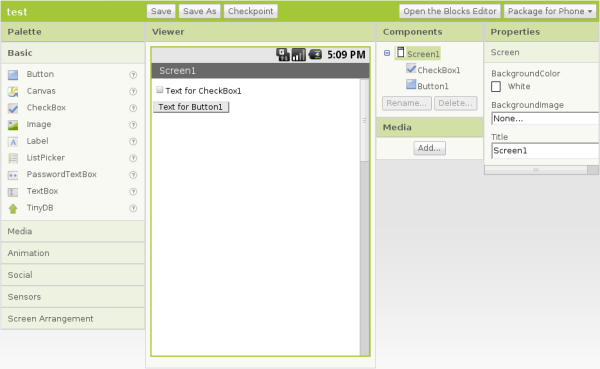 What piques my interest particularly is that AppInventor includes building blocks that allow you to talk to things like the GPS, so you can write location-aware apps, perhaps even apps that are APRS related.
I own a Windows Mobile smartphone. I also own a currently uninstalled copy of Microsoft Visual Studio, which can create apps for the phone. I once wrote an app to sync the clock to an internet time server. But like everything to do with Windows it’s all just too darn complicated and my ageing brain doesn’t feel like getting to grips with it.
The AppInventor approach looks much easier and more fun. I see an Android in my life before too long.

Inspirational
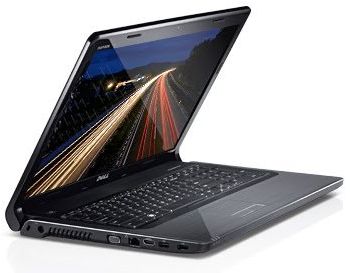 My new work laptop came this morning. It’s a Dell Inspiron 1764 with an Intel i3-350M(2.26GHz) Mobile CPU, 3GB of RAM and a 250GB SATA hard drive. It isn’t the most portable laptop, having – like the Toshiba it replaces – a full-sized keyboard and a 17.3in. widescreen display. It looks and feels absolutely gorgeous, the screen is superb, the keyboard perfect for my fat fingers, and it’s blisteringly fast. Click on the Firefox icon and the browser is there in a second or two.
What’s more, the Dell doesn’t cause any RF interference that I’ve noticed. The old Toshiba caused an increased level of hash that broke the squelch on my 2m FM receiver unless I cranked the knob round quite a way. Since I started receiving HF APRS I noticed that the Tosh caused a 3 S-point noise level on 30m as well, which all but prevented reception of any packets. So I am delighted with the new PC for that reason as well. I can now leave my radio station running all day as a VHF and HF APRS gateway while I work.
The old Toshiba had Linux installed on it early on in its life for security reasons plus the fact that Linux has some good web development tools. I was going to buy a PC with Linux preinstalled but I couldn’t find what I wanted so I resigned myself to paying the Microsoft Tax. The Dell came with 64-bit Windows 7. I thought that I should try it under Windows for a few days just in case there was a fault and I had to send it back. But to be honest I think I may stick with Windows. It looks more polished than Linux, it’s fast and I’ve already started to find replacements for the Linux tools I used. Firefox, which I spend most of the day using, looks and works exactly the same on both platforms, of course.
I certainly wouldn’t choose Windows 7 64-bit for a shack PC as there are too many compatibility problems with popular hardware and ham radio applications. But for what I need to do to keep the business running it looks like being a good choice.

Undesired attention
I wish Murphy, the patron saint of things that don’t work, would leave me alone. It’s a bit frustrating reading on other blogs that someone spent a weekend and ended up with some perfect working piece of gear while I spent several hours just trying to get a computer to talk to a radio.
Although APRSIS32 now supports transmit and receive using AGW Packet Engine which can use a soundcard as a modem I have never decoded a single packet, nor have my beacons been reported as heard by anybody. I started to wonder whether my cheap USB dongle – one of those things about the size of your thumb with a USB plug on one side and two 3.5mm stereo jacks on the other, that cost next to nothing – was up to the job. It had worked acceptably well for Echolink, but although my braaaps sounded to me like packet, they might not sound enough like packet to someone else’s decoder.
My computer’s on-board soundcard is in use by my K3 so there was no point in trying that. But I did have another slightly better USB audio dongle being used for PC sound, so I decided to swap them over. I removed the cheaper dongle in order to better access the audio sockets and when I replaced it I received a message from Windows that “One of the USB devices attached to the computer has malfunctioned” and it disappeared from the system.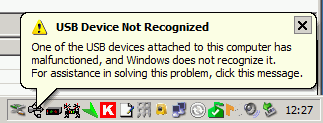 Giving up on computer sound for the moment I proceeded to try to test APRS packet transmission using the other dongle. But although I was receiving audio OK and keying the transmitter I was not transmitting any audio!
I fished the interface out from behind the rigs – a trying task ever since I installed the new shelving – in order to test it with my netbook and FT-817. It worked perfectly with Fldigi. Perhaps a bad connection? Back in position connecting the Icom to the shack computer and still no transmit audio, even though I could plug the computer speakers into the headphone output and hear the braaps being generated by the software!
Eventually it finally dawned on me that the AGWPE soundcard software only generates audio on the left channel. My radio interface was wired to the right channel! The cheapo USB audio dongle (that was now malfunctioning) presumably had a mono output so I was getting audio on both channels. The better one was generating proper stereo so there was no output on the channel I was using. D’oh!!
Fixing this ought to have been simple. Just open up the interface and switch the wires so the one from the left channel provides the input instead of the right one. But of course, it wasn’t. Even though the cable from the stereo jacks used in this interface had no less than four insulated wires within the screening, only one was connected to anything – the tip (right channel) of the plug. The ring was unconnected. So I had to take another audio patch lead, cut it in half, and use that to make new audio cables for the interface using the left hand channel.
Finally, it appears to be working, though I have still to decode an APRS packet. But now I have no computer audio because the other USB dongle is still broken and the connecting cable was cut in half to get the interface working. I came this –><-- close to saying "the hell with all this" and ordering a Signalink USB interface this morning.

Noises off
Show me a tidy shack and I’ll show you the shack of someone who doesn’t spend much time tinkering with equipment, or someone who has been nagged by his XYL to make the shack tidy and curses every time he needs to connect or disconnect something – which at G4ILO seems to be several times a week.
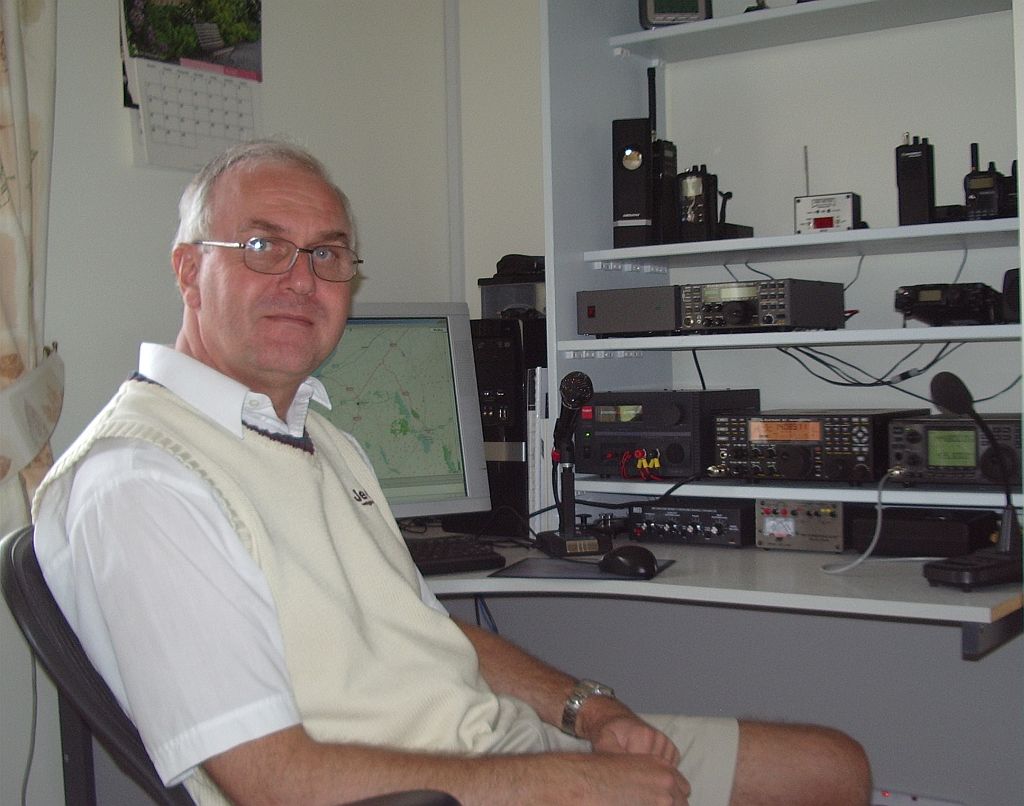 When I switched on the computer this morning there appeared to be a Sporadic-E opening building on 2m to the south east so I switched on the IC-910H and turned the SuperMoxon in that direction. Nothing was heard, so I switched to the vertical instead and was puzzled as to why the band noise was so much greater on the beam than the Slim Jim.
The opening passed, as all such openings have this year with nothing heard or worked, and I decided to investigate. I switched the computer off and the noise fell to the same level as on the vertical. Eventually, after much trial and error and cursing because the cables can only be reached by groping blind (with the aid of a shaving mirror or a picture of the back of the rig) behind the equipment I established that the problem was the serial cable providing PTT control to the interface connecting the 910H to the computer. Even when it was disconnected from the radio, plugging it in to the serial port on the computer caused the noise level to jump up.
This was a cheap interface I’d bought some time ago for the FT-817. The serial cable supplied wasn’t screened, but I’d shortened it to use with a USB to serial adapter without a lot of spare cable lying around. This had resulted in it being too short to use with a real serial port, so I had replaced the cable. I had used screened cable for the replacement, but although I had connected the copper shield to the GND pin of the RS-232 port, it wasn’t connected to the body or shell of the plug, which in any case was plastic.
I managed to solder to the metal flange of the plug, the bit that pushes on to the socket on the PC, and connect a short wire from that to the GND pin and the shield. That seemed to do the trick, and the noise level is now the same when the beam is pointing towards the shack as it is on the vertical. Problem solved, for once! Nevertheless I do sometimes wonder if computers are worth all the trouble they cause to us radio enthusiasts.

Avoiding the Microsoft Tax
I need a new office notebook. Yesterday, while working on something a thin bright blue vertical line appeared on the screen. It’s still there this morning. I guess the TFT display is going on the fritz. Well, this Toshiba Satellite M60 is 4 1/2 years old and has been in heavy use 10 hours a day 5 days a week for nearly all that time, so I can’t complain. Time for a replacement. The trouble is, I use Linux on my work PC and it doesn’t seem to be possible to buy a high-spec laptop with Linux ready installed and working on it.
 Obviously, I’d like to avoid paying for a copy of Windows I’m not going to use. If you’ve ever seen it on sale, you’ll know that the cost of a copy of Windows is quite substantial. Since, thanks to Microsoft’s obsessive copy protection, it will be an OEM copy locked to the hardware and without installation media I won’t even be able to install and use this copy under VirtualBox if I want to.
But also, as it’s a work machine, I’d like to buy one on which the operating system is supported and all the hardware works with it. I’ve installed operating systems far too many times in my life to have any enthusiasm for doing it one more time, and I know from experience that laptops often contain hardware that isn’t supported out of the box by Linux.
When we bought a new laptop for Olga a couple of years ago I bought a budget HP laptop that came with Windows Vista – which ran so slowly it took two hours just to finish it’s automated initial setup routine. I installed Linux but had an anxious couple of hours as I couldn’t get the wi-fi adapter to be recognized. I did in the end, and the chances are that any problems with whatever system I got this time could be resolved after hours of ferreting through support forums. But that long ago ceased being fun and I would really prefer to avoid it.
However, it is virtually impossible to buy a PC or laptop with Linux installed and supported. Dell appears to offer a small selection of laptops preinstalled with a long superseded version of Ubuntu. There is also a firm called The Linux Emporium that offers a limited range of Lenovo laptops with Ubuntu installed on them. But they have nothing that meets my spec. This old Toshiba has a 17in display with WGXA+ 1440×900 resolution and I’m not going to settle for anything smaller. So it seems the only way I am going to get what I want is to buy the laptop I want, pay the Microsoft Tax, throw away Windows and do my own Linux installation.
Is it any wonder that Microsoft enjoys such a virtual monopoly when people who buy PCs don’t even know there is an alternative? Why hasn’t the EU done something about this? It has taken months and cost millions to force Microsoft to install a screen that lets people choose what web browser to use, despite the fact that a) the browser market already has healthy competition and b) switching browsers later on if you want to isn’t a problem. But it has done nothing about a situation that forces people to pay for a Microsoft operating system even if they know enough not to want one. Even if computer manufacturers don’t want to offer Linux because they don’t wish to support it, they should at least be required to offer the OS as an optional extra so those who don’t want it don’t have to pay for it.

Baffled
I don’t know if it’s just my advancing years but increasingly I find new technology and the direction it is going in completely incomprehensible. Phones are becoming so complicated that they can now only be understood by teenagers. But the topic of today’s rant is computer sound cards.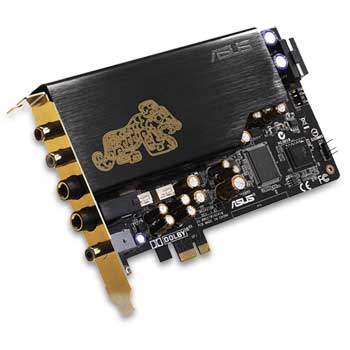 One of the reasons I prefer a desktop or tower PC in the shack is that you can install additional soundcards in them. This allows you to interface with one or more radios for digital modes, EchoLink and so on and still have normal computer sound available. Yes, you could do this with a laptop and external USB soundcards. But it has always seemed to me to be better RF practise to have the digital electronics inside the nice tightly screened metal PC case with only screened cables going from the PC to the radio. USB looks like a radio amateur’s nightmare with these often unscreened cables carrying high speed data and the USB devices usually in completely unscreened plastic cases radiating digital hash everywhere. In fact I would not be surprised to find that the proliferation of USB devices is mainly responsible for the increasing HF noise environment that one day soon will result in my giving up HF altogether.
Once upon a time you could buy a 16-bit soundcard for £15 – £20 ($25 – $30) that was more than good enough for computer sound or amateur digimodes. But one of the advances in computer technology has been the disappearance of PCI slots. The new computer I bought a few months ago, to my surprise, turned out to only have something called PCI Express slots, for which the cheapest sound cards available cost around £70 ($100.)
The specifications of these “bottom end” PCI Express soundcards are way above what I need to either listen to computer sounds and video soundtracks on my PC speakers or decode PSK31 signals. Why do ordinary computer users need 24-bit 96kHz recording or a direct digital input? What on earth is “sound output 7.1” and why do I need three or four different speaker outputs (the presence of which make finding the socket for the PSK31 TX audio by trial and error while groping round the back of the PC in the dark about as likely as winning the lottery?)
I understand that some people might want these features but those who didn’t want them weren’t forced into buying them because more basic products were available. Who decided the simple, stereo 16-bit soundcard without 3D special effects such as computers had for years was no longer needed by anybody?














