Posts Tagged ‘amateur radio’
 Handiham World for 22 February 2012
 February 22nd, 2012 |
  Author:
 Welcome to Handiham World.
Have you ever belonged to a book club or discussion group? Sometimes public libraries or local bookstores sponsor such activities. The idea is for everyone in the group to read a book and then come together to discuss it in a relaxed and cordial atmosphere.
I started thinking about this idea of having a discussion group while I was listening to one of our Handiham nets. As luck would have it, I was also browsing through the e-mail from my local radio club and one of the messages in my inbox had a list of potential radio club program topics. The idea of the book club discussion group and the message about radio club program topics started to mix and merge in my brain. Perhaps it would be a good idea to have a discussion topic on a regular basis during one of our nets, but make it related to a particular article about ham radio, much the same as a book club would discuss a particular novel. This would be different than the trivia net in that a roundtable discussion would be essential to make it work. The norm in many amateur radio nets is for the net control station to run the net in what I will call a “linear” format. In other words, the net control station opens the net with a preamble and then follows a pattern of calling for stations to check in with traffic or announcements or just to get on the station list for that day. Once checked into the net, a station operator need not feel obligated to check in a second or third time. In fact, if the net is run in this kind of linear format, the expectation is that permission will be requested from the net control station to “re-check” because it is assumed that once a station has checked in the net will move on to each new check-in in succession.
Of course this kind of linear format will not work in a discussion net. By its very nature, a discussion requires back-and-forth dialogue as ideas and concepts are presented and then commented on by the group. If you were sitting in a room at the library or bookstore with other book club members who have read the book of the month that has been assigned for discussion, how would you prefer that the chairs be arranged? My preference would be to put them in a circle rather than in a long line along one wall of the room. Having chairs in a circle promotes discussion, and what we want in a discussion group is the interchange of ideas. It is not an accident that this kind of ham radio net is called a “roundtable”. Sitting around the table encourages discussion.
So a linear format net is different in that very fundamental way from a roundtable discussion net. If you tune across the amateur radio bands and really get familiar with what is going on, you will soon learn that groups of friends meet at various places on the bands around the same time every day or evening. Most of these groups are really just informal roundtable sessions and did not have a specific net mission or formal structure. There are, however, some discussion nets that are more formal in that the discussion topic may be limited by the group to a particular interest area such as religion or aviation. What I would propose is something just a little bit different in that the discussion topic would change depending on which article is the assigned reading of the week. The net would discuss that particular article and then participants would be able to weigh in with their opinions and suggestions as well as comment on the opinions and suggestions of the other net participants.
One consideration with this kind of a targeted roundtable discussion group is that it tends to work best when there are not too many people trying to participate. If the group gets too large, this will hamper discussion because by the time everybody gets a chance to say their piece the allotted time for the net may be nearly over. As with any kind of a net, everything will run more smoothly when all of the participants know and follow the rules. Some of the basics are:
1. Always yield to the net control station.
2. Stick to the topic.
3. Be sure you have read the article before joining the net as a participant. If you have not read the article, don’t bother checking in but feel free to listen.
4. Try to be as brief and concise with your thoughts as possible so that everyone will have a chance to talk.
5. Play nice! Be respectful of everyone’s opinions.
6. Take notes during the discussion so that you can comment on what has been said while you are waiting for your turn.
7. Maintain good engineering standards for your station and computer system so that your audio is clean and easy to understand.
8. Be on time for the net. Remember, the discussion will begin right away so the expectation is that only the stations who are on time will participate in the discussion. Latecomers are welcome to listen to the discussion.
9. As the discussion comes to a close, be ready with ideas for the next week’s topic. At that point, the net control station can ask for other ideas and see if there is any consensus about the next article to be discussed. Sometimes this will not be possible to nail down, given the limited time available on the air. In that case, an e-mail message with a topic can be sent to the discussion group participants.
10. If the net decides that the topic will be carried over into the next week or that some other follow-up needs to be done, put that in your notes to make sure that you don’t forget to do whatever “homework” needs to be done before the next net session.
You can see that this is a whole different ballgame than the nets that we are used to. Most typical linear format nets require virtually no preparation and ask very little of participants. A discussion roundtable net requires a different level of commitment but at the same time can be a more rewarding experience because of the depth of your participation. Roundtable discussion nets are not for everyone, and no one need apologize if they are just not willing to commit the time and effort that this kind of net requires. I have often found myself tuning around the bands and listening to different roundtable conversations without actually participating. There is nothing wrong with doing a lot of listening – after all, you can learn a lot by listening. If a topic area seems beyond your understanding, listening is probably your best choice until you learn enough to join in. On the other hand, some people are adventuresome and jump off the highest diving board as soon as they get to the pool. “Learn by doing”, they will say, and they might just be right!
This morning I enjoyed listening on 3.930 MHz. “The Morning Group” is up here in Minnesota, but I’m sure you have similar groups located near you. Round table discussions need not be formalized with a net control station, nor do they have to have a scheduled topic. You may find this kind of informal net to be an interesting way to stay in touch with a small group of friends who share some of your interests. On the other hand, a directed net with a net control station can give a formal roundtable with a designated topic for the day just enough direction to make for a lively and fun conversation.
For Handiham World, I’m…
Patrick Tice, [email protected]
Handiham Manager

PARP 52–QSL Bureau and more
 The Practical Amateur Radio Podcast episode 52 is now available for download or stream. You can subscribe via iTunes, Zune or stream directly from MyAmateurRadio.com Want to stream on the go from your favorite smart phone device? You can do that as well via our mobile site.
In this new episode, I discuss the QSL Bureau Service as it relates to US Amateur’s. The bureau service is a great, inexpensive method of QSL’ing those DX contacts. Our featured website segment discusses the Ham Nation podcast/netcast as well as Mike Baxter, WA0XTT.
Please visit MyAmateurRadio.com to listen or download this new episode.
Thank you for listening and thank you for sharing your knowledge with others. The Practical Amateur Radio Podcast, creating Elmers one podcast at a time.
Until next time…
73 de KD0BIK
DIY Magnetic Loop Antenna – Part 2
Part 1 of the DIY Magnetic Loop Antenna covered mostly theory and materials so now its time to move on to designing the magnetic loop antenna (MLA).
If you have priced a commercially made MLA you’ll see prices start at $400 and keep going up, and up. If they cost so much you would think they must be difficult to build or use expensive parts, right? Well, it is certainly possible to spend more and get a higher quality MLA but a low cost MLA will still work very well.
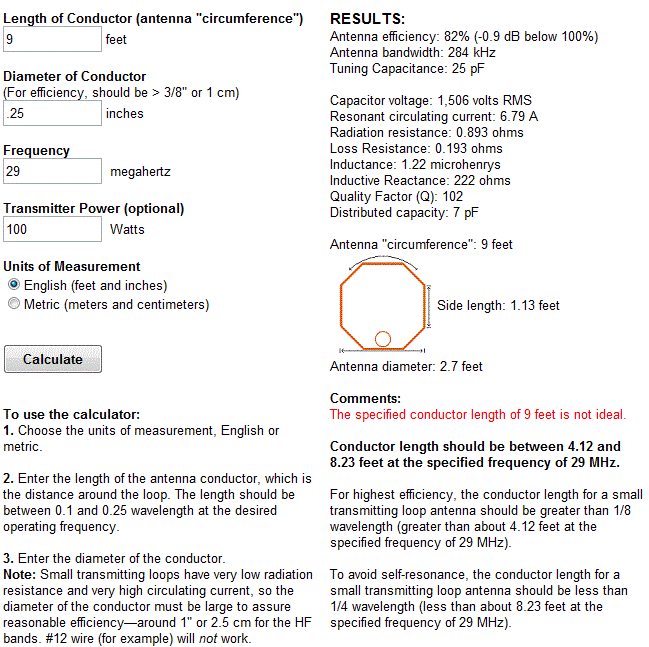
For the purposes of this article we’ll assume that you want to build a loop to cover the 20-10M bands. I’ll run through the calculations required to build the MLA.
The required information for the MLA calculator is:
- Length of the loop
- The conductor diameter
- Frequency/s of operation
- Input power to the antenna
- We don’t really know the best length of the loop at the moment so I’ll pick 9 feet circumference as a starting point (It’ll still fit in the trunk of my car)
- Since we seem to be having better luck with sunspots now I’d like to try 10M so we’ll start with 29 Mhz as the highest frequency we’ll use.
- I have some copper pipe left over from an ice-maker install, it is 1/4 (0.25) inch in diameter.
- Input power to the loop will be 100W.
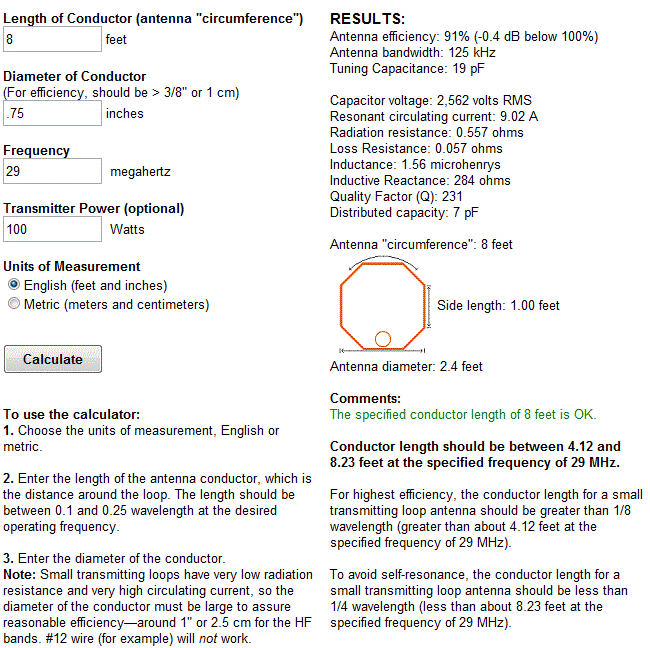
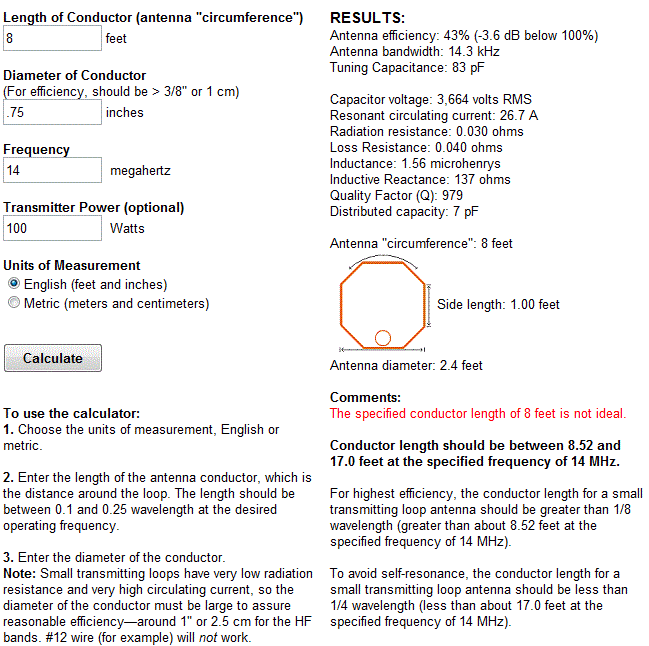
 A peak voltage of 5181V will require a minimum spacing of 1.7 mm (peak voltage / breakdown voltage per mm) between the closest conductors in the capacitor. That would rule out an old air spaced variable capacitor from a vacuum tube radio but you could still use a wide spaced variable capacitor from an antenna matching unit or transmitter. A vacuum variable capacitor would be great (watch the minimum capacitance) or a home-made capacitor would also be fine provided you checked the breakdown voltage of the insulating material.
 My Morse Journey
As I’ve mentioned many, many times. My attempts at learning Morse code or CW as a teenager were unsuccessful. While I’ve mentioned my excuse was too many distractions (cars, sports, girls). I also believe my failure was a learning block which I couldn’t overcome. Perhaps another way to word this was a learning block I didn’t know how to overcome.
Since getting my license in 2007, CW has been a mode I’ve wanted to operate. I will admit that I’ve fiddled around in Ham Radio Deluxe DM780 and have also downloaded and installed other software applications to decode via the computers soundcard to text translation. I’ve decoded many times, but have never actually attempted to send via these mechanisms.
Please understand that what I’m going to say next is my opinion and only my opinion. But if I have to use computer software to send and receive CW signals, I might as well stay away from that mode. Again…this is my opinion for my own operational style and my own way of thinking.
So having said that, I am in the process of researching methods of learning Morse code. I’ve spent some time talking to some friends and researching information on the internet. I plan to wrap up this discovery phase and get started in the next few days.
While I know many learned CW from simply studying the dots and dashes which make up each letter or from listening to code tapes. I’m looking for alternative methods as I’ve tried the code tapes and studying an A is .- with not much success. Of course, I also understand I’m a much different person now than I was 30 years or so ago. Most of this will be similar to overcoming my obstacles with earning extra last summer. Meaning, I just need to focus and get it done but at the same time not setting unnecessary pressures on myself.
Morse code is very much alive on the bands and it is a mode I dearly want to enjoy. I’ll be certain to most frequent updates to share both my successes and frustrations along my Morse journey.
Until next time…
73 de KD0BIK
Handiham World for 15 February 2012

For Handiham World, I’m…
Patrick Tice, [email protected]
Handiham Manager

Will Solar Cycle 24 Be 17 Years long?
Read an interesting Blog today about three Norwegian scientists who used historical solar green corona emissions data to predict that Solar Cycle 24 will be 17 years long, 4.5 years longer than Solar Cycle 23:
http://wattsupwiththat.com/2012/02/11/quantifying-the-solar-cycle-24-temperature-decline/
The Norwegian study referred to in the Blog is available for download here:
http://arxiv.org/pdf/1202.1954v1.pdf
We are currently in Cycle 24 which has, thus far, been lackluster as far as sunspots and solar flux go. I haven’t read the Norwegian study in detail, yet – I’m curious to know when the Norwegian authors think Cycle 24 will peak and at what level of solar activity and how they reached their conclusions.
My fingers are crossed for a vigorous Cycle 24 peak as it would be nice to have a bout or two (or three) of temperate latittude F2 propagation on 50-MHz before sliding down to the Cycle 24/25 trough!
73
Bill AA7XT
HamLog App Upgrades–WOW!!!
I’ve blogged about iOS apps before, but I can’t remember if I’ve previously mentioned anything about HamLog. I’ve owned HamLog for a few years now. I’ll honestly say for the record I don’t currently use it, but feel that will soon change.
HamLog is an iOS and Android application developed by Nick Garner, N3WG. Nick has developed over a dozen different apps. One I mentioned briefly in another blog post is his Pocket SOTA app. You can view Nick’s listing of Apps from his website.
As I mentioned, I’ve owned HamLog for a few years. I believe Nick developed and released it in 2009. I’ve watched Nick make many changes to the HamLog app over the years. While I’ve tried using it to log contacts, I found I could log via pen and paper much faster. Especially with operating SOTA, you can easily find yourself generating a large pileup. The extra time it takes to manually key in all the info was just something I wasn’t interested in for my own operational setup. Until now…
Please take a few minutes to watch this video. Nick introduces some new enhancements to the HamLog App as well as a new piece of hardware called Pigtail Air. Pigtail air will allow for true rig control through the HamLog app and of course will speed up the logging process.
I believe the Pigtail Air device, coupled with my new KX3 (when it arrives) and my iPad will make a fantastic SOTA or portable logging setup. I’ll now have an excuse to buy that Otterbox Defender iPad case.
Until next time…
73 de KD0BIK













