Posts Tagged ‘amateur radio’
 Handiham World for 14 March 2012
 March 15th, 2012 |
  Author:
 Welcome to Handiham World.
Last week I was thinking about mentioning something about “bad apples” – amateur radio operators who exhibit poor operating practices while on the air. There was plenty of other stuff to cover in the newsletter and podcast already, so I decided to let it go until this week. Anyway, as you know, the Amateur Radio Service is largely self-policed. That means that we observe what is going on on the bands and help other operators learn good operating practices, largely leading by example. In fact, the last thing you want to be is “the band police”, which is someone who sticks their nose into every situation and scolds other operators for real or imagined infractions on the bands. No, it is better to lead by example and always use your call sign, be helpful rather than judgmental as much as possible, and convey your concerns off the air. Frequently the telephone is a better choice, as would be a note in the mail. You don’t want to embarrass someone who has made a mistake by pointing it out on the air. If the violation was willful, it is likely that confronting someone on the air about it will simply result in an on the air argument that will certainly be heard by others and show amateur radio in general in a bad light.
Thankfully there are volunteers who listen on the bands for situations that call for some kind of resolution. These are “Official Observers”, or “OO’s”. The Official Observer program is run by ARRL. It is administered by the Section Manager, and the volunteers report to him or her. An Official Observer is recommended for appointment by the ARRL Section Manager and completes a short training course by reading relevant information provided by ARRL. For a complete list of the requirements, visit the ARRL website and put “Official Observer” in the search box. You’ll find a complete description and everything you need to know about becoming eligible for this important volunteer appointment.
But anyone can hear a violation or instance of bad operating on the air and take some notes. You can always send your Section Manager an e-mail expressing your concern and asking that Official Observers listen for further violations. Some of the most annoying and difficult situations are those where the bad operating practices go on day after day, week after week, and month after month. These are not something for an individual to tackle; it takes a team to gather information and make a case against the perpetrator. You will definitely want to pass the information on through the right channels. In some cases, the bad operating may be originating outside the borders of your country. Again, going through the right channels to gain experienced assistance is key to solving such problems. That is why I like the Official Observer program. It is backed by 85 years of collective experience at ARRL in dealing with virtually every kind of technical problem and bad operating practice.
Part of knowing when to report a violation is simply something that comes to you by gaining experience through years of operating and listening on the bands. You learn to get a sense of when something is a willful violation (done on purpose with a bad intent) or simply an innocent mistake that is unlikely to be repeated once the person finds out what they did wrong. Frankly, all of us are human and will make mistakes. It is not necessary to jump on someone because they made one of these all too common errors. Who among us has not gotten Echolink stuck in transmit mode? Yes, it is an embarrassing mistake but it is not the end of the world. On the other hand, talking for a half-hour in a roundtable conversation without using your call sign even once is not only against the law but also rude and inconsiderate of other operators. As I said, figuring out what to report and what to simply set aside for the moment is one of those things one picks up by experience. Listening is really important in amateur radio. We all learn a lot more by listening than by talking no matter what the situation – and amateur radio is no different!
The ultimate goal is to make the amateur radio bands a better, safer, and more civil place for all users and to always “put our best foot forward” for any listeners out there who might be thinking about getting their amateur radio licenses.
For Handiham World, I’m…
Patrick Tice, [email protected]
Handiham Manager

Understanding HF propagation
Along the lines of my previous comments about bad operating practices, I recently received an email about an interference problem on 160 meters. The interference situation arises when a group of stations in the eastern United States run high power and operate close to another frequency several kilohertz away that is in use by a group of operators here in Minnesota. As you know, these groups of stations may not even hear each other during early evening hours when daytime conditions hold sway and absorption keeps long-distance sky wave propagation from taking place. As the night falls and the ionospheric absorption decreases, the band starts to open up to longer distance skip, and soon the two groups of stations begin hearing each other.
Both groups may be tempted to dig in their heels and say, “We were here first”, but the fact of the matter is that the propagation conditions simply changed and that is what causes the interference. Understanding that it is not the other guy’s fault is important in making a decision about what to do next.
Remember what the FCC says about how we should only use the level of power necessary to carry on communications? Well, Sec. 97.313 Transmitter power standards, (a) says, “An amateur station must use the minimum transmitter power necessary to carry out the desired communications.”
When propagation conditions change, there are three good choices to mitigate the interference problem:
- All stations in both groups should lower their transmitting power levels, even though the temptation is to crank up the linear amplifier. Lower power levels decrease the likelihood of interference.
- Consider using a different frequency. This is often the best solution. Remember, no frequency has any single user’s name on it – I don’t care if your group has been on “their” frequency for 10 years. Get out of the mindset that one can claim a frequency by squatter’s rights.
- Change the scheduled time of your on the air gathering to avoid the propagation conditions you find undesirable.
Notice that these are all non-confrontational solutions that do not involve blaming “the other guy”. Understanding HF propagation can be very helpful in solving interference problems and enjoying ham radio even more!
Troubleshooting 101

If you are like most amateur radio operators, you probably have several portable, battery-operated devices that take consumer-grade replaceable cells such as AA’s or 9 V square batteries often used in smoke detectors. In this scenario, you decide to use your dip oscillator to check on the approximate resonant point of an antenna that you are building. When you press the power button, nothing happens. Since the dip oscillator is a battery-operated portable device, the first thing you are probably going to think of doing is checking the battery or batteries. For some incomprehensible reason, many of these amateur radio test accessories require you to use a screwdriver and take the case apart to get at the batteries. This makes it inconvenient to take the batteries out if the device if it is not going to be used for a long period of time.
Okay, so you go ahead and get the screwdriver and take the case off the dip oscillator. What do you see? Of course the battery is dead; it has obviously died a rather messy death because there is a white residue around the contacts. The battery has leaked and corrosion may have set in, possibly damaging the dip meter. The first thing to do is dispose of the old battery safely. Usually alkaline batteries or the old carbon-zinc batteries can simply be thrown in the trash while batteries with other chemistries such as rechargeables might have to be taken to a recycling center. If you are unsure of the residue leaked by the battery, it is prudent to wear gloves. Anything leaked from a lead-acid battery should be considered dangerous and corrosive. Usually such batteries are not found in small accessories.
With the battery gone, you can now attend to the mess left behind inside your meter. Flaky or powdery residue can sometimes be removed effectively with a brush such as an old paintbrush that is dedicated to such projects on your workbench. Do your best to avoid inhaling anything and if necessary use a mask to protect your lungs. A damp Q-tip can also be effective without creating dust. I have used a Q-tip dipped in rubbing alcohol because the alcohol will evaporate from the circuit board and contacts quickly. You don’t need to use much! A pencil eraser like the kind on a number two lead pencil can do a pretty good job of polishing up a battery contact on the meter’s battery holder. Try to make sure that the battery holder contacts are shiny and clean before putting in a new battery. I always try to avoid using abrasives on these battery contacts because they will remove any plating and open the road to further corrosion. If the battery contacts have been destroyed, it will be necessary to find a new battery holder, and this may mean making some slight modifications to accommodate it. Every case will be different, so this is a chance to be creative and figure out your own solution. Just be careful that nothing will short out when the meter is in use or when you put the case back on!
I have always wondered why manufacturers of these devices make it so doggone hard to get at the batteries in the first place. Something like a dip oscillator will only be used occasionally by most amateur radio operators, so it would be great to be able to put in and remove the battery easily and quickly so that the device could be stored for months or years without the battery in place.

Ham Radio Deluxe

You may remember back in September, I blogged about the news of the developer (Simon) of Ham Radio Deluxe selling to several US hams. I followed one of the threads over on the QRZ forums until I basically grew bored of the hate and non-sense being discussed. At that time (Sept. timeframe) no one really knew what was going to happen or when we would learn the fate and future of the HRD software. While many had conjured up ideas of users receiving cease and desist letters, as I stated then (and what has been proven since) I didn’t think anyone had anything to worry about.
As the old year (2011) turned into the new year (2012) news began to surface about the plans for Ham Radio Deluxe. The new owners (Rick Ruhl, W4PC Mike Carper, WA9PIE and Randy Gawtry K0CBH have since released two free updates (version 5.1 and 5.11) and offered users a $59.95 support plan which covers version 5.11 and version 6 at no cost. Ham Radio Deluxe version 6 is scheduled to be available around the Dayton Hamvention timeframe of this year.
I learned about HRD before I even earned my license and was using it with my Yaesu FT-897 as I tuned around the bands listening. Once I got my ticket I used it to log my first HF QSO’s on 10 meters and have used it since. The value of what Ham Radio Deluxe brings to me in the enjoyment of the hobby is certainly more than I can associate a cost to. I’ve looked into alternatives for casual QSO logging, rig control and the digital modes and have found nothing that even comes close to beating HRD in its present form.
After watching the video below, I’m actually excited about the opportunity for HRD version 6 and beyond. Some of the new features discussed will be an integration between N1MM logger and DM780. This to me will be worth the investment to upgrade to version 6. I do love N1MM logger for contest operations, but I rarely use anything other than DM780 for digital modes. When I try to use other applications for PSK or RTTY, I’m like a fish out of water. For that reason I don’t do a lot of true digital contest operations.
If you haven’t already, please take about 52 minutes of your time and watch the video below which is made available by Gary Pearce, KN4AQ and his Amateur Radio Video News (ARVN) service.
I’ve had no contact with any of the three mentioned owners and simply blog about this particular subject because I want to. The opinions expressed are simply my own. I fully understand and appreciate that not everyone will share my thoughts and opinions on this subject.
Until next time…
73 de KDØBIK
Handiham World for 07 March 2012
Welcome to Handiham World.

On March 5, 2012 the latest version of the United States Amateur Radio Bands chart from ARRL became effective. If you will recall, last November the FCC made some changes to the 60 meter band, and this new chart brings us up to date. Of course that will mean that you will want the latest version on your computer or in your ham shack for reference. Prior to this week, only upper sideband operation was allowed on the channelized 60 meter band. Few of us had actually made the move to 60 meters and made contacts, partly because of the odd restrictions in frequencies and modes, but also because many antenna systems just didn’t tune on 60 meters. Even so, those who were adventuresome took the plunge and were delighted to find that propagation on 60 meters made it quite a useful alternative to 75 and 40 meters since it has characteristics of both of those popular bands. This morning I was surprised to be listening on 5.330.5 MHz and hear a station in the southeastern United States calling CQ using CW at around 30 words per minute. He called off and on for perhaps 15 minutes, obviously using a programmed keyer before he was finally answered by a station somewhere on the East Coast. I have to admit that 30 words per minute is too fast for me to copy comfortably, so I had to listen up to make sure I was hearing correctly. After all, only upper sideband operation was allowed on the 60 m band. When I was sure I was copying the call sign correctly, I decided to check the frequency chart on my wall just to confirm that only upper sideband operation was allowed. The chart confirmed this, but then I recalled the changes that the FCC had made and decided to check the ARRL website for a new frequency chart. Sure enough, a new version was available and had been released just two days ago!
The difference is pretty significant, because the effective radiated power, the modes of operation, and even one of the channelized frequencies have been changed. Let’s go over the “new” 60 meter band as shown in the ARRL Frequency Chart. Here is the new information for our blind members in an easy to listen format:
The 60 meter band is also known as the 5.3 MHz band. Only General, Advanced, and Extra Class licensees may use 60 meters. All of these license classes have full band privileges.
The five channels available on a secondary basis with a maximum effective radiated power of 100 W PEP relative to a half wave dipole are:
5.330.5 MHz
5.346.5 MHz
5.357.0 MHz
5.371.5 MHz
5.403.5 MHz
Some readers and listeners may find it odd that we have listed two decimal points in each frequency. I decided to do it that way because this preserves the concept of the “5.3 MHz band”. The ARRL chart lists kilohertz, so that the frequency would read 5330.5 kHz, for example. On my ICOM IC-7200 transceiver the readout follows our listing in megahertz and has two decimal points.
Only USB suppressed carrier voice, CW, RTTY, and data such as Packtor 3 transmissions are allowed on the 60 m band.
There is a bandwidth restriction on 60 m. Bandwidth is limited to 2.8 kHz centered on 5.332, 5.348, 5.358.5, 5373, and 5.405 MHz respectively. (For example, you will be on the right frequency if you use upper sideband and tune to 5.330.5 MHz, which is the carrier frequency.)
All things considered, the 60 m band has been improved by these changes. It is still quite unique in its channelized nature, but the addition of new modes of operation do increase its versatility and will make it more attractive to a wider variety of users. Although there is no restriction on which mode of operation may or should be used on which channel, I did hear the CW station on 5.330.5 MHz, perhaps because that is the traditional lowest frequency spot on the band where CW operators might decide to congregate. Perhaps at some time in the future there will be at least an informal band plan beyond the more or less agreed upon use of 5.403.5 MHz as a DX frequency. The increase in power from 50 W to 100 W makes the band more useful still, especially during summertime band conditions when more power is likely to be needed to be heard above thunderstorm static.
I hope you will consider giving the 60 m band a test drive if you have a General Class license or above and an antenna that can be tuned to 5.3 MHz. I think you will be surprised and delighted with the propagation characteristics on 60, and will likely add it to your regular list of useful frequency bands.
For Handiham World, I’m…
Patrick Tice, [email protected]
Handiham Manager

DIY Magnetic Loop Antenna – Part 3
Well, I finally have had time to sit down and put together part three of the DIY Magnetic Loop Antenna, sorry it has taken so long!
This post will cover building and coupling the loop to your transceiver. After reading through posts one and two you should have a good idea of the parts you’ll use and the physical dimensions of the main loop.
DIY Magnetic Loop Antenna – Part 1
DIY Magnetic Loop Antenna – Part 2
Most magnetic loops have the capacitor at the top of the main loop and the gamma match or matching loop at the bottom, this arrangement avoids running the feed-line through the center of the antenna.
You can assemble the main loop from continuous copper tube or from eight straight sections and 45 degree joiners. Make sure you have a blow torch or propane torch to solder the joints as you’ll need more heat than a soldering iron can supply. Whichever way you decide to build the main loop make sure that all joints are soldered or clamped as securely as possible, you want the lowest resistance possible to avoid your output power turning into heat. Other materials can be used for the main loop such as aluminium or low loss coax but copper pipe is easy to work, has low resistivity and available from just about every hardware store.
To construct the frame of the antenna you can use PVC pipe. It is a cheap and relatively sturdy building material and is available in a range of thicknesses, just about any hardware store will stock a wide selection of fittings. It insulates well and can be glued once you are sure your project is in its final form.
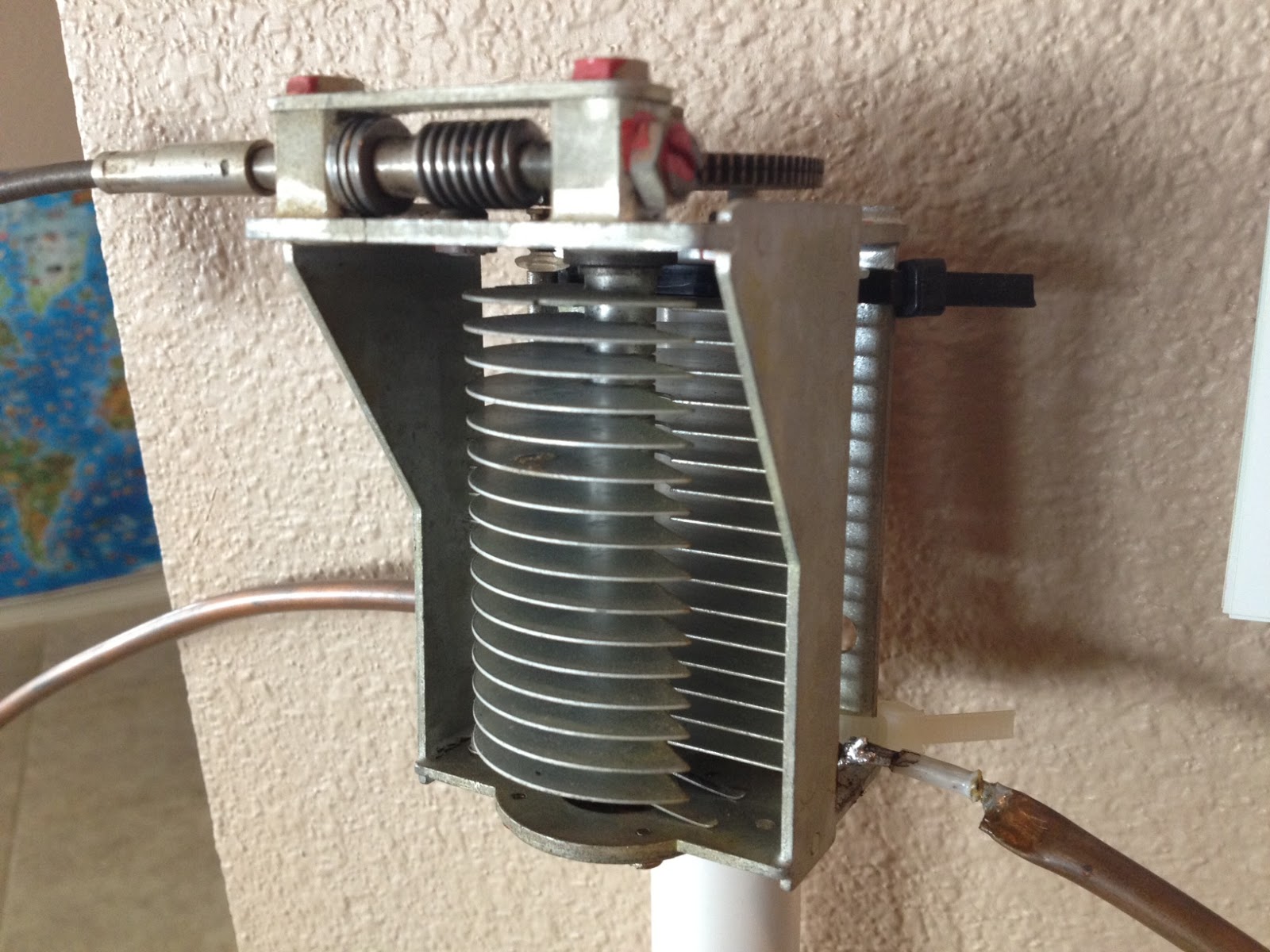
Once the main loop is constructed you’ll need to connect your capacitor to the two ends of the pipe at the top of the loop. Depending on the capacitor you may want to solder tags to the ends of the loop so they will be easier to attach. Copper pipe is a great conductor of heat and takes a lot to heat up and solder while it is not advisable to apply the same amount of heat to your capacitor.
It is also a good idea to attach the capacitor to a solid support so that the connections are not under strain.
The main loop and the capacitor forms the resonant circuit of the magnetic loop antenna.

To couple the main loop to your transceiver and match the expected 50 Ohms impedance you can use one of two methods. Probably the easiest is to use is a loop of insulated wire 1/5 the circumference of the main loop. The smaller loop is placed at the bottom of the main loop and can be shifted around to provide the best match. If you have an antenna analyzer you’ll be able to set it to the desired frequency, tune the variable capacitor for resonance and then move the small matching loop around till you have achieved close to 1:1 SWR. If you don’t have an antenna analyzer you can tune the capacitor for the greatest received noise and then on low power tweak the capacitor and move the coupling loop around for best SWR. Do NOT touch the loop while it is transmitting, use a wood or plastic rod to make adjustments as there are high voltages and intense RF fields near the loop.
An alternative to the coupling loop is the gamma match. The shield of the coax feed cable is connected to the base of the main loop while the inner conductor is connected to a point approximately 1/5 of the circumference around the loop. Its a good idea to use stiff wire (large gauge) for the gamma match as it can be critical of the position and orientation and once you have it in the right position you won’t want to move it again.
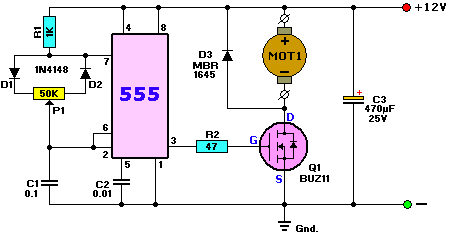
It would be preferable to have the ability to remotely tune the loop. A motor with a reduction gear could be used to move the variable capacitor but because the point of resonance is very narrow there should be a way of slowing the motor down. A simple control circuit using variable pulse width modulation could be used to slow the motor down while still retaining enough torque to move the capacitor. Whatever method is used to move the capacitor it should be well insulated from the other components of the antenna. Several thousand volts are generated on the MLA and care should be taken to ensure they don’t find their way onto control leads and back into the shack. Control leads should also be wrapped around toriod inductors as they leave the near field of the antenna to reduce the possibility of RF travelling along them.
With a SWR bridge and microcontroller you could build a fully automatic tuner that swept through the range of the tuning capacitor when the SWR rose above a defined limit indicating that the transmit frequency had changed.
With a little creativity and knowledge you could have an impressive MLA the equal of multi-thousand dollar military style units.
Hopefully this has given you some ideas for constructing your own loop antenna. Regardless of if you go top-of-the-line and buy a vacuum variable or build for economy and QRP you’ll have a compact, useful and unique antenna.
Handiham World repost for 01 March 2012
Welcome to Handiham World.
Ice! Are you ready?

Photo: Ice and snow cling to the dipole at the WA0TDA station in Minnesota. The 450 Ohm feedline and the antenna wire are carrying a coating of heavy ice, as are the nearby tree branches.

Photo: Iced birch tree branches pull the antenna wire down.
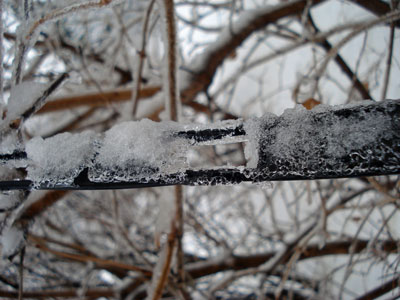
Photo: Heavy ice coats the 450 Ohm ladder line in this close-up.
Here it comes: The annual Spring severe weather season is here in North America. Tornadic winds hit in the southern Midwest states of Missouri and Kansas last night, while the same huge weather system brought Minnesota freezing rain and snow. The transition from winter to summer often means that we will be visited by bad weather that can take down antennas and put stations off the air at the very time their communications capability may be needed. This storm was well-forecast because it was being watched even as it approached the west coast from the Pacific. Computer modeling lends a new degree of confidence in such forecasts, so it is perhaps a bit easier than ever to be ready.
The problem for any given amateur radio operator is that forecasts cannot predict exact weather circumstances in a small geographic area. In this particular storm, heavy snow fell north and west of my location but we only got about 3 inches worth. Our snow was preceded by rain – freezing rain – which coalesced around antenna wires and tree branches. When the snow came, it added to the mass already collecting on the branches and wires. This was a prescription for power outages because tree branches would inevitably begin to break under the weight of the ice and fall across power lines. The power lines themselves, if in the clear, seldom collect enough ice to fall on their own. Sure enough, this morning almost 15,000 customers were without power here in the Twin Cities. Since the storm was more severe in the northwest part of the urban area, that was the place with the most power outages. Even so, in my town there were over 400 customers without power. Our power never failed or even flickered, probably partly because of just plain luck and good switching at the power company to keep failed power lines from bringing down the entire system. One thing I looked for specifically when purchasing my property was underground power lines. I have lived in too many neighborhoods where tree branches fell across lines and cut the power in almost every severe storm.
So what can you do to keep your own antenna systems from failing under the weight of snow and ice?
Wire antennas should be installed so that they have some “give” to them. That means that if the wire should be stressed by the extra weight of ice, the antenna will be able to bend with the weight enough to avoid outright failure. There are various methods of making a wire antenna a bit more flexible. The obvious one is to make sure that when the antenna is installed that the wire is not pulled up tight. Sometimes ingenious methods can be designed to allow an antenna anchored in a tree to move freely as the tree moves in the wind. Usually unless the tree is exceptionally flexible it will be enough to simply allow enough slack in the antenna wire to make for reasonable movement.
Rigid metal antennas are another story. Most amateur radio beam antennas are made of aluminum tubing. Some types of aluminum tubing are “aircraft grade” and may flex more than standard tubing before breaking. No matter what kind of aluminum tubing is used, it is not immune to severe damage from ice loading. If the weight of the ice itself bending the aluminum doesn’t break it directly, wind that comes up after the ice is coated onto the elements may very well finish the job and bring the entire structure down in pieces. I am not sure that there is any practical way to prevent this kind of damage in a beam antenna system, but perhaps someone with experience can weigh in on the matter and let us know. Few amateur radio operators have tilt over towers that can perhaps be used to bring the whole antenna down close to the ground with the elements 90° to the surface of the earth so that water will run off of them. But what happens to the horizontal portion of the tower that will then be collecting ice? It’s hard to figure out how to prevent ice damage on a beam antenna system, so keep your insurance paid up.
An antenna that is coated with ice and snow will not necessarily tune correctly. When I tried using the LDG auto tuner this morning to tune my 200 foot wire antenna on a frequency that had been previously “memorized” by the tuner, it behaved exactly as if it were visiting that 75 m frequency for the very first time. The tuner cranked away for a while before finally settling on what had to be a very different combination of capacitance and inductance to allow for a reasonable standing wave ratio. Once the ice melts off the wire, the auto tuner will have to search again for a new combination as things return to normal. One thing to consider is that not all automatic tuners will be able to match an antenna that is heavily loaded with ice and snow. The operator must be aware of this and be careful not to operate with a high standing wave ratio.
The antenna wire itself is not the only thing affected by ice and snow. If you are using open wire feed line as I am, you can expect ice loading on the feed line to contribute to changes in how the antenna behaves on the air. If you use coaxial cable, your only real concern is weight of the ice on the cable itself. Any place feed line comes into the house it should have a “drip loop” so that water can drip off the bottom of the loop of feed line as the ice melts. This prevents the water from following the cable through the wall of the house and into the ham shack.
Your antenna system will be more robust if you use good quality materials to construct it in the first place. Good antenna wire may be more expensive initially, but it will be more likely to stay up under ice loading than some bargain wire. As the old saying goes, “a chain is only as strong as its weakest link”. In terms of a wire antenna system, this means that a cheap insulator could easily be a failure point no matter what kind of expensive wire and feed line you use. Needless to say, you should always take the time to secure wires properly to center and end insulators so that it will not work loose under pressure as ice pulls on the wire.
Following a weather event such as high wind or icing, you should plan to inspect your antenna systems for any possible damage or tree limbs that might’ve fallen against the antenna wire. Any kind of antenna system should always be located well away from power lines so that a failure in either the power line or the antenna will not make one of them come in contact with the other.
Tomorrow it will be March, and that is the month that I usually think of as being the start of this severe weather transition season. Maybe it’s time to take a look at that go-kit and make sure that you are ready.
For Handiham World, I’m…
Patrick Tice, [email protected]
Handiham Manager

Handiham World for 29 February 2012
Welcome to Handiham World.
Ice! Are you ready?
Photo: Ice and snow cling to the dipole at the WA0TDA station in Minnesota. The 450 Ohm feedline and the antenna wire are carrying a coating of heavy ice, as are the nearby tree branches.
Photo: Iced birch tree branches pull the antenna wire down.
Photo: Heavy ice coats the 450 Ohm ladder line in this close-up.
Here it comes: The annual Spring severe weather season is here in North America. Tornadic winds hit in the southern Midwest states of Missouri and Kansas last night, while the same huge weather system brought Minnesota freezing rain and snow. The transition from winter to summer often means that we will be visited by bad weather that can take down antennas and put stations off the air at the very time their communications capability may be needed. This storm was well-forecast because it was being watched even as it approached the west coast from the Pacific. Computer modeling lends a new degree of confidence in such forecasts, so it is perhaps a bit easier than ever to be ready.
The problem for any given amateur radio operator is that forecasts cannot predict exact weather circumstances in a small geographic area. In this particular storm, heavy snow fell north and west of my location but we only got about 3 inches worth. Our snow was preceded by rain – freezing rain – which coalesced around antenna wires and tree branches. When the snow came, it added to the mass already collecting on the branches and wires. This was a prescription for power outages because tree branches would inevitably begin to break under the weight of the ice and fall across power lines. The power lines themselves, if in the clear, seldom collect enough ice to fall on their own. Sure enough, this morning almost 15,000 customers were without power here in the Twin Cities. Since the storm was more severe in the northwest part of the urban area, that was the place with the most power outages. Even so, in my town there were over 400 customers without power. Our power never failed or even flickered, probably partly because of just plain luck and good switching at the power company to keep failed power lines from bringing down the entire system. One thing I looked for specifically when purchasing my property was underground power lines. I have lived in too many neighborhoods where tree branches fell across lines and cut the power in almost every severe storm.
So what can you do to keep your own antenna systems from failing under the weight of snow and ice?
Wire antennas should be installed so that they have some “give” to them. That means that if the wire should be stressed by the extra weight of ice, the antenna will be able to bend with the weight enough to avoid outright failure. There are various methods of making a wire antenna a bit more flexible. The obvious one is to make sure that when the antenna is installed that the wire is not pulled up tight. Sometimes ingenious methods can be designed to allow an antenna anchored in a tree to move freely as the tree moves in the wind. Usually unless the tree is exceptionally flexible it will be enough to simply allow enough slack in the antenna wire to make for reasonable movement.
Rigid metal antennas are another story. Most amateur radio beam antennas are made of aluminum tubing. Some types of aluminum tubing are “aircraft grade” and may flex more than standard tubing before breaking. No matter what kind of aluminum tubing is used, it is not immune to severe damage from ice loading. If the weight of the ice itself bending the aluminum doesn’t break it directly, wind that comes up after the ice is coated onto the elements may very well finish the job and bring the entire structure down in pieces. I am not sure that there is any practical way to prevent this kind of damage in a beam antenna system, but perhaps someone with experience can weigh in on the matter and let us know. Few amateur radio operators have tilt over towers that can perhaps be used to bring the whole antenna down close to the ground with the elements 90° to the surface of the earth so that water will run off of them. But what happens to the horizontal portion of the tower that will then be collecting ice? It’s hard to figure out how to prevent ice damage on a beam antenna system, so keep your insurance paid up.
An antenna that is coated with ice and snow will not necessarily tune correctly. When I tried using the LDG auto tuner this morning to tune my 200 foot wire antenna on a frequency that had been previously “memorized” by the tuner, it behaved exactly as if it were visiting that 75 m frequency for the very first time. The tuner cranked away for a while before finally settling on what had to be a very different combination of capacitance and inductance to allow for a reasonable standing wave ratio. Once the ice melts off the wire, the auto tuner will have to search again for a new combination as things return to normal. One thing to consider is that not all automatic tuners will be able to match an antenna that is heavily loaded with ice and snow. The operator must be aware of this and be careful not to operate with a high standing wave ratio.
The antenna wire itself is not the only thing affected by ice and snow. If you are using open wire feed line as I am, you can expect ice loading on the feed line to contribute to changes in how the antenna behaves on the air. If you use coaxial cable, your only real concern is weight of the ice on the cable itself. Any place feed line comes into the house it should have a “drip loop” so that water can drip off the bottom of the loop of feed line as the ice melts. This prevents the water from following the cable through the wall of the house and into the ham shack.
Your antenna system will be more robust if you use good quality materials to construct it in the first place. Good antenna wire may be more expensive initially, but it will be more likely to stay up under ice loading than some bargain wire. As the old saying goes, “a chain is only as strong as its weakest link”. In terms of a wire antenna system, this means that a cheap insulator could easily be a failure point no matter what kind of expensive wire and feed line you use. Needless to say, you should always take the time to secure wires properly to center and end insulators so that it will not work loose under pressure as ice pulls on the wire.
Following a weather event such as high wind or icing, you should plan to inspect your antenna systems for any possible damage or tree limbs that might’ve fallen against the antenna wire. Any kind of antenna system should always be located well away from power lines so that a failure in either the power line or the antenna will not make one of them come in contact with the other.
Tomorrow it will be March, and that is the month that I usually think of as being the start of this severe weather transition season. Maybe it’s time to take a look at that go-kit and make sure that you are ready.
For Handiham World, I’m…
Patrick Tice, [email protected]
Handiham Manager

Morsemail and LCWO.net
The time has come when I can’t put off learning Morse code any longer, With an interest in vintage amateur radio and the impending restoration of a Heathkit AT-1 I’m going to need to use CW sooner or later.
So I have been checking out resources for learning Morse code and stumbled across two that really intrigue me.
The first is LCWO.net, a web browser based Morse code learning tool that is usable on any internet connected computer. It is available free of charge and there is no software to install. LCWO.net keeps track of where you are in your lessons and where you need to concentrate your effort. The Koch method is the primary tool available but they also offer code group practice, callsign and plain text training modes along with a service to convert text to Morse MP3s for download and use offline.
Once you are on the way to CW proficiency and want to communicate with others you can always fire up a rig and get on the air … What if you don’t have a rig or need a confidence boost before ‘going live’?
Well, you could always send Morsemail using the Morsemail client from http://brasspounder.com:8873/.
Morsemail is, “A simple text format that encodes mark and space times to make it possible to send Morse coded messages via email” but a recently added feature allows for QSOs using a internet repeater hosted on brasspounder.com. You can use a mouse or actual key wired to the mouse or joystick buttons to send CW which can be emailed or sent through the repeater live.
Now I just have to carve out the time to sit down and use these resources!













