Posts Tagged ‘amateur radio’
 KX3–The first 24 hours
 April 21st, 2012 |
  Author:
 As previously mentioned, my KX3 shipped from the Elecraft factory on Tuesday afternoon and was delivered to me in Denver, Colorado via USPS Priority Mail Service. I’ve gotta say for the price, USPS Priority service is the best way to go in most cases. Of course this blog post is not about shipping services and I’ll move on.
Over the past couple of weeks I’ve seen some awesome Youtube videos from hams who have received their new KX3. I see no reason to re-invent the wheel, just search Youtube for Elecraft KX3 and you’ll find these.

My Elecraft KX3 is serial number 57. Perhaps s/n 59 would have been cool, but I’m happy nonetheless. I spent a little bit of time with my KX3 the first evening. I took the time to attach Anderson Powerpoles onto the supplied power cable. I adjusted the tilt legs on the back. Which by the way, in recent days I’ve noticed a lot of discussion on the Yahoo KX3 reflector dedicated to the discussion of the tilt legs. I’ve seen no issues with any binding of the thumb screws. You just need to gently loosen the thumbscrew, lower the tilt leg into position and then re-tighten the thumbscrew. Repeat for the other side. It really is that simple.
I grabbed a short coax jumper and connected the KX3 to my Hustler 6BTV. I clicked the band switch until the KX3 was in the 40m band and turned the VFO. While doing so I read through the manual and tried out many of the features of this remarkable radio.
For the most part, my KX3 will be used for SOTA or Summits On The Air and will replace my Yaesu FT-817. At this time, I’m not planning to purchase the Elecraft amplifier which would most certainly turn this little radio into a nice shack rig. I already own a Yaesu FT-950 which I use primarily for SSB and run digital modes from my Yaesu FT-897. I’m happy with what both of these transceivers do for me in the ham shack.
In all honesty, I was also pleased with my Yaesu FT-817 for field use. I purchased it new about 4 years ago and it’s been a trusty companion for both SOTA activations as well as general portable use. So why purchase the Elecraft KX3?
Like many of you, I began hearing about the KX3 around Dayton 2011. I watched the videos and did some research into Elecraft. Everything I read, heard and watched pointed to the KX3 being a fantastic radio. Then in the fall of 2011, I was bitten by the SOTA bug. Chasing quickly turned into activating and now I’m lucky to have the opportunity to assist one of the coolest SOTA activators I know. Of course, I’m talking about Steve Galchutt wG0AT. Steve appointed me as the Central Colorado regional manager. My role is to promote the Summits On the Air program as well as amateur radio. To date, I’ve conducted three face to face SOTA presentations to local amateur radio clubs in the greater Denver area. I’ve conducted one via Skype to a club in Washington state and I have many more lined up. This opportunity has truly allowed me to broaden my Elmer opportunities beyond my blogging and podcasting efforts. Thank you Steve.
So as I learned more, I realized the KX3 would become a much better SOTA performer for me than the 817. Allow me to point out a few of the differences.
Weight – Advantage KX3
My Yaesu FT-817 weighs in at a little over 2.5 pounds. This includes the internal FNB-85 9.6v battery pack.
The KX3 with 8 AA batteries weighs in slightly less than 2 pounds. While I don’t plan to operate the KX3 solely on internal power, I may not install internal batteries. Note: I didn’t purchase the optional KXBC3 charger.
Size – Advantage KX3
The size differences between the 817 and KX3 are minimal. The 817 measures in at 7 3/4 x 5 1/2 x 1 1/2 inches. The KX3 is much more compact with measurements of 8 x 3 1/2 x 2 3/4. Unfortunately, the comparisons I did a few weeks ago with my 2×4 prototype don’t match real KX3 comparisons. I can still use the Lowepro Apex bag but will not pack the battery pack in side.
Durability and Ruggedness – Advantage 817
I’ll admit this was one category I thought long and hard about. The Yaesu FT-817 is a rugged little radio just like it’s big brother the FT-897. I handle all my gear with care, but accidents do happen and certainly portable operations increase this chance greatly.
Now please don’t confuse this with poor construction or design. The KX3 design just has a larger control panel footprint. This is great and what leads to my next category. However, a little more surface area to get damaged from an accidental drop or other mishap. I’ll just be extra careful.
LCD Display and Control Panel– Advantage KX3
I’m 45, will turn 46 in October. I’ve been using reading glasses for the past 4-5 years. Each year my prescription is bumped up a little. I’m to the point where I can’t read anything without either holding it at arms length away from me or making sure I have my reading glasses with me.
The LCD display on the 817 is a tiny 1.5 x 1.0 (rough measurement) screen. However, the LCD on the KX3 is 4.75 x 1.25. I can read the frequency or any of the other items without my reading glasses.
Portability and SOTA Readiness – Advantage KX3
While the Yaesu FT-817 is an all mode transceiver including HF, VHF and UHF operations as compared to the KX3 which today is HF/50MHz only (internal 2m module coming soon). The lack of 2m or 70cm operations does not impact me and the way I will use the rig. I carry the Yaesu VX8 for APRS tracking and will use that radio for any V/UHF operations.
Speaker Audio Output – Advantage 817
Elecraft has stated from the beginning that headphones or external speakers would be a must for a noisy environment. The speaker in the KX3 is tiny and I honestly don’t see how this could have been avoided. However, I view this as a non-issue. I use a lightweight pair of over-the-ear ear buds for SOTA activations. This is important as in windy conditions or even noisy band conditions, a headset or ear buds will help.
Other Features and Functionality – Advantage KX3
I’ve truly enjoyed operating QRP and have honestly gained much more respect for QRP operations in general since being active in SOTA. Working DX from on top of Mt. Herman (W0/FR-063) opened my eyes to what a little bit of power and a properly tuned antenna can accomplish.
While the KX3 does offer extra transmit power from the 817, I will keep it set at 5 watts and only increase to 10 or 12w when needed. In addition, while I’ve never packed my LDG Z-100 Auto tuner on a SOTA trip, I did order the internal ATU in the KX3. However, I firmly believe a successful SOTA activation starts with a properly tuned antenna and will continue to stick to that process.
The VFO knob is most certainly a major difference between the KX3 and 817. You can really crank up or down the bands with much greater precision and speed on the KX3. In addition, the KX3 allows for direct frequency entry. This makes easy work of tuning up and down the bands.
Of course, another feature set that completely blows the 817 out of the water is the ability for the KX3 to decode PSK/RTTY and CW signals. I’ve played around with this and the PSK decode is spot on. The only problem is watching the text. The text is displayed in an 1.5 x .5 inch area of the LCD screen. It goes by pretty quick. I’m experimenting (with much success) using the PSKer iOS app. I plan to blog soon about this testing.
In closing, and in all fairness to the Yaesu FT-817, the 817 is a great little SOTA rig. There are many SOTA activators and other portable enthusiasts who will continue to benefit from the performance the 817 can deliver. Just how much improved performance I’ll gain from the KX3 on a typical SOTA activation has yet to be seen. I plan to correct this and schedule a SOTA activation in the near future.
Until next time…
73 de KD0BIK
Handiham World for 18 April 2012
Welcome to Handiham World.
You can do it!
Today, just as we did last week, we are going to begin with Troubleshooting 101 as part of our initiative to help new ham radio operators (and even some of us older ones) learn how to do some basic troubleshooting for ourselves. Yes, it can be tempting to ask someone else to do things for us. This can become a bad habit when it keeps us from learning new things, especially things that we could – with a bit of practice – learn to do for ourselves. Knowing these basic things can serve us well in the future when no help is available. This next simple exercise is one that we will be practicing at this summer’s Radio Camp. You can do it yourself once you learn a few basics.
Troubleshooting 101
Help! My HF radio is dead!
One of the things we grow used to is turning on the radio and hearing stations, even if they happen to be weak or off frequency. We quickly learn, as new operators, how to tune around and adjust the VFO to hear stations clearly. Sometimes we turn the radio on first thing in the morning and hear nothing but static from far-off thunderstorms, but that is nothing new. We know that we can tune across the band and find some really strong stations.
But this morning is different. You turn the transceiver on, but there is nothing – no sound at all, at least any that is loud enough to detect without headphones. What could be wrong?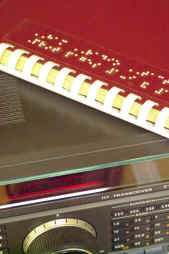
Well, the best thing to do is to follow the advice in “The Hitchhiker’s Guide to the Galaxy” and don’t panic. Many of our Handiham members are blind, so we will include some troubleshooting steps for them. We are going to check off everything without making assumptions. Some of our readers will think that this stuff is obvious, but in the grand scheme of things we must allow for a wide range in the knowledge and experience of amateur radio operators. Some will be familiar with the “dead radio” problem and others will be experiencing it for the first time. Let’s cover all the bases.
- Yes, I know this is obvious, but did the radio really turn on when you flipped the switch? Did the radio make a telltale sound when switched on? Even if I could not see the lighted display of my IC-7200, when it is powered up I hear a click as a relay energizes in the connected autotuner and my computer makes a connected sound to tell me that a USB device is now on line. Keying the PTT in SSB mode and not talking should trip the transmit relay without sending any RF, so you can hear the click of the relay. Have you checked the power supply switch?
- Make sure that you have not left headphones plugged into the PHONES jack. Doing so on most radios will mute the speaker.
- Check the AF gain (volume) control. Maybe you turned it all the way down the last time you used the radio. Don’t laugh – I often do this if I am in the radio room and get a phone call or start listening to something else. Turn up the volume and if you can hear stations, you have solved the problem.
- Check the RF gain control. Sometimes this gets turned down by accident, or perhaps you turned it down in a previous session because you were dealing with a very strong signal. Turn it back up and try tuning around again. Incidentally, I often find that users of the Handiham remote base stations leave the RF gain turned down on the TS-480 radios. No wonder the bands seem dead!
- Okay, so now we have power to the radio, the RF and AF gains are adjusted, and there is still no sound. Many radios have squelch controls, and this little feature can cause all but the very strongest signals to be completely muted. Perversely, this control is sometimes a concentric one that shares the same spot as the volume control. It is easy to misadjust, by which I mean setting it to anything but completely off! With the volume turned up to mid-range turn the squelch all the way down. Note that you don’t want the volume cranked up to max when you do this, as the sound may be startlingly loud!
- Don’t forget the other adjustments your radio may have to tailor the sound. Filter settings and pass band tuning might be set incorrectly. If they have detents, return them to “normal”.
- Still nothing at all? Retrace your steps to make sure there is power to the radio. Check the power supply and connection to the radio. Check the fuses and breakers at the station equipment and at your home’s breaker box. Make sure everything is connected as usual.
- Assuming that you do actually have power and that the radio is powered on, you could have a problem with the radio itself. Sometimes oxidation occurs on the mechanical connection in the headphone jack. Push a headphone plug in and out to clear it. Don’t forget to listen via the headphones to eliminate the unlikely possibility that the speaker coil has opened. If any of this resolves the condition, you are good to go. If not, take further steps to have the radio checked. Ask for help from your local radio club before assuming that the radio has failed. There are probably club members who are experienced with that radio and who can help you determine what is wrong and whether it needs service.
- Let’s say that you do actually hear a gentle hiss from the radio but that you can’t tune in any stations. Check to see if you have locked the main tuning dial by mistake. If the tuning is locked, you can twirl the dial all day long and the frequency will not change!
- Now you have tuned across the band and there are no signals. Try another band and check again. Still nothing? Check to make sure that the antenna’s feedline is connected. If you have an antenna switch, make sure that it is in the correct position. Don’t forget the radio’s antenna selector if your transceiver has one!
- Try WWV on 5 and 10 MHz. Both put out awesomely strong signals. If you hear a weak or warbling signal, conditions may be poor.
- Next, tune your radio to a local commercial AM radio frequency. You may not be used to doing this, so be aware that to direct enter such a frequency you may need to key in something like
zero dot eight three via the direct entry on your keypad to get “830” on the AM radio dial as I do here for local station WCCO. Of course you will choose your own local station if you don’t live here in the Twin Cities. If you can hear a local AM station it is likely that the radio is fine and that HF sky wave band conditions are just extremely poor. By tuning the local commercial AM station, you can hear a ground wave signal that does not depend on sky wave propagation. - If the local commercial station comes in fine, try checking the SWR on your antenna system. If that passes muster, it is likely that your station is intact and functioning normally and that HF band conditions are just really, really poor following a solar event. If the SWR is terrible, perhaps the feedline or antenna have failed. That is a separate troubleshooting issue.
- If the HF conditions are indeed so bad that you cannot hear sky wave stations, you can confirm this by checking various solar weather and propagation websites. It is generally a matter of waiting a few days for conditions to return to normal. When I was a young lad and had only recently gotten my General license, I ran into just this situation. I even went out side to check to see if my antenna was still up in the air! It was the first time I had experienced what amounted to a radio blackout of sky wave propagation caused by a solar event. Today we can confirm our suspicions about solar weather via the Internet, but back then it was a very puzzling thing. Eventually I did learn more about solar weather and HF propagation so that the next solar storm did not catch me by surprise and make me think my antenna had fallen down!
Email me at [email protected] with your questions & comments.
Patrick Tice
Handiham Manager

The further adventures of the Heathkit AT-1
Work has been conspiring to eliminate my spare time but I was able to spend a few hours over the Easter holiday to clean up the shack and make space to put the Heathkit AT-1 on the desk again. I have been able to spend a little time going over parts that need to be replaced and making a list.
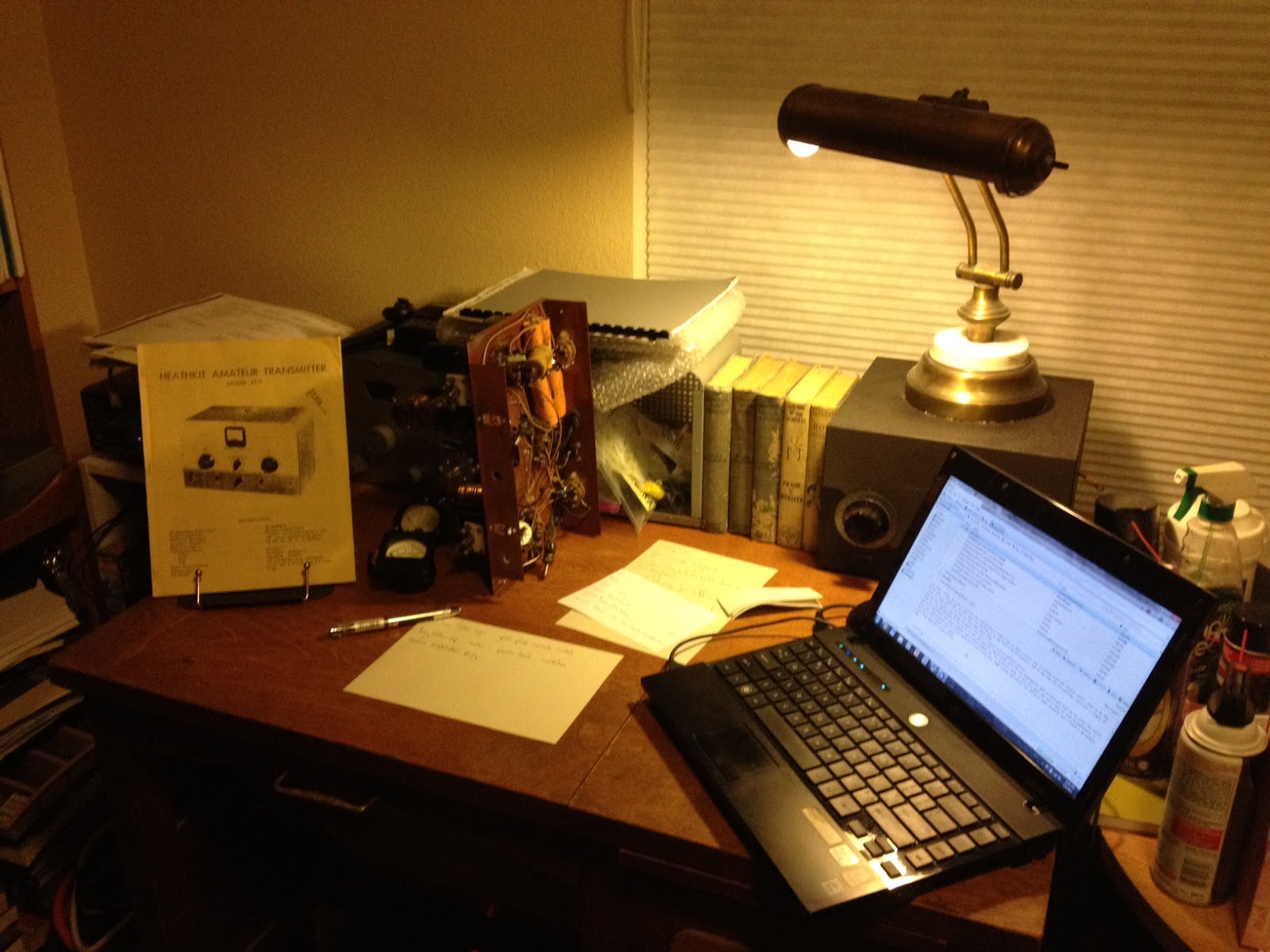 |
| The Heathkit AT-1 chassis with case and VFO-1 behind. |
There doesn’t seem to be any show stoppers although the wafer of the meter switch has broken in two and will need to be repaired. If I’m not able to repair it then thankfully it is fairly simple and replacement rotary switch can be substituted.
This isn’t going to be a museum quality restoration but the changes that were made to this transmitter in the past were sensible and if left in place are representative of period modifications. The original meter for example was not the highest quality and a Western or Simpson replacement would be an improvement. The original slide switches have been replaced with period snap-toggle switches which are also an improvement over the original.
The Heathkit VFO-1 however has been modified for grid-block keying which is a significant departure from the original and I plan to revert it back to cathode keying. Although a technical improvement it is not in keeping with the original design and needs to be undone. Everyone will have their own opinion but I think if I wanted modern circuits I’d get a more modern rig, so the VFO-1 will be returned to stock.
Hopefully I can carve out a bit of time here and there to work on this and slowly return it to working condition.
Handiham World for 04 April 2012
Welcome to Handiham World.
Goodbye, cassettes.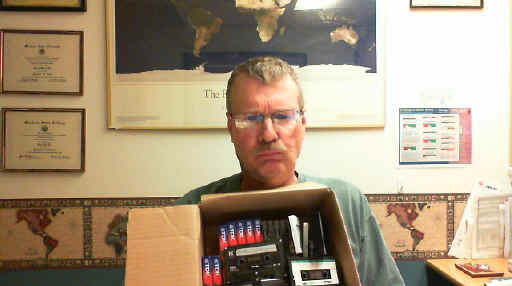
The old way of doing audio: Unhappy Pat poses with box of assorted tape cassettes. Each one holds only a portion of an audio book.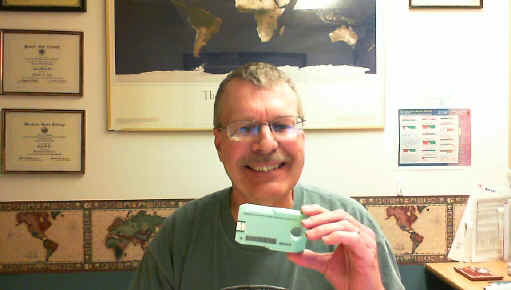
The new way: Smiling Pat holds up a single Library of Congress digital cartridge. Each new digital cartridge holds thousands of DAISY book pages or many hundreds of audio files.
Well, don’t say you didn’t know this was coming. Learning Ally and the Library of Congress have both made the switch to digital audio. Bookshare has been digital for a long time already. Now it is time to announce the final stage in the life cycle of the Handiham tape cassette service, one of the few remaining analog special format services that is still active.
Over the last decade digital audio has steadily overtaken analog tape cassettes in commercial applications. The old cassette format is no longer supported as it once was in boom boxes, portable players, and automobile audio systems. The tapes themselves are harder to find and many households no longer even have equipment to play cassettes. Anticipating the need for a digital system to replace this old technology that was also used by people who could not read regular print, the DAISY Consortium has developed the DAISY format book system that can couple audio files read by humans to specific sections and subsections of books. DAISY can also generate computer speech from computer text of a book, then arrange it all on a DAISY book that includes spoken word audio and all of the text, complete with headings for sections and subsections. Now that the Library of Congress has completed its distribution of the new DAISY-capable digital players to replace the aging 4-track tape cassette players, we feel confident that Handiham members, even those without computers, will still have access to the new digital cartridges.
Make no mistake; the digital audio is far better than the old cassette tape audio. If you are still using tape cassettes, now is the time to check out that new digital player. With the new player you can navigate using audio prompts and find the exact thing in a book that you want. You could never do that with tapes. In the bad old days of taped instruction manuals, it was nearly impossible to find that part about setting the memories on your new radio! With the new digital system, that is an easy task. In the old days, your audio had to come by postal mail. Today you can download it via the Internet and put it on your digital player with a small adapter cable. Even Handiham members without computers can still receive their new digital cartridges in the mail, in special mailers similar to the old Library of Congress tape mailers. The new system is designed to seem familiar to tape users, so that they can more easily learn it and make the transition.
The digital cartridges themselves are just a bit smaller than the old tape cassettes. They have a hole in one end to facilitate grasping the correct end of the cartridge, even by a person with some mobility limitations. The other end of the cartridge has a small USB connector that plugs into the digital player. It slips into the new player only one way, and the experience feels much like putting a cassette tape into the old player. The USB plug is protected by extensions of the plastic cartridge to protect it from damage. This format also keeps it from plugging directly into a standard computer’s USB ports. That is why blind users who receive their audio from Library of Congress digital downloads must use an adapter cable between their computers and their digital cartridges. We can also use such a cable to put Handiham digital audio onto the new cartridges.
There is a cost difference between a tape cassette and the new digital cartridge. Tape cassettes usually ran under a dollar, and because they are falling out of use they are available virtually free from people who are simply getting rid of old technology. The new digital NLS cartridges are around $10 to $12 each, but remember that each one holds the equivalent of hundreds and hundreds of tapes. And because the new digital cartridge has a different form factor than a tape cassette, it requires a new specialized NLS mailer. These run about $2.50 each.
The way the Handiham monthly digest audio program will operate takes into account the cost of these two items. In the old system, we bought tapes and mailers and sent them to our members. The members were responsible for returning the tapes and mailers when they had listened to the audio. The return rate was never 100%, so some tapes and mailers were lost to attrition each month.
In the new system, we will ask our members who want to have digital audio mailed to them by free matter postal mail to purchase their own digital cartridge and mailer, mark them with their callsign or identification, and send them to us for processing each month. We will fill the cartridge and return it. That way each individual has a vested interest in their own cartridge and mailer. This will make the program easier to manage because we won’t have to maintain a supply of our own cartridges and mailers. It also spreads the cost among those users who don’t have computers or Internet services. It has really become labor-intensive to support a smaller and smaller number of Handiham members who use the old tape cassette technology. As our tape duplicators get older, they are more likely to make recording errors. It has gotten to the point where tapes are sometimes custom-produced for a single member who needs something like one of our license courses but who has no computer. So serving that single member can get quite expensive, while hundreds of other members simply download their audio from our website with no staff assistance. The digital cartridge provides a means of still serving that single member with good quality audio, even if they do not have a computer.
So what is the plan?
We will continue to support tape cassettes through the end of 2012, but not for new members, beginning immediately. All new members will be told about the new digital cartridge plan. They will have a choice of either simply downloading the digital audio they need from our website or providing their own digital cartridge and mailer. Members who are currently using the old tape system will be notified of the new cartridge plan and they will be given some options about where to purchase the cartridges and mailers. Members who get their audio via the website will not be affected.
For Handiham World, I’m…
Patrick Tice, [email protected]
Handiham Manager

Handiham World for 21 March 2012 Repost
Welcome to Handiham World.
Digital Bling and a Cautionary Tale
The news this week about QST going digital is exciting stuff. (See the next story for an explanation and link.) If our own Handiham World had not gone digital, we would still be publishing only four issues a year, one for each season. Yes, back in the bad old days a couple of decades ago the Handiham World was mailed out each Spring, Summer, Autumn, and Winter in a print format. Volunteers would read the print version onto cassette tapes that were mailed to our blind members. Any news that arrived via that system was bound to be pretty old. Then, when printing and mailing costs began to climb we had to cut down to three issues, then two. Using the Internet to deliver the Handiham World was faster, cheaper, and better. Not only could it be read directly with screenreading software by our blind members, but it could be in audio as well, also delivered via streaming or download. Members could even call a phone number to hear the same Internet audio, even if they only had a telephone. The Handiham World could be enjoyed by anyone as a podcast from iTunes. Better yet, it could be published weekly instead of quarterly.
Even though these advantages seem obvious, there were – and still are – some who feel that our service has left them behind. These are the members who don’t have computers and who don’t plan to get them. And this, my friends, is the problem every publisher faces. That is why I’m going to share with you my experience with a newspaper.
It is certainly not news that newspapers want to print: Newspapers are struggling to find their new business model in the 21st century. Who reads them anymore?
Probably people like me, that’s who! I’m old enough to remember having a paper route as a kid. Delivering the daily paper was one of those rite of passage jobs a kid could have back in the middle of the 20th century. The news business was less competitive back then, and there was little urgency to have up to the second updates. The newspaper business held its own until cable news began nipping at its heels, but it wasn’t until news sites began appearing on the Internet that the real problems with printing paper copies and physically dumping them on doorsteps became too big to ignore.
These days we would get our newspaper delivered by some guy driving his personal vehicle around town and pitching the paper out onto the driveway or sidewalk. He would back over the lawn and sometimes his truck would have a loud muffler in the wee hours of the morning. Often as not the morning dew or the lawn sprinklers would soak the paper before we could retrieve it. On rainy mornings the paper arrived in a plastic bag that managed to protect about 3/4 of the paper from getting soaked. The newspaper company also published an on line edition once the power of the web was obvious, and like many other readers I took to it instantly and never looked back. Unfortunately for the newspaper, they lost money giving the news away for free on the web (duh), and they finally had to come up with a pay-for alternative. It involved a special digital edition that looked just like the printed version. In a scattergun approach to pleasing every customer from the grumpiest computer-hating Luddite to the early-adopter geek, they offered a plan to give you a print paper AND a digital edition.
We signed up. I like trying new stuff but I still like a print edition. This would be a chance to compare the technologies.
It’s been a couple of months now, so I feel as if I know where things are going. Both my wife and I read the print paper to some extent, and both of us use the newspaper’s website. The website is actually easy to use, but it is not the new so-called “digital edition” that looks exactly like the printed paper. For that, you have to log on to a special website. The newspaper sends a helpful link by email each day as a reminder. The digital look alike loads a web application in your browser window, after which you see the copy of the printed version in what amounts to a browser frame. Try as I might, I just cannot warm to the idea of trying to read a newspaper that way. The page does not all fit in the browser window, which means that you are constantly scrolling one way of another to read articles. Worse yet, because the digital look alike is supposed to be like the printed copy, you have to follow the story onto other pages buried deep in that day’s edition. The pages of the digital edition have a feature that prompts you with a cute little animation to turn them. Page turns themselves are also animated. Ooooo! This is digital bling! It looks so cool, but let’s face it – I think having to scroll left and right and up and down, then fiddle with the mouse to get the cursor exactly in the right spot to connect me to the remainder of a front-page article that ends up buried on page 10 is just not my cup of tea. What I want is content. I would like it to be easy to find, easy to read, and – after being in the business of helping people with disabilities for so many years – accessible to people who use screenreaders. I have to say that some of these new digital publishing efforts fall flat on all those counts.
What I don’t really understand is the need to make a digital edition look like a printed page. The printed page is fine when it is a printed page. When it is a digital copy on a small screen, it is like putting Victorian furniture in a Frank Lloyd Wright house. It is a bad fit. If you are going to use the web to publish your newspaper, publish it using the easily understood, common, and highly accessible web page formats that are already available. That is why for Handiham World we provide accessible HTML in our web pages. If we put something up in a format like PDF, it contains embedded text and an audio alternative, plus an HTML version. But really, the PDF version is not meant so much to be read on line as to be printed and read as a print publication.
The bottom line with digital publishing is that it needs to be recognized for what it really is – a new and better way to deliver content that is more up to date, cheaper to deliver, and takes advantage of the technology to allow users to search thousands of pages quickly, have access to past issues without collecting an attic full of paper copies, and enjoy it all with accessible technology. It is not a new way to deliver the same old paper dressed up with page turn animations. In other words, forget the bling and give me the content.
Oh, well. At least the digital version does not drive over my lawn at 4:00 A.M. in a noisy truck. On the down side, I miss the plastic bag that is so handy for “dog duty” when I take Jasper out for a walk.
For Handiham World, I’m…
Patrick Tice, [email protected]
Handiham Manager

Handiham World for 21 March 2012
Welcome to Handiham World.
Digital Bling and a Cautionary Tale
The news this week about QST going digital is exciting stuff. (See the next story for an explanation and link.) If our own Handiham World had not gone digital, we would still be publishing only four issues a year, one for each season. Yes, back in the bad old days a couple of decades ago the Handiham World was mailed out each Spring, Summer, Autumn, and Winter in a print format. Volunteers would read the print version onto cassette tapes that were mailed to our blind members. Any news that arrived via that system was bound to be pretty old. Then, when printing and mailing costs began to climb we had to cut down to three issues, then two. Using the Internet to deliver the Handiham World was faster, cheaper, and better. Not only could it be read directly with screenreading software by our blind members, but it could be in audio as well, also delivered via streaming or download. Members could even call a phone number to hear the same Internet audio, even if they only had a telephone. The Handiham World could be enjoyed by anyone as a podcast from iTunes. Better yet, it could be published weekly instead of quarterly.
Even though these advantages seem obvious, there were – and still are – some who feel that our service has left them behind. These are the members who don’t have computers and who don’t plan to get them. And this, my friends, is the problem every publisher faces. That is why I’m going to share with you my experience with a newspaper.
It is certainly not news that newspapers want to print: Newspapers are struggling to find their new business model in the 21st century. Who reads them anymore?
Probably people like me, that’s who! I’m old enough to remember having a paper route as a kid. Delivering the daily paper was one of those rite of passage jobs a kid could have back in the middle of the 20th century. The news business was less competitive back then, and there was little urgency to have up to the second updates. The newspaper business held its own until cable news began nipping at its heels, but it wasn’t until news sites began appearing on the Internet that the real problems with printing paper copies and physically dumping them on doorsteps became too big to ignore.
These days we would get our newspaper delivered by some guy driving his personal vehicle around town and pitching the paper out onto the driveway or sidewalk. He would back over the lawn and sometimes his truck would have a loud muffler in the wee hours of the morning. Often as not the morning dew or the lawn sprinklers would soak the paper before we could retrieve it. On rainy mornings the paper arrived in a plastic bag that managed to protect about 3/4 of the paper from getting soaked. The newspaper company also published an on line edition once the power of the web was obvious, and like many other readers I took to it instantly and never looked back. Unfortunately for the newspaper, they lost money giving the news away for free on the web (duh), and they finally had to come up with a pay-for alternative. It involved a special digital edition that looked just like the printed version. In a scattergun approach to pleasing every customer from the grumpiest computer-hating Luddite to the early-adopter geek, they offered a plan to give you a print paper AND a digital edition.
We signed up. I like trying new stuff but I still like a print edition. This would be a chance to compare the technologies.
It’s been a couple of months now, so I feel as if I know where things are going. Both my wife and I read the print paper to some extent, and both of us use the newspaper’s website. The website is actually easy to use, but it is not the new so-called “digital edition” that looks exactly like the printed paper. For that, you have to log on to a special website. The newspaper sends a helpful link by email each day as a reminder. The digital look alike loads a web application in your browser window, after which you see the copy of the printed version in what amounts to a browser frame. Try as I might, I just cannot warm to the idea of trying to read a newspaper that way. The page does not all fit in the browser window, which means that you are constantly scrolling one way of another to read articles. Worse yet, because the digital look alike is supposed to be like the printed copy, you have to follow the story onto other pages buried deep in that day’s edition. The pages of the digital edition have a feature that prompts you with a cute little animation to turn them. Page turns themselves are also animated. Ooooo! This is digital bling! It looks so cool, but let’s face it – I think having to scroll left and right and up and down, then fiddle with the mouse to get the cursor exactly in the right spot to connect me to the remainder of a front-page article that ends up buried on page 10 is just not my cup of tea. What I want is content. I would like it to be easy to find, easy to read, and – after being in the business of helping people with disabilities for so many years – accessible to people who use screenreaders. I have to say that some of these new digital publishing efforts fall flat on all those counts.
What I don’t really understand is the need to make a digital edition look like a printed page. The printed page is fine when it is a printed page. When it is a digital copy on a small screen, it is like putting Victorian furniture in a Frank Lloyd Wright house. It is a bad fit. If you are going to use the web to publish your newspaper, publish it using the easily understood, common, and highly accessible web page formats that are already available. That is why for Handiham World we provide accessible HTML in our web pages. If we put something up in a format like PDF, it contains embedded text and an audio alternative, plus an HTML version. But really, the PDF version is not meant so much to be read on line as to be printed and read as a print publication.
The bottom line with digital publishing is that it needs to be recognized for what it really is – a new and better way to deliver content that is more up to date, cheaper to deliver, and takes advantage of the technology to allow users to search thousands of pages quickly, have access to past issues without collecting an attic full of paper copies, and enjoy it all with accessible technology. It is not a new way to deliver the same old paper dressed up with page turn animations. In other words, forget the bling and give me the content.
Oh, well. At least the digital version does not drive over my lawn at 4:00 A.M. in a noisy truck. On the down side, I miss the plastic bag that is so handy for “dog duty” when I take Jasper out for a walk.
For Handiham World, I’m…
Patrick Tice, [email protected]
Handiham Manager

PARP 53–RST Signal Reports

The Practical Amateur Radio Podcast episode 53 is now available for download or stream. I’ve also updated the audio player used on MyAmateurRadio.com to work across multiple platforms including portable devices such as iPhone and iPad.
In this episode I discuss RST Signal Reports. I provide details into what each of the numerical values mean and my own thoughts about their use. In the featured website segment I introduce the new amateur radio podcast from Gary Pearce, KN4AQ titled Ham Radio Now.
Please visit MyAmateurRadio.com to listen or download this new episode.
Thank you for listening and thank you for sharing your knowledge with others. The Practical Amateur Radio Podcast, creating Elmers one podcast at a time.
Until next time…
73 de KD0BIK













