 |
 Portable Hexbeam v’s Cobwebb
 27 April 2014 | by
 After a few more weeks of not getting on the air I managed to man handle the portable Hexbeam up to about 4 above ground level (Note: must get that tilt base sorted out) to compare it against the Cobwebb I have in the loft.
So before we go down the ‘It’s not scientific’ route. I’m ok with that, no big deal its just a bit of fun.
There are some significant differences between the two antennas that I hadn’t fully appreciated. Firstly the noise levels on the Cobwebb were quite a bit higher, which seemed to make the Hexbeam sound quiet, when in actual fact there was no significant difference on the higher bands when it comes to S points. But, the lower noise levels made it much nicer to use. The image below shows what I mean. There is a band of ‘mush’ slap bang in the middle where I switched onto the Cobwebb. Just so you know, the Cobwebb was way quieter than the vertical I had before.

It’s not a huge visual difference on the screen but the ears make it obvious. The gain on the Hexbeam made it easy to make contacts with C06LA answering on the first call, I’d never expect that on the Cobwebb.
You can also see that the signal strength is fairly similar, that was W4UH calling CQ.
So not much in it when the Hexbeam is really low, I’m sure it’ll beat the pants off the Cobwebb at 12m but interesting to see that the Cobwebb is ‘noisier’. Especially as I thought it was quite a quiet antenna.
Alex Hill, G7KSE, is a regular contributor to AmateurRadio.com and writes from Cumbria, UK. Contact him at [email protected].
Super fast broadband. Finally
Ok so not a radio related blog entry but its worth sharing anyway.
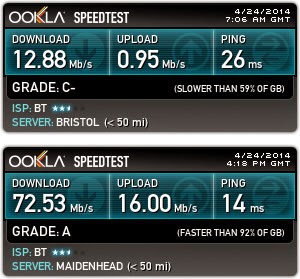
I have for the first time ever now joined the super fast broadband club. Using BT infinity2 I have for the first time broken through the “Up to” 16Mb/s download and jumped straight up to 76Mb/s download.
For the uninitiated this is accomplished by only installing Fibre cable to the nearest cabinet and then the existing copper to the house. The is known as FTTC. (Fibre To The Cabinet). and going forward its quite possibly the only large scale Fibre Optic roll out we will see in the UK. placing Fibre Optic to the home (FTTP – Fibre To The Property) is prohibitively expensive and the last large scale roll out nearly bankrupted NTL.
So how is it ? well to be honest I haven’t really noticed any difference browsing the web. But I have noticed a massive difference when everyone is using a piece of the internet connection. the upload speed has made a massive difference too. Being able to upload videos to YouTube and also working with files (day job) and placing them on remote servers is now much quicker.
The actual speeds I’m getting are not that different to the advertised connection – That being 76Mbs down and 19Mbs up. have a look at the before and after speed tests.
Dan Trudgian, MØTGN, is a regular contributor to AmateurRadio.com and writes from Wiltshire, England. He's a radio nut, IT guru, general good guy and an all round good egg. Contact him him here.
Bike Ride to Eagle Pond
All Photos by W3ATB
Tim W3ATB and I rode our bikes to Eagle Pond along the old rail route. We worked Hungary, Israel, Ukraine, Indiana, and Virginia.

We traveled along the old Northern Rail route about four miles. It’s 60F and a perfect spring day. We skirted back and forth across the Black River starting out in Andover.

We stopped at the covered bridge to enjoy the scenery and rest a bit. About a mile and a half from Andover is Potter Place. The local historical society has turned the old station into a museum.

The route is a perfect bike path. Railroad grades are very slight so there are no hills at all. We come to Eagle Pond after riding 40 minutes or so. It’s glorious. Blue sky, sparkling water and some good DX. I’m running the KX3 with a 33 foot wire. I operate mostly on 15M and 17M.

Here’s my log:
25 Apr-14 1855 21.010 HA9RT CW 599 599 Hungary
25 Apr-14 1900 18.076 EM90WF CW 599 599 Ukraine
25 Apr-14 1910 21.018 HA8FK CW 559 599 Hungary
25 Apr-14 1915 18.091 KA4RRU CW 559 599 VA
25 Apr-14 1922 18.078 4Z5IW CW 559 599 Israel
Tim is sitting about 60 feet away running an HB-1B and the Par End fed wire. He’s operating on 20M. He has a nice QSO with an Indiana station. Amazingly, we don’t interfere with each other even though we have parallel vertical wires in close proximity.
We pack up our gear for the return trip and stop several times along the trail. Our butts are sore and our muscles feel the exercise. We’ll be in better shape next time. We pass a few spots with telltale signs of winter. They’ll probably be gone next time too. It’s supposed to rain tomorrow.

Jim Cluett, W1PID, is a regular contributor to AmateurRadio.com and writes from New Hampshire, USA. Contact him at [email protected].
Smack down, round 2. ID-5100A vs IC-2820H.
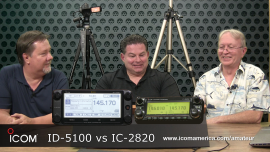
Ray Novak from Icom America came by the AmateurLogic studio with Icom’s newest 2m/70cm, D-Star capable radio. We had the perfect opportunity to host another smack down match. This time it was between the new ID-5100A vs the IC-2820H.
Check it out here: ID-5100A vs IC-2820H
George Thomas, W5JDX, is co-host of AmateurLogic.TV, an original amateur radio video program hosted by George Thomas (W5JDX), Tommy Martin (N5ZNO), Peter Berrett (VK3PB), and Emile Diodene (KE5QKR). Contact him at [email protected].
Possible fix for Wouxun memory problem

Courtesy of N8NQH
Thanks to Tim, N8NQH for sharing a possible 60-cent fix for the loss of memory problems plaguing some Wouxun radios. He’s created a great little resource page for those looking to tackle this repair. According to him, the problem is a little 8-pin DIP surface mounted 24C64 serial memory IC.
Please note, however, that he makes it very clear that this repair is made at your own risk! Your mileage may vary, but at least it’s a possible starting place.
http://tim-yvonne.com/ham/wouxun-memory/index.htm
Matt Thomas, W1MST, is the managing editor of AmateurRadio.com. Contact him at [email protected].
Some things
Got an answer from Terry G4POP regarding my Log4OM issue regarding the distances being shown in kilometers, rather than miles (even though I chose the miles option):
“Distance in miles is only for display, when the record is saved to your log it has to conform with the ADIF (Amateur Data Interchange Format) format which requires Km.”
Since I’m not the software or ADIF expert, I’ll accept that answer, although HRD and other logging programs I have played with seem to work around it. In light of how good the program seems to me so far, it’s a minor inconvenience, and in the scheme of things I can live with that. What’s more important to me is that the CAT (Computer Aided Tuning) works well. The KX3 seems to obey whenever I point and click on a frequency.
The DX Cluster and the loading and downloading to and from eQSL and LotW work especially well. Callsign lookup is lightning fast. In short, Log4OM is easy to use (it has a very short learning curve), it makes sense, works well and is aesthetically pleasing too. It’s easy on the eyes and to many, that may be superfluous, but to me it is important.
Another big plus is that the Website offers for download a comprehensive User Manual that is complete, but is still a manageably sized document that I can keep on my tablet for easy reference.
The evaluation of logging software is very subjective. What works for one person is useless to another. Log4OM works very well for me, and if you’re looking for something new, or a nice package, be sure to check it out. It might not be your cup of tea; but then again it might.
Here’s a VERY COOL special event that is going on tomorrow. I want to help spread the word:
“A Special Event honoring 20 years of the AZ ScQRPions QRP Club will be held April 26, 1400-2330 UTC at the unique relic of the cold war nuclear deterrent: the TITAN MISSILE MUSEUM in Green Valley AZ dedicated by Ronald Reagan to creating an ongoing awareness of the Armagedon that would result from a nuclear exchange. Everyone should be guided through the silo andcontrol rooms to get a sense of the reality of it all.
The CLUB will use the site’s primary antenna — a broadband 90′ DISCONE with a fairly flat SWR from 1.8-30 Mhz, with low nodes in most of the ham bands. We will operate with QRP rigs such as the KX3, K3, QRP+, ICOM-703, ATS-4, Wilderness Sierra and who knows what else. QRP frequencies will be used to the extent they produce steady contacts. Otherwise take note of the following operating Fregs: SSB — 14270Mhz, 18130Mhz, 21280Mhz, & 28370Mhz, +/-20Khz; c.w. –14020, 18072, 21030, 28015, +/-10Khz. We will call ” CQ TITAN de K7T”.
Details and photos of the DISCONE monster can be viewed at the following links:
http://www.wa0itp.com/titandiscone.html
http://www.wa0itp.com/ttm%202010.htm
Special QSL on receipt of your QSL to:
Ade Weiss W0RSP, 810 N. Placita la Canoa, Green Valley, AZ 85614
QRO stations certainly invited to let us know we’re getting out — and to practice copying weak DX signals and local QRP signals! Win-win!
Check http://www.QRPSPOTS.com for most current frequency info.
Simultaneous operation of three stations on the Discone is planned using a triplexer and bandpass filters. An in-band SSB 20m – 10M experiment will be attempted with additional antennas separated from the Discone. Note that 12M, 17M CW/SSB and 30M may also be used as this is not a contest, but an outdoor operating event on a nice 90F+ spring day!
Drop by for a QSO! Make our day! CU de TITAN!
Also …… tomorrow, Saturday April 26th is International Marconi Day. You may hear a lot of stations on the air around the world using an “IMD” suffix. That’s what that is all about. You can read more about it on the ARRL Letter, if you get that, or by going here: http://g4usb.net/IMD/the-award/award-classes/
72 de Larry W2LJ
QRP – When you care to send the very least!
Larry Makoski, W2LJ, is a regular contributor to AmateurRadio.com and writes from New Jersey, USA. Contact him at [email protected].
TXtra from TX Factor is On The Air!
 TX Factor, the UK’s first TV show dedicated entirely to amateur radio has launched TXtra, a regular supply of extra features with new and exciting content related to amateur radio and associated technology.
Nick Bennett 2EØFGQ co-hosts TX Factor with Bob McCreadie GØFGX and Mike Marsh G1IAR. Contact the team at [email protected]
 Ham Radio Deluxe |
 W5SWL Electronics |
 Ham Radio Prep |
 KB3IFH QSL Cards  Hip Ham Shirts  HamRadioAuctions HamRadioAuctions Reliance Antennas Reliance Antennas Enigma Shop Enigma Shop |  morseDX  Ni4L Antennas  R&L Electronics R&L Electronics antennas.us antennas.us QRV QRV |
- Matt W1MST, Managing Editor
