 |
 ICQ Podcast Episode 225 – What is VSWR
 27 November 2016 | by
 In this episode, Martin M1MRB / W9ICQ is joined by Chris Howard M0TCH, Martin Rothwell M0SGL, Dan Romanchik KB6NU and Ed Durrant DD5LP to discuss the latest Amateur / Ham Radio news. Colin M6BOY rounds up the news in brief, and this episode’s features - What is VSWR
- Students FM transponder Satellite Launched
- WWII Veteran Still Taps out Morse code
- Enrol for UK Advanced Distance Learning Course
- Lowest Sunspot Cycle for 5 Years
- Suggestions Requested for Technician Pool
- New Greenlandic Beacon - OX4M
- HF Antenna Tester
Colin Butler, M6BOY, is the host of the ICQ Podcast, a weekly radio show about Amateur Radio. Contact him at [email protected].
Amateur Radio Weekly – Issue 135

Virtual Build-a-thon
Using either Skype or Webex we will present each week for about 30 minutes showing you the next stage of building the project. You can then ask questions and show us how you are getting on.
Chertsey Radio Club
Toyota Tacoma Mobile HF Install
Surprisingly the 590SG is compact enough IMHO for a nice mobile install, however someone with a smaller vehicle might not have the luxury of so much space. I rarely use the access cab except to throw junk in, so why not utilize it better?
K5ACL
Upcoming solar years… Can they be too quiet?
In 2008 there were 265 ‘zero sunspot’ days and the following year saw another 262 days of blank suns!
VE7SL
Should amateur radio be used for military purposes?
If the Border Patrol or Army asked you to listen for potential terrorist communications, would you do so?
KB6NU
Podcast: Foundations of Amateur Radio
A weekly, 4 minute podcast. The building blocks for Amateur Radio, one concept at a time
VK6FLAB
FCC’s Laura Smith – Your Repeater; Your Rules
We haven’t heard a lot from FCC Special Counsel Laura Smith lately, but she spoke at Pacificon.
Southgate/Ham Radio Now
Solar powered Ham Radio for beginners
I am going through the gear one will need to operate with a solar power source, how to use it and a couple of things to avoid.
Ham Radio Reviews
SKYWARN Recognition Day on-the-air event is December 3rd
SKYWARN Recognition Day was developed in 1999 by the National Weather Service and ARRL to honor the contributions that SKYWARN volunteers make to the NWS mission.
ARRL
Special Event K7Z: Zane Grey’s 145th Birthday
Zane Grey was an author and master of the American western novel.
K7Z
Special Event W1T: Mark Twain’s 181st Birthday
ARRL staff will be operating as W1T from November 28 – December 4, in honor of Mark Twain’s 181st birthday.
W1T
Video
D-Star DVmega Raspberry Pi 3 hotspot
This hotspot is using a Raspberry Pi to operate as a full D-star hotspot.
HamRdioConcepts
Compact Homebrew End Fed QRP Antenna
I built this antenna specifically for low wattage QRP use to be compact and inexpensive. It utilizes a 9:1 balun wrapped on a T106-2 torpid and minimal hardware to be lightweight.
KD9EAS
W2LI: Dry Tortugas NPOTA Activation
Rob (K2RWF) and Craig (KD2INN) activate Dry Tortugas National Park in the Gulf of Mexico.
YouTube
Amateur Radio Weekly is curated by Cale Mooth K4HCK. Sign up free to receive ham radio's most relevant news, projects, technology and events by e-mail each week at http://www.hamweekly.com.
Hunting For NDBs In CLE 213
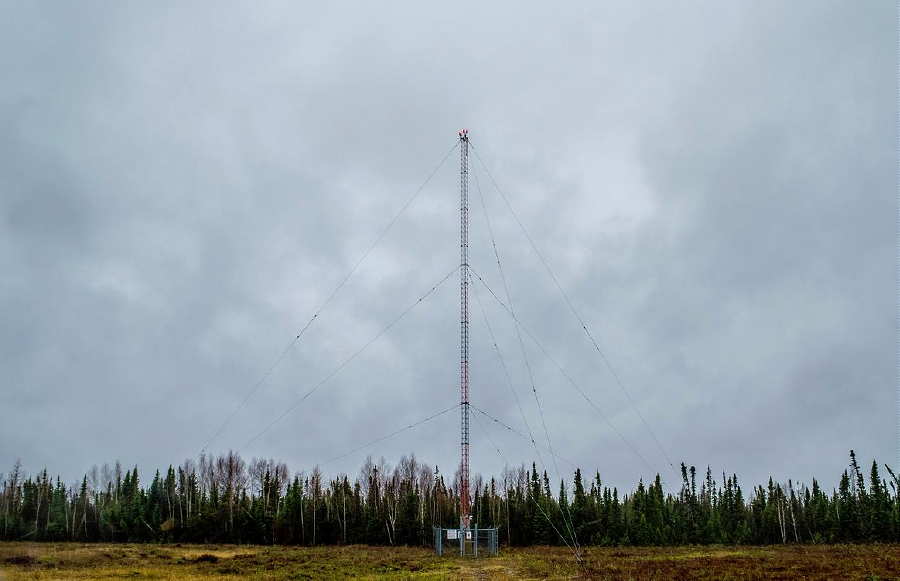 |
| 'YLH' - 247 courtesy: http://www.ve3gop.com/ |
This coming weekend will see another CLE challenge, this time in two ranges: 240.0 - 259.9 kHz plus 420.0 - 439.9 kHz.
A 'CLE' is a 'Co-ordinated Listening Event', as NDB DXers around the world focus their listening time on one small slice of the NDB spectrum.
A nice challenge in this one is to hear the Lansdowne House, Ontario, NDB, 'YLH' on 247 kHz. This one runs 250 watts and gets out well, having been logged from coast to coast. Listen for it on 247.417 kHz with your receiver in the CW mode.
From CLE organizer Brian Keyte, G3SIA, comes the usual 'heads-up':
Hi all,
Here are the final details for our 213th co-ordinated listening event this
weekend. First timer logs too? Yes, please!
Days: Friday 25 Nov. to Monday 28 Nov.
Times: Start and end at midday, your LOCAL TIME
Range: 240.0 - 259.9 kHz plus 420.0 - 439.9 kHz
(BOTH ranges are for ALL listeners)
Please log NDBs that you can positively identify in the ranges, plus any
UNIDs that you come across there.
The lower frequency range will be really hard for most Europe listeners,
the higher range not at all easy for most others.
Send your CLE log to the List, if possible as a plain text email and
not in an attachment, with CLE213 at the start of its title.
Show on EVERY LINE of your log:
# The Date (or day 'dd') and UTC (the day changes at 00:00 UTC).
# kHz - the beacon's nominal published frequency (if you know it).
# The Call Ident.
Please show those main items first on each line, BEFORE any optional
details (Location, Offsets, Cycle time, Distance, etc.)
If you send interim logs, do make sure that you also send a 'Final' log
containing all your loggings. As always, please make your log useful and
interesting to everyone by including your own location and brief details
of your receiver, aerial(s) and any recording equipment that you used.
I will send the usual 'Any More Logs?' email at about 18:00 UTC on
Tuesday so that you can check that your Final log has been found OK.
Do make sure that your log has arrived on the List at the very latest
by 09:00 UTC on Wednesday 30th November.
I hope to complete the combined results later on that day.
To help you with your search you can find lists of your target NDBs at
http://www.ndblist.info/cle.htm Select the SEEKLIST link there.
(To also see a MAP of the seeklist NDBs, just change 'List' to 'Map',
select 'All Results' and uncheck 'Clustering')
Good listening
Brian
----------------------------------------------------------
From: Brian Keyte G3SIA ndbcle'at'gmail.com
Location: Surrey, SE England (CLE co-ordinator)
----------------------------------------------------------
(Reminder: You could use any one remote receiver for your loggings,
stating its location and owner - with their permission if required.
A remote listener may NOT also use another receiver, whether local or
remote, to obtain further loggings for the same CLE).
These listening events serve several purposes. They:
- determine, worldwide, which beacons are actually in service and on-the-air so the online database can be kept up-to-date
- determine, worldwide, which beacons are out-of-service or have gone silent since the last CLE covering this range
- will indicate the state of propagation conditions at the various participant locations
- will give you an indication of how well your LF/MF receiving system is working
- give participants a fun yet challenging activity to keep their listening skills honed
Final details can be found at the NDB List website, and worldwide results, for every participant, will be posted there a few days after the event. If you are a member of the ndblist Group, results will also be e-mailed and posted there.
The very active Yahoo ndblist Group is a great place to learn more about the 'Art of NDB DXing' or to meet other listeners in your region. There is a lot of good information available there and new members are always very welcome. As well, you can follow the results of other CLE participants from night to night as propagation is always an active topic of discussion.
If you are contemplating getting started on 630m, listening for NDBs is an excellent way to test out your receive capabilities as there are several NDBs located near this part of the spectrum.
You need not be an ndblist member to participate in the CLEs and all reports, no matter how small, are of much value to the organizers.
'First-time' logs are always VERY welcome!
Reports may be sent to the ndblist or e-mailed to either myself or CLE co-ordinator, Brian Keyte (G3SIA), whose address appears above.
Please ... give the CLE a try ... then let us know what NDB's can be heard from your location! Your report can then be added to the worldwide database to help keep it up-to-date.
Good hunting!
Steve McDonald, VE7SL, is a regular contributor to AmateurRadio.com and writes from British Columbia, Canada. Contact him at [email protected].
Hunting For NDBs In CLE 213
|
| 'YLH' - 247 courtesy: http://www.ve3gop.com/ |
This coming weekend will see another CLE challenge, this time in two ranges: 240.0 - 259.9 kHz plus 420.0 - 439.9 kHz.
A 'CLE' is a 'Co-ordinated Listening Event', as NDB DXers around the world focus their listening time on one small slice of the NDB spectrum.
A nice challenge in this one is to hear the Lansdowne House, Ontario, NDB, 'YLH' on 247 kHz. This one runs 250 watts and gets out well, having been logged from coast to coast. Listen for it on 247.417 kHz with your receiver in the CW mode.
From CLE organizer Brian Keyte, G3SIA, comes the usual 'heads-up':
Hi all,
Here are the final details for our 213th co-ordinated listening event this
weekend. First timer logs too? Yes, please!
Days: Friday 25 Nov. to Monday 28 Nov.
Times: Start and end at midday, your LOCAL TIME
Range: 240.0 - 259.9 kHz plus 420.0 - 439.9 kHz
(BOTH ranges are for ALL listeners)
Please log NDBs that you can positively identify in the ranges, plus any
UNIDs that you come across there.
The lower frequency range will be really hard for most Europe listeners,
the higher range not at all easy for most others.
Send your CLE log to the List, if possible as a plain text email and
not in an attachment, with CLE213 at the start of its title.
Show on EVERY LINE of your log:
# The Date (or day 'dd') and UTC (the day changes at 00:00 UTC).
# kHz - the beacon's nominal published frequency (if you know it).
# The Call Ident.
Please show those main items first on each line, BEFORE any optional
details (Location, Offsets, Cycle time, Distance, etc.)
If you send interim logs, do make sure that you also send a 'Final' log
containing all your loggings. As always, please make your log useful and
interesting to everyone by including your own location and brief details
of your receiver, aerial(s) and any recording equipment that you used.
I will send the usual 'Any More Logs?' email at about 18:00 UTC on
Tuesday so that you can check that your Final log has been found OK.
Do make sure that your log has arrived on the List at the very latest
by 09:00 UTC on Wednesday 30th November.
I hope to complete the combined results later on that day.
To help you with your search you can find lists of your target NDBs at
http://www.ndblist.info/cle.htm Select the SEEKLIST link there.
(To also see a MAP of the seeklist NDBs, just change 'List' to 'Map',
select 'All Results' and uncheck 'Clustering')
Good listening
Brian
----------------------------------------------------------
From: Brian Keyte G3SIA ndbcle'at'gmail.com
Location: Surrey, SE England (CLE co-ordinator)
----------------------------------------------------------
(Reminder: You could use any one remote receiver for your loggings,
stating its location and owner - with their permission if required.
A remote listener may NOT also use another receiver, whether local or
remote, to obtain further loggings for the same CLE).
These listening events serve several purposes. They:
- determine, worldwide, which beacons are actually in service and on-the-air so the online database can be kept up-to-date
- determine, worldwide, which beacons are out-of-service or have gone silent since the last CLE covering this range
- will indicate the state of propagation conditions at the various participant locations
- will give you an indication of how well your LF/MF receiving system is working
- give participants a fun yet challenging activity to keep their listening skills honed
Final details can be found at the NDB List website, and worldwide results, for every participant, will be posted there a few days after the event. If you are a member of the ndblist Group, results will also be e-mailed and posted there.
The very active Yahoo ndblist Group is a great place to learn more about the 'Art of NDB DXing' or to meet other listeners in your region. There is a lot of good information available there and new members are always very welcome. As well, you can follow the results of other CLE participants from night to night as propagation is always an active topic of discussion.
If you are contemplating getting started on 630m, listening for NDBs is an excellent way to test out your receive capabilities as there are several NDBs located near this part of the spectrum.
You need not be an ndblist member to participate in the CLEs and all reports, no matter how small, are of much value to the organizers.
'First-time' logs are always VERY welcome!
Reports may be sent to the ndblist or e-mailed to either myself or CLE co-ordinator, Brian Keyte (G3SIA), whose address appears above.
Please ... give the CLE a try ... then let us know what NDB's can be heard from your location! Your report can then be added to the worldwide database to help keep it up-to-date.
Good hunting!
Steve McDonald, VE7SL, is a regular contributor to AmateurRadio.com and writes from British Columbia, Canada. Contact him at [email protected].
This is not the wattage you’re looking for… move along
Getting hot under the collector/base junction
My Elecraft W1 power meter has been absent from the antenna chain for a while due to a jumper cable shortage when I last reconfigured my shack. But now the W1 meter is back in the chain and it revealed something a bit worrisome about the 1Watter transceiver...
The Elecraft W1 power meter is a nice, inexpensive QRPp to QRO meter because it measures from 150 watts all the way down to 150mw.
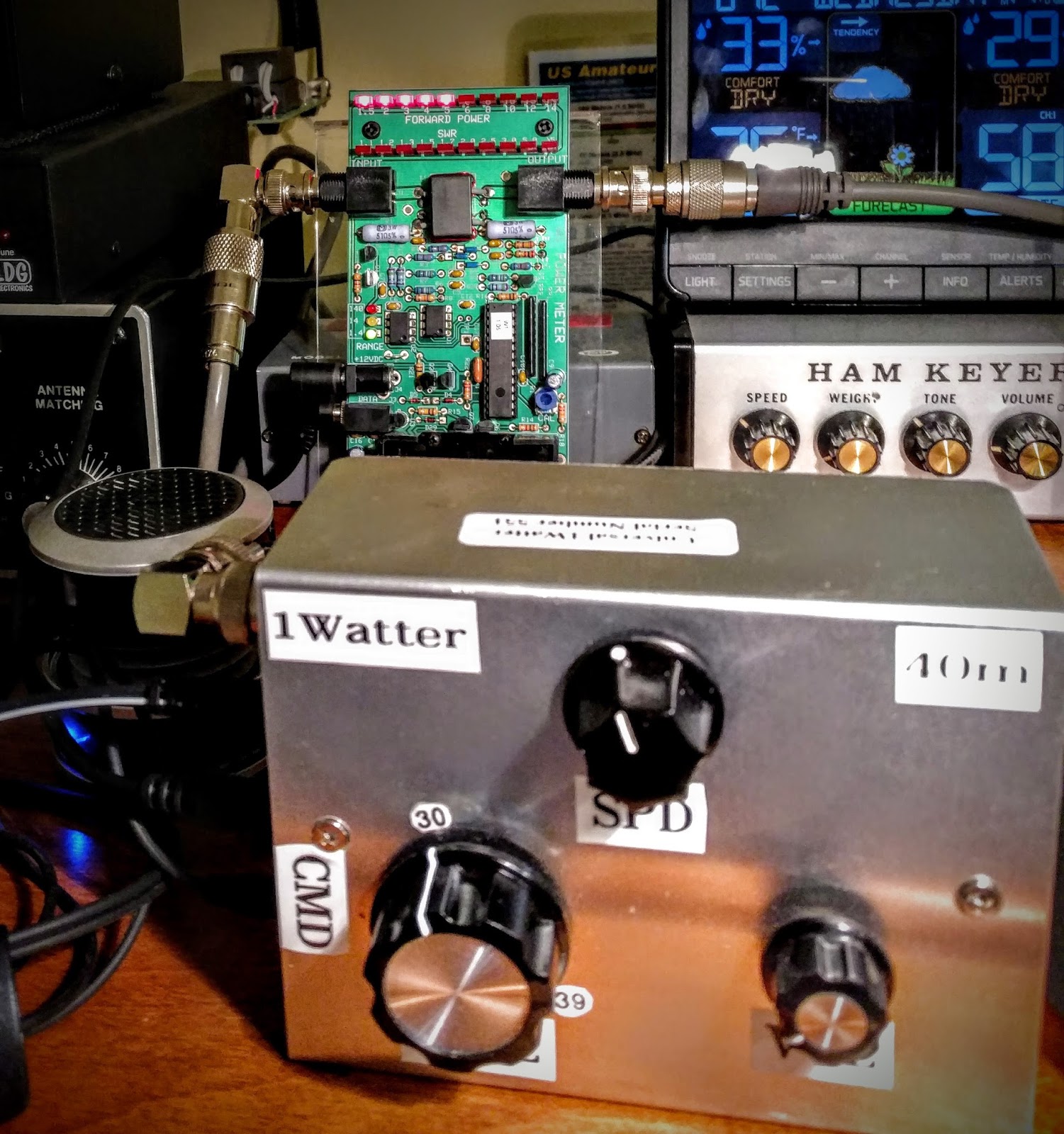 |
| Power meter in background showing 500mw by the end of the first QSO |
Heat is the enemy
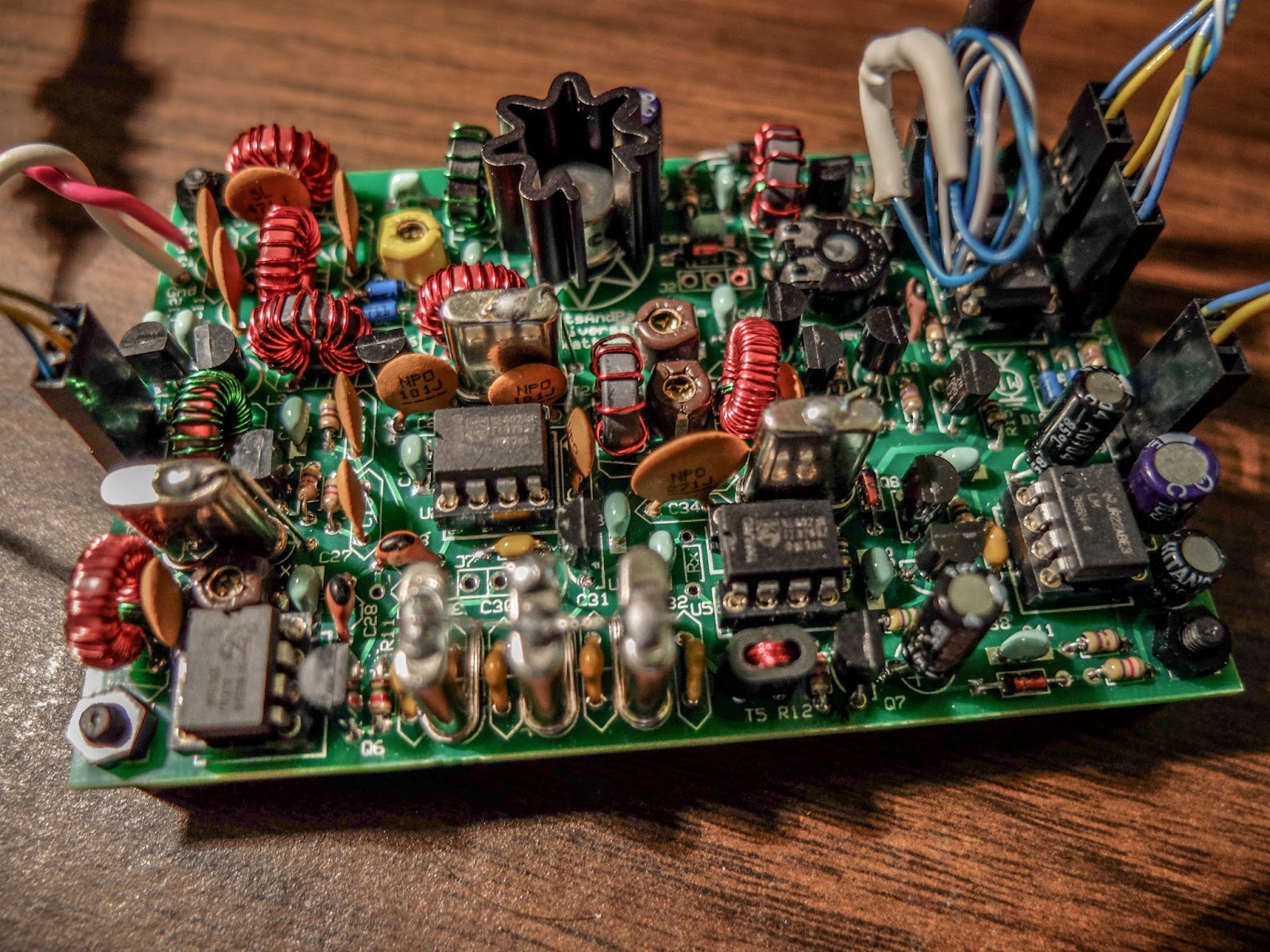
The maximum power output available from a power transistor is closely linked to temperature, and above 25°C falls in a linear manner to zero power output as the maximum permissible temperature is reached.
But the real moral of the story is...
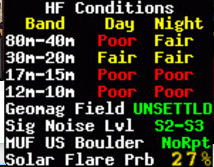 |
| Band conditions on the evening of this QSO |
So as I sat here wondering why my 1 watt radio was only producing a 1/2 watt now, I reminded myself that I was having extended QSOs using a (now) 500mw radio with other QRP operators (5w and 2w). I was also using my attic antenna, not some multi-element beam on a tower. Band conditions on 40m were also a limiting factor tonight (see snapshot at right).
But it's times like this with my 1Watter that keeps reminding me to lower my power and raise my expectations.
Richard Carpenter, AA4OO, is a regular contributor to AmateurRadio.com and writes from North Carolina, USA. Contact him at [email protected].
Upcoming Solar Years … Can They Be Too Quiet?

Most of us LF/MF and topband diehards have been looking forward to the next several years of low solar activity ... maybe even 'ultra-low' as some of the solar gurus are predicting.
An interesting posting on the Topband reflector a few weeks ago by noted propagation expert, Carl, K9LA, made me re-think my expectations!
I flagged the post for a later blog topic but have since seen the information pop-up on a couple of other reflectors as well as on the ARRL News page. Apparently I wasn't the only one to give the posting a double-take. If you missed it, here is Carl's post:
About a week ago Wolf DF2PY posted a message here commenting on the recent adverse levels of geomagnetic field activity and how it will now change for the good - giving us good 160m propagation.
We'll certainly see less geomagnetic field activity as we move into winter,
but there's another issue we should be aware of. The Sun's magnetic field
is weakening - probably to the lowest levels in our lifetime. With a weak
solar magnetic field, more galactic cosmic rays will be able to get into
the Earth's atmosphere. We are now seeing unprecedented high neutron counts (neutrons are one of the by-products of cosmic rays)
Since galactic cosmic rays are mostly *very energetic* protons, they can
get down to low atmospheric altitudes, causing collisional ionization in
the D region (and lower E region). A cursory estimate using cosmic ray
ionization rates confirms more ionization in the lower atmosphere. 160m is
not very tolerant of more absorption, so we may see an adverse effect of
the weakened solar magnetic field.
Many of us think that "solar min is solar min is solar min". But maybe a
solar minimum can be too deep for 160m. A good question to ask in the early 2020s will be "how was 160m?" So stay active on 160m and let's see what happens.
Carl K9LA
My initial response was to think that perhaps there wouldn't be as much to look forward to as I had been hoping for, when it came to improved LF, MF and 160m propagation. Carl's postulation was also backed-up by another mention on the Spaceweather site, although the influence of cosmic ray bombardment on radio propagation was not discussed.
As I thought more about this unfortunate possibility actually coming to pass, I thought back to my own on-air and listening experiences during previous solar-low years ... particularly the unprecedented low between our most recent cycle and its predecessor, Cycle 23.
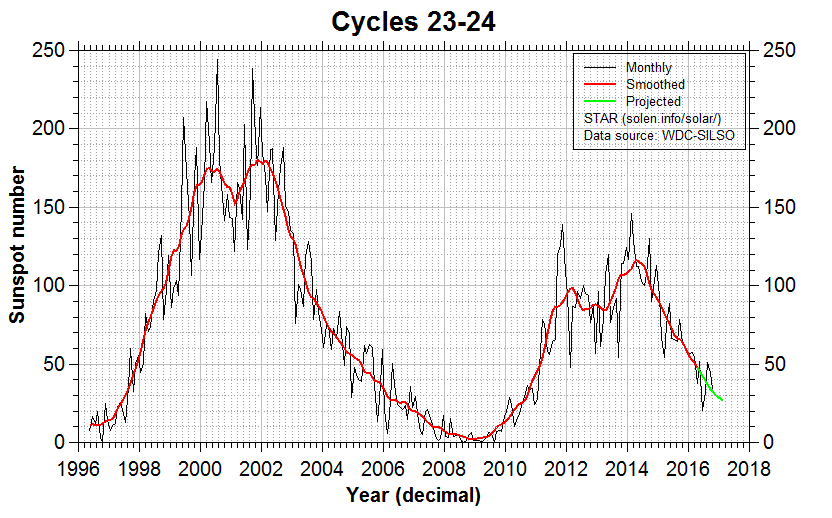
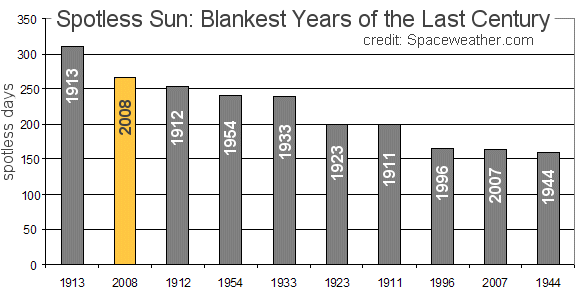
The low period between these two cycles, as most will likely recall, saw the quietest solar conditions observed in the past 100 years. The solar-low winters saw week after week of a blank Sun, with solar activity virtually flatlining for the entire period. In 2008 there were 265 'zero sunspot' days and the following year saw another 262 days of blank suns!
These effects were well noted here for two winters that are usually prime 'DX times' ... if ever there were a period when cosmic ray bombardment should negatively impact low frequency propagation, surely it would have been then.
So just what did I observe?
What I saw was not only what I had been expecting but was much much better than I had ever believed possible. For west coast topband operators, the 'holy grail' of propagation is working Europe. Working Europe from here means that signals must travel through the polar regions, usually the kiss-of- death for weak signals, as the severe attenuation through the auroral zone means that it just doesn't happen very often ... except for this prolonged period of ultra lows. In a word, conditions to Europe were 'spectacular' ... night-after-night, for several weeks over a period of two winters, working Europe on 160 became normal.
On most nights, European signals could be heard before local sunset, and on several occasions, CW contacts with Europeans, were completed up to one and a half hours before my local sunset. As darkness set in, more signals would appear and the band would rapidly become populated with Europeans ... and only Europeans.
Most of the time there were no signals from North America evident, just Europeans ... a condition that had me shaking my head in disbelief night after night. It was something I had never observed before, as I watched 160m behaving more like 20m CW on a good day to Europe! During this period, my DXCC totals skyrocketed from 99 to 143 worked, as new Europeans and Africans were added to my logbook.
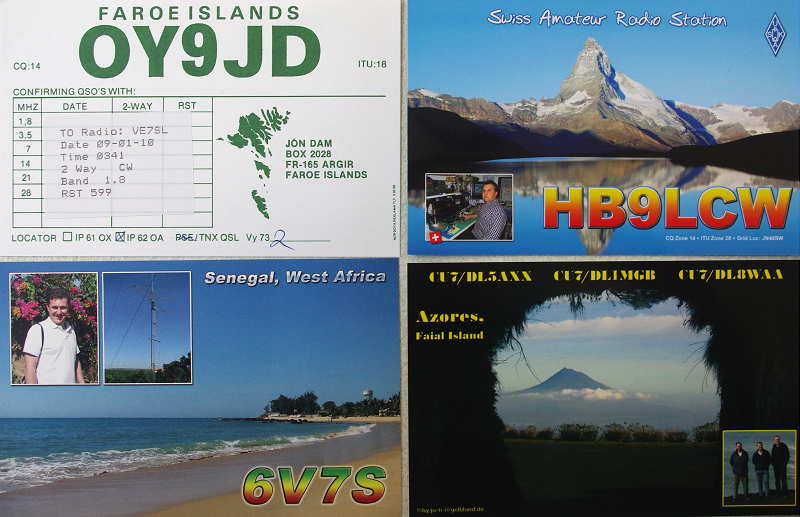
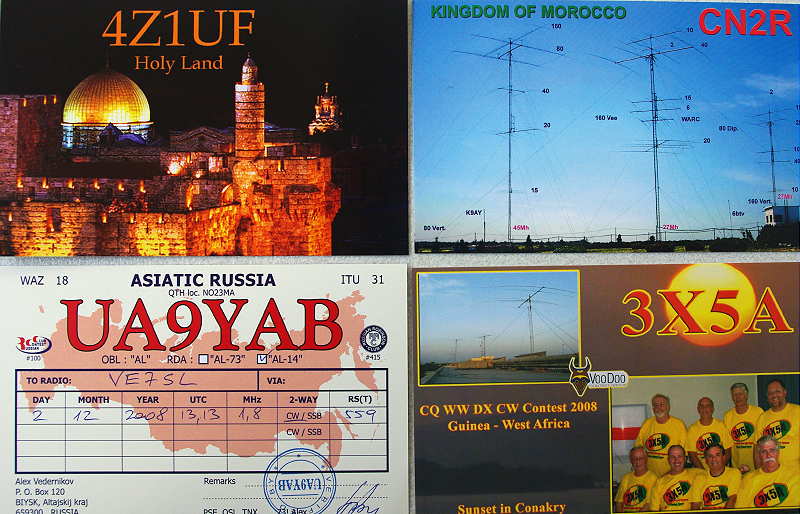
Signal levels were also outstanding, often pushing the FT-1000 S-meter well past the S9 level. On one particular night, I recall hearing an SM4 calling CQ, with just such a signal. I set my output power level at 10 watts and gave him a call, to which he quickly responded. If cosmic ray bombardment was at a high level, it was not reeking any havoc as far as the west coast path to Europe was concerned! For the record, my topband system is nothing special, consisting of a simple 'half-sloper' over a poor ground and a very old amplifier running about 500W output.
My other favorite winter pastime is chasing NDBs in the MF range between 200-500 kHz. Exceptional east west conditions were evident throughout the two winters of ultra-lows.
On one such night, I noted a new strong signal where none had been previously heard. Because of its strength, I surmised that it was probably a new NDB in nearby Washington state. Noting its ident ('NYA' on 414 kHz), I was not able to find any reference to such a beacon being previously reported and turned to the Yahoo ndblist group for help, posting my catch as 'unidentified'. Almost immediately I received a response, telling me that the signal I was hearing was located in Europe ... Svalbard to be exact, located midway between Norway and the North Pole!
Now, European NDBs have never been heard from the west coast, other than occasional signals from some of Greenland's powerhouses, so this represents a very rare event. Although I have often listened for this signal, it has yet to be heard here again and my logging of remains its only reported foray into any part of North America. Unfortunately, in 2015, it was listed as 'decomissioned'. I have no doubts that this rare propagation was a result of the solar flatlining conditions of the time.
As chilling as Carl's warning sounds, he himself admits uncertainty with a 'let's wait and see' attitude and after reviewing my own experiences under what surely must be similar conditions, I'm still very optimistic over what might be in store. Hopefully we shouldn't have to wait too much longer to find out!
Steve McDonald, VE7SL, is a regular contributor to AmateurRadio.com and writes from British Columbia, Canada. Contact him at [email protected].
Upcoming Solar Years … Can They Be Too Quiet?
Most of us LF/MF and topband diehards have been looking forward to the next several years of low solar activity ... maybe even 'ultra-low' as some of the solar gurus are predicting.
An interesting posting on the Topband reflector a few weeks ago by noted propagation expert, Carl, K9LA, made me re-think my expectations!
I flagged the post for a later blog topic but have since seen the information pop-up on a couple of other reflectors as well as on the ARRL News page. Apparently I wasn't the only one to give the posting a double-take. If you missed it, here is Carl's post:
About a week ago Wolf DF2PY posted a message here commenting on the recent adverse levels of geomagnetic field activity and how it will now change for the good - giving us good 160m propagation.
We'll certainly see less geomagnetic field activity as we move into winter,
but there's another issue we should be aware of. The Sun's magnetic field
is weakening - probably to the lowest levels in our lifetime. With a weak
solar magnetic field, more galactic cosmic rays will be able to get into
the Earth's atmosphere. We are now seeing unprecedented high neutron counts (neutrons are one of the by-products of cosmic rays)
Since galactic cosmic rays are mostly *very energetic* protons, they can
get down to low atmospheric altitudes, causing collisional ionization in
the D region (and lower E region). A cursory estimate using cosmic ray
ionization rates confirms more ionization in the lower atmosphere. 160m is
not very tolerant of more absorption, so we may see an adverse effect of
the weakened solar magnetic field.
Many of us think that "solar min is solar min is solar min". But maybe a
solar minimum can be too deep for 160m. A good question to ask in the early 2020s will be "how was 160m?" So stay active on 160m and let's see what happens.
Carl K9LA
My initial response was to think that perhaps there wouldn't be as much to look forward to as I had been hoping for, when it came to improved LF, MF and 160m propagation. Carl's postulation was also backed-up by another mention on the Spaceweather site, although the influence of cosmic ray bombardment on radio propagation was not discussed.
As I thought more about this unfortunate possibility actually coming to pass, I thought back to my own on-air and listening experiences during previous solar-low years ... particularly the unprecedented low between our most recent cycle and its predecessor, Cycle 23.
The low period between these two cycles, as most will likely recall, saw the quietest solar conditions observed in the past 100 years. The solar-low winters saw week after week of a blank Sun, with solar activity virtually flatlining for the entire period. In 2008 there were 265 'zero sunspot' days and the following year saw another 262 days of blank suns!
These effects were well noted here for two winters that are usually prime 'DX times' ... if ever there were a period when cosmic ray bombardment should negatively impact low frequency propagation, surely it would have been then.
So just what did I observe?
What I saw was not only what I had been expecting but was much much better than I had ever believed possible. For west coast topband operators, the 'holy grail' of propagation is working Europe. Working Europe from here means that signals must travel through the polar regions, usually the kiss-of- death for weak signals, as the severe attenuation through the auroral zone means that it just doesn't happen very often ... except for this prolonged period of ultra lows. In a word, conditions to Europe were 'spectacular' ... night-after-night, for several weeks over a period of two winters, working Europe on 160 became normal.
On most nights, European signals could be heard before local sunset, and on several occasions, CW contacts with Europeans, were completed up to one and a half hours before my local sunset. As darkness set in, more signals would appear and the band would rapidly become populated with Europeans ... and only Europeans.
Most of the time there were no signals from North America evident, just Europeans ... a condition that had me shaking my head in disbelief night after night. It was something I had never observed before, as I watched 160m behaving more like 20m CW on a good day to Europe! During this period, my DXCC totals skyrocketed from 99 to 143 worked, as new Europeans and Africans were added to my logbook.
Signal levels were also outstanding, often pushing the FT-1000 S-meter well past the S9 level. On one particular night, I recall hearing an SM4 calling CQ, with just such a signal. I set my output power level at 10 watts and gave him a call, to which he quickly responded. If cosmic ray bombardment was at a high level, it was not reeking any havoc as far as the west coast path to Europe was concerned! For the record, my topband system is nothing special, consisting of a simple 'half-sloper' over a poor ground and a very old amplifier running about 500W output.
My other favorite winter pastime is chasing NDBs in the MF range between 200-500 kHz. Exceptional east west conditions were evident throughout the two winters of ultra-lows.
On one such night, I noted a new strong signal where none had been previously heard. Because of its strength, I surmised that it was probably a new NDB in nearby Washington state. Noting its ident ('NYA' on 414 kHz), I was not able to find any reference to such a beacon being previously reported and turned to the Yahoo ndblist group for help, posting my catch as 'unidentified'. Almost immediately I received a response, telling me that the signal I was hearing was located in Europe ... Svalbard to be exact, located midway between Norway and the North Pole!
Now, European NDBs have never been heard from the west coast, other than occasional signals from some of Greenland's powerhouses, so this represents a very rare event. Although I have often listened for this signal, it has yet to be heard here again and my logging of remains its only reported foray into any part of North America. Unfortunately, in 2015, it was listed as 'decomissioned'. I have no doubts that this rare propagation was a result of the solar flatlining conditions of the time.
As chilling as Carl's warning sounds, he himself admits uncertainty with a 'let's wait and see' attitude and after reviewing my own experiences under what surely must be similar conditions, I'm still very optimistic over what might be in store. Hopefully we shouldn't have to wait too much longer to find out!
Steve McDonald, VE7SL, is a regular contributor to AmateurRadio.com and writes from British Columbia, Canada. Contact him at [email protected].
 Ham Radio Deluxe |
 W5SWL Electronics |
 Ham Radio Prep |
 KB3IFH QSL Cards  Hip Ham Shirts  HamRadioAuctions HamRadioAuctions Reliance Antennas Reliance Antennas Enigma Shop Enigma Shop |  morseDX  Ni4L Antennas  R&L Electronics R&L Electronics antennas.us antennas.us QRV QRV |
- Matt W1MST, Managing Editor
