 |
 My Favorite Contest
 13 December 2016 | by
A few blogs back, I briefly touched upon my favorite contest of the year ... the 160m Stew Perry Contest, or more affectionately noted as the 'Stew' or 'SP'.
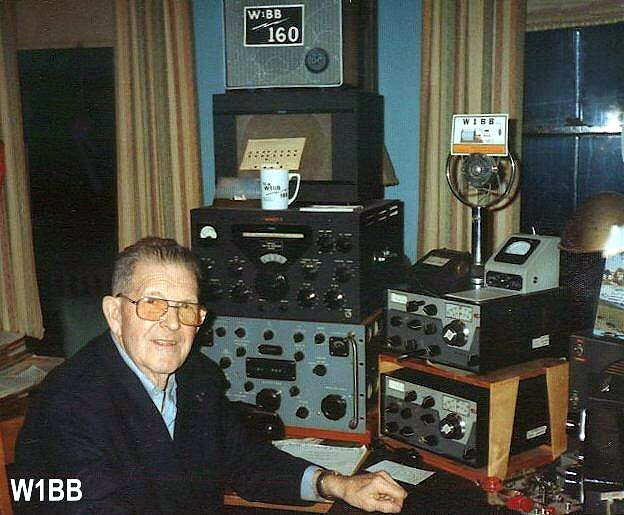
The contest is named in honor of W1BB, one of the earliest and most dedicated proponents of 160m in its earlier days, as well as being the first amateur to earn 160m DXCC #1, in 1976.
 |
| courtesy: http://www.k1zm.com/w1bb |
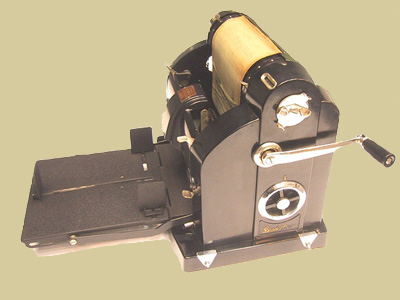
These bulletins were chalk-full of DX reports, station information, and antenna-building hints. It was hard not to get excited about the Topband after reading one of Stew's bulletins!
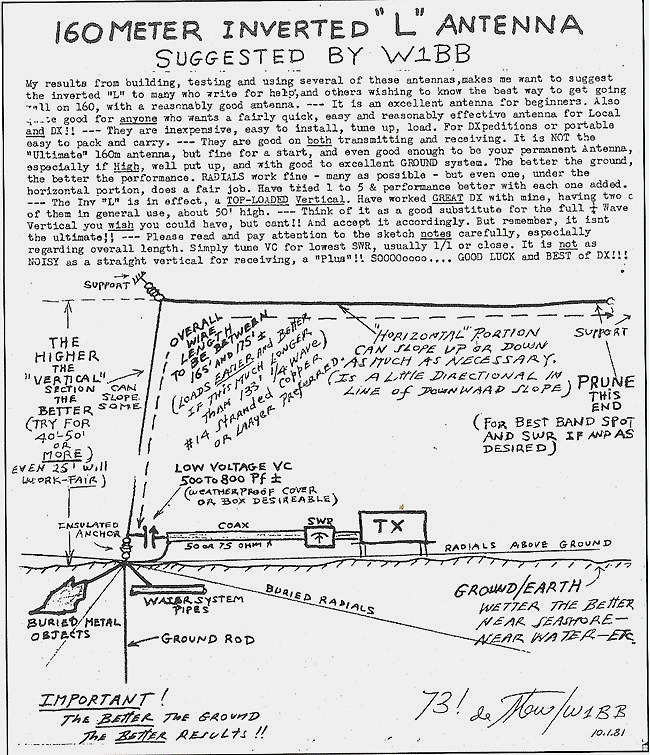
This was largely back in the day when very few commercial transmitters had a 160m position on the bandswitch. If it did, it was most likely a hernia-making DX-100 or a similar E.F. Johnson biggy ... seems most 160m ops were he-men back in the early days.
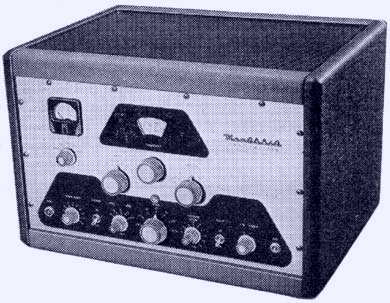 |
| Heathkit DX-100 |
The 'Stew' is just a short 24 hour affair but often packs the CW band from end to end with a ton of activity, including lots of DX. It seems that most 160m diehards will jump at any opportunity to get on their favorite band, especially when conditions are as good as they have been of late.
The 'SP' is somewhat unique in that its system of scoring is probably the fairest of any contest around. The number of points earned for any QSO is determined by the distance between the two stations, with your computer contesting software dutifully making the needed calculations automatically from the exchange of Grid Square information, rather than the ubiquitous '599'.
Such a system gives stations in the western half of North America a chance to compete, on equal grounds, with the much higher activity levels found back east. With most contests awarding fixed points per QSO, it is much easier for eastern stations to rack-up big scores by working the multitude of other easterners ... this is just not possible out west where activity levels, and population densities, are so much smaller.
Contest PR-man ... Lew, W7EW, on behalf of the Boring (Oregon) Amateur Radio Club sponsorship, has sent a heads-up via the Topband reflector, which is reproduced below in case you wish to learn more.
Greetings Radio Ruffians with a TopBand Bent,
The anticipation is palpable as time draws near for the
start of the 21st Running of The Stew Perry TopBand DX
Challenge sponsored by the multitude of Amateurs who
make up The Boring Amateur Radio Club. The contest is Dec
17/18. That is this weekend coming up, for those of you
that need reminders like to remember an anniversary, put
gas in the vehicle or to breathe.
The rules for this contest are different. Please navigate to
http://www.kkn.net/stew/ and see how they are different.
Another unique aspect of The Stew is that The Boring
Amateur Radio Club does not specify categories to win
handsome plaques. You, the combatants do that. Yes,
anyone who thinks up a stellar category and remits $60 or
$63 to us will join the radio stalwarts listed below who are
stoking the fires of competition.
KL7RA Top # of QSOs by a S/O
N0TT Top Score, S/O, <21Y/O, > 200 QSOs
K7CA Longest DX, S/O, Low Power from Zone 3
K7CA Top Score S/O CQ Zone 19,24,25,27,28 or China
KH6LC VK/ZL Challenge- Top S/O VK-ZL
AA6VB Top Score Big City >50K, Little Pistol <100W
AA6VB Top Score Base Loaded Vertical < 60' tall
N6TQ/A25TQ California Dreaming- Top # of QSOs with Cal
VK0EK Stations by a non-California station
Rochester DX Assoc Top Score,S/O, L-P, Outside N. America
UX1UA Top # NA + SA QSOs by Zone 16 station
K7FL Top Score 100% Search and Pounce
K9JWV/WC7S Top QRP Score,West of Mississippi,wire antennas
Dr. Beldar-L1AR Top Score,S/O, Temporary Antenna erected > Dec.3
(All parts of temporary antenna including radials must be
installed after Dec. 3, 2016. This antenna must be the only antenna
for TopBand at the station and may be left erected because as we
all know "temporary" means "until I die")
KR2Q Golden Log Award
K2PO Top Score, S/O, Low Power, Zone 3
N6TR Top Score,S/O, Hi Power from CN Grid Field
W2GD Team Top # QSOs, NA/SA by EU Station
K6ND K6SE Memorial- Top Score, S/O, World
WA6CDR N5IA Memorial- Top # of Grids Worked
WA8WZG Top Score, S/O, by a 6 character call (Example- KA2BFD
or WD6XYZ)
W7RH Top Score, Low Power Asia
K1EP Top Score (>100QSOs) by YL or XYL
VE9AA Yr Trees Ants? If you have your TX wires in the trees or even
attached to 1 tree and your adjudicated score is closest one to
tree tree tree tree (3,333), then you win this plaque
VK6VZ VK6HD Memorial- Top Score by N. hemisphere station working S.
hemisphere stations.
Winner gets a new, fresh Flying Doctors of VK baseball hat
This list grows but will become even longer after you dream up a
contesting category. Just email me with the particulars so we may flesh it
out as some prior plaque proposals were too obtuse, couldn't be performed
by any one of our species or just a tad obscene.
There will be one or two more postings of the categories and sponsors
right up until and through the start of The Stew so don't delay! Also those
who haven't sent off their check or PayPals for their plaque sponsorship yet should not delay either.
Also follow Stalwart's VK6VZ's example and go fire up your system
tonight so you won't be modally morose when the only thing that happens
when you call CQ is that you open and close the neighbor's garage door
with a distinctive cadence.
73 and I remain,
Lew w7ew
The Boring Amateur Radio Club Committee on Participation
[email protected]
If you have a few hours of free time this Saturday night, why not give the 'Stew' a look, especially if you've never operated on the Topband. If you can load-up that old longwire on 160, I'll guarantee you'll have fun as well as be surprised at what you can work ... hopefully I'll see many of you this weekend in the best contest of the year!
Steve McDonald, VE7SL, is a regular contributor to AmateurRadio.com and writes from British Columbia, Canada. Contact him at [email protected].
» Leave a Comment (0)
My Favorite Contest
A few blogs back, I briefly touched upon my favorite contest of the year ... the 160m Stew Perry Contest, or more affectionately noted as the 'Stew' or 'SP'.
The contest is named in honor of W1BB, one of the earliest and most dedicated proponents of 160m in its earlier days, as well as being the first amateur to earn 160m DXCC #1, in 1976.
|
| courtesy: http://www.k1zm.com/w1bb |
These bulletins were chalk-full of DX reports, station information, and antenna-building hints. It was hard not to get excited about the Topband after reading one of Stew's bulletins!
This was largely back in the day when very few commercial transmitters had a 160m position on the bandswitch. If it did, it was most likely a hernia-making DX-100 or a similar E.F. Johnson biggy ... seems most 160m ops were he-men back in the early days.
|
| Heathkit DX-100 |
The 'Stew' is just a short 24 hour affair but often packs the CW band from end to end with a ton of activity, including lots of DX. It seems that most 160m diehards will jump at any opportunity to get on their favorite band, especially when conditions are as good as they have been of late.
The 'SP' is somewhat unique in that its system of scoring is probably the fairest of any contest around. The number of points earned for any QSO is determined by the distance between the two stations, with your computer contesting software dutifully making the needed calculations automatically from the exchange of Grid Square information, rather than the ubiquitous '599'.
Such a system gives stations in the western half of North America a chance to compete, on equal grounds, with the much higher activity levels found back east. With most contests awarding fixed points per QSO, it is much easier for eastern stations to rack-up big scores by working the multitude of other easterners ... this is just not possible out west where activity levels, and population densities, are so much smaller.
Contest PR-man ... Lew, W7EW, on behalf of the Boring (Oregon) Amateur Radio Club sponsorship, has sent a heads-up via the Topband reflector, which is reproduced below in case you wish to learn more.
Greetings Radio Ruffians with a TopBand Bent,
The anticipation is palpable as time draws near for the
start of the 21st Running of The Stew Perry TopBand DX
Challenge sponsored by the multitude of Amateurs who
make up The Boring Amateur Radio Club. The contest is Dec
17/18. That is this weekend coming up, for those of you
that need reminders like to remember an anniversary, put
gas in the vehicle or to breathe.
The rules for this contest are different. Please navigate to
http://www.kkn.net/stew/ and see how they are different.
Another unique aspect of The Stew is that The Boring
Amateur Radio Club does not specify categories to win
handsome plaques. You, the combatants do that. Yes,
anyone who thinks up a stellar category and remits $60 or
$63 to us will join the radio stalwarts listed below who are
stoking the fires of competition.
KL7RA Top # of QSOs by a S/O
N0TT Top Score, S/O, <21Y/O, > 200 QSOs
K7CA Longest DX, S/O, Low Power from Zone 3
K7CA Top Score S/O CQ Zone 19,24,25,27,28 or China
KH6LC VK/ZL Challenge- Top S/O VK-ZL
AA6VB Top Score Big City >50K, Little Pistol <100W
AA6VB Top Score Base Loaded Vertical < 60' tall
N6TQ/A25TQ California Dreaming- Top # of QSOs with Cal
VK0EK Stations by a non-California station
Rochester DX Assoc Top Score,S/O, L-P, Outside N. America
UX1UA Top # NA + SA QSOs by Zone 16 station
K7FL Top Score 100% Search and Pounce
K9JWV/WC7S Top QRP Score,West of Mississippi,wire antennas
Dr. Beldar-L1AR Top Score,S/O, Temporary Antenna erected > Dec.3
(All parts of temporary antenna including radials must be
installed after Dec. 3, 2016. This antenna must be the only antenna
for TopBand at the station and may be left erected because as we
all know "temporary" means "until I die")
KR2Q Golden Log Award
K2PO Top Score, S/O, Low Power, Zone 3
N6TR Top Score,S/O, Hi Power from CN Grid Field
W2GD Team Top # QSOs, NA/SA by EU Station
K6ND K6SE Memorial- Top Score, S/O, World
WA6CDR N5IA Memorial- Top # of Grids Worked
WA8WZG Top Score, S/O, by a 6 character call (Example- KA2BFD
or WD6XYZ)
W7RH Top Score, Low Power Asia
K1EP Top Score (>100QSOs) by YL or XYL
VE9AA Yr Trees Ants? If you have your TX wires in the trees or even
attached to 1 tree and your adjudicated score is closest one to
tree tree tree tree (3,333), then you win this plaque
VK6VZ VK6HD Memorial- Top Score by N. hemisphere station working S.
hemisphere stations.
Winner gets a new, fresh Flying Doctors of VK baseball hat
This list grows but will become even longer after you dream up a
contesting category. Just email me with the particulars so we may flesh it
out as some prior plaque proposals were too obtuse, couldn't be performed
by any one of our species or just a tad obscene.
There will be one or two more postings of the categories and sponsors
right up until and through the start of The Stew so don't delay! Also those
who haven't sent off their check or PayPals for their plaque sponsorship yet should not delay either.
Also follow Stalwart's VK6VZ's example and go fire up your system
tonight so you won't be modally morose when the only thing that happens
when you call CQ is that you open and close the neighbor's garage door
with a distinctive cadence.
73 and I remain,
Lew w7ew
The Boring Amateur Radio Club Committee on Participation
[email protected]
If you have a few hours of free time this Saturday night, why not give the 'Stew' a look, especially if you've never operated on the Topband. If you can load-up that old longwire on 160, I'll guarantee you'll have fun as well as be surprised at what you can work ... hopefully I'll see many of you this weekend in the best contest of the year!
Steve McDonald, VE7SL, is a regular contributor to AmateurRadio.com and writes from British Columbia, Canada. Contact him at [email protected].
» Leave a Comment (0)
My Favorite Contest
A few blogs back, I briefly touched upon my favorite contest of the year ... the 160m Stew Perry Contest, or more affectionately noted as the 'Stew' or 'SP'.
The contest is named in honor of W1BB, one of the earliest and most dedicated proponents of 160m in its earlier days, as well as being the first amateur to earn 160m DXCC #1, in 1976.
|
| courtesy: http://www.k1zm.com/w1bb |
These bulletins were chalk-full of DX reports, station information, and antenna-building hints. It was hard not to get excited about the Topband after reading one of Stew's bulletins!
This was largely back in the day when very few commercial transmitters had a 160m position on the bandswitch. If it did, it was most likely a hernia-making DX-100 or a similar E.F. Johnson biggy ... seems most 160m ops were he-men back in the early days.
|
| Heathkit DX-100 |
The 'Stew' is just a short 24 hour affair but often packs the CW band from end to end with a ton of activity, including lots of DX. It seems that most 160m diehards will jump at any opportunity to get on their favorite band, especially when conditions are as good as they have been of late.
The 'SP' is somewhat unique in that its system of scoring is probably the fairest of any contest around. The number of points earned for any QSO is determined by the distance between the two stations, with your computer contesting software dutifully making the needed calculations automatically from the exchange of Grid Square information, rather than the ubiquitous '599'.
Such a system gives stations in the western half of North America a chance to compete, on equal grounds, with the much higher activity levels found back east. With most contests awarding fixed points per QSO, it is much easier for eastern stations to rack-up big scores by working the multitude of other easterners ... this is just not possible out west where activity levels, and population densities, are so much smaller.
Contest PR-man ... Lew, W7EW, on behalf of the Boring (Oregon) Amateur Radio Club sponsorship, has sent a heads-up via the Topband reflector, which is reproduced below in case you wish to learn more.
Greetings Radio Ruffians with a TopBand Bent,
The anticipation is palpable as time draws near for the
start of the 21st Running of The Stew Perry TopBand DX
Challenge sponsored by the multitude of Amateurs who
make up The Boring Amateur Radio Club. The contest is Dec
17/18. That is this weekend coming up, for those of you
that need reminders like to remember an anniversary, put
gas in the vehicle or to breathe.
The rules for this contest are different. Please navigate to
http://www.kkn.net/stew/ and see how they are different.
Another unique aspect of The Stew is that The Boring
Amateur Radio Club does not specify categories to win
handsome plaques. You, the combatants do that. Yes,
anyone who thinks up a stellar category and remits $60 or
$63 to us will join the radio stalwarts listed below who are
stoking the fires of competition.
KL7RA Top # of QSOs by a S/O
N0TT Top Score, S/O, <21Y/O, > 200 QSOs
K7CA Longest DX, S/O, Low Power from Zone 3
K7CA Top Score S/O CQ Zone 19,24,25,27,28 or China
KH6LC VK/ZL Challenge- Top S/O VK-ZL
AA6VB Top Score Big City >50K, Little Pistol <100W
AA6VB Top Score Base Loaded Vertical < 60' tall
N6TQ/A25TQ California Dreaming- Top # of QSOs with Cal
VK0EK Stations by a non-California station
Rochester DX Assoc Top Score,S/O, L-P, Outside N. America
UX1UA Top # NA + SA QSOs by Zone 16 station
K7FL Top Score 100% Search and Pounce
K9JWV/WC7S Top QRP Score,West of Mississippi,wire antennas
Dr. Beldar-L1AR Top Score,S/O, Temporary Antenna erected > Dec.3
(All parts of temporary antenna including radials must be
installed after Dec. 3, 2016. This antenna must be the only antenna
for TopBand at the station and may be left erected because as we
all know "temporary" means "until I die")
KR2Q Golden Log Award
K2PO Top Score, S/O, Low Power, Zone 3
N6TR Top Score,S/O, Hi Power from CN Grid Field
W2GD Team Top # QSOs, NA/SA by EU Station
K6ND K6SE Memorial- Top Score, S/O, World
WA6CDR N5IA Memorial- Top # of Grids Worked
WA8WZG Top Score, S/O, by a 6 character call (Example- KA2BFD
or WD6XYZ)
W7RH Top Score, Low Power Asia
K1EP Top Score (>100QSOs) by YL or XYL
VE9AA Yr Trees Ants? If you have your TX wires in the trees or even
attached to 1 tree and your adjudicated score is closest one to
tree tree tree tree (3,333), then you win this plaque
VK6VZ VK6HD Memorial- Top Score by N. hemisphere station working S.
hemisphere stations.
Winner gets a new, fresh Flying Doctors of VK baseball hat
This list grows but will become even longer after you dream up a
contesting category. Just email me with the particulars so we may flesh it
out as some prior plaque proposals were too obtuse, couldn't be performed
by any one of our species or just a tad obscene.
There will be one or two more postings of the categories and sponsors
right up until and through the start of The Stew so don't delay! Also those
who haven't sent off their check or PayPals for their plaque sponsorship yet should not delay either.
Also follow Stalwart's VK6VZ's example and go fire up your system
tonight so you won't be modally morose when the only thing that happens
when you call CQ is that you open and close the neighbor's garage door
with a distinctive cadence.
73 and I remain,
Lew w7ew
The Boring Amateur Radio Club Committee on Participation
[email protected]
If you have a few hours of free time this Saturday night, why not give the 'Stew' a look, especially if you've never operated on the Topband. If you can load-up that old longwire on 160, I'll guarantee you'll have fun as well as be surprised at what you can work ... hopefully I'll see many of you this weekend in the best contest of the year!
Steve McDonald, VE7SL, is a regular contributor to AmateurRadio.com and writes from British Columbia, Canada. Contact him at [email protected].
» Leave a Comment (3)
Simple Solution for a CW Paddle/Key Selector
I really enjoy CW, it's my preferred mode. However, it's not just the mode I enjoy, but the different tools of the trade. There are paddles, straight keys, bugs and the variations on the those themes, single lever, double lever, and then iterations within iterations of key and paddle design. Well, I enjoy all of them. I collect keys, paddles and bugs, but not just to look at, I love getting them on the air. I have a K3 which allows me to connect a straight key or bug into one plug and a paddle into another which allows me to switch seamlessly between a paddle and a bug or straight key. However, I wanted to have a straight key, maybe a couple of bugs, and paddle ready to go on demand and in addition a WinKeyer that interfaces with my contesting software that has to be plugged into the radio also. I needed a more efficient method of changing between the keys rather than leaning over reaching down among the tangle of wires and cable, feeling for the plug before I could make the change.
I needed a switch, one that would allow me to select the key or paddle that I wanted to use. So I begin looking for a switch to suit my needs among ham equipment suppliers, but found nothing. I finally found a couple of schematics on the web to build my own and decided to take that path.
I was about to start ordering the parts when a friend of mine was visiting the shack. I told him about building the switch and his response was; "why do you want to that, you can a switch on EBay that will be relatively cheap and do the job". He told me I wasn't Googling with the right words. He suggested I try "3.5mm audio switch ". Who knew? Much to my surprise and delight several devices came up that would meet my needs. Here is the link to the one I bought.
http://www.ebay.com/itm/4-PORT-3-5mm-STEREO-Manual-Sharing-Switch-AUX-Audio-Speaker-selector-way-4-1-/290812907832?hash=item43b5ccd138:g:MpMAAOxyn~pRz8yb
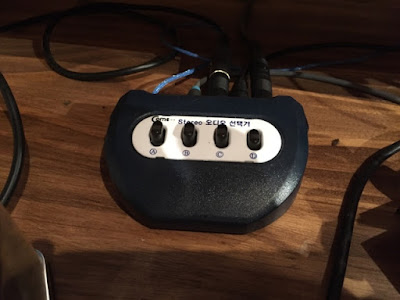
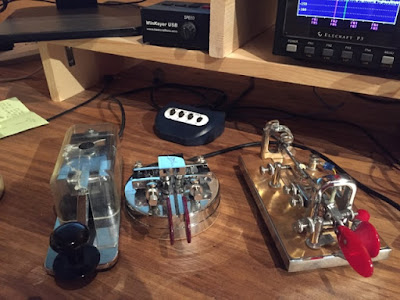
A cable with an 1/8" on one end (switchbox) and a 1/4" connector on the other, (K3 plug) works for the K3. Simply connect the switch via the cable to the radio and then plug in your keys, paddle, etc. into the switch. As can be seen below I have a straight key, bug and Winkeyer plugged into the switch, while the paddle is plugged directly into the radio. I actually have an empty port in the switch where I usually have a second bug plugged in. You could actually get a second switch that would allow multiple paddles to be at your disposal as well.
So when I'm chatting with my CW buddies I can change my method of sending code with the push of a button. I can answer a CQ'er with a like kind instrument. An operator calling CQ with a bug, I can answer with a bug, etc.. This switching solution is very easy and very economical. There are 8 position switches available as well.
Mike Crownover, AD5A, is a regular contributor to AmateurRadio.com and writes from Texas, USA. Contact him at [email protected].
I needed a switch, one that would allow me to select the key or paddle that I wanted to use. So I begin looking for a switch to suit my needs among ham equipment suppliers, but found nothing. I finally found a couple of schematics on the web to build my own and decided to take that path.
I was about to start ordering the parts when a friend of mine was visiting the shack. I told him about building the switch and his response was; "why do you want to that, you can a switch on EBay that will be relatively cheap and do the job". He told me I wasn't Googling with the right words. He suggested I try "3.5mm audio switch ". Who knew? Much to my surprise and delight several devices came up that would meet my needs. Here is the link to the one I bought.
http://www.ebay.com/itm/4-PORT-3-5mm-STEREO-Manual-Sharing-Switch-AUX-Audio-Speaker-selector-way-4-1-/290812907832?hash=item43b5ccd138:g:MpMAAOxyn~pRz8yb

A cable with an 1/8" on one end (switchbox) and a 1/4" connector on the other, (K3 plug) works for the K3. Simply connect the switch via the cable to the radio and then plug in your keys, paddle, etc. into the switch. As can be seen below I have a straight key, bug and Winkeyer plugged into the switch, while the paddle is plugged directly into the radio. I actually have an empty port in the switch where I usually have a second bug plugged in. You could actually get a second switch that would allow multiple paddles to be at your disposal as well.
So when I'm chatting with my CW buddies I can change my method of sending code with the push of a button. I can answer a CQ'er with a like kind instrument. An operator calling CQ with a bug, I can answer with a bug, etc.. This switching solution is very easy and very economical. There are 8 position switches available as well.

Mike Crownover, AD5A, is a regular contributor to AmateurRadio.com and writes from Texas, USA. Contact him at [email protected].
» Leave a Comment (0)
Simple Solution for a CW Paddle/Key Selector
I really enjoy CW, it's my preferred mode. However, it's not just the mode I enjoy, but the different tools of the trade. There are paddles, straight keys, bugs and the variations on the those themes, single lever, double lever, and then iterations within iterations of key and paddle design. Well, I enjoy all of them. I collect keys, paddles and bugs, but not just to look at, I love getting them on the air. I have a K3 which allows me to connect a straight key or bug into one plug and a paddle into another which allows me to switch seamlessly between a paddle and a bug or straight key. However, I wanted to have a straight key, maybe a couple of bugs, and paddle ready to go on demand and in addition a WinKeyer that interfaces with my contesting software that has to be plugged into the radio also. I needed a more efficient method of changing between the keys rather than leaning over reaching down among the tangle of wires and cable, feeling for the plug before I could make the change.
I needed a switch, one that would allow me to select the key or paddle that I wanted to use. So I begin looking for a switch to suit my needs among ham equipment suppliers, but found nothing. I finally found a couple of schematics on the web to build my own and decided to take that path.
I was about to start ordering the parts when a friend of mine was visiting the shack. I told him about building the switch and his response was; "why do you want to that, you can a switch on EBay that will be relatively cheap and do the job". He told me I wasn't Googling with the right words. He suggested I try "3.5mm audio switch ". Who knew? Much to my surprise and delight several devices came up that would meet my needs. Here is the link to the one I bought.
http://www.ebay.com/itm/4-PORT-3-5mm-STEREO-Manual-Sharing-Switch-AUX-Audio-Speaker-selector-way-4-1-/290812907832?hash=item43b5ccd138:g:MpMAAOxyn~pRz8yb
A cable with an 1/8" on one end (switchbox) and a 1/4" connector on the other, (K3 plug) works for the K3. Simply connect the switch via the cable to the radio and then plug in your keys, paddle, etc. into the switch. As can be seen below I have a straight key, bug and Winkeyer plugged into the switch, while the paddle is plugged directly into the radio. I actually have an empty port in the switch where I usually have a second bug plugged in. You could actually get a second switch that would allow multiple paddles to be at your disposal as well.
So when I'm chatting with my CW buddies I can change my method of sending code with the push of a button. I can answer a CQ'er with a like kind instrument. A guy calling CQ with a bug, I can answer with a bug, etc.. Very easy and very economical. There are 8 position switches available as well.
Mike Crownover, AD5A, is a regular contributor to AmateurRadio.com and writes from Texas, USA. Contact him at [email protected].
I needed a switch, one that would allow me to select the key or paddle that I wanted to use. So I begin looking for a switch to suit my needs among ham equipment suppliers, but found nothing. I finally found a couple of schematics on the web to build my own and decided to take that path.
I was about to start ordering the parts when a friend of mine was visiting the shack. I told him about building the switch and his response was; "why do you want to that, you can a switch on EBay that will be relatively cheap and do the job". He told me I wasn't Googling with the right words. He suggested I try "3.5mm audio switch ". Who knew? Much to my surprise and delight several devices came up that would meet my needs. Here is the link to the one I bought.
http://www.ebay.com/itm/4-PORT-3-5mm-STEREO-Manual-Sharing-Switch-AUX-Audio-Speaker-selector-way-4-1-/290812907832?hash=item43b5ccd138:g:MpMAAOxyn~pRz8yb
A cable with an 1/8" on one end (switchbox) and a 1/4" connector on the other, (K3 plug) works for the K3. Simply connect the switch via the cable to the radio and then plug in your keys, paddle, etc. into the switch. As can be seen below I have a straight key, bug and Winkeyer plugged into the switch, while the paddle is plugged directly into the radio. I actually have an empty port in the switch where I usually have a second bug plugged in. You could actually get a second switch that would allow multiple paddles to be at your disposal as well.
So when I'm chatting with my CW buddies I can change my method of sending code with the push of a button. I can answer a CQ'er with a like kind instrument. A guy calling CQ with a bug, I can answer with a bug, etc.. Very easy and very economical. There are 8 position switches available as well.
Mike Crownover, AD5A, is a regular contributor to AmateurRadio.com and writes from Texas, USA. Contact him at [email protected].
» Leave a Comment (4)
ICQ Podcast Episode 226 – Low Cost Chinese Stocking Fillers
In this episode, Martin Butler M1MRB / W9ICQ is joined by Leslie Butterfield G0CIB, Edmund Spicer M0MNG and Matthew Nassau M0NJX to discuss the latest Amateur / Ham Radio news. Colin M6BOY rounds up the news in brief, and this episode’s feature by Ed Durrant DD5LP is Low-Cost Chinese Stocking Fillers.
- Hull UK City of Culture 2017
- UK Digital Radio Uptake
- UK Foundation Ham Radio Training Videos
- Youngsters on the Air 2016
- South Carolina School Number One
- WSPRLite First Impressions
- SDRplay launches RSP2 SDR
- Norfolk ARC Club of the Year 2016
- No Rebuke for Channel 5 TV Show
Colin Butler, M6BOY, is the host of the ICQ Podcast, a weekly radio show about Amateur Radio. Contact him at [email protected].
» Leave a Comment (0)
ICQ Podcast Episode 226 – Low Cost Chinese Stocking Fillers
In this episode, Martin Butler M1MRB / W9ICQ is joined by Leslie Butterfield G0CIB, Edmund Spicer M0MNG and Matthew Nassau M0NJX to discuss the latest Amateur / Ham Radio news. Colin M6BOY rounds up the news in brief, and this episode’s feature by Ed Durrant DD5LP is Low-Cost Chinese Stocking Fillers.
- Hull UK City of Culture 2017
- UK Digital Radio Uptake
- UK Foundation Ham Radio Training Videos
- Youngsters on the Air 2016
- South Carolina School Number One
- WSPRLite First Impressions
- SDRplay launches RSP2 SDR
- Norfolk ARC Club of the Year 2016
- No Rebuke for Channel 5 TV Show
Colin Butler, M6BOY, is the host of the ICQ Podcast, a weekly radio show about Amateur Radio. Contact him at [email protected].
» Leave a Comment (1)
Please support our generous sponsors who make AmateurRadio.com possible:
 Ham Radio Deluxe |
 W5SWL Electronics |
 Ham Radio Prep |
 KB3IFH QSL Cards  Hip Ham Shirts  HamRadioAuctions HamRadioAuctions Reliance Antennas Reliance Antennas Enigma Shop Enigma Shop |  morseDX  Ni4L Antennas  R&L Electronics R&L Electronics antennas.us antennas.us QRV QRV |
- Matt W1MST, Managing Editor
