 |
 Field Day: Season to Taste
 24 June 2025 | by
  This weekend is the ARRL Field Day, a great opportunity for individual hams, small groups, and radio clubs to get on the ham bands and have some fun. But what is Field Day all about? The ARRL says this:
Field Day is ham radio’s open house. Every June, more than 31,000 hams throughout North America set up temporary transmitting stations in public places to demonstrate ham radio’s science, skill and service to our communities and our nation. It combines public service, emergency preparedness, community outreach, and technical skills all in a single event. Field Day has been an annual event since 1933, and remains the most popular event in ham radio.
I have always thought that one of the great things about Field Day is that it can be tuned to whatever interests you or your club. It can be a Radio Contest, an Emergency Communications Exercise, a Radio Campout; a Food Fest, a Beer-Drinking Party, a Social Event, a SOTA or POTA activation, a Public Relations event, an Educational Event, a Mentoring or Training event, or (very likely) some combination of these ideas. Or insert your idea here. In other words, “season to taste” and make it your own.
Always remember the Universal Purpose of Amateur Radio:
The Universal Purpose of Amateur Radio is To Have Fun Messing Around with Radios.
If you’re not having fun, you’re not doing it right.
73 Bob K0NR
The post Field Day: Season to Taste appeared first on The KØNR Radio Site.
Bob Witte, KØNR, is a regular contributor to AmateurRadio.com and writes from Colorado, USA. Contact him at [email protected].
LHS Episode #583: Department of Redundancy Department

Hello and welcome to the 583rd installment of Linux in the Ham Shack. In this short topics episode, the hosts discuss European countries transitioning to Linux, the upcoming hurricane season, open source CRM solution Huly, Morse Maven, DragonLog and much more. Thanks for listening and have a great week.
73 de The LHS Crew
Russ Woodman, K5TUX, co-hosts the Linux in the Ham Shack podcast which is available for download in both MP3 and OGG audio format. Contact him at [email protected].
Odd looking SWR
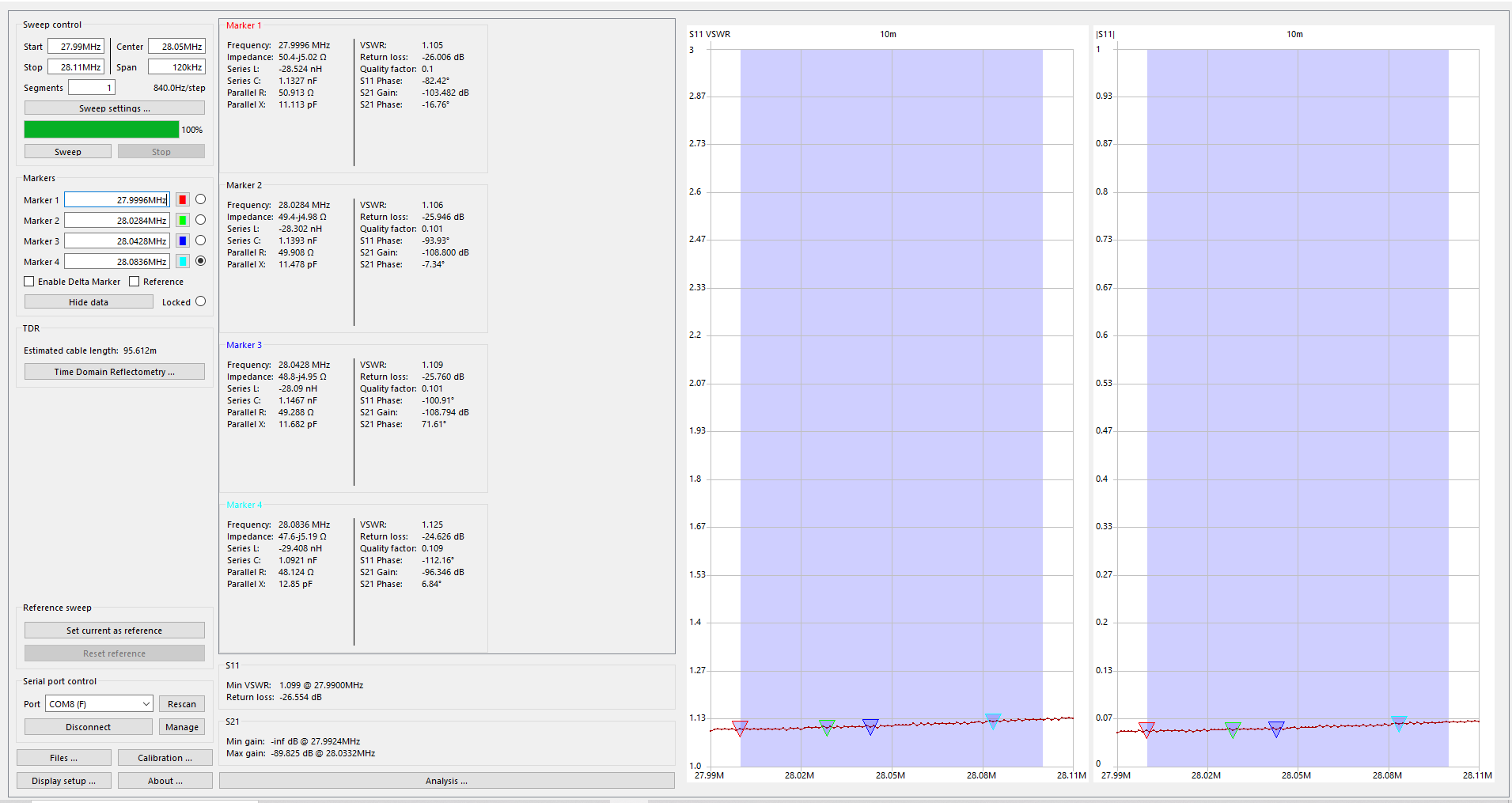
My 10m sweep
My Hustler 4BTV has now been up to 5 years and I was thinking it was due time to take it down and give it a good cleaning. Before I do that I wanted to take a baseline SWR of each band and see if the SWR changes after the cleaning. I used my NanoVNA to take the SWR readings and in my opinion, my 15m readings looked a bit odd. I have posted a sweep of 10m and then 15m and you can see the large spikes in the 15m readings. I am not sure why this is and I am searching for some input.

15m sweep
Mike Weir, VE9KK, is a regular contributor to AmateurRadio.com and writes from New Brunswick, Canada. Contact him at [email protected].
AmateurLogic 206: HackRF Porta Pack
AmateurLogic.TV Episode 206 is now available for download.
Tommy explores the HackRF Porta Pack H2 SDR. Emile and the Simulated Emergency Test. George’s adventures in spot welding and Laptop Battery Replacement.
George Thomas, W5JDX, is co-host of AmateurLogic.TV, an original amateur radio video program hosted by George Thomas (W5JDX), Tommy Martin (N5ZNO), Peter Berrett (VK3PB), and Emile Diodene (KE5QKR). Contact him at [email protected].
KH8 SOTA/POTA (3) – Ofu Island
See Part 2 of this report.
Ofu Island is not easily accessible, so it was a key decision on whether to include it as part of the trip. The more I read about American Samoa, the more I noticed that many of the best photos were from Ofu Island. It has a huge beach that stretches along the south side of the island, located within the national park. Not only that, Ofu has an attractive SOTA summit with an excellent view. So, yeah, we needed to go there.

Getting There
Flights from Pago Pago to Ofu are scheduled for Tuesday and Thursday mornings on Samoa Airways. We wanted more than two days on Ofu, so we arrived on a Thursday with a return flight on the following Tuesday. These are small planes with strict weight limits on baggage: 5 kg (11 lbs) for one carry-on bag and 15 kg (33 lbs) for one checked bag. The airline weighs everything and everybody going onto the flight. You can pay for extra luggage, but you risk having it left behind for a later flight if your flight happens to be overweight.
We opted to take only the essentials to Ofu, repacking our gear to fit into just a few bags. Only the lightweight SOTA station went with us, along with snorkel gear and minimal clothing. Everything else was stored at the Tradewinds Hotel.

Lodging
There are limited lodging options on Ofu. We chose to stay at the Vaoto Lodge, right next to the airstrip. The rooms at the lodge are very basic but do have air conditioners. There are no restaurants on the island. The lodge offers a shared kitchen for its guests to prepare their own meals, as well as a limited but adequate selection of groceries for purchase. This may not work for everyone, but Joyce was able to come up with some excellent meals for us.
Four people were staying at the lodge when we were there, including us. One person was there to work on a government-sponsored project. The other was a tourist from New Zealand. So there were probably only three tourists on Ofu at that time.
The best information I found concerning Ofu is: The Ultimate Guide to Ofu Island, American Samoa. This was very helpful, but also double-check the details concerning lodging and airline flights, as things do change with time. Based on the advice of the locals, we concluded that Tumu Mountain was our only SOTA option on Ofu. Sunuitao Peak and Piumafua Mountain (on Olosega Island, connected to Ofu by a bridge) are not considered hikeable.
Tumu Mountain (KH8/MI-003)
The trail to the summit is 3 miles one-way, with 1500 feet of elevation gain. This trail used to be a road, starts out wide and narrows as the elevation increases. It is overgrown in spots, and there is a rope assist in one difficult spot. This video provides a good overview of the climb. This trail is not in the national park.

Our host at Vaoto Lodge dropped us off at the trailhead and picked us up afterward. The hike begins in some 18-inch-high brush that includes some plants with stickers. I wore shorts and accumulated quite a few scratches on my legs. If I do this hike again, I would start with long pants or gaiters and switch to shorts at the first trail marker, about one-half mile up the trail. This trail marker indicates a left turn that starts the climb up the side of the mountain. As the map shows, there is a big switchback that keeps the slope of the trail reasonable.
 Near the summit, we noted a sign indicating a trail to the left for the viewpoint, but we continued to the summit. The actual summit is covered by dense vegetation, so we stopped where the trail faded out, labeled “Operating Location” on the map, within the activation zone. There is a small radio installation here. To get to the actual summit would require a serious bushwhack through the tropical forest.
We set up the SOTA station using our smaller antenna mast (fishing pole) and fired up the IC-705 on 17m FT8. Conditions were not great, but we both worked four stations on HF plus each other on VHF/UHF. We were running behind schedule for our pickup time, so we did not operate any longer than necessary.

On our descent, we took the side trail over to the viewpoint, which was fantastic. This is the best photo we took in American Samoa. We are accustomed to hiking in the Rocky Mountains, where reaching a high summit always provides a great view. Tropical forests are a lot different…the vegetation may not allow you to see anything of interest on a summit. Finding a good viewpoint can be challenging.
POTA (AS-0001)
We found a nice spot on Ofu Beach (-14.17776, -169.65428), about a one-mile walk from Vaoto Lodge that is a great place to snorkel and operate ham radio. There is a little shelter there that provides some protection from rain. We did seven POTA activations from this location using the smaller SOTA station with 10 watts. These QSOs were mainly on 15m and 17m, using digital transmissions (FT8 via the iPhone app and the IC-705).


We were supposed to leave Ofu on Tuesday morning, but our flight was delayed until the afternoon. We were aware that flights to/from Ofu can be delayed or cancelled, and we planned some flexibility into our schedule to mitigate this risk. We still made it to Pago Pago that day, returning to the Tradewinds Hotel. After our wonderful stay on Ofu, this felt like a welcome return to civilization.
We were delighted to have visited Ofu Island and highly recommend it. However, it did add six days to the trip, so it may not work for travelers with a more limited schedule.
Wrap Up On the Whole Trip
This concludes our KH8 trip report. Joyce and I had a fantastic time in American Samoa and enjoyed the ham radio aspect of the trip. The only stations we worked on VHF/UHF were each other, which was not a big surprise, but still disappointing. Oh, well, I guess that’s why we have access to the HF spectrum.
Some additional travel notes here:
K0NR Guide to American Samoa
73 Bob KH8/K0NR
The post KH8 SOTA/POTA (3) – Ofu Island appeared first on The KØNR Radio Site.
Bob Witte, KØNR, is a regular contributor to AmateurRadio.com and writes from Colorado, USA. Contact him at [email protected].
KH8 SOTA/POTA (2) – Tutuila Island
We arrived at Pago Pago (pronounced “pango pango”) around 9 pm and were met by the shuttle van from Tradewinds Hotel. We stayed there for three nights, then took our 5-day side trip to Ofu Island, returning to Pago and the Tradewinds for another 6 nights.
The next morning, we rented a small SUV from the Tradewinds Hotel, which worked out great. Our first stop was the National Park of American Samoa Visitor Center, a 30-minute drive from the hotel. We received some good information about hiking trails and potential summits. The visitor center is located outside the park, so we made a point to drive a bit further to actually set foot in the park. We were thinking that if our trip got cut short unexpectedly, we wanted to make sure we checked the box on being in the park.

Olotele Mountain (KH8/TI-004)
The next stop was Olotele Mountain. My research on this summit was not conclusive. To start with, I found that some maps showing its location incorrectly, something we worked out when creating the KH8 Association Reference Manual (ARM). Some websites suggest that the summit could be hiked, but they did not provide any details. By studying a variety of maps and satellite photos, I concluded there was probably a road to the top, to support a developed radio site. This summit is not in the national park.

We headed toward Aasu on Route 2 and turned off at (-14.31473, -170.76616) to follow the road leading south to the summit. The road is not well-marked, but easy to spot once you know it’s there. This road passes through a residential area with plenty of barking dogs (they seem to be everywhere in KH8). At the top is a well-developed radio site.

We planned to set up the HF SOTA station and make some contacts from the summit, but the clouds moved in, producing heavy rain. At this point, we opted for a quick VHF activation, just working each other with handheld radios, checking the box on activating the first KH8 summit, but without points. Again, the thought was to get the first KH8 activation in the log, just in case. We also figured we would come back another day and do a more proper activation, earning the 4 points for this summit. And we did return to this summit after our visit to Ofu. We both worked quite a few stations on 10m and 15m using FT8.
Both times we activated Olotele, crews were working at the radio installation. We just chatted with them about what we were doing, and they were fine with that. One guy asked me what frequency we would be on and I said 21 MHz. He replied, “no problem.” We also saw a tour guide bring a group of tourists to the summit, which surprised us because the view is mostly blocked by high vegetation.
Mount Alava (KH8/TI-003)

The next day, we activated Mount Alava. This is a well-known summit and hiking trail, promoted by the national park. The trailhead is relatively well-marked, starting at Fagosa Pass. The trail to this summit is 3.9 miles one-way, with 1,300 vertical feet of elevation gain, located inside the national park. This trail used to be a road, generally wide but overgrown in spots, narrowing as the elevation increases.

While planning the trip, I noticed that the National Park Service had posted an alert on its website that said the trail to Alava was closed. Later, information was posted stating the trail is open, but the summit is off-limits. During our visit to the visitor center, the NPS staff told me that the main trail from Fagasa Pass is usable, with no problems. The specific thing that is not allowed is ascending the broken-down stairs that go up about 30 feet to an old structure, which provides an excellent view of the area. Often, this structure is referred to as “the summit,” and folks will simply say that “the summit is closed.” Trail conditions do change frequently in the tropical climate, so it is best to inquire locally for the latest information.

We activated Alava from near the bottom of these stairs, inside the activation zone. We saw some local folks climb over the locked gate and go up the stairs to get a better view, but we opted not to do the same. I am sure it provides a better view, but we were mostly after radio contacts.
As shown on the maps above, Alava sits on a long ridgeline that the trail follows, making the activation zone quite broad. We stopped about 500 feet west of the actual summit location indicated by the SOTA ARM. The trail seemed to end at this point, at the bottom of the stairs mentioned above. There should be a path that continues to the east, but I was unable to find it. No worries, we were within the activation zone, so we set up and made radio contacts.

This was a challenging hike due to the muddy conditions and the overgrowth of vegetation on the trail.
POTA (AS-0001)
When we arrived in Pago Pago, I expected to find many suitable locations for POTA activations. It turned out to be not quite that simple. Many of the roads skirt the national park instead of going through it. After studying the map a bit more, we settled on the Pola Island Viewpoint on the northeast side of the island. This is a convenient turnout on Route 6, heading to Vatia, also known as the Lower Sauma Ridge Trailhead.

We did seven activations here as KH8/K0NR and KH8/K0JJW. Most of the activity was on 15m and 17m, using FT8, FT4, and SSB. We tried 20m, but the propagation wasn’t all that great and we would get covered by stateside QRM. Bob/W0BV was usually listening and gave us valuable feedback on band conditions and whether our frequency was clear in the US. This was extremely helpful when operating from a remote location. We worked plenty of stateside stations, VK, ZL, JA, HL, B, South America, and the Caribbean.
W0BV recorded some audio of me working POTA on 15m SSB, quite a bit of fading at the time.

The POTA radio setup had the FT-991 in the back of the SUV, connected to my notebook computer for logging and digital operating. We just stood at the back of the vehicle under the hatch, which provided rain cover during the occasional storm. This was not super convenient, but we managed.

We used the power analyzer shown above to monitor the battery voltage, so we didn’t run down the battery. The end-fed antenna was supported by the SOTAbeams pole and connected to the radio using 50 feet of RG-8X coaxial cable. We kept the antenna as far away from the radio as possible and inserted a common-mode filter in line with the coax. This avoided the EMI issues we experienced in Hawaii, so we were able to use the notebook computer running WSJT-X.
The number of POTA contacts (including Ofu Island, described in Part 3) were:
KH8/K0NR: Phone 39, Data 213, Total= 252
KH8/K0JJW: Phone 18, Data 21, Total= 39
Next stop is Ofu Island.
On to Part 3
The post KH8 SOTA/POTA (2) – Tutuila Island appeared first on The KØNR Radio Site.
Bob Witte, KØNR, is a regular contributor to AmateurRadio.com and writes from Colorado, USA. Contact him at [email protected].
Monitor real-estate

what is your shack monitor real estate? For many of us, our hobbies and computers are intertwined, there are many programs out there that can enrich our radio experience. As we indulge in programs I find the monitor real estate becomes a bit crowed. Sure you can put things in the taskbar until needed again and I did this but then the taskbar became a bit crowded.
As I became more involved in contesting I found I needed more programs running as well needed to see them up close and personal on not taskbar jumping. Also many modern transceivers today have a monitor-out option, which is nice and allows a larger view of the waterfall. But that is another monitor that is needed just for this option. Now a basic setup is two monitors. In my case, I have one monitor for the Icom 7610, 2 monitors for my PC and one monitor for Ham Clock running on a Pi 3. Some may think that two monitors for your PC is a bit excessive and there are some very large monitors one can easily fit everything into. I find these monitors to be pricey and I found 2 Samsung 24-inch monitors for 1/2 the price of a very large PC monitor.
The part of the hobby I really enjoy is contesting and 2 monitors allow me to comfortably have Win4icom radio control program running, N1MM+ logger, VFO A and B waterfalls working ( as I operate SO2V) and finally an open window of Firefox as well. My second monitor looks after N1MM+ VFO B logging window and VFO B waterfall along with the open Firefox window. This monitor is on my right, I also have my external VFO B RC-28 knob on my right as well. This way everything to do with VFO B is on my right. Therefore when I look to the right it's all about VFOB. I use Firefox to monitor live contest scoring, reverse beacon network and during slow times look up contesters I worked on QRZ.COM to learn about them. The final monitor looks after Ham Clock and I mainly use that for the solar conditions as well as which bands are open for me as Ham Clock has VOACAP on it.. For example, if I am taking part in a German, North American or Spain contest I setup the a VOACAP in the country or continent I am working and I get informed about the open and closed bands between them and my location. Elwood does a great job at updating this program and it is well worth adding it to your station's software.
Finally, all my monitors are on swivel arms so they can be adjusted to my liking. Because I spend a lot of time in front of the screens I like to have the most commonly used ones at eye level and my left and right monitors set up so that my head does not have to move just my eyes. For me the less neck movement the better over the long-term contesting adventures. The Ham clock monitor is the only one up high and I only check that screen now and then.
So what does your monitor real estate look like?
Mike Weir, VE9KK, is a regular contributor to AmateurRadio.com and writes from New Brunswick, Canada. Contact him at [email protected].
 Ham Radio Deluxe |
 W5SWL Electronics |
 Ham Radio Prep |
 KB3IFH QSL Cards  Hip Ham Shirts  HamRadioAuctions HamRadioAuctions Reliance Antennas Reliance Antennas Enigma Shop Enigma Shop |  morseDX  Ni4L Antennas  R&L Electronics R&L Electronics antennas.us antennas.us Ears to Our World Ears to Our World |
- Matt W1MST, Managing Editor
