 |
 ICQ Podcast Episode 357 – Questions, Answers and Tips
 15 August 2021 | by
 In this episode, Colin Butler (M6BOY) is joined by Leslie Butterfield G0CIB, Edmund Spicer M0MNG and Martin Butler (M1MRB) to discuss the latest Amateur / Ham Radio news. Colin (M6BOY) rounds up the news in brief and in the episode, we feature Questions, Answers and Tips.
ICQ AMATEUR/HAM RADIO PODCAST DONORS
We would like to thank David Reid (W6KL), David Strachan (2M0WHX), and our monthly and annual subscription donors for keeping the podcast advert free. To donate, please visit - http://www.icqpodcast.com/donate
- Ofcom Inquiry About PMR 446 Prosecutions
- Hyderabad Hams Develop Low Cost Transverter for QO-100 Satellite
- ARRL Make Online RF Exposure Calculator Available
- Revised Prediction for Solarcycle 25
- Radio Frequency Interference from Water
- UK Broadband Rollout Trial to Target Hard-to-Reach Homes Through Water Pipes
- Steel Schooner Gedania SP2J/mm Operation
- RSGB 2021 Online Convention
- EI2WRC to Activate Hook Lighthouse for ILLW
Colin Butler, M6BOY, is the host of the ICQ Podcast, a weekly radio show about Amateur Radio. Contact him at [email protected].
AmateurLogic 159: 3D Fumes, SDR Console, AH-705 Setup
AmateurLogic.TV Episode 159 is now available for download.
Mike 3D prints a custom Solder Fumes Extractor. Emile reviews SDR Console software. Tommy sets up his Icom AH-705 auto tuner. George does some AA exploring.
Announcement of AmateurLogic’s 16th Anniversary Contest. Someone is going to win a great Icom IC-705 transceiver package. Details at amateurlogic.tv/contest .
1:18:50
George Thomas, W5JDX, is co-host of AmateurLogic.TV, an original amateur radio video program hosted by George Thomas (W5JDX), Tommy Martin (N5ZNO), Peter Berrett (VK3PB), and Emile Diodene (KE5QKR). Contact him at [email protected].
LHS Episode #424: The Weekender LXXVI
It's time once again for The Weekender. This is our bi-weekly departure into the world of amateur radio contests, open source conventions, special events, listener challenges, hedonism and just plain fun. Thanks for listening and, if you happen to get a chance, feel free to call us or e-mail and send us some feedback. Tell us how we're doing. We'd love to hear from you.
73 de The LHS Crew
Russ Woodman, K5TUX, co-hosts the Linux in the Ham Shack podcast which is available for download in both MP3 and OGG audio format. Contact him at [email protected].
Loop On Ground (LOG) Tests At VA7ST
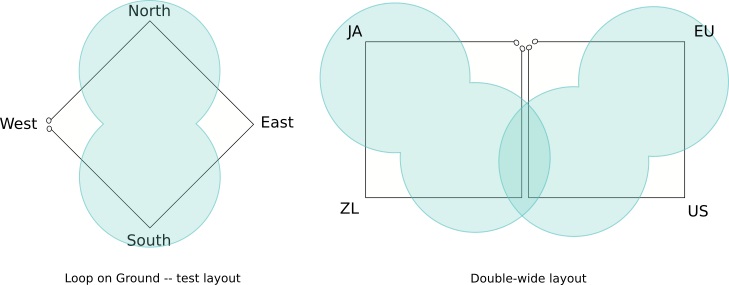 |
| Single LOG / Dual LOG - courtesy: va7st.ca |
As man-made noise levels become ever more problematic for radio amateurs, particularly those that are serious about weak-signal DX on the lower bands (160 / 80m), the ‘Loop On Ground’ or ‘LOG’ is proving to be a worthwhile improvement for some.
Bud, VA7ST, near Kelowna, has done some recent experimenting with a LOG as an alternative to listening with his 160 / 80m transmitting antennas and has written a great blog on his findings.
Bud has included some ‘A-B’ tests comparing the LOG to his normally-used vertical or inverted-L and the results are quite interesting.
If you’ve ever considered building a separate quieter low-band antenna, you can find everything you might need to get motivated as well as a nice listing of LOG-related links in Bud’s very helpful blog:
https://va7st.ca/2021/02/matching-transformer-for-loop-on-ground-and-beverage-antennas/
and
https://va7st.ca/2021/01/hearing-through-the-noise-on-the-low-bands/
Steve McDonald, VE7SL, is a regular contributor to AmateurRadio.com and writes from British Columbia, Canada. Contact him at [email protected].
This jig is up. In fact, it’s about to be put to the test…
We hams often resort to the common claim to choke the “life” out of RFI on feed-lines or other wire carrying electrical current in our shack environment (and nearby) by using ferrite materials in various forms. So it’s just a reflex action to buy those ferrites to install or to make chokes. Wind-em tight. A lot. Pour on the ferrite beads. If one is good, five should be better, especially if they’re cheap. And we like cheap. Right?
Hardly! That jig can be terribly misleading, expensive or, heaven-forbid, make noise worse! That’s a jig that needs to be up.
We do it without knowing because of the genuflection to the folklore of the hobby. Without putting a meter to it to more fully understand just what the ferrite(s) we install are doing. And what we want them to do. But that is the dominant behavioral pattern of many ham operators. Add K4FMH to the list of guilty parties.
It is much easier with that handy-dandy NanoVNA that you got for not much money. IF you know how. Yes, you could read Dunsmore, Witte or Bonaguide & Jarvis. And you should. Or, have someone give you a more practical tutorial. That may well lead you to study the Masters of the VNA as shown below. As Lord Kelvin once said something like: it ain’t science if you ain’t measuring it. Sort of.
Definition of the jig is up: —used to say that a dishonest plan or activity has been discovered and will not be allowed to continue.
Merriam-Webster
It was an honor to get to do a sneak-peek at one of this weekend’s QSO Today Virtual Ham Expo talks on this very subject. Mark Smith N6MTS is giving a talk entitled, Measuring Common Mode Chokes Using a NanoVNA, at 8:00 AM – 9:00 AM: 1500 UTC, 15.08.2021. This talk is worth the price of admission alone if you work HF!
I found it highly engaging, practical, informative, and he’s got the plans to build a test jig (get my title now?) to measure your own chokes before just “hoping” they will do the trick. Mark plans to post those on the Ham Radio Workbench podcast website soon. There are a lot of what look to be great talks scheduled for this weekend. But I know this is one of them because I got the chance to see it already and to share comments with N6MTS.
After you watch Mark’s talk, take a look at one or more of the online NanoVNA groups I am a member of which are listed below. Very helpful and (most always) nice members. Then take a look at Bob Witte’s book if you’re not familiar with it. It’s the preferred gateway drug to the ones by Bonaguide & Jarvis then Dunsmore. Measurement is addictive. And there’s no Twelve Instrument path for withdrawal.
Cited Books:
The VNA Applications Handbook by Gregory Bonaguide and Neil Jarvis.
Handbook of Microwave Component Measurements: with Advanced VNA Techniques 2nd Edition by Joel P. Dunsmore.
Spectrum and Network Measurements, 2nd Edition by Robert Witte.
Online groups on NanoVNAs:
https://groups.io/g/nanovna-users
https://groups.io/g/nanovna-f-v2
Frank Howell, K4FMH, is a regular contributor to AmateurRadio.com and writes from Mississippi, USA. Contact him at [email protected].
Take This Command and Shove It…
While he may have been channeling his inner Nashville self, those are the exact words KJ4VU used to describe his tool to facilitate use of the Elgato Streak Deck in your ham shack. Telling attendees at last Saturday’s Cycle 25 Tribe Zoom meeting about his macro.exe software tool, George KJ4VU aptly described the engineering design of his latest tool for the Stream Deck. The reference was to sending a command out of the serial port, in case you were wondering.
“macro.exe allows the user to send serial control commands to radios and other station accessories in
multiple data formats, baud rates, destination addresses and com ports. Commands are triggered by
invoking the program and sending a set of parameters on the command line. A command can be simple
individual command like set my radio to CW mode or it can trigger a sequence of commands called
macros.“
OK. So how’s this different than the famous Hello, World! thing in most programming languages? Actually, it may be a big deal.
One of the steps along the way to organizing the Stream Deck’s built-in functions to automate amateur radio software is to engage the existing software that controls rig devices on the PC. He’s building out some of the CAT commands for Icom and Yaesu radios initially as shown on his blog page.
The structure of the macro.exe program is to take conventionally stated options to the program as illustrated below, as taken from the PDF guide by George.
When the mac program is invoked, the parameters on the command line are parsed and executed.
Command line options include:
-t Define data format type
-p Com port number
-b Baud rate
-d Device address
-m Macro name
-c Command string to be sent
-w Wait for x seconds
In most cases, not all parameters are used. Some parameters have default values if they are left off and
default values are loaded from the macro.env configuration file.
Most experienced computer users will follow this flow and control lingo easily. There’s a lot more here for stacking multiple commands to, say, set up a given rig for CW operation with one button and so forth.
Those who like turning knobs, winnowing down through stacked menus (Yaesu lovers: I’m talking to you, lol!), and generally playing Mr. Fixit while operating their radios won’t be interested in automating mundane tasks so they can focus on direct operation fun. That’s ok. There is a big tent in amateur radio. But for those who do want to automate things (like making sure your amp is on the right band when that DX entity pops up on your monitor and you’re too excited to notice), you might follow George’s blog at the Ham Radio Workbench website.
From there, you too can just take this command and shove it...out of the serial port!
Frank Howell, K4FMH, is a regular contributor to AmateurRadio.com and writes from Mississippi, USA. Contact him at [email protected].
Button, Button. Who’s Got the Button? George KJ6VU Does. And So Can You!
Managing your ham radio station has become increasingly complex, to say the least. We have more complex transceivers with so many features that Computer Aided Transceivers (CAT) are the norm in many circles. With this, both computer-based logging of QSOs with CAT control makes a PC de rigueur for many, many hams.
But therein lies the details. Or the Devil, if you prefer. Multiple operating systems (OSes) make the choice of PC platform an additional challenge, especially if the PC in question has non-amateur radio uses too. Heck, I have two Dell Precision 1700 workstations in my ham shack. And another Dell Precision 7910 there in my office for “normal” work. The two in my shack run Windows 10 while the one on my desk where I’m writing this uses Linux. Throw in my iPad and iPhone with my wife’s Macbook Pro and you have the not unusual computer sausage that comprises a middle class household. (There is another Dell PC out in my workbench room off of the garage, running Windows 10 and several more doing other things, like monitoring a GPSDO.) Then, there are two laptops, one a Lenovo Thinkpad X1 Carbon for personal writing and another Thinkpad T420s for portable ham radio use. Both are Windows 10 machines. I would like to use any of them—except my wife’s Macbook—to access either of the two shack PCs to check on things when I’m out of the shack. Remote access ramps up the relative complexity. But hopefully you get the emerging point. It gets complicated.
There have been several attempts to “automate” shack management. Some expensive. Some relatively cheap. But all involving relative increases in the Zen of Motorcycle Maintenance…er, fooling with settings until they’re “just right” and so forth. This has been done in bespoke terms, even by KJ6VU. On his blog, George has built a cool set of buttons in a portable palm-sized case-of-buttons that automates multi-stroke menu choices on his new Icom IC-705 (see below). This stack of four PCBs is another ingenius invention by George as he’s done time and again on the Ham Radio Workbench podcast. But it is largely tied to a specific radio and menu system although it could be later modded to fit another rig. But what if we didn’t have to have a box of buttons like this tied to a specific radio or set of menu buttons? What if we could, like a dry-erase marker board, wipe it clean if we sell or replace the radio and insert another set of controls? And, if we wanted to automate several radios in our shack or in our portable stations? Or…well, you get the point.

But there’s a development that is largely the brainchild of George KJ6VU, co-host of the highly popular Ham Radio Workbench podcast, that could indeed streamline a lot of these operations. All at the push of a button! He already has a lot of them for his shack. But you can too. Here’s how.
Take a look below, first at the interface of the Elgato Stream Deck and the buttons themselves. Note that Stream Deck software is directly available on Windows and Mac via Elgato’s website and on Linux at this website. In addition, there is a smartphone app for iOS and Android. Plus Elgato has a key creator to make custom icons for the buttons. While there are other commercial products that do similar things like the Elgato product, Stream Deck may well be the most mature and accessible product in its class.
So the Streak Deck comes in different sizes and the one above is the large (“XL”) version. There are a few more from Elgato and a mobile app. What is potentially revolutionary is that it is customizable using modifications of stock “profiles” from an existing repository, Moreover, there is a published API which is amenable to several common programming languages or no programming per se at all.
The profile creator/editor has an interface that is usable to the non-programmer. As shown below from the Elgato website, the user interface emulates the Streak Deck device on your desk attached via USB to your PC. You can select, modify and design graphic with text icons that are then represented on each button. Some actions are drag-and-drop. Animations via GIF are also usable (e.g., beam rotor is turning). A button can do a specific action or open up a “deck” of other related buttons (e.g., here are my Kenwood TS-590SG controls). So for each physical button on your Stream Deck, you can define a specific action for that button and give it a meaningful graphic that will be displayed on the button itself. No labels to make. No removing them to change their function. None of that. At all. (You might feel the need to wipe it off if you love Cheetos…)

To more fully illustrate the architecture of how the Stream Deck works, here’s a slide from Tim Pringle’s blog. The Stream Deck uses a Profile that can be selected on-the-fly if desired. But the management software uses “chunks” of programs called Plugins to do certain things, such as integrate external software on the PC or elsewhere into the button definitions in the Profile in use. It uses JSON file formats to communicate with Plugins. This could give hams who are knowledgeable of JSON and use it already in their operations could only need modifications to work with Stream Deck.

I’ll leave it to Elgato to give you further details in the video below but I’ll then weigh in on an amateur radio group project that’s beginning to emerge that could take ham radio to another level of automation. That’s where you come in. Or not. Either way, it’s a group sharing effort.
George KJ6VU has already created a “profile” for his ham radio shack. He’s very keen on automating his antenna switching to rigs, bands, and so forth. That’s not unusual. But he can add new rigs’ CAT commands with a minimum of effort. Such as the FT-857D he’s recently acquired to go with his Flex 6400. He uses the 857D mostly on CW, for intance, so just touching a button to set up the 857D to CW mode, say 40M band, and switching the right antenna to it is just that: ONE touch of a customized button that he created using the Profile Software plus a software program on his PC.
What if there was a collective effort to share Stream Deck profiles of CAT and other command-sets for the popular transceivers and other devices used by ham operators? What if a few hams with Javascript or C++ talent wrote some plugins for the Stream Deck device and shared them? And, what if hams had open access to them and made the type of improvements and potential innovations with them such as creating hooks to other software platforms like Node-Red? There is already a Stream Deck plugin that provides the basic link to a Node-Red server in the unofficial general repository for Stream Deck Plugins. Check out Mike Walker’s presentation on Node-Red on Youtube, linked below.
Several hams, George KJ6VU, Rod VA3ON, Michael VA3MW and I (K4FMH) are at the start of assembling a ham radio-oriented repository of such Stream Deck profiles, probably on GitHub. Stay tuned to the Ham Radio Workbench Podcast for details as well as the Cycle 25 Tribe’s Youtube Channel. I’ll announce details here on this blog as they materialize.
Mike VA3MW and George KJ6VU gave a recent talk on station automation that is shown below. It lays out a paradigm for station control that coincides with George’s early thoughts of the Stream Deck thinking expressed here. But the contribution of just a few third-party programmers who have built plugins that create bridges to both the Windows and others OS environments as well as independent machines like a Node-Red server (Raspberry Pi even), just sets the stage for the near future’s work. Here are some initial thought experiments for you.
How should your Stream Deck control box be organized?
If you’re a CW Op mostly, would a button that opens a stack of other related buttons (think deck of cards) that are all related to your station organization to operate CW mode be useful? How about one for CW, one for SSB and one for digital? How about one for “there’s lightning approaching” that shuts down stuff and sets other things to ground. How about, I’m leaving for a trip and here’s a button to organize things for remote access?
What is needed is a clear community discussion of how to meld the behavior of hams in their shack with their usual and customary control settings. And, to give some near range Blue Sky thoughts to how this concept can be grown for the least “cost” in terms of time and effort. That’s where community contributions are usually the most valuable.
Interested in getting involved? KJ6VU, VA3ON and I are good on QRZed. Drop us a line. This can really move the management of amateur radio shack’s forward over the next few months. It just takes the building of a community of interested hams who wish to help make it happen, each contributing just a little bit but in strategic ways. Stay tuned…
Don’t touch that dial…just touch a button!
Frank Howell, K4FMH, is a regular contributor to AmateurRadio.com and writes from Mississippi, USA. Contact him at [email protected].
 Ham Radio Deluxe |
 W5SWL Electronics |
 Ham Radio Prep |
 KB3IFH QSL Cards  Hip Ham Shirts  HamRadioAuctions HamRadioAuctions Reliance Antennas Reliance Antennas Enigma Shop Enigma Shop |  morseDX  Ni4L Antennas  R&L Electronics R&L Electronics antennas.us antennas.us Ears to Our World Ears to Our World |
- Matt W1MST, Managing Editor
