 |
 Wouxun go mobile with the KG-UV920R
 14 October 2010 | by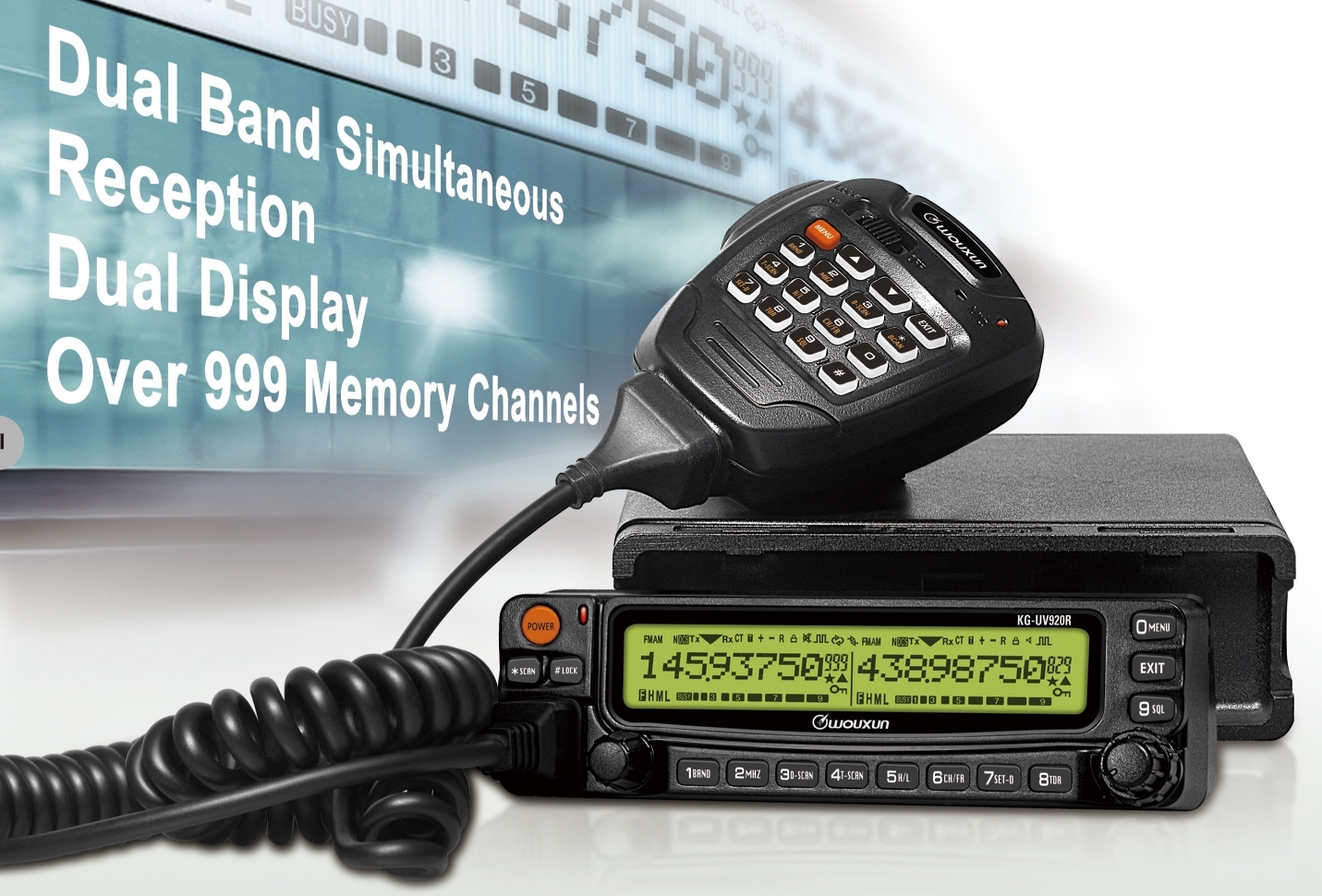
Alerted by posts by Patrick, WA0TDA and Steve, GW7AAV, I see that Wouxun have announced an entry into the mobile rig market, with their KG-UV920R rig covering 144/432MHz.
Based on the coverage that Steve mentions in his post, there is FM receive from 65-220MHz – so this rig could receive on 70MHz too! In fact, reading the posts, I was wondering whether Wouxun will, in time, consider a 70MHz capable mobile rig.
The Wouxun portables have proved excellent and I am looking forward to hearing more about the mobile rig in due course.

Tim Kirby, G4VXE, is a regular contributor to AmateurRadio.com and writes from Oxfordshire, England. Contact him at [email protected].
Tuesday night tropo…
I didn’t spend too much time on the radio on Tuesday evening, as the cats were requesting entertainment again – which was a pleasure to provide! Being the second Tuesday of the month, it was the 432MHz Activity Contest and there was still some tropo around. The best DX for me was DF0MU in JO32 – which I was more than happy with. It was also good to work GD8EXI (IO74) – the first time I have worked GD from Longworth on 432MHz. Interestingly, like last month, he was at his strongest when I was beaming southeast. A reflection, perhaps? I was also pleased to hear some northerly IO93/IO84 squares which are less common for me.
Oh. And a special mention to the contester, whose callsign I will not mention, who when I called him first, he only got my suffix. No problem. He asked if I could give my prefix. No problem, I did. Then he proceeded to moan that he hadn’t got my full callsign! I seem to remember mentioning when I wrote the contest column in RadCom, that it’s best to be nice to the people who call you – otherwise they might not call you again. This gentleman won’t be hearing from me for a while, then!
Tropo seems to have faded down mostly now, although there was something weak on 145.650 this morning, either GB3PO or ON0WV – I couldn’t tell. Apparently the forecast for the weekend could be favourable for more tropo. Let’s hope so!

Tim Kirby, G4VXE, is a regular contributor to AmateurRadio.com and writes from Oxfordshire, England. Contact him at [email protected].
Technology failure
Olga and I went to a dinner party last night and the topic of how we have become slaves to computers came up. When I was a child, the science books promised that technology and automation would make our lives easier so we would work less hours and have more time for leisure. What a joke that seems now. We all work longer hours and the impact of computing and modern communications technology is that people now expect answers instantly instead of when you can get around to it. When I mentioned another promise of the computer age, the paperless office, the entire table fell about laughing.
Kelly, K4UPG writes that he had just spent six hours running updates, fixing the problems the updates created and figuring out how to install the updates that wouldn’t install automatically. His verdict: Computers Do Not Save Time.
The last couple of mornings Acronis Non-stop Backup has displayed a message that it was not running. Kelly’s post made me wonder if this was caused by a recent Windows update. I decided to do a System Restore back to last Monday, before most of the updates occurred, and lo and behold Non-Stop Backup is running again. I don’t have the inclination to spend six hours installing updates individually to find which one caused the problem, nor to ferret through forums searching for a solution, so automatic updates have been switched off for the time being. Having a working backup is more important than receiving fixes to problems I haven’t experienced and probably never will.
The trouble with computers is you have to spend too much time being your own support technician, time you should be spending working, playing radio or whatever the computer is supposed to be helping you with. Once upon a time computers were simple, reliable and never needed updating. What was the name of the operating system they ran? Ah yes, MS-DOS.

Julian Moss, G4ILO, is a regular contributor to AmateurRadio.com and writes from Cumbria, England. Contact him at [email protected].
KN-Q10 SSB/CW 5W kit – US$280
Recently there was an interesting discussion here on vk2rh.com about some of the barriers to a wider takeup of the new wave of Chinese QRP or DIY ham radio kitset activity. One of the hurdles of course is language and the current lack of an English language user base to grow and deliver email support for kit builders.
Overnight Adam, BD6CR has made available an English translation of the construction manual for the KN-Q10 QRP kit designed by Ke Shi BA6BF. The KN-Q10 is a four band (3.5, 7, 14 & 21MHz) 5W SSB/CW transceiver kit.

The KN-Q10 4 band SSB/CW QRP kit designed by Ke Shi BA6BF
Adam has also revived the Yahoo group China_QRP -
“I have made a decision to turn this yahoo group into a forum to support overseas Chinese kit builders and merchants. We will see more overseas kit builders and merchants joining.”
John AE5X posted a report about the manual translation earlier today. He also included a link to a discussion thread about the kit on the Chinese language HelloCQ forum. The photos here are sourced from the designer Ke Shi, BA6BF’s own postings and give some sense of the finish and quality of the project. There’s a large number of photos of the Q10 under construction on the thread.

A view of the BA6BF designed KN-Q10
John AE5X noticed the current lack of a schematic & parts placement diagrams and an operating manual for the kit even though this appears to be referenced in the translation. Certainly this version of the manual doesn’t offer the comprehensive ‘hand-holding’ guidance Elecraft, SWLabs or Softrock kit builders are used to. John sees no inherent problem with this – as long as prospective buyers are aware. I see this manual translation as an important first step towards opening up this exciting DIY/QRP activity to a wider audience.
Today on the China QRP Yahoogroup Adam has explained that he is selling the KN-Q10 kit for US$280 which includes air parcel delivery anywhere worldwide and that he accepts PayPal. If you’re keen to buy, it might be best to contact Adam via the Yahoogroup to identify the appropriate email address for that.
UPDATE 15 October: Adam BD6CR has already posted an updated version of the manual and it now also includes photos and links to the schematic diagram of the KN-Q10 and a Chinese language document with photos illustrating the modification to the encoder.

One of the photos from the currently Chinese language KN-Q10 encoder modification guide
Stephen Rapley, VK2RH, is a regular contributor to AmateurRadio.com and writes from New South Wales, Australia. Contact him at [email protected].
Handiham World for 13 October 2010
Welcome to Handiham World!
It’s time for a new HF net.
When was the last time you thought about getting on 20 m and being part of the Handiham net? Don’t be embarrassed to admit that you haven’t thought about it for a long time. Neither have I, as a matter of fact, so you are not alone. The 20 m net died several years ago when our last regular net control volunteer Mike Knox, WA0KKE, finally had to throw in the towel.
What happened?
Like many things in our technologically-driven existence, there was no single cause for the demise of the Handiham net. A prime suspect certainly had to be the relentless, never-ending sunspot minimum that we are trying to claw our way out of with limited success, even now in 2010 when the sun should be really perking up. As most of you know, the higher solar activity associated with more sunspots creates ionospheric conditions that favor really good high-frequency radio propagation. In a really good solar maximum, the HF bands crackle with strong DX signals and one can “work the world” with just a few watts of power on bands like 10 and 15 m. Sad to say, it has been so long since we have seen those conditions that many operators have simply drifted away from regular HF operation, especially if they did not have room for wire antennas that would allow them to tune 160 through 40 m, bands that remain usable even during solar minimum conditions.
The 20 m band sits astride the critical part of the HF spectrum that just barely remains inside the “always useful” zone. At sunspot minimum, it is generally crowded with DX seekers and anyone else simply looking for an open band with capability of working stations at some distance during daylight hours. Even then, 20 isn’t always reliable when solar storms wipe out the bands. So what happened was that the conditions on 20 simply didn’t favor continued scheduled net activities. The net control station would be faced with terrible band conditions and fewer and fewer check-ins. In spite of my efforts to find another net control station, no one was interested, and I guess I don’t blame them. Who wants to preside over a net with no stations checking in?
But we can’t ignore other factors that came into play during the deterioration of the HF bands during the sunspot minimum. The rise of the Internet followed by the spread of broadband connectivity made EchoLink much more practical and reliable than HF communications. The VHF and UHF repeater systems with EchoLink capability came into their own as HF activity deteriorated. More and more people made the move to EchoLink. The Internet is also a huge factor in siphoning away people from ham radio – and most other leisure time activities. It’s not that the Internet is good or bad per se, it’s just that people only have so much time for all of the competing leisure time activities, and ham radio is simply finding a new “normal” in this very different world.
Another factor is that a daytime 20 m HF net is simply too hard to conduct when more and more people with disabilities are going to school and work, instead of the “bad old days” situation in which people with disabilities simply sat around housebound. We are glad that those days are gone, but Handiham members who work and go to school cannot be expected to have the time to check into a daytime net on any regular basis. You simply can’t count on enough folks having a day off from work or a school holiday to keep a critical mass of net participants.
So what to do?
I would suggest a change in net frequency and timing. We need at least consider moving our HF net to 160, 75, or 40 meters, and those bands are likely to be most useful in the evening. Because 160 requires a very long antenna, it is impractical for many users. 40 can get crowded, but requires the shortest antenna of the three. Of course we can consider reviving our 17 meter “non-net roundtable”, which was originally started by Alan, K2WS, but the sun will have to spit out a few more spots for that band to get where it needs to be. So what do you think? 160? 75? 40? Or something else? And what about the time and day?
I hope to hear from you about this suggestion soon. Please drop me an email, and I’ll share your thoughts with our readers and listeners.
New at the Hong Kong Electronics Fair: Wouxun KG-UV920R

The Hong Kong Electronics Fair opened today, October 13, and runs through October 16.
Amateur radio is about to be introduced to a brand-new entry in the mobile dual-band radio category, the Wouxun KG-UV920R. Although at this time we have little in the way of product specs, the Wouxun dual-band handheld radio that was demonstrated at Handiham Radio Camp early this year created quite a lot of interest because of its built-in speech frequency readout for blind users. The KG-UV920R features dual-frequency display and cross-band repeater capability. It comes with more than a thousand memory channels. It also includes an unusual receiver that covers the short-wave bands! We are waiting for a more detailed specification document so that we can tell if speech frequency readout will be a feature – and we sure hope that it is! At this time, no pricing is available.

Pat Tice, WA0TDA, is the manager of HANDI-HAM and a regular contributor to AmateurRadio.com. Contact him at [email protected].
Computer Does Not Save Time
Remember when we used to think computers would save us time?

Why did we think the computer would save us time?
I spent the last 6 hours running updates, fixing the problems the updates created and figuring out how to install the updates that would not install automagically. Grrrrrrr!
Think I need some time to play radio, but I won’t be taking a SDR radio with me for a bit. Grrrrr…. need to recover from the 26 reboots and all the time wasted surfing and reading the small print.
Good thing there is a QRP ARCI event this weekend and the following weekend is our Polar Bear Moonlight Madness Event. Grrrr! I’m ready for some CW. CU on the bands!
72,
Kelly K4UPG PB #173
Kelly McClelland, K4UPG, is a regular contributor to AmateurRadio.com and writes from Florida, USA. Contact him at [email protected].
Grab me a callsign
While I wait for a correctly programmed chip for my QRSS keyer kit I thought I would investigate the receive side of QRSS beaconing. It’s no good transmitting if nobody receives, and unlike WSPR every transmitter isn’t automatically a receiver during its off periods. This is a mode where you need to give as well as take, to receive in order to be heard, otherwise you can’t complain if no-one tells you that they heard you.
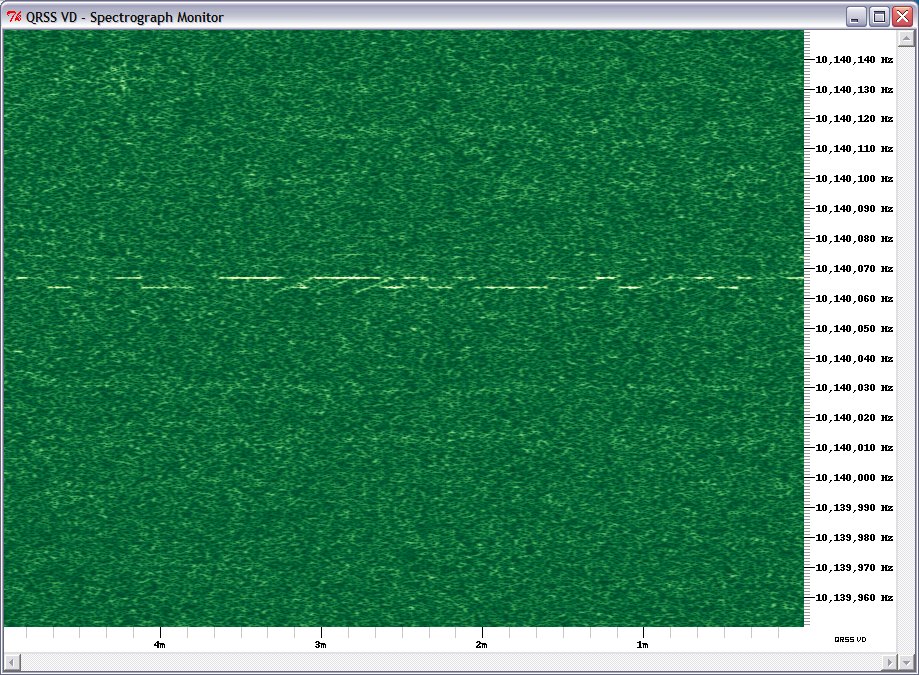
QRSS signals are decoded visually using a spectrograph, a waterfall display similar to that found in digital mode software. However, you can’t use a digimode software waterfall for two reasons: it moves too quickly – to capture a full callsign in QRSS you need to be able to see at least a couple of minutes worth of transmission – and it scrolls down vertically so trying to read calls would give you a crick in your neck!
Fortunately there are programs that have been specially written for just this application – and they are free so there is nothing to stop you trying them. The most popular program for Windows appears to be Argo. However there is alternative called QRSS VD by Scott Harden (the odd choice of name becomes clear when you realized that Scott’s call is AJ4VD.) QRSS VD has one problem: it is a CPU hog. On my fairly modern shack PC it runs at about 50% CPU utilization. For that reason, you might have no alternative but to use Argo. But if you can run QRSS VD it has some nice features that add to the enjoyment of this aspect of the hobby.
QRSS VD includes three programs: a Spectrograph, a Viewer and a Grabber. The QRSS VD Grabber automatically captures the live waterfall and creates images suitable for uploading to a website so others can see whether you are receiving their signals. It doesn’t have any way of automatically uploading the images to the web server, though. It’s really for people who want to run an online grabber, which is only worth doing if you are going to run it regularly. I don’t have enough radios and antennas to do that so I probably won’t investigate this feature further.
QRSS VD Spectrograph is the program that displays in real-time what you are receiving. It has no obvious user interface – you have to right-click the window and then you will get a menu of options. One option lets you select the sound card that is connected to your radio. Another is for setting the frequency. The main settings option determines the size of the window and the maximum and minimum frequencies that are displayed.
There is also an option to save these settings. If you don’t, you will have to set them all over again the next time you start the program. Finally there is the Resume option which you must click to start the spectrum display working.
Most QRSS activity takes place on the 30m band, in the first 100Hz above 10.140 MHz. This is just below the 200Hz used by WSPR, which is itself just below the region where PSK31 operation takes place.
To start receiving QRSS, set your receiver to USB mode and tune it to 10.139.000. If your rig has a DATA mode that is USB you can use that. Don’t be tempted to use the CW mode – most rigs add an offset to the displayed frequency so it shows the frequency in the centre of the CW filter passband, and some rigs use LSB for CW, so finding the right spot gets confusing.
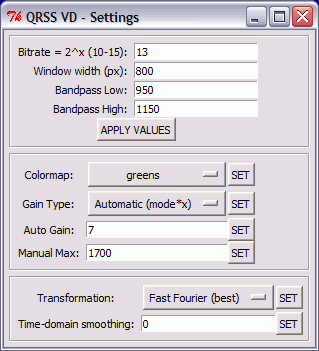
Select the sound card in QRSS VD, then set up the settings dialog. The window width in pixels can be whatever suits your screen size. The bandpass low and high settings define the height of the window, the minimum and maximum audio frequencies displayed on the spectrograph. With the radio on 10.139.000 USB, signals in the QRSS sub-band will be heard at audio frequencies of 1000 to 1100Hz. I set the low and high values to 950 and 1150Hz respectively to give a 50Hz margin on either side. (Note: if you aren’t sure of your receiver’s accurate calibration you might want to choose a wider margin initially because you could miss the QRSS band entirely of it is more than 100Hz out.) The other values on this dialog are all defaults.
[If you are interested in receiving WSPR as well, you could tune the radio to 10.138.700 and enter low and high values of 1250 and 1450Hz. Then you could run WSPR and QRSS VD on 30m simultaneously.]
Right-click the spectrograph window, click Resume and the screen should start scrolling to the left and filling with received signals. Conditions are pretty poor at the moment so there isn’t much to see on the screenshot I made, but when I first tried this program I immediately received a trace of a signal from Steve, G0XAR who coincidentally is the producer, together with Hans G0UPL, of the QRSS beacon kit I just bought. I don’t know if he was using one of these kits but it was producing a heck of a signal. (Ignore the frequency shown, this was received using my K2 whose calibration is considerably out.)

What’s nice about the QRSS VD software is that you don’t have to watch the output in real time to capture signals and it is simple to produce nicely formatted records of signals received like the one above. Every few minutes the spectrograph dumps a bitmap file in the program’s Output folder. When you want to see what you caught you start up the QRSS VD Viewer, select a group of bitmaps to view and it will stitch them into a seamless time continuum. You can then scroll through from start to finish looking for the traces of QRSS signals.
When you find one, you can capture a region of the spectrograph by clicking to specify the top left and bottom right of the desired area. You can even specify a custom caption. The selected area is then copied to the Windows clipboard and pasted into your default bitmap viewer ready for you to save in a format of your choosing (for example, as a JPG file.)
Why would you want to do this? As I mentioned at the beginning, there is no way of finding out how far your signals got (apart from a handful of online grabbers) unless someone sends you a signal report, so if you receive someone’s beacon you should send them a report too. The only way to do this is to look up their email address at qrz.com and send them an email. A picture is worth a thousand words, so it’s nice to be able to send a screen grab of their actual signal as an attachment to the email.

If my initial experience is anything to go by, this personalized way of sending signal reports makes for a very friendly aspect to the hobby. I sent this capture (above) of a beacon from IQ2DP with an emailed report. This morning I received a nice reply from Teo I2RIT thanking me for the report and telling me all about the beacon, which is made from junk box parts and runs well under 100mW into a ground plane made of scrap aluminium tubing. He also sent a link to an article about it. The article is in Italian but here is a translation. If you’ve read this far then you will probably find it interesting. Yet another facet to our amazingly varied radio hobby.

Julian Moss, G4ILO, is a regular contributor to AmateurRadio.com and writes from Cumbria, England. Contact him at [email protected].
 Ham Radio Deluxe |
 W5SWL Electronics |
 Ham Radio Prep |
 KB3IFH QSL Cards  Hip Ham Shirts  HamRadioAuctions HamRadioAuctions Reliance Antennas Reliance Antennas Enigma Shop Enigma Shop |  morseDX  Ni4L Antennas  R&L Electronics R&L Electronics antennas.us antennas.us QRV QRV |
- Matt W1MST, Managing Editor
