 |
 Bête noire
 21 October 2010 | by
 In the digitalradio Yahoo group a few people have been experimenting with APRS on HF using the robust ALE400 mode. I am interested in trying more robust modes for APRS and wish that someone would work out how to interface the new Winmor TNC to an APRS client. But as nobody has, I thought I would try to give this a go. Unfortunately this meant getting to grips with MultiPSK, a program that is something of a personal bête noire as whenever I have been tempted to try I have never been able to figure out how to use it. Today turned out to be no different.
I downloaded the latest version of the program, started it, and was presented with an unexpected screen for a digital modes program. After a few seconds of puzzlement I realized that this was the configuration screen. Normally with software you get the main screen and select configuration from a menu but MultiPSK is not as other software. Oh no. The author threw away the book when he wrote this program, the book in question being “Microsoft User Interface Guidelines.”
I managed among the bewildering array of buttons and options to find one to set the sound card, another to set the KISS TNC port that I would need and one that I presumed would set the serial port for PTT. As I couldn’t find an OK button I tried closing the window and MultiPSK itself closed. Completely. I tried again and realized that you have to click a large button marked RX/TX Window to get to the main operational screen. Bizarre!
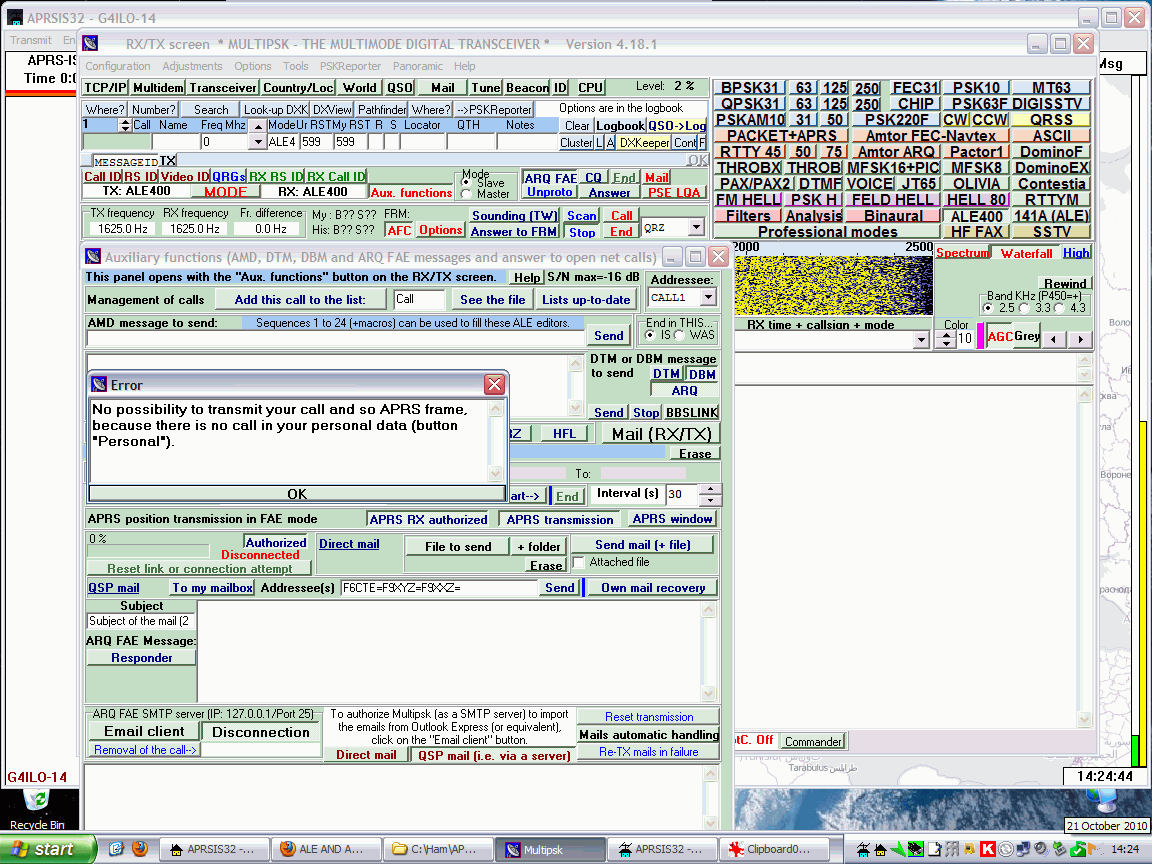
The main screen contains another mind-boggling array of buttons and controls, but I did see a waterfall with noise scrolling down the screen, which looked encouraging. At least I’d managed to select the sound card correctly. After staring open-mouthed at the screen for fully two minutes I managed to spot a button marked ALE400, so I clicked it. I was now in ALE400 mode. At least, I think I was, though I don’t know how I was supposed to tell for sure.
One of the Yahoo group postings had mentioned that you needed to click a button marked “Aux. functions”. After some more searching I found this button it and clicked it and up popped another bewildering dialog box crammed with buttons. Hilariously, at the top is the caption “This panel opens with the Aux. functions button in the TX/RX screen.” Yes, I really laughed out loud when I saw that. If I didn’t know that how would I ever find it?
I spotted that some buttons on this new dialog were to do with APRS. I clicked one and a dialog popped up saying something about there being no map folder. So apart from being a digital modes program MultiPSK is trying to be an APRS client as well? The phrase “jack of all trades, master of none” sprang briefly to mind before I dismissed it as being uncharitable.
I clicked another button marked “APRS Transmit” and a strange notepad-style window appeared with the caption Error which said “No possibility to transmit your call and so APRS frame because there is no call in your personal data (button ‘Personal’).” The English wasn’t great but I could understand what it was trying to tell me. I closed the error dialog but although I could see several places that looked as if they were meant to have a call entered in them I couldn’t see anywhere marked “Personal.”
I did discover a documentation file to do with setting up APRS using ALE400. Unfortunately it is a .doc file and I don’t have Microsoft Word. I did try opening it in Wordpad which is what I normally use but it displayed several errors about graphics filters and opened the file without the all-important images. Google’s HTML view of the document couldn’t display the images either. Hello, anyone heard of PDF files?
Now I do feel a little bit guilty criticizing the work of a fellow amateur programmer. I’m sure the author of MultiPSK, Patrick F6CTE, is far more talented than I ever was in being able to implement all of these sound card digital modes. But when it comes to user interface design I’m sorry but MultiPSK sucks.
This has to be the worst user interface of any program I have ever encountered, by a long way – and at one time in my life I used to review software for a living. Its worst sin is that it uses buttons instead of menus and apparently has no context-sensitivity (or more specifically mode-sensitivity) so that you are presented with all of the available options all at once, which is not only confusing but wastes a lot of screen space. It is testimony to the delight that so many practitioners of our hobby take in doing things the hard way that so many people are willing to use this program to operate digital modes when there are so many better-designed alternatives.
Once again MultiPSK has been deleted from my hard drive without transmitting so much as a digit. If APRS over ALE400 is only achievable by those able to master MultiPSK then I’m afraid it will go nowhere.

Julian Moss, G4ILO, is a regular contributor to AmateurRadio.com and writes from Cumbria, England. Contact him at [email protected].
Spotted in Spain
My 30m 50mW QRSS signal has now been received in Spain by the grabber of EA1FAQ. (It’s the one at 10140.030 kHz.)
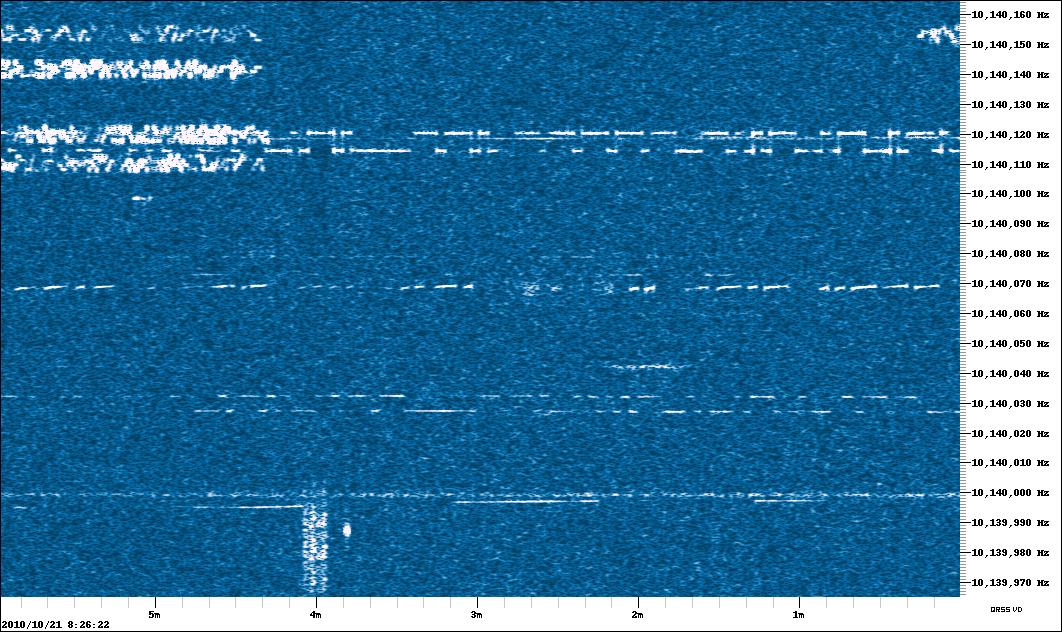
That’s a distance of 1458km or 906 miles.
[Off-topic note: When will Blogger fix its frigging “Add Images” uploader so it works in Firefox? I had to use the ghastly IE to insert the picture.]

Julian Moss, G4ILO, is a regular contributor to AmateurRadio.com and writes from Cumbria, England. Contact him at [email protected].
Handiham World for 20 October 2010
Welcome to Handiham World!
It’s time for a new HF net – Part 2

Last week we said : We need at least consider moving our HF net to 160, 75, or 40 meters, and those bands are likely to be most useful in the evening. Because 160 requires a very long antenna, it is impractical for many users. 40 can get crowded, but requires the shortest antenna of the three. Of course we can consider reviving our 17 meter “non-net roundtable”, which was originally started by Alan, K2WS, but the sun will have to spit out a few more spots for that band to get where it needs to be. So what do you think? 160? 75? 40? Or something else? And what about the time and day?
Interestingly enough, the 75 meter band seems to be favored so far. More than one respondent has suggested that we would have the best chance of success in the Extra Class segment of the band. The reason cited was that the General segment is crowded in the evening when the band is open to longer distance communications and thus most useful for our purposes.
I think we can agree that the 160 meter band is “out” because of the antenna requirements. 40 is a good alternative because of its propagation characteristics, but the phone portion of the band is less than half that available on 75 meters and there is no doubt that it will be difficult to find some open real estate for an evening net. Besides, we already have the CW net on 7.112 MHz.
So what do you think? A 75 meter net in the evening to be in the Extra portion of the band? Remember, only participants with Extra Class licenses would be able to transmit, but anyone could listen. We could initiate a “check in by email”, or some similar system, which I have heard on other nets, to accommodate those without transmit privileges. Another idea would be to have the Handiham Radio Club as the net sponsor. We do need regular HRC activities, aside from a single meeting at Radio Camp during the year.
Weigh in! I hope to hear from you about these suggestions soon. Please drop me an email, and I’ll share your thoughts with our readers and listeners.
QST Reviews Wouxun KG-UVD2 & KG-UVD1P Talking Handheld Radios

The Wouxun KG-UVD1 talking HT created quite a stir at Hamvention in May, both for its low price and for its built-in speech access for the blind. As I stated in a previous story, “Handiham volunteers Larry Huggins, KA0LSG, and Ken Silberman, KB3LLA, both found the new Wouxun 2m/70cm KG-UVD1P HT at Dayton, and Larry actually had his radio along to demonstrate to us at Handiham Radio Camp.”
We have had many questions about this radio, but details on its overall quality and functionality were mostly anecdotal. That has changed with a QST review of the latest versions of the KG-UVD2 & KG-UVD1P talking handheld radios by Bob Allison, WB1GCM, ARRL Test Engineer. Bob’s article appears in the November 2010 QST, which will be available to blind Handiham members in the upcoming Friday audio updates in the Members Only section of the Handiham website. QST is also produced in audio through the Library of Congress National Library Service and will be available for the new NLS digital players, available to those who qualify for services. The NLS version of QST is the complete magazine without advertising, but it takes some time to produce and is typically around a month later than the print mailing or Handiham digest version.

Pat Tice, WA0TDA, is the manager of HANDI-HAM and a regular contributor to AmateurRadio.com. Contact him at [email protected].
Memory fix
Six months ago I bought an old Kenwood TH-205 on eBay for spares or repair. I got it working, managed to find a new replacement NiCad battery pack for it and built a drop-in charger for it for a total cost of well under £20. The backup battery had died so the memories didn’t work and the radio wouldn’t even remember the frequency it was last used on, but I was pleased just to have got it working and I was afraid the replacement would be an expensive part the cost of which couldn’t be justified.

Today I decided to have a look and see if the backup battery could be replaced. I wasn’t sure where the backup battery was, but I guessed it might be hidden under a foam pad in the centre of the circuit board. I had a peek and was pleased to find that it was a CR2032 3V lithium button cell. However it wasn’t your regular CR2032 cell that you can buy in stores, but one with solder tags spot welded to each side.
I looked on eBay, but although this turned up zillions of sellers of the regular cells at prices from five for a pound, no-one had the version with solder tags. I looked to see if I could fit a cell holder into the radio but the PCB mount one I had was quite a bit thicker than the cell itself and there was insufficient space for it.
I tried a Google search and Digikey had a CR2032 with solder tags for £1.17 a time, but there was a £12 shipping charge which made it uneconomic. The cost of the repair needed to be proportionate to what I paid for the radio.
So I decided to try taping wires to a regular CR2032 cell. I doubt that I could solder to it, and that probably isn’t a good idea anyway. I had a CR2032 which came in a kit I purchased recently but haven’t started to build yet. It was new and sealed in its packing so I thought I would use that. It was a good job I decided to check the voltage after taping the wires to it, in order to verify they were making good contact, because it was as dead as a dodo! Even the one I took out of the radio showed more signs of life, as it acts as a capacitor and charges up a little bit when the battery power is turned on.
So it’s back to eBay to order a couple of replacement cells, one for the Kenwood and one for the kit I haven’t yet built.

Julian Moss, G4ILO, is a regular contributor to AmateurRadio.com and writes from Cumbria, England. Contact him at [email protected].
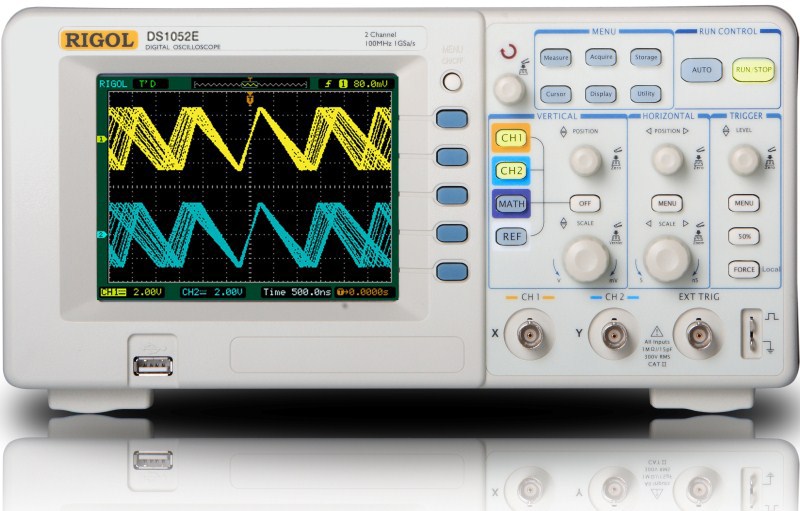
Rigol DS1052 scope hack – NEAT!
 OK, regardless of what many “old hat” hams think, there is a lot of kit building and homebrew activity going on in our little “geek” subculture. I don’t bother with the discussions with many of my friends, as they don’t go anywhere to see the truly neat projects people are developing.
To that end, many hams have asked me over the past few months about scopes (even a recent topic on “the zed”). Basically, you can go one of four routes.
1: Buy a super expensive scope
2: Buy a decent used scope for a couple hundred
3: Buy a USB/computer based scope
4: Buy a brand you may not be familiar with, hack it, and get double what you paid for (in the $400. range).
I’m a fan of 2 and 4. Both have their merits. A used O’scope (not really Irish either) is a bargain, you can get a name brand and will cover most of what you need in our hobby. Used scopes are also great to learn on as well until you figure out what you really may need.
That leads us to a “no name” brand. The Rigol is truly a neat scope. I used one on my last job for about 9 or so months and it really had some neat features. It is portable, can store images to a USB drive, can connect via USB to a computer, the list goes on, but here’s a few:
| Model | DS1052E | |||
| Bandwidth | 50 MHz | |||
| Analog Channels | 2 | |||
| Vertical Sensitivity | 2 mV/div – 10V/div | |||
| Real-time Sample Rate | 1 GSa/s?each channel??500 MSa/s?dual channels? | |||
| Equivalent Sample Rate | 10 GSa/s | |||
| Memory Depth | Mode | capture rate | common | long memory |
| one channel | 1 GSa/s | 16 kpts | N/A | |
| 500 MSa/s | 16 kpts | 1 Mpts | ||
| dual channels | 500 MSa/s 250 MSa/s | 8 kpts 8 kpts | N.A. 512 kpts | |
| Standard Interface | USB Host & Device, RS-232, P/F Out | |||
| Vertical Resolution | 8 bits | |||
| Math | ?, ?, ×, FFT | |||
| Max Input Voltage | All inputs 1M??15pF 300 V RMS CAT? | |||
| Cursor Measurements | Manual, Track and Auto Measure modes | |||
Not a bad scope for the $400. range on ebay.
But…… (think Vince from “Slap Chop”)…… if you act now, because we can’t do this all day………
Dave Jones over at the EEVBlog has a neat video on Youtube on how you can double some of the specs…. for nothing. Be wary of some google searches on the topic, some want you to hack into the scope and do all sorts of nonsense. This is a simple first start and many people have had great results with it.
If you would like to go to the actual Rigol page and look up the specs and download the manual, go here:
http://www.rigolna.com/products/digital-oscilloscopes/ds1000e/ds1052e/
Finally, if you’re still not sure what you are looking for, you may be able to try a scope at a few places. Some trade schools, community colleges and such will let you come down and just take a look (or attend a workshop). There is also a growing number of “hackerspaces” around the globe. A “hackerspace” is a place to explore and learn technology in all it’s facets. Some vendors (Tektronix for example) have some really good resources on their websites as well.
Jonathan Hardy, KB1KIX, is a regular contributor to AmateurRadio.com and writes from Connecticut, USA. Contact him at [email protected].
C’mon people, listen!
A lot has been written recently (including by me) about the general conduct of hams on the airwaves. Over the last few days, I’ve seen something that has just been so absurd that I had to vent here.
I’ve discussed operating in pileups before, and how it’s important to listen to the operator’s instructions to understand where they are listening. It’s frustrating when an operator doesn’t listen and calls right on top of the DX station instead of on his split frequency. While there’s really no excuse, the occasional call or two can be understood by operators who just send 5NN TU (on CW) or just “Thanks” on phone without giving the split often. The same can be said for those operators who don’t ID often.
What I cannot understand, and to me what’s totally inexcusable was the behavior that I’ve seen on RTTY in the pileups for the folks operating from the new PJ entities recently. The vast majority of operators at the DX end seem to be really top-notch operators and are doing their best to control the pileup. They leave nothing to chance when, at the end of a contact, they send something like “K2DBK TU DE PJ7E UP 2-4”. You know who the station is, and you know that they are listening for your transmission 2-4 up. In spite of this, operators repeatedly (and I don’t mean once or twice, but dozens of times) continue to call on the operators transmit frequency, not where he’s listening.
I believe in Heinlein’s Razor: Never attribute to malice that which is adequately explained by stupidity. I don’t believe that most of these operators are calling just to QRM (create noise) on the DX station. For one thing, they are all using their callsigns, so we know who they are. (There is a chance that they are using someone else’s callsign to intentionally make them look bad, but I don’t think that’s the case.) I think that either they don’t have a good enough copy on on the DX station to be able to understand that he’s listening on a different frequency, or they don’t understand what “UP” means. In the former case, they shouldn’t be calling at all. If you don’t have a good enough copy on a station to receive what they are sending, how on earth are you going to know if you’ve worked them? If it’s the latter, and you don’t know that “UP” means that the operator is working stations using split operation, then ask someone what it means, don’t just ignore it.
Incidentally, I want to mention that I’ve looked up a number of callsigns that are guilty of this behavior. There is a mix of stations, but a significant number of stations seem to be US Amateur Extra class, and, as best I can tell, they have been Extras for quite some time. This isn’t a case of “no-coders” not knowing how to operate. It may well be that RTTY, which has increased in popularity recently, is new to these operators, but like any mode you need to learn how to use it.
When in doubt, refer to the DX Code of Conduct.

David Kozinn, K2DBK, is a regular contributor to AmateurRadio.com and writes from New Jersey, USA. Contact him at [email protected].
C’mon people, listen!
A lot has been written recently (including by me) about the general conduct of hams on the airwaves. Over the last few days, I’ve seen something that has just been so absurd that I had to vent here.
I’ve discussed operating in pileups before, and how it’s important to listen to the operator’s instructions to understand where they are listening. It’s frustrating when an operator doesn’t listen and calls right on top of the DX station instead of on his split frequency. While there’s really no excuse, the occasional call or two can be understood by operators who just send 5NN TU (on CW) or just “Thanks” on phone without giving the split often. The same can be said for those operators who don’t ID often.
What I cannot understand, and to me what’s totally inexcusable was the behavior that I’ve seen on RTTY in the pileups for the folks operating from the new PJ entities recently. The vast majority of operators at the DX end seem to be really top-notch operators and are doing their best to control the pileup. They leave nothing to chance when, at the end of a contact, they send something like “K2DBK TU DE PJ7E UP 2-4”. You know who the station is, and you know that they are listening for your transmission 2-4 up. In spite of this, operators repeatedly (and I don’t mean once or twice, but dozens of times) continue to call on the operators transmit frequency, not where he’s listening.
I believe in Heinlein’s Razor: Never attribute to malice that which is adequately explained by stupidity. I don’t believe that most of these operators are calling just to QRM (create noise) on the DX station. For one thing, they are all using their callsigns, so we know who they are. (There is a chance that they are using someone else’s callsign to intentionally make them look bad, but I don’t think that’s the case.) I think that either they don’t have a good enough copy on on the DX station to be able to understand that he’s listening on a different frequency, or they don’t understand what “UP” means. In the former case, they shouldn’t be calling at all. If you don’t have a good enough copy on a station to receive what they are sending, how on earth are you going to know if you’ve worked them? If it’s the latter, and you don’t know that “UP” means that the operator is working stations using split operation, then ask someone what it means, don’t just ignore it.
Incidentally, I want to mention that I’ve looked up a number of callsigns that are guilty of this behavior. There is a mix of stations, but a significant number of stations seem to be US Amateur Extra class, and, as best I can tell, they have been Extras for quite some time. This isn’t a case of “no-coders” not knowing how to operate. It may well be that RTTY, which has increased in popularity recently, is new to these operators, but like any mode you need to learn how to use it.
When in doubt, refer to the DX Code of Conduct.
David Kozinn, K2DBK, is a regular contributor to AmateurRadio.com and writes from New Jersey, USA. Contact him at [email protected].
 Ham Radio Deluxe |
 W5SWL Electronics |
 Ham Radio Prep |
 KB3IFH QSL Cards  Hip Ham Shirts  HamRadioAuctions HamRadioAuctions Reliance Antennas Reliance Antennas Enigma Shop Enigma Shop |  morseDX  Ni4L Antennas  R&L Electronics R&L Electronics antennas.us antennas.us QRV QRV |
- Matt W1MST, Managing Editor
