 |
 Taking part
 1 November 2010 | by
 On Saturday I blew the dust (literally!) off my K3’s microphone. After I had finished sneezing, I started making some contacts in the CQ WorldWide SSB DX Contest.
This was not intended to be a serious competitive effort. My intention was to spend all of the time I could spare that weekend making contest contacts and see how many stations I could work. I spent about an hour on Saturday morning before going with Olga to the garden centre, and a couple of hours in the afternoon. On Sunday I was up earlier than normal because the clocks went back overnight, so I operated for about three hours in the morning before lunch. I had intended to do some operating in the afternoon as well but the three hours in the morning had left me feeling a bit tired and stiff so I went for a walk after lunch and then fell asleep on my return home. Getting old is my excuse!
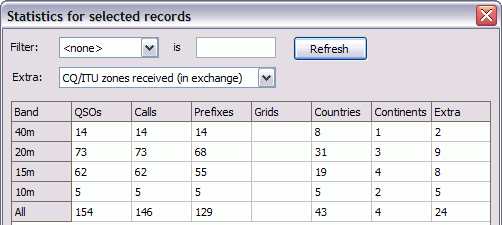
I made a total of 154 contacts in 43 different countries and 4 continents during my six hours or so of operating. The detailed breakdown, for those interested, is shown in the screen grab of the contest statistics dialog from KComm (the Extra field shows the number of CQ zones.) This would give me a claimed score of 17,487 points if my calculations are correct, which by comparison with last year’s results would place me well down the second half of the All Band Single Operator Low Power Unassisted results table.
This was the first time I had made such an effort for an SSB contest. Until now I hated turning on the radio during big SSB contests because the bands sounded like bedlam. But I had never tried with the K3 before. Instead of a mush of intermod, splatter and AGC pumping I could hear everything clearly. Sometimes I could hear two or three stations on the same frequency simultaneously, one in the foreground and a couple in the background. And the superb DSP filtering made it easy to shut out close-by stations so I could copy a weaker one. I often had the passband down to 1.8kHz and copy was still crystal clear.
Initially I started off just working the loud ones because I didn’t want to waste the serious contesters’ time by making them struggle to hear my call. But I found there was no hard and fast rule relating how strong a station was with whether they heard me. One Finnish station, 10dB over 9 with me, just kept on calling as if I wasn’t there. But many weaker ones came right back to my first call.
Frustratingly, a significant number of stations came back to me as “Golf 4 Lima India Oscar” – exactly the same error that was made when I ordered my QRSS beacon kit a couple of weeks ago. What is it about my call? This doesn’t happen on CW (though I used to get replied to as G3ILO very often as the holder of that call is a well known QRP CW operator.)
Conditions didn’t appear to be very good this weekend. I’d hoped to hear some interesting DX on 10m but I heard hardly anyone at all on the band. As always, 20m was the liveliest band, but I made almost as many contacts on 15m, probably because the QRM was less making it easier to make contacts.
I didn’t work any DX and I only worked one all time new DXCC entity – Svalbard, JW5E. I did hear a VK on 15m on Sunday morning but he had a big pileup going and after trying for about five minutes I decided not to waste any more time and move on.
Despite my unspectacular results I thoroughly enjoyed my few hours in the CQ WW DX SSB contest. No doubt QRZ.com and other online forums will be full of grumbles about contests taking over the band for the entire weekend, the only time working people can get on the air etc etc. But if you can’t beat them, why not join them?
My feeling is that contesting is one of the many different activities you can pursue and to get the most from the hobby you should try as many of those different activities as you can. As this post has hopefully shown, having indoor antennas is no obstacle to working a decent number of stations and earning a respectable score for the time spent. It’s not the winning, it’s the taking part that counts. I certainly felt like a real participant in this radiosport event and I look forward to seeing my call in the results table next year.

Julian Moss, G4ILO, is a regular contributor to AmateurRadio.com and writes from Cumbria, England. Contact him at [email protected].
A little contesting this weekend
I spent about 10 hours Saturday and Sunday making some contacts in the CQ WW SSB contest. This is one of the biggest contests, where the goal is to work stations, for the most part, outside of your own country. You get two points for working a station on your own continent (if you’re in North America, one point elsewhere) and three points for working stations on another continent. There are also multipliers for each different country and CQ Zone that you contact. As with other contests, your score is computed by multiplying the number of points by the multipliers. World-class competition stations typically have scores in the millions or even tens of millions for the high-power multi-operator stations. My score was quite a bit more modest, just a bit under 115,000 points. That beats my score from last year, though I’ve done better in the past. (Though I’ve also spent more time in the past.)

This isn’t one of my favorite contests specifically because it is so popular. Because it is so popular, there are almost always a lot of stations calling, which makes it harder for a small station like mine to be heard. As a result, stations that I’m hearing very well just can’t hear me, and it often took several minutes to work stations that under non-contest conditions could be very easy. In a lot of cases, I’d just give up and move on, sometimes coming back to try to work the stations again later.
Partway into the contest, I came up with a technique that made things a little less frustrating: I intentionally made my station “hard of hearing”. Normally, although I’ve got a very modest antenna (my G5RV), my radio is quite good at pulling in relatively weak stations. However, in this case, there was little point in trying to work very weak stations because they weren’t going to hear me. What I did was to turn off any pre-amplification (kind of like a “hearing aid”) for all bands, and on some bands (particularly 40m and 80m), I put in 8db or more of attenuation. (Kind of like putting in earplugs.) There were still plenty of stations to hear, and with my self-imposed handicap, I found that I was a lot more likely to work these stations.
This technique isn’t something that I’d normally recommend, but for this particular contest, it kept me from wasting time on stations that I really had no chance of working.
Here’s my score breakdown for the contest. One interesting thing is that this is one of a very few contests where I’ve actually worked stations on all six possible HF bands.
Band QSOs Pts Cty ZN
1.8 2 2 2 2
3.5 22 50 17 11
7 62 172 39 12
14 87 223 45 18
21 45 113 25 16
28 8 22 7 3
Total 226 582 135 62
My total score was 114, 654 points, which, as always, is subject to adjustment for any errors that I (probably) made.

David Kozinn, K2DBK, is a regular contributor to AmateurRadio.com and writes from New Jersey, USA. Contact him at [email protected].
A little contesting this weekend
I spent about 10 hours Saturday and Sunday making some contacts in the CQ WW SSB contest. This is one of the biggest contests, where the goal is to work stations, for the most part, outside of your own country. You get two points for working a station on your own continent (if you’re in North America, one point elsewhere) and three points for working stations on another continent. There are also multipliers for each different country and CQ Zone that you contact. As with other contests, your score is computed by multiplying the number of points by the multipliers. World-class competition stations typically have scores in the millions or even tens of millions for the high-power multi-operator stations. My score was quite a bit more modest, just a bit under 115,000 points. That beats my score from last year, though I’ve done better in the past. (Though I’ve also spent more time in the past.)
This isn’t one of my favorite contests specifically because it is so popular. Because it is so popular, there are almost always a lot of stations calling, which makes it harder for a small station like mine to be heard. As a result, stations that I’m hearing very well just can’t hear me, and it often took several minutes to work stations that under non-contest conditions could be very easy. In a lot of cases, I’d just give up and move on, sometimes coming back to try to work the stations again later.
Partway into the contest, I came up with a technique that made things a little less frustrating: I intentionally made my station “hard of hearing”. Normally, although I’ve got a very modest antenna (my G5RV), my radio is quite good at pulling in relatively weak stations. However, in this case, there was little point in trying to work very weak stations because they weren’t going to hear me. What I did was to turn off any pre-amplification (kind of like a “hearing aid”) for all bands, and on some bands (particularly 40m and 80m), I put in 8db or more of attenuation. (Kind of like putting in earplugs.) There were still plenty of stations to hear, and with my self-imposed handicap, I found that I was a lot more likely to work these stations.
This technique isn’t something that I’d normally recommend, but for this particular contest, it kept me from wasting time on stations that I really had no chance of working.
Here’s my score breakdown for the contest. One interesting thing is that this is one of a very few contests where I’ve actually worked stations on all six possible HF bands.
Band QSOs Pts Cty ZN
1.8 2 2 2 2
3.5 22 50 17 11
7 62 172 39 12
14 87 223 45 18
21 45 113 25 16
28 8 22 7 3
Total 226 582 135 62
My total score was 114, 654 points, which, as always, is subject to adjustment for any errors that I (probably) made.
David Kozinn, K2DBK, is a regular contributor to AmateurRadio.com and writes from New Jersey, USA. Contact him at [email protected].
Telling Terry What’s New
About a week or so ago, I had the opportunity to visit the Cheltenham Amateur Radio Association and give the Terry Russell, G3JFH Memorial Lecture.
This was a particular pleasure for two reasons – I grew up in Cheltenham and CARA was the first amateur radio club that I ever attended. I received a lot of support there as I learned the ropes and made a lot of good friends. It was simply wonderful to see many of them last week – they must be doing something right as they didn’t look any different!
Secondly, I knew Terry Russell, G3JFH pretty well. He was an influential member of the club and indeed he was my first contact on the air! He’d also been a friend of my Dad and they’d done lots of cycling together.
When I was trying to decide what to talk about, I thought it might be nice to ‘Tell Terry’ about the trends and developments in amateur radio since he’d passed away a few years ago. So that was what I did. I thoroughly enjoyed the evening and I hope that people found at least something of interest.
Here are the Powerpoint slides in case anyone wants to take a look.

Tim Kirby, G4VXE, is a regular contributor to AmateurRadio.com and writes from Oxfordshire, England. Contact him at [email protected].
SDR needs more UX
Spotted a very interesting post from Tobias, DH1TW on his blog ‘Contesting & SDR‘ titled Does SDR really suck?. He wonders out loud if the performance, flexibility and cost of SDR is so excellent, why hasn’t it taken off? What possible barriers might there still be to it assuming a place matching its promise and achievement?
He identifies the missing link as adequate user interface. He mounts a case arguing for a similar level of investigation and development on the user experience front to match the investment and experimentation on RF and signal processing.
And he acknowledges that there may be more than one user interface solution. Contesting and HFPack have different UX demands as other experts understand. Look at Elecraft‘s K3 and KX1, or the Steve Weber, KD1JV designs, especially the ATS series. And now Tobias argues, SDR gives us the opportunity to re-think user interface design from the ground up.
Who says that the radio controls must be on the front of a black box and located perpendicular to your shacks desk? SDR allows us for the first time to completely redefine and optimize the radios User Interface! Are you serious into contesting? If so, you want to pay special attention to ergonomics. Why not having the control console directly next to your keyboard? Or do you prefer portable, backpack operations? Then your focus will lie on the limited physical dimensions. N2ABPs SDR-Cube is a nice example on this.
A very timely – and well illustrated – read.
Stephen Rapley, VK2RH, is a regular contributor to AmateurRadio.com and writes from New South Wales, Australia. Contact him at [email protected].
LHS Show Notes #051
Ubuntu 10.10 – Maverick Meerkat
Russ upgraded from 10.04 to 10.10, which isn’t particularly easy. as 10.04 is the long-term-support (LTS) version, but 10.10 isn’t.
There is a command line command to upgrade:
do-release-upgrade
which will work, but you must first make a change in the Ubuntu software center. Click Edit -> Software Sources -> Updates tab. At the bottom of the Updates tab, there are three options for the release upgrade: Never, Long-term Support Only, and Normal Releases. You must select “Normal Releases”. Russ then issued the do-release-upgrade command. Once the downloads were complete, the upgrade just took about 45 minutes. A reboot is necessary due to the newer kernel.
The desktop background is a bit different, but otherwise it looks and runs much the same as 10.04. Russ had some performance issues with 10.04 on some of his machines. He thinks 10.10 runs much better.
- GNOME updated to current 2.32 version.
- Gnome desktop manager (gdm) version 3. Russ thinks it looks more like OS-X.
- Evolution updated to version 2.30. Russ thinks they should drop Evolution entirely. There would be room for GIMP if Evolution were deleted.
- Shotwell replaces F-Spot as the default photo manager. F-Spot replaced GIMP in a previous release due to space issues, and now Shotwell replaces that. Isn’t this kind of silly?
- Gwibber updated to use Twitter’s new authentication scheme.
Kubuntu changes:
- More updates to KDE.
- Updates to Qt, and KDE (4.5.1).
- Switched to PulseAudio. Russ says: BOOOOO!, because he’s unhappy with all audio systems on Linux.
Ubuntu Server changes:
- Eucalyptus updated for cloud computing environments.
Kernel update:
- 2.6.35-22.33 Based on 2.6.35.4 upstream stable kernel.
- Support for i586 and older processors, and i686 processors without the conditional move opcode (CMOV), has been dropped. Bad news for older machines.
WSPR was highlighted in the November, 2010 issue of QST.
- What is WSPR? From the WSPR Users Guide:WSPR (pronounced “whisper”) stands for “Weak Signal Propagation Reporter.” The WSPR software is designed for probing potential radio propagation paths using low-power beacon-like transmissions. WSPR signals convey a callsign, Maidenhead grid locator, and power level using a compressed data format with strong forward error correction and narrow-band 4-FSK modulation. The protocol is effective at signal-to-noise ratios as low as –28 dB in a 2500 Hz bandwidth. Receiving stations with internet access may automatically upload reception reports to a central database. The WSPRnet web site http://wsprnet.org/drupal/ provides a simple user interface for querying the database, a mapping facility, and many other features.
- Developed by Joe Taylor, K1JT.
- System Requirements:
- SSB receiver or transceiver and antenna.
- Computer running the Windows, Linux, FreeBSD, or OS X operating system.
- 1.5 GHz or faster CPU and at least 100 MB of available RAM.
- Monitor with at least 800 x 600 resolution.
- Sound card supported by your operating system and capable of 48 kHz sample rate.
- If you will transmit as well as receive, an interface using a serial port to key your PTT line or a serial cable for CAT control. Linux and FreeBSD versions can also use a parallel port for PTT. Alternatively, you can use VOX control.
- Audio connection(s) between receiver/transceiver and sound card.
- A means for synchronizing your computer clock to UTC.
Richard’s setup:
- Yaesu FT-897D Transceiver.
- G5RV Antenna.
- Rascal GLX sound card interface.
- Ubuntu 9.10.
- 3 gigs of memory and an Intel 3.0 Ghz CPU.
- Onboard sound card.
Installation:
- Richard downloaded what looked like the .deb package from the web site.
- He used Gdebi to unpack and install it, but could not get it to stay running. Every time he tried to do anything it crashed.
- After reading the Linux installation instructions from the user guide, he attempted to install it in the manner described:
- Download the appropriate file from http://physics.princeton.edu/pulsar/K1JT/wspr.html, place it in your home directory, and run the following commands in a terminal
$ sudo dpkg --instdir=. -i wspr_2.00r1714_i386.deb
$ cd WSPR
$ ./wspr
- This resulted in a program that would receive after some fooling around with the sound card, but no rig control, and no transmit.
- As a last resort, Richard downloaded the Windows version and loaded it under Wine, which gave him rig control, transmit, and receive, without much of a problem.
- It did leave him with a few minor annoyances: he has to start it from the file manager with “Open with Wine” from the directory “.wine/Drive_c/Program Files/WSPR”. The menu bar at the top was only partially functional, but he thinks it has to do with his USB mouse, as keyboard control works fine.
- Richard was heard in Argentina on 40m running 5 watts and reported on the wsprnet site.
- WSPRNet website
- WSPR net offers a wide variety of information on the network in real time.
- Page of stations currently active on WSPR.
- Map of stations that can be filtered by callsign and/or band.
- Offers dicussion forums for Q and A, setting up schedules, and general WSPR discussion.
Donations
If you’d like to help the podcast, please consider making a donation. It’s easy! Just a click on the Donate button on the web site. Every dollar helps. Or purchase some LHS merchandise at the SHOP! link on Web site. Check out the Badgerwear or buy one of the other LHS-branded items at PrintFection.com/lhs or Cafe Press. Thanks!
Contact
- Contact Richard at [email protected], Russ at [email protected], or both at the same time at [email protected]
- Listen to the live stream every other Tuesday at 8:00pm Central time. Check the LHS web site for dates.Leave us a voice mail at 888-455-0305 or 417-200-4811, or record an introduction to the podcast.
- Sign up for the LHS mailing list.
- Thanks to Dave from Gamma Leonis for the theme music.
Music
- “Monument” by Shearer from the album “Monument,” courtesy of Jamendo.
- “This Love” by Spinous from the album “Empathy,” courtesy of Jamendo.
Russ Woodman, K5TUX, co-hosts the Linux in the Ham Shack podcast which is available for download in both MP3 and OGG audio format. Contact him at [email protected].
Foxed
My FoxTrak APRS tracker board is now installed in a plastic case, together with 4 x AA NiMH cells which provide near enough 5V to power both the tracker and the GPS. Two mini-DIN sockets on the side of the case allow connection to a PS/2 GPS or PC for configuration, and to the radio. Now I just have to make up interface cables to my radios and install the top half of the case after drilling it and installing the charger socket for the battery.
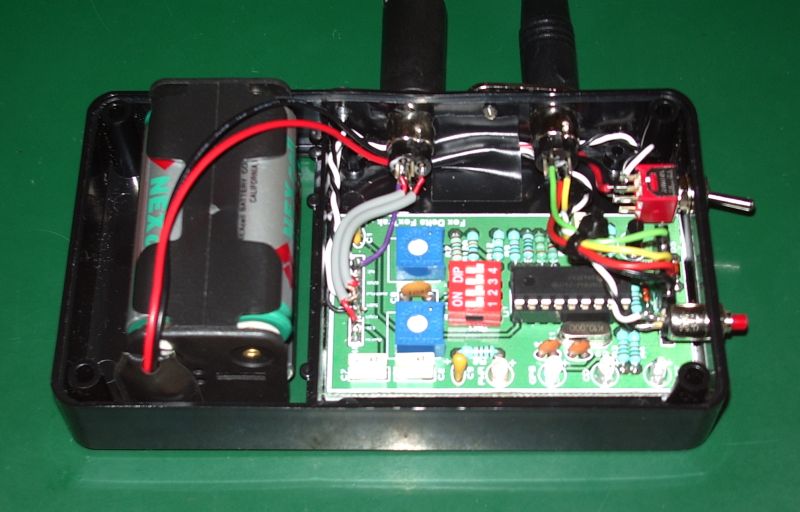
I purchased a GlobalSat BR-355 PS/2 GPS receiver on eBay and it works very well indeed with the FoxTrak, much better than the GPS in the Yaesu VX-8GR. It gets a fix within a couple of minutes when it is sitting on the shack window sill, unlike the VX-8GR which often never finds its position indoors at all, and the position remains rock steady unlike the Yaesu which tends to wander about.
I wanted to make a cable to use the tracker with my Motorola GP-300 hand-held. However I found that the jack plugs you can buy from component suppliers have too wide a body and can’t plug all the way in to the sockets on the top of the radio, which are a bit recessed. It appears that you need to use a proper moulded plug with the two pins. A cable for the Motorola GP-300 is available on eBay, so I’m waiting for one to arrive.
I was luckier with the old Kenwood TH-205E. The sockets for external mic, PTT and speaker are flush with the top of the case and the cable I made up using separate plugs works fine. Lacking a deviation meter I adjusted the audio output so the braaps sounded as loud as those from other APRS stations.
However, the TH-205E is a bit big and heavy for portable use, especially as it has a high capacity Ni-Cad battery pack (the original being as dead as a dodo.) I had expected the cable to work just as well with the little TH-F7E, because the Kenwood speaker-mic I have works with both radios. But although PTT works on the smaller Kenwood there is virtually no audio. I have to turn the audio up to maximum on the FoxTrak to get enough signal to be decoded by my gateway, and the deviation is still too low.
I am completely foxed by this problem. The only thing I can think of is that it is something to do with using two separate plugs and not the proper moulded two-pin connector used by the speaker-mic. Perhaps, as with the Motorola, the wide body of the plugs is preventing them from going far enough in to disconnect the internal microphone, which is shorting out the audio. Unfortunately the only way to prove this hypothesis would be to buy a cheap Kenwood speaker-mic or programming cable on eBay and cut the cable off. It’s a bit of a gamble, as I don’t know for sure if that’s the solution, and the cables in some of those cheap mics from China are very poorly screened so I could end up with an RF-induced problem.

Julian Moss, G4ILO, is a regular contributor to AmateurRadio.com and writes from Cumbria, England. Contact him at [email protected].
 Ham Radio Deluxe |
 W5SWL Electronics |
 Ham Radio Prep |
 KB3IFH QSL Cards  Hip Ham Shirts  HamRadioAuctions HamRadioAuctions Reliance Antennas Reliance Antennas Enigma Shop Enigma Shop |  morseDX  Ni4L Antennas  R&L Electronics R&L Electronics antennas.us antennas.us QRV QRV |
- Matt W1MST, Managing Editor
