 |
 ICQ Podcast S04 E06 – Radio Play Night (13 March 2011)
 13 March 2011 | by
 Series Four Episode Six of the ICQ Podcast has been released. News Stories include :-
- ARISS inspires students to study science
- Humber Fortress DX ARC to activate GB0BB
- Radio amateurs killed by Somali pirates
- RAYNET member gets funding
- IC-9100 transceiver now available for orders
- UK Propagation charts for March 2011
- Microwatt ERP 9 kHz signal copied at 45km
- New look for radio charity
- VHF activity on the increase
Your feedback, Propagation Report from Steve Nichols (G0KYA) and Colin (M6BOY) reviews a Radio Play Night.
Colin Butler, M6BOY, is the host of the ICQ Podcast, a weekly radio show about Amateur Radio. Contact him at [email protected].
ICQ Podcast S04 E06 – Radio Play Night (13 March 2011)
Series Four Episode Six of the ICQ Podcast has been released. News Stories include :-
- ARISS inspires students to study science
- Humber Fortress DX ARC to activate GB0BB
- Radio amateurs killed by Somali pirates
- RAYNET member gets funding
- IC-9100 transceiver now available for orders
- UK Propagation charts for March 2011
- Microwatt ERP 9 kHz signal copied at 45km
- New look for radio charity
- VHF activity on the increase
Your feedback, Propagation Report from Steve Nichols (G0KYA) and Colin (M6BOY) reviews a Radio Play Night.
Colin Butler, M6BOY, is the host of the ICQ Podcast, a weekly radio show about Amateur Radio. Contact him at [email protected].
QSY
It’s been a fun ride in the amateur radio blogosphere these past few years. I’ve had some good discussions with intelligent people and had fun along the way. I shared ideas, some good and some half-baked. I had some folks believing that the LORAN network was being saved by radio amateurs, organs were going to be harvested from radio amateurs for universal healthcare, and the Red Hot Chili Peppers liked to jam on amateur radio. I analyzed, complained, praised, and ranted, and a lot of you listened. Several of you presented alternate points of view that provoked thought and sometimes changed my opinions.
Unfortunately, I find it increasingly difficult to write about topics that are consistent with the original intent of this blog. As I’ve often mentioned, I wanted to do something different from the normal “I did this today” blog. A lot of folks like to do that, and that’s OK. A blog is what you want it to be, it’s your creation. There’s only so much I can write about regarding what’s broken or can be improved in amateur radio, and writing about it doesn’t really do anything to fix it. Often in this online world we amass an audience that agrees with our viewpoints and opinions, and critical topics on blogs tend to preach to the converted. Those who really need to read such topics aren’t reading blogs.
Rather than have this blog go on a life support system with periodic and annoying “I’ve been really busy” posts as many amateur radio blogs have done, I’m retiring The K3NG Report and have launched another site entitled Radio Artisan which will focus on projects and operating events, mainly outdoors. While technically it’s hosted with WordPress and essentially is a blog format, I’m not treating it as blog so I don’t feel an obligation to post regularly or write about the amateur radio crisis du jour.
See you over at Radio Artisan…
Thanks for reading and 73. Dit dit.


Welcome
Welcome to Radio Artisan, and a special shout out to former K3NG Report readers. This is my new creation which will focus on projects and operating activities. Links to projects and “sticky” articles are over on the right. I will generally post articles when some new project page has been created or if there’s an update to an existing one.
A few of the pages are past postings from the K3NG Report. The PIC Keyer is a project that I’ve had published for several years now. My newest creations are the Arduino CW Keyer and the Arduino Computer Rotator Interface / Yaesu Rotator Interface Emulator. Both are being actively developed with new features, but are fully functional.
I’m currently on an Arduino kick as you may be able to tell. I also have in the works a frequency counter which will interface with the CW keyer, and a DDS chip controller which may become the basis for a larger project. I also have in the works an Arduino controlled balanced antenna tuner.
If you have any interests in these projects, please be sure to drop me a line.
73


Happy birthday, ZX81
Thirty years ago today the Sinclair ZX81 was introduced to the world. The world’s first affordable personal computer, it wasn’t in fact the first home computer I had owned. That had been a Nascom 1, a Zilog Z80 based machine with just 1Kb of RAM, which I built from a kit – all 1,400 soldered joints of it, using the same Antex soldering iron I still use today.
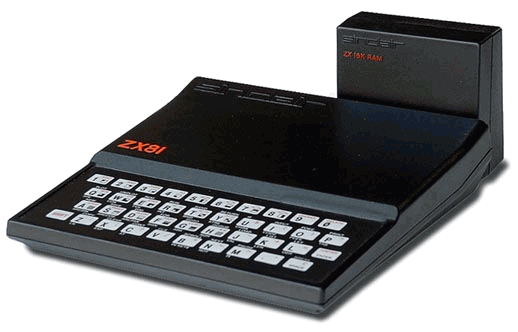
The ZX81 was also offered as a kit as well as a ready built version, so naturally I ordered the kit. I seem to remember it cost £49 – much less than the Nascom. I don’t remember how many soldered joints there were, but there were only four main chips. It was a much easier project to build. The ZX81 also came with just 1Kb of RAM. But unlike the Nascom, it had a built-in BASIC interpreter so you could still do more with that 1Kb and you didn’t have to program it in assembly code.
Innovative design was used to cut the cost of the ZX81. For example, instead of a dedicated display processor the Z80 CPU generated the display. Whenever your program executed, the screen went blank. The screen was an ordinary black and white TV. Programs were loaded and saved using a cheap cassette recorder. That was read and written by the CPU too, which generated wild patterns on the screen while it neglected its display duties. The keyboard was a plastic membrane type. It was horrible to type on.
Later I upgraded the memory to 48Kb using a third party RAM pack (the standard RAM pack sold by Sinclair was only 16Kb.) This, too was built from a kit. Like the Sinclair one, it fixed to the rear of the machine using an edge connector, with no other fixing. Every ZX81 owner is familiar with the term “wobbly RAM pack”. One accidental jolt could interrupt the connection and crash the computer losing all your work. Ah, those were the days!
As a radio ham, I naturally was interested in writing ham radio software for the ZX81. I wrote several programs including a morse tutor, which used a machine code routine for sending the actual code. I think I have written morse tutors for every type of computer I have owned – it’s amazing that I am still so bad at reading the code! An article describing the morse tutor and a memory keyer for the ZX81 was published in Short Wave Magazine and was one of my first published articles.
I can still remember the excitement of home computing in those early days. Today’s PCs, vastly more powerful and capable though they are, just aren’t as interesting. Back then, home computing was very much a hobbyist’s game. We were pioneers. Now everyone and his granny has a computer, and programming has become more or less a job for professionals. I do miss those old days!
Thank you, Clive Sinclair, for bringing us these wonderful toys. Happy 30th birthday, ZX81!

Julian Moss, G4ILO, is a regular contributor to AmateurRadio.com and writes from Cumbria, England. Contact him at [email protected].
Boosting the VX-8GR on APRS
A few weeks ago I did an analysis of the audio levels of different APRS radios and lamented the low level of the audio transmitted by the Yaesu VX-8GR. An Italian ham wrote to me enclosing a copy of a document he obtained from Yaesu showing how to increase the transmit deviation. I decided to give it a try. You can find a copy of this document in the Files section of the VX-8R Yahoo group, but I will describe the process here.
Note that performing this adjustment will increase the transmit deviation on speech as well. There is no way to increase the packet deviation independently. Note too that while you are in the alignment menu it is possible to change other settings as well by accident. This may be undesirable, especially if you don’t have the test equipment to realign the radio properly, so be careful and perform the adjustment at your own risk! Finally, note that these instructions will work only for the VX-8GR. There are instructions for accessing the alignment menu of the VX-8R on the web. They don’t work for the GR and these instructions don’t work for the R. I have no idea if any of the instructions work with the DR.
To avoid entering the alignment menu accidentally, Yaesu has made accessing it quite difficult. First you must enable the CW ID (main menu item 16) and program a password AH041M into it. The manual explains how to do this. You must then set the transceiver to single band mode on the A band, in VFO mode (not memory) on a frequency of 430.000MHz. Now switch the radio off.
Press and hold the HM/RV key and turn the VX-8GR back on. If all the above steps were carried out correctly the radio should start up in alignment mode showing the first alignment setting. Rotate the control knob clockwise a few clicks to select the MAX DEV adjustment, then press the V/M button to select it. A pointer symbol should appear to show that adjustment is selected.
The control knob now adjusts the deviation setting. Make a note of the original value in case you want to reset it, then turn it up to 254. Yes, I know this sounds like a CB “screwdrivers to the max” tweak but as you can see from the spectrograms below, even at that setting the packet deviation won’t quite match that of the Kenwood rigs. Press the V/M button again to exit the adjustment, then press HM/RV to exit the alignment menu. The radio will restart in normal operational mode. Don’t forget to clear the CW ID once you’re happy with the new setting.
The spectrograms below show the difference made by the adjustment, with the Kenwood TH-D72 shown as a reference.

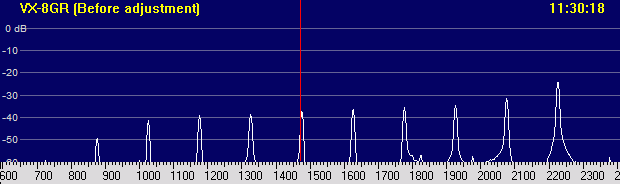

As you can see, the peak deviation of the high tone is now within 1dB of that of the Kenwood, though the Yaesu still has more low-frequency roll-off. Nevertheless, this is as good as it gets with the Yaesu. If you still can’t hit the digis you think you ought to, perhaps you’d be better off with a Kenwood.
As I said earlier, this deviation adjustment makes your audio louder as well. You, your local hams or your local repeaters might not like this. The VX-8GR has a “Half Deviation” menu option which will reduce the deviation back to approximately what it was before this adjustment, but it works across the whole radio and not per band, so you can’t have the wider deviation only on the APRS band.
It is interesting to note that in the Yaesu alignment document the deviation alignment is performed at 435MHz. I found that the deviation on 70cm is higher than it is on 2m. This appears to be a consequence of the way the radio is designed, as there are not independent deviation adjustments for the two bands. But this does explain to an extent why the deviation on 145MHz is lower than it should be.
Where I live, 70cm is completely dead and 2m is quiet so we can operate using 25kHz channel standards with no problems. Therefore I have not found this adjustment to cause any adverse effects and it certainly has improved the reach of my APRS packet beacons. Your mileage may vary.

Julian Moss, G4ILO, is a regular contributor to AmateurRadio.com and writes from Cumbria, England. Contact him at [email protected].
Handiham World for 9 March 2011
Welcome to Handiham World!

A couple of months ago my local radio club decided to bring back their monthly newsletter. The newsletter had been absent as a club communications tool for a few years, although there was a well-maintained website with frequent updates by multiple contributors. At least part of the reason the newsletter is returning to our club is that I suggested at one of the club meetings that it do so and that I would help to edit the new publication. So far, so good! There are two of us sharing editorial duties and several club members have stepped up to the plate and contributed columns and stories so that no one person is responsible for doing all of the work each month. Working together as a team allows the newsletter crew to turn out a good product that is an asset to the club.
But why is a newsletter still important in this age of constantly-available information that bombards us from every direction?
It’s hard to put one’s finger on exactly why people prefer one news and information source over another one. The obvious preference for a traditional means of reading the club news, a print newsletter format that has been successful for years, perhaps decades, is one consideration. If your club is anything like mine, there are going to be several club members who do not have computers and who feel left out without a monthly newsletter that they can actually hold in their hands and perhaps even mark or take notes on with a pencil. Although individual stories from a club website can be printed up for members who do not use computers, it really isn’t even close to the same thing as an official club newsletter that pulls together all of the information in one single publication. Then there will be the other club members who have and use computers but who still prefer the traditional print format. Even some people with advanced technical skills find a print newsletter more compelling and relaxing to read, especially if they sit in front of a computer screen all day long at the workplace. A print newsletter can also be passed on to another family member or a friend. A physical newsletter is not quite as easy to forget about as a web link that someone might give to you. A print newsletter can be read without any device or Internet access.
The last time I checked my calendar, it was 2011. With our feet firmly planted in the 21st century, even a print newsletter for your radio club must have a digital online edition. The reasons for this are pretty obvious; there will be people who prefer to read everything online. It is important that the club serve the newsletter up for these people on the website because doing so will save printing and mailing costs, probably for the majority of club members. In fact, our club seldom mails anything out these days, much less newsletters. It makes more sense to produce the newsletter in PDF, place it on the website as a download, and allow club members who want to read a print newsletter to go ahead and download and print the publication for themselves and for their friends. Several printed copies will be available to distribute at club meetings to members without computers. A few newsletters will be available to mail out to club members who are out of State for the winter or who are unable to get to a club meeting because of health or transportation issues. Furthermore, the PDF version necessarily contains embedded text that can be read by blind members who use screen reading technology.
So the club newsletter of 2011 is different from the club newsletter of 1991 or 2001. The differences are obvious even to club members who read the print edition. The layout and color photos wouldn’t be possible without modern software like Microsoft Publisher. The content itself is available 24/7 on the club website for club members to explore months or years after it was first published. Articles are searchable by computer. Content is accessible to blind computer users. Before all of this new technology came along, club newsletters were pretty basic-looking monochrome publications that were sometimes done on mimeograph machines. There is no doubt that the 21st century amateur radio club newsletter can be a pretty impressive looking publication!
However, the newsletter still serves the same basic purpose of communicating to club members in a way that it always has. Monthly meeting announcements and notes, things that are happening in the lives of radio club members, amateur radio news of broader importance to everyone, club calendars, regular columns by club members or officers, minutes from the previous month’s meeting, and all of the other timely news collected in a single place each month make up the traditional content of a typical monthly issue. The newsletter is fundamentally different from a website in that it represents information that has been collected, edited, arranged, and presented in a very specific way at a specific point in time by editors. The monthly publication, once posted on the website, is the official newsletter for that month. This may be seen as hopelessly outdated by some people who cannot understand why anyone would want to look at a news source that isn’t constantly updated, but on the other hand may be seen as a huge asset by others who don’t care to devote the time and attention to a club website where information overload can lead to missing important stories that might not be near the top of the pile of information.
One of the problems club websites have is simply that they must compete with hundreds of other websites for our attention every day every month every year every hour. Although at the time dropping a regular monthly newsletter seemed like a good idea, having the newsletter as a single point of collected information each month now seems like it is a little bit too important to give up just yet. That is the reason that I volunteered to help edit my club’s newsletter. Yes, it is another thing to do in my already busy life, but I know that I have the ability and desire to help my radio club in this activity and I realize that making a radio club a successful endeavor is something that requires all of us to roll up our sleeves and pitch in. I would like you to think about how you are helping your local radio club to be the best possible organization it can be. You may not be able or interested in editing a club newsletter, but you may have time to write an article or a monthly column about one of your amateur radio interests. You may have time to write an occasional column, perhaps promoting Handihams or the Handiham nets to your local club via the club newsletter or website. If you are simply not a writer, there are still plenty of other opportunities to participate in your club’s activities. Although showing up for meetings is important, your radio club will be better off and you will have more fun if you sometimes raise your hand to volunteer to help put together the club’s field day activities or the club picnic. Monthly meetings are generally divided into the business part of the meeting and some kind of club program. If you have a special interest in amateur radio and would like to put on a program for your club, I’d be willing to bet just about anything that you would be welcomed with open arms. Most clubs are eager to find presenters for the club program, instructors for their licensing classes, and volunteer examiners for their VE teams.
I guess my point is that you can’t be afraid to step forward and do something for your local radio club, whether it is working on the newsletter or some other club project or on the air activity like the net or the repeater. Every active organization will have volunteer opportunities. I hope you will step up to the plate. You will have more fun and your club will be the better for it!
Patrick Tice, WA0TDA
Handiham System Manager
[email protected]

FCC issues three accessibility-related NPRMs – Handiham members might want to comment!

Washington, D.C. – As part of its ongoing efforts to implement the “Twenty-First Century Communications and Video Accessibility Act of 2010” (CVAA), the Federal Communications Commission issued three Notices of Proposed Rulemaking (NPRMs). The CVAA is considered the most significant piece of accessibility legislation since the passage of the Americans with Disabilities Act in 1990.

Pat Tice, WA0TDA, is the manager of HANDI-HAM and a regular contributor to AmateurRadio.com. Contact him at [email protected].
 Ham Radio Deluxe |
 W5SWL Electronics |
 Ham Radio Prep |
 KB3IFH QSL Cards  Hip Ham Shirts  HamRadioAuctions HamRadioAuctions Reliance Antennas Reliance Antennas Enigma Shop Enigma Shop |  morseDX  Ni4L Antennas  R&L Electronics R&L Electronics antennas.us antennas.us QRV QRV |
- Matt W1MST, Managing Editor
