 |
 Working the Wainwrights
 4 April 2011 | by
 I noticed that when you save a radio coverage image from Radio Mobile, the program also saves a KML file. If you double-click on this it opens Google Earth superimposing the coverage map on the satellite view.
I made a new coverage map without the road map and then opened that in Google Earth. I then opened a Google Earth plugin showing all the Wainwright summits. I could then easily see the predicted radio reception from each of the summits. (Click the image to see it full sized.)
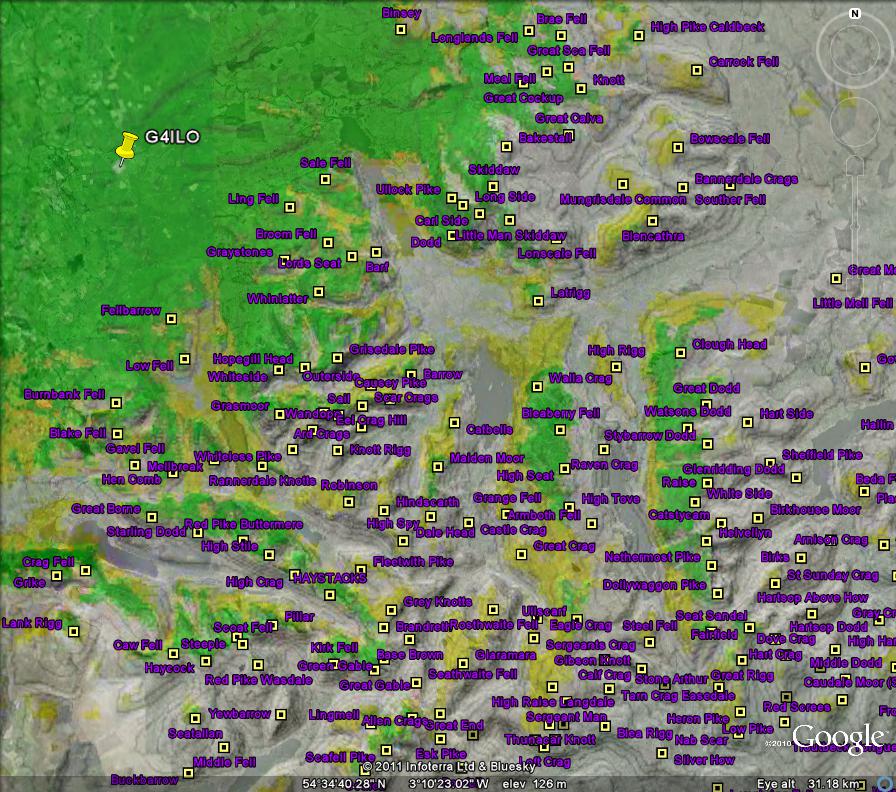
The predictions seem pretty accurate from the summits I have worked (or failed to work) so far.

Julian Moss, G4ILO, is a regular contributor to AmateurRadio.com and writes from Cumbria, England. Contact him at [email protected].
Dayton Hamvention® Survival Guide
The Dayton Hamvention® is the most influential annual gathering of amateur radio enthusiasts in the world. It’s been around since 1952 and for much of that time it has taken place at the Hara Arena, a large multi-purpose facility just outside the city limits of Dayton, Ohio. It’s a three-day event that takes place in the month of May that fills the hotels and campgrounds in the surrounding area to overflowing.
Attendance peaked in the early 1990s at over 33,000 visitors making it easily then the largest ham radio convention on the planet.
Of course, if you just mention to a few of your friends that you’re planning on making the trip to Dayton at least one of them is bound to declare that “Hara Arena is a dilapidated old venue that deserves to be torn down”. While it’s true that the facility has seen its better days, it’s also true that this is a multi-day hobbyist event that attracts tens of thousands of visitors.
Jeff Davis, KE9V, is a regular contributor to AmateurRadio.com and writes from Indiana, USA.
April 2011 Buddistick Giveaway Winner

We are very pleased to announce the winner of the
Buddistick Deluxe Package
from Buddipole Antennas
Thanks to Chris from Buddipole for sponsoring this month’s drawing.
We had 1,124 entries!
We’re giving away more great prizes soon.
Stay tuned and get ready to enter.
OK, onto what you’ve all been waiting for!
The winner of our April 2011 prize giveaway is…
Matt Thomas, W1MST, is the managing editor of AmateurRadio.com. Contact him at [email protected].
Simple AM transmitters
 I had a lot of good response from some bread board based projects in the past. so, here is a neat little AM transmitter I stumbled on Instructables.
It’s simple enough that you may already have most of the spare parts, yet detailed enough to allow you a little room for modification. I like building transmitters like these and sending audio to my old broadcast radios or even amateur receivers like my old Hallicrafters gear.
Want to really freak people out? Build one of these and hook it up to an MP3 player or portable CD Player (not like we have a massive use for these) and use it to stream old time radio. Tons of resources online. it just seems right to listen to classic radio on…… a classic radio. I have an old American Bosh console with great woodwork, classic styling and such. Hooked it up to my MP3 player and listened to the entire broadcast day of CBS on “D Day”. Really kewl! The Shadow hasn’t sounded this cool in quite some time.
Here is a link to the AM transmitter in the photo:
http://www.instructables.com/id/Easy-AM-Transmitter/

Here is a slightly different approach. Lets say you have found a great condition cabinet at a tag sale, but the parts inside are truly destroyed. I, don’t like modifying a restorable gem. But……. If you want, you could take an MP3 player, load it up with your favorite shows and have a great tabletop discussion piece. You can get MP3 players REALLy cheap even at a drug store for ten bucks or so and load quite a bit of audio.
Here is the link for the MP3 player in a classic radio project:
http://www.instructables.com/id/Vintage-Tube-Radio-Restoration-MP3-Upgrade/
Don’t think I left you guys out with some neat radios from the 70′s and such. Especially those radios that came out around the time of the great Sci-fi flicks. Ohhhh, I wish I had one of those vintage Welltrons!!!!!!!!
Below is a neat FM transmitter project. I like this because it gives you a different dimension into the different modes and won’t cost a lot of money to truly learn a lot. This title is called “How to build the simplest FM transmitter”:
http://anarchy.translocal.jp/radio/micro/howtosimplestTX.html
Jonathan Hardy, KB1KIX, is a regular contributor to AmateurRadio.com and writes from Connecticut, USA. Contact him at [email protected].
Getting the plot
A few years ago I read about a program called Radio Mobile which was supposed to be able to plot maps showing your VHF or UHF station coverage using actual terrain data. I downloaded it but couldn’t figure out how to get it to work so I gave up. A few days ago someone mentioned that it is possible to hook the program into an APRS server so I thought that I would try again. I was given a hint that for UK users the G3TVU Quick Start package was the easiest way to get Radio Mobile going.
The default setup is for a location in the Derbyshire Peak District so I followed the instructions on Changing Location to try to create maps centered on G4ILO. I got as far as producing an elevation map but was then baffled by the sentence: “Which can then be ‘Merged/Copy’ with a road map and ‘Kept in new picture’ to produce.”
James VE6SRV came to my assistance with an explanation in English: “On the menu select EDIT then in the drop down menu select MERGE PICTURES… F7. You’ll get a dialog box opened up. It will have a list of various sources on the left, detailed choices about the source in the middle and operation controls on the right.Try picking OSM, and then clicking DRAW. After the merge is complete, you’ll be asked how you want to keep the resulting image, or to discard it. The four options equate to SAVE, SAVE AS, LET ME LOOK AT IT FOR NOW, and TOSS IT. If you chose copy, the OSM tiles will overwrite the relief map. ADD, MULTIPLY, and BITWISE are 3 different methods of merging the shaded relief map with the OSM tiles. Depending upon the colours, and the type of output you want, you’ll need to play a bit with the choices to see how it looks for you. You can also play with contrast and brightness sliders to try and get the output just how you like it.” This was just what I needed, and after a bit of experimentation I soon had a road map of my area merged with the relief map showing the mountains.
The next step was to try to plot the coverage of my station on the map. I believe the default setup had a dummy base, mobile and hand-held station predefined but they were now outside my area and in any case I must have deleted them. Creating a “unit” for my own station was simple enough, but when I selected one of the tools to plot coverage the Draw button was disabled. Eventually I worked out that you have to have at least two stations (“units”) defined and they must both be members of the same network. The program will then plot the coverage for your station as received by a station of the same type as the other one.
I thought the coverage plots were rather optimistic judging by experience so I had to change some of the parameters and choose the “worst case” to get a plot that looked reasonable. This being VHF, it’s possible that the fact of my antenna being located in the attic could result in some degradation of the signal. I felt the default colouring of green for 3dB over noise or better and yellow for 3dB below noise to 3dB above didn’t give a realistic picture so I changed the colouring so that green depicts 10dB or more over noise and yellow shows between 0 and 10dB.
The first plot shows a wide area view:
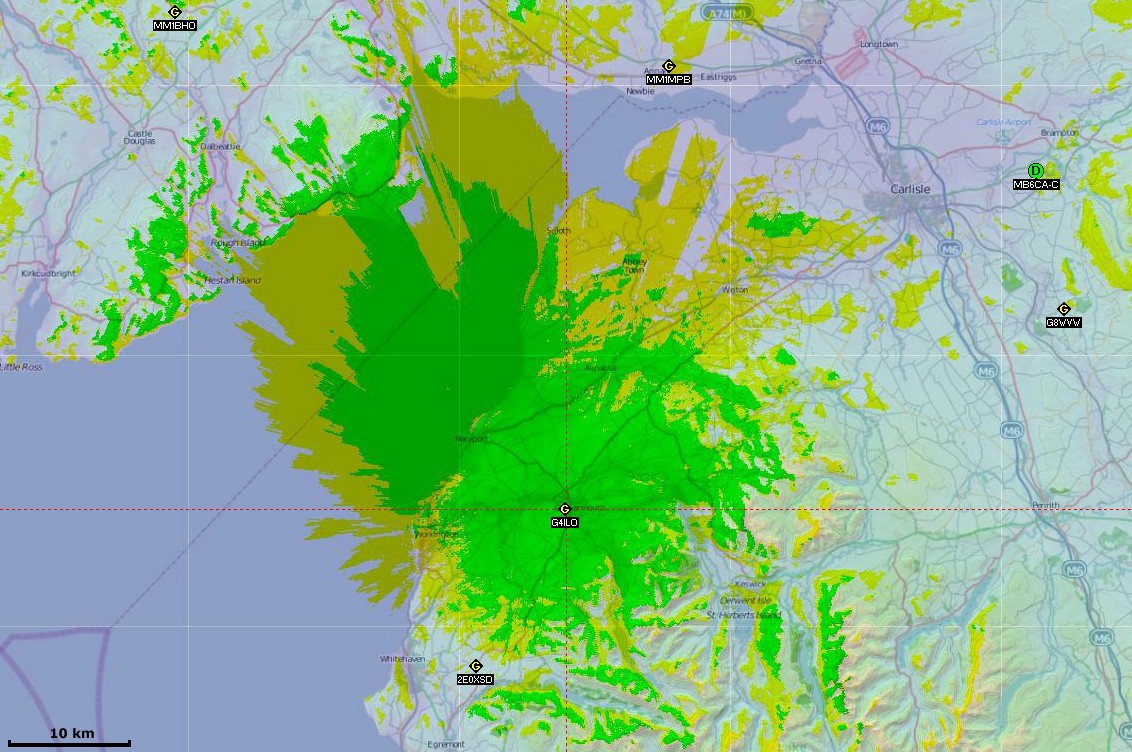
Click to see the map full-sized. I did a second plot at a larger scale to show the local coverage in more detail:

The plot shows really clearly how my VHF range is limited by the surrounding hills.
Connecting Radio Mobile to an APRS server has limited use. The program doesn’t seem to handle objects very well so for example the GB3CA object put out by MM1MPB shows as MM1MPB and moves that station’s position. But it is a useful way to get other local stations into the system instead of manually entering their details.
The objects sent out by WOTA to show the position of a Wainwrights On The Air activation are shown as WOTA not the name of the object. The Radio Link option can be used to plot the path between two stations and estimate the received signal strength, as in this example showing the path between me and Phil G4OBK/P on the summit of Seatallan.
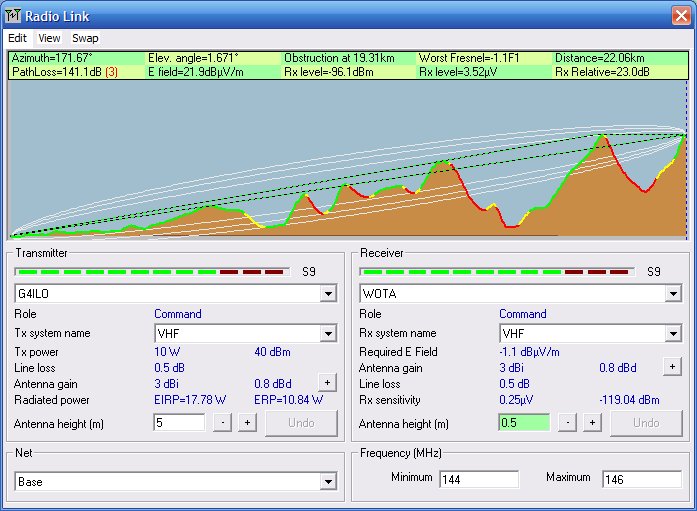
The estimated S9 signal strength is somewhat more than I actually received from Phil and I was running 50W not 10W. As mentioned earlier my antenna gain is also downrated over reality to try to get a more realistic picture.
Radio Mobile is a clever piece of software and it was interesting to play with it. It was quite hard work to get going, but it was useful to see how the nearby hills affect my VHF coverage.

Julian Moss, G4ILO, is a regular contributor to AmateurRadio.com and writes from Cumbria, England. Contact him at [email protected].
Congratulations SV2DCD and ZS6WAB: 70MHz first
Just catching up with the week’s VHF news. Really good to see this video of the first ever 70MHz TEP QSO between Greece and South Africa.They start out on WSJT but stick with the video and you’ll hear them work on SSB.Congratulations to you both!And I wish I could get my FT847 to work *that* well on 70MHz. I’ve seen the receive board advertised on eBay. Interesting that Leo, SV2DCD’s 847 will run about 70W output!

Tim Kirby, G4VXE, is a regular contributor to AmateurRadio.com and writes from Oxfordshire, England. Contact him at [email protected].
Congratulations SV2DCD and ZS6WAB: 70MHz first
Just catching up with the week’s VHF news. Really good to see this video of the first ever 70MHz TEP QSO between Greece and South Africa.They start out on WSJT but stick with the video and you’ll hear them work on SSB.Congratulations to you both!And I wish I could get my FT847 to work *that* well on 70MHz. I’ve seen the receive board advertised on eBay. Interesting that Leo, SV2DCD’s 847 will run about 70W output!
Tim Kirby, G4VXE, is a regular contributor to AmateurRadio.com and writes from Oxfordshire, England. Contact him at [email protected].
 Ham Radio Deluxe |
 W5SWL Electronics |
 Ham Radio Prep |
 KB3IFH QSL Cards  Hip Ham Shirts  HamRadioAuctions HamRadioAuctions Reliance Antennas Reliance Antennas Enigma Shop Enigma Shop |  morseDX  Ni4L Antennas  R&L Electronics R&L Electronics antennas.us antennas.us QRV QRV |
- Matt W1MST, Managing Editor
