 |
 Jan Mayen Island DXpedition
 27 April 2011 | by
Talk about the trip of a lifetime! This from their new website launched today:
Jan Mayen Island is a volcanic island in the Arctic Ocean and part of the Kingdom of Norway. It is 55 km (34 miles) long (southwest-northeast) and 373 km2 (144 mi2) in area, partly covered by glaciers (an area of 114.2 km2 or 44.1 mi2 around the Beerenberg). It has two parts: larger northeast Nord-Jan and smaller Sør-Jan, linked by an isthmus 2.5 km (1.6 mi) wide. It lies 600 km (about 400 mi) northeast of Iceland, 500 km (about 300 mi) east of central Greenland and 1,000 km (about 600 mi) west of the North Cape, Norway.
Jan Mayen island is not placed at the top of the 100 Most Wanted DXCC list, but it’s still very wanted in some areas and modes – especially West Coast of the USA, Japan, Oceania, Africa.
After a deep analysis of specific areas vs. modes, we decided to focus on CW and RTTY as our primary modes during JX7VPA.
Since our path towards Africa (where, according to feedback we received, it is still very wanted) will be a bit more difficult due to island’s terrain, we will try to test long path conditions if short path fails.
First day of our activity will be used to check openings toward different areas as conditions we will find at the island may be a big surprise due to polar day period 24/7.
The biggest threat we must face while at Jan Mayen is auroral activity. Since the island is in range of often Au oval’s activity, any increase of A/K indexes may result in deep RF blackouts. Please keep that in mind if our signals disappear from bands suddenly.
Take a moment to check out their website and of you’re a CW or RTTY op, mark your calendar for early July.
Matt Thomas, W1MST, is the managing editor of AmateurRadio.com. Contact him at [email protected].
Handiham World for 27 April 2011
Welcome to Handiham World!
And welcome to our special occasional computers-drive-me-crazy edition! Since the personal computer has become such a mainstay in the ham shack, every so often we devote an edition to the blessings and curses these machines visit upon us, and this is that edition.
If you are anything like the typical computer user, you use your computer to do a variety of plain vanilla tasks like web browsing and email. These functions are so mainstream that even grandma and grandpa have become comfortable with them. I know from my experience with amateur radio and amateur radio operators that most of us will go way beyond asking our computers to do those basic things. The typical ham shack is full of equipment that is just begging to play “tag, you’re it” with your computer. There is a specialty software for everything from antenna modeling to rig control, and of course VoIP software like EchoLink. Ham radio operators are often interested in other activities like astronomy, photography, aviation… The list seems to be just about endless. Personal computers can host software applications to make all of those other hobby activities even more fun. With all of these different applications installed on the ham shack computer there is potential for conflicts and – dare we say it – computer problems.
Who among us hasn’t had their personal computer drive them crazy on a semi-regular basis? Whether it is just one application that simply refuses to work even though it worked perfectly the day before or the whole computer being overtaken by malware or perhaps some kind of hardware failure, we have all experienced the frustration of dealing with this machine that has become pretty much essential in our daily activities. Why do we keep it around? Well, because it’s so doggone handy! I know I would hate to go back to the bad old days of typing on a typewriter. I’ve always been a terrible typist and make oodles of mistakes that used to require gallons of white correction fluid. When I type something on a typewriter, it is more efficient to use a paint roller to apply the correction fluid to the page than that little brush that comes in each bottle of “Type White”. In fact, I am typing this using voice input computing, Dragon NaturallySpeaking to be specific. I know my blind friends would hate to go back to the days before personal computers and modern screen readers opened up so many pathways to accessibility. And in the ham shack my radios are controlled by software, Ham Radio Deluxe, and I’m afraid I’ve gotten pretty spoiled with how easy this software makes keeping my amateur radio logbook up-to-date. Although the computer may be a pain in the posterior more often than I think it should be, I would never go back to the bad old days of pre-computer ham radio.
So today let’s take a look at some ongoing issues with computers in the ham shack and computers in general as well as some new stuff that has been suggested to us by Handiham members.
For Handiham World, I’m…
Pat Tice
[email protected]

Pat Tice, WA0TDA, is the manager of HANDI-HAM and a regular contributor to AmateurRadio.com. Contact him at [email protected].
Handiham World for 27 April 2011
Welcome to Handiham World!
And welcome to our special occasional computers-drive-me-crazy edition! Since the personal computer has become such a mainstay in the ham shack, every so often we devote an edition to the blessings and curses these machines visit upon us, and this is that edition.
If you are anything like the typical computer user, you use your computer to do a variety of plain vanilla tasks like web browsing and email. These functions are so mainstream that even grandma and grandpa have become comfortable with them. I know from my experience with amateur radio and amateur radio operators that most of us will go way beyond asking our computers to do those basic things. The typical ham shack is full of equipment that is just begging to play “tag, you’re it” with your computer. There is a specialty software for everything from antenna modeling to rig control, and of course VoIP software like EchoLink. Ham radio operators are often interested in other activities like astronomy, photography, aviation… The list seems to be just about endless. Personal computers can host software applications to make all of those other hobby activities even more fun. With all of these different applications installed on the ham shack computer there is potential for conflicts and – dare we say it – computer problems.
Who among us hasn’t had their personal computer drive them crazy on a semi-regular basis? Whether it is just one application that simply refuses to work even though it worked perfectly the day before or the whole computer being overtaken by malware or perhaps some kind of hardware failure, we have all experienced the frustration of dealing with this machine that has become pretty much essential in our daily activities. Why do we keep it around? Well, because it’s so doggone handy! I know I would hate to go back to the bad old days of typing on a typewriter. I’ve always been a terrible typist and make oodles of mistakes that used to require gallons of white correction fluid. When I type something on a typewriter, it is more efficient to use a paint roller to apply the correction fluid to the page than that little brush that comes in each bottle of “Type White”. In fact, I am typing this using voice input computing, Dragon NaturallySpeaking to be specific. I know my blind friends would hate to go back to the days before personal computers and modern screen readers opened up so many pathways to accessibility. And in the ham shack my radios are controlled by software, Ham Radio Deluxe, and I’m afraid I’ve gotten pretty spoiled with how easy this software makes keeping my amateur radio logbook up-to-date. Although the computer may be a pain in the posterior more often than I think it should be, I would never go back to the bad old days of pre-computer ham radio.
So today let’s take a look at some ongoing issues with computers in the ham shack and computers in general as well as some new stuff that has been suggested to us by Handiham members.
For Handiham World, I’m…
Pat Tice [email protected]
Pat Tice, WA0TDA, is the manager of HANDI-HAM and a regular contributor to AmateurRadio.com. Contact him at [email protected].
VX-8GR receiver overload
This afternoon I went for a stroll up Ling Fell, LDW-205. It was a fine afternoon and I wanted a bit of exercise. I took the VX-8GR so I could test the new QRU feature of Lynn KJ4ERJ’s APRSISCE/32 software that allows an APRS user to receive information about nearby objects on request. I have created a QRU server for Wainwright summits so that an APRS user in the fells could receive information about the nearest summits, to aid identification or navigation.

I put a 2m helical antenna on the rucksack support for the walk up, so the VX-8GR could send my position. The other channel was monitoring 145.500MHz (S20) the FM calling channel. As I gained height I started to hear some loud bursts of interference, a combination of a whine and a buzz, on S20. When I got to the top I switched antennas to the RH-770 dual band telescopic. My first call was answered by Colin, 2E0XSD. His signal was moving the meter on the VX-8GR to an S3 or 4 but there was intermittently a lot of crackly interference over his audio. I tried engaging the RX Attenuator option in the VX-8GR menu and it did seem to improve things a bit, but not completely.
A bit later, when I was testing the QRU server, I could hear the APRS packets coming back from my gateway (which is line of sight from Ling Fell, just behind me in the distance in the picture) but they sounded distorted and the VX-8GR didn’t decode them.
I wondered if there was a fault with the cable to the rucksack mount so I put the antenna directly on the radio. My next call was answered by Geoff G4WHA from his car in the car park in Penrith. He was 5 by 1 but his signal was cutting out intermittently. I got the feeling the problem wasn’t Geoff’s, but was my receiver cutting out due to overload from some nearby transmitter. There is a commercial mast a couple of miles away on the other side of the valley, though I have no idea what is on it.
I am starting to get a feeling that the receiver in the VX-8GR is not much good on summits when connected to a decent antenna. I first noticed odd things with the original VX-8R I had when I tried it out with a SOTA Beams MFD. There have also been several occasions when other people using VX-8 series rigs on summits have failed to hear me, even though I could hear them clearly and in some cases was running much more power than they were. This is quite disappointing. I really like the VX-8GR and much prefer it over the Kenwood TH-D72 which I have been thinking about selling. But perhaps it would be better to keep the Kenwood.
I wish that I had the test equipment to try to compare the strong signal performance of my various hand held radios. HF radios have their receiver performance exhaustively tested and the results of tests by the likes of Sherwood Labs are endlessly debated on various reflectors despite the fact that the only difference it is likely to make is whether you can copy a very weak station right next door to an extremely strong one. But the reviews of VHF radios focus only on matters like the ease of use of the menu system, how many memories it has or how the scanning works.
I think the receive performance of VHF/UHF hand helds is just as important as for HF receivers. If a receiver can’t cope on a hilltop on the middle of nowhere how will it fare with the signal levels in a busy urban environment? Heck, you might be missing vital emcomms messages and not know it! It’s about time the ham radio magazines started publishing blocking dynamic range and cross-mod figures for hand held radios.

Julian Moss, G4ILO, is a regular contributor to AmateurRadio.com and writes from Cumbria, England. Contact him at [email protected].
VX-8GR receiver overload
This afternoon I went for a stroll up Ling Fell, LDW-205. It was a fine afternoon and I wanted a bit of exercise. I took the VX-8GR so I could test the new QRU feature of Lynn KJ4ERJ’s APRSISCE/32 software that allows an APRS user to receive information about nearby objects on request. I have created a QRU server for Wainwright summits so that an APRS user in the fells could receive information about the nearest summits, to aid identification or navigation.
I put a 2m helical antenna on the rucksack support for the walk up, so the VX-8GR could send my position. The other channel was monitoring 145.500MHz (S20) the FM calling channel. As I gained height I started to hear some loud bursts of interference, a combination of a whine and a buzz, on S20. When I got to the top I switched antennas to the RH-770 dual band telescopic. My first call was answered by Colin, 2E0XSD. His signal was moving the meter on the VX-8GR to an S3 or 4 but there was intermittently a lot of crackly interference over his audio. I tried engaging the RX Attenuator option in the VX-8GR menu and it did seem to improve things a bit, but not completely.
A bit later, when I was testing the QRU server, I could hear the APRS packets coming back from my gateway (which is line of sight from Ling Fell, just behind me in the distance in the picture) but they sounded distorted and the VX-8GR didn’t decode them.
I wondered if there was a fault with the cable to the rucksack mount so I put the antenna directly on the radio. My next call was answered by Geoff G4WHA from his car in the car park in Penrith. He was 5 by 1 but his signal was cutting out intermittently. I got the feeling the problem wasn’t Geoff’s, but was my receiver cutting out due to overload from some nearby transmitter. There is a commercial mast a couple of miles away on the other side of the valley, though I have no idea what is on it.
I am starting to get a feeling that the receiver in the VX-8GR is not much good on summits when connected to a decent antenna. I first noticed odd things with the original VX-8R I had when I tried it out with a SOTA Beams MFD. There have also been several occasions when other people using VX-8 series rigs on summits have failed to hear me, even though I could hear them clearly and in some cases was running much more power than they were. This is quite disappointing. I really like the VX-8GR and much prefer it over the Kenwood TH-D72 which I have been thinking about selling. But perhaps it would be better to keep the Kenwood.
I wish that I had the test equipment to try to compare the strong signal performance of my various hand held radios. HF radios have their receiver performance exhaustively tested and the results of tests by the likes of Sherwood Labs are endlessly debated on various reflectors despite the fact that the only difference it is likely to make is whether you can copy a very weak station right next door to an extremely strong one. But the reviews of VHF radios focus only on matters like the ease of use of the menu system, how many memories it has or how the scanning works.
I think the receive performance of VHF/UHF hand helds is just as important as for HF receivers. If a receiver can’t cope on a hilltop on the middle of nowhere how will it fare with the signal levels in a busy urban environment? Heck, you might be missing vital emcomms messages and not know it! It’s about time the ham radio magazines started publishing blocking dynamic range and cross-mod figures for hand held radios.
Julian Moss, G4ILO, is a regular contributor to AmateurRadio.com and writes from Cumbria, England. Contact him at [email protected].
Success
On Good Friday I was able to get out and make another attempt at a Summits on the Air (SOTA) activation. This time I was successful, making a short run of contacts on 15 meters into Europe and activating summit W3 / PO-23. It was windy and cold with some occasional snow flurries, but I was able to setup the station in a rock outcropping to shield myself from the wind.

My rocky QTH

My portable station: an FT-817, BLT tuner, and modified Whiterook paddle
At this rate it will take some 250 summits to get to the famed Mountain Goat status, not considering bonus points for winter activations. There are only 220 summits in the W3 SOTA association, so quite a bit of travel and planning would be necessary to pull this off. But I’m in no rush :-)


Small loop antenna for HF listening
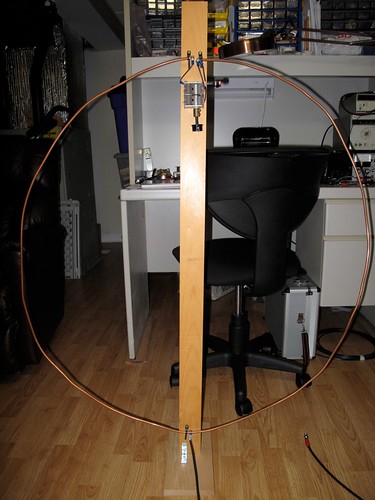
I built this antenna a few years ago and it is about time I posted details about it on this blog.
This is a small loop, that is the length is ≤0.1 of a wavelength, and designed for receive only, not transmitting. The loop is a little more oval than round with the narrower diameter being 36″ and the wider diameter being 40″. A transformer is used to collect the signal and pass it via coax to the receiver. The antenna shown and described here tunes from around 3 MHz to 18 MHz. So it covers 80m through to 20m and of course the broadcast bands in between those frequencies too.
The schematic of the loop is shown below.

Schematic of the small loop antenna
The main loop is composed of ¼” copper tubing (available from hardware and plumbing stores). The advantage of this type of tubing is that is easy to bend into a set shape and it maintains that shape with just a few fixing points. If a wire loop was to be made it would require some sort of frame to retain the loop shape.
The capacitor is a variable capacitor from a receiver. I have not measured the capacitance but I suspect both sections together give a maximum of 300 to 400pF. To increase the range of the tuning of the loop I included a switch to allow either one or both of the dual stage capacitor to be included in the loop. The picture below shows the top mounting of the loop, the variable capacitor and the switch. To make easy connection to the capacitor, the copper was squeezed closed at the ends and holes were drilled for bolts. Ring or spade-end connectors can be used to connect wires from the capacitor to the copper tube, and held in place with nuts and bolts.
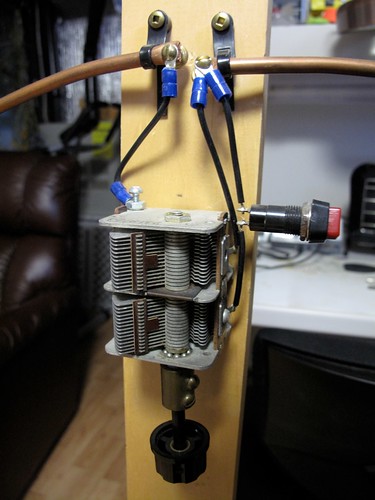
Note that the copper ends of the loop should not contact each other. They are close in my loop, because of the cable tie mountings on the pine wood, but they do not touch. Electrical connectivity is through the capacitor. To prevent any ‘hand capacitance’ effects when tuning (and hence tuning issues) I added a non-conducting shaft on the capacitor (you can see the brass shaft connector). In my loop the two capacitor sections are joined in parallel to increase the capacitance. The switch can switch out one section, so decreasing the minimum capacitance and increasing the upper frequency that can be tuned. A single stage capacitor, without a switch, will do fine, but the higher the capacitance the better.
At the opposite end of the loop a T50-43 toroid has been threaded onto the copper tube. The toroid has five turns of enameled wire wound on it and it slides easily over the copper. The copper loop now makes one turn on the loop and the five turns of wire on the ferrite toroid makes the transformer (as shown on the schematic). This arrangement can be seen below.
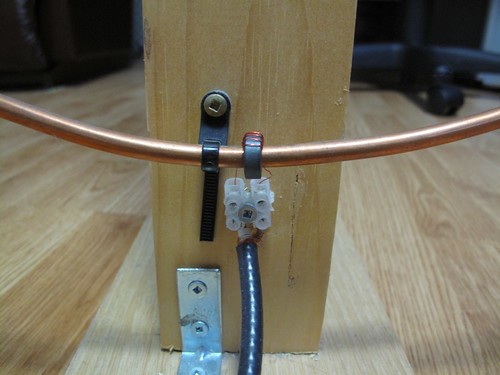
The enameled wire ends have had the enamel removed (only the ends) and have been tinned with solder before inserted into the electric wire block, which allows connection to the RG-58 cable. At the end of the cable add whatever connector you need for your receiver. The photograph also shows the simple L bracket arrangement for holding the pine plank upright on a simple plinth (a small piece of off-cut maple) large enough to stop the loop from toppling over..
The use of the electric connector block is not ideal I find (the enameled wire is too thin) and in future I will probably make something suitable out of some unetched copper circuit board and solder the wire and coax directly to the board.
I am sure there is room for experimentation with the type of mix of the toroid, as well as the number of turns of the enameled wire. My loop worked satisfactorily so I left it as it is.
How does it perform? Well I find it always surprises me how well it works for about 10ft of copper tube in a loop, a capacitor and a transformer. I use this in my basement and can easily tune in stronger stations on the bands. The high Q of small loop antennas rejects strong out of band stations that can bleed-through in more conventional random wire or even dipole antennas, so improving reception performance. When using the antenna you must tune to the frequency or band of interest and then adjust the loop’s capacitor to tune the loop to the same frequency. You will hear either a rise in signal strength of a station or background noise if there is no station on frequency. It is simple to use and it is surprising how it can increase the received signal.
Below are a few recordings made using the loop antenna. The receiver was the old but excellent Yaesu FRG-7, which for the purpose of this demonstration serves well as a general good receiver, although as you will hear the filtering is wide (‘barn-door’ wide springs to mind). For each of the recordings I tuned the receiver to the required frequency and adjusted its pre-selector for maximum signal. What you will hear in each case is the signal and then I will detune the loop one way, then tune it back through the peak to the other side and then returning to the peak of the signal. Recordings were made with an MP3 recorder place in-front of the receiver’s speaker, so you hear what the listener would hear. You should remember this is a 10ft circumference loop in my basement, NOT 100+ft of wire 50ft off the ground.
Small loops are directional to the signal source so if you use one you should experiment by turning it. It may be the HF frequency, or the fact that my antenna is below ground level, but I have noticed not too much of a difference when the loop is turned in orientation. That said, other small loops I have built for the AM broadcast frequencies, or medium wave, do show a stronger directional nature.
If you want to learn more about small loop antennas I recommend Joe Carr’s Loop Antenna Handbook, published by Universal Radio. That book describes many loops, both large and small and is well worth the read if you enjoy antenna design. This loop design is not from the book, but I used concepts and theory from it. The idea of using the copper tubing and the toroid transformer slid onto the copper was my own, although it may not be a novel idea and could have been reported before.
Let me know with a comment if you build and experiment with such an antenna. Share your findings with other readers.


Alan Steele, VA3STL, is a regular contributor to AmateurRadio.com and writes from Ottawa, Ontario. Contact him at [email protected].
 Ham Radio Deluxe |
 W5SWL Electronics |
 Ham Radio Prep |
 KB3IFH QSL Cards  Hip Ham Shirts  HamRadioAuctions HamRadioAuctions Reliance Antennas Reliance Antennas Enigma Shop Enigma Shop |  morseDX  Ni4L Antennas  R&L Electronics R&L Electronics antennas.us antennas.us QRV QRV |
- Matt W1MST, Managing Editor
