 |
 LHS Episode #060: apt-get install make-pr0n-work
 17 May 2011 | by
  Hello, faithful listeners and newcomers alike. A couple of big events are coming up. The first is the Dayton Hamvention, this weekend from May 20th through the 22nd. The other is the Southeast Linux Fest, from June 10th through the 12th. Linux in the Ham Shack will have a presence at both events and we hope to see everyone there. We will be having raffles for “quite good” prizes so you don’t want to miss that either.
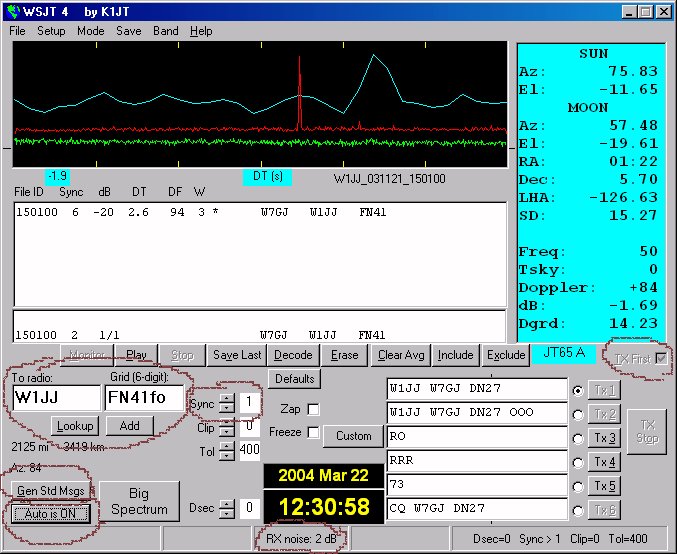
In this episode of our show, we catch up on almost all of our (very old) feedback and even manage to discuss a couple of items which may interest ham radio and Linux enthusiasts alike: JT65, a weak-signal digital mode, and codec2, a new audio codec designed for low bandwidth, telephone quality, error correction and to be free of patents or encumbrances of any kind. Enjoy.
Russ Woodman, K5TUX, co-hosts the Linux in the Ham Shack podcast which is available for download in both MP3 and OGG audio format. Contact him at [email protected].
The Defense of 440
Lately there’s been more saber-rattling and calls to arms over HR 607 here in the US. This is the bill that places several UHF bands on the auction block for commercial wireless service and public safety. The item of concern to amateur radio is the listing of the 440 band which amateur radio has a secondary allocation.
There are some “inconvenient truths” about 440 and its potential reallocation:
1. Amateur radio usage of the 440 band is abysmal. (Dead repeaters don’t count as usage.)
2. What usage there is of 440 is inefficient when compared with 3G and 4G technologies that could use the band.
3. Millions could benefit for 440 rather than a few thousand who use it today.
4. Amateur radio’s 440 band is a secondary allocation, not primary.
BPL was a major threat to amateur radio and I adamantly opposed it. Millions could have benefited from BPL as well so opposition of BPL may seem hypocritical, but there is key difference. BPL didn’t actually use the spectrum, it polluted it. If BPL would have made actual use of the spectrum for transmission of data, we may have seen a de facto reallocation of amateur radio HF spectrum. But ultimately physics and market forces killed BPL.
When it comes to the reallocation of 440, I’m neutral about it and almost leaning towards letting the chips fall where they may. However, I feel like I’m selling out amateur radio. It’s been ingrained in our minds that we have to reflexively defend amateur radio against any and all threats.
The comments I see from amateurs regarding HR 607 seem to reflect a lack of understanding of the real world today, technology, and amateur radio’s place in the world. Perhaps I’m reading and hearing the wrong comments, undoubtedly from venues that cater to those who speak before thinking. But I digress.
Amateur radio has little to no political pull today. Any semblance of political power is merely momentary photo opportunity politics. We lack the numbers to give politicians appreciable benefits from sticking their necks out for us. The post 9/11 homeland security “importance bump” we received is winding down and arguably so will the war on terrorism. The next war is going to be a war of limited resources and debt, areas where amateur radio is politically irrelevant and potentially a roadblock.
We can’t expect to hold on to valuable spectrum forever with 1960s technology when faced with 21st century technology that can make use of a limited resource that would result in a benefit several orders of magnitude greater than what amateur radio is doing today. In recent years in American society it’s become common for vocal citizens to complain about entitlements, programs, and hand outs under the guise of reigning in the national debt, thinly veiled in patriotism, protecting the American Way and all that is good. But when it comes to cutting entitlements, programs, and hand outs from which they receive benefits, the conversation abruptly ends and out come the protest signs and 16th century costumes. It’s much the same with amateur radio bands. Our wise and aging licensees are deathly afraid of the coming debtpocalypse, but “you can pry my barely used UHF spectrum from my cold, dead fingers.” I see retorts to HR 607 like “why do they need more spectrum; public safety/cellular has X MHz” or “why don’t they reallocate FRS/TV/WIFI/Cellular!?!” I just have to do a face-palm. It’s painful to read.
Ultimately I doubt 440 will be reallocated as a result of HR 607. Amateur radio is a secondary allocation, the primary being the military. All the boilerplate letter mailing campaigns and phone calls to poor overworked congressional staffers won’t have an effect. If the military throws in the towel on the 440 band, the amateur radio 440 allocation is going down for the count, regardless. Much like the situation with BPL, it’s mostly out of our control.
Rather than just totally blocking the reallocation of this band, “we’re the radio guys who will save the world, end-of-story”, we need come up with some reasonable compromise options that gives something to the public and justifies what spectrum we hold on to for decades to come. Perhaps this means offering up 10 or 20 Mhz and keeping the remain part for satellites and data modes. As I mentioned in a previous article, we need to develop a digital protocol and network to utilize this spectrum at a respectable level with applications beyond ragchewing and exchanging grid squares. We certainly can’t forever defend holding on to this band with analog repeaters and point-to-point links linking vegetating two meter repeaters.
Inside the UV-3R
Many people have been buying the cheap little dual band Baofeng UV-3R handheld radios from China. Some people have been pulling them apart, such as Fabrice, F4AVI, who has discovered that it is really quite a state of the art radio.

Fabrice found that the VHF/UHF transceiver functionality is provided by an RDA Microelectronics RDA1846 chip. This is a single chip fully DSP based transceiver capable of covering 134-174, 200-250 and 400-500MHz and supports CTCSS, CDCSS and DTMF with an 8dBm on-board PA. The Band 2 broadcast FM receiver uses an RDA5802E chip, also from RDA Microelectronics, which is a single chip broadcast FM stereo tuner. The UV-3R doesn’t cover the US 220MHz band, of course, nor is the FM broadcast audio in stereo. But future models might well do.
Some buyers of the Boafeng have experienced minor issues with their radios that suggest the quality control is not all it could be. Still, it is interesting to see innovative designs coming out of China. One can only wonder what next?

Julian Moss, G4ILO, is a regular contributor to AmateurRadio.com and writes from Cumbria, England. Contact him at [email protected].
Inside the UV-3R
Many people have been buying the cheap little dual band Baofeng UV-3R handheld radios from China. Some people have been pulling them apart, such as Fabrice, F4AVI, who has discovered that it is really quite a state of the art radio.
Fabrice found that the VHF/UHF transceiver functionality is provided by an RDA Microelectronics RDA1846 chip. This is a single chip fully DSP based transceiver capable of covering 134-174, 200-250 and 400-500MHz and supports CTCSS, CDCSS and DTMF with an 8dBm on-board PA. The Band 2 broadcast FM receiver uses an RDA5802E chip, also from RDA Microelectronics, which is a single chip broadcast FM stereo tuner. The UV-3R doesn’t cover the US 220MHz band, of course, nor is the FM broadcast audio in stereo. But future models might well do.
Some buyers of the Boafeng have experienced minor issues with their radios that suggest the quality control is not all it could be. Still, it is interesting to see innovative designs coming out of China. One can only wonder what next?
Julian Moss, G4ILO, is a regular contributor to AmateurRadio.com and writes from Cumbria, England. Contact him at [email protected].
A birthday to forget
As you may have noticed, I have been experimenting with making software instruction videos. APRSISCE/32 has been the beneficiary of my attempts, but my real intention has been to make videos that would bring traffic back to the website that for the last few years has provided us with a living. For the core of the videos – and for APRSISCE/32 videos – the screen capture software I have been using (BB Flashback Express) is good enough. But I wanted to make the videos more professional by including shots of me talking to camera – which meant that I needed to buy a camcorder and get to grips with video editing software.
I ordered by post an AgfaPhoto camcorder which captured good quality video, though the sound level was low. I struggled with the supplied Arcsoft Total Media Extreme software. Eventually, and quite by accident, I found that my work laptop which is running 64-bit Windows 7 had on it a program called Windows Live Movie Maker. This is a brilliantly designed piece of software and easy enough even for me to use. Unfortunately I found that the audio level on the video made with the camcorder was much lower than that recorded by the screen capture software. I tried reducing the level in BB Flashback to match that of the clips filmed using the camcorder, but once the video was uploaded to YouTube the audio was much quieter than other videos and even with the PC speakers turned up to the max you could hardly hear it.
Olga made a test clip using the video feature of her digital camera and the audio on that was much louder. So yesterday we decided the camcorder must have a fault and emailed to the supplier saying we wanted to return it. Not wanting to waste time we then went to Argos and bought a different camcorder, this time one from Hitachi, which had received good reviews. You can imagine the sinking feeling when, after waiting for the battery to charge up, we tried it only to find that the recorded audio level was no louder than on the Agfa.
I felt out of my depth, clueless with no idea what to do. Other people managed to upload videos to YouTube with speech you could hear – why was I finding it so difficult? I asked in a couple of familiar ham radio forums if anyone had experience of this and could offer some advice. One person explained how to change the audio level in Windows Live Movie Maker, but as I had already found, the volume slider was at maximum in the video clips and the only direction I could adjust the audio level was down. Few people seemed to have experience of using camcorders, most using smartphones or other pocket devices to make their YouTube submissions, which would not give the HD quality I was hoping for.
Olga, trying to be helpful because I was getting stressed, found what she thought was a Hitachi support forum. Twelve Hitachi technicians were online waiting to answer my questions, the site claimed. I wrote my question and immediately received the response that this had been passed to someone who was an expert in this particular field and I should pay £12 for an answer by email or £18 for a consultation by phone. Ready to try anything at this point, I handed over my credit card details, only to find that this was not Hitachi support at all, but some generic advice service claiming to answer all kinds of questions. More than 12 hours later we have not received any answer for our £12.
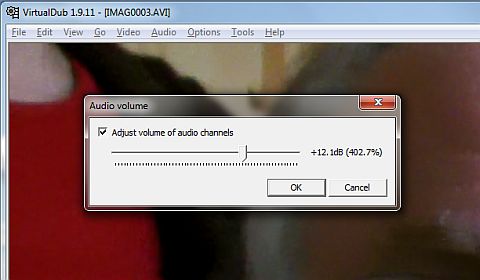
Eventually I stumbled upon a workaround. The Hitachi camcorder creates AVI files (unlike the Agfa whose video files are MOV.) Google found several answers to how to increase the audio in an AVI file, which suggests this is a common problem. Many of the answers were couched in gobbledygook I didn’t understand, using terms like “demux” that mean nothing to me. But eventually I found a “how to” procedure I could follow. It involved using a free utility called VirtualDub to rewrite the AVI file after processing and increasing the level of the audio track by 12dB. Even that didn’t work until I had visited a dodgy looking site and downloaded an iffy looking unofficial codec for the H.264 video encoding used by the Hitachi.
So I have a solution to the problem, though it’s a bit of a cumbersome one involving processing every video clip before I can start to assemble them in Movie Maker. To arrive at this point I have ended up buying two camcorders the first of which is probably not faulty as we first thought (it being unlikely they both are.) and been suckered into paying £12 to an internet scam site. This is not to mention the hours spent in front of the computer feeling frustrated and helpless on what was actually my birthday. Certainly not a birthday I particularly want to remember.
I think I’m getting too old for this tech stuff. I wish I could retire somewhere and keep chickens or something that did not require the use of computers at all. You would think that making home videos was something lots of people would want to do. Why is it so difficult?

Julian Moss, G4ILO, is a regular contributor to AmateurRadio.com and writes from Cumbria, England. Contact him at [email protected].
A birthday to forget
As you may have noticed, I have been experimenting with making software instruction videos. APRSISCE/32 has been the beneficiary of my attempts, but my real intention has been to make videos that would bring traffic back to the website that for the last few years has provided us with a living. For the core of the videos – and for APRSISCE/32 videos – the screen capture software I have been using (BB Flashback Express) is good enough. But I wanted to make the videos more professional by including shots of me talking to camera – which meant that I needed to buy a camcorder and get to grips with video editing software.
I ordered by post an AgfaPhoto camcorder which captured good quality video, though the sound level was low. I struggled with the supplied Arcsoft Total Media Extreme software. Eventually, and quite by accident, I found that my work laptop which is running 64-bit Windows 7 had on it a program called Windows Live Movie Maker. This is a brilliantly designed piece of software and easy enough even for me to use. Unfortunately I found that the audio level on the video made with the camcorder was much lower than that recorded by the screen capture software. I tried reducing the level in BB Flashback to match that of the clips filmed using the camcorder, but once the video was uploaded to YouTube the audio was much quieter than other videos and even with the PC speakers turned up to the max you could hardly hear it.
Olga made a test clip using the video feature of her digital camera and the audio on that was much louder. So yesterday we decided the camcorder must have a fault and emailed to the supplier saying we wanted to return it. Not wanting to waste time we then went to Argos and bought a different camcorder, this time one from Hitachi, which had received good reviews. You can imagine the sinking feeling when, after waiting for the battery to charge up, we tried it only to find that the recorded audio level was no louder than on the Agfa.
I felt out of my depth, clueless with no idea what to do. Other people managed to upload videos to YouTube with speech you could hear – why was I finding it so difficult? I asked in a couple of familiar ham radio forums if anyone had experience of this and could offer some advice. One person explained how to change the audio level in Windows Live Movie Maker, but as I had already found, the volume slider was at maximum in the video clips and the only direction I could adjust the audio level was down. Few people seemed to have experience of using camcorders, most using smartphones or other pocket devices to make their YouTube submissions, which would not give the HD quality I was hoping for.
Olga, trying to be helpful because I was getting stressed, found what she thought was a Hitachi support forum. Twelve Hitachi technicians were online waiting to answer my questions, the site claimed. I wrote my question and immediately received the response that this had been passed to someone who was an expert in this particular field and I should pay £12 for an answer by email or £18 for a consultation by phone. Ready to try anything at this point, I handed over my credit card details, only to find that this was not Hitachi support at all, but some generic advice service claiming to answer all kinds of questions. More than 12 hours later we have not received any answer for our £12.
Eventually I stumbled upon a workaround. The Hitachi camcorder creates AVI files (unlike the Agfa whose video files are MOV.) Google found several answers to how to increase the audio in an AVI file, which suggests this is a common problem. Many of the answers were couched in gobbledygook I didn’t understand, using terms like “demux” that mean nothing to me. But eventually I found a “how to” procedure I could follow. It involved using a free utility called VirtualDub to rewrite the AVI file after processing and increasing the level of the audio track by 12dB. Even that didn’t work until I had visited a dodgy looking site and downloaded an iffy looking unofficial codec for the H.264 video encoding used by the Hitachi.
So I have a solution to the problem, though it’s a bit of a cumbersome one involving processing every video clip before I can start to assemble them in Movie Maker. To arrive at this point I have ended up buying two camcorders the first of which is probably not faulty as we first thought (it being unlikely they both are.) and been suckered into paying £12 to an internet scam site. This is not to mention the hours spent in front of the computer feeling frustrated and helpless on what was actually my birthday. Certainly not a birthday I particularly want to remember.
I think I’m getting too old for this tech stuff. I wish I could retire somewhere and keep chickens or something that did not require the use of computers at all. You would think that making home videos was something lots of people would want to do. Why is it so difficult?
Julian Moss, G4ILO, is a regular contributor to AmateurRadio.com and writes from Cumbria, England. Contact him at [email protected].
Dayton pre-post-event writeup, redux
Several years ago, I wrote a tongue-in-cheek blog posting satirizing the usual post-event writeups that are posted after folks attend the annual Dayton Hamvention. I just re-read it and and I think it stands up pretty well, so I thought I’d include a pointer to that, particularly for those of you who are new to reading this blog and might not have seen it the first time around. Click here to read “My first annual pre-post-Dayton writeup”.
 Ham Radio Deluxe |
 W5SWL Electronics |
 Ham Radio Prep |
 KB3IFH QSL Cards  Hip Ham Shirts  HamRadioAuctions HamRadioAuctions Reliance Antennas Reliance Antennas Enigma Shop Enigma Shop |  morseDX  Ni4L Antennas  R&L Electronics R&L Electronics antennas.us antennas.us QRV QRV |
- Matt W1MST, Managing Editor
