 |
 A WSPR Handy-Walkie
 13 August 2011 | by
 The VCXO-AXE WSPR transmitter has now been put into a plastic project box and lettered with Dymo tape. I think it looks rather smart even if I say so myself.
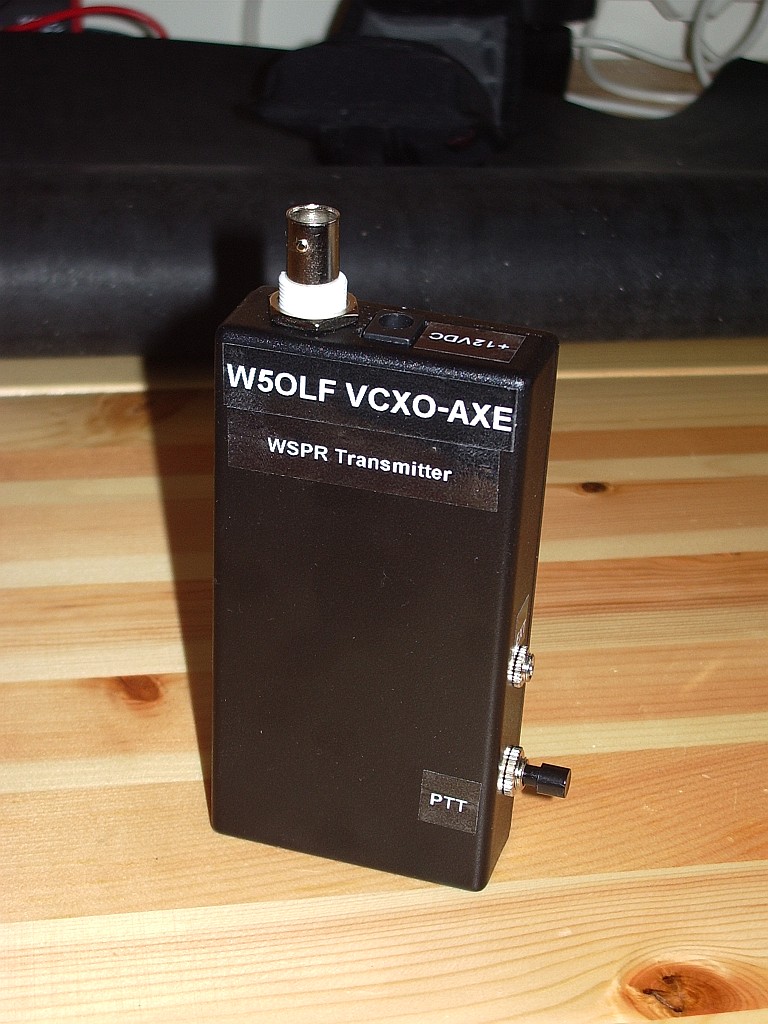
It did think about building it into a box that contained the batteries as well but that would have made it larger and prevent the batteries being used for something else. Plus I already had a box that fit the transmitter by itself. So what I now have is a pocket WSPR handy. Imagine going to the park or the beach or a hilltop and sending a signal that could be received half way round the world using a battery powered radio you can hold in your hand. How cool would that be?
Unfortunately the charger that charged my 10 AA cell NiMH QRP battery pack decided to fail and I’d exhausted the batteries during my initial tests so I couldn’t try portable operation unless I first spent a day charging the cells up 4 at a time. So I decided to see how far my 30m WSPR signals would get using a selection of hand held QRP antennas with the rig running off the bench power supply in the shack. As most of the antennas are equipped with right-angle PL-259 connectors for attachment to the back of an FT-817 I attached them to the back of my SWR/power meter with a short patch lead connecting it to the VCXO-AXE. For an RF ground I used the nearby central heating radiator.
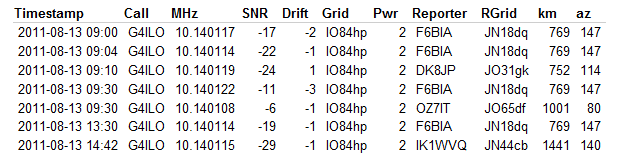
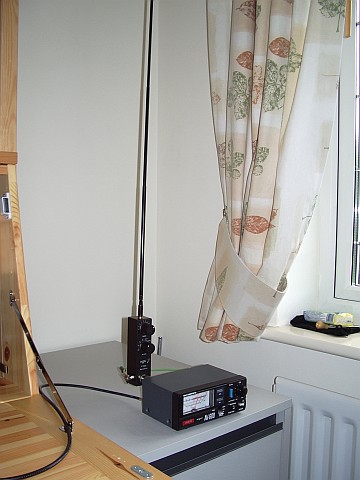
The Wonder Wand L-Whip produced several spots from as far afield as Italy during the morning.

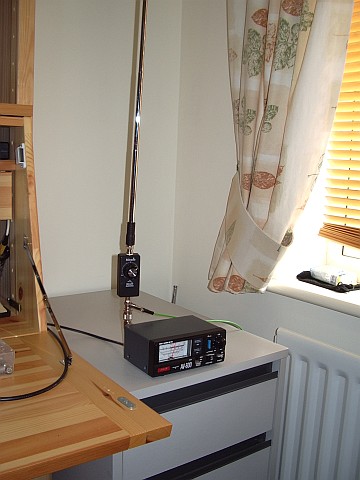
The Miracle Ducker with 1.4m telescopic whip was somewhat less successful, though as I tested it at a different time of day it would perhaps be wrong to draw any conclusion from that. I used the MD with the radiator counterpoise. Although it would give a reasonable SWR with no counterpoise at all the current drawn by the VCXO-AXE TX increased from around 300mA to 400mA which made me think the PA might not be happy so I decided not to test it like that.

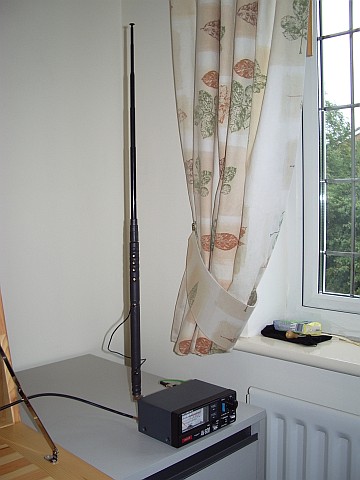
The most surprising result came from the ATX Walkabout antenna. For those unfamiliar with it, this is a small QRP antenna with a 1.4m telescopic whip and a base loading coil that is tapped for the 80m, 40m, 20m, 15m, 10m and 6m bands. To use the WARC bands with this antenna you have to use the tap for the next lower band and then obtain resonance by shortening the whip. On 30m the whip length is only about 40cm! The length of coil that is in use (not shorted out) is about 15cm.
So this antenna when used on the 30m band is effectively less than 2 feet long! Despite that it produced several spots at quite respectable SNR levels. The SWR using the radiator ground was a rather poor 3:1. I suspect that this, and overall efficiency, would have been improved if I had used a quarter wave counterpoise, but I didn’t have 7.5m of wire handy and it would not have been practical to deploy it inside the shack in any case.
Obviously with a good antenna you will get stronger reports, be heard further afield and get more spots. But from the results of these tests it appears that even with a compromise hand held antenna (and a counterpoise for grounding) some interesting results could be possible using this little WSPR transmitter. Great fun!

Julian Moss, G4ILO, is a regular contributor to AmateurRadio.com and writes from Cumbria, England. Contact him at [email protected].
The Land Down Under–Finally
I’m amazed that nearly four years into the wonderful hobby, I still find myself getting ‘as giddy as a schoolboy’ with some accomplishments in the amateur radio hobby. Of course, this is just a reminder how how truly awesome this hobby of ours really is.

My first QSO as a licensed ham was made on 18 August 2008 on a local 2m repeater with WA0DFW. I had only had my license a few days, but had spent time listening on the local repeater. I took the advice of Gordon West and clearly stated, This is KD0BIK looking to make my first contact as a licensed ham. Mo came back to me and we had a nice QSO. Within about 5 minutes the rest of the afternoon repeater crowd had joined in and I was ‘smack dab’ in the middle of my first roundtable. Mo was kind enough to invite me to send him a QSL card, which he would reciprocate to mark the occasion of my first ham radio QSO. By the way, I made my first HF contact a little over a month later during a 10m DX contest. The station was ZW5B (a contest station) in Brazil.
If you have followed my blog over the years and also listen to my podcast, The Practical Amateur Radio Podcast you know I live in an HOA restricted neighborhood. My restrictions state no outside antennas other than satellite and small digital TV antennas. The policies also state permission must be received from the architectural review committee so they can approve placement of these antenna types. So how do I operate HF?
I think the answer to that question is probably best answered in a future blog posting, so please stay tuned and I’ll add that to my long list of items to blog about. I’ll just add that my antenna setup is as stealth as I can get it and do most of my HF operations on a 20m hamstick dipole. This hamstick dipole has gained me many DX stations in my logbook. I also have a Hustler 6BTV vertical which I use for 10, 30, 40 and 80m. The 20m hamstick dipole really outperforms 20m from the vertical. But I’ll save that discussion for another time.
I grew bored with what was on the “boob tube” (TV Set) and decided to go down to the shack to see what I could conjure up on the HF bands. I had been working JT65-HF earlier in the evening and decided to see what was biting. Within a half hour I had answered about four CQ’s and decided I should probably turn the radios off and head upstairs to read and study for the extra class license I’m working on. My self-control just doesn’t allow me to study in the ham shack. Before I know it, I’ve turned on a radio or two and have Twitter, Facebook and Google+ all up and I’ve wasted time I could/should be using to study. But before I shut down I decided I would answer one more stations CQ. After all, why work just four stations when you can work five?
Much to my surprise the next station I saw calling CQ on JT65-HF was a VK station. Without hesitation, I double-clicked on his entry and hit the “Answer CQ” button. A few seconds later my Yaesu FT-897D started the 50 second transmit cycle. This was one of the longest 50 seconds of my life and of course I would need to wait another minute to learn if the VK station copied my signal. While I’ve worked many DX stations before on SSB, PSK, RTTY…this would be the first DX station using JT65-HF. Fingers crossed, the next thing I would see would be his report to me and after his transmit cycle I wasn’t disappointed. He had copied me and gave me a signal report of –20. The complete JT65-HF QSO was complete a few minutes later after I sent his report (-16) and the final 73. VK3BM became my first Australian JT65-HF contact and I was very pleased.
It wasn’t until this morning I realized the JT65-HF contact I had made with VK3BM was actually much more impressive. VK3BM became not only my first JT65-HF contact in Australia, but my first Australian DX contact and of course my furthest contact ever made from my home QTH station at a distance of 8,760 miles. I’ve been as ‘giddy as a schoolboy’ ever since realizing this.
While I know my station has been heard many times in and around Australia from using WSPR (this was also exciting the first time), I’ve never actually managed to have a true two-way contact until now. While JT65-HF may not be a voice mode and it doesn’t provide for “rag chewing” QSO’s, it does provide an exchange of callsigns, locators, and signal reports all in real-time with an operator on both ends.
Remember, you don’t need a tall tower and high priced amplifiers to work DX. Also, just because someone says “no you can’t have an antenna” doesn’t mean you still can’t get on the air and work DX stations like I do. You just have to be smarter and have a lot of patience. Yes you can do it.
So….what’s stopping you?
Until next time….
73 de KD0BIK
Jerry Taylor, KD0BIK, is a regular contributor to AmateurRadio.com and writes from Colorado, USA. He is the host of the Practical Amateur Radio Podcast. Contact him at [email protected].
Whispering with a VCXO-AXE
My VCXO-AXE WSPR transmitter kit from W5OLF came this morning. It was two weeks in the post, doubtless due to Customs which had opened the package. I wasted no time in building it, though it did take me somewhat longer to complete than it took AE5X.

The kit itself has been impressively put together. The PCB is extremely high quality and the instructions are almost of Elecraft standard. If the horrible Spectrum Communications Off-Air Frequency Standard kit had been produced to this level of quality it might not have turned out to be a failure for me. If American kit makers can produce nice silk screened and solder masked boards, why do ours make us struggle with boards that look like they were made by hand on somebody’s kitchen table?
The VCXO-AXE kit uses almost all through hole components and there is plenty of space around the solder lands. I doubt that anyone would have any trouble building this. The one part that induced a feeling of terror when I saw it was the VCXO itself.
As described, it is a “larger surface mount component.” But what I didn’t expect was that it didn’t have any pins or legs that stick out to solder to. Instead, you have to solder it so the solder goes under or up the side of the chip. You need a very fine tipped soldering iron for this. I couldn’t really see if I had successfully soldered the chip or not, so I took a couple of pictures.
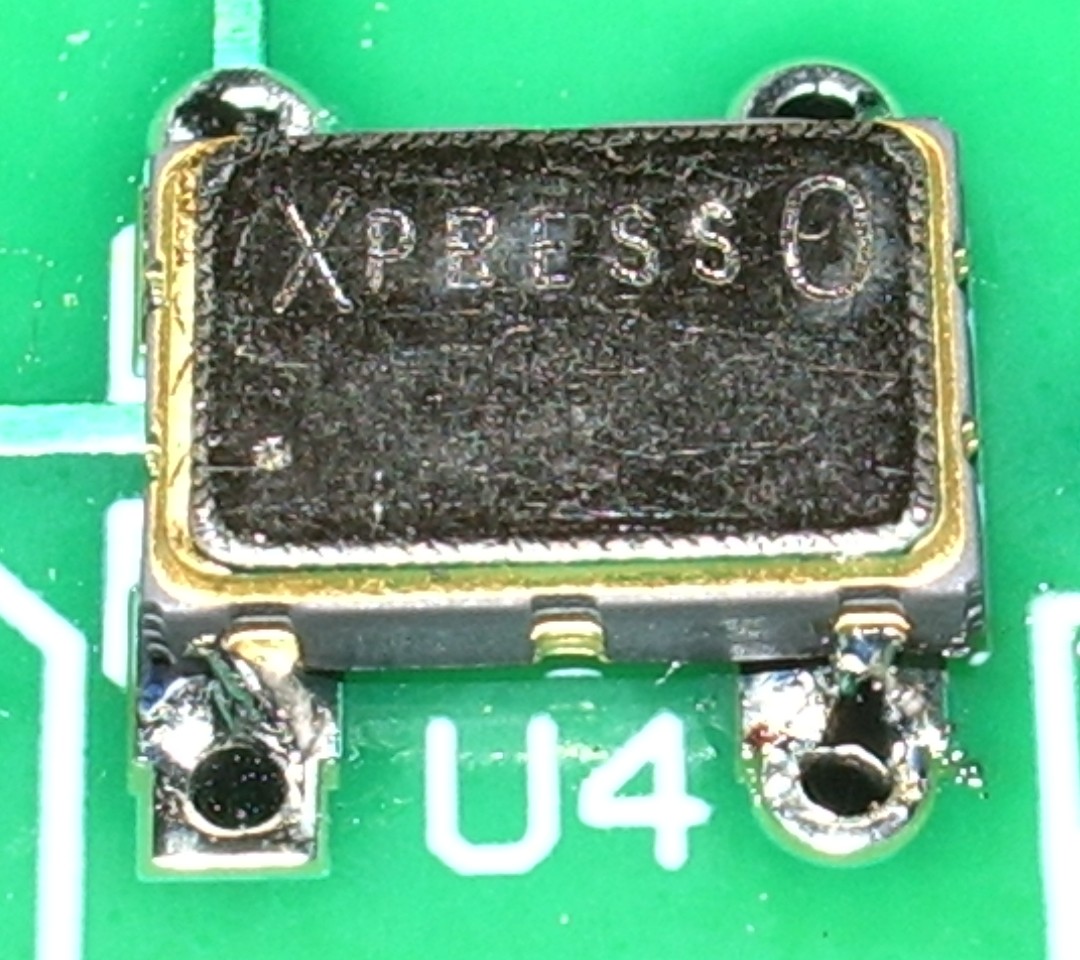
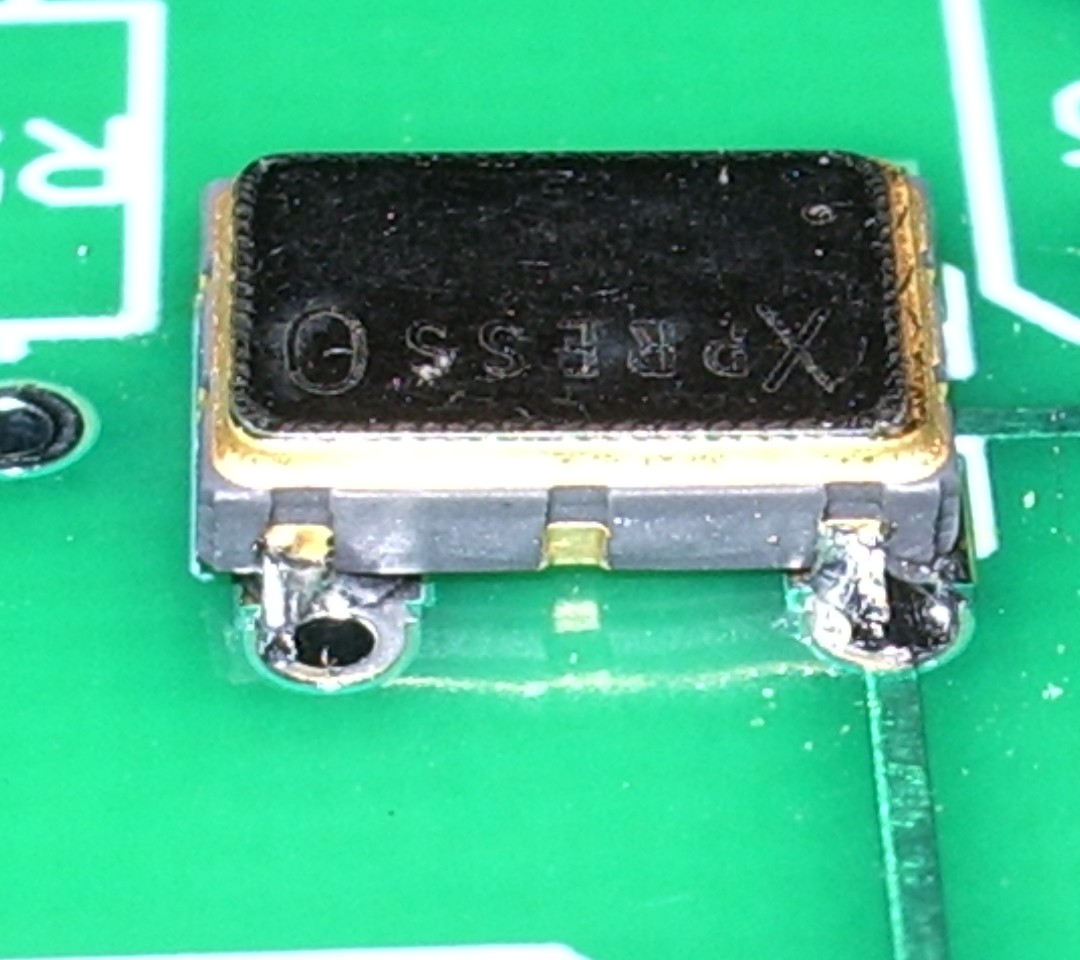
The result is not very pretty, but it must have been OK because the transmitter eventually worked!
When ordering, I specified my call, locator and the supply voltage I would be using (12V, as I planned to power the transmitter off a pack of 10 NiMH batteries.) The PICAXE controller chip came programmed with this information and a power level of 33dBm – 2 watts.

On a freshly charged battery pack I was actually getting nearer 3 watts output once the PA tuning capacitor had been peaked up, but after the first few transmissions the power did drop off a bit to become nearer the advertised 2 watts.
I hooked the VCXO-AXE up to my attic MFJ magnetic loop, watched the radio-controlled clock in the shack until it rolled over to an even minute, pressed the transmit button and a couple of minutes later had my first WSPR spots.
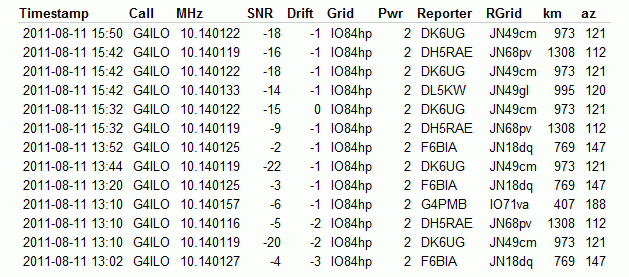
Soon after that I had several more. No great DX, but perhaps that is just down to conditions at the moment.
The instructions warn that second harmonic suppression of this transmitter is not great and an external low pass filter is advised. However, the magnetic loop (either the MFJ or my portable Wonder Loop) has a very high Q which I am sure does a good job of attenuating out of band harmonics on its own.
My next move will be to build the little transmitter into a plastic box and use it as a hand held portable WSPR rig. It would be fun to try making a 30m base loaded whip – which should also be fairly high Q – and see how well that works. So expect some WSPRing from various locations around Cockermouth some time soon!
This was a fun project and a good morale booster to prove to myself that I can still build stuff – and with an SMT part in it, too! Thanks to Jay W5OLF for making the kit available. A 20m version would be nice, as well!
If you want to buy one of these kits for yourself you have to look on eBay, though as of right now there doesn’t seem to be any for sale.

Julian Moss, G4ILO, is a regular contributor to AmateurRadio.com and writes from Cumbria, England. Contact him at [email protected].
Huzzah! Get Your Meteor Showers On! Perseids Peak Aug 12th
If you have been itching for some meteor scatter to work, well, isn’t it a coinky-dink, that the Perseids with peak on August 12th, which is tomorrow. With luck, you could work a station 2000 miles away by bouncing a signal off the ionized trail of a meteor! How sick is that!The Perseids Meteor Shower is so named because of the direction of the meteors, which look to come from the constellation Peresus. This meteor shower has been observed for about 2000 years, so there is no guess work in knowing when it will come around.
Now I have never worked meteor scatter, so I checked the googles and found a nice webpage with some technical info and tips for meteor scatter on 2 meters and 6 meters. And for an added bonus, here’s a video.
73.
Rich also writes a Tech blog and posts stories every Tuesday and Thursday on Q103, The Rock of Albany’s website, as well as Amateur Radio stories every Monday thru Friday here on AmiZed Studios.
Rich Gattie, KB2MOB, is a regular contributor to AmateurRadio.com and writes from New York, USA. Contact him at [email protected].
Ham Nation 12
Leo shows off his shiny new call sign, Don explains amateur radio television, George shows us the proper tools that every person needs, and more.
Guests: Don Hill, KE6BXT and George Thomas, W5JDX
Download or subscribe to this show at http://twit.tv/hn.
We invite you to read, add to, and amend our show notes at wiki.twit.tv.
Thanks to Joe Walsh who wrote and plays the Ham Nation theme.
Thanks to Cachefly for the bandwidth for this show.
http://dts.podtrac.com/redirect.mp4/twit.cachefly.net/video/hn/hn0012/hn0012_h264b_864x480_500.mp4
http://dts.podtrac.com/redirect.mp4/twit.cachefly.net/video/hn/hn0012/hn0012_h264b_640x368_256.mp4
http://www.podtrac.com/pts/redirect.mp3/twit.cachefly.net/hn0012.mp3
Dr. Bob Heil, K9EID, is the founder of Heil Sound and host of TWiT.tv's Ham Nation which streams live each Tuesday at 6:00pm PT (9:00pm ET) at http://live.twit.tv. Contact him at [email protected].
APRS iGate on a smartphone
Not that many will have noticed its absence, but the Cockermouth APRS internet gateway G4ILO is back on the air using APRSISCE running on a SIM-less HTC Touch Pro smartphone.

I had wished for a long time that I could run the gateway without having the shack PC on all the time running up the electricity bill. But when I looked at the documentation for things like aprs4r it looked too difficult. After I got my Android smartphone I was wondering what to do with the Windows Mobile I used previously and it occurred to me that I could use this for the gateway, since the Windows CE version of APRSISCE contains more or less the same functionality as its full-blown Windows counterpart. (Personally, most of the time I don’t consider that to be an advantage, and I had often wished that Lynn would release a cut-down version for mobile users with simplified menus, but that’s another story.)
In order to use the phone as a gateway I would have to set up a Bluetooth connection to the Kenwood TM-D710 TNC as the Touch Pro doesn’t have a serial port. Achieving this was one of those things that I wish I had never started, entailing hours of wasted time, failure and frustration. It also brought upon the first bad headache I have had since my brain operation. This is probably not helpful to the state of my health, so I have vowed from now on to give up the technical stuff and use the computer only for non-stressful activities like writing and web surfing. Life is, for me, literally too short to spend fighting with computers.
My first attempt at a Bluetooth connection involved using a Pico Plug. I bought two of these a couple of years ago when I saw them cheap on eBay (where they are still available, though not as cheaply) but I had never actually used them. However this first attempt got nowhere. My netbook – the only PC that had Bluetooth on it – would only see the Pico Plug as a modem and would only allow me to try connecting to the Internet through it. The smartphone saw the device but could find no services offered by it. So that idea went nowhere.
My next thought was to try one of the cheap Bluetooth serial modules being sold on eBay, as something similar had been mentioned in a thread in the APRSISCE Yahoo group. The one I ordered was described as a small size Bluetooth TTL UART full duplex data transmission module Class 2 10 meter range(30ft), 35mm by 15mm excluding pins length nicely sleeved in transparent nylon sheath supplied with 4 wire header cable. The module is based on the BT0417C chip and has a regulator to run off 3.3 – 5V. It arrived the next day by first class post and was quickly attached to a DB9 connector and power.
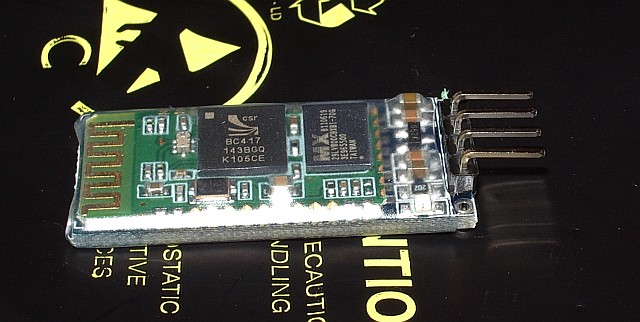
The BT0417C module was seen by the computers and advertised a serial port service. But whenever the Kenwood TNC sent any data what appeared in the terminal program was garbage. It was the same garbage for the same data, which made me think that the baud rate was wrong, though the default settings for the module were supposed to be 9600,8,N,1 just the same as the Kenwood. Try as I might – and I tried for a long time – I could not get the thing to display the proper data.
Eventually it dawned on me that changing the baud rate of the terminal program might not actually alter the baud rate used by the module to communicate with the device. I found some instructions that were supposed to describe how you could change the module’s baud rate by sending an AT command to it. This didn’t work either, after which I grasped that you were supposed to send the command by direct connection to the module, not over Bluetooth! To do this I needed to disconnect a serial cable from the back of the shack PC in order to free a gender changer that would enable me to connect a USB to serial cable to the BT module. When I disconnected the cable, one of the standoffs that the cable plug screws into decided to come off with the plug instead of stay on the PC and a nut dropped down inside the computer. So I had to disconnect the shack PC – not a simple task as it has 4 serial ports and 3 sound cards attached as well as the usual paraphernalia – in order to retrieve and replace the errant nut. Then we couldn’t get the backplane of the serial board seated back in the PC. I couldn’t see what I was doing properly so Olga had a go, and it took her half an hour of fiddling.
After all that I still couldn’t change the baud rate or get the data to be displayed correctly. I even tried connecting my Elecraft K3 to the module to see if I could send or receive commands from that, but I still got garbage at any of the K3’s available baud rates. I then wondered if I had damaged the module by doing that as I vaguely recall that the K3’s I/O module uses proper +/-12V RS232 signalling levels and the BT is a TTL module. I don’t know what the Kenwood’s serial output is either. At this point I decided to abandon the entire idea. Net result: a wasted day and a splitting headache – though at least we had taken the opportunity to vacuum all the dust out of the inside of the shack computer!
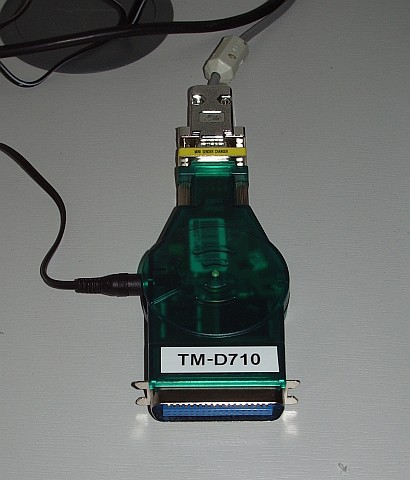
This morning, feeling a little calmer, I decided to have one last try with the Pico Plug. It suddenly occurred to me that perhaps there was some newer software or firmware for it. Sure enough, there was, though not a lot newer. I upgraded the firmware in the Plug, then installed the newer configuration utility. The result: still no advertised serial port service. 🙁
However, the new configuration utility had a few more options. By trying them at random I finally got a serial port to appear in Bluetooth on the smartphone! I connected to it with Pocket Putty, and the whoop of joy when the Kenwood packet TNC sign-on message appeared could probably have been heard five miles away. I quickly created an RF port in APRSISCE using the Kenwood(D710) APRS configuration and it put the radio into APRS mode just as it was supposed to. Stations started appearing on the display as “heard over RF.” So, finally, I was on the way to running an APRS iGate on my smartphone!
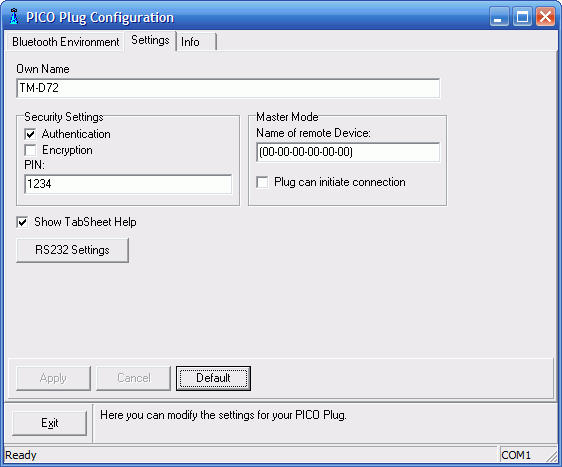
In case it is helpful to anyone else who wants to use a Pico Plug to connect a Kenwood APRS radio to another device using Bluetooth, here is a screenshot of the configuration utility showing the settings that worked. (Yes, I know, I set the device name to TM-D72 instead of TM-D710 as I intended. Believe me, by this point I was tired!)
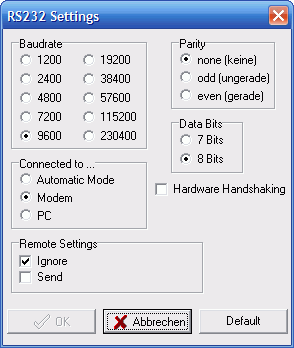
Here is one showing the RS232 settings. The important bit seems to be to set it as a Modem.
If you know what to do then that’s all there is to it. But my goodness what a frustrating nightmarish day or so it took getting there. I hate computers – and it would seem that the feeling is mutual!

Julian Moss, G4ILO, is a regular contributor to AmateurRadio.com and writes from Cumbria, England. Contact him at [email protected].
ARISSat-1 the Easy Way [VIDEO]
If you’re like me and have been wanting to receive signals from ARISSat-1, it is pretty easy. Here’s is a simple way that you can do it in the field, with just something to record audio and a receiver that can hear the satellite on 145.950MHz.
73.
Rich also writes a Tech blog and posts stories every Tuesday and Thursday on Q103, The Rock of Albany’s website, as well as Amateur Radio stories every Monday thru Friday here on AmiZed Studios.
Rich Gattie, KB2MOB, is a regular contributor to AmateurRadio.com and writes from New York, USA. Contact him at [email protected].
 Ham Radio Deluxe |
 W5SWL Electronics |
 Ham Radio Prep |
 KB3IFH QSL Cards  Hip Ham Shirts  HamRadioAuctions HamRadioAuctions Reliance Antennas Reliance Antennas Enigma Shop Enigma Shop |  morseDX  Ni4L Antennas  R&L Electronics R&L Electronics antennas.us antennas.us QRV QRV |
- Matt W1MST, Managing Editor
