 |
 Waste of money
 20 September 2011 | by
 Yesterday I received a personally addressed letter from our cash-strapped radio society, the RSGB. What had motivated them to write to me? Apparently it was to tell me the annual subscription is to rise to £47 a year – the first increase since 2006 – and to ask if I would donate to the Spectrum Defence Fund – which I already have, once, and a lot of good that did – or the Radio Communications Foundation.
Why could this letter not have been put in the same mailer as RadCom, the monthly magazine that all members receive, or even published in the magazine itself? Why did this even merit a letter, rather than a page of the magazine, in the first place?
A few months ago I read that the RSGB was to use a bequest from a silent key member to employ a professional fund raiser. This, presumably, is the result. What a waste of money.

Julian Moss, G4ILO, is a regular contributor to AmateurRadio.com and writes from Cumbria, England. Contact him at [email protected].
Spectrum Wars: Coalition to Save Our GPS vs. LightSquared

This time it isn’t about ham radio spectrum. But it is about something we use extensively in our hobby: GPS.
Browsing the Web today I noticed an ad from LightSquared, a Virginia company that’s in the process of rolling out a terrestrial broadband service in competition with the cellular providers.
So far, so good, right? Well, according to a recent article in The Daily Beast, the Obama administration allegedly pressured Gen. William Shelton to alter his testimony on Capitol Hill where he planned to raise Pentagon concerns about potential GPS interference, making them more favorable toward commercial broadband interests:
According to officials familiar with the situation, Shelton’s prepared testimony was leaked in advance to the company. And the White House asked the general to alter the testimony to add two points: that the general supported the White House policy to add more broadband for commercial use; and that the Pentagon would try to resolve the questions around LightSquared with testing in just 90 days. Shelton chafed at the intervention, which seemed to soften the Pentagon’s position and might be viewed as helping the company as it tries to get the project launched, officials said.
“There was an attempt to influence the text of the testimony and to engage LightSquared in the process in order to bias his testimony,” Rep. Mike Turner (R-OH) said in an interview. “The only people who were involved in the process in preparation for the hearing included the Department of Defense, the White House, and the Office Management and Budget.”
The article raised concerns that the White House’s motivations may have been political. Philip Falcone, a major Democratic donor, runs an investment fund with a substantial stake in LightSquared. While one can speculate about whether politics could have played a role, that’s well beyond the scope of this blog post. I’m more concerned about how LightSquared’s plans could affect hams who use GPS for APRS and other applications.
What’s the worry? Only that LightSquared’s 40,000 ground-based transmitters would overwhelm current GPS receivers rendering them unusable in some situations. Industry officials argue that GPS receivers, especially those designed for consumer use, may not have been built robustly enough to reject interference from adjacent users such as LightSquared. There are many organizations signed on as being in opposition including such diverse interest groups as the FDNY, Aircraft Owners and Pilots Association, and the American Sailing Association.
I remember buying my first GPS. I remember something else about it: it was expensive. And it didn’t work that well. But it was still a couple hundred bucks.
Fast forward to 2011. GPS devices are cheap and they’re everywhere, integrated into many of the devices we own. We depend on them every day. You can even buy a standalone GPS receiver for under $50.
From a civilian perspective, GPS service is a national resource that deserves protection. While I’m all for GPS manufacturers tightening up their receiver tolerances when they can do so at a reasonable cost, I don’t think that the public interest is served allowing a company to launch a service that may interfere with legacy GPS devices. LightSquared argues that GPS manufacturers have known that this was coming for a long time. That may be true, but the losers here will be the consumers — not the manufacturers.
You can view both arguments here:
Coalition to Save Our GPS vs LightSquared
What’s your take on this?
Matt Thomas, W1MST, is the managing editor of AmateurRadio.com. Contact him at [email protected].
I’m baaaaack!
OK, I owe ya’ll a bit of an explanation.
No, the site hasn’t been abandoned! I had a very busy summer, plus I moved and I managed to go from employed, laid off, employed, laid off, employed again…..
So, the long and short of it is this……
The site is still here, isn’t going anywhere and new posts will be coming back shortly. I’ll try to go back to my original format of at least one educational post a week.
Jonathan
Jonathan Hardy, KB1KIX, is a regular contributor to AmateurRadio.com and writes from Connecticut, USA. Contact him at [email protected].
The Dummy Load Projects
About two years ago I ordered a QRP Wattmeter kit from Oak Hills Research (OHR). The kit contained everything I would need to complete the project and in a few hours over the course of about 2 days I had it fully assembled, tested and working. Prior to this kit, I hadn’t done this kind of work since high school.
I was actually very fortunate that while in high school, my band director Mr. Crawford NB5I put together a basic electronics and computer class. I’m thinking this was either in my sophomore or junior year (1983-84). This was in the timeframe when I was really interested ham radio and my off and on again attempts at learning CW. The class was a welcome change to the reading, writing and arithmetic classes which I’ll admit did bore me. It was really my intention to take this electronics class to help better assist me in learning all that a novice class amateur would need to know back then. I remember two things about this class. One, I built a cool 12v power supply. We had to design the project, etch the circuit boards, solder in all the parts and for it to work. Mine did. The second thing I remember about that class was burning the snot out of my first two fingers and thumb from accidentally grabbing the soldering iron at the wrong end. Thank you Mr. Crawford for teaching this class.
 Now skip forward some 25+ years, I had a ball putting that QRP wattmeter together and to find that it worked in the end with no burns on my fingers was all I needed. I had been bitten by the bug. I ordered a few additional kits from OHR. These were two 10w dummy loads and one 100w dummy load. The 10w models are pictured just sitting on top of the 100w dummy load. These 10w models are great for the QRP rig.
I’ll admit I started the 100w model about a year ago. I managed to get ten of the twenty resistors soldered onto the board and life got busy and I moved it to the side of my workbench. I’ve looked over at it several times and even grabbed the soldering iron a few times only to put it back with either no time or no interest to complete it.
Now that I have extra under my belt, I thought it was about time to get some of these half completed projects moved from the workbench. This 100w dummy load only needs about a half hour more work and today was a good day to do it. I fired up the soldering iron and soldered the remaining ten 1K Ohm resistors onto the board. (shown below)

The next step was to test to make sure all the resistors were secure and see how close to 50 Ohms I would be. I call 50.6 close enough for me.

Now to mount the board into the chassis and complete the solder work to the SO-239 connector and chassis ground.

Mount the top and secure the four rubber feet and we can call this one good.

This is an air cooled unit. The documentation states 100w continuous with high loads possible for shorter durations. Considering 100w is as much power as I have, this will do fine. I connected it to my FT-897. Yep…it worked and did exactly what it should. I tested up to 100w and the resistors heated up slightly with a 30 second transmit cycle.
Both the 100w and the two 10w dummy loads were fun to build. Today I ordered a nixie tube clock kit and it should arrive in the next week or two. Tomorrow I’m checking out a new amateur radio club I’m considering joining. So stay tuned…lots to blog about.
Until next time…
73 de KD0BIK
Jerry Taylor, KD0BIK, is a regular contributor to AmateurRadio.com and writes from Colorado, USA. He is the host of the Practical Amateur Radio Podcast. Contact him at [email protected].
Put those serial cables on the EDGE…..
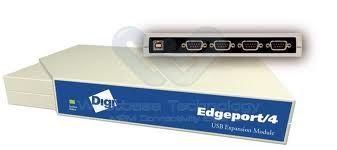

Mike Weir, VE9KK, is a regular contributor to AmateurRadio.com and writes from New Brunswick, Canada. Contact him at [email protected].
Install computer radiocontrol is not that difficult!
Most modern tranceivers can be controlled by computer, I don’t have to tell that. But the majority of them are using serial ports for control, and most modern computers don’t have those ports anymore. That’s were most radioamateurs have a problem, they buy a unknown brand of USB to serial converter from which drivers are already obsolete and don’t work on Windows Vista or Windows 7. The consequence is lock-ups and irritation, then the endless search for non existing drivers begins. At the end of all this many radioamateurs give up hope to ever get their radio connected to the computer. Though it doesn’t have to be that difficult if you choose the right converter or modem. Following my own experience and many others the best are those who have the FTDI chipset on board. They will install flawlessy and are very stable. Now since I needed to install my ZLP electronics modem again because of a computer crash I had the opportunity to make a small video. Unfortenately for the english readers I have a Dutch Windows Vista version so I guess it is worthless for international readers. Anyway, the ZLP has a FTDI chipset inside and it is like advertised plug&play. I hope to encourage people to try again to control you transceiver by computer. This gives you many opportunities to do all kind of things which you normal do by pushing knobs on the radio. Think about the DX cluster, you see a call that you like to hear or work and one click on the call gets you on the right frequency. You have unlimited space for storing all kind of frequencies and click once you’re there. You can scan all those stored frequencies or just scan part of a band or several frequencies on all kind of bands. Radio control by computer is a thing you really need when contesting. Even the newest WSPR version with frequency hopping makes use of it. And there are so many other things you can do with it. I like to control my Yaesu FT817 with it as it is famous for it’s extended menus, on screen everything is clarified and much easier to control. Best program to use is Ham Radio deLuxe, but there are others less populair as well. Most contest software is working with it. Good luck with controlling your transceiver!
USB to serial converter install video (Dutch)
Bas, PE4BAS, is a regular contributor to AmateurRadio.com and writes from Groningen, Netherlands. Contact him at [email protected].
UV-3R programming software
A new programming software has been released for the Baofeng UV-3R. At the moment you can download it here. I used BitZipper to open the rar file.
This software is claimed to be for the UV-3R MkII with the dual frequency display but it works with my MkI as well. I took the precaution of reading from the radio before modifying and writing anything: some people who didn’t do that with the old program experienced problems.
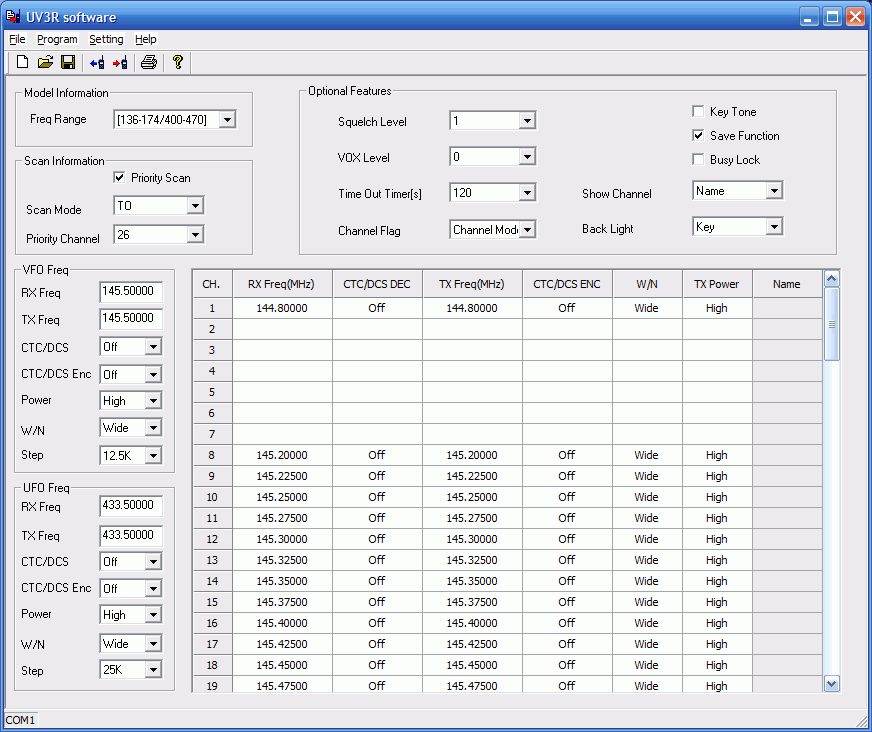
The new program is easy to use. Interestingly, it has two options for frequency range, one of which limits the range to the ham bands 144-146MHz and 430-440MHz. I assume that is to get approval in some countries that don’t allow radios that can transmit out of band. There is also a column called Name for each channel, though I couldn’t type anything in there. Perhaps a newer model will allow you to have channel names as well.
I discovered a bug with setting the priority channel, though it’s kind of hard to explain. You choose the priority channel from a drop-down list of channels that have been used. If you haven’t used all the channels between channel 1 and the priority channel then the radio will check the channel corresponding to the position in the list of the one you selected instead of that actual channel number. I wanted to make channel 20 the priority channel butthe radio started checking channel 14 because 20 was the 14th filled channel in
the list! To use channel 20 as the priority channel I had to select channel 26, which was the 20th one in the list.
I don’t know what would have happened if the channel I’d picked was one that didn’t have a frequency programmed into it – and I’m not going to risk finding out!
I ought to mention that the cross-platform multi-radio supporting memory management software CHIRP supports the UV-3R as well. Not sure about the UV-3R MkII though.

Julian Moss, G4ILO, is a regular contributor to AmateurRadio.com and writes from Cumbria, England. Contact him at [email protected].
 Ham Radio Deluxe |
 W5SWL Electronics |
 Ham Radio Prep |
 KB3IFH QSL Cards  Hip Ham Shirts  HamRadioAuctions HamRadioAuctions Reliance Antennas Reliance Antennas Enigma Shop Enigma Shop |  morseDX  Ni4L Antennas  R&L Electronics R&L Electronics antennas.us antennas.us QRV QRV |
- Matt W1MST, Managing Editor
