 |
 New toys
 14 March 2012 | by
 There is nothing like some new toys to cheer you up when things get a bit boring! The G4ILO shack received two new arrivals this morning. Actually there was a third, non-radio addition that came yesterday as well, but that will have to wait for another posting.
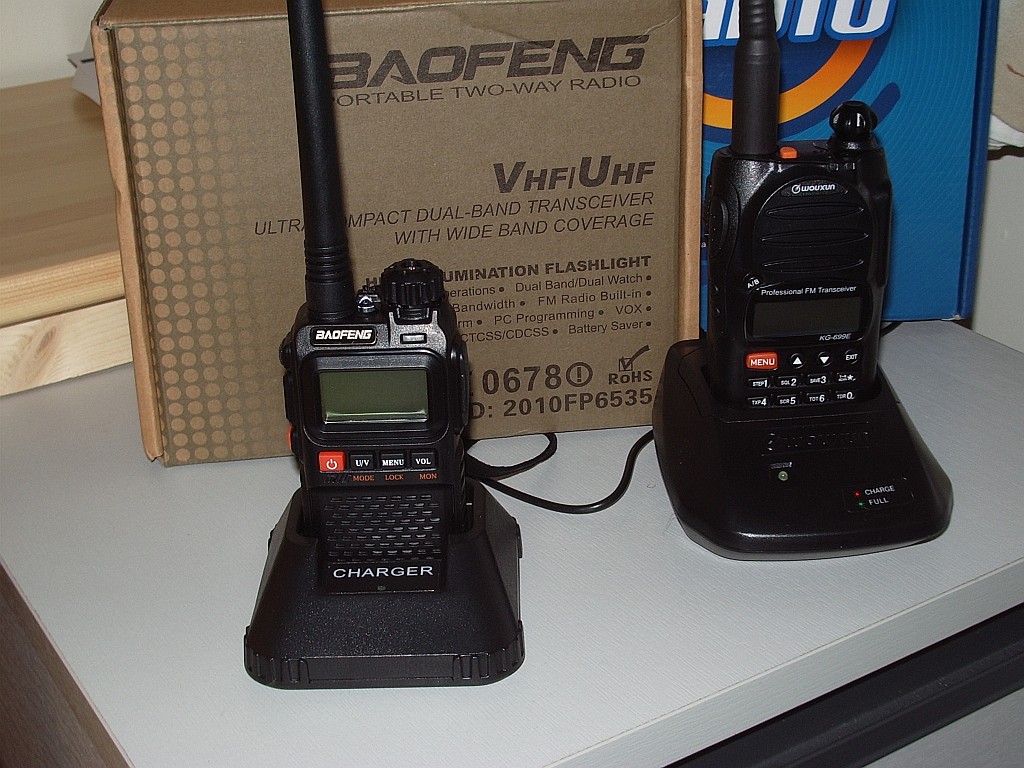
The arrivals are two new handies – one a Baofeng UV-3R+ VHF/UHF dual band transceiver (note the plus,) the other a Wouxun KG699E low band VHF transceiver for 4 metres. My original UV-3R has found a new home, whilst the Taiwanese “professional” radio I got for 4 metres is just a rubbish radio.
I haven’t had time to get to know the new radios. The Wouxun in particular is not intuitive and will require some intensive study of the manual. The Baofeng is functionally identical to the UV-3R Mark II but the build quality is much superior – on a par with the Wouxun and favourably comparable to the ham radio brands like Yaesu.
A major plus of the UV-3R+ is that you now get a professional grade drop-in charger. Besides a more rugged-feeling case it also has a metal belt clip – a big improvement over the flimsy plastic one that came with the earlier model. I believe that both radios use Kenwood specification accessories. This will be useful, if true, as I have two Kenwood radios as well. One of the first things I will have to do is find a wiring diagram for the programming cable because the one I made for the UV-3R Mk I has a 3.5mm 4-pole plug and is no longer useful.

Julian Moss, G4ILO, is a regular contributor to AmateurRadio.com and writes from Cumbria, England. Contact him at [email protected].
ZD7XF and some reminiscences!
I was really pleased to work Nigel, ZD7XF at the weekend for a new country.
You might be interested to see a few pictures of Nigel’s previous operation from St Helena here
Nigel is, of course, G3TXF at home and is a very well-known and respected contester and dxpeditioner. He’s also a fine man. Some years ago, I had the absolute pleasure of working with him and Roger, G3SXW on a project building a website and database reporting on the financial performance of Telecom companies. In fact, on Nigel’s amateur radio website, there’s still a bit of code that I wrote which shows all of Nigel’s DXpeditions that a particular callsign has worked, band by band!
So, whenever I work Nigel from a faraway place, it’s always a particular pleasure.

Tim Kirby, G4VXE, is a regular contributor to AmateurRadio.com and writes from Oxfordshire, England. Contact him at [email protected].
Heavy handed
This post will probably get me thrown off QRP-L for all eternity.
The other morning, I was trying to send an e-mail and Thunderbird started acting flookey. I was getting error messages that said my ISP “Cannot send message due to possible abuse” and then I also got this: “The message could not be sent because the connection to SMTP server smtp.verizon.yahoo.com was lost in the middle of the transaction. Try again or contact your network administrator.”
The situation was like this all day Saturday, so when sending e-mails, I had to use the Web based client that Verizon Yahoo offers.
No big deal really, in the scheme of things. But later on that day, I saw that Terry KQ5U was experiencing the EXACT same problem and he posted about it as an Off Topic on QRP-L. Wishing to communicate with him about it, but not wishing to tie up the e-mail reflector, we shared a couple of direct e-mails.
Thunderbird started acting normally for me on Sunday morning; but then gave me the same error Sunday afternoon and evening. For the record, it seems to be all right today. And I would have to say that in all, there were less than a half dozen posts about this on QRP-L.
Then I saw this today, and quite frankly, it rubbed me the wrong way.
“QRP-L mailman list,
Just a reminder, we don’t use OT in the subject or have Off Topic posts on this list. Especially when it comes to computer operating systems. Please take that elsewhere please.
This list is to be use for QRP and ham radio related topics. Some think this is a fine line since many of us have computers attached to our rigs, it is not.
Antenna modeling, SDR’s, logging and control are OK to discuss on the list, but I draw the line on operating systems. Guys that want to continue pushing this will be moderated without warning.
If you have any questions on this contact me direct and NOT to the list.
Thank you and 73 qrp-l moderator.”
Now, first off …… this is a private list that is run by someone. Who that someone is, I am not sure and really, do not even want to know. That said person sets rules and that we are expected to follow them is also fine. I have no qualms with any of that. That this notice was posted didn’t even bother me.
Here’s what bothered me, this one single, line: “Guys that want to continue pushing this will be moderated without warning.”
There were a grand total of less than 1/2 dozen posts regarding this; and the originator, Terry KQ5U was looking for assistance. And he came looking for that assistance to a group of guys that are very knowledgeable on a wide variety of topics. The fact that there were so few posts about it didn’t warrant the reaction, in my book. And the “challenge” to anyone who might have offered some valuable information or tips seemed to be way off base in my most humble opinion.
In the past years, I have seen some really mundane topics that had NOTHING to do with QRP, just beaten to death on QRP-L, without one iota of comment from anyone. This one, where someone was looking for some help with regards to an e-mail client (and NOT an operating system as was erroneously pointed out) so that he could continue posting to the list, just seems rather arbitrary and heavy handed to me.
Like I said, if this gets me banned from QRP-L in a snit of retaliation – so be it, but what’s right is right. The list owner’s announcement was correct and reasonable – the implied threat wasn’t.
72 de Larry W2LJ
QRP – When you care to send the very least!

Larry Makoski, W2LJ, is a regular contributor to AmateurRadio.com and writes from New Jersey, USA. Contact him at [email protected].
Ham Shack Update–Walls Complete
Even with losing one hour this weekend due to the daylight saving time change, I’m pleased to report that after three weekends and an estimated 20-24 hours of labor, the walls are complete. As I reported last week, I only had about 5 sheets of drywall to hang this weekend. Unfortunately, these 5 sheets were in the laundry area of the basement and included a lot more intricate and fiddly work. I also decided to replace the laundry dryer vent which took about an hour and two trips to the hardware store. The old vent pipe was crushed and had been taped and spliced together before we purchased the QTH in 2004. While we all know duct tape and bailing wire are near permanent repairs, I went ahead and erred on the side of better judgment and replaced it all.
I also had to accommodate a small design plan my wife had suggested. This included a short divider wall next to the washer and dryer. The laundry area of the basement was one area my wife and I had changed our minds on the overall design. Initially we had planned to completely enclose the washer and dryer behind doors. Today our washer and dryer are a basic set of Sears Kenmore models. We are planning to upgrade to some nice front load models. I figure if we’re going to spend the extra money for these upgraded models, we don’t want them hiding behind a door.
Here are a few pictures from the work this weekend. Please excuse the mess, the area is under construction.

Here’s the short wall which was a last minute addition.

Looking from my ham shack down the short hall to the laundry area. The door on the left is access into the utility closet where the furnaces, hot water heater etc. are located.
The next few pictures (a few I’ve shown in older blog postings) are in my ham shack area and show the progression over the past few weekends.

The stud walls

Just two more panels to close in the corner.

Corner done.
The above corner had to be framed in this way due to a basement support post. While it takes up a little extra space, it should be fine. Above desk cabinets, below desk cabinets and a nice wide work surface and all will be fine. I’ve also been getting the electrical outlets wired in. Once electrical is done I’ll wire in the CATV and network (voice/data) jacks.
So what’s next on the agenda? After three weekends of hanging drywall, my wife and I need a break. Plus I need to reposition one AC/Heating vent in preparation for the ceiling drywall work. This will also be a good time to move some of the scrap drywall pieces from the basement upstairs to the garage and just tidy the construction zone up a bit.
The weather forecast for this upcoming weekend is supposed to be warm and I think we’ll tackle a few quick outdoor projects. While snow is still very much likely in the mile high city, signs of Spring are popping up right and left. It’s time to get the flowerbeds cleaned, rake up the winter kill grass and drag the water hoses out.
If all goes as planned, I’ll be ready to rent the drywall lift and start on the ceiling the weekend of 24/25 March. Once all the drywall is installed, then we’ll start the messy phase of taping, mudding and sanding. This phase could begin as early as the last weekend in March. But I don’t want to jinx myself, so I’ll just say it will get done when it gets done.
In closing, you’ll likely not hear from me on this particular subject again until the ceiling is complete. I won’t bore you with an update next weekend on my progress of sheet metal duct work.
Until next time…
73 de KDØBIK
Jerry Taylor, KD0BIK, is a regular contributor to AmateurRadio.com and writes from Colorado, USA. He is the host of the Practical Amateur Radio Podcast. Contact him at [email protected].
Using CircuitLab to Design Projects
I ran into this online circuit design program, called CircuitLab, on a few blogs and forums, and have been playing around with it myself. There are many who are more technically-minded than myself (Fred W0FMS comes to mind), but I’ve had some initial luck playing around with it. It’s very visual and easy to use (on Firefox, at least). I’m curious if others have tried it and what your reactions are? I know that this isn’t the first circuit simulation program out there, but it seems ridiculously easy to use.
Matt Thomas, W1MST, is the managing editor of AmateurRadio.com. Contact him at [email protected].
Cloud RF
Cloud RF is something that I stumbled over and to be honest I’m not sure where so if I’m telling you something you already know then I’m sorry, its a function of me not concentrating.
Anyway the blurb from the Google marketplace / Google play site indicates that the app is for all sorts of RF planning and I quote ‘DAB, DVB, GSM 2G/3G/4G/LTE, Marine VHF, PMR, TETRA, PTT, WiFi, WiMax
Groups: Emergency services (Ambulance, Coastguard, Fire, Forestry, Police), Amateur/Ham enthusiasts, Armed Forces/Military, Construction industry, Event organisers, Government, Maritime/Private Security, WISPs.’

For me its a way of simply checking the coverage I’m expecting. there are 2 applications for your Android phone and a web based offering to boot. The programme is squarely aimed at the corporate market and the trial offshoot for hams is either a 12km limited plot for free or for a fiver you get 100km of signal plotting. I guess you could reduce power to minimal levels and attempt to extrapolate but it doesn’t seem worth it if you’re into planning for a RAYNET or emergency communications type situation.
Still for the casual user there is at least something to wet your appetite and the operation couldn’t be simpler on your phone. Use the GPS or map to locate where you are / want to be. Entering in the frequency and power as well as height above ground for the rudimentary settings and press the button to calculate your plot. Other aspects can be changed such as type of ground and the usual modelling parameters that you’d expect from a simplified model that bears a similarity to Radio Mobile that Julian, G4ILO posted a while ago. I’m only guessing but I’d image its a similar if not the same engine that delivers the plots (Irregular Terrain Model).
Have a play with the trial version and see if that takes you fancy and if you dip into the paid for version then let me know what you think.
Alex Hill, G7KSE, is a regular contributor to AmateurRadio.com and writes from Cumbria, UK. Contact him at [email protected].
The ups and downs of amateur radio!
There are some days when things don’t go quite right. In fact, nothing goes quite right.
Yesterday morning, I thought I’d have a look on 28MHz JT65. I plugged the interface lead into the sound card on the computer but there was no receive noise. Fiddled and faffed and discovered that there was a problem on the socket with the computer.
Managed to get around that by using an external USB sound card which came with the ZLP interface. That worked great with WSJT, but with the W6CQZ JT65-HF program which I use on HF there wasn’t enough gain using the basic interface that I have from the FT1000MP. In the shower, I realised the simple way around that was to run all the digimodes from the FT847 which had previously just been used on VHF/UHF. Got that going and in fact, the receive on 28MHz seemed to be better than from the old setup. I had some contacts to test it and all seemed ok.
Later in the day I was playing around on FSK441 on 144MHz and I noticed the output was down! I had a sinking feeling that I had done something horrible to the PA whilst on HF JT65A. Fortunately, it proved to be the patch lead between the FT847 and the amplifier. I removed the patch lead and everything seemed ok. Need to grab some more connectors from Maplin tomorrow and make another up.
Then I got panicky about a noise that the FT847 made when going back to receive on JT65. That proved to be something to do with the JT65-HF program – WSJT was fine. I think it was just a slightly different click of the relays on HF. But I’m not quite convinced!
Playing around on JT65 on LF I realised that the filters in the FT847 weren’t anything like as good as the FT1000MP. I decided to connect the MP back up. On LF, the lack of gain really wasn’t an issue compared to my findings on 28MHz earlier. So that’s good, I can still use the MP for JT65 on 7 and 3.5MHz.
About then, I saw a tweet from Paul, M3JFM to say he’d just worked ZD7XF on 10m. Now, I’m pretty sure that I haven’t worked St Helena from the UK, so I thought I’d better do something about that.
I found Nigel, ZD7XF on 7MHz easily, but what a pileup! I decided to admit defeat somewhat grudgingly and went to bed.
The cats asked to get up at 0530z so I had a quick check on the bands after testing them out. ZD7XF was audible on 3505. I tried a couple of quick calls, but it was clear I wasn’t getting anywhere. Back to bed!
By 0800z ZD7XF was on 21MHz. The Butternut isn’t great on the band, but it works – just. After just a few calls, Nigel was in the log! Already, today seemed more positive. After breakfast, I thought I had a few minutes before I needed to start my jobs! I checked 28MHz and he was there – not strong, but workable. It took a few goes, but I made it. Thank you, Nigel!
It all worked out in the end. Need to get that patch lead sorted and take a look at the socket on the laptop…..
And a quick ‘get well soon’ to Paul, M3JFM who inspired the ZD7XF chase!

Tim Kirby, G4VXE, is a regular contributor to AmateurRadio.com and writes from Oxfordshire, England. Contact him at [email protected].
 Ham Radio Deluxe |
 W5SWL Electronics |
 Ham Radio Prep |
 KB3IFH QSL Cards  Hip Ham Shirts  HamRadioAuctions HamRadioAuctions Reliance Antennas Reliance Antennas Enigma Shop Enigma Shop |  morseDX  Ni4L Antennas  R&L Electronics R&L Electronics antennas.us antennas.us QRV QRV |
- Matt W1MST, Managing Editor
