 |
 We love new gear, don’t we?
 9 May 2012 | by
 I’ve been watching with some amusement as the news continues to break about the newest entry into the ham gear market…Kenwood’s TS-990S. It dovetails nicely with other big roll-outs such as Elecraft’s KX-3. As soon as the ad for the 990 appeared on the back of last month’s QST and CQ with word that a prototype would be shown at Dayton, the message boards have exploded with speculation about what kind of rig it would be, what features it would have, how much it would cost, and more. And there were the immediate negative comments, too.
“Who needs another ($4000, $5000, $10,000, $Trillion…take your pick) ham rig?”
“Why don’t they do a QRP rig instead of another (IC-7600, IC-7700, IC-7800, FT-5000, FT-9000…take your pick) clone transceiver?”
“Will it have a band scope?” “Will it have (one, two, three, sixteen…take your pick) USB ports?” “It’s bigger than the TS-850. I don’t want it.” It’s smaller than the TS-850. I don’t want it.”
There have even been many who denigrate Kenwood for their lack of marketing acumen on so many scores you would actually think those posters actually knew anything at all about the top-secret radio. Or assume they know more about marketing ham gear than Kenwood–who has been doing it for many, many years now.
Then things really went bonkers this week with the publication of an ad on the back page of the June QST:

- Ad in June QST for the new Kenwood TS-990S
Don Keith, N4KC, is a regular contributor to AmateurRadio.com and writes from Alabama, USA. Contact him at [email protected].
UV-5R programming lead fun!
When I ordered my UV-5R, I didn’t order a programming lead. As I have commented before, I recommend you do! Manual programming is rather arcane, especially for repeater/duplex frequencies.
I’d used a Wouxun lead that I’d borrowed to get the first few memories set up. Yesterday, the lead I had ordered from Hong Kong arrived. Installation of the driver didn’t go quite as smoothly as I’d hoped! I tried running the executable but had no luck. In the end I followed some instructions I found to install the driver manually and it worked. The PC I was working on runs Vista. Perhaps that’s why it was awkward.

Tim Kirby, G4VXE, is a regular contributor to AmateurRadio.com and writes from Oxfordshire, England. Contact him at [email protected].
Propagation always has a twist in the tail!
Rainy and a little bit windy. Not the sort of weather that you really associate with VHF/UHF tropo. But this evening, driving home, the Wells 144MHz repeater, GB3WR was around 40db up on normal as I drove up the A34 from Didcot. Quite stable and consistent until I was a little further north.
A weather front coming through perhaps?
It’s great when propagation doesn’t do what you expect. Always something new to learn.

Tim Kirby, G4VXE, is a regular contributor to AmateurRadio.com and writes from Oxfordshire, England. Contact him at [email protected].
Handiham World for 09 May 2012
Welcome to Handiham World.
You can do it!
Today, just as we did last week, we are going to begin with Troubleshooting 101 as part of our initiative to help new ham radio operators (and even some of us older ones) learn how to do some basic troubleshooting for ourselves. Yes, it can be tempting to ask someone else to do things for us. This can become a bad habit when it keeps us from learning new things, especially things that we could – with a bit of practice – learn to do for ourselves. Knowing these basic things can serve us well in the future when no help is available.
Troubleshooting 101

Let’s get to today’s troubleshooting question:
I like using Echolink, and I’ve finally figured out how to forward the ports on my home router to my ham shack computer. The problem is that I can’t use Echolink on any other computer in the house unless I change all those port forwarding settings or use a public proxy, which isn’t always available. Is there anything else I can do to make Echolink a little more convenient?
Echolink is pretty addictive, and it’s easy to understand why you would want to be able to use it all around the house, perhaps even on your laptop while seated out on the patio one of these nice upcoming summer days. As you discovered, when you set up your home router to forward ports as described on the Echolink website, the application will then only work on the computer you selected. The router will happily direct traffic through those open ports, but only to that one specific ham shack computer. As you discovered when setting up your home router, port forwarding is not something you can do on a moment’s notice. You have to log into your router’s web-based administration page, go to the advanced settings, and then the port forwarding section. When you make changes to the settings, the router may momentarily drop internet connectivity and perhaps even reboot. Then it will take a while for everything to settle down and work again. This can be a major aggravation if you have other users in your household or if your home phone is a VoIP system that depends on the internet being connected.
Let’s examine our Echolink application’s built-in Firewall test. You will find it by opening Echolink, going to the “Tools” menu, and arrowing to the “Firewall/Router Test”. Once there, press
Since you have already told us that your ham shack computer has Echolink working, you should get this “Testing Complete” message that says “Firewall test results: PASS”. 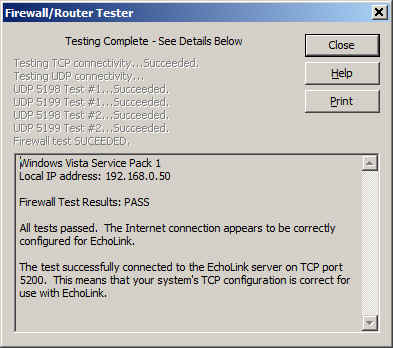
It is important to know about this handy little tool that is built into Echolink because you are going to use it again on a fairly regular basis once you make a few simple changes to your router settings.
Now it is time to use your main computer, which is connected by a LAN cable (preferably) to the router, to open the router’s administration page. Depending on your router’s setup, you will need to log in, then go to the advanced settings page and then to the port forwarding page. This should all seem familiar as you have already done it once. Next, you will need to uncheck the port forwarding boxes that you already set up. Yes, I know it seems crazy, but it is a necessary step. Save the settings, then go back to the advanced settings page and choose “port triggering” or “application rules” this time. It is similar to setting up port forwarding, but there is a BIG difference: You are opening ports when the Echolink application calls for them to carry traffic, no matter which computer on your network is running Echolink. This means that when you open Echolink on your wireless laptop while on the patio, the ports will be open to that computer. When you close Echolink on the laptop and later that evening you go back into the ham shack to use your main computer, Echolink will then work on that one because the ports will be opened by the “trigger” of a call for traffic to that machine.
I happen to have a D-Link router, so a screenshot of the application rules (triggering) page shows that I have triggered ports 5198 and 5199 for UDP traffic and port 5200 for TCP traffic. 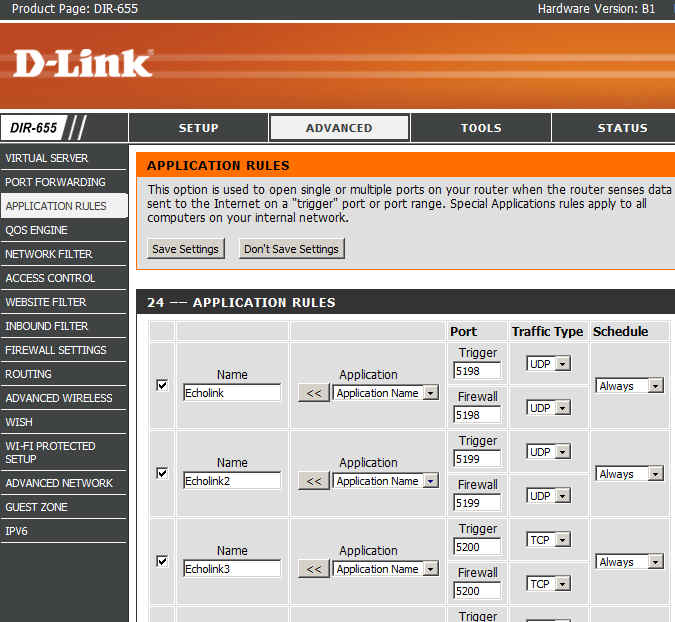
Now I can save the settings and after that I should be able to use Echolink on any computer on my home network without having to worry about port forwarding.
There are some things to remember:
- Only one computer at a time can be running the Echolink application. If more than one computer is running Echolink, only one of them will actually connect properly.
- When you close Echolink on one computer, it may take a few minutes for the network to resolve itself back to a neutral state. If you try to connect Echolink on another machine immediately, it may not work. Always allow a few minutes between switching machines – Both machines may be running and connected to the network at the same time, which is not a problem. It is only starting Echolink too soon after just closing it on another machine that can cause problems.
- This is where we try our built-in Firewall/Router tests again:
If the network is ready, the tests will proceed normally with a “PASS” and you are good to go for Echolink fun!
Email me at [email protected] with your questions & comments. But for the record, please remember that I am NOT tech support for Echolink or your home networking equipment since you are there at home and I’m here in Minnesota. Reading the manual will get you way farther than calling me for sympathetic head-nodding.
Patrick Tice, WA0TDA
Handiham Manager

Pat Tice, WA0TDA, is the manager of HANDI-HAM and a regular contributor to AmateurRadio.com. Contact him at [email protected].
Speculation-Biased Speculation…
If you are old enough, I bet you remember the game Fascination and that song in the commercial that stuck in your head all these years? For you new ones, here’s that commercial in YouTube format.
If you change the word fascination to Speculation, that naggy song becomes Speculation, Biased Speculation… the game we love to play! Seems like today’s political and journalistic culture has invaded ham radio if you follow the threads on QRP-L reflector about the Ten Tec 539 which is yet to be released. It has been diced, sliced and all sorts of factless speculation has already been thrown out as to why it won’t be popular or competitive with brand x’s new scrumpdillyicious xcvr. Whew!
I think it is a sad sign of the times that instead of waiting for things to be released publically and from the source, products are already condemned as unworthy and judged based on hearsay and not true facts. It is bad enough that our culture does that in tv news broadcasts. Everyday we endure seeing the accused virtually tried and convicted on the screen by endless talk show hosts and experts often months before the courts are convened. I hate to see that culture spilling over from the current US political context where finger-pointing, wild speculation, and always attempting to avoid responsibility and accountability begins to be spewed out on our hobby.
I for one will look forward to the final roll out of what looks like a very nice new transceiver from a US company before I make that buying decision. Might be something I want, but who can tell until the process is finished and we get to see the final product? From here, it looks promising despite the speculation that is taking over all the airwaves and culture here in the USA. As for me and my house, we will wait for the facts!
72,
Kelly K4UPG
Kelly McClelland, K4UPG, is a regular contributor to AmateurRadio.com and writes from Florida, USA. Contact him at [email protected].
Early release of Dayton eye candy!!
 |
| Dayton with many more surprises |


Mike Weir, VE9KK, is a regular contributor to AmateurRadio.com and writes from New Brunswick, Canada. Contact him at [email protected].
More KX3, iPad and PSK-31 Experimentation
Last week I created a YouTube video to document some experimentation I had completed with the KX3, my iPad and the iOS PSK-31 app called PSKer. This week I made some modifications to my setup. This included adding a USB extension cable and I experimented with the VOX settings of the KX3.
Thank you for watching!
73 de KD0BIK
Jerry Taylor, KD0BIK, is a regular contributor to AmateurRadio.com and writes from Colorado, USA. He is the host of the Practical Amateur Radio Podcast. Contact him at [email protected].
 Ham Radio Deluxe |
 W5SWL Electronics |
 Ham Radio Prep |
 KB3IFH QSL Cards  Hip Ham Shirts  HamRadioAuctions HamRadioAuctions Reliance Antennas Reliance Antennas Enigma Shop Enigma Shop |  morseDX  Ni4L Antennas  R&L Electronics R&L Electronics antennas.us antennas.us QRV QRV |
- Matt W1MST, Managing Editor
