 |
 GSM phone power control and signalling
 8 January 2013 | by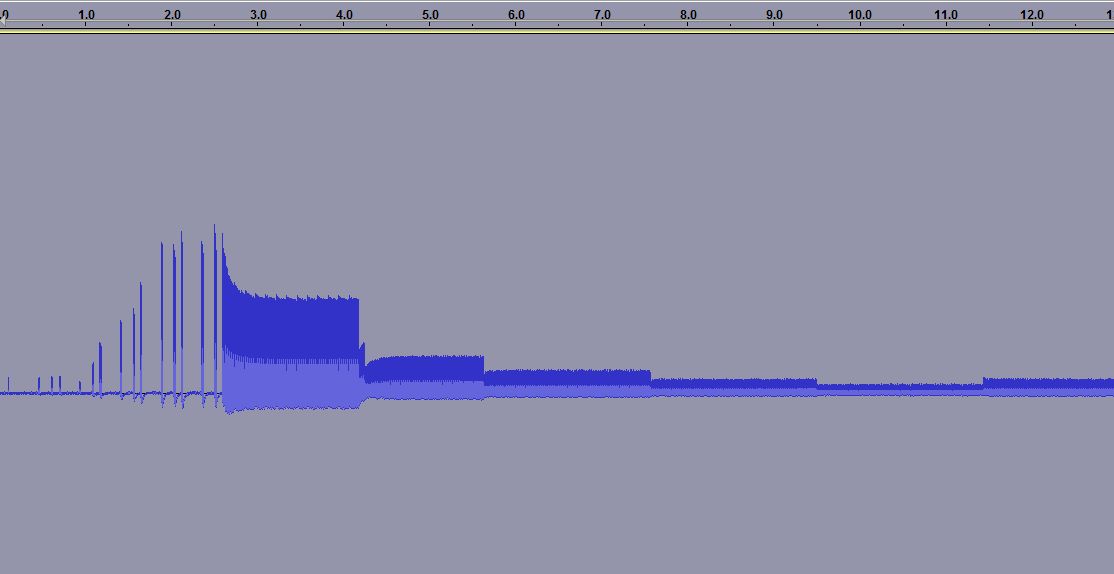
When you measure the energy out of a GSM cell phone at the moment of initiating a call, you get the picture to the right. It shows the first 15 seconds.
For the first 3.5 seconds there is the signalling between the phone and the base station. Then the connection is established, but after some time (at 4.2, 5.6, 7.5 and 9.5 seconds) one can see how the phone turns the power down, according to the commands it gets from the base station.
 The first example was for the case of a strong received signal, all bars are shown in the signal strength meter. The reduction in power, preservers battery life and as a side effect the user is exposed to a smaller amount of radiation. Interestingly, one can see that after a while there is a small adjustment of the power and it is turned up a bit (at 11.5 seconds).
 In other cases one can see a situation which follows the same pattern in time, except that the power stays at a high value. This second recording was done in my basement where GSM coverage is much poorer. Here the phone’s signal level indicator hardly shows any signal.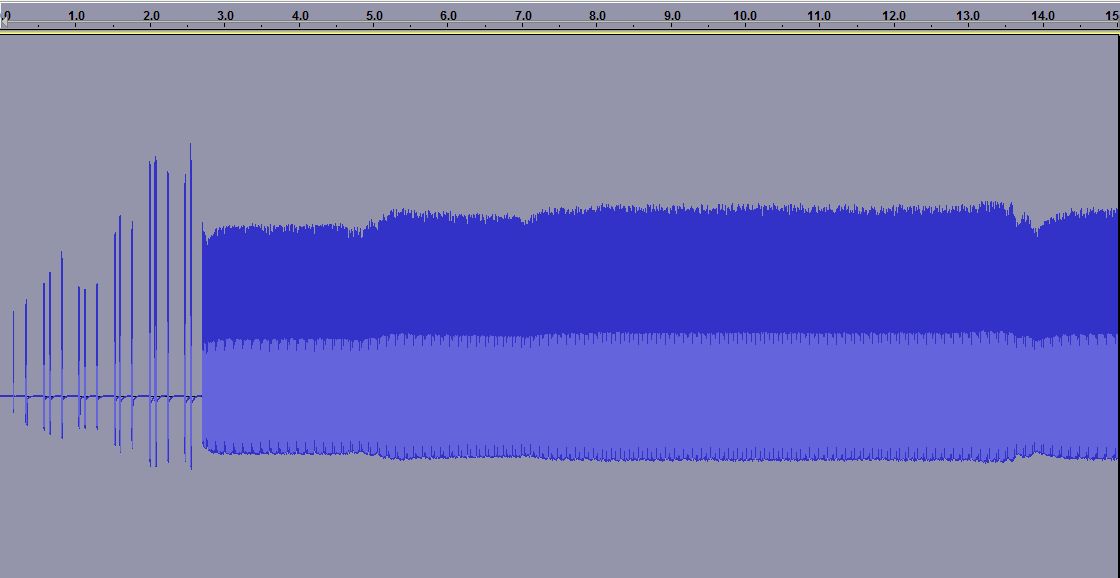

The third plot is a zoom of the previous one. Here one can see how the phone only transmits 1/8 of the time as it shares the channel with 7 other phones in a time multiplex. It is allowed to transmit every 4.6 ms and this is the reason why one often can hear a buzzing sound at 1/4.6 ms = 217 Hz in equipment which is placed close to a phone.
One also sees another frame structure, as the phone transmits 25 bursts and then breaks for one burst before continuing. Every transmission consists of 150 bits, but that is not possible to resolve with the simple setup that was used here.
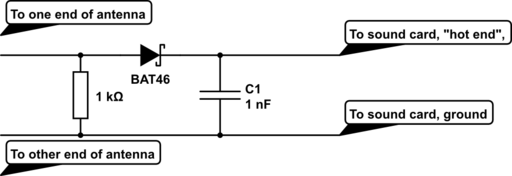
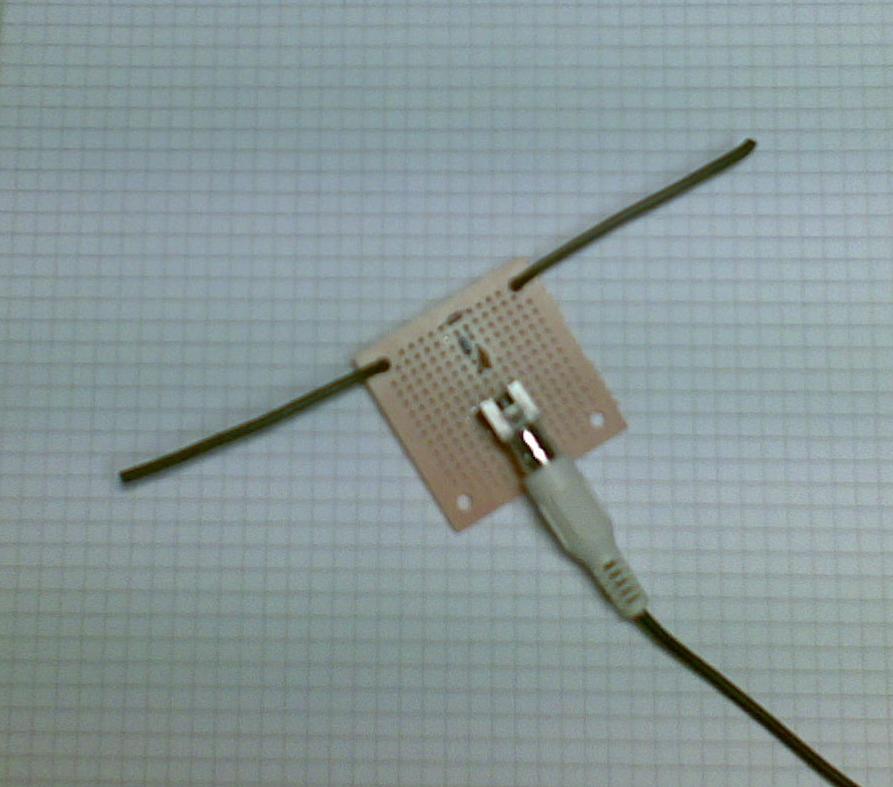 The equipment was a dipole antenna and a simple diode detector:
- A half wave dipole antenna for 950 MHz has a length of 0.5*3*108/950*106 = 15.8 cm, thus the antenna is about 2 x 8 cm (probably not very critical). The antenna was made from stiff self-supported wires.
- There is a resistor of R=1 kohm across the antenna and then a Shottky diode which acts as a detector (A Shottky diode which handles higher than 1 GHz is needed and BAT46 was used here), and finally a 1000 pF capacitor as a filter.
This post was inspired by William Andrew Steer’s “GSM phone signal analysis“.
Sverre Holm, LA3ZA, is a regular contributor to AmateurRadio.com and writes from Norway. Contact him at [email protected].
Hamlib and virtual serial ports
Sometimes it seems as if half the posts in this blog relate to trouble with computers.
After I got back from the hospital today I thought I would try some WSPR for a change. Paul PC4T had mentioned that conditions on 80m were good. 80 is not a band I often use so I thought I’d try there. But no sooner than I had tried to change band than the software beeped rudely at me. The console window contained an error message: serial_open: Unable to open COM13 – Invalid argument.
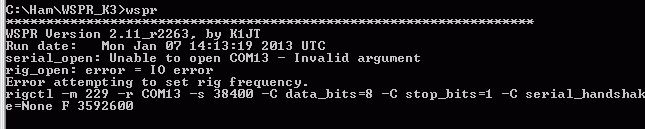
COM13 is a virtual serial port splitter on COM3 which I’d created using Eterlogic’s Virtual Serial Port Emulator, VSPE. I’ve used this utility for years to create virtual serial ports so that more than one program can open my radios’ computer control ports at the same time. I’d used one to try out CW Skimmer with KComm before Christmas. As I’d uninstalled Skimmer I removed the virtual serial port. WSPR, which does its rig control through hamlib, then opened COM3 up just fine.
That’s a temporary solution, but I haven’t given up the idea of running other ham software alongside KComm for good. I think there are other serial port splitters out there (there’s com0com which was far too complicated for me to figure out) but VSPE has always worked for me until now. Don’t you just love computers?
Julian Moss, G4ILO, is a regular contributor to AmateurRadio.com and writes from Cumbria, England. Contact him at [email protected].
Philco Tropic Model 3012
Last weekend I attended the Houston Vintage Radio Association holiday dinner & picked up a Philco Tropic Model 3012 during the fundraiser auction. I had let a few other radios go without placing a bid and was beginning to think I might go home empty handed when I saw the Philco “on the block”. A few seconds later I was the proud owner of this vintage receiver.
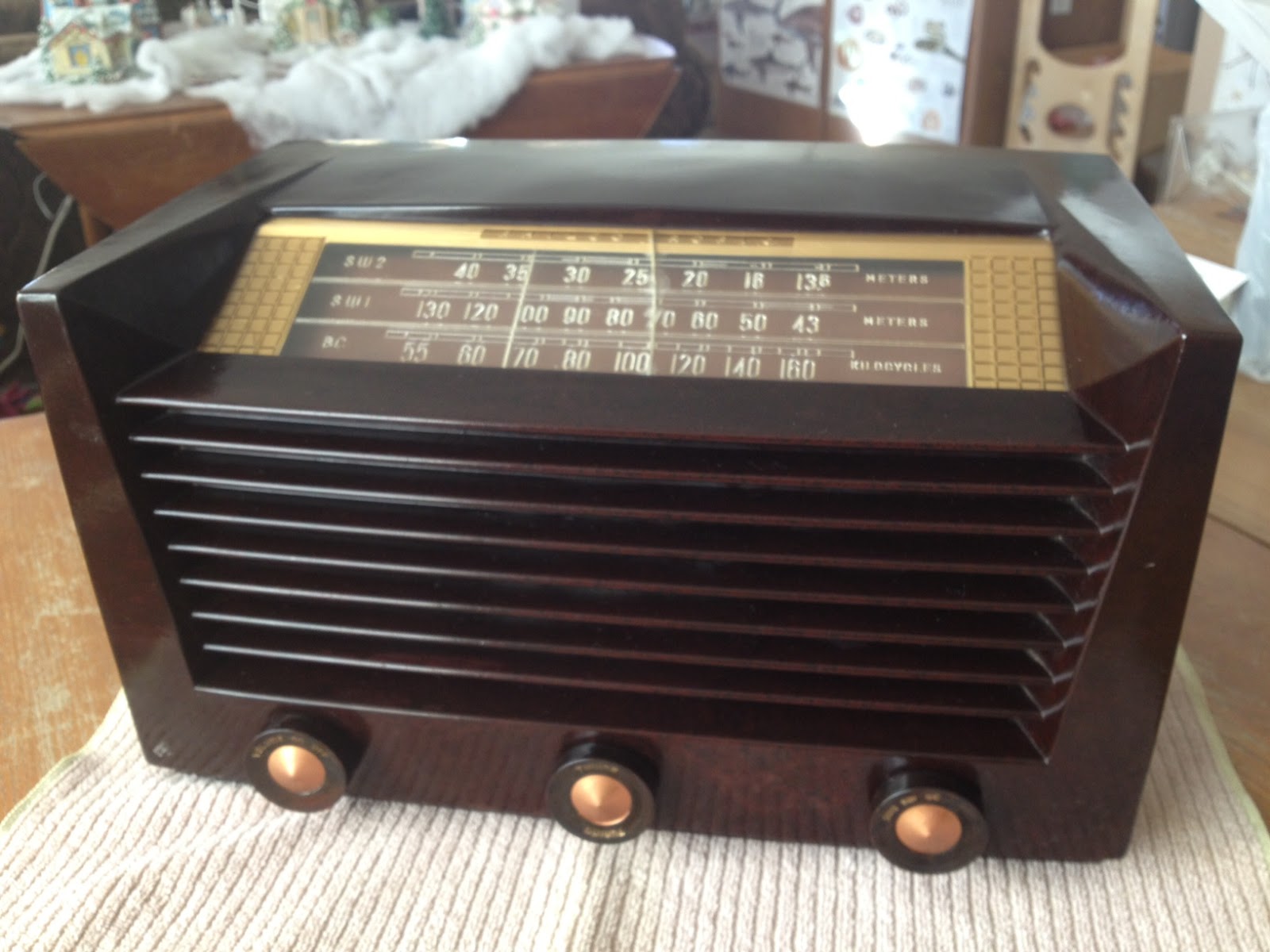 |
| Philco Tropic 3012 |
Information on this model seems a little scarce, however the style of case was introduced by Philco in 1951 and used in their line of AM/FM receivers for many years after that. This particular example is a transformer-less AC/DC set with a potentially live chassis and the unusual (to me) lineup of 14Q7, 7B7, 14B6, 35A5 & 35Y4 vacuum tubes.
What prompted me to bid on this particular radio was the inclusion of two shortwave bands in addition to the typical AM broadcast band. The dials are marked off in meters which also appealed to the ham radio side of my interests.
After attaching a short length of wire as an antenna I was able to pick up signals across the two SW1 & SW2 bands so I’ll be interested to see what it can receive with a long wire antenna at night.
After a gentle cleaning with dilute mild detergent to remove dirt I rubbed in some beeswax polish to restore the original gloss. Sadly the plastic dial is cracked in the middle but I can look past that given its a little more unusual than the typical All American Five receiver.
Being over fifty years old I wonder what this radio has been used to listen to and what stories it could tell. Perhaps it gave some youngster his or her first taste of ham radio, listening to shortwave stations and AM QSOs until they received the final demand to, “Switch that radio off and GO TO BED!”
Owen Morgan, KF5CZO, is a regular contributor to AmateurRadio.com and writes from Texas, USA. Contact him at [email protected].
I feel like the frog
who was in the pot of water, that little by little got warmer and warmer until it was boiling.
I was sitting in the shack having a QSO with Greg KD5EW on 15 Meters when I turned around and took a good look at my surroundings. How did it get this bad? How did this part of the basement become such a mess?
Beginning during the weeknights after work, and continuing next weekend, I am determined to clean this space up and make it more functional again.
It will be interesting to see how many things I find that I forgot about and didn’t realize that I have.
73 de Larry W2LJ
QRP – When you care to send the very least!
Larry Makoski, W2LJ, is a regular contributor to AmateurRadio.com and writes from New Jersey, USA. Contact him at [email protected].
Will Cycle 24 Break Record Sunspot Count?
 |
| Count of 208 was recorded 9 November 2011 |
 |
| Solar Terrestrial Relations Observatory (STEREO) Image |
 |
| North American Polar Paths To Europe And Japan |
Good afternoon from the Shell Beach shack after a winter’s morning rain shower leaving behind a partly cloudy sky with a temperature nearing 55 degrees plus or minus a few degrees.
Right now, I’m listening on 15m while machines speak to machines in the mechanical language of RTTY under the control of RadioSport operators, who undoubtedly are smiling ear to ear. The pain of the chair seems less painful when Cycle 24 maybe approaching a record count?
I never paid attention to auroral data and, with critical polar paths playing a fundamental role in the success of RadioSport scores across the globe, I finally get it.
NOAA Explains
Auroral data is as important as the solar flux indice, sunspot count, and both indexes. Each measure gives a reasonable guess at what I can expect on a given RadioSport weekend as NOAA explained it this way, “Energetic auroral particles (primarily electrons) not only produce the visible aurora but also greatly influence the properties of the ionosphere and are connected with strong electrical currents (as much as several million amperes) that flow in the ionosphere and connect along the geomagnetic field to a dynamo process at high altitude in the magnetosphere.“
NOAA further stated, “Thus, this same display provides a similar “best-guess” estimate of the geographic locations that may be subject to geomagnetic fluctuations that result from electrical currents flowing in the ionosphere, or the radio propagation paths that maybe degraded because of increased absorption of the radio signal by the disturbed ionosphere.“
In Sum
The potential for a storm increases as the number of sunspots increase and the possibility of a record count is approaching. Although, I’m a little perplexed because I’m not hearing much CW activity given current conditions? Those RTTY operators get all the luck!
73 from my Shell Beach shack.
Raspberry Pi progress (RTL_ADSB, WSPR, WSJT and Dump1090 all compiled)
This year, Santa was kind enough to bring me a Raspberry Pi computer for Christmas. I’d been aware of them throughout the year, but had become much more interested recently when I started to see some real solid amateur radio applications for the device.
The idea of having a £25 computer which could be tasked with running programs like WSJT or WSPR was very attractive, as well as being a handy machine for web browsing and general internet use (I’m writing this post on the Pi, for example).
Pete 2E0SQL had posted about getting RTL_SDR running on the Pi which was a very useful and interesting. The only issue that I had was with libusb1.0 – because I was compiling it seemed that I needed to install the libusb-1.0.0-dev package. Once I did that, everything worked well.
Initially, I tried the Remote_SDR which certainly worked, although was a little stuttery. What was more interesting to me was the rtl_adsb program, which I was able to use to decode ADSB messages from aircraft and send these across the network to the Windows laptop running ADSBScope. This was done simply by piping the output of rtl_adsb using netcat as follows:
rtl_adsb |netcat -lp portnumber (where the portnumber is where ADSBScope is pointing)
I was impressed and this worked pretty well and the receiver and decoder seemed sensitive – considering the antenna was downstairs and away from a window.
Dave G4FRE had posted about compiling WSPR on his Raspberry Pi which made a great basis for getting WSPR going.
I had to amend my configure statement as follows:
./configure -with-portaudio-include-dir=/usr/include -with-portaudio-lib-dir=/usr/lib/arm-linux-gnueabihf
Finally, when I ran the make install, I got an error which was quite terminal!
(no rule to make target mept162.f needed by WsprMod.w.so. Stop
However, Googling around a little, I found that a number of people had had the same issues compiling the latest release of WSPR, so I downloaded the 2840 version from the repository using the following command:
svn co http://svn.berlios.de/svnroot/repos/wsjt/branches/wspr -r2840
I still needed to use the amended configure statement but this seemed to work ok. The program compiles up and starts and I was able to select a USB sound card. I haven’t yet tried a decode (the Pi is in the lounge and not the shack!) but will aim to do that soon.
Next to compile was WSJT and I used Dave G4FRE’s post to guide me. There were no nasty surprises requiring too much thought and the process was simple and straightforward.
Finally, was a new ADSB decoder that could be used with an RTLSDR device. Called Dump1090 it was written by Salvatore Sanfilippo that I saw mention of on Twitter – this was very simple to get going:
git clone git://github.com/antirez/dump1090.git
cd dump1090
make
Once the program was built, I particularly liked running Dump1090 in interactive mode with the RTLSDR dongle in one of the USB Hub slots connected to the Pi
./dump1090 –interactive
This produces a simple, but interesting list of aircraft that the the decoder is seeing. Unlike any of the other decoders I’ve used recently, it gives an interesting indication of the sheer volume of messages that are being decoded.
It was good fun getting these different programs working and remembering some of my lost Unix skills!
Thanks particularly to Pete 2E0SQL and Dave G4FRE for their inspiration for these experiments.
Tim Kirby, G4VXE, is a regular contributor to AmateurRadio.com and writes from Oxfordshire, England. Contact him at [email protected].
Time for some radio time………
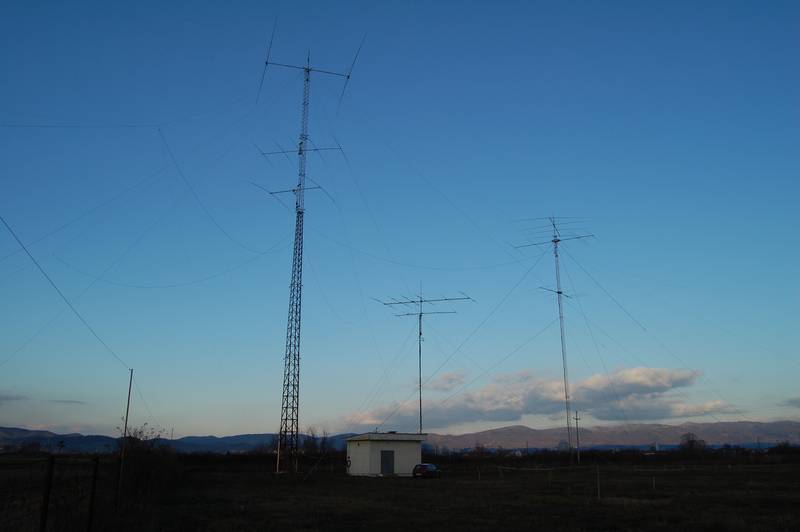 |
| Some of E77DX's antennas!!! |
I was able to make a fast DX 599 and go report to E77DX in Bosnia and I check on QRZ.COM and he sure does have a wild setup!! Emir was coming in around an S3 and I had to use my APF to really pic him out of a rising noise floor. This was on 30m's and I seem to find this a really go to band for me. I then for some reason jumped down to 10m's and VA7WW was calling CQ and he was in around an S2 to S3 here
%5B1%5D.jpg) |
| Now that is some great looking landscape!! |
to cut the QSO short but it was nice to have a CW conversation as to the 599 and move on. At this moment I am on 10m's again with VFO A in my right ear listening to QX3XR and KR7Q in my left ear on another spot on 10m's. Well I just contacted Peter OX3XR in Greenland he gave me a 559.......radio is so much more fun than farting around with the computer....
Mike Weir, VE9KK, is a regular contributor to AmateurRadio.com and writes from New Brunswick, Canada. Contact him at [email protected].
 Ham Radio Deluxe |
 W5SWL Electronics |
 Ham Radio Prep |
 KB3IFH QSL Cards  Hip Ham Shirts  HamRadioAuctions HamRadioAuctions Reliance Antennas Reliance Antennas Enigma Shop Enigma Shop |  morseDX  Ni4L Antennas  R&L Electronics R&L Electronics antennas.us antennas.us QRV QRV |
- Matt W1MST, Managing Editor
