 |
 QRP Tactics and XT2TT
 5 March 2013 | by
 However, as they say, there is more than one way to skin a cat, so are there many ways to work big DX-peditions QRP. I did not need XT for a new QRP country, however I did need them on 160m. (before you say I know what's coming, I did not work XT2TT on 160m QRP). So after the IOTA Bash festivities on Saturday night I went to the shack to see if the XT was up on 160m. Not only did I need them for a new one on Top Band, but a friend of mine has already worked him on that band, so I was doubly motivated. As luck would have it, they were not on 160m, but on 20m CW. So rather than fire up the QRO rig, I thought I would give the KX3 a workout to see if I could get a QRP QSO with Burkina Faso.
So I turned the beam to Africa, found the split and started calling. The Op was working primarily Russian stations that I could not hear so I had trouble knowing exactly were to call. He work several in succesion, leading me to believe that band was much louder to Eastern EU. My hopes of a QSO weren't very high. Finally he worked a W4 that I could hear, I moved the VFO to the W4's frequency and called, "AD5A/QRP" after which he came right back to me. In fact the online log has AD5A/QRP in it.
I'll admit that I was a little surprised to make the QSO, so I sat there thinking why was this relatively easy. After evaluating the scenario and remembering that the ARRL DX Phone contest was in full swing, it was a late night opening on 20m that isn't used that much, the situation made more sense. For both reasons above, the competition was much lighter and therefore a QSO was much more probable.
I guess the moral of this story is to look for QRP workable DX on a major phone contest weekend on the CW bands and I suppose the reverse would be true as well.
By the way, I managed a QRO QSO with XT2TT on 160m last night so I have a new band country in the log, but more importantly, my buddy no longer has bragging rights:-)
Mike Crownover, AD5A, is a regular contributor to AmateurRadio.com and writes from Texas, USA. Contact him at [email protected].
Who says it can’t be done?
I always like reading about what can be achieved using a stealth antenna system, so I always enjoy reading the blog of John, N8ZYA.
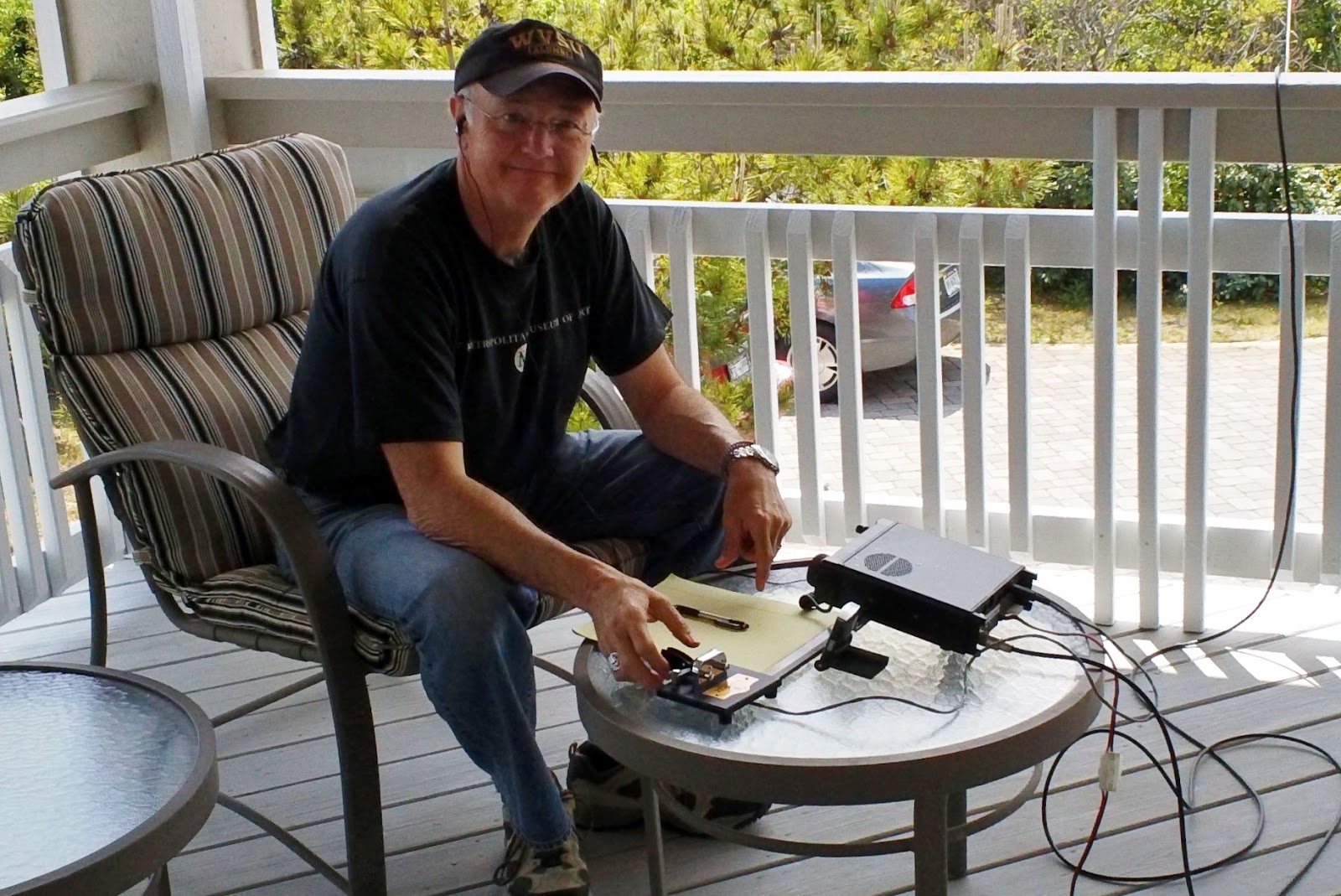
From a town house in Charleston, West Virginia using 3 watts of CW to an indoor random wire, John has made 1,830 contacts including 361 DX stations in 73 different countries. Simply amazing!
I hope you don’t mind me pinching your picture, John!
Julian Moss, G4ILO, is a regular contributor to AmateurRadio.com and writes from Cumbria, England. Contact him at [email protected].
Sure you did!

72 de Larry W2LJ
QRP – When you care to send the very least!
Larry Makoski, W2LJ, is a regular contributor to AmateurRadio.com and writes from New Jersey, USA. Contact him at [email protected].
Classic WSPR vs WSPR-X
Are you a fan of WSPR mode? Have you tried K1JT’s new program WSPR-X yet?
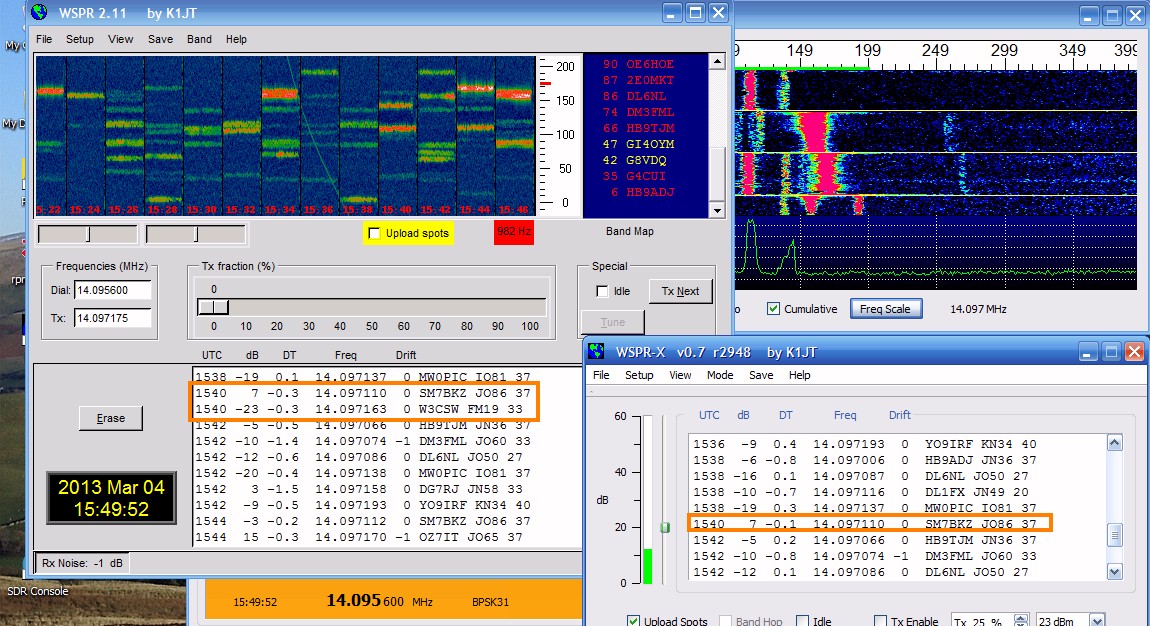 |
| Comparing classic WSPR to WSPR-X |
I decided to switch to the newer program as the older ‘classic’ version won’t work with VSPE virtual serial ports. But I had a sneaky feeling that WSPR-X was not decoding some of the traces it should. So I decided to run both programs in parallel, using the same sound card, the same radio, the same data source. Sure enough, WSPR-X is missing about 1 decode in 10 compared to WSPR 2.11. There is no apparent common factor between the signals it missed. They are not at the extremes of the frequency range, close to the limit of timing error nor especially faint.
Look at the screenshot above and look at the decodes for 1540. Classic WSPR has decoded two signals for this interval whilst WSPR-X has decoded only one. The signal from W3CSW was missed. Later signals from the same station were decoded. That is just one example. I only needed to wait a few minutes to find another.
I set the older WSPR to save .wav files and when these were processed by WSPR-X using its File Open option the result was the same as when the signals were received off-air. The same transmission was missed in each case.
WSPR-X seems a bit faster to run the decodes than WSPR. It prints them up on the screen before classic WSPR does. There are sometimes slight differences in the dB and DT figures, but not enough to worry about. Has anyone else noticed this?
Julian Moss, G4ILO, is a regular contributor to AmateurRadio.com and writes from Cumbria, England. Contact him at [email protected].
DX today, but not QRP
Turned on the K3’s afterburner to 80 Watts in order to work TX5K on Clipperton and TZ6BB in Mali.
This was the first time I have ever heard Mali on the air. My concern was to just get them in the log. He was very loud on 17 Meters. Afterwards, I did one of those “V-8 forehead slaps”, thinking that he may have been loud enough to work QRP.
I could have tried again at 5 Watts, but somehow it didn’t seem “quite cricket” to try and work them again on the same band so soon.
I heard TX5K again a bit later, and almost as loud on 12 Meters. I tried for a while to break the pileup, but my 5 Watts wasn’t up to it. I will have to try later this week. If conditions keep up like they were today, I should be able to snag them again on 17 Meters via QRP. Patience and persistence will be the key.
I also began working on my PigRig while monitoring the pileups for TX5K. I got all the parts inventoried (yes, everything was there) and got the first few resistors soldered in before I had to step out for a while. Serial #81 is slowly coming to life!
72 de Larry W2LJ
QRP – When you care to send the very least!
Larry Makoski, W2LJ, is a regular contributor to AmateurRadio.com and writes from New Jersey, USA. Contact him at [email protected].
Seems doing nothing is doing something…..
 |
| RFI Friday night |
1. I changed out the video cables and wrapped them with chokes as well.....did nothing.
2 Moved the monitors to other locations on the operating desk...that was loads of fun and it too did nothing.
3. Tried running the K3 just off battery power and.... nothing.
4. Ran the monitors from the 12 volt Astron power supply and again nothing.
5 Put snap on chokes on ALL cables coming out of PC and the ALL cables from each monitor.....NOTHING!
6. Even tried tin foil on the back of the monitor and grounding it...only made monitor look sci-fi.
7. Put 1:1 balun on the coax coming out of the K3 and still had problem.
8. Tried my Elecraft K2 (maybe just a K3 problem) found same issue with K2.
 |
| Sunday...not to bad |
9. Plugged monitors into separate AC outlets on different circuits and did not fix issue.
10. Ran a ground up to each monitor and video card on the PC (PC is already grounded) and nothing.
11.Repositioned screen to see if that made any difference I thought it did but turned out not to.
So that was how my Saturday was spent and from doing all the above I was able to find out a few things that I hope may ring a bell on how to solved the RFI isssue
1. As I move my hand closer to the monitor the RFI increases.
2. When the rig is on the dummy load the RFI is gone.....but so is everything else regarding signals.
Now it's Sunday and I have come to the understanding that I am going to just have to live with the problem. I know where it is coming from that sometimes that is half the battle! I am going to do some reading and thinking about the issue. I came into the shack to just roll the desk back up against the wall and tidy up the room. I then turned on the K3 along with the PC and for some reason the RFI is still there but not as much at all!!! Seems doing nothing is doing something!!
Mike Weir, VE9KK, is a regular contributor to AmateurRadio.com and writes from New Brunswick, Canada. Contact him at [email protected].
Ghosts on JT9-1
I spent a couple of hours working JT9-1 on 20m this afternoon. I only messed up once when I forgot where I was in the sequence. I could do with the software showing the outgoing message in the log as well.
Julian Moss, G4ILO, is a regular contributor to AmateurRadio.com and writes from Cumbria, England. Contact him at [email protected].
 Ham Radio Deluxe |
 W5SWL Electronics |
 Ham Radio Prep |
 KB3IFH QSL Cards  Hip Ham Shirts  HamRadioAuctions HamRadioAuctions Reliance Antennas Reliance Antennas Enigma Shop Enigma Shop |  morseDX  Ni4L Antennas  R&L Electronics R&L Electronics antennas.us antennas.us QRV QRV |
- Matt W1MST, Managing Editor
