Archive for the ‘Uncategorized’ Category
 Win a Buddistick™ Deluxe Package!
 March 27th, 2011 |
  Author:
AmateurRadio.com & Buddipole Antennas have teamed up to give away a Buddistick™ Deluxe Package to a very lucky ham!
(a 175 USD value!)
Combating Interference: From AC and Antenna
 Depending on the type of rig you’re working with, interference from antennas or the AC line are likely degrading signal strength. While U.S. and international Hams face different interference challenges based on their hardware, man-made noise, the electrical grid and more, I wanted to share my experience using a piece of power management equipment typically suited for high-end audio gear. In addition to being a UK-based operator, I’m also an “audiophile,” which led to this experiment.
Recently, I decided to try a power management device designed to provide, component level filtering and protection to any AV system, on my HF transceiver, a top of the range Japan Radio Company JST-245 just to see what effect it had on the noise floor which has been increasing bit by bit every year.
Suffice to say the product lowered the noise floor from a constant S4 to an acceptable S1-S2 on the rigs meter. I was amazed and replaced the standard JRC kettle IEC several times with and without the product in line, and the same results came back every time when the piece was in the chain. My experiment was on 28.535 MHz where I normally work DX on the 10 meters.
These measurements show how dirty the mains are (at least in the UK) since you could actually see the reduction on the rigs meter. It’s worth noting that my AC power is fed through overhead lines, and not underground as with many modern homes, which likely adds interference. But with many UK and international hams lamenting the rising levels of QRM, in my experience, electrical main noise is the biggest culprit.
From what I understand, interference in the U.S. and internationally is driven by the antenna side of the receivers and not through the AC side. I also understand that a high percentage of ham radio transceivers used by hams worldwide have external DC power supplies that are usually well filtered, and wouldn’t require an external AC line filter since they feed the radios directly with 12 -14 volts DC. However, based on this, I’d say any international ham operator with an internal AC power supply (like mine) could benefit from an external power filter.
I know many new radios feature advanced DSP filtering/processing, but hearing the difference this product made inspired me to share my experience. One last cool thing is that the power unit also acts as a under/overvoltage protector which adds a layer of safety while protecting expensive investments from power surges, sags and spikes.
Now, to find a solution for filtering the RF signal before it reaches the radio antenna.
A nuclear disaster
I’m taking a bit of a break from radio. Perhaps it’s because I’m feeling a bit run down or perhaps I’m suffering from radio burnout but at the moment I can’t even be bothered to turn on APRS or WSPR or something that will run even when I’m not there.
I think the events unfolding in Japan may have an influence on my feelings too. We are used to seeing disasters on our TV screens but the scale of this one seems to eclipse anything in living memory. Hobby activity seems frivolous when you consider how the inhabitants of north eastern Japan must be feeling. The floods that hit my own home town seemed devastating at the time and after more than a year many people are still not back in their homes. But by comparison with what has happened in Japan, what happened to us pales into insignificance. It will take many years before life returns to normal for many people there – if it ever can for the tens of thousands who will have lost family members and loved ones in the disaster. My heart goes out to them. It is yet another reminder that the works of man are as nothing compared to the forces of nature.
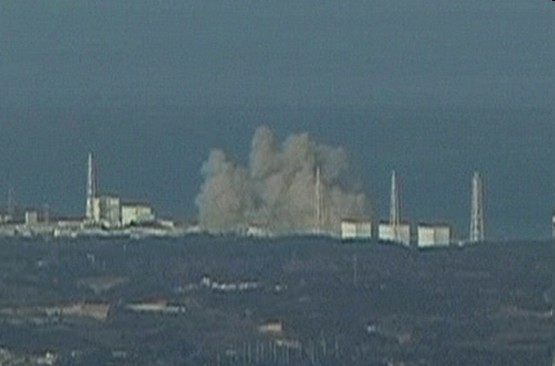
If the earthquake and tsunami were not bad enough there is also the impending threat of a nuclear disaster. One is eerily reminded of the Chernobyl disaster, the 25th anniversary of which is only just over a month away. Though the nuclear power experts assure us that everything is under control and there is no risk of another Chernobyl, the headlines scrolling across the screen still scream “Meltdown.” This is a disaster that is going to have repercussions across the world, and I’m not talking about the economic shockwaves from such a big blow to the world’s third largest economy though I’m sure we will soon feel them.
The Three Mile Island nuclear incident in 1979 halted the development of nuclear power in the USA for thirty years. It is unrealistic to expect that what is happening to the Japanese nuclear plants won’t have an impact on how people here feel about nuclear power. Engineers have and will continue to argue that the Japanese plants were 40 years old, that actually they coped with the effects of this major disaster pretty well, and that the UK is not in an earthquake zone so we would never experience such problems. But for as long as these images are fresh in people’s minds, nobody will want a nuclear power station in their back yard. And in a country as small and crowded as the UK if we are going to have nuclear power someone will have to.
This is a disaster, not just for Japan, but for the entire nuclear industry.

Free Online Ham Radio Course
Do you know someone who is getting ready to take their Technician class license exam? Have them check out KE4GKP’s free online video study guide:
http://www.amateurradio.com/courses/technician/
35 free video lessons (6 hours total)
Andy goes over each question and answer from the Element 2 Technician Class question pool. It’s like having a tutor to walk you through the whole thing. I think it’s one of the very best resources available on the Internet. It’s clear that he spent many hours creating the videos. Together with KB6NU’s The No-Nonsense Technician Class License Study Guide (PDF, 411 KB), Andy’s video series is the best free ham radio course available online.
What do you think? What resources do you recommend for someone studying for their Technician ticket?
ICQ Podcast Series Four Episode Three – Magic 6m Band (30 January 2011)
Series Four Episode Three of the ICQ Amateur / Ham Radio Podcast. News Stories include:
- New Amateur Radio bill introduced in Congress
- Italian 145.800MHz repeater shuts down
- Radar intruders in Amateur bands
- Cadets’ using 5MHz WSPR clarified
- Contest University 2011
- FSTV beacon GB3CZ back to full power
- Mass SOTA/WAB activation planned
- Goonhilly rejoin deep space comms programme
- Celebrating 85 years of hospital radio
- D-Star active in Johannesburg
- Cell-phone to fly in space
Your feedback, upcoming events and Martin (M1MRB) discusses the 6m band.
Security for the Ham Shack: FakeTV

Although I’ve never personally suffered a break-in, I know others who have and I’ve been giving quite a bit of thought to “hardening” my home against theft and doing everything I can to create a deterrent. I’ve done all the commonsense stuff: installed deadbolts, added more motion-sensitive exterior lighting to the back of my home, and made arrangements with a neighbor to have the mail and newspaper picked up daily when I go on vacation.
Most of us have a pretty big collection of expensive radio toys. We also have the FCC callsign database pointing every criminal to the exact street address where they can find our expensive toys. And then there’s the antenna farm in the backyard broadcasting RF to the world and and the message to passerbys that “there’s something interesting and valuable here!”
Two weeks ago I began doing research on timers and other devices that fool burglars into believing someone is home. I figure that the best way to protect my home is to discourage a burglary to begin with. To me, this is the best plan. By making the house appear “lived in,” I hope to counteract the other factors that may make my home especially interesting to thieves. I certainly want to avoid my home being pegged as an easy target.
I stumbled onto a cool little device called FakeTV. I contacted the manufacturer with a few questions and they kindly provided me a demo unit to evaluate. It arrived quickly and I was pretty interested to see if the device lived up to some of the comments and reviews that I had read online. The FakeTV device is about the size of a fist — smaller than I had imagined. It’s very solidly built and is unobtrusive. My wife thought that it made a nice nightlight as well and the kids were mesmerized by it.
Now, I’m a pretty skeptical guy and am not easily impressed. FakeTV is pretty cool. It works a lot better than I expected it would. Looking at a window at night, I cannot tell the difference between a television and this device. The way it randomly switches colors and brightness creates a very, very convincing effect.
 The Fake TV has some limitations. First, I think it would be most effective in a second floor window. You really don’t want the would-be burglar to be able to peek into the window and see the device. It would kind of defeat the purpose. When I tested it, I put it on the first floor and it was very realistic with the blinds closed. However, at very close range with my face near the window I would probably have been able to hear the sound from the TV and it was conspicuously absent. Putting it in a room on the second floor (maybe a spare bedroom or den?) facing the road or driveway would probably be most effective.
I tested a few different configurations and it seemed to be most effective in a completely dark room. Other lights on in the room seem to diminish the quality of the FakeTV “effect.” I don’t think that you would want to use a light on a timer in the same room that you’re using the FakeTV device as I think the light would completely overpower it.
According to the manufacturer, it uses about 3W of power. The cost to operate the FakeTV is about $5 per year on average. Compared to about $150 per year for the same effect from leaving on a medium-sized LCD TV, you can see how FakeTV would pay for itself rather quickly.
The retail price of FakeTV is about $30. I haven’t seen them at Wal-Mart, Target, or any of the other big box stores but I wouldn’t be surprised to see them soon. Considering the investment I’ve made in radio equipment, I think $30 for this kind of deterrent is fair.
Official: Verizon announces iPhone 4

Big news today for Apple fans. After years of speculation — it’s here. The Verizon iPhone. The cost? $199 for the 16GB version. $299 for the 32GB version. Both require a contract, of course. No word what the Verizon iPhone plans are going to cost or whether they’ll be different than other smartphone plans.
The new CDMA iPhone will be available to existing Verizon Wireless customers on February 3rd. Everyone else will have to wait until February 10th.
Will you be switching? Why or why not?
What are your favorite ham radio apps for iPhone/iPod Touch?













