Archive for the ‘Uncategorized’ Category
 The Zen of Arduino
 November 28th, 2011 |
  Author:
 Well, I shoulda gotten out into the detached garage this weekend and worked DX.. but the weather was nice on Thanksgiving and the day after (when I had to do family stuff thankfully) and freaking cold and windy the rest. (I can heat it but it takes some planning…)
So instead, I decided to catch up on building/hacking projects from the past and ones on a weird tangent to my current construction project the BATC DigiLite.
The past project is rebuilding my ORIGINAL 1998 Dallas Semiconductor “iButton” WS-1 One Wire weather station w/humidity and the tipping rain gauge (it’s been ten years since I had it up and running last– it took me several hours to find it!). I plan on stripping all of the one-wire garbage (sorry, it never worked reliably with any cable length at all) except for the temp sensors out of both units and embedding an AVR and running RS-485 to the units.. and connecting to an Ethernet connected Arduino to report to APRS and/or Weather Underground. My kids are interested and I’m also adding a Real Time Clock and a Barometric Pressure sensor (to the inside unit since my house isn’t pressurized) and having a fairly complete station. No PC will be required and the little 8-bit processors are misers when it comes to power usage!
I want to get my older boys interested in the systems engineering aspect and the coding and the weather station is starting to peak there interest a bit. Keeping my fingers crossed!
This is actually connected to the BATC project in that I want to use the Arduino development system and the extensive library of code instead of taking time I don’t have and writing everything from scratch on a PIC or AVR (non-Arduino). I discovered that except for the bootloader and the sometimes bloated code in some of the libraries (most are very good) that it is not that much less efficient than straight-C on the AVR’s. (The Arduino environment conceals a full open source GCC C++ complier and yup, you can write in C and C++.. you actually are even under the “sketch” environment– but they conceal that well to beginners.) Yes they are small, and slow.. but at $2.50-$6 a pop for DIP IC’s that you can hack together in a hurry.
Here is a picture of some of the AVR based toys I’ve bought and put together over the years. The “real” Arduino shields are recent.. for prototyping your own stuff they suck (since one header isn’t on 0.1″ centers.. DUH!).. but since they are a standard certain modules are cheap (at least the non-Italian “bad labor condition” clones from China) and readily available. You can put together relatively inexpensively and quickly since most of the core code can be borrowed from libraries.
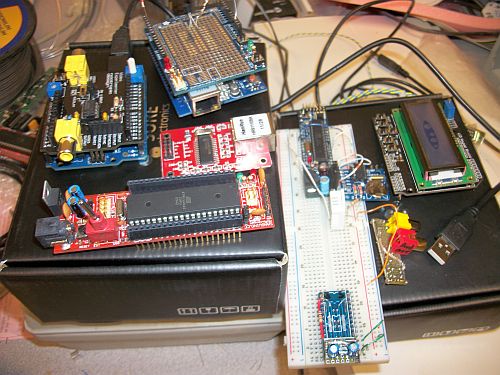
Some AVR based "Arduino" toys-- Arduino 2009 clone with a Nootropic Designs Video Experimenter's Shield, a Sanguino board, an Ethernet module, a Adafruit Proto shield on top of a Clone W5100 Ethernet/SD card shield, a "Boarduino" board with a humidity/temp sensor DHT-22 on it, and a DS1307 Adafruit RTC board attached.. and a homemade video/audio out and a e-bay "DFRobot" LCD Shield 16x2 -- "Unknown" proto card at bottom will be a 5V to 3.3V bidirectional 8-bit I/O board with a 3.3V regulator on it for prototyping.
In relearning the coding, I wrote a lot of odd stuff. Here is an example of a ATMega644 (in an Sanguino PCB) doing a bunch of stuff.. talking to a LCD (via the library in 4-bit mode) and shifting data to a 74HC595 driving the LED’s in a row.. reading from a Dallas (yes, one-wire) Temperature Sensor (those are great units if not parasite powered!) with two debounced switches… doing math for the PLL synth (the numbers in the left bottom corner).. Here is a video:
Sanguino board doing all sorts of stuff
Anyway.. I am going to use the ShiftOut function on the Arduino to program the "Ultram Technologies" PLL board (That I bought preset to 1255 MHz) for the DigiLite LO on the DVB-S modulator. I was going to use that Arduino 2009 / "DFRobot" (clone) LCD Shield to do a GUI. But most of the time the little AVR will be idle. So sad. So I came across the Nootropic Designs Video Experimenters Shield and I thought… really since the BATC project needs the real time MPEG-2 chip in the Hauppage PVR-150 board.. I might as well also do a callsign overlay.
Since the Arduino 2009 has a FTDI chip on it.. it has USB to Serial functionality on it. I can poll the UART at the Vertical Blanking interval and if it receives a PLL tune command, that can be sent to the PLL and displayed (for a short time?!?) on the Video overlay as well. For now, the video overlay shows a callsign message and the system timer in ms for debugging.
Here’s a shot of that too:
Arduino/Nootropic Designs Video Experimenter Shield Overlay Example Video
The video callsign overlay is done with this "sketch":
#include <TVout.h>
 #include <fontALL.d>
 #define W 136
 #define H 104
 TVout tv;
 char s[32];
 unsigned int n = 0;
 int index = 0;
 int messageLen = 34;
 char message[] = "...W0FMS Digital Amateur Television";
 char saveChar;
 void setup()  {
 tv.begin(NTSC, W, H);
 initOverlay();
 tv.select_font(font6x8);
 tv.fill(0);
 }
 // Initialize ATMega registers for video overlay capability.
 // Must be called after tv.begin().
 void initOverlay() {
 TCCR1A = 0;
 // Enable timer1.  ICES0 is set to 0 for falling edge detection on input capture pin.
 TCCR1B = _BV(CS10);
 // Enable input capture interrupt
 TIMSK1 |= _BV(ICIE1);
// Enable external interrupt INT0 on pin 2 with falling edge.
EIMSK = _BV(INT0);
EICRA = _BV(ISC11);
}
 // Required to reset the scan line when the vertical sync occurs
 ISR(INT0_vect) {
 display.scanLine = 0;
 }
 void loop() {
 saveChar = message[21];
 message[21] = '\0';
 for(int x=6;x>=0;x--) {
 if (x<6) {
 tv.delay_frame(3);
 }
 tv.print(0, 92, " ");
 tv.print(x, 92, message);
 }
 message[21] = saveChar;
 saveChar = message[0];
 for (int x=0; x<messageLen; x++)
 message[x] = message[x+1];
message[messageLen] = saveChar;
 sprintf(s, "%dms    ", millis());
 tv.print(0, 0, s);
 }
Assuming that you’ve downloaded the Enhanced TVOut Library into the \arduino\libraries directory.. the code above is how simple something like this can be with Arduino and the libraries. This compiles to less than 10K or 1/3 of the ATMega328P (on the Arduino 2009, or 1/6 of the ATMega644 on the Sanguino).
This is why I like Arduino. It took me less than an hour to build the shield and write the example code. I am not easily impressed and even that isn’t that impressive.. but the Closed Captioning decoder example is impressive. It works really well.. and is so simple really for what it is.
I know that hopefully some day the TV input portion of the BATC project will go from SD analog to SD/HD full digital and a little hack like this won’t be appropriate anymore. But I’ve had a blast with it and I really hope I can leverage it into a learning experience for the kids also.
Pick up a few of these Arduino gadgets (now you can buy them at Radio Shack if you are in a hurry– and want to pay 3x the clone price from e-bay/China) and give it a try– it’s quick fun experimentation and I can now see the ZEN.
73, Fred W0FMS
CQWW CW 2011

Saturday: Well, I did switch on the radio this Saturday morning. But had only limited time. First QSO was made late in the afternoon on 10m. But 10m did close early, so down to 15m. Only 9 QSOs made till now only with the USA and Canada. Hopefully I do have more time for it at Sunday.
Sunday: Switched on the radio and computer late Sundaymorning. But no time till about 14:30 UTC. I concentrated on the 10m band and made some QSOs. Most of them with the USA and Canada again. CW is more luck then wisdom for me, the computer does most of the work. Then I came across the signal of 5X1NH Uganda, a couple of calls later I made the QSO. New DXCC all band and on 10m. 10m closed early again at about 19:30 UTC, so I end with 29 QSO. 23 on 10m and 6 on 15m. Did unfortunately not have much time for this international event this year. But after all am lucky with the new DXCC.
Time issues again
A few months ago I wrote about a time issue I had with a program called meinberg NTP. It suddenly stopped sync time on my laptop. I went back to Dimension4 and have no problems since. Now, I installed meinberg NTP on my desktop as well, using it for JT65-HF, WSPR and other digi mode programs. But last week it stopped sync the time on the desktop as well. So back to D4 I thought, so I downloaded it and installed but although it told the clock has been synchronized it didn’t really update the computer clock. I’ve tried everything to get it working, installed it again, did a restore of Win Vista, seaarched on the internet. But could not solve the problem. I wanted to get active again with JT65, but with the clock out of sync that is impossible. I found a atom time clock on the internet and updated the clock myself. But found that was not the solution. I came across NetTime then and just thought to give it a try. It seems to be working as I can make and receive JT65 again. Strange things happen if you use windows…..
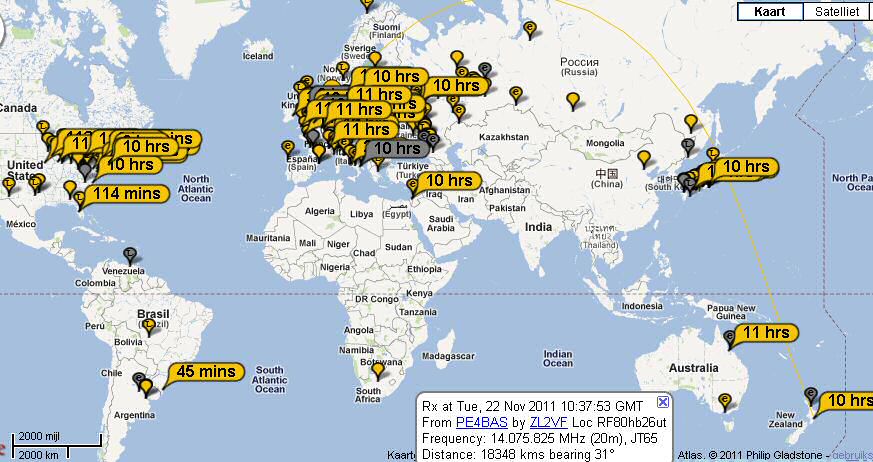 |
| Results after a QSO with Japan and USA on 20m with 5W on the loop antenna. |
I don’t care about SWR anyway!
 Did you read about W2LJ’s rookie mistake? Want to read about another one? Had some afternoon time yesterday and fired up my TS-440S with a fresh battery. Yes, full 100 Watt output this time.
I had no laptop, so I decided to do some just plain old CW/SSB again. 21 MHz was open to southern Europe, so I logged EA6UN in CW. He was quite strong, but some Japanese on the same frequency kept calling him even though he clearly stated “BX2?”. He still got me in the end, though, and I got him. The next nice QSO was CX2TQ in SSB on 14 MHz. Weak but readable when the local QRM was gone. First time CX in the log, so that was nice.
A little later I turned to 18 MHz and CT3FT came in very nicely in CW. I totally forgot to tune up and set the beat tone first and in my enthusiasm I answered him right away. When I looked at my SWR Meter I realised my mistake and started to fiddle with my antenna tuner. No need: he came back to me right away and gave me a 559 report. SWR on my side 1:5, output from my rig 12 Watts, reflected power 7 Watts. Does that mean I worked the Madeira Islands using QRP power? (12-7=5 Watts). Never mind, because I scored three new entities in one afternoon! Not bad at all for a cold and rainy afternoon.
Why do we need a radio…or, is this the end of amateurradio?

I had a little sked last Sunday morning with PA3GNZ. And although this sked didn’t work out I had my HT on receive at the 70cm coversity channel. Now at a certain time I received 2 radioamateurs, the conversation went on and seems that one of them did not hear about the coversity channel before. He, like many others, thought he was being repeated by the PI2HVN repeater. It was the case as you can verify it at the internet and the other amateur told him that. It seems they had a chat before because the one mentioned earlier wishes to know more about coversity. Now, the other amateur told him to go back to skype so he could explain. And gone they were.
So what do we need radio for? Or is this the end of amateurradio (as we know it)?
FCC Makes Changes to 60 Meter Band for US Amateurs
I saw this on Southgate this morning and figured I would simply repost the whole article as it’s got all the info and is to the point. If you work on 60 Meters at all, you may want to make sure you have this info handy. From Southgate ARC’s website here is the info:
By Bonnie Crystal, KQ6XA (used with permission) –
The U.S. Federal Communications Commission released a ‘Report and Order’ on November 18, 2011, with new 5 MHz rules for the Amateur Radio Service.
The effective date is 30 days after publication in the Federal Register.
Some of the FCC changes are to now allow Phone (Upper Sideband), RTTY, Data, and CW; with specific limitations on the use of these modes, as well as the maximum allowed power level is now 100 watts PEP (ERP) effective radiated power referenced to a dipole.
The FCC has deleted a channel and added a channel. The new 60 meter channel list (for General, Advanced, or Amateur Extra Class license only) is as follows (Suppressed Carrier):
VFO Dial frequency
——————
5330.5 kHz USB (center of channel = 5332.0)
5346.5 kHz USB (center of channel = 5348.0)
5357.0 kHz USB (center of channel = 5358.5) New!
5371.5 kHz USB (center of channel = 5373.0)
5403.5 kHz USB (center of channel = 5405.0)PLEASE NOTE: The FCC deleted the channel 5366.5 USB (center=5368.0)
and “replaced it” with channel 5357.0 kHz USB (center=5358.5).For the complete FCC ‘Report and Order’ release, see:
http://www.fcc.gov/document/amateur-radio-service-5-mhz
73.
Rich also writes a Tech blog and posts stories every Tuesday and Thursday on Q103, Albany’s #1 Rock Station website, as well as Amateur Radio stories every Monday thru Friday on AmiZed Studios and hosts a podcast called The Kim & Rich Show with his fiance’ Kim Dunne.
Why 10 meters is not my favourite band.
Everybody is on 10 meters nowadays! I am no exception, just check out my piece from yesterday. But 10 meters is not my favourite band. I’ll show you why….
http://www.youtube.com/watch?v=70fed-lAcxM
Imagine scanning that in SSB! “Get the aspirin out, honey, I’m going on 10 meters now.” Can it get any worse? Yes, two nights ago someone was singing on 28.325 MHz. And not just for a few seconds, no minute after minute. Amateur radio keeps amazing me.
On a serious note: I can’t make much of the language that is spoken by most of the intruders. It is certainly not Mandarin, but there are definitely Chinese dialects amongst them. Most of what I hear, I think, are from southern Asia, probably the Philippines, Indonesia, Papua New Guinea, etc.
In the mean time I spend more time on 12 and 15 meters than on 10. Especially 12 meters is a fun little band with a lot of the characteristics of 10 meters. Try it out yourself, you’ll like it. See you there.













