Archive for the ‘ham radio’ Category
 Handiham World for 04 April 2012
 April 3rd, 2012 |
  Author:
 Welcome to Handiham World.
Goodbye, cassettes.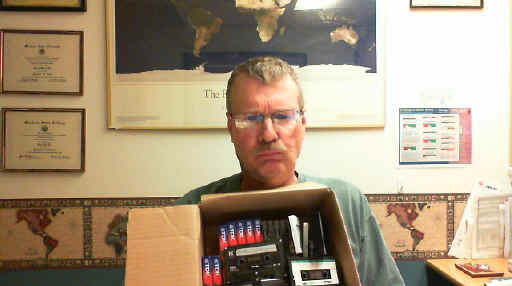
The old way of doing audio: Unhappy Pat poses with box of assorted tape cassettes. Each one holds only a portion of an audio book.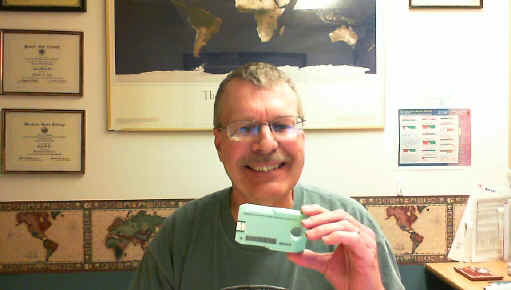
The new way: Smiling Pat holds up a single Library of Congress digital cartridge. Each new digital cartridge holds thousands of DAISY book pages or many hundreds of audio files.
Well, don’t say you didn’t know this was coming. Learning Ally and the Library of Congress have both made the switch to digital audio. Bookshare has been digital for a long time already. Now it is time to announce the final stage in the life cycle of the Handiham tape cassette service, one of the few remaining analog special format services that is still active.
Over the last decade digital audio has steadily overtaken analog tape cassettes in commercial applications. The old cassette format is no longer supported as it once was in boom boxes, portable players, and automobile audio systems. The tapes themselves are harder to find and many households no longer even have equipment to play cassettes. Anticipating the need for a digital system to replace this old technology that was also used by people who could not read regular print, the DAISY Consortium has developed the DAISY format book system that can couple audio files read by humans to specific sections and subsections of books. DAISY can also generate computer speech from computer text of a book, then arrange it all on a DAISY book that includes spoken word audio and all of the text, complete with headings for sections and subsections. Now that the Library of Congress has completed its distribution of the new DAISY-capable digital players to replace the aging 4-track tape cassette players, we feel confident that Handiham members, even those without computers, will still have access to the new digital cartridges.
Make no mistake; the digital audio is far better than the old cassette tape audio. If you are still using tape cassettes, now is the time to check out that new digital player. With the new player you can navigate using audio prompts and find the exact thing in a book that you want. You could never do that with tapes. In the bad old days of taped instruction manuals, it was nearly impossible to find that part about setting the memories on your new radio! With the new digital system, that is an easy task. In the old days, your audio had to come by postal mail. Today you can download it via the Internet and put it on your digital player with a small adapter cable. Even Handiham members without computers can still receive their new digital cartridges in the mail, in special mailers similar to the old Library of Congress tape mailers. The new system is designed to seem familiar to tape users, so that they can more easily learn it and make the transition.
The digital cartridges themselves are just a bit smaller than the old tape cassettes. They have a hole in one end to facilitate grasping the correct end of the cartridge, even by a person with some mobility limitations. The other end of the cartridge has a small USB connector that plugs into the digital player. It slips into the new player only one way, and the experience feels much like putting a cassette tape into the old player. The USB plug is protected by extensions of the plastic cartridge to protect it from damage. This format also keeps it from plugging directly into a standard computer’s USB ports. That is why blind users who receive their audio from Library of Congress digital downloads must use an adapter cable between their computers and their digital cartridges. We can also use such a cable to put Handiham digital audio onto the new cartridges.
There is a cost difference between a tape cassette and the new digital cartridge. Tape cassettes usually ran under a dollar, and because they are falling out of use they are available virtually free from people who are simply getting rid of old technology. The new digital NLS cartridges are around $10 to $12 each, but remember that each one holds the equivalent of hundreds and hundreds of tapes. And because the new digital cartridge has a different form factor than a tape cassette, it requires a new specialized NLS mailer. These run about $2.50 each.
The way the Handiham monthly digest audio program will operate takes into account the cost of these two items. In the old system, we bought tapes and mailers and sent them to our members. The members were responsible for returning the tapes and mailers when they had listened to the audio. The return rate was never 100%, so some tapes and mailers were lost to attrition each month.
In the new system, we will ask our members who want to have digital audio mailed to them by free matter postal mail to purchase their own digital cartridge and mailer, mark them with their callsign or identification, and send them to us for processing each month. We will fill the cartridge and return it. That way each individual has a vested interest in their own cartridge and mailer. This will make the program easier to manage because we won’t have to maintain a supply of our own cartridges and mailers. It also spreads the cost among those users who don’t have computers or Internet services. It has really become labor-intensive to support a smaller and smaller number of Handiham members who use the old tape cassette technology. As our tape duplicators get older, they are more likely to make recording errors. It has gotten to the point where tapes are sometimes custom-produced for a single member who needs something like one of our license courses but who has no computer. So serving that single member can get quite expensive, while hundreds of other members simply download their audio from our website with no staff assistance. The digital cartridge provides a means of still serving that single member with good quality audio, even if they do not have a computer.
So what is the plan?
We will continue to support tape cassettes through the end of 2012, but not for new members, beginning immediately. All new members will be told about the new digital cartridge plan. They will have a choice of either simply downloading the digital audio they need from our website or providing their own digital cartridge and mailer. Members who are currently using the old tape system will be notified of the new cartridge plan and they will be given some options about where to purchase the cartridges and mailers. Members who get their audio via the website will not be affected.
For Handiham World, I’m…
Patrick Tice, [email protected]
Handiham Manager

The 2012 MNVOAD Training Conference: Lake County RACES/ARES®
This post was updated on 4/2/12 after Mr. Angelos kindly corrected me on several points.

Mr. Peter Angelos, KCØKRI
The 2012 MNVOAD Training Conference was well-worth attending! My favorite part, of course, was the presentation by Peter Angelos, KCØKRI, on the Lake County, MN RACES/ARES® response to the Pagami Creek Fire in September, 2011. His “keystone” speech was the first of the many sessions that day, and the only plenary session (the other 15 sessions were breakouts). While he focused upon RACES/ARES®, he also discussed principles that apply to any voluntary organization.
Here are my notes from Mr. Angelos’ presentation, in the order presented:
- The Pagami Creek Fire
- RACES/ARES® fills gaps in existing communication-systems, and reduces load on those systems.
- A lightning strike on 8/18/11 13 miles east of Ely started a fire that ultimately caused $23M in response expenses in Lake County. On 9/12/11 this became the largest fire in Minnesota since 1918, with 92,682 acres and over 800 workers assigned through 10/17/11. Fires are an annual occurrence in Lake County, the home of the famed BWCA (Boundary Waters Canoe Area); what made this fire unusual was its size.
- Cell phone coverage is the only phone service available in some parts of the area, and in some parts not even that. An 800 MHz public-safety trunked system using portable antennas was also set up to provide coverage.
- Many hours of training and dedication go into RACES/ARES® in preparing for an event like this.
- RACES/ARES® personnel stayed far behind the actual fire line.
- The Lake County RACES/ARES® group is a “spring chicken,” having been organized in mid-2009.
- On 9/12/11, RACES/ARES® was activated when the fire suddenly grew from 11,000 to 70,000 acres in only 24 hours due to winds gusting up to 35 mph. This drove the fire 16 miles in one day, toward a populated area. As evacuations increased, RACES/ARES® was activated. (In the Q & A that followed, one person asked how many messages were passed. Mr. Angelos said that only a handful of messages were actually passed. The activation of RACES/ARES® was a proactive attempt to prepare for a catastrophe in case this fire reached populated areas. When it became clear that this was not a threat, RACES/ARES® was deactivated.)
- As the smoke plume blew as far as Milwaukee, WI and Minneapolis, MN, the potential for health & welfare inquiries increased.
- A RACES/ARES® communicator was attached to the evacuation shelter manager. Hams were also located at the incident command post, staging area, evacuation checkpoints, and the EOC. The goal was to handle non-emergency traffic to take the load off police, fire, and rescue channels.
- The log of messages kept by RACES/ARES® is helpful for post-event evaluation.

Lake co. RACES/ARES® portable tower, AMCV and MCT deployed at a Canadian National RR mock fuel spill exercise in Two Harbors MN on September 14, 2010. Photo by BJ KDØHHW. (http://n0lcr.org)
The Lake County RACES/ARES® group uses two state-of-the-art vehicles, each outfitted with a PSN (Public Switched Network capable of establishing a cellphone network), as well as 2m/75cm FM/Packet and all HF modes including WinLink, WINMORE, Pactor, and other digital modes. One of these vehicles is a trailer of their own (the “MCT”), while the other is an RV (the “AMCV”) purchased by an 11 county consortium in the northeast Minnesota Arrowhead Region (with help from a grant). This vehicle can provide video conferencing and internet connection via satellite.
- The repeater network available is huge, extending from Ely, MN to Solon Springs, WI.
- RACES/ARES® deployed for a total of five days, suspending operations on 9/16/11 after contributing 633 man-hours. The Lake County RACES/ARES® group provided 445 of these hours, with the remainder provided by mutual aid from RACES/ARES® groups in four neighboring counties.
- The Relationships Necessary for Success
- The Lake County RACES/ARES® group would never have been invited to participate if it weren’t for the well-established relationships that had been built with Lake County Emergency Management and the Lake County Sheriff’s Office.
- Professional conduct and standard ICS documentation-procedures are essential for establishing credibility with served agencies.
- Served agencies expect to see stuff like this duty roster.
- None of this could have happened without the “four C’s” (communication, coordination, collaboration, and cooperation), the hallmark of VOAD. They couldn’t invite themselves to drills — they had to participate in non-emergency events like local marathons and sled dog races to demonstrate their capability and build relationships. Only then did they get invited to their first drill.
- Lake County RACES/ARES® volunteers are required to complete FEMA courses IS-100b, IS-200b and IS-700a.
- These hams are volunteers with the Lake County Emergency Management Department. They are required to have security background checks, they all have photo ID’s issued by Lake County, and they are even insured by the county.
- As a result of this relationship-building, the Lake County Emergency Manager got her amateur radio license (KDØHHW) and joined this RACES/ARES® group herself.
- So much credibility has been established with served agencies that this RACES/ARES® group has been entrusted with the housing and maintenance of the AMCV.
- Building these relationships is “complicated” but worth it. Their relationships are so good now, Mr. Angelos said, “We even have a Christmas pot-luck dinner together.”

Not only was this presentation of RACES/ARES® center-stage at the conference, but the Bloomington, MN Amateur Radio Association had a great display set up out in the vendor’s area, complete with a couple of Buddipoles and HF/VHF radios. Mr. Wayne Snyder, KCØZJB was kind enough to send me some photographs:
If you get a chance to attend a VOAD conference like this, I heartily encourage you to do so. Not only did I learn from KCØKRI’s presentation, I also learned quite a bit from several other breakout sessions. It is clear that ARES® work is not conducted in a bubble. To be efficient and effective (much less to even be invited to participate) in an emergency we must develop relationships with the agencies we serve, from governmental entities to other voluntary organizations. The time to do that is not at the time of the emergency itself, but long before. Conferences like this one can be a great way to learn from each other.


The Next Step in Electronic Communication
 It figures: I just get done blogging about the history of electronic communications and Google takes the topic to the next level. Recognizing the inherent problem of cramming a QWERTY keyboard onto a Smart Phone, Google has gone back to the future by adopting a simple binary input device that uses DOTS and DASHES. That’s right, the new Gmail Tap uses Morse Code.
Google has apparently rediscovered what CW operators knew all along: Morse Code is extremely efficient for text communication.
Go to the Gmail Tap web page to get the full story.
73, Bob K0NR
Handiham World for 28 March 2012
Welcome to Handiham World.
Off the shelf
Most of us have heard the expression “off the shelf” when it comes to purchasing an item from a store. We generally understand this to mean that the item is readily available so that we can simply walk into the store, find it on the shelf, put it into a shopping cart, and head for the checkout line to pay for it. Buying an item “off the shelf” means that it is produced for a mass market and therefore the manufacturer can take advantage of spreading the production costs over a large number of units, thus keeping the price as low as possible. Conversely, an item that is not available “off-the-shelf” is probably produced in limited quantities for a much more specialized customer. Because the production costs per unit are quite high due to the fact that there are fewer units manufactured, the customer must expect to pay more for that item.
This is basic economics. It is the reason why specialized adaptive technologies such as standalone DAISY players can command a price of hundreds of dollars more than simple digital audio players that are produced for the mass market and available anywhere.
Amateur radio equipment is rather specialized as a category in itself because it is produced for a limited market of amateur radio operators. You don’t expect to be able to go to a big box store in your neighborhood to buy a transceiver. Some amateur radio equipment is manufactured with speech frequency read out built in, while some radios have an option for an additional speech module for blind users. Within the specialized category of the amateur radio equipment, this additional adaptive technology adds only a modest amount (under $100) to the total purchase price. Considering the size of the potential market, this is very reasonable.
Personal computers, now a mainstay of the modern amateur radio station, have moved steadily toward “off the shelf” accessibility. Many assistive technology features are now built into operating systems. Apple provides a built in screen reader that is relatively full featured. Microsoft also provides a somewhat less complete screen reader and a very good speech recognition dictation system. Screen reading software and speech recognition software used to be expensive additional purchases that were definitely not “off the shelf”. Today there are more options than ever to get many of these features already installed on the computer you buy at a local retailer. Rather than being optional at considerable extra cost, they are now available to everyone at little or no extra cost. This is the power of mass production and mass marketing to bring costs per unit down and provide an excellent benefit to those of us who need assistive technology.
Earlier this week I talked with a Handiham member who was wondering about more “off the shelf” solutions for people who read DAISY books. Of course specialized standalone readers are available, but they are expensive and they are something else to carry around. Some of them, such as the Library of Congress digital player, work well and are readily available free of charge from the government for anyone qualifying for NLS services, but they are not portable and thus not convenient to use in more than one place. The fact of the matter is that blind people need to be out and about for work, shopping, and all the activities of daily life just as anyone else does. We agreed that it would be better to have a portable reader that could easily be carried around all day long.
This, as you might expect, led us to the obvious conclusion that an already available “off the shelf” device that most of us carry around should also be able to function as a DAISY reader. Of course that device is the modern smart phone, which might be an Android or an iPhone.
Neither of us knew whether it was possible to turn a smart phone into a DAISY reader, so when we finished our phone conversation I turned to the iTunes store and the Android Market (now called Google Play) to search for DAISY reader apps. Guess what? There are some, available from a cost of free to around $15 available for my own Android smart phone. The best bet for Android looks to me like it is the Darwin Reader that reads both Daisy formatted text and audio books and is also compatible with Bookshare and Librivox. That one is $14.95. Compare that to hundreds of dollars for a standalone digital player. And you already have your phone with you if you are like me! Daisy Worm is under a dollar and available for iPod or iPhone. There is also a Learning Ally app for iPhone for around $20.
The neat thing about the off the shelf smart phone is that it can also run Echolink, which can be useful when you are on the go and want to maintain your regular net check-in schedule via the HANDIHAM conference.
Consider, if you will, the profound difference in access “off-the-shelf” can provide. By finding ways to make things like screen readers and DAISY players available on mass-produced devices, we ultimately make these things available to almost everyone.
For Handiham World, I’m…
Patrick Tice, [email protected]
Handiham Manager
ARRL volunteers make an impression


SKYWARN Training, and a Word of Advice About Amber Lights
 Over the last 30 years I’ve attended quite a few SKYWARN Storm Spotter training sessions, and I’ve always found the time well-spent. When I lived in the Twin Cities, Metro SKYWARN was simply part of being an amateur radio operator — there, SKYWARN is primarily a ham radio operation, and I got involved when I was a teenager. Later as a police officer I attended SKYWARN training in that capacity, but it was obvious that cops and firefighters weren’t nearly as effective as the ham radio operators who formed the well-oiled machine of Metro SKYWARN.
It’s a bit different out here in rural Minnesota. While some parts of rural Minnesota are connected via a hub-and-spoke repeater system to KØMPX — located right in the Chanhassen office of the NWS — such is not yet the case here in Granite Falls. Out here the well-oiled machine of storm spotters is the local fire department. Until we get the local repeater EchoLinked to KØMPX, ham radio operators must rely upon their cell phones to call in storm reports (unless of course they’re firefighters, who have their own radio net).
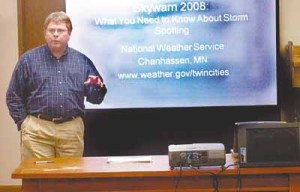
Todd Krause, KBØSGH, Warning Coordination Meteorologist with the National Weather Service, giving SKYWARN training in 2008. (Photo obtained from www.nujournal.com).
In any case SKYWARN training does come to our small town, thanks to the tireless efforts of Mr. Todd Krause, KBØSGH, a true gentleman and an excellent teacher. He’s on the road quite a bit in the spring of each year, putting on storm spotter classes all over Minnesota. Our class was two days ago, from 7:00-9:00 P.M., and the room was packed!
If you haven’t attended a SKYWARN class, or if it’s been a while since you have, I encourage you to find a training session near you (click here) and attend. This is the time of the year when these classes are offered, but we’re nearing the end of this year’s schedule — you’ll want to act quickly. In my experience you’ll need to attend this training more than once to really get the hang of it. It’s easy to identify the features of a storm by looking at pictures in the classroom, with the instructor right there to help you, but it’s much more difficult to do so out in the field. This class will help you distinguish between what really matters and what merely looks scary as you look up into the sky. More than once I’ve been with untrained people who freak out because of a scary-looking cloud, e.g. a rapidly rotating shelf cloud, and I’ve been able to calm them down by explaining what’s really happening.
One word of advice — if you do get into SKYWARN spotting, don’t go nuts decking out your car with amber lights and cheesy stickers/decals, okay? Even untrained observers know that stuff is for your ego, not for your storm spotting. They’re not impressed; they’re rolling their eyes. I don’t want to embarrass anybody in particular so I won’t provide any links, but a little Googling will show you how silly some storm spotters can be. I just saw one a few weeks ago with a bunch of amber lights on the rear deck of his car along with SKYWARN stickers and other home-made stickers proclaiming to the world that he is a Very Important Person as an Officially Certified Storm Spotter. Truly cringe-worthy! If you have this stuff, would you mind removing it? Maybe one SKYWARN sticker isn’t such a bad idea, but the other stuff is an embarrassment to the rest of us.
When I was a police officer I had all sorts of insignia and lights on my patrol car, but guess how much of it helped me when storm-spotting (with my 2m HT in my hand)? None of it. Ever. Flashing lights (including amber ones) can snarl traffic and even cause accidents if you use them, whether you’re driving or pulled over. Unless they’re absolutely necessary, they shouldn’t be used at all — and when it comes to storm-spotting, they’re almost never necessary. If you’re going to do your storm spotting from your car, drive the speed limit, obey all traffic laws, find a good vantage point where you can park safely, and you won’t even need the four-way flashers that came with your car.


Today’s QSO with KØLR, Who Gave Me My Novice Code Test in 1978
My online ARRL course, “Introduction to Emergency Communication,” is in full swing. I’m happy to say that it is pretty demanding. Not that the material itself has been especially difficult (yet), but the essay-assignments do require some thought — and other assignments are pushing me to do some new things on the air, like listening to several nets, critiquing an NCS (Net Control Station), and checking into a net (okay, I probably have checked into a net or two over the years, but it’s been so long that I hardly remember doing it).
Today I reaped some unexpected benefits from one of these assignments. Having been assigned to check into a formal net, I checked into the PICONET this morning. This was no small feat, since it was on 75 meters. My New Carolina Windom is only cut for 40 meters, and the automatic tuner on my Kenwood TS-440S has never been able to match it — the SWR is terrible! But using my old Drake MN-7 Matching Network, I was able to match it surprisingly well. So now I’m on 80/75 meters! I even made a CW contact with a fellow in Wisconsin, and got a decent signal report.

Lyle Koehler, KØLR, with Katharine Lord, KØTHY (photo copied from the PICONET website)
And after checking in this morning, I visited the PICONET website — and learned that Lyle Koehler, KØLR, would be the NCS for the PICONET this afternoon! Wow! Lyle is the ham who gave me my Novice code test back in 1978. I was only 10 years old, but I remember it like it was yesterday. I’ll never forget how I shook like a leaf on the couch in his living room while he sat beside me and tapped out 5 wpm code with a straight key and oscillator. When he told me I passed, I couldn’t wipe the grin off my face for the rest of the day!
So the thought of talking with Lyle again after all these years was enough to make me watch the clock, eager for the PICONET to open again at 1500 CDT. And sure enough, at the appointed hour I heard Lyle’s voice as he opened the net! I was his first check-in, and I took advantage of the net’s slow start to explain that he had given me my Novice code test over three decades ago. He remembered me!
What a pleasure to meet this fellow on the air after all these years.


Ham Radio and Mesh Networks
Lately I’ve been fascinated by the capabilities of mesh networks. The ability to quickly create ad-hock computer networks could be an invaluable resource for amateur radio operators in general and particularly for emergency communications (EMCOM)
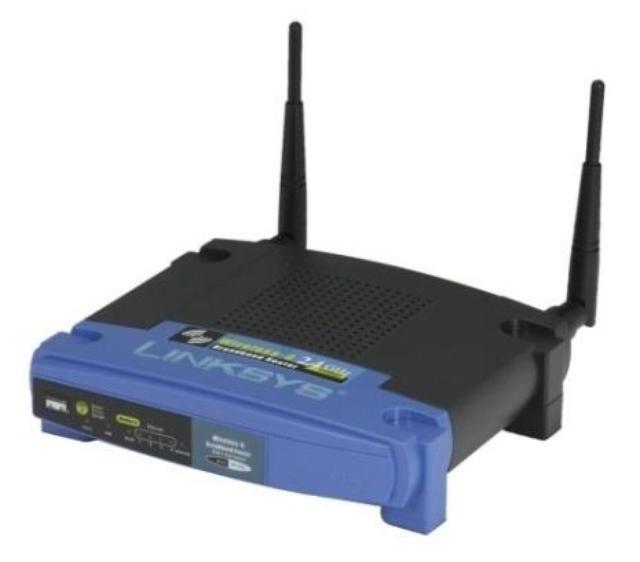
The particular device and software I have been experimenting with is the Linksys WRT54G router and HSMM-MESH firmware from http://hsmm-mesh.org/.
Installing the HSMM-MESH firmware changes the way the Linksys router functions and allows it to automatically connect to other HSMM routers in a mesh network. No special configuration is required after setting your callsign. All TCP/IP configuration is pre-configured, even down to automatically assigning addresses to connecting clients.

Mesh networks are highly fault tolerant. Every router in the network is aware of every other router and has the ability to move network packets through from one unit to another provided there is a link, or chain of linked routers, between them.
In the diagram to the right each router is represented by a numbered circle. If router number 6 were to fail then network packets that needed to move between router 1 and 7 would travel through routers 2 & 3 or 5 & 10 until 6 was repaired. All this happens automatically and quickly enough so that there is no disruption to the traffic.
Anything you can access on a normal computer network can be made to work on a mesh network. Some of the services that have been demonstrated include email, voice over IP (VOIP), video conferencing, file sharing, web servers & groupware applications.
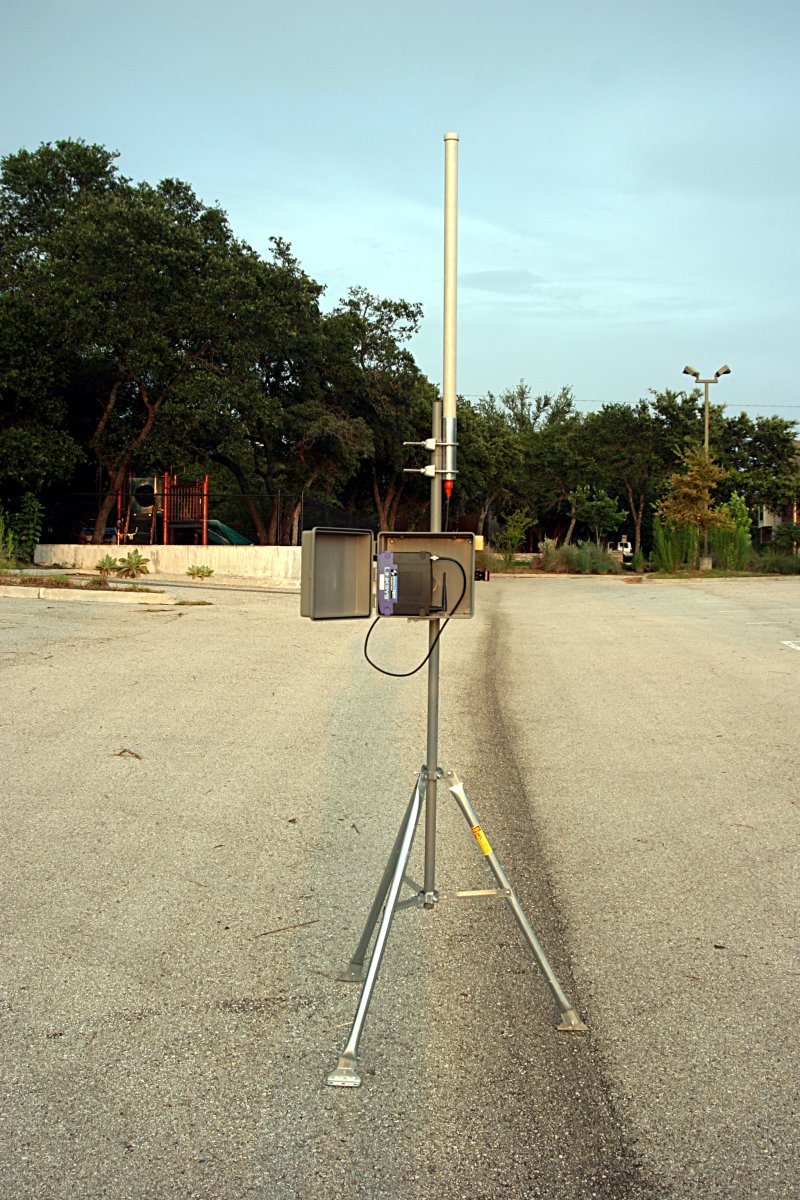 With simple modified antennas the modest output power from the WRT54G (100 to 200mW) can be used to reach distances of many miles or tens of miles with directional antennas. Mounting the router on a mast in a sealed enclosure can reduce losses from long cable runs while running off 12V power makes them compatible with ham radio power sources including solar and wind power.
The example to the left is from NG5V located on hsmm-mesh.org and consists of an omni-directional external antenna and a lawn sprinkler controller box from a popular home improvement store.
Did you know that … Frequencies used by channels one through six of 802.11b and 802.11g fall within the 2.4 GHz amateur radio band. Licensed amateur radio operators may operate 802.11b/g devices under Part 97 of the FCC Rules and Regulations, allowing increased power output but not commercial content or encryption.
I hope to acquire a few more WRT54G routers and put together a mesh network in the Katy TX area as a resource for experimentation and education in an area not normally touched upon by regular amateur radio operators. Who knows what the future holds & it behooves us to investigate this technology and bend it to our own needs.
The Amateur is Progressive … He keeps his station abreast of science. It is well built and efficient. His operating practice is above reproach.














