Archive for the ‘ham radio’ Category
 OK, OK! I Will Write that Ham Radio Book!
 July 30th, 2012 |
  Author:
 Ever since I began writing articles about my hobby of choice–amateur or “ham” radio–for my ham radio web site and several others, people have been asking me when I was going to do an amateur radio book. The truth is, I have just been too darn busy to even think of such a thing. And I also knew, in my heart of hearts, that it be would difficult indeed to get any kind of decent book contract for such a niche book. I presented my idea of a half-fiction/half-nonfiction book to the ARRL and they passed, so that confirmed my feelings. If they had no interest, I doubted anyone else who published books would either.
Fast-forward to July 2012. Things have changed, both in my personal life and in the wild and woolly world of big-time book publishing.
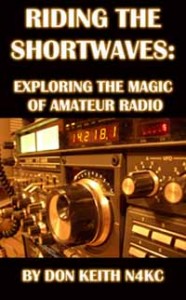
Don Keith N4KC has just published his new book of short stories, articles, advice, and more about ham radio.
First, I retired from my 60-hour-a-week day job back in May. And as I shuffled through the articles I had in the can, several more I was working on, and a few still in my head, I realized I was closer to a book than I had thought. And I truly believed I had something that would be different and could find a readership.
Secondly, as I investigated Kindle Direct Publishing at Amazon.com for the re-issue of a couple of my previous now-out-of-print books, I realized that I should absolutely pull the ham radio book together for that outlet–Kindle and some other e-book readers–at least. Amazon has become a real threat to traditional publishing companies–especially when it comes to e-books–as the old-line publishing houses struggle to figure this newfangled thing out. At the very least, it gives me the opportunity to make my book available at a very reasonable price to those interested in amateur radio. No, I don’t make much money at the price I set, even if I actually sell some downloads of the book, but that is not really the object anyway. As I have said many times, and not totally facetiously, if I wanted to make a fortune writing books, I would write pornography (See FIFTY SHADES OF GREY).
Then, as I considered other options, I realized that Amazon offers a truly unique opportunity for works like this one that allows me to offer the book in a traditional paperback format with minimal investment up front. Remember, I’m retired, on a fixed income these days! Amazon’s is a print-on-demand deal, but they seem to have it down to a science. I ordered some copies as soon as I got the book and cover uploaded and accepted for publication. The very next day I got the email that they were being shipped that day. Wow!
Again, this was with very little upfront cost and minimal hassle. Now, the paperback will be available not only via Amazon.com, but through major distributors, for order by libraries, and even in many European markets. We will see how good the print job is, but believe me on this: the major houses don’t necessarily produce the highest quality book any more either. They have to cut where they can to make a profit and printing, binding, and warehousing is a big drain on them.
Talk about rapid technological change and its effect on society and the media! Broadcast radio, TV, the Internet and telephone communications are not the only things evolving at a dizzying pace. Include the anachronistic business of book publishing in that mix, too!
Realistically, will tons of booksellers and all the Barnes & Noble stores order a box full of the books each? Or will hundreds of thousands of libraries order up a couple dozen copies each? Of course not. The big publishers do have sales staff to encourage that sort of thing. But a) no big publishing house was going to do a contract for RIDING THE SHORTWAVES: EXPLORING THE MAGIC OF AMATEUR RADIO and b) even if they did, it would be somewhere near the bottom of the sales staff’s sample case, so c) Amazon’s various self-publishing options are perfect for this kind of book.
By the way, if you have any interest in the dynamic and rapidly growing hobby of ham radio–believe me, it ain’t your weird uncle’s past-time any more!–then you may want to stop by Amazon.com and take a look “Inside the Book,” read the description, and maybe buy a copy or two…for yourself or someone you know and want to spark the interest in our amazing hobby.
See, right there in that last sentence, I did more publicity for RIDING THE SHORTWAVES than the big publishers do for most of the books they print up and ship out!
73,
Don Keith N4KC
www.donkeith.com www.n4kc.com
Handiham World for 25 July 2012
Welcome to Handiham World.
Troubleshooting 101
Here is an interesting little problem that showed up in my own ham shack just a few weeks ago. It’s funny how we can run into things that seem not quite right but then sort of just shrug them off and say, “Oh, well.”
The problem showed up when I was using my shack’s two meter rig, which is powered by a switching power supply. It’s the one that’s typically used for the Handiham net each day. I’m located some distance from the N0BVE repeater system. (It’s in the western part of the Twin Cities Metro while I am in the east.) That means my reception of the N0BVE signal is not exactly perfect. I can hear an annoying hiss in the background when the repeater is active, but that’s easily eliminated with a flip of the switch on my external ClearSpeech speaker. This handy device has almost magical properties – really a very smart algorithm – that digitally cleans up the signal, virtually eliminating the noise. I don’t like to leave it turned on all the time because I also enjoy listening to Minnesota Public Radio with the extended receive feature of the transceiver, and MPR has enough signal to be rock-solid perfect. It sounds best with the external ClearSpeech speaker’s processing turned off.
One day I encountered an interesting problem. I had been listening to MPR when I last used the radio, and when I turned it on, that’s the station I heard. Since I wanted to monitor the repeater instead, I flipped the memory to the stored two meter channel. Then, noticing that the ClearSpeech speaker was turned off, I slid its power switch to “on”. At that very moment, the radio went dead – no power. I pushed the power button on the radio and everything was back to normal. I put up with this for weeks before finally getting the gumption to track it down.
Can you guess what was going on?
Email me at [email protected] with your questions & comments.
Patrick Tice, WA0TDA
Handiham Manager
Handiham remote base station report
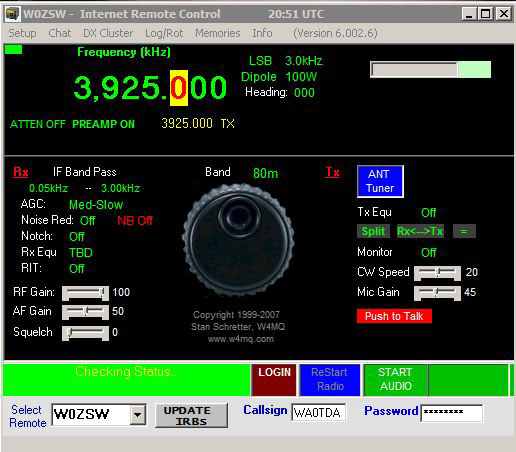
W0EQO at Courage North is in service and performing well. W0ZSW is off line due to internet connectivity issues that make it too unreliable to use. I hope to address this issue soon. Luckily, propagation has been excellent via W0EQO for PICONET, a regional HF 75 meter net on 3.925 MHz.
A Great Weekend on VHF
 One of the things that makes a VHF contest so much fun is that you never know how its going to play out. One of the major factors is sporadic-e propagation which is, well, sporadic. Sometimes we get rewarded with decent propagation and sometimes we get completely skunked.
In the morning, before the 2012 CQ World Wide VHF Contest started, the 6 Meter band was open from Colorado to the east. The band continued to be open to various locations for most of Saturday, even late into the evening. I made my last contact on 6 Meters to the Pacific Northwest after 10:30 PM local time.
On Sunday morning, 6 Meters gave us some more fun but it was not nearly as good as Saturday. Instead of strong signals and consistent runs, the signals were variable and QSOs were often a challenge. Sometimes it was like pulling teeth. This contest only uses two bands: 6 Meters (50 MHz) and 2 Meters (144 MHz). As 6 Meters pooped out, the action moved to 2 Meters. Fortunately, we had a number of rovers out that helped activate some of the rarer grids. Thanks W3DHJ, AB0YM, KR5J and W0BL.
This is probably my best score ever in the CQ WW VHF Contest, due to the excellent propagation on Saturday and some station improvements I’ve made over the past couple of years.
     Band       QSOs X pt =  QSO pts.  X   Grids   =     Points
---------------------------------------------------------------
     50         337    1      337           130           43810
     144        34     2      68            13            884
---------------------------------------------------------------
     TOTALS     371           405           143           57915

                            Claimed score =  57915
All in all, a great weekend on the VHF bands.
73, Bob K0NR
Dear Yaesu, Please Make a VHF FT-950
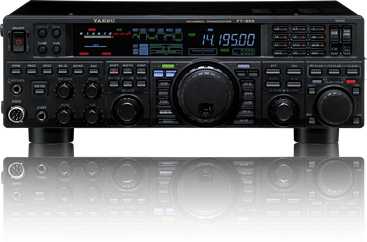 About a year ago, I bought a Yaesu FT-950 transceiver with HF through 50 MHz. I’ve really enjoyed that radio. This weekend I am working the CQ WW VHF Contest and giving it a good workout on 6 Meters. It is set up quite nicely for contesting with a decent receiver, built-in antenna tuner, DSP processing, dual VFOs, built-in voice and CW keyers, etc. For 2 Meters, I use my trusty old FT-847, which has always been one of the favorite rigs. I have to admit that the 847′s receiver is a bit wimpy when it comes to operating on a crowded band with strong signals, and it only puts on 50 Watts on 2 Meters.
So here’s my request:
Dear Yaesu,
Please add 2 Meters to the FT-950 transceiver. When you obsoleted the FT-847, you left a big hole in the ham radio market. The FT-847 was supposed to be a satellite rig, which is nice but not required. I really just want a radio that can put out 100W on 2 Meters, with the great features of the FT-950. Note that I am not asking for 70 cm operation, but if you want to toss that in, it would be cool. You can even leave out some of the HF bands if that would make it easier.
Thanks and I await your reply.
73, Bob K0NR
Handiham World for 18 July 2012
Welcome to Handiham World.
Bucket list!

Photo: I found the problem. The confabulator gear is stripped. You’ll need a new one if you want this Vega to make it back to Podunk.
Hey, readers and listeners! It is certainly high summer here in North America and the temperature is so high and the humidity so oppressive that we are definitely not thinking clearly. That is why we have come up with this “bucket list” which we hope to complete before we die.
1. Landing a single engine plane on the beach.
2. Changing the transmission in a Chevrolet Vega.
3. Making yogurt from scratch.
4. Setting the tone and frequencies on a mobile radio while driving.
Well, if you are like me you have probably done the first three of these things without any particular problem, but you have never been able to safely program a mobile VHF/UHF radio while driving a car. In fact, programming a radio while driving can be a frighteningly dangerous experience, much worse than sampling that first icky-looking spoonful of homemade yogurt or dropping a Vega transmission on your toes. That is why the radio programming is not checked off my bucket list. In fact, programming a radio while driving instead of watching the road is a good way to assure that you will probably die before completing most of the items on your bucket list.
I started thinking about this particular problem when I read the correspondence section of the August QST wherein astute letter writer K2GW talks about making the programming process for VHF/UHF radios more user-friendly. The use of subaudible tones on repeater systems is so common as to be expected, and most of us will have to admit that these systems do an excellent job of preventing the repeater from ever actually being used for anything, but mostly from ever being successfully accessed by anyone trying to keep a car between the ditches while traveling through the area supposedly served by the repeater.
Of course the subaudible tones might be necessary to prevent interference from distant repeaters should there be a band opening or from other nearby RF sources or an alien invasion where the flying saucers transmit on the repeater input. I get that. But the problem remains that unless you are able to preprogram your radio for the repeaters along your route, you are likely going to be out of luck when you try to simply access them by punching a receive frequency into the VFO and letting the radio’s built-in offset function set the transmit frequency according to the band plan. One possible workaround is to listen for activity on the repeater in question and then punch the tone scan function button to try to locate the correct subaudible tone. If this works and you do not end up in the ditch (especially dangerous in Florida where hungry alligators find the ditches quite attractive), then you might be in business. The more likely outcome is that you will drive entirely through the repeater’s coverage zone without hearing any activity.
The ARRL TravelPlus® repeater directory on CD-ROM does provide a way to map and program radios along a planned route, so it is a good resource that allows you to program your radio well in advance of your trip. Programming your radio while sitting in the driveway is one heck of a lot safer than meeting an alligator for lunch. Still, you may need to program a radio while in motion. The safe way to do this is for you to pay full attention to the radio by letting someone else do the driving. When my wife and I take car trips, I feel safe enough fiddling with the radio while she pilots the car. While this division of labor keeps the car out of the ditch, it does not necessarily ensure that one will be able to access or make a contact on a repeater.
One time, on a trip through alligator-free central Illinois, I tried a repeater that I really, really wanted to use and that was programmed into my radio already, because I had looked it up in my repeater directory. I heard the repeater identify and decided to throw out my call sign.
Silence.
Okay, so I upped the power and tried again.
Silence.
Obviously, the subaudible tone that I had programmed was incorrect. So I set the radio to tone scan and hoped for someone to transmit on the repeater. Well, that didn’t happen. I guess I probably could have gone through every possible subaudible tone while kerchunking the repeater and throwing my call sign out, but somehow that didn’t seem to be worthwhile. Instead, I switched to VFO mode and 146.52 MHz where I had a nice QSO with a truck driver who was passing through. The subaudible tone system had certainly done its job of preventing interference and any actual use by mobile stations, that’s for sure. Later, after we got back home from vacation, I discovered that the subaudible tone for that particular repeater was incorrectly listed in the directory.
I’m not sure what the answer to this partly technological and partly behavioral issue is with VHF/UHF repeater systems. All I know is that you cannot make things that difficult to use because prospective users have many other alternative means to communicate and they will vote with their feet and go somewhere else. For example, I can easily bring up the node of my favorite repeater on my Android phone by using the EchoLink application. I recommend doing this while you are sitting in the passenger seat rather than trying to steer the car. Once I am connected on EchoLink, all I need for reliable communications is a cell phone data signal. I can talk to my friends who are regulars on my preferred EchoLink-enabled repeater system.
Would I prefer to use the radio in my car to make a local contact? Certainly! But hey, repeater owners out there – you might consider connecting your repeaters with the world via IRLP or EchoLink and make sure that your frequency and tone information are correctly listed in repeater databases and on your club website. And if any of you local stations are listening on the repeater and hear a mobile station give a call, take a minute to have a short conversation and make a new friend! Maybe the technology will improve to the point that radios will be easy enough to use while driving so that one day I will be able to actually use repeaters I encounter along my mobile route.
Today’s safety tip: Don’t feed the alligators. Also, but not safety-related, the QST audio digest in DAISY format is now available for our blind members in the DAISY section. You can hear me read the correspondence section with the K2GW letter.
The long-range forecast: Speaking of Podunk, localism is an endangered species. As applications for mobile devices like smartphones proliferate, people will listen to the broadcast stations they prefer, avoiding the local stations – especially when they are on the move, traveling by car. When the typical car driver would one time tune around for the local yokel stations along the route, the trend will favor simply staying tuned to the internet station they have always liked. Satellite radio is already making such inroads into localism. The same thing is going to happen to local repeater systems. If the repeater system is not linked, it may be doomed to obscurity. Repeater owners who think EchoLink “isn’t real radio”, take note.
SOTA Activation Without The Tears
I recently confessed blogged about a not-that-well-executed SOTA (Summits on The Air) activation, in How Not to Do a SOTA Activation. This past weekend, I made another run at it with much better results. Still, I did use a slacker low impact approach to the activation.
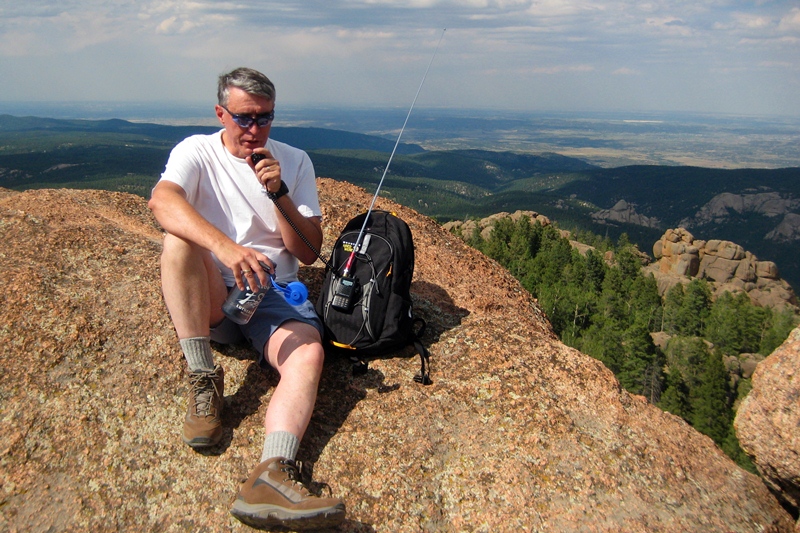
My hiking partner spouse and I decided to go for a hike on Sunday afternoon. It had been many years since we had climbed up to the fire lookout on Devils Head in Pike National Forest, so that sounded like a great destination. There is an excellent view at the top (fire lookouts tend to be like that) and the weather was awesome. I checked the SOTA list, and sure enough, Devils Head is a legitimate SOTA peak (W0/FR-051).
The hike is about 2.8 miles round trip with an elevation gain of 950 feet. I put this in the category of a good tourist hike…with just enough huffing and puffing to make you think you worked for it but not so much that it kills you. Here’s the topo map and route taken from everytrail.com: 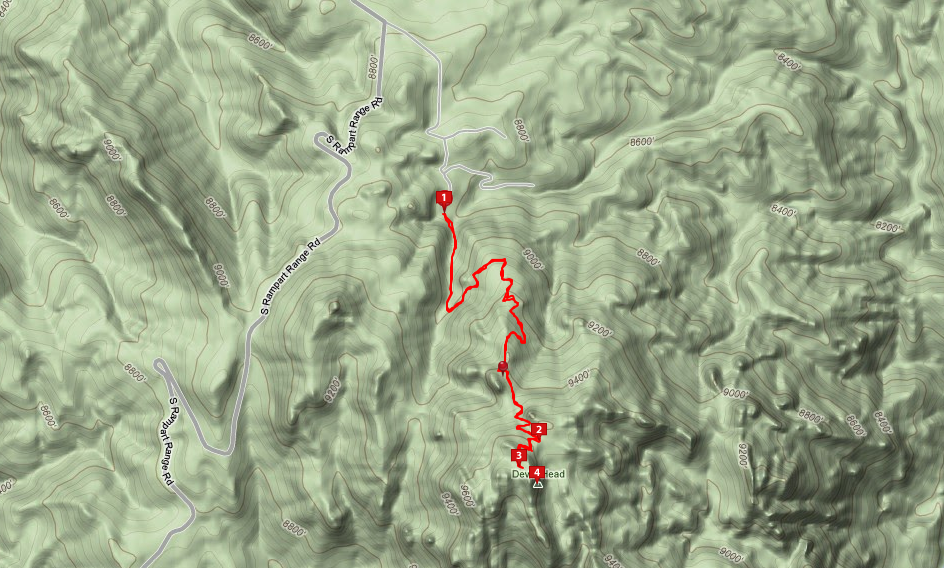
As I put together my daypack, I tossed in my Yaesu FT-60 handheld radio and a 1/2-wave vertical whip antenna. This was going to be a 2M FM operation only. (I don’t have anything against HF, but there is something magic about VHF propagation with a little altitude.) Then I sent a quick message to a couple of the local email lists asking for people to try to work me on the summit. We drove to the trailhead and started our hike up the trail, which is heavily used but well maintained.
The fire lookout is not a tower. It sits on top of a large rock formation with stairs leading up the side of the rock.
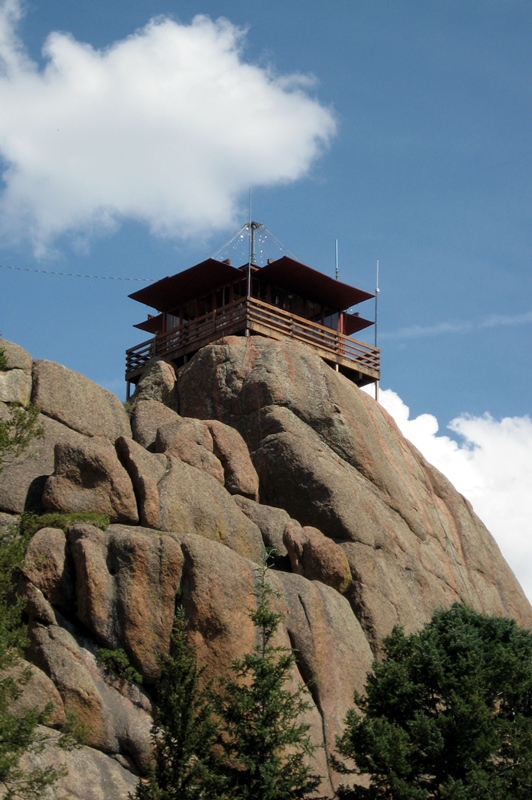
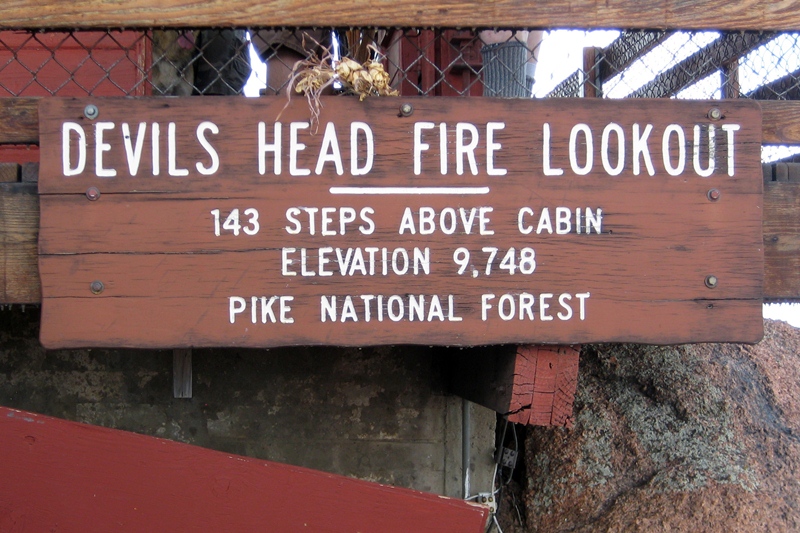
When we got to the top, we spent some time enjoying the view and catching our breath. As the sign says, the stairs have 143 steps which take you to an elevation of 9748 feet.
I got out the radio and started calling CQ on 146.52 MHz. Ted (NØNKG) came right back to me…I think he probably saw my email message. Over the next half hour, I worked a total of 7 contacts: NØNKG, N2RL, NØGWM, W7RTX, WB9QDL, KØDEN and WXØPIX. I even remembered to bring along a log book and a pen to write it all down.
Bill Ellis staffs the fire lookout for the US Forest Service most of the time during the summer. He handed me a card that certifies that I climbed up to the lookout station. Note that this card indicates that it is the 100th anniversary of the fire lookout! And Bill’s been doing this for 26 years. Cool!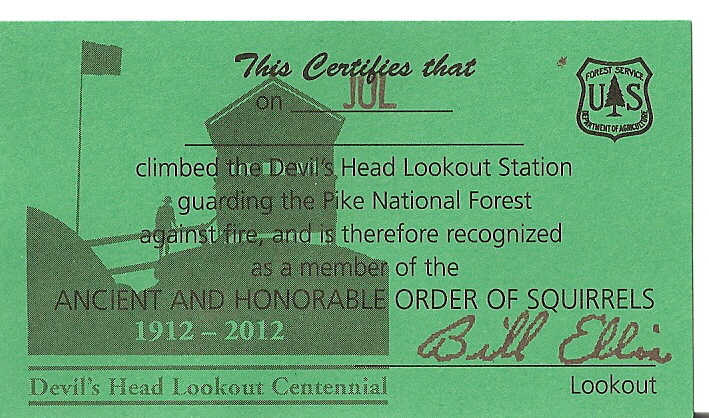
Various people have said that Devils Head is a must do hike in Colorado and I have to agree (whether you are doing a SOTA activation or not). It turns out that I was the second person to activate Devils Head as a SOTA summit, with Chuck (N6UHB) having done it in October 2011. I’ll probably do some more of this since it is a nice blend of ham radio, hiking and enjoying the view from a high spot.
73, Bob K0NR
The ARRL Radiogram, Part 2
In this post I’ll describe how to compose a basic radiogram. I won’t wax on about everything involved here — if you want to learn more just click here. Here’s an example that I’d like to explain piece by piece. (Thank you to the Oregon ACES program for sharing a fillable PDF of the radiogram; I used it to create what you see here.)

The four main parts of the radiogram are the preamble (at the top), the address block (just below the preamble on the left), the text (the main body of the message), and the signature (just below the text). For now I’ll ignore the part at the bottom where it says “REC’D” and “SENT” as well as the box just below the preamble on the right where it says “THIS RADIO MESSAGE WAS RECEIVED AT,” since those are just for record-keeping.
Preamble:

Notice that a couple of the boxes are blank. I’ll still explain them, but because they’re optional and often not used I’ve left them blank. The preamble has eight boxes:
- NUMBER: This is whatever number the originating station chooses. (If you are the first station to send this radiogram, then you are considered the “originating station.”) Typically you start with “1″ on the first radiogram of the year and number each subsequent radiogram sequentially. Just make sure that it’s a number with no letters and that it doesn’t start with a zero.
- PRECEDENCE: Either R, W, P, or EMERGENCY. The first three letters stand for Routine, Welfare, and Priority, but “EMERGENCY” is always spelled out. Unless you’re dealing with a disaster, your radiogram is probably Routine, so put “R” in this box.
- HX: This is for one or more of seven optional handling instructions: HXA, HXB, HXC, etc. You don’t have to put anything in this box unless you have some special need, like to authorize a collect call for delivery, hold delivery until a certain date, etc. To learn more, click here.
- STATION OF ORIGIN: Your call sign, if you’re the first station to send the radiogram.
- CHECK: The number of words in the text of your message. If there is an ARL code used in your message, then put “ARL” in front of the check number. Later I’ll say more about ARL codes — and a dangerous trap that some operators fall into with this box when delivering a radiogram.
- PLACE OF ORIGIN: The location of the person who actually authored the text of the message. If you as the originating station are the one and only person composing it, then this would be your location. But if you’re not, then it may be some other location. Say for instance that your non-ham friend wants you to send a message of his own by radiogram. The place of origin would be your friend’s location, not yours.
- TIME FILED: This is optional (unless you have entered special handling instructions in “HX” that require it) and is often left blank for routine messages. If you do enter a time, enter the time you (the originating station) created the message. Use 24 hour format followed by an indicator of the time zone, e.g. 1730Z (UTC), 1730L (Local time).
- DATE: The three-letter abbreviation for the month followed by a number for the day. This is assumed to be UTC unless you have indicated a different time zone in “TIME FILED.”
Address block:

Enter the address of the person the radiogram is intended for. Don’t neglect the phone number (and remember to include the area code!) since usually radiograms are delivered by telephone once they make it to a ham who lives close enough to place a local call. I’ve put dashes in the phone number, which I should point out is technically incorrect but I’ll probably keep doing it.
Text and signature blocks:

Notice that there are five rows, each row containing five blanks? Each blank is for one word. The rows of five are to make it easier to count the words to compare with the “CHECK” box in the preamble. Instead of counting every word, you can just count by fives for every row that is full. This makes it easier for stations in the NTS to rapidly check for missing/extra words after they have copied a message. Here are a few notes on this part of the radiogram:
- Punctuation: Don’t use any punctuation marks. At the end of a sentence where a period would normally go, write “X” on a blank (it counts as a word and is pronounced “X-RAY” when read over the air). Don’t write “X” at the end of your last sentence, though. For a question mark, write “QUERY” on its own blank line (it also counts as a word).
- ARL Codes: ARL codes are a handy way to say a lot with only two or three words. For a listing of all the ARL codes, click here (it’s toward the end of the document). “ARL FIFTY” means, “Greetings by Amateur Radio,” and that’s what the recipient will hear when finally a ham calls him and reads the radiogram to him. Note that the number “FIFTY” is spelled out, and both “ARL” and “FIFTY” each count as a word. If you used, say, “ARL FIFTY ONE,” that would count as three words. Warning! Don’t confuse the “CHECK” in the preamble with the ARL code you are trying to send. In the example I’ve shown here, “ARL 15″ is in the “CHECK” box, but all that means is that 1) there is an ARL code in your message 2) there are 15 words total in your message. Frankly I wish we didn’t have to put that “ARL” in the check box because it’s confusing and can be disastrous. Just read the story in the Operating Manual about the time a poor ham delivered a radiogram and mistakenly interpreted “ARL 13″ in the “CHECK” box for “Medical emergency situation exists here” (the meaning of ARL THIRTEEN, if it were actually in the text of the message). After the family received this botched radiogram, they threatened to file a lawsuit!
- Wording: Be concise. The fewer words the better, as long as it still makes sense.
- Closing: Closing words like “sincerely,” “love,” etc. should be included in the text of the message, not the signature.
- Signature: The name of the person(s) writing the text. The signature goes just below the text as shown. At first this is a bit confusing when you’re staring at a blank radiogram form because it’s not obvious that the top border of the REC’D/SENT boxes doubles as the line for the signature. But that’s where it goes — above that top border, not below it. It has nothing to do with “REC’D/DATE/TIME” or “SENT/DATE/TIME,” which are for record keeping as the radiogram is sent and received. Note: the signature does not count toward the number in the “CHECK” box of the preamble.
I hope this is helpful! In my next post about the ARRL Radiogram I’ll discuss how to send it using a voice mode like SSB.















