Archive for the ‘ham radio’ Category
 Double Dip Weekend August 2012
 August 13th, 2012 |
  Author:
Homebrew Buddipole inspection
Great weekend of QRP Portable fun. Saturday our Central FL QRP group had some new ops join us and we had a good time comparing antennas and rig setups at Sylvan Lake Park in Sanford, FL. As is typical, we did more talking than operating but did manage to sneak a few qso’s in on 20 and 17 meters. The contesters in Europe were hot and heavy on 15 m too so made for a fun day despite the heat and high humidity. I was a bit disappointed to not be able to snag any fellow Polar Bear QRP ops on 30m but the band did not stay open long and the other stations were operating on alternative bands.
Sunday after church was the first annual NJQRP Skeeter Hunt. So glad to work Skeeter Hunt promoter and fellow Polar Bear, Larry, W2LJ before the lightning ran me off. Larry was my last QSO of the day as a thunderstorm started making LOTS of noise and it was my signal to pull down the 31 ft Jackite and wire and get out from under the shade of the 50 ft tall pine trees down by the lake! YIKES… just made it too!
I ran my Sierra at 2.4 watts out into an end fed half wave suspended as a sloper from the 31 ft Jackite pole in a WNW direction. I normally use the trees to get a bit more height for my wire, but the Jackite goes up and down faster and with storms coming, I chose the simple and fast way to git ‘er done. Turned out to be a good choice. Band conditions were pretty good on 20m and I was hearing a good bit of activity. After 1800 the Caribbean, Central and South American SSB stations were causing a good bit of QRM down here in FL. They all seem to run power and gain antennas so we learn to listen through the chatter here in FL. The approaching storm was obvious as QRN increased with distant lightning stirring up the noise and crashes. Nonetheless, the signals were pretty good despite the distractions and there were some SKCC, FISTS and other cw fans out there having fun too which made the band busy.
I built a simple key and am posting a photo of my K4UPG Knee Cap Key. Used the lid of a bulk black peppercorn jar and made a simple non-iambic key with paper clips, standoff and a bit of wire. It actually worked fairly well, but not good enough to use for the whole contest. As a long time CPG (Contest Point Giver) I decided that was a good way to give myself some points so took advantage of the bonus points! It did inspire me to try a more substantial lid and make a strap to use it as a leg key for portable ops.


Umbrellas for the rig and the op!
It was fun to hear so many familiar calls and work a few of our fellow Polar Bear Ops who were out for the fun too. Sure appreciate the effort to put this event on the calendar and process the results. Thanks to the NJQRP group for the support of our niche in the hobby and to you Larry for the time you devote to contests, blogs and getting us all out and on the air.
Here’s my results before the storm drove me for cover:
| Date | Time | Call | Band | Pwr | RST | RCV | SPC | Nr | |
| 8/12/2012 | 17:12 | N0SS | 20 | CW | 2.4 | 559 | 579 | MO | #122 |
| 8/12/2012 | 17:17 | W0EA | 20 | CW | 2.4 | 559 | 559 | IA | #22 |
| 8/12/2012 | 17:23 | NK9G | 20 | CW | 2.4 | 559 | 559 | WI | #75 |
| 8/12/2012 | 17:25 | VE3WDM | 20 | CW | 2.4 | 559 | 559 | ON | #15 |
| 8/12/2012 | 17:37 | KQ2RP | 20 | CW | 2.4 | 449 | 439 | NJ | #27 |
| 8/12/2012 | 17:39 | AB4PP | 20 | CW | 2.4 | 579 | 599 | NC | #79 |
| 8/12/2012 | 17:42 | N0JRN | 20 | CW | 2.4 | 559 | 559 | MO | 5W |
| 8/12/2012 | 17:46 | N3AO | 20 | CW | 2.4 | 449 | 559 | VA | #109 |
| 8/12/2012 | 17:49 | W4MPS | 20 | CW | 2.4 | 599 | 559 | NC | 5W |
| 8/12/2012 | 18:00 | KR9Z | 20 | CW | 2.4 | 449 | 449 | IL | #10 |
| 8/12/2012 | 18:06 | AA4GA | 20 | CW | 2.4 | 579 | 569 | GA | #2 |
| 8/12/2012 | 18:08 | N7UN | 20 | CW | 2.4 | 579 | 559 | NJ | 5W |
| 8/12/2012 | 18:14 | WF4I | 20 | CW | 2.4 | 559 | 559 | NC | #71 |
| 8/12/2012 | 18:18 | K3RLL | 20 | CW | 2.4 | 449 | 339 | PA | #21 |
| 8/12/2012 | 18:31 | KX0R | 20 | CW | 2.4 | 449 | 359 | CO | #69 |
| 8/12/2012 | 18:36 | W2LJ | 20 | CW | 2.4 | 579 | 599 | NJ | #4 |
A good time was had by me!
72,
Kelly K4UPG
TechDay 2012 – Your Start in Amateur Radio
 Come join us on Saturday, September 15th, 2012 (9:00 AM to 2:00 PM) at the Tri-Lakes Monument Fire Administration Complex at 166 Second St. in beautiful Monument, CO for a half day workshop aimed primarily at the new Technician Licensees to help them get started in ham radio. While you’re here you’ll learn what it takes to be a ham radio operator, brush up on your DXing skills, test your own ham radio equipment, check out some sweet mobile radio installations, and ask an Elmer “What’s so cool about 10 meters?”
Getting started in ham radio has never been so much fun!
Presentations
9:30 am – Youth DXpedition to Costa Rica
by Anna Veal WØANT
10:30 am – Mountaintop Operating
by Steve Galchutt WGØAT
11:30 am – Home Station Setup
by Anna Veal WØANT
12:30 pm – Getting On the Air
by Brandon Hippe KDØPWF
1:30 pm – Radio Equipment 101
by Shel KFØUR
* Each presentation is approximately 15 minutes with 5 minutes of Q&A at the end. Events subject to change
Booths – Open 9AM to 2PM
Get Your Radio Programmed with Local Repeater Freqs by RT Systems
hosted by Kyle Hippe KYØHIP & Cole Turner WØCOL
Check Your Radio Performance
hosted by Bob Witte KØNR
See an HF Station
hosted by Dan Scott WØRO & Stu Turner WØSTU
Ask Any Question – The Elmer Booth
hosted by Paul Swanson AAØK & Shel KFØUR
Understand Mobile Installations
hosted by James Bucknall KDØMFO & Ethan Bucknall KDØMFP
Getting Your Ham Radio License
hosted by Brandon Hippe KDØPWF & Eric Hippe NØHIP
Ham Radio & Public Service
hosted by Randy Meadows KNØTPC
Sponsors
Tech Day 2012 is proudly sponsored by the WØTLM Amateur Radio Club and the Pikes Peak Radio Amateur Association.
Get the one page flyer in pdf format here.
Direct any questions to Bob KØNR
Handiham World for 08 August 2012
Welcome to Handiham World.
What should you have to know to operate a club station?
Radio clubs usually do not have dedicated meeting space and extra room for a complete club station, but some do. Many clubs do have temporary “club stations” for the duration of club events or Field Day. What all of these club stations have in common is that they are shared resources that can be operated by many club members. For those amateur radio operators who cannot put up antennas at their homes, the club station is a great way to get on the HF bands or to have fun with VHF weak signal operation.
But here’s the problem: The typical home station will be configured by the owner to be exactly what that operator wants. It will have the brand of radio equipment and the accessories preferred by that person, and everything will be laid out in a customized fashion. The club station will be used by many different operators. It may have different equipment than what you are used to, and be configured differently. With all of these different operators, each with different station layouts at home, the club station presents a learning challenge!
Let’s consider some basic skills that might be expected of each club station user. These might be part of a “check ride”, similar to that given to a licensed pilot when being checked out in an airplane for the first time. Although a person may hold a pilot’s license, it is by no means certain that the pilot knows everything about every airplane! The same is true about licensed amateur radio operators and radios. To begin this discussion, I have identified six basic knowledge areas, but you may be able to think of some others:
- License and identification: To operate an amateur radio station, you need a license, so a new user should expect to present his or her license along with some supporting identification (if requested) so that the club’s station manager can determine if the licensee is current and what the operating privileges might be.
- Safety and convenience: Since the club station will be unfamiliar territory to the new user, it is important to go over basic safety topics. These include the emergency power shut off, the location of fire extinguishers and other emergency equipment such as an AED, the location of exits, a telephone, and restrooms, and how to call for emergency help.
- Ergonomics, accessories, and policies: This topic area covers your comfort and safety while operating the station. It will cover how to switch the lighting on and off, where writing materials, a frequency chart, and other commonly used desktop materials are found, seating adjustments, station layout, the ham shack computer (if there is one), and policies related to the use of the station. For example, a policy might include switching the equipment on and off in a certain sequence, no beverages on the operating desk, returning antennas and extendible towers to their nested positions at the end of a session, logging all contacts, using the club callsign, and so on.
- Radio orientation and operation: This will show the new operator what each piece of equipment does and how it operates. It will include all the basics, such as the power switch, tuning, modes, antenna switching and rotor control and use of various accessories such as amplifiers.
- Record-keeping: There may be a sign in/out sheet for users of the station. If logging of contacts is done, there may be a need to explain the procedure, whether it is by computer or in a paper logbook. There may also be a QSL policy and procedure. If a piece of equipment is not working or if a part is broken or missing there is usually a place to make note of it so that the club can remedy the problem.
- Securing at shutdown: After the operating session, the station must be shut down and secured. In some cases, this may include disconnecting the equipment from the power mains and antennas to prevent lightning damage. It is also considered good practice to leave the radio in a more or less “normal” mode of operation, so that the next user will not sit down to a radio that has been left in split frequency mode with the RF gain at zero and every button pressed and knob twisted! If desk accessories are used during the operating session, they should be returned to wherever they were stored so that the operating desk is clear of clutter. The lights should be turned off and the room should be secured in whatever way is described by club policy.
A club station is an excellent resource for all club members, but because it is shared among many users it is wise to have some clear rules about its use and to include an orientation (“check ride”) for each new user.
Email me at [email protected] with your questions & comments.
Patrick Tice, WA0TDA
Handiham Manager
Handiham remote base station report
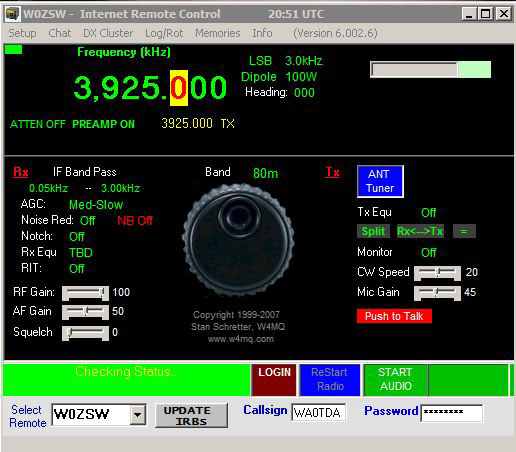
W0EQO at Courage North is in service. W0ZSW is in service.
A Great Day of Mountaintop Radio
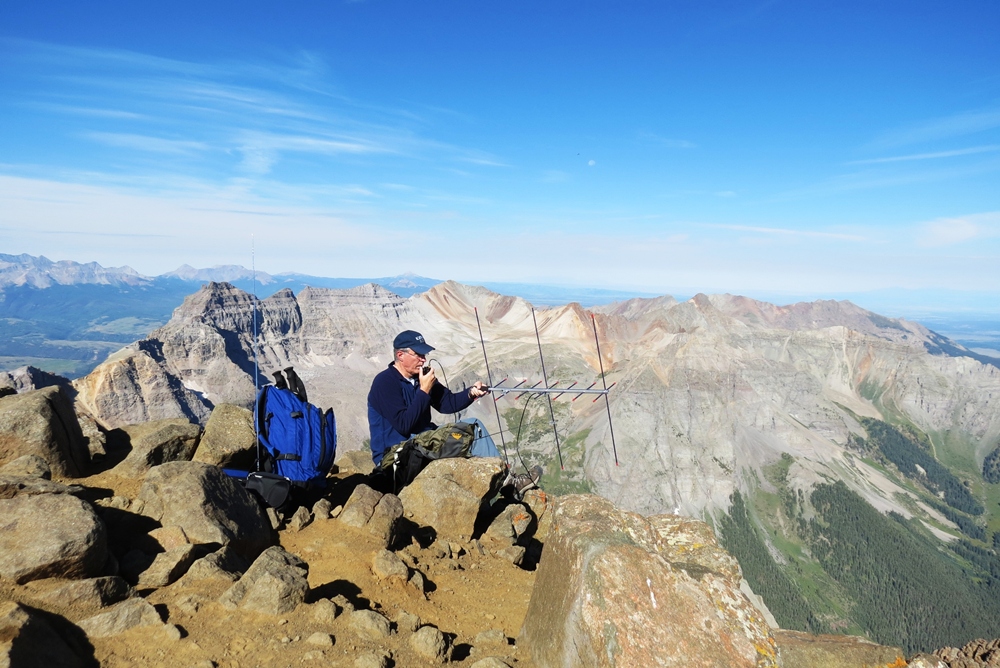
Here is the report on the Colorado 14er Event operation from Mount Sneffels. Joyce K0JJW and I drove our Jeep up to the “upper trailhead” for Sneffels, arriving at 6 AM. The 14ers.com web site describes the trailhead and route.
On paper, the climb is not that difficult but there is quite a bit of loose rock that you have to navigate…annoying on the ascent and very tiring on the descent. We reached the summit at 9AM and fired up the radio gear.
Mt Sneffels (and the other peaks in the San Juans) is a long distance from many of the fourteeners. Take a look at the fourteener map on 14ers.com. Previously, I had operated from Pikes Peak where you hear tons of stations calling and Mount Antero which is centrally located so you can easily work all of the 14ers. Operating from Mt Sneffels is different — kind of like you have fallen off the edge of the earth.
We soon found that the omnidirectional antennas were not that effective at pulling out the other 14er stations and that the Arrow II yagi antenna was the way to go. I’ll so some more analysis on this later.
Most of the contacts were made with the Yaesu FT-817 but we also used a pair of HTs. Note that we used both FM and SSB.
I had my Yaesu VX-8GR burping out APRS packets for the upper half of the hike but it appears they only made it to an IGate when we were on the summit.
The weather was awesome so we stayed on the summit until 11:40 AM. After we finally worked Pikes, we decided to head down. The clouds were building but we did not expect it to amount to much. But the storm moved in quickly and we did get snowed on while hiking down.
Radio Log
Local
Time  Freq        Callsign  Location    Comments
 0934 144.200 USB   N0KE    near Silt   Phil, 100 miles away
 0949 432.100 USB   N0KE    near Silt
 0954 147.420 FM    W0NX    Quandary    Keith, strong signal
 1006 147.420 FM    WE7C    near Cortez Glen, 70 miles away
 1018 147.510 FM    WO9S    Mt Evans    Jon
 1049 147.450 FM    KM5TY   Huron       Strong signal
 1058 147.435 FM    KD0EGE  Lincoln
 1100 147.420 FM    KC0VFO  aeronautical mobile
 1110 147.420 FM    KT0AM   Shavano     Mark, strong signal
 1115 147.420 FM    KI6ASW  Blanca      Strong signal
 1130 144.200 USB   KB0SA   Pikes Peak  Eric
 1132 144.200 USB   W0STU   Pikes Peak  Stu
 1135 147.480 FM    W0STU   Pikes Peak  Stu
Joyce ended up logging for me and pointing the antenna, so she only worked Glen WE7C on 147.42 MHz. She also got to explain to the other hikers what the heck we were doing. People seemed genuinely interested and when we told them we just talked to Quandary or Evans, they’d say “that’s cool.”
This was a Summits On the Air activation, the first ever for Mount Sneffels (W0/UR-001). All in all, a good day playing ham radio in the mountains.
Thanks to everyone that came out to play.
73, Bob K0NR
Busy, Busy: ARES Incorporation and My Son’s Enrollment in an Electrician AAS Program
It’s been too long since I’ve posted; for those waiting for my next post on the ARRL Radiogram, please pardon the delay. The last couple of weeks have been unusually busy. More important matters have largely taken precedence over ham radio and blogging, but ham radio has by no means died at the QTH of NØIP and KAØCEM!
ARES® has been thriving here. On July 5, Yellow Medicine County ARES®, Inc. was incorporated. We filed our articles of incorporation with the MN Secretary of State and also obtained vanity call sign WØYMC (Yellow Medicine County) from the FCC! Two nights ago, the board of directors held their organizational meeting at which they adopted bylaws, elected officers, etc. Now we are ready to make application for 501(c)(3) status with the IRS. Hopefully I will get to that next week.
We had one emergency operation in July, though I sort of backed into it. After I received a phone call from a friend, my son and I assisted in searching for a missing girl. At first I wasn’t even thinking in terms of ARES. Intending to just help our friends, I told my son to throw on his ARES vest to be more visible, I grabbed mine, and we brought our HT’s so we could communicate. Upon arrival at the scene we found ourselves in the midst of many similarly-clad firefighters and EMS personnel as well as police officers and deputies. Long story short, by the time the search was concluded, many more firefighters would be involved as well as local K9, bloodhounds from Watertown, SD and the MN State Patrol Helicopter. Thanks be to God, the girl eventually turned up safe.
The weekly Yellow Medicine County ARES Training Net continues. In July I covered the ARRL radiogram, an introduction to the Incident Command System, and spent one session discussing lessons learned in the search for the missing girl. Thus concludes the latest ARES news from Yellow Medicine County.
And on the home front it appears that by elmering my son Antonio, KAØCEM, I have unwittingly steered him toward a career as an electrician! This past Wednesday he was admitted to the Electrician AAS program of MN West Community College, Canby, as a PSEO (Post-Secondary Enrollment Option) student in his last two years of highschool/homeschool. He surprised me a couple months ago by asking about this, and now he’s all registered for classes and already has a pile of books to study.
That’s all I have time for right now. After dashing this off it’s back to work for me. Hopefully I’ll get back to regular posting next week.


Colorado 14er Event This Weekend

Just a quick reminder that the Colorado 14er Event is happening this Sunday. I am going to try to make it up Mt Sneffels down in the San Juan range and operate 2 Meters and 70 cm. This will also be a SOTA activation (W0/UR-001).
For more information, see http://www.k0nr.com/wordpress/2012/07/colorado-14er-event-now-with-sota/
73, Bob K0NR
Handiham World for 01 August 2012
Welcome to Handiham World.
Troubleshooting 101
Last week’s problem showed up when I was using my shack’s two meter rig, which is powered by a switching power supply. Let’s just recap: It’s the one that’s typically used for the Handiham net each day. I’m located some distance from the N0BVE repeater system. (It’s in the western part of the Twin Cities Metro while I am in the east.) That means my reception of the N0BVE signal is not exactly perfect. I can hear an annoying hiss in the background when the repeater is active, but that’s easily eliminated with a flip of the switch on my external ClearSpeech speaker. This handy device has almost magical properties – really a very smart algorithm – that digitally cleans up the signal, virtually eliminating the noise. I don’t like to leave it turned on all the time because I also enjoy listening to Minnesota Public Radio with the extended receive feature of the transceiver, and MPR has enough signal to be rock-solid perfect. It sounds best with the external ClearSpeech speaker’s processing turned off.
One day I encountered an interesting problem. I had been listening to MPR when I last used the radio, and when I turned it on, that’s the station I heard. Since I wanted to monitor the repeater instead, I flipped the memory to the stored two meter channel. Then, noticing that the ClearSpeech speaker was turned off, I slid its power switch to “on”. At that very moment, the radio went dead – no power. I pushed the power button on the radio and everything was back to normal. I put up with this for weeks before finally getting the gumption to track it down.
The challenge was to guess what was going on. Rick, W0IS, was right on the money when he wrote:
My educated guess is that the negative power lead for the speaker had gotten disconnected, but it still got power because it was grounded through the radio, either through the speaker connection, or just from the two chassis touching somewhere. But my guess is that the radio’s negative power lead does not go directly to the chassis of the radio. There is some electronics between the black power wire and the chassis, and this electronics did not like the current running through it. I don’t remember the details, but I had something similar happen with my FT-817 (or maybe it was a different rig). The black wire came loose, but it was still connected to the negative side of the power supply through the chassis. It worked, but there were some flukes, since the black wire did not go directly to the rig’s chassis. Did I guess right? 73, Rick W0IS
Yes, and it turned out that the fault was in the ground side of one of those popular snap-together connectors in common use today. The connector was probably not properly installed in the first place, or else the spring tension inside was just so weak as to allow the ground side to lose contact if the connector was bumped or the power supply cable got moved in just the wrong way. It’s worth noting that had the powered speaker had a grounded metal cabinet with a common grounding lug and had both the radio and the speaker been grounded to a common station ground, this problem would likely not have even shown up. As it was, the ground had been completed through the speaker’s 3.5 mm audio plug’s grounded side to the radio. Obviously this is not the ideal way to power things! In any case, the fix was as simple as it could be – just repairing the power supply DC cabling fixed the problem.
Station grounding is important, though. Grounding equipment to a common station ground can help eliminate RF circulating in places where it shouldn’t be as well as protecting equipment from static discharges and keeping the gear at the same potential to avoid electrical shock hazards.
Email me at [email protected] with your questions & comments.
Patrick Tice, WA0TDA
Handiham Manager













