Archive for the ‘amateur’ Category
 User Hostile! Radios that you love to hate!
 May 28th, 2015 |
  Author:
Three band HT Radio, 2 Meters, 70 CM and 6 Meters
“I hate this radio”
Have you ever said this?
I certainly have. Some radios are a joy to use. They are intuitive, easy to use and you don’t ‘NEED THE MANUAL’ every time you want to change something!
HT’s seem to be the most ‘user hostile’ radios available to hams. I know! All HT radios should have certain things, VFO, on off knob/button, volume control and keypad, and in my opinion, they should not be so difficult to use that you need to read the manual every time you want to do, what should be a simple task; change CTCSS tone of a repeater, for example!
When HT’s were reduced in size, they became more complicated to use. Menu systems were instituted. They were further reduced in size and menus were multi-layered! How many times have I yelled at my HT after holding button a for 1 second, then within 4 seconds, tried to press button 2, for 1 second but no more than 2.5 seconds, while doing 3 pirouette turns on my left foot, only then, can I use my radio. That same button has 3 functions now a days. Press it once for one thing, press it again within a specified number of seconds and you get another function. Press and hold it and you get yet another option.
Enter the English Translation, manual! Poorly translated from Japanese, but at least its in English! (With many pertinent things omitted!)
Why do manuals go to great lengths to tell you in great detail everything that you ‘don’t want to know’ and will most likely never use or use very seldom?
But tell you want you NEED TO KNOW, naw! Tell you how to ‘undo’ something? That would make it too easy!
Actually, I really like this VX5-R HT from Yaesu. It’s a love/hate relationship, however! So very handy, it fits in the palm of my hand, has lots of memories, and many many nice features. Accessing those features is not always easy, especially without the manual right in front of you. If you ever push the wrong button, and send it into ‘never-never-land’, its hard to un-do what you just did! One thing that was left out of the VX 5 is a memory clear feature! That omission makes life with this radio difficult at best!
You cannot return a designated memory channel to its ‘no data’ state. The only thing you can do from the radio itself is to overwrite that particular memory with another frequency!

2 Meter IC V8000
I’m not picking only on Yaesu!
This Icom V 8000 is the most ‘User Hostile’ radio that I have ever owned.
Not only is it difficult to use, but it has problems as well. The mic is notorious for a mechanical problem with the PTT button, and the external speaker jack does not work well. Unfortunately, the external speaker jack is where you have to plug the programming cable in to program the radio. The Icom program for doing this is also ‘user hostile’ BTW!
Editing and Cloning Software RT Systems I bought software and cable from RT systems to program and manage the Icom T 70-A. The HT and its programming software arrived yesterday.

IC T 70 programming software and cable

Icom T70 A with spare battery, left, drop in charger, and speaker mic
The Icom T-70-A, is the replacement radio for the Yaesu VX 5
It will replace the VX5 as my ‘go to’ HT. Just last night, I picked up the Yaesu VX5 the wrong way, mashed some buttons on its face and sent it into never-never-land! Try as I may, I could not undo it with normal button press. Since the radio has an RT Systems program and cable on its way, I went nuclear, and reset the processor. Finally, the radio was operational once more. It needs programming of course but the display is no longer stuck!
It programmed the Icom T 70-A radio to my specifications with only a cursory reading of the manual. The radio is intuitive, easy to use and has some great features. RT Systems Programming Software and Cable

IC 7100 with Touch Paddles
Funny, I just installed an Icom 7100 mobile HF/VHF/UHF/MF radio in my truck. That radio was ‘done right’ by the manufacturer! Its easy to program and use, so there is no need to keep the manual handy for simple tasks. I run mobile CW/SSB and VHF repeaters with it. If there were any UHF in the area, I’d have that programmed in there too. Its a joy to use!
This photo shows the IC 7100 on a modified clip board held in place with bungee cords. So far, I have not seen the need for programming software. That said, there is an SD card on board this radio. It can save the settings to the SD card. I have not explored this avenue yet. It would be nice to keep a copy of the settings on an SD card and on my laptop for future use. Something unexpected can happen. Spare radio data would come in very handy then. Replacing all the settings would be very easy with the programming/clone software. RT systems sells that one too.
Do you have a radio that you love to hate?
2 Meter Portable Ground Plane Gizmo Antenna
Portable, Ground Plane for 2 Meters made with BNC antennas
that you can ‘take down’
Its a compact ground plane antenna for portable use!

2 Meter Ground Plane Portable Gizmo Antenna in Operation 2
This antenna is built on a 2 inch washer. Holes were drilled in the washer to accommodate 4 radials. The center hole for the BNC to BNC connector was already there, but had to be reamed out. This (male to male) connector is where the coax from the radio is attached on the bottom of the washer. It also serves to hold (the center radiator element)!
(Note: The radiator, in the center, needs to attach to a BNC MALE connector, the cable from the radio also needs a BNC MALE connector. I used a male to male adapter for this purpose. It didn’t fit tightly so I used an old bike inner tube to cut a small spacer for taking up the slack. I’d have used a metal washer for ‘fitting’ the adapter, but I had already make 3 trips to the hardware store, so I used what I had)
Gizmo Portable Antenna
without the cover

Center Post of BNC Connector for the Radials are Shorted to the Shell Side
I used BNC female connectors from, Digikey, a good source for components! The center post of this connector is shorted to the ‘shell side’ to provide a ground plane with all the radials!
The 24 inch antennas from China were purchased on Ebay! CHEAP! The 2 inch washer is from the local hardware store. Everything fits on this washer, a 2 inch space, but the center coax is tedious to attach with all the radials in place, especially if you have big fingers.
The Cap is from a spice bottle!
I live alone so it was not a problem! LOL

Spice Bottle Cover
I love to use things for which they were never intended! This spice bottle cap is a good example of this. At this point, I’m not sure if I’ll seal it to the top BNC antenna radiator element or not? If I seal it (with hot glue, maybe) , the cap becomes permanently attached to the radiator element, and would be difficult if not impossible to remove. The whole idea here is to use this antenna as an impromptu portable antenna!

2 Meter Ground Plane Portable Gizmo Antenna Hanging from a Taped Tie Wrap
A tie wrap is used to ‘hang’ the antenna. Its hanging from a hook on my porch at the condo. I put 50 watts into it to get a repeater 10 miles away. SWR was 1:1 This is a portable antenna! Its not meant to be a permanent one. If you have ever needed a 2 meter antenna that you can pull up into a tree with a string or rope, this is it! Hauling it up 40 or 50 feet on a rope will get you better results than at ground level.
There is a joke that says, have you ever seen a golfer with only 1 club? Ham radio antennas are in the same category as golf clubs. You just can’t have too many!
All the elements can be removed for easy storage and transport, (radials as well as the vertical element)! I’m sure some clever ham will come up with a suitable case for this entire assembly. If I had one of those nifty clear plastic shipping tubes, I’d store in that! I’ll be on the lookout for one!
Amateur VLF DXing
Operating an amateur station at VLF is a very specialised area of experimentation. There are basically 2 different threads (1) earth-mode or utilities assisted earth-mode with propagation mainly along or close to roads and (2) radiated DXing in which a VLF signal is actually radiated and propagated to great distances. With (1) I have managed 6km with QRSS3 with 5W from a TDA2003 audio IC at 8.97kHz. Earth-mode gear can be low powered and simple to build.
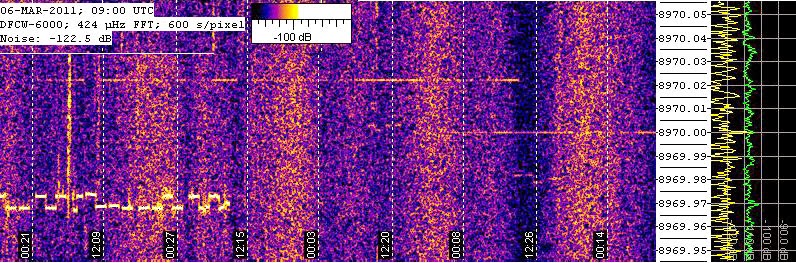 |
| VLF amateur signals |
With (2) the Atlantic Ocean has now been crossed, i.e. quite remarkable distances with amateur powers and antennas. Usually very large loading coils are needed and making these can be “challenging”. As high voltages are likely, great care is needed. Of course, most DXing is done with very long stable transmissions in very narrow bandwidths. Most amateur VLF gear is home made with free PC software to allow signals to be seen. Casual listening is not effective. Most operation is now around 8.300kHz as this is unallocated in many countries.
News of VLF activity may be found at https://sites.google.com/site/sub9khz/ .

HF Mobile, A Different Kind of Radio Shack
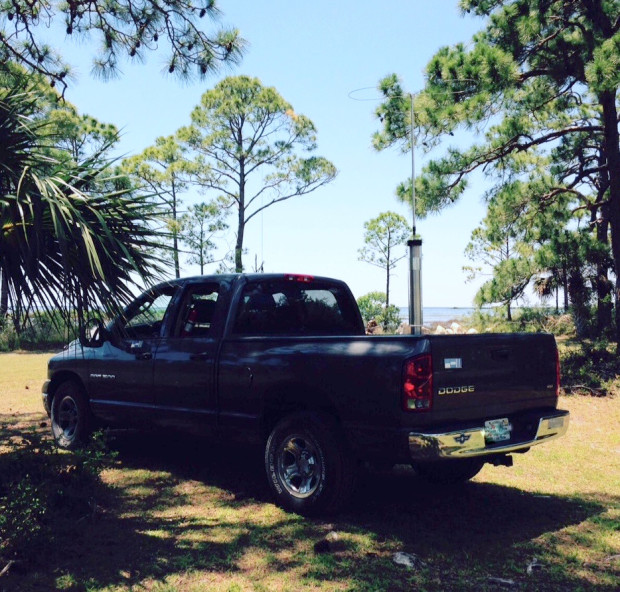
The Scorpion Antenna is mounted in a good spot in the rear of my pickup truck bed. Seen here at Hagen’s Cove in Perry Florida on the Gulf of Mexico in the ‘big bend area’!
Going Mobile, Rag Chews, Nets, CW, its all available and very doable when you are on the road!
Mobile HF radio adds yet another dimension to Ham Radio. This is my second go, at HF Mobile operation.
Years ago, when ‘real life’ happened to me, I had no home QTH to operate from so I bought a new (at that time) Icom 706 M II G radio. It was a great choice. A DC to daylight rig, and its still working 15 years later. This next episode of HF mobile is greatly improved over my previous one. A good antenna at the time, was made by High Sierra. It was a screwdriver type. (the original mobile antenna’s were nick named ‘screwdriver’ because they used an electric screwdriver for moving the coil)
High Sierra no longer makes mobile antennas, but the good news is there is a good company making them in Arizona, Scorpion antennas!
The Scorpion antenna is a heavyweight, at 18 pounds and it needs a very robust base to hold it. Breedlove Mounts
Its the Rolls Royce of Mobile screwdriver type antennas, and not just because I bought one, it is indeed, a very rugged and carefully crafted antenna.
I’m primarily a CW op so I incorporated a touch sensitive paddle to do CW on the move or sitting still in a local park like this one at Hagen’s Cove, on the Gulf of Mexico in the ‘big bend area of Florida!’

The cap hat ‘whip’ is a 3 foot rod of solid aluminum. It shortens the overall whip. This is nice for parking my truck in the breezeway without hitting the roof.
A motorized coil is moved up or down electrically! Listening for the greatest noise, depending on the band of choice, puts me in the ball park for checking the SWR. A 1:1 ratio is easily obtainable if care is taken during installation. Bonding straps are a must. All the parts of the truck body, door, tailgate, hood, fenders and truck bed, must be bonded together to from a good RF ground. Not a DC ground, mind you, but an RF ground plane. (The ‘other half’ of the antenna’)

All the body parts of the truck must be bonded together with straps. RF flows on the surface not the cross section of a conductor, so the wider the better. Copper flashing best carries RF current but a compromise is make for braid due to continuous flexing while opening and closing doors, and tail gates.
Bonding is one of the things that separates a good installation from a poor one. I had fun with the first truck and radio set up back in 2001 but I learned a lot about mobile HF radio since then and did things differently this time.
Location, location, location! It sells real estate and its very important for HF Mobile Antennas!
What makes a good location on a vehicle?
I’ve seen many examples of HF radio antenna installations that work, but some work much better than others. Besides bonding, another good trick for a good installation is to use a very good location; the main mass of metal must be Directly under, not near, the base of the antenna. Will a bumper mounted antenna work? Yes, but one with a mass of metal directly beneath the antenna will work better.
Its simply a case of, more bang for the buck!

Positioning the bottom of the movable coil above the truck side wall is best.
The Scorpion antenna movable coil still has the protective bubble wrap on it in this picture.
Clearance is important!
The bottom of the coil must have clearance from metal objects like the side wall of the truck.
Detailed installation instructions come with the scorpion antenna. This is very important. A good installation will insure good operation. Skimping on installation will only hurt you in the long run.
I installed an auxiliary battery in the back set compartment of the truck. Its a sealed lead acid 75 Ah battery made by Optima. I bought it trough Apex Battery.
Optima Blue Top from Apex Battery co.

Optima Blue Top 75 Ah Auxilliary Battery
I can use either the auxiliary battery or the truck battery or both at the same time, thanks to a marine dual battery manual switch.
See its picture below.
I used #4 wire to connect the truck battery in parallel with the auxiliary battery in the back seat area. This large gauge wire greatly reduces voltage drop between the batteries. For extended stays in one place, I can operate on the auxiliary battery, without running the engine. This insures that the separated truck battery will start the truck when I’m done operating.
I have not yet mounted this switch on a back board, but that is coming. I need both hands to operate the switch now and I want to be able to do it with only one hand!

Dual Battery Switch in the -Both-Battery- Position
The business half of the IC 7100 is mounted to the floor of the truck on the hump. The battery box can be seen with a power pole connection box on top.
The control box for the IC 7100 rides up front on the center console as does the touch sensitive paddle. The microphone hands on the cup holder.
I have a Warren Gregoire headset for SSB. It features a noise cancelling microphone. Warren Gregoire Headset (no relation to me)
(Special note here; its illegal to have both ears covered with a headset in Florida while you drive.)
Its a stupid law because you can legally drive in Florida even if you are stone deaf! So that kills the reasoning for ‘listening to sirens’ on emergency vehicles!
Okay, that rant is done! Back to the Mobile installation.

Battery Box, with Power Pole Box,-top, IC 7100-bottom

AA1IK, Using Warren Gregoire Headset 2
Join me on a new Yahoo Group for HF Mobile ops.
New HF Mobile Yahoo Group
Here I am using the Warren Gregoire headset. This headset has a noise cancelling mic so its a good fit for mobile HF radio. SSB is a new thing for me. I’ve been a CW op, for most of my ham life. I’m having a great time meeting new folks all around Florida on 40 Meter SSB. Ham radio has lots to offer and I’m glad I have not yet exhausted all the possibilities. I have not forsaken CW, but SSB is a fun mode, as I’m sure many of you already know.
The IC 7100 is a two part radio. You saw the ‘business end’ in a previous photo. This photo shows the control head and the touch sensitive paddles Touch Sensitive Paddles They are held in place with a bungee cord. The black plate that you see here is a small plastic clipboard with the clip removed. It is glued in place to the light brown plate, and that is also a clipboard with the clip removed. Both clipboards are held in place with bungee cords. This allows me to remove the control head and the paddles for security reasons.
IC 7100 and Touch Paddles

Remote Switch-top, SWR/RF PWR Meter-left, Speaker-right
The remote switch for moving the antenna up and down to tune in each band is show in the little cubby hole. The SWR/PWR meter is stuffed into a hole where the ‘never has been used-ashtray’ was. The speaker is mounted just above the cup holder.

Remote Switch Moves Antenna Up and Down to Tune Each Band
This photo shows the remote switch. It is hand held, and easily put away after the antenna is tuned.
So! That is pretty much the end of a walk through in my new mobile ham radio shack. So far, I’ve listened to CW on the road but have not called CQ or talked to anyone while driving. I became interested in CW Mobile early in my ham radio career.
The first requirement for operating CW Mobile, according to an article that I read on the subject, said to ‘become a dynamite CW operator! Its been almost 25 years since then and I’m still working on that first requirement.
I’ll keep trying!
De AA1IK
Ernest Gregoire
New Sunspot Region: Flare Activity Expected This Week
There is a new sunspot region rotating into view, producing moderately-strong (M-class) x-ray flares. This video shows you the first 11 hours of May 5, 2015
Expect flares throughout this week, which will degrade HF propagation DURING the flare, but enhance propagation overall (due to the higher Radio Flux). There might be occasional coronal mass ejections, too.
Watch stunning highlights, last 5 years of the Sun
We rely on the Sun for HF radio communication propagation. For the last five years, we have an amazing front-row seat: the SDO spacecraft. Here is a video with highlights of the last five years of solar activity as seen by NASA and the SDO AIA spacecraft. This is worth seeing on a larger monitor, so try to view it full screen on something larger than your palm. The music is pretty good too. It is worth the 20-some minutes of stunning viewing. Be sure to share!
Enjoy!
Details:
This video features stunning clips of the Sun, captured by SDO from each of the five years since SDO’s deployment in 2010. In this movie, watch giant clouds of solar material hurled out into space, the dance of giant loops hovering in the corona, and huge sunspots growing and shrinking on the Sun’s surface.
April 21, 2015 marks the five-year anniversary of the Solar Dynamics Observatory (SDO) First Light press conference, where NASA revealed the first images taken by the spacecraft. Since then, SDO has captured amazingly stunning super-high-definition images in multiple wavelengths, revealing new science, and captivating views.
February 11, 2015 marks five years in space for NASA’s Solar Dynamics Observatory, which provides incredibly detailed images of the whole Sun 24 hours a day. February 11, 2010, was the day on which NASA launched an unprecedented solar observatory into space. The Solar Dynamics Observatory (SDO) flew up on an Atlas V rocket, carrying instruments that scientists hoped would revolutionize observations of the Sun.
Capturing an image more than once per second, SDO has provided an unprecedentedly clear picture of how massive explosions on the Sun grow and erupt. The imagery is also captivating, allowing one to watch the constant ballet of solar material through the sun’s atmosphere, the corona.
The imagery in this “highlight reel” provide us with examples of the kind of data that SDO provides to scientists. By watching the sun in different wavelengths (and therefore different temperatures, each “seen” at a particular wavelength that is invisible to the unaided eye) scientists can watch how material courses through the corona. SDO captures images of the Sun in 10 different wavelengths, each of which helps highlight a different temperature of solar material. Different temperatures can, in turn, show specific structures on the Sun such as solar flares or coronal loops, and help reveal what causes eruptions on the Sun, what heats the Sun’s atmosphere up to 1,000 times hotter than its surface, and why the Sun’s magnetic fields are constantly on the move.
Coronal loops are streams of solar material traveling up and down looping magnetic field lines). Solar flares are bursts of light, energy and X-rays. They can occur by themselves or can be accompanied by what’s called a coronal mass ejection, or CME, in which a giant cloud of solar material erupts off the Sun, achieves escape velocity and heads off into space.
This movie shows examples of x-ray flares, coronal mass ejections, prominence eruptions when masses of solar material leap off the Sun, much like CMEs. The movie also shows sunspot groups on the solar surface. One of these sunspot groups, a magnetically strong and complex region appearing in mid-January 2014, was one of the largest in nine years as well as a torrent of intense solar flares. In this case, the Sun produced only flares and no CMEs, which, while not unheard of, is somewhat unusual for flares of that size. Scientists are looking at that data now to see if they can determine what circumstances might have led to flares eruptions alone.
Scientists study these images to better understand the complex electromagnetic system causing the constant movement on the sun, which can ultimately have an effect closer to Earth, too: Flares and another type of solar explosion called coronal mass ejections can sometimes disrupt technology in space as well as on Earth (disrupting shortwave communication, stressing power grids, and more). Additionally, studying our closest star is one way of learning about other stars in the galaxy.
Goddard built, operates and manages the SDO spacecraft for NASA’s Science Mission Directorate in Washington, D.C. SDO is the first mission of NASA’s Living with a Star Program. The program’s goal is to develop the scientific understanding necessary to address those aspects of the sun-Earth system that directly affect our lives and society.
Please visit my channel on YouTube, and subscribe ( https://YouTube.com/NW7US ).
— Twitter: https://Twitter.com/NW7US
— Facebook: https://www.facebook.com/spacewx.hfradio
— Web: http://SunSpotWatch.com
( Data feed Twitter https://Twitter.com/hfradiospacewx )
Credits:
Music Via YouTube “Free-for-use” Creation Tools
Video clips of the Sun are from NASA’s Goddard Space Flight Center/SDO which are in the Public Domain
By the way, this is an example of what I am trying to produce on a more regular basis, once I launch the space weather YouTube channel that I have started. If you wish to help, here is the GoFundMe link: http://www.gofundme.com/sswchnl
LHS Episode #144: Amateur Radio Resources
 Hello, folks! We're happy to say that Pete has rejoined our crew for this episode of the show, and he brings with him some excellent information for all you listeners out there. We take a look at several great video and audio resources for amateur radio adventures this fortnight. On top of that, we give a detailed description of YFKtest in action during a contest, and an overview and introduction to the latest version of the Tucnak logger. Lots more news, reviews and excitement as well. Please enjoy!
73 de The LHS Guys