Author Archive
 DX contact out of the blue!
 November 13th, 2016 |
  Author: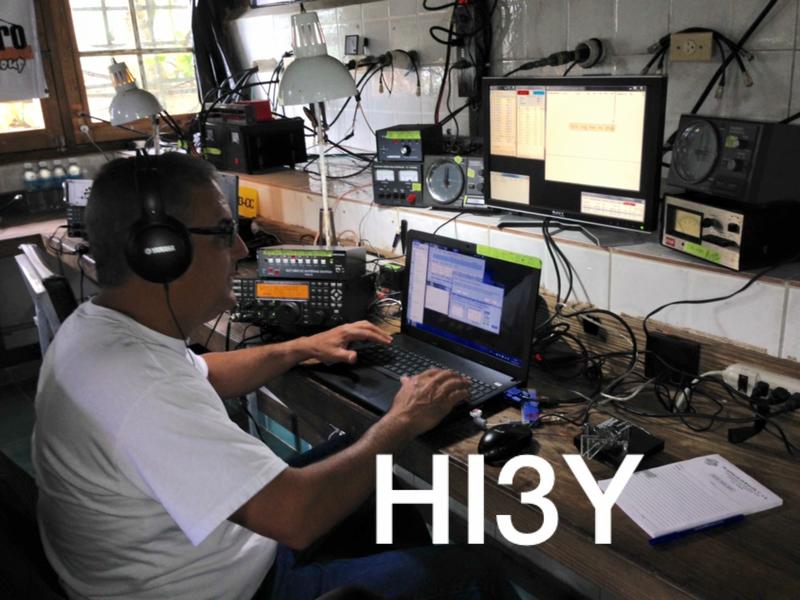
While setting things up I did have the K3 on and the P3 waterfall viewing the 20m band. I did notice TL8AO and the HUGE pileup that was "UP" 2 KHz on the band. Funny thing as I was listening I did find an op more often than not calling on TL8AO's calling freq and not splitting "UP" On the waterfall of the P3 I did notice a new strong CW signal appear so I pointed and clicked over to it. It was HI3Y in the Dominican calling CQ and "UP". I listened as I setup the split and he seemed to be calling without a pileup. I threw my call out there and he came back to me with a report. He was in the books just that easy...now only if my 5 watts could break the pileup with TL8AO that fast! Time to start dinner now.......Tenderloin steak on the BBQ, mini potatoes on the BBQ with butter and rosemary and finally butternut squash........yum!
DX contact out of the blue!
While setting things up I did have the K3 on and the P3 waterfall viewing the 20m band. I did notice TL8AO and the HUGE pileup that was "UP" 2 KHz on the band. Funny thing as I was listening I did find an op more often than not calling on TL8AO's calling freq and not splitting "UP" On the waterfall of the P3 I did notice a new strong CW signal appear so I pointed and clicked over to it. It was HI3Y in the Dominican calling CQ and "UP". I listened as I setup the split and he seemed to be calling without a pileup. I threw my call out there and he came back to me with a report. He was in the books just that easy...now only if my 5 watts could break the pileup with TL8AO that fast! Time to start dinner now.......Tenderloin steak on the BBQ, mini potatoes on the BBQ with butter and rosemary and finally butternut squash........yum!
Comparing two CW decoding programs.
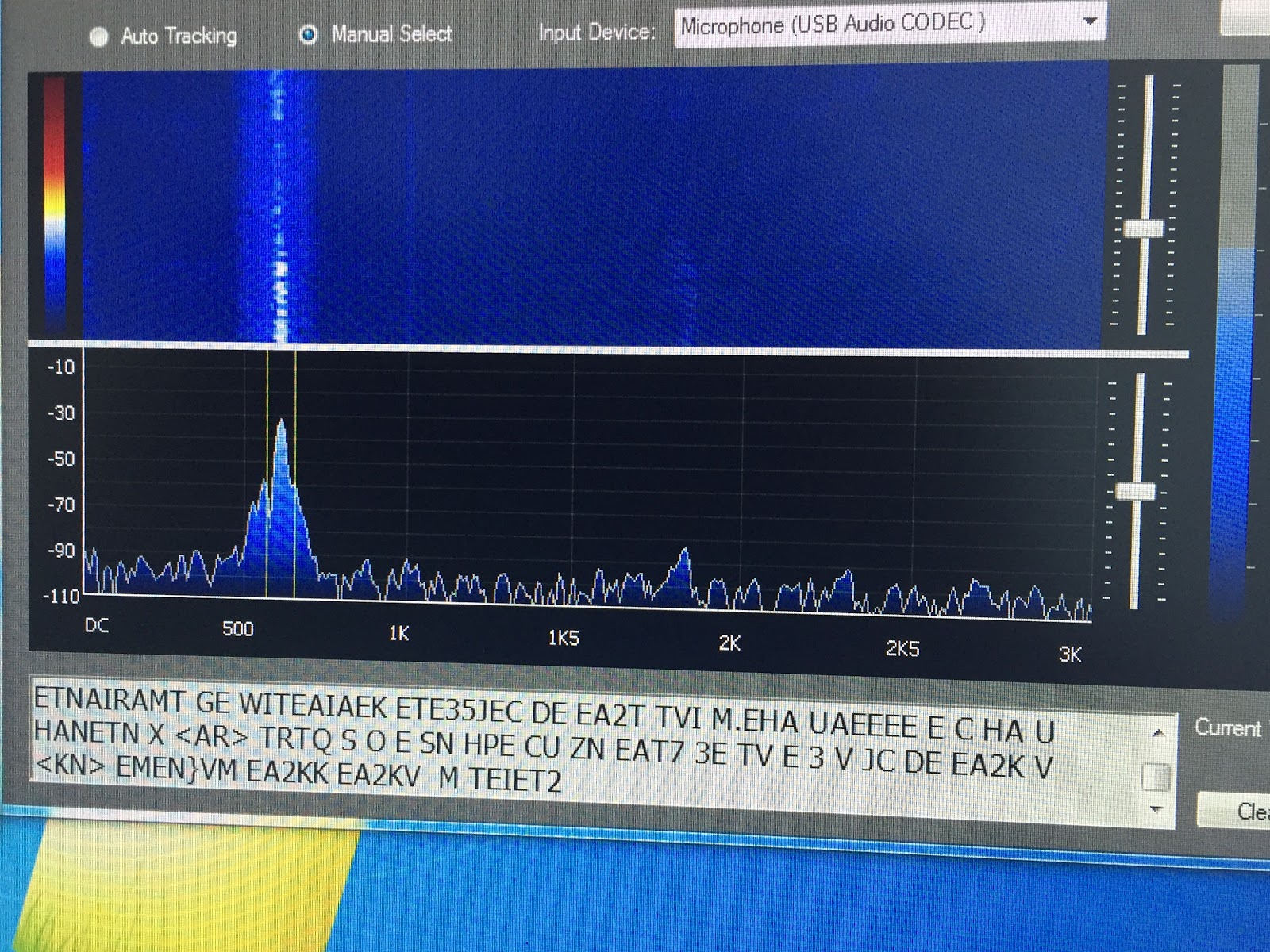 |
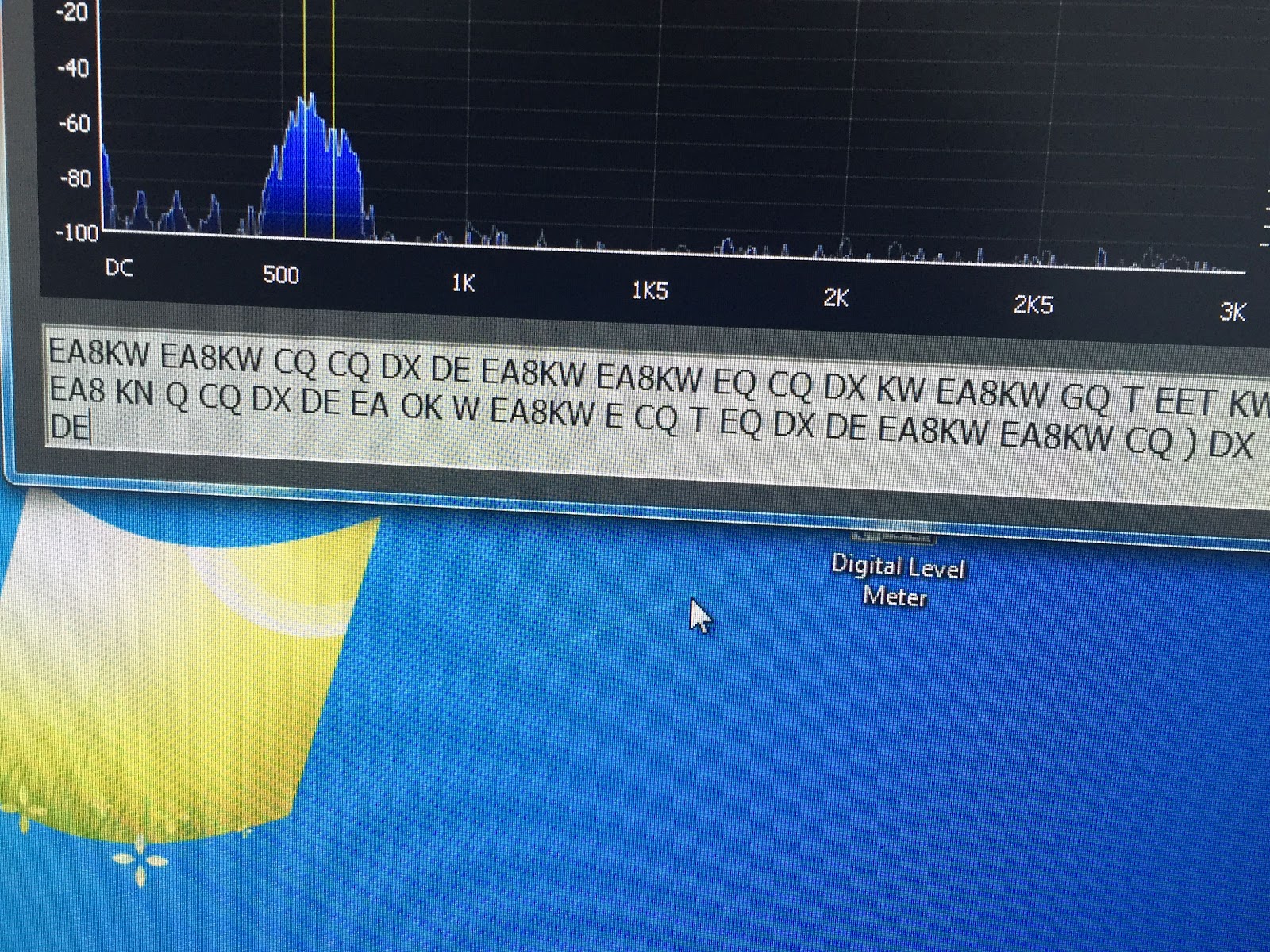
| LY3H CW decoder logic program MRP40 compared to CW decoder logic by LY3H MRP40 CW decoder 1. Decodes all speeds up to 60wpm Decodes but not mention top decode speed. 2. Has good documentation No documentation 3. Auto tracking very smooth Auto tracking hunts between long letter spaces 4. Text formatting-format mode works great Only option is manual or auto decode 5. Will not decode when APF is on Will de-code when using APF 6. Great weak signal decode S1 and below Poor weak signal de-code (not using APF) 7. Great email support Upgrades come out regularly 8. See's noise as code sends radium letters Only sends letters not radium noise as code 9. Does have save QSO but awkward to use. Just added cut and paste QSO to word or clipboard 10. Has “always on top” option Just added “always on top” option. 11. Added a mini log book No log book as of yet 12. You can send code At this time only able to read code A more in-depth look at some of the above comparisons: A) Auto tracking- When wanting to decode a CW signal it helps when the program can lock onto a signal. MRP40 will lock onto a CW signal and stay locked on. CW decoder on the other hand once the CW signal stops or has long gap between letter the program starts to hunt small segments on either side of the CW signal for other CW signals. Once the code starts again CW decoder has to relock onto it and you lose some decoding. If slow code is sent you are in a battle of lock and relock of the code. B) Text formatting options- with MRP40 you have the option on how you want to decode. - Correct word spacing…..this will attempt to add spacing between decoded words even if sender is running them together. - Expand abbreviations…..KN, AR and DE to mention a few. - Expand Q codes…self-explanatory. Both of these programs do the job of decoding CW very well, you have more options and customization option with MRP40. CW decoder logic is very easy to setup and in no time you are decoding CW. I have not had a chance to compare both programs in a CW contest situation. The major drawback to each program is….. MRP40…….no matter what test formatting option I used the program when idling would send radium code as it listened to static were as CW decoder logic would not. CW decoder Logic……when the receiving code stopped the program would start “hunting” for other CW signals. This created two issues, the first being if you are decoding slow code I found the program between letters words would start to hunt. When it does this it bounces back and forth from decoding and hunting and your decode is not reliable. The second is if I second CW op appears close to the op you are decoding the program will bounce between the two QSO’s. The major positive of each program is….. MRP40…..it will decode CW that is almost down at the noise floor and do a great job of it too. CW decoder Logic……it will not send random letters when it is not decoding and does a great job of adding the breaks between words and not running them together. Also this program is free. These code programs will always decode what is sent so you must consider if you are reading odd words and letters it may have to do with poor code sending. CW signals that are close to each other (CW contesting) if your rig cannot filter out the one CW signal your decoder will be confused. CW decoder by LY3H free. MRP40 will cost you 50.00 Euro. 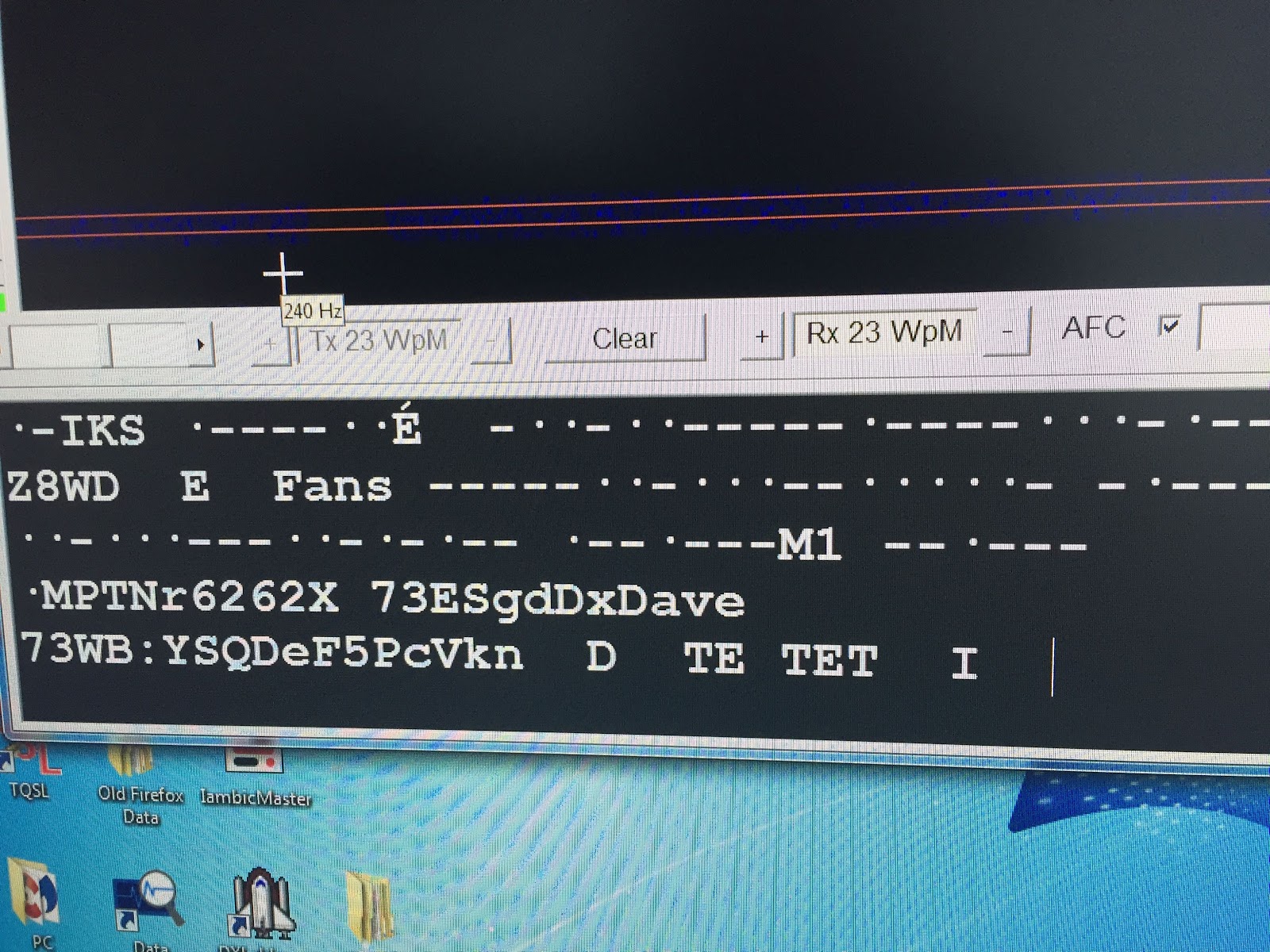 The picture to the left shows MRP40 trying to decode static. |
Comparing two CW decoding programs.
|
| LY3H CW decoder logic program MRP40 compared to CW decoder logic by LY3H MRP40 CW decoder 1. Decodes all speeds up to 60wpm Decodes but not mention top decode speed. 2. Has good documentation No documentation 3. Auto tracking very smooth Auto tracking hunts between long letter spaces 4. Text formatting-format mode works great Only option is manual or auto decode 5. Will not decode when APF is on Will de-code when using APF 6. Great weak signal decode S1 and below Poor weak signal de-code (not using APF) 7. Great email support Upgrades come out regularly 8. See's noise as code sends radium letters Only sends letters not radium noise as code 9. Does have save QSO but awkward to use. Just added cut and paste QSO to word or clipboard 10. Has “always on top” option Just added “always on top” option. 11. Added a mini log book No log book as of yet 12. You can send code At this time only able to read code A more in-depth look at some of the above comparisons: A) Auto tracking- When wanting to decode a CW signal it helps when the program can lock onto a signal. MRP40 will lock onto a CW signal and stay locked on. CW decoder on the other hand once the CW signal stops or has long gap between letter the program starts to hunt small segments on either side of the CW signal for other CW signals. Once the code starts again CW decoder has to relock onto it and you lose some decoding. If slow code is sent you are in a battle of lock and relock of the code. B) Text formatting options- with MRP40 you have the option on how you want to decode. - Correct word spacing…..this will attempt to add spacing between decoded words even if sender is running them together. - Expand abbreviations…..KN, AR and DE to mention a few. - Expand Q codes…self-explanatory. Both of these programs do the job of decoding CW very well, you have more options and customization option with MRP40. CW decoder logic is very easy to setup and in no time you are decoding CW. I have not had a chance to compare both programs in a CW contest situation. The major drawback to each program is….. MRP40…….no matter what test formatting option I used the program when idling would send radium code as it listened to static were as CW decoder logic would not. CW decoder Logic……when the receiving code stopped the program would start “hunting” for other CW signals. This created two issues, the first being if you are decoding slow code I found the program between letters words would start to hunt. When it does this it bounces back and forth from decoding and hunting and your decode is not reliable. The second is if I second CW op appears close to the op you are decoding the program will bounce between the two QSO’s. The major positive of each program is….. MRP40…..it will decode CW that is almost down at the noise floor and do a great job of it too. CW decoder Logic……it will not send random letters when it is not decoding and does a great job of adding the breaks between words and not running them together. Also this program is free. These code programs will always decode what is sent so you must consider if you are reading odd words and letters it may have to do with poor code sending. CW signals that are close to each other (CW contesting) if your rig cannot filter out the one CW signal your decoder will be confused. CW decoder by LY3H free. MRP40 will cost you 50.00 Euro. The picture to the left shows MRP40 trying to decode static. |
The ARRL has done it again!

The ARRL has done it again!
Taking your QRP signal to the next step.
I was reading NY4G's blog a week or two ago and came across a great post that I wanted to share with my readers. I emailed him about reposted it but never heard back so here goes.......It is full of great DXing tips!
DXing Tips For Little Pistols Like Me
OK I admit it I am more often than not a little pistol. More than likely, I am trying to make a contact at 5W.
Keep in mind two things - the heavy lifting is done not by you but by the DX who is trying to dig you out
of the mud. Some are more willing than others. Of course, the second thing is your persistence. If you
don't go away after he has worked stronger stations - chances are he will try to work you.
Here are some additional tricks to slay that DXing dragon I learned from Brian Smith WO9I. Some are
Here are some additional tricks to slay that DXing dragon I learned from Brian Smith WO9I. Some are
verbatim and some are paraphrases. Some I omitted but most I kept. Some I added to from my own
experience. Here is the URL: http://www.ybdxc.net/2014/10/14/25-dxing-tips-for-the-little-guy/
(1) "Sharpen your sword. Never embark on a DX quest without first tuning-up your rig. Make sure
(1) "Sharpen your sword. Never embark on a DX quest without first tuning-up your rig. Make sure
your PA is not putting out into a high SWR situation - wasting your meager power into heat as
feedline loss. Sometimes you get only one shot at a rare station before the rest of the world
catches up with you."
(2) See which bands are open before starting the hunt. Bandconditions.com is a good resource.
(2) See which bands are open before starting the hunt. Bandconditions.com is a good resource.
A reading of 100 for a band indicates that your 1 watt or 5 watt signal stands a good chance
of being heard. Yet another way to do it is to listen for the band beacons. Make sure your foray
into the ether is worth the effort. WWV (at 5, 10, 15 and 20 MHz) gives propagation info at 18 minutes
past every hour. Look at the cluster and listen for on-going QSOs. See how strong the signals are in
the cluster spots - even if it is a country you don't need. If you are looking for an entity in the
Balkans - see how loud the DX are around your hunting ground.
(3) Never send “CQ DX.” Rare and even not so rare DX station seldom answer such calls, especially
(3) Never send “CQ DX.” Rare and even not so rare DX station seldom answer such calls, especially
when transmitted by weak signals.
(4) Use the contests. If you could operate only a few days a year, I’d pick the weekends of the major
(4) Use the contests. If you could operate only a few days a year, I’d pick the weekends of the major
international contests such as the CQ World-Wide, the ARRL DX Contest, CQ WPX, and so forth. I
gnore your score; the idea is to bag DX,you need for whatever - DX Marathon, DXCC, band slots.
These events are like for the little kid in the candystore - except you are truly a little kid
(or a small fry). During contests, the bands are crawling with stations, some rare and some not so
rare. If you are doing DX Maraton - you need most of if not many. The QSOs are short, and best
of all, wide dispersal of the big guns.
(5) After the contest, hang around, to see if rare stations—particulary DXpeditions—want to hang
(5) After the contest, hang around, to see if rare stations—particulary DXpeditions—want to hang
around to see if anyone else wants to work them. The big guns are usually in their holsters by
then, which is exactly why you’re still blazing away.
(6) Peek into the DX alleys, which are usually located just inside the General band
(6) Peek into the DX alleys, which are usually located just inside the General band
(14.026 Mhz, etc.). On non-contest days many rare stations hang out here. However, these are also
the most congested places of all. But hey, sometimes the propagation gods smile on you.
(7) Know when to quit. Don’t spend your life trying to break pile-ups; when the band’s open,
(7) Know when to quit. Don’t spend your life trying to break pile-ups; when the band’s open,
there’s plenty of good stuff elsewhere (usually from the same region), and lots of big guys don’t
know how to root it out. How to tell good odds from bad? Good odds: the DX station is booming,
the op is working stations quickly, other station from your call area are getting through, and/or you
don’t hear much competition. Bad odds: weak DX station, slow op, propagation favours other call
areas, pile-up is loud and limitless.
(8) Nail the newcomers. Now for real guerilla tactics: Move to the slow edge of a band and,
(8) Nail the newcomers. Now for real guerilla tactics: Move to the slow edge of a band and,
tuning slowly accross it, listen for the sound of any station coming on the air, such as a
“tuning up” signal, “QRL?” or of course, CQ. Should one of these surface, stop immediately and
listen for an ID. (Ninty-nine times out of 100 it wont be rare DX, but trust me: that 100th time will
more than make up for it.)
Late means wait. As you’re hunting stations coming on frequency, also check for QSOs that are
Late means wait. As you’re hunting stations coming on frequency, also check for QSOs that are
about to end (“73,””TNX FER QSO,” etc.)—and wait for an ID.
(10) Develop DX ears. DX signals rarely sound like statesiders. They’re weaker and more
(10) Develop DX ears. DX signals rarely sound like statesiders. They’re weaker and more
unstable (and those which cross over the North Pole sound “fluttery”). Teach your eardrums
the difference.
(11) Be watchful for 10 or 12 meter openings. Ten meters is the little guy’s equalizer. When the
(11) Be watchful for 10 or 12 meter openings. Ten meters is the little guy’s equalizer. When the
surf’s up on 10, the DX comes in waves, and a puny signal (even a 5 watter) floats just fine.
Ten meters tend to open to a small geographic area at a time (meaning less competition); also,
signal strength can fluctuate wildly within a few minutes. If you find a new one that’s too weak to
work, lock on to it and relax. Within 15 minutes its signal may peak, giving you a clear shot.
(12) WFWL (work first worry later). If an exotic-sounding station appears, don’t look up its
(12) WFWL (work first worry later). If an exotic-sounding station appears, don’t look up its
QTH—pounce! I once heard a 3B8 sending CQ. “What’s a 3B8?” I wondered, but the second he
stopped transmitting, I chased him. Only after the QSO did I discover I had just worked Mauritius.
Rehearse. Rare DX stations are sometimes barely audible, or covered with QRM. A trained ear
Rehearse. Rare DX stations are sometimes barely audible, or covered with QRM. A trained ear
can pull them through, but an untrained ear hears only clutter. So hone your hearing. Practice
working common DX stations (such as G’s and JA’s) with faint signals.
(13) Upgrade. Much of the delectable DX swims in the extra portion of the band. Thus reeling it
(13) Upgrade. Much of the delectable DX swims in the extra portion of the band. Thus reeling it
in is often a question of “How low can you go?” Remember, only 7 percent of all American
amateurs can operate in these murky depths.
(14) Rock around the clock. DX conditions vary with the time of day, so don’t just operate from
(14) Rock around the clock. DX conditions vary with the time of day, so don’t just operate from
7 to 9 o’clock every evening. Vary your routine: Stay up all night on a Friday, rise before dawn
on a Sunday. Remember, sunrise and sunset can produce interesting conditions, so try
them often.
Turn lemons into lemonade. “Bad breaks” aren’t always what they seem. Sometimes they even
Turn lemons into lemonade. “Bad breaks” aren’t always what they seem. Sometimes they even
work to the little guy’s advantage. Example 1: While trying to work a weak ZK1
(South Cook Islands) during a contest. I was dismayed when a loud Californian began blasting
away on a nearby frequency. Then I realized that because of the W6, most people who were
casually tuning around wouldn’t hear the ZK. During brief lull I caught his “QRZ?”, jumped in,
and nailed him instantly. Example 2: A T3Ø (West Kiribati) operating SSB dodged a stateside
pile-up by QSYing to a U.S. CW-only frequency. Just one American moved with him—yours
truly, who fired up a key and worked him cross-mode.
(15) Talk the talk. Even with Q signals, all CW stations don’t sound the same. DX stations favour
(15) Talk the talk. Even with Q signals, all CW stations don’t sound the same. DX stations favour
expressions such as “TKS” (instead of American “TNX”) and “DR” (as in “DR OM BRIAN”).
Soviets often close with “DSW” (a Russian good-luck term). And of course, stations whose
transmissions alternate between “599 K” and “QRZ?” are often worth working. Familiarity with
international callsigns helps, too, as I learned one evening in 1988 when I tuned in Y88POL.
Just another East German, right? But wait! East German suffixes usually have only two
letters … hmmm. Moments later I worked a new one—Antartica.
(16) Less is Morse. Not only CW is less popular than SSB (decreasing your competition), but
(16) Less is Morse. Not only CW is less popular than SSB (decreasing your competition), but
it’s more effective in marginal conditions—a plus for weak stations.
Read the news. Serious operators learn about DXpeditions and such by subscribing to publications
Read the news. Serious operators learn about DXpeditions and such by subscribing to publications
such as QRZ DX? and The DX Bulletin. And for those with packet capability, lots of DX packet
clusters spot rare stations.
(17) Never assume. Once, during a Boy Scout jamboree weekend, I heard a Liberian station with
(17) Never assume. Once, during a Boy Scout jamboree weekend, I heard a Liberian station with
a special callsign, using scouts as ops. No one was answering its CQ, probably because
everyone believed the station was working only fellow Scouts. But when I asked, “Are you
working only Scout stations?” I was rewarded with a “No, you’re 5 by 6”—and a new one.
(18) Beat the bushes. Many people think all the primo DX hangs out on the low ends, but
(18) Beat the bushes. Many people think all the primo DX hangs out on the low ends, but
that’s a fallacy. Ever work Moroco? I did—on a 10 meter Novice CW frequency! And I once
heard Zimbabwe on 21.080. Moral: Don’t just look in the clearings; rummage through the high
weeds, too.
Listen for swan songs. Normally, when sunspots are high, upper HF bands such as 10 and
Listen for swan songs. Normally, when sunspots are high, upper HF bands such as 10 and
15 meters close in the evening. During their final moments, however, strange conditions
sometimes occur. Try to catch each band just before it gives out (see whether any signals are
audible; if so, tune around). As the band dies, most of your competition will give up and
head south. I bagged my first CEØ (Easter Island) under such conditions.
(19) Check and double check the DX call. Don’t just scribble down a DX callsign; make
(19) Check and double check the DX call. Don’t just scribble down a DX callsign; make
absolutely certain you heard it correctly. On CW I’ve worked lots of ops who can’t tell a “4” from
a “V” or an “H” from an “S.” Missing even one dot in a call sign can turn a prize catch
into a busted QSO.













