Practice practice and more practice.


 Moving along with my contest code...I call it contest code as it's really not conversation code as that takes a bit more skill. Not saying that contest code does not take skill but you kinda have an idea with contest code what to expect.........a call sign, a number or in some instances a name. Conversational code is more whatever the heck you both are going to talk about. Now mind you the RST, name, QTH and WX are kinda standard it's when the op deviates from the plan and gets going on about the vacation his family took in your hometown.......I digress. 

I have been trying to build on my contest CW speed, accuracy and most of all confidence. I have been doing that with these programs G4FON cw traner, RufzXP, Morse Runner and LCWO code practice programs. What I have found is you have good days and you have not-so-good days. There was a practice session when I would hear the code and freeze wondering for some crazy reason what that letter was. Then the mixing up of letters on the keyboard, going to a "G" but end up typing an "H". Oh and then a big confidence builder is when the contest program send you "SH5IH" 

The most recent issue I was having was hitting between the letters on the keyboard and gong for letters on the 3rd row up such as "W, T or Y" but hitting the numbers above those letters.  I finally figured out what the issue was. Seems when I was practicing on my Mac laptop the keys are closer together than on my Lenovo keyboard. I was doing twice as much practicing on my Mac laptop and my fingers were trained to only move slightly on the keyboard. This meant issues on the larger Lenovo keyboard. The solution was to bring the Lenovo keyboard to the make and use that. 

Anyway today I was thrilled to get zero mistakes on the G4FON CW contest trainer today......I know I know I am all ready for the big ego bubble burst the next session when missing more than I copy. But so goes the contest CW battle. For now, I am bathing in the success! 

This weekend is the annual running of the RAC Canada Winter contest and I am entering the CW only category and yes you guessed it I am going to be calling CQ..........unless I see a nice RAC multiplier worth 20 points!! 


Practice practice and more practice.


 Moving along with my contest code...I call it contest code as it's really not conversation code as that takes a bit more skill. Not saying that contest code does not take skill but you kinda have an idea with contest code what to expect.........a call sign, a number or in some instances a name. Conversational code is more whatever the heck you both are going to talk about. Now mind you the RST, name, QTH and WX are kinda standard it's when the op deviates from the plan and gets going on about the vacation his family took in your hometown.......I digress. 

I have been trying to build on my contest CW speed, accuracy and most of all confidence. I have been doing that with these programs G4FON cw traner, RufzXP, Morse Runner and LCWO code practice programs. What I have found is you have good days and you have not-so-good days. There was a practice session when I would hear the code and freeze wondering for some crazy reason what that letter was. Then the mixing up of letters on the keyboard, going to a "G" but end up typing an "H". Oh and then a big confidence builder is when the contest program send you "SH5IH" 

The most recent issue I was having was hitting between the letters on the keyboard and gong for letters on the 3rd row up such as "W, T or Y" but hitting the numbers above those letters.  I finally figured out what the issue was. Seems when I was practicing on my Mac laptop the keys are closer together than on my Lenovo keyboard. I was doing twice as much practicing on my Mac laptop and my fingers were trained to only move slightly on the keyboard. This meant issues on the larger Lenovo keyboard. The solution was to bring the Lenovo keyboard to the make and use that. 

Anyway today I was thrilled to get zero mistakes on the G4FON CW contest trainer today......I know I know I am all ready for the big ego bubble burst the next session when missing more than I copy. But so goes the contest CW battle. For now, I am bathing in the success! 

This weekend is the annual running of the RAC Canada Winter contest and I am entering the CW only category and yes you guessed it I am going to be calling CQ..........unless I see a nice RAC multiplier worth 20 points!! 


A keyboard is a keyboard……….but is it?


As frequent readers of my blog, you know my interest in contesting, and specifically CW contesting. Just a few weeks ago, for the first time, I called CQ in a contest and was running for the entire contest. I had a great time and also a time of growing. As with all bloggers, we have different keyboarding levels. To be a blogger, you have to be somewhat of a typist. There are single finger, two-finger and home row typists. There is a saying "mom knows best" and well in grade 7 I was not so sure about that saying. You see, I had what was called in school a spare period. It was a time slot with no class, and really it was my first one ever, and I planned it as a rest time. Well, mom knows best, and she had to sign off on my spare period and well she had other plans for me. 

She looked at my school timetable and the available classes for my so-called spare period. She found a class that fit right into the spare period time slot..........TYPING.....yup that's right typing! With my mom it's not a suggestion.....it's "your taking typing, and you will end up thanking me for it one day" I went to school in the '70s, and you know how many guys were in typing class.........ME! 

In I went and well there was a positive note and that is it was a great place to meet girls anyway I digress.  The first thing I noticed was you can't look at the keyboard to find the letters as there were no letters to be found, the keyboard was blank. To make a long story short I learned about something called home row and I can still hear the teacher calling out "AAA   BBB    EEE" and so on. I have to admit that yes, mom knows best, and I took 2 semesters of typing class. It made my university years way easier for term papers and so on. 

Fast forward to now......getting a blog post together runs along very smoothly, BUT who would have thunk that my CW contest would benefit as well? I found that when I was running in a CW contest, having the ability to not look down at the keyboard was a bonus. I can hear the calls or exchange and just look at the PC screen and enter the information. 

Here is the catch........ I can type, and my speed is ok for blogging, but typing a call sign and then an exchange at 25-34 WPM takes practice. In the past I felt keyboard was a  keyboard right ?? Well, I found over time, frustration and trial and error that all keyboards for contesting anyway are not alike. 


The keyboard of choice for the longest time was the wireless Logitech k830. It was a smaller keyboard that had a mouse pad. The keys had a soft touch, meaning not much pressure was needed when typing. Also, the keys were close together therefore no ambidextrous finger moves to hit certain letters were needed. 

When practicing with this keyboard for CW contest call sign copying at slower speeds it was good but up around 25 WPM, I found myself hitting two keys at once a lot. At 25 WPM when this happens you lose track of the next letters coming at you, and it can get frustrating.  The Logitech keyboard is not going to cut it. 

I went through my PC junk box and found a keyboard called Adesso this was a small keyboard as well, but with much firmer keys that were raised a bit higher than the Logitech keyboard. I gave this one a go and yes I was not hitting two letters at once but when the CW speed increased again there were issues but again. With firmer keys, I needed to give an extra effort to press each key and at higher CW speeds it just took too much time to enter the needed info from a contact. Once you miss a letter, your concentration is removed from the CW program and  to the keyboard and hence calls and exchanges are missed. 

I have heard it said that most times the solution is right under your nose, and you just can't see it. This was the case with the perfect keyboard. My wife was working from home during the height of the pandemic, and for some time that has not been the case. Her company PC has sat ideal at home for some time now along with a KEYBOARD! It was a full size keyboard, much different from my other go-to keyboards, but I thought I would give it a go. This keyboard is a Lenovo Pro 2 and when she requires it again I have already scoped them out online. I am thinking I will purchase one as a New Years gift for myself. 


I have been using it for about 2 weeks now, and it's amazing, the keys are the right height and key sensitivity is spot on as well. Not only that, but I am having no issues copying calls and exchanges around 33-35 wpm.  So no, a keyboard is a keyboard is not true. I found that it's a personal thing and once you get the right keyboard for you, it sure can make a differance ....in contesting anyway. 


A keyboard is a keyboard……….but is it?


As frequent readers of my blog, you know my interest in contesting, and specifically CW contesting. Just a few weeks ago, for the first time, I called CQ in a contest and was running for the entire contest. I had a great time and also a time of growing. As with all bloggers, we have different keyboarding levels. To be a blogger, you have to be somewhat of a typist. There are single finger, two-finger and home row typists. There is a saying "mom knows best" and well in grade 7 I was not so sure about that saying. You see, I had what was called in school a spare period. It was a time slot with no class, and really it was my first one ever, and I planned it as a rest time. Well, mom knows best, and she had to sign off on my spare period and well she had other plans for me. 

She looked at my school timetable and the available classes for my so-called spare period. She found a class that fit right into the spare period time slot..........TYPING.....yup that's right typing! With my mom it's not a suggestion.....it's "your taking typing, and you will end up thanking me for it one day" I went to school in the '70s, and you know how many guys were in typing class.........ME! 

In I went and well there was a positive note and that is it was a great place to meet girls anyway I digress.  The first thing I noticed was you can't look at the keyboard to find the letters as there were no letters to be found, the keyboard was blank. To make a long story short I learned about something called home row and I can still hear the teacher calling out "AAA   BBB    EEE" and so on. I have to admit that yes, mom knows best, and I took 2 semesters of typing class. It made my university years way easier for term papers and so on. 

Fast forward to now......getting a blog post together runs along very smoothly, BUT who would have thunk that my CW contest would benefit as well? I found that when I was running in a CW contest, having the ability to not look down at the keyboard was a bonus. I can hear the calls or exchange and just look at the PC screen and enter the information. 

Here is the catch........ I can type, and my speed is ok for blogging, but typing a call sign and then an exchange at 25-34 WPM takes practice. In the past I felt keyboard was a  keyboard right ?? Well, I found over time, frustration and trial and error that all keyboards for contesting anyway are not alike. 


The keyboard of choice for the longest time was the wireless Logitech k830. It was a smaller keyboard that had a mouse pad. The keys had a soft touch, meaning not much pressure was needed when typing. Also, the keys were close together therefore no ambidextrous finger moves to hit certain letters were needed. 

When practicing with this keyboard for CW contest call sign copying at slower speeds it was good but up around 25 WPM, I found myself hitting two keys at once a lot. At 25 WPM when this happens you lose track of the next letters coming at you, and it can get frustrating.  The Logitech keyboard is not going to cut it. 

I went through my PC junk box and found a keyboard called Adesso this was a small keyboard as well, but with much firmer keys that were raised a bit higher than the Logitech keyboard. I gave this one a go and yes I was not hitting two letters at once but when the CW speed increased again there were issues but again. With firmer keys, I needed to give an extra effort to press each key and at higher CW speeds it just took too much time to enter the needed info from a contact. Once you miss a letter, your concentration is removed from the CW program and  to the keyboard and hence calls and exchanges are missed. 

I have heard it said that most times the solution is right under your nose, and you just can't see it. This was the case with the perfect keyboard. My wife was working from home during the height of the pandemic, and for some time that has not been the case. Her company PC has sat ideal at home for some time now along with a KEYBOARD! It was a full size keyboard, much different from my other go-to keyboards, but I thought I would give it a go. This keyboard is a Lenovo Pro 2 and when she requires it again I have already scoped them out online. I am thinking I will purchase one as a New Years gift for myself. 


I have been using it for about 2 weeks now, and it's amazing, the keys are the right height and key sensitivity is spot on as well. Not only that, but I am having no issues copying calls and exchanges around 33-35 wpm.  So no, a keyboard is a keyboard is not true. I found that it's a personal thing and once you get the right keyboard for you, it sure can make a differance ....in contesting anyway. 


Feel the heat of a cluster


A member from a club I belong to the Maritime Contest Club  posted on our groups i.o.  site his choice for a DX Cluster.  Oh, before I get too far along, the link above to the Maritime Contest Club has some great information and links regarding contesting if you are interested. Back to the cluster, his choice was DX Heat. I checked it out and really liked it and up to that point my choice was DX Summit. I do like DX Summit and have been using it for some time. Most clusters offer the same thing, with just a few cluster specific features. For example, DX Summit does have a tab called Daily DX. There is a subscription fee and I imagine it's very informative, but I have to manage where and what I am a paid member of. These days you can doll out a lot of cash if you pick all that interests you. 

Anyway, I digress.....back to the cluster.  What I have really come to like about DX Heat is everything is on the home page. You can filter what you see on the cluster with convenient options on the home page. For example, you can choose to see only CW, on a certain band and from spotter only in North America (all other continents also available)  Holding your mouse and clicking on the spot you are given 3 options QRZ lookup, very interesting stats on the spotted contact or be taken to a Web SDR to tune in and listen. 

There is also the commonly found UTC clock, propagation forecast, call sign lookup and call sign spot features common to most clusters. But there is also a handy and accurate band activity, and you can select the continent you want to look at. I chose NA and you can see a visual of what bands according to the cluster spots are open and how hot the band is. This I have found has given me some surprise openings on 10m and 6m. 

So check it out and see what you think? 

Feel the heat of a cluster


A member from a club I belong to the Maritime Contest Club  posted on our groups i.o.  site his choice for a DX Cluster.  Oh, before I get too far along, the link above to the Maritime Contest Club has some great information and links regarding contesting if you are interested. Back to the cluster, his choice was DX Heat. I checked it out and really liked it and up to that point my choice was DX Summit. I do like DX Summit and have been using it for some time. Most clusters offer the same thing, with just a few cluster specific features. For example, DX Summit does have a tab called Daily DX. There is a subscription fee and I imagine it's very informative, but I have to manage where and what I am a paid member of. These days you can doll out a lot of cash if you pick all that interests you. 

Anyway, I digress.....back to the cluster.  What I have really come to like about DX Heat is everything is on the home page. You can filter what you see on the cluster with convenient options on the home page. For example, you can choose to see only CW, on a certain band and from spotter only in North America (all other continents also available)  Holding your mouse and clicking on the spot you are given 3 options QRZ lookup, very interesting stats on the spotted contact or be taken to a Web SDR to tune in and listen. 

There is also the commonly found UTC clock, propagation forecast, call sign lookup and call sign spot features common to most clusters. But there is also a handy and accurate band activity, and you can select the continent you want to look at. I chose NA and you can see a visual of what bands according to the cluster spots are open and how hot the band is. This I have found has given me some surprise openings on 10m and 6m. 

So check it out and see what you think? 

I can’t believe I did it!!

The hills are alive with the sound of music....well you get the idea. 

This past weekend, as most of you may have known or seen, the bands were alive with a CW contest, all except the WARC bands. The annual running of the CQWW CW contest was in full swing for the entire weekend.  I try to take part in most of the large CW contests, and this one was not exempt. In this contest, for the first time EVER, I did not operate search and pounce. (search and pounce meaning searching out stations in the contest who are calling CQ and trying to contact them) I was for the first time ever a running station. (run, meaning you sit on a frequency and call "CQ contest" and wait for stations to contact you)  I CAN'T BELIEVE I DID IT.....

For those of you who are not into CW contesting when you are running (for me anyway) it's a big deal, and you have to  be on your CW game. You send out your call sign (for me at 26-28wpm) and wait for the grease to hit the fan and at times it did!  Below is how it feels to be a first-time CW running contester. 

Before I begin with the adventure, just a little background. They say that preparation is the key, and that I worked on. Over time, getting my code speed up to copy around 30wpm.  Every day I practiced with programs such as Morse Runner and RufzXP.  These are both free programs and  excellent tools. I also downloaded the CWops intermediate CW course and worked through that each day.  I worked on my keyboard skills, so I am now able to copy calls without looking at the keyboard. This allowed me to concentrate on the contest program. 

Well here we go......first thing that occurred to me was a contest simulator and the real deal is very different! I was not sending code to a computer program but a real person, it's a hobby and all, but I was very nervous about the whole thing.  Out the code went, "TEST VE9KK VE9KK" I did this about 3 times and then a station came back to me........it didn't turn out as planned. 

I heard the code but my N1MM+ contest software was just met with my blank stare.  I heard the call again, and this time it was a full out fumbling act between reading the call and keyboard stumbling. Eventually the op just moved on to another running station.  Well, that was a bell ringer for sure! I took a deep breath and tried again, and this time it was worse. The next station came back to me in around 35 wpm, and I was clueless. This time I did not even attempt to answer them, they gave their call a few times and moved on. 

I decided it was time to go back to search and pounce and that contest running at this stage in the game was not for me. I took a little break from the contest with a walk, and once I got back to the operating desk, I began to search and pounce. After making a few contacts it occurred to me that  this was the first time I tried running in a contest and for sure there are going to be hiccups. Heck after all I just did not grab my first bike and started riding it, I had training wheels..........wait a minute training wheels! 

I took a deep breath and set my N1MM+ contest program back to running but this time I opened up a program called MRP40  an excellent code reading program. Now just wait a minute, I am not giving up and relying on a code reader......it's my training wheels and will be used when needed.  Well off I went again......"TEST VE9KK VE9KK" 

The contest is now in the history books and I did keep running throughout the contest except when I did some search and pounce for needed multiplies for a better score.  Midway through the contest, I started to loosen up and began to get the hang of things. Sure, I had op's get frustrated when I messed up their call and when I asked for repeats, some just moved on. 

Some highlights were: 

-The obvious one being, running for basically the entire contest. 

- Being spotted in the cluster and BOOM I'm not trying to work a pileup, I am the pile up. They were not huge pileups and did not last for long but exciting nonetheless. 

- Having the time fly compared to search and pounce where the time went slowly. 

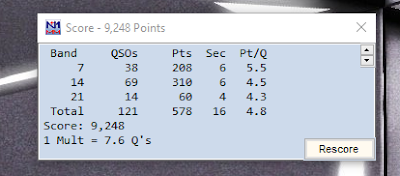
- My highest number of contacts ever in a contest of 412 and my best score as well of  113,775.

- Depending less and less on MRP40's decodes. 

Some funny moments: 

- With N1MM+ you are able to program macros to send preprogrammed messages.  It's when my fingers press the wrong key and send thanks for the contact before the was made! 

- Finding out the hard way that the code reader is not always correct.  I copied a call in my head and then glanced at the code reader, I may have messed up on a letter. So I change it and low and behold my head was correct and MRP40 was wrong. 

- This has happened more than a few time......forgetting to change N1MM+ from search and pounce to run and send out the incorrect message. 

- Finding myself answering one call after another and sounding  to others that I have really pulled this off to only then totally screw up the next few callers.....the way the contest can humble me.

Finally, I want to apologize to those of you with whom I messed up your call or made your contact with me a bit painful. Then those who just gave up and moved on I hope next time things will be better.  


Subscribe FREE to AmateurRadio.com's
Amateur Radio Newsletter

 
We never share your e-mail address.


Do you like to write?
Interesting project to share?
Helpful tips and ideas for other hams?

Submit an article and we will review it for publication on AmateurRadio.com!

Have a ham radio product or service?
Consider advertising on our site.

Are you a reporter covering ham radio?
Find ham radio experts for your story.

How to Set Up a Ham Radio Blog
Get started in less than 15 minutes!


  • Matt W1MST, Managing Editor