Author Archive
 First impressions of the Noble Radio NR4SC 70MHz CW/SSB rig
 September 27th, 2014 |
  Author: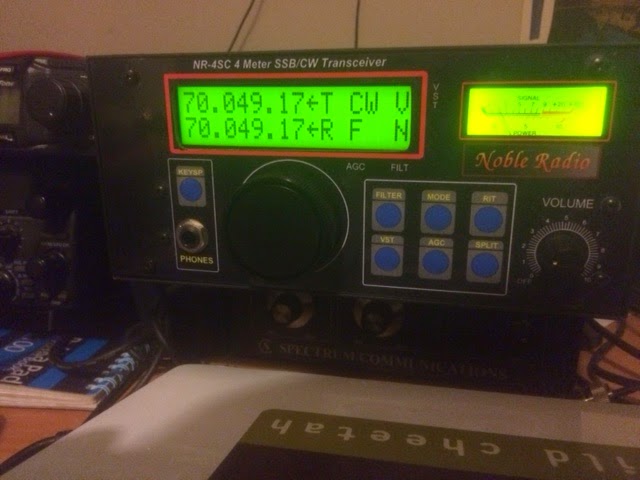
The first impression is of a solidly built radio. It’s quite chunky. When I posted a picture on Twitter, someone used the U word! But, I think the U word we should use is Utilitarian. It’s functional and reminds me of some of the Tentec styling.
Powering it up – I love the clear, big display of the frequency readout. Initially, I found the volume control a bit noisy. I mentioned this to Rob PE9PE and he said that some of the rigs did this, but a few quick rotations of the volume control would cure it. Sure enough it did. I hooked the rig up to my 70MHz vertical, which is what I normally use for working Es and the occasional tropo contact. Not ideal, but enough to make some contacts.
First tests were to listen to the GB3RAL 70MHz beacon. It was the same sort of signal strength that I expect with the Spectrum Transverter and HF rig, but interestingly, I felt the receiver was a lot quieter, which was nice.
The rig has a built in Iambic keyer for CW. I wanted to try that out as it seemed as if CW would probably be my best chance of making some contacts! The keyer socket on the rig is for a 3.5mm jack rather than a 1/4 inch jack – slightly pesty as all my other rigs have the larger size and I couldn’t immediately find an adapter. However, the Palm Paddle which I use with my FT-817 had the right size connector, so I decided to use that and plugged in and changed the mode to CW.
I discovered that the keyer jack is expected to have the dash on the tip, rather than the usual dot! Simple enough to resolve – I turned the paddle upside down and all then falls into place. The keyer is quite nice to use although I made the occasional mistake – which is just a question of getting used to the dot/dash memory.
The rig can also be supplied with a fist microphone and Rob had kindly included one of these with the package. Listening to the transmitted audio and the CW on a monitor receiver was fine and on a quick listen I didn’t hear anything I didn’t like the sound of.
Early this evening, Pete 2E0SQL kindly tried listening for me, although we didn’t manage a QSO – probably owing to our cross-polarised antennas. However, I did hear John M0UKD calling CQ on 70.200 from Hornchurch in Essex and was very pleased to be able to have a quick QSO with him. John was running 25W to a vertical compared to my 10W, so I was pleased to work him.
Tomorrow afternoon brings the Practical Wireless 70MHz contest, so I hope to make a few more contacts then.
In the meantime, the first impressions are positive. A rig which is simple to use, has a nice quiet receiver – and here’s the real plus – a rig with which you can monitor 70MHz without tying up an HF rig – no transverter needed.
I’m looking forward to playing some more, hopefully with some better antennas too and will post my further thoughts.
A new 70MHz mono-band radio from Noble Radio
Rob, PE9PE got in touch to let me know about the new 70MHz mono-band rig from Noble Radio

The rig produces 10W out – you can see a full list of the specs here
The rig is priced at EU499 in the Netherlands, including 21% Dutch VAT.
I’ve asked Rob if there are plans to distribute the rig in the UK and what the price will be. I’ll update this post accordingly when I find out. The PDF also mentions a 50MHz variant, but I’m guessing that the 70MHz will be of immediately more interest.
Updated: Rob PE9PE replied to say that the rig is available direct from the Netherlands and comes with a 2 year warranty.
A new 70MHz mono-band radio from Noble Radio
Rob, PE9PE got in touch to let me know about the new 70MHz mono-band rig from Noble Radio
The rig produces 10W out – you can see a full list of the specs here
The rig is priced at EU499 in the Netherlands, including 21% Dutch VAT.
I’ve asked Rob if there are plans to distribute the rig in the UK and what the price will be. I’ll update this post accordingly when I find out. The PDF also mentions a 50MHz variant, but I’m guessing that the 70MHz will be of immediately more interest.
Updated: Rob PE9PE replied to say that the rig is available direct from the Netherlands and comes with a 2 year warranty.
Raspberry Pi, RTL-SDR and PiAware – feeding ADS-B spots to the Flightaware network
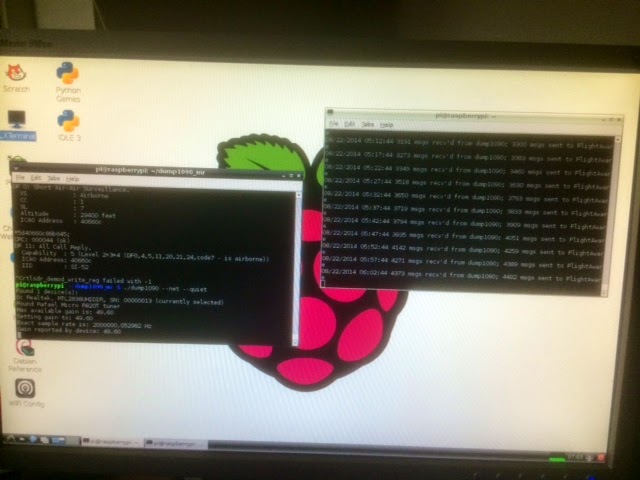
Earlier in the week, the nice people from Flightaware got in touch and mentioned they had some software called PiAware. This software runs on a Raspberry Pi which has an RTL-SDR dongle and antenna attached and the Dump1090 software running.
Flightaware say:
If you are running an inexpensive Raspberry Pi ADS-B receiver with dump1090 then you can install the PiAware Package from FlightAware to freely view nearby flight traffic and transmit this data to FlightAware’s tracking network. Most aircraft within Europe by 2017 and USA by 2020 will be required to have ADS-B transmitters onboard.FlightAware’s user-hosted worldwide ADS-B receiver network tracks about 90,000 unique aircraft per day and feeds this live data into the FlightAware website in combination with other public/private flight tracking data sources. FlightAware has over 500 user-hosted ADS-B sites online across 60 countries, with top contributors tracking over 10,000 aircraft per day. To see how ADS-B data is put to use, check out the FlightAware Live Map.The PiAware installation process takes only a few minutes. If you don’t have PlanePlotter, you can download it and then send FlightAware your installation’s serial number and we’ll buy you a license. FlightAware will also give users a free Enterprise Account ($90/month value) in return for installing PiAware.
So, if you don’t have a copy of PlanePlotter and would like one – this is a nice bonus for setting up and sending your data into Flightaware. I had a copy of PlanePlotter anyway, but this looked like a fun challenge to get working.
The instructions from Flightaware are good and comprehensive and can be found here
It was a while since I had run Dump1090 on my Pi, so I had to do a bit of work to get things in a state where PiAware would work.
– After some issues, I decided to ensure that Raspbian was updated: sudo apt-get upgrade (this takes a while!)
– I then refreshed rtl-sdr
git clone git://git.osmocom.org/rtl-sdr.git
cd rtl-sdr
mkdir build
cd build
cmake ../ -DINSTALL_UDEV_RULES=ON
make
sudo make install
sudo ldconfig
– Having read around a little, I decided to install a Flightaware specific version of Dump1090. It appears that this shouldn’t be necessary and you can use a ‘regular’ version of Dump1090, but I decided that my chances were improved of getting it working if I did this!
cd ~
git clone git://github.com/MalcolmRobb/dump1090.git
cd dump1090
make
sudo apt-get install pkg-config
make
Having compiled this – assuming you have installed RTL-SDR and have your RTLSDR stick, with an antenna (the little antenna which comes with the stick should work fine), plugged into the Pi – or a connected USB hub, it’s time to see if you can receive any ADS-B transmissions
Navigate to your dump1090 directory (dump1090_mr in my case)
cd dump1090_mr
./dump1090 — interactive
If everything is working, you should start to see some data coming through from the aircraft in your area.
Having got this going, you can install the PiAware software. Goto this page and you can start from step 2. I had some issues (mostly my fault!) with PiAware versions prior to 1.7-1 – but that is working fine.
Before you start PiAware up (in Step 4), stop your Dump1090 if it’s still running and restart it as follows:
./dump1090 –quiet –net
I used the quiet parameter to keep resource usage to a minimum. The net parameter ensures that Dump1090 makes the data available to other applications (PiAware in our case).
Start up another LX Terminal window and type
sudo piaware start
Hopefully, you will shortly see a message saying that PiAware has started. You can get a good idea of what is going on by checking the Piaware log file
tail -f /tmp/piaware.out
With any luck, you will see a bunch of messages including ‘Connected to Flightware – logging in and so on).
You should then see a message every 5 minutes detailing the number of messages that Flightaware has received from your receiver. If you run into problems, there is a helpful forum thread here
After all this, my Pi is feeding date into the Flightaware network successfully!
It’s intriguing to note, running the Pi/RTLSDR combo at the same time as PlanePlotter and the LZ2RR microADSB receiver (on similar antennas). In the same time interval, the microADSB receiver has seen 488 aircraft and the RTLSDR has heard 329. So, the RTL_SDR is not quite as sensitive, but it’s not bad at all! It may be worth trying different versions of Dump1090 and see if this can be improved.
Great fun to try – thanks in particular to Max at Flightaware for letting me know about PiAware.
Finally, if you want to see the map that your spots feed into – it’s here
Raspberry Pi, RTL-SDR and PiAware – feeding ADS-B spots to the Flightaware network
Earlier in the week, the nice people from Flightaware got in touch and mentioned they had some software called PiAware. This software runs on a Raspberry Pi which has an RTL-SDR dongle and antenna attached and the Dump1090 software running.
Flightaware say:
If you are running an inexpensive Raspberry Pi ADS-B receiver with dump1090 then you can install the PiAware Package from FlightAware to freely view nearby flight traffic and transmit this data to FlightAware’s tracking network. Most aircraft within Europe by 2017 and USA by 2020 will be required to have ADS-B transmitters onboard.FlightAware’s user-hosted worldwide ADS-B receiver network tracks about 90,000 unique aircraft per day and feeds this live data into the FlightAware website in combination with other public/private flight tracking data sources. FlightAware has over 500 user-hosted ADS-B sites online across 60 countries, with top contributors tracking over 10,000 aircraft per day. To see how ADS-B data is put to use, check out the FlightAware Live Map.The PiAware installation process takes only a few minutes. If you don’t have PlanePlotter, you can download it and then send FlightAware your installation’s serial number and we’ll buy you a license. FlightAware will also give users a free Enterprise Account ($90/month value) in return for installing PiAware.
So, if you don’t have a copy of PlanePlotter and would like one – this is a nice bonus for setting up and sending your data into Flightaware. I had a copy of PlanePlotter anyway, but this looked like a fun challenge to get working.
The instructions from Flightaware are good and comprehensive and can be found here
It was a while since I had run Dump1090 on my Pi, so I had to do a bit of work to get things in a state where PiAware would work.
– After some issues, I decided to ensure that Raspbian was updated: sudo apt-get upgrade (this takes a while!)
– I then refreshed rtl-sdr
git clone git://git.osmocom.org/rtl-sdr.git
cd rtl-sdr
mkdir build
cd build
cmake ../ -DINSTALL_UDEV_RULES=ON
make
sudo make install
sudo ldconfig
– Having read around a little, I decided to install a Flightaware specific version of Dump1090. It appears that this shouldn’t be necessary and you can use a ‘regular’ version of Dump1090, but I decided that my chances were improved of getting it working if I did this!
cd ~
git clone git://github.com/MalcolmRobb/dump1090.git
cd dump1090
make
sudo apt-get install pkg-config
make
Having compiled this – assuming you have installed RTL-SDR and have your RTLSDR stick, with an antenna (the little antenna which comes with the stick should work fine), plugged into the Pi – or a connected USB hub, it’s time to see if you can receive any ADS-B transmissions
Navigate to your dump1090 directory (dump1090_mr in my case)
cd dump1090_mr
./dump1090 — interactive
If everything is working, you should start to see some data coming through from the aircraft in your area.
Having got this going, you can install the PiAware software. Goto this page and you can start from step 2. I had some issues (mostly my fault!) with PiAware versions prior to 1.7-1 – but that is working fine.
Before you start PiAware up (in Step 4), stop your Dump1090 if it’s still running and restart it as follows:
./dump1090 –quiet –net
I used the quiet parameter to keep resource usage to a minimum. The net parameter ensures that Dump1090 makes the data available to other applications (PiAware in our case).
Start up another LX Terminal window and type
sudo piaware start
Hopefully, you will shortly see a message saying that PiAware has started. You can get a good idea of what is going on by checking the Piaware log file
tail -f /tmp/piaware.out
With any luck, you will see a bunch of messages including ‘Connected to Flightware – logging in and so on).
You should then see a message every 5 minutes detailing the number of messages that Flightaware has received from your receiver. If you run into problems, there is a helpful forum thread here
After all this, my Pi is feeding date into the Flightaware network successfully!
It’s intriguing to note, running the Pi/RTLSDR combo at the same time as PlanePlotter and the LZ2RR microADSB receiver (on similar antennas). In the same time interval, the microADSB receiver has seen 488 aircraft and the RTLSDR has heard 329. So, the RTL_SDR is not quite as sensitive, but it’s not bad at all! It may be worth trying different versions of Dump1090 and see if this can be improved.
Great fun to try – thanks in particular to Max at Flightaware for letting me know about PiAware.
Finally, if you want to see the map that your spots feed into – it’s here
Practical Wireless SOTA VHF weekend 23-25 August 2014
Just a quick reminder that next weekend is the August Bank Holiday weekend and Practical Wireless are encouraging VHF/UHF operators to operate from Summits on the Air on the VHF bands. It’s not a contest, more an excuse to get out and enjoy some portable radio in some great scenery!
Richard G3CWI at SOTABeams has very kindly sponsored some prizes.
I’m planning to be out during the weekend on one or more of our local summits (there aren’t many in Oxfordshire!) and will be listening out for other SOTA activity.
Practical Wireless SOTA VHF weekend 23-25 August 2014
Just a quick reminder that next weekend is the August Bank Holiday weekend and Practical Wireless are encouraging VHF/UHF operators to operate from Summits on the Air on the VHF bands. It’s not a contest, more an excuse to get out and enjoy some portable radio in some great scenery!
Richard G3CWI at SOTABeams has very kindly sponsored some prizes.
I’m planning to be out during the weekend on one or more of our local summits (there aren’t many in Oxfordshire!) and will be listening out for other SOTA activity.













