Author Archive
 Defeated by Microsoft
 December 2nd, 2010 |
  Author:
 I have never understood why Microsoft has become the most successful software company in the world. When compared to similar products the underlying design of their software, to me, seems unnecessarily complex. And the company couldn’t care less about backward compatibility and breaking something when bringing out a new version. Microsoft software development tools, compared to third party products like Delphi or Lazarus, are far more difficult to use in my opinion. Visual Basic long ago ceased to be a “basic” programming language for amateurs like myself.
I had an idea for a program to run on my HTC Touch Pro smartphone that needed to access the phone’s internal GPS. A couple of months ago I actually got a good way towards implementing it for the Android platform (even though I’d never programmed in Java before) just by downloading the source code of someone else’s GPS application and modifying it using the free development tools. But because my phone was running an unofficial port of Android on which not all features worked I could only run it in an emulator, not transfer the app to the phone. In any case, the XD Android port was unstable and ate battery power even worse than Windows Mobile did, so I had to go back using WM 6.1 despite the fact that under Android it was a much nicer phone.
So I thought I’d have a go at writing my program for Windows Mobile. I had a copy of Visual Studio 2005 sitting on the shelf. So as before, I started Googling for example programs for accessing a GPS.
If I am writing a program for Windows desktop using Lazarus / Free Pascal I can Google for what I am trying to do and nearly always find code I can use. Even if it was written for Borland Delphi in 1996 it usually still works. The problem with the Windows smartphone / PDA platform is that it has been through many incompatible incarnations in less time than that. There is Windows CE, Pocket PC, Windows Mobile versions 4, 5, 6 and 6.1, Windows Smartphone, Windows Phone 7, Compact Net Framework 1.0, Compact Net Framework 2.0 and Compact Net Framework 3.5. If you do manage to find a relevant example there is no guarantee that it is actually compatible with the development tools and SDKs you have installed on your PC, or with your mobile device.
The first program I tried that actually did anything came with two DLLs, one for serial port access and one to decode the GPS data. That would print out a few NMEA strings and then fail with an exception. None of the other examples I tried would do anything at all. The problem with the first program appeared to be in the serial port DLL, so I tried to upgrade it to version 2.0 of the .Net Compact Framework which had built-in serial port support. I copied examples of serial port access code but although the program didn’t crash it never received anything from the GPS at all, even though I knew it was working (e.g. by running APRSISCE.) Unfortunately when run from Visual Studio the Net CF 2.0 programs would display an error on the phone that “this device has a newer version of the Compact Framework installed that must be uninstalled first.” I wasn’t about to do that since who knows what it would break. So much for backward compatibility.
One of the reasons implementing my idea was so easy on the Android platform is that Google had provided a GPS object that gave you ready to use data. On Windows Mobile you have to listen to the GPS via a serial port and then parse the NMEA data that comes out. So, having failed to find a GPS example that would run for more than a couple of seconds I decided to look for serial port examples. None of those would receive any data from the GPS either. I even found a free GPS test application. That would receive several lines of data from the GPS then disappear without trace.
At this point I started to wonder if there was a problem with the internal GPS of my HTC Touch Pro. I did some more Googling and found that users of some GPS apps on HTC smartphones with internal GPS had found these apps did not recognize the internal GPS or timed out while waiting to get data from it. Presumably these apps had been written based on the same code examples I had been trying. One user had found the only way to get the GPS data into the program was to use a program called GPSGate. But this was a commercial program, costing money, which I had no wish to spend just to see if this worked when everything else hadn’t.
After a couple of days of fruitless effort my interest in continuing with this project had evaporated completely so I gave up. At least, unlike with abortive hardware projects, no components were wasted. I restored the PC back to a couple of days earlier to remove all the hundreds of megabytes of APIs, SDKs and examples I’d installed. And I have gained a new respect for people who actually manage to develop software using Microsoft tools.

Minor update for KComm
I have just uploaded a minor update to the Windows version of KComm, my logging and digital modes program for Elecraft K2 and K3 transceivers. Version 1.91 now supports the ability to specify the receive and transmit sound devices using the device name rather than a number which Windows appeared to change at will.
I had been unable to find a way to get the sound card device names from Windows using Free Pascal and happened to mention this during a discussion in the Yahoo digital modes group about how so many sound card programs seemed to lose the sound card settings under newer versions of Windows. Patrick, F6CTE, who is the author of MultiPSK, very kindly responded with some Delphi Pascal code to list the installed sound devices. This has now been incorporated in KComm and makes sound card selection much easier – especially for me as I am always adding and removing USB audio devices on the shack computer which changes the numbering.
My grateful thanks to Patrick for his help with this little problem.

Jam tomorrow
I have not been keeping up with the development of the controversial ROS digital mode as for reasons given in earlier posts I decided it was not something I wanted to use. However a recent post in the Yahoo digital modes group brought to my attention a development that seems rather alarming. The ROS software has recently included an anti-jamming switch the purpose of which is described as “improves rejection against strong CW and Beacons interferences.”
Polite usage of the amateur bands require that you check the frequency is in use before making a call so no-one should be jamming anybody. Furthermore, no-one should be using ROS in the CW or beacon sub bands. So what exactly is the purpose of this switch and why should anyone need it?
Perhaps an inkling of what may be going to happen can be drawn from some of the comments relating to the performance of the anti-jam switch, for example:
- “The New ROS/2000 passed the test successfully during the CW Contest last weekend.”
- “More test with the New ROS/2000 in other hostile environment. This time during a PSK63 Contest on Sunday.”
As I said all along (indeed, this was my original objection to the use of this mode) ROS is just too wide for use in the narrow digital allocations of the HF bands. There just isn’t the space for it, unless it remains a niche, occasionally used mode, which clearly its developer and supporters don’t intend it to be. As another comment in the ROS forum states: “The bands will fill up once people realize how good this mode is.”
The development of anti-jam techniques suggest that ROS is being readied to engage in war with users of other modes. When users can’t find a clear frequency they will just operate on top of other modes. The principal claimed advantage of the wide ROS mode is that it enables contacts to be made under similar weak signal conditions to JT65A but that it permits keyboard chats to take place rather than the basic exchange of signal reports and locators. So it appears that a vast swathe of spectrum space is going to be made unusable for other modes simply so that people can exchange brag files.
We need strict regulation of digital modes on the amateur bands. The days of gentlemen’s agreements are over. There are too many modes competing for limited spectrum space, and too many hams who aren’t gentlemen.

Tiny transmitter
I think I may have discovered one of the best kept secrets in radio. I have been thinking, off and on, about how to make a very low power 2m FM transmitter in order to get weather data into my APRS system wirelessly. A circuit using the Motorola MC2833P chip is quite easy to build, and I even have one in my parts box, but a custom crystal to multiply up to 144.800MHz would cost about £25 to be made which just isn’t worth it.

One day I was browsing looking at various APRS articles and came across a tracker someone had built using a VHF transmitter module from Radiometrix. I had come across this site before but thought that a) these modules were only for transmitting digital data not the AFSK that we use, b) they were not manufactured for amateur frequencies and c) they were not available in one-off quantities for individual private purchasers. I submitted an enquiry, stating that I was interested in purchasing one TX1 low power (10mW) module on 144.800MHz if the price was within my amateur budget, and was amazed to be informed that they would be happy to offer the module for £13.00 plus carriage and VAT, with a lead time of five days. In total it came to not much more than £20 which is amazing considering many professional electronics suppliers specify a minimum order value greater than that.
The picture of the module is much larger than it actually is – the pins are the standard 0.1in spacing. As I am nowhere near actually needing to use it at the moment, I hooked it up on the breadboard to give it a quick test. The module does indeed accept an audio input: as described in the data sheet you should bias the input pin and then feed it with audio at a couple of volts amplitude via a blocking capacitor. I lashed it up to my FoxTrak APRS tracker and a braaap was received and decoded by my 2m APRS gateway which was enough of a test to be going on with.
There are several other products with interesting ham radio applications on the Radiometrix website. The HX1 is a high power (300mW) version of the module I bought. With the addition of a PA I could turn my FoxTrak into a standalone tracker. Even by itself it would probably have quite a decent range from the fell tops. Also of interest is the SHX1 which is described as “a small multi-channel 25kHz narrow band VHF transceiver with up to 500mW RF power output, usable for 144MHz band amateur applications.” I think you could build a little hand-held transceiver with one of these, just for fun.
Many of these products aren’t in the online shop so you can’t find out the price or buy online, which is probably just as well as I could see myself ordering some more of these toys for something to play with over Christmas. I would certainly be interested to hear from anyone who has used, plans to use or has some ideas for using any of these little radio modules from Radiometrix.

Free Lake District Wallpaper
I have received many favourable comments whenever I have posted pictures from some of my local walks in this blog. I’m sure this has more to do with the beauty of the landscape than my skill as a photographer or the quality of my camera. Still, your appreciation of my pictures gave me the idea that I could use some of them to create desktop backgrounds or wallpapers that I could give away as promotional freebies from a website that needs more visitors. Here’s a sample of one of them.
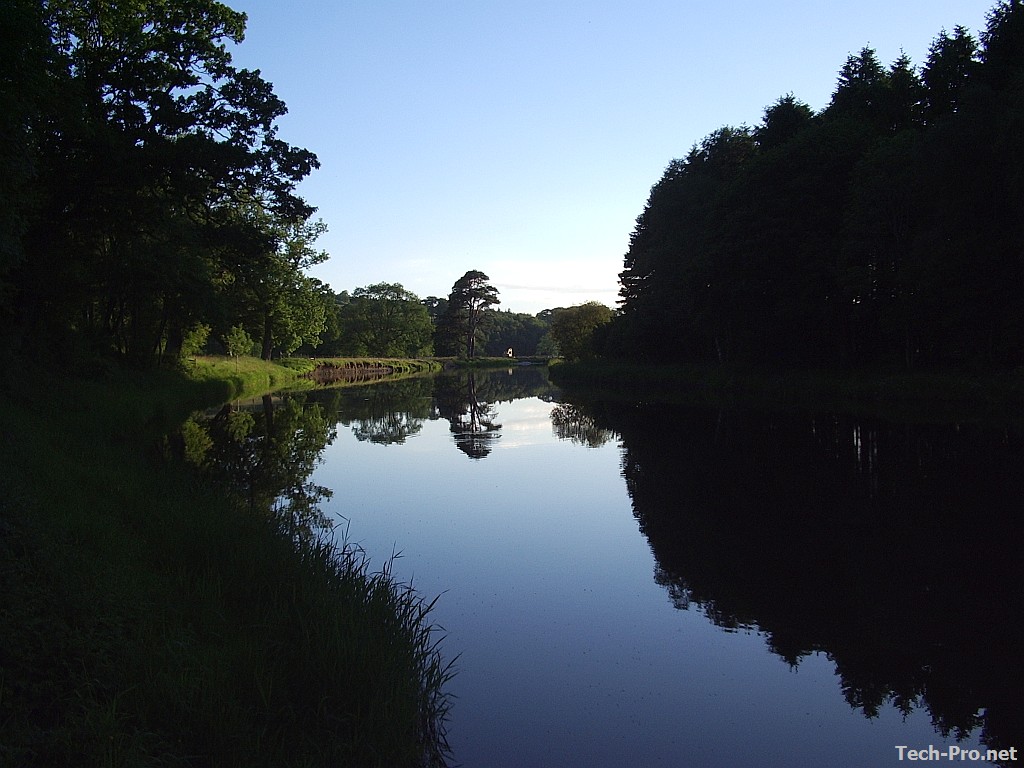
If you would like a view from the English Lakes to brighten up your desktop, please visit Free Desktop Wallpapers. I hope you find something there you like. And please feel free to post the link anywhere it might be seen by others who would enjoy the images. Every little helps!

WOTA day
What a day it has been for activity in the Lake District fells! Although the day isn’t over the light is beginning to fade as I write this and I’m guessing there won’t be any more activations today. But a quick count of the spots on the Wainwrights On The Air website shows there have been a total of 22 different fells activated by 6 different people which is probably a Wainwrights record.

At times the spots were coming so thick and fast that there was a danger of missing someone because you spent too long calling another station. And the fell-top stations had a hard job finding a clear frequency. Many had to QSY two or three times from their original chosen frequency because they landed on top of someone else’s contact. Perhaps we need to consider moving to 70cm for WOTA?
I myself made 16 contacts and added 7 new summits to my chaser total. I wish I could have been out on the fells myself to gain a bit of elevation and work some of the more distant ones. But this has still been my most productive day of WOTA chasing. Thanks to Phil G4OBK, Geoff GM4WHA, Phil M0AYB, Richard G1JTD and Colin G4UXH for the contacts. Visit Phil G4OBK’s Wainwrights blog where he will no doubt be posting an account of today’s activity with pictures shortly.

A little RF goes a long way
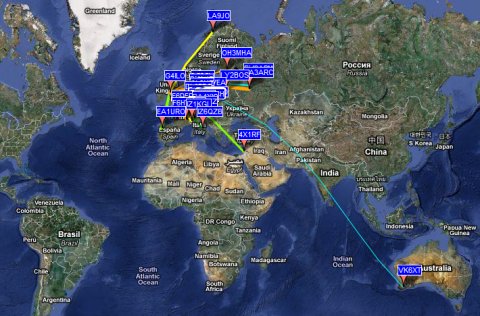
In this case, 5W of WSPR on 40m to a bent attic dipole. Not, perhaps, as impressive as M0XPD’s results with 50mW on 30m. But it’s still nice to be heard on the other side of the planet.














