Author Archive
 Not much happening
 May 11th, 2013 |
  Author:
 Nothing blogworthy has happened at G4ILO in the last few days. My mind has been preoccupied with two other things: frustration at still being without a driving license and anxiety about my forthcoming gall bladder operation. As a nurse said yesterday during my pre-operation assessment, a gall bladder op is nothing compared to the surgery I have had for my brain tumour. The difference is with the brain tumour everything happened very quickly so I didn’t have time to do much thinking about it.
I haven’t been completely inactive on the radio in the time since my last post. Most days when I haven’t been going to a medical appointment I have turned on my 2 metre and 30 metre APRS gateways. Most days I have also set my K3 to monitor the WSPR frequencies on 10 metres. There have been some signs of Sporadic-E activity, such as the presence of Russian taxi operators on the 10m WSPR frequency. A few days ago DXmaps showed a small but intense Sporadic-E opening on 6 metres. My 10m signals have frequently been spotted by 4X1RF and have also reached Argentina and the Philippines. I hope that things will soon perk up and motivate me to do something worth writing about again.
Spring is here!
Testing a new build of WSJTX for K1JT I hopped on to 10m and was surprised to see a strong signal. It soon revealed itself to be SM6NZV who gave me a +8dB report on my 5 watts.
This reminded me that it is May 1 today, the start of Spring and usually also the start of the Sporadic-E season. I tuned around on 6m and heard a couple of weak stations on my dipole, also a couple of stronger GMs working stations I could not hear.
I thought about installing the SDR-4+ as a panadapter for the K3 which had been one of the things I had intended to use it for. But something was amiss and I didn’t have control of the receiver’s frequency. I think the settings had got hosed, probably when I was playing around with using a USB DVB dongle as an SDR. I have no idea how to get it working again and I started getting stressed about it so I decided to abandon the idea.
SDRs are not for me, or at least not those that use a PC for a user interface. Windows is just too fragile, though if Linux is any better it’s only because there are fewer things to install on it in the first place!
Instead I will set up scanning on the K3 to scan a section of the 6m band. I always forget how to do this so I had to dig out the manual. Load the start frequency into VFO A and the end frequency in VFOB, make sure the mode and frequency are what you want and store it in a memory. I used memory 6 for 6m scanning.
To start a scan you just recall memory 6 (M>V, 6) and press and hold SCAN. I’ll probably forget that sequence of button presses as well so I looked up the CAT commands in the K3 Programmers Reference (SWT23;SWT29;SWH41;) and stored it in a KComm shortcut. I’ll probably make one for 2m as well though the chances of hearing any 2m Es up here are slim indeed. Last year I don’t think here was a single opening that extended this far north on 2m.
Pingback
Thanks to Peter, G3OJV, for featuring this blog in his latest blog post. That’s Peter Waters of Waters and Stanton, one of the biggest ham radio dealers here in the UK. You might think that Peter would have a shack crammed with the latest equipment and a huge HF yagi out the back. But in fact Peter’s major interest is in QRP operating and antenna design. Many of his blog posts relate to those aspects of the hobby, so it’s worth a look.
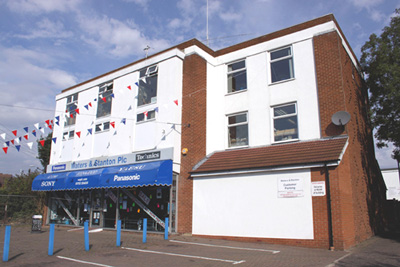 |
| Waters and Stanton’s Hockley shop |
Back in the 1970s when I was newly-licensed G8ILO and lived in Essex I was a regular visitor to Peter’s Hockley shop. In those days I used to swap rigs quite frequently as it was always necessary to sell one rig to finance the next. I can’t remember all the things I’ve had from there but it would be quite a long list.
I haven’t visited since 1994 when I moved up to Cumbria but that hasn’t stopped me from being a customer. In fact my attic antennas – the MFJ magnetic loop and the 80plus2 antenna which forms the nucleus of my multiband attic dipole, both came from there. I’m pretty sure that the 80plus2 is one of Peter’s antenna designs. It works very well as an attic antenna (with the addition of elements for 10 and 6 metres it covers all bands 80m to 6m except 30m and 17m.) I think my results on the air testify to that.
Iler progress
The Iler 40 QRP SSB transceiver kit proceeds apace – a snail’s pace. I wasted a lot of time correcting stupid errors – like soldering a resistor in the wrong place and putting a diode in back to front. I mean, I know diodes have to go the right way round and the banded end is clearly enough marked on the board. Removing parts from boards with plated through holes is a nightmare. Why didn’t I check it?
 |
| Part completed Iler 40 board |
Another reason for the slow progress is that building circuits does my back in. It’s the bending forward to see the parts under the magnifying lens that does it. Eventually there is a twinge from my lower back that says: time to take a break. So I’ll put everything to one side and do something else for a bit.
SCSmail using Robust Packet
After my post about using Winlink on HF using a Robust Packet Radio (RPR) TNC Helge DF8LS emailed to say he was trying out another method for email over HF: SCSmail. It sounded interesting so I thought I would have a go too. The software is a free download from the SCS website, but it won’t be any use without an SCS TNC – either the Tracker like I’ve got or one of the even more expensive Pactor jobs.
To install SCSmail all you do is create a folder for it, copy the downloaded EXE file into it and run the EXE. It will create some empty folders as temporary receptacles for your mail. Next you need to set the program up. This is accomplished by entering the name and login credentials of your POP3 and SMTP servers at your ISP or mail provider. You also provide the details of where to find your TNC (what com port and so on) and can also set up CAT control for setting the transceiver frequency. I used the Kenwood setting which worked fine with the Elecraft K2 to which my TNC is connected.
 |
| SCSmail mail client configuration |
SCSmail can be configured either as a client or a server. A client is what you will use to send and receive mail and is what I set up. A server is what your client connects to via radio. I used a server set up by (I guess) SCS.
The setup is:
your email client (such as Outlook Express) -> SCSmail client -> SCS TNC -> your radio transceiver —> the ionosphere —> server transceiver -> SCS TNC -> SCSmail server —> the internet -> your ISP mail server
One advantage of SCSmail is that you can use your own familiar email client (such as Outlook Express) instead of an unfamiliar one like RMS Express. You can also use your own email address instead of having to use a special one @winlink.org. But you pay a price in speed for this.
To reconfigure your mail client to use SCSmail you simply change the addresses of the incoming and outgoing mail servers (usually something like mail.yourisp.com) to localhost. You can then send and receive mail just as you would normally. This is obviously an advantage if you are setting up an HF mail system for people who don’t want to learn a new way of doing things.
 |
| Receiving mail using SCSmail |
What happens is the client logs in to your ISP mail server via the radio link to the remote SCSmail server. The first time, it downloads and deletes all the mail from the ISP server so it is a good idea to make sure your inbox is empty before you start. SCSmail supports a list of servers that you can connect to, but none is provided with the program. There is only one server you can use with Robust Packet Radio and that is DB0UAL-9 which uses 3.610 and 14.102 MHz. Having entered the server’s call and set your transceiver to one of those frequencies you click on Connect HF-Server. Then you set Outlook Express to send and receive mail and wait until the client disconnects.
I connected instantly to the server on 20m using 10 watts to my attic dipole. But compared to Winlink’s RMS Express SCSmail is slow. This is probably the penalty for using protocols designed for use on the wired internet over a wireless HF link. Winlink and RMS Express are optimised for HF use. RMS Express creates efficient small text mode emails whereas Outlook Express creates messages that can contain lots of fancy formatting and unnecessary header lines which increase the time to send and receive.
It all worked (or mostly did: the test emails I sent myself and Helge still haven’t turned up.) If I owned a boat or a log cabin miles from the nearest telecoms provider I might find SCSmail a useful facility to have. Even though I haven’t, it was still an interesting thing to try out.
Is it just me?
For the last few weeks, when I browse the pages in G4ILO’s Shack using Google Chrome browser, they start displaying in a plain text sort of mode.
 |
| How pages look in Google Chrome |
 |
| How that page is supposed to look |
I think what’s happening is the CSS style sheet isn’t being loaded. So the pages are appearing without any formatting. But why? This doesn’t happen in Firefox. It didn’t used to happen in Chrome. And it doesn’t happen in Chrome after I clear the cache. After that the next few pages display OK until it eventually happens again.
Is it just me, or is this happening to everyone who visits my site using Google Chrome?
Special events

HF propagation conditions have not been great today. There was not much happening on 15m at all.













