Posts Tagged ‘Software’
 Comforting JT65-HF developments
 March 10th, 2013 |
  Author:
 JT65-HF-Comfort, the fork of JT65-HF that I mentioned a few weeks ago, has now been made into a public beta. There is now a project page at http://abcsolutions.de/jt65hf/. There is also a forum at http://jt65hfcomfort.iphpbb3.com/. If you use JT65-HF then you should really join the forum in order to have an input to the changes being discussed.
Classic WSPR vs WSPR-X
Are you a fan of WSPR mode? Have you tried K1JT’s new program WSPR-X yet?
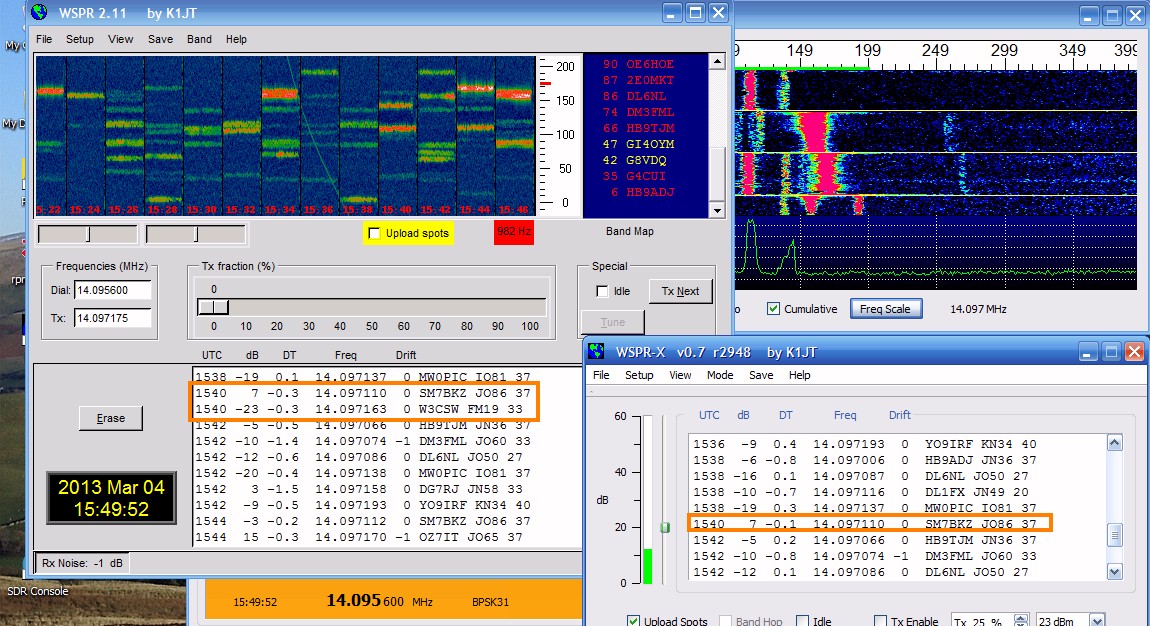 |
| Comparing classic WSPR to WSPR-X |
I decided to switch to the newer program as the older ‘classic’ version won’t work with VSPE virtual serial ports. But I had a sneaky feeling that WSPR-X was not decoding some of the traces it should. So I decided to run both programs in parallel, using the same sound card, the same radio, the same data source. Sure enough, WSPR-X is missing about 1 decode in 10 compared to WSPR 2.11. There is no apparent common factor between the signals it missed. They are not at the extremes of the frequency range, close to the limit of timing error nor especially faint.
Look at the screenshot above and look at the decodes for 1540. Classic WSPR has decoded two signals for this interval whilst WSPR-X has decoded only one. The signal from W3CSW was missed. Later signals from the same station were decoded. That is just one example. I only needed to wait a few minutes to find another.
I set the older WSPR to save .wav files and when these were processed by WSPR-X using its File Open option the result was the same as when the signals were received off-air. The same transmission was missed in each case.
WSPR-X seems a bit faster to run the decodes than WSPR. It prints them up on the screen before classic WSPR does. There are sometimes slight differences in the dB and DT figures, but not enough to worry about. Has anyone else noticed this?
WSJT-X update
A couple of days ago I had an email from Joe, K1JT, author of the WSPR and WSJT software. He had read my post about my first JT9-1 QSO in which I said that I missed the JT65-HF user interface. Joe pointed out that WSJT-X is in a very early stage of program development, and user input will surely help to define its future evolution. He asked what features of the JT65-HF GUI I found desirable.

I replied with what I thought were the key points that made JT65-HF easier to use. The result is a new version of WSJT-X which I have just tried. One change is that the horizontal ‘panadapter’ display scale now matches the waterfall when the user has set FFT Bins/Pixel greater than 1.
However, the real big change is that double-clicking on a decode line now generates a set of messages addressed to the second callsign on the line, regardless of where you double-click. It also sets the Tx and Rx frequencies to that of the decoded transmission and selects the first message in the sequence. This is a big time and error-saver in the few seconds you have between receiving a call and having to reply. You still have to set Auto to ON to enable the transmitter and select the next message in the sequence after the first has been received. Perhaps it’s a matter of personal preference but I don’t think it is a bad thing for the user to take control of this rather than have the program try to work out the appropriate reply. In other words, double-click on a decode when it is a CQ call or a reply to your CQ. Use the Tx n buttons to select the next message in the sequence as you progress through the QSO.
Try this latest version of WSJT-X. I think you’ll find it a big improvement. Now all we need is for Laurie VK3AMA to come up with a version of JT-Alert that adds logging and ‘worked before’ detection and there will be no reason not to switch to this much narrower JT mode.
A JT65-HF update
Due to the health issues of the developer Joe Large W6CQZ it has been some time since there was a new version of the popular JT65-HF application. So I was interested to receive an email from Erwin, DK5EW, telling me about an enhanced version of JT65-HF made by Matthias DL3VCO called JT65-HF-Comfort.
 |
| JT65-HF as enhanced by Matthias, DL3VCO |
Matthias has not made an add-on to JT65-HF in the style of programs like JT-Alert. Instead he has made changes to the actual JT65-HF source code. I was particularly pleased to see that the enhanced version retains compatibility with the popular add-on JT-Alert by Laurie, VK5AMA. When I tried recompiling the JT65-HF source code myself the new version did not work with Laurie’s program, which I regard as an essential aid to JT65A operating. (In fact I have cheekily asked VK5AMA if he would consider making a version of JT-Alert that works with K1JT’s WSJT-X program!)
I have not spent much time with JT65-HF-Comfort as my interest at the moment is directed towards the new JT9 mode, but you can see from the screenshot that one of the improvements DL3VCO has made is to display the callsign above each trace on the waterfall. He has also added a new Statistics menu which displays the number of contacts you have made per DXCC entity per band. I couldn’t show you that as I use KComm for logging so my log is not in a format that JT65-HF-Comfort can read. You can find a Google-translated version of the JT65-HF-Comfort information here.
If you are interested in trying JT65-HF-Comfort then you can download a setup program (a modified version of W6CQZ’s installer) to install the updated version. I shall certainly try using it the next time I do some JT65A operation.
My first JT9-1 QSO
PC4T Paul’s blog post about working Tasmania with 5 watts gave me the spur to try the new JT9-1 mode, so I installed the WSJT-X software. The user interface is quite a bit different to the older WSJT programs but most of the same controls are there. I never really figured out how to use WSJT, much preferring the simpler interface of Joe W6CQZ’s JT65-HF application.
 |
| Working SM5CS using JT9-1 mode |
Digital voice on HF
I was going to title this post “D-Star’s nemesis” but I thought that would be too provocative and premature! But the much talked-about Codec2 open source voice codec has just surfaced in usable form, in the shape of an easy to use bit of software called FreeDV.
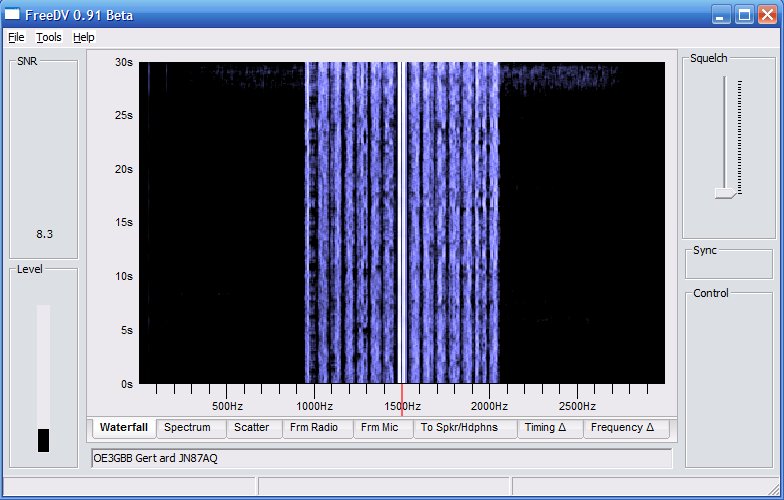 |
| FreeDV running on Windows |
FreeDV is available for Linux, Windows and Mac. I installed the Windows version, which is just a matter of extracting the files from a zip archive into a folder.
If you’re set up to run digital modes on HF then you’re half way there already. FreeDV uses the same sound card as your digimode software and the same audio levels. As with PSK31 you just need to make sure you aren’t driving the transmitter into ALC.
You’ll need a second sound card for the receive and transmit audio. Assuming that you aren’t using one sound card for both digimodes and computer sound, this will be the one you use for Windows noises. On my shack PC that’s one of those el cheapo eBay USB sound card dongles. You’ll also need a microphone or a computer headset.
There’s no VOX (perhaps that will come in a later version of FreeDV) so you have to click a button to toggle PTT. Before you can do that you need to set up PTT using a com port. In my case the same serial port used for CAT control and updating the firmware of my K3 was used. The rig went straight into transmit until I ticked the RTS +V check box.
The main challenge is finding other people who are using FreeDV. At the moment the frequency 14.236MHz on 20m seems to be the only calling frequency. It would be nice to have some centres of activity on other bands, but no doubt that will come in due course. There’s a Digital Voice Google Group which will probably become the meeting place for FreeDV users.
A FreeDV transmission is 1.1kHz wide, less than half of the bandwidth of an SSB signal. The audio is best described as telephone quality. It’s a bit boxy, but there is an equalizer called “Filter” in the software that can be used to brighten up both the transmit and receive audio. A nice feature of the software is a button that lets you instantly switch between analogue and digital so you can easily make comparisons. I wish I could include a clip of the audio recorded off air but I couldn’t figure out how to do it.
Right now I’m sitting on 14.236MHz waiting for someone else to come on the frequency. Hopefully as the word gets out more people will get on the air with FreeDV and contacts will be easier to come by.
Seeing red
I just started up Google Chrome and my eye was caught by the minimize, maximize and close buttons in the title bar, which are bright red.

They stick out like a sore thumb. I can’t believe I wouldn’t have noticed it before. Is it just me, or my computer? If the buttons have changed colour, why? My eye is constantly drawn to these bright red buttons. It is a real eyesore.













