Posts Tagged ‘K3’

K3 Weirdness in AFSK-A Mode (SOLVED!)

During the BARTG test I had some weird moments after I QSY’d from 20m to 40m — DM780 would key the K3’s PTT (via HRD IP Server) but there would be no audio into the Line In port, and thus no RF output. Sometimes rebooting the K3 would work, other times quitting and re-launching DM780 did the trick. I’m not 100% certain of the cause but I’m leaning towards software rather than hardware.
Then I noticed low RF output at certain audio frequencies, and this only in AFSK-A reverse (USB) mode; no trouble in normal (LSB) AFSK-A mode, nor in DATA-A normal and reverse. The output power would be OK when the center frequency was set low on the waterfall (+/- 400 Hz, for example) but would drop off at higher Fc setings. And the cutoff point seemed to vary — sometimes I could get full 100W RF out at around 1500 Hz Fc (I typically use 1530 Hz as Fc for RTTY), other times the output would drop above 900 Hz and be effectively zero at 1300 Hz and above. After some messing around with soundcard and line input levels I seemed to have gotten it somewhat sorted out, but as I did all that in the middle of a contest while in semi-panic mode I didn’t take too many notes.
I did some basic tests today by transmitting RTTY diddles at 100W into the MFJ-267 dummy load/wattmeter while in AFSK-A REV mode; mic gain is adjusted for 3 flickering bars of ALC as per the advice of Elecraft. I got full 100W reading on the meter at 2200 Hz Fc, but it steadily decreased as I inched upwards — at 2300 Hz Fc the output was down around 60W, and by 2400 Hz the wattmeter needle barely moved. But when I switched from REV (USB) to NOR (LSB) I get full output right up to the top edge of the waterfall (2900 Hz Fc) — pretty much what I experienced yesterday during the RTTY test.
I then shut the whole system off for a while and repeated these tests an hour or so later to see if things changed from a “cold” state: starting out my output at 2200 Hz was down around 10 to 15W. The output then slowly rises as PA temperature (as measured by the K3’s built-in PA TEMP meter) reaching full 100W at 43 deg C. But after cooling off (PA: 35 deg C, front panel: 32 deg C) power output remains at full 100W! This is driving me absolutely bat-shit crazy.
I’m not really concerned that I won’t be able to transmit RTTY at high center frequencies as my operating style is to find and click on a signal in the waterfall, center it at 1530 Hz, then switch to a narrow filter setting; I’m more troubled by how the cutoff frequency changes, sometimes below 1530 Hz, and apparently is a function of temperature. It doesn’t appear to be a PA problem — the same power drops occur when bypassing the PA unit and running at 10W, and I’m getting full power in all other modes — so I’m going to guess it’s an issue with the DSP board and its handling of audio at the Line In port. More tests to follow, and when I have a better set of test results I’ll contact the boys in Aptos.
Update 26-Jan-2010: I believe it has been solved — the only things I didn’t check until today were the filter parameters in the CONFIG menu. Sure enough, I had FL3 set to 2.4 kHz even though the filter is actually a 2.1 kHz filter. Unsure how or why this caused the problem, but since setting it to the correct setting I am now able to get full output power at the mark frequencies indicated by the K3’s MARK-SH setting (2125, 1445, 1275 or 915 Hz). Not sure how the FL3 parameter got changed; perhaps inadvertently while running K3-EZ, or perhaps it was set improperly during my assembly and setup back in January ’08. In any case, all’s well that ends well. My apologies to Wayne, Eric, Lyle, Don, Greg, etc. for bothering them with what turned out to be user error. I will now sit in the corner wearing my “Dumb Ass” hat as penance.

The Noisy K3

or: How I Learned to Stop Worrying and Love the RF Gain

The latest kerfuffle currently brewing on the Elecraft reflector concerns the “Noisy K3 receiver” and, predictably, the commenters have broken down into two opposing factions: the “Me Too!” group is posting comparisons with other receivers that supposedly have less background noise and less listening fatigue, and the “Not Here!” group which swears that their K3 is so quiet that they sometimes think it has been damaged.
Whether any or all of the complaints about background noise are valid, and/or whether these people have radios that are somehow defective or simply misadjusted is beyond my ability to discern. I’m not picking sides here, the guys who think their K3s are noisy may have real issues, and if so I’m confident Elecraft will address these issues as they have done with all others in the past. Perhaps we’ll all end up with better, quieter K3s in a few weeks as a result of this discussion.
That said, what really fascinates me is that some of my fellow amateurs apparently believe the RF Gain control to be an archaic, vestigial appendage left over from ancient days of vacuum tubes, and that it has no place or purpose in a modern receiver. To wit:

“Bill has linked to and quoted Eric’s paper which quite frankly seems way too complicated to me. IMHO, a modern DSP, microprocessor-controlled receiver should figure all of this stuff out automatically and do it for me … If the receiver has a properly designed AGC system then there are only two variables that are potentially the operator’s responsibility: 1) Preamp On/Off and 2) Attenuator On/Off. With the smarts built into modern radios, why can’t the radio do, for example upon band switching, a little routine of turning each of these on and off and measuring the resulting SNR and then setting them accordingly?” — N7WS

And:

“I’m used to leaving the RF gain wide open on the MkV, leaving the audio gain pretty much alone, and maybe switching between SLOW and FAST occasionally. I don’t seem to have any trouble hearing the weak ones under the strong ones. Now I have to fiddle with the RF gain (a small knob hidden amongst the others) while running a pileup. Not enough hands (or enough brains).” — VE7XF

Seriously? Not enough hands? No offense intended to these guys, fine gentlemen both, but we’ve long suffered complaints about how the K3 doesn’t have the all front panel controls one “needs” at his fingertips to tweak a signal to perfection. Now, a single RF Gain knob is too many controls to tweak in order to deliver a good sounding signal? And what N7WS is asking for falls under the general category of “Artificial Intelligence” — I think we’re going to have to wait a few more decades before we start seeing that offered in consumer electronics products!
The fact is, if you run the K3 or any other radio with RF Gain flat out, the result will be a higher level of background noise than if you “ride” the RF Gain. Whether analog or digital, a receiver’s AGC cannot magically discriminate a desired signal from noise. Instead, it will adjust the gain of the IF stages in response to the entirety of what it detects — that is, signal and noise. The purpose of the RF Gain control is to allow the operator to limit the range of the AGC to some degree in order to compensate for this lack of intelligence. RF Gain is like a transmission in a car, and just as an automatic transmission may work well some or perhaps even most of the time, it doesn’t always put the car in the right gear for every road condition. Similarly, the AGC doesn’t — and cannot — always deliver the optimum results under all band conditions. The RF Gain control is the radio’s stick shift. Use it.
Advancements in DSP technology have made it somewhat possible for a processor to detect speech or CW from random noise and perform the requisite voodoo to pass the wanted signal and suppress all else, but this technology still isn’t perfect. I don’t pretend to understand it all, but lot of math is employed to come up with what is still essentially a “best guess” as to what is, or isn’t, wanted. In my experience, it doesn’t always guess correctly; operator input is still required. The reason there are so many different possible settings for the Noise Reduction (NR) on the K3 is so you can choose what works best for you. But if you can’t be bothered riding the RF Gain a little bit, you surely won’t want to mess with the NR parameters.
Is my K3 unusually “noisy?” Honestly, I don’t know for sure. I don’t think it is; when I first got it I did comparisons with the JST-245, a rig which had a pretty damn quiet receiver. At the time I thought the K3 compared quite favorably. However, these tests were not scientific and the antennas used at the time were fairly crappy. Now I have a slightly better antenna… but alas, no more JST-245.
I did a brief A/B test with one of my NRD-515s on 40m SSB switching between both radios with the same antenna, each feeding identical NVA-515 speakers. It was a hands-down win for the K3 even with NR and AFX turned off. Tweaking both radios for best results, the difference in signal quality and intelligibility was pretty significant. Not exactly a fair fight, though… the NRD-515 is a 25 year old design.
Maybe I’d notice this perceived noisiness more if I had a quiet antenna and QTH. Unfortunately, I contend with a constant S7-8 background noise that I attribute to environmental factors (the QRN of suburban hell) and the fact that I have a vertical antenna, by nature more susceptible to electrical noise. In any case, I’ve never experienced how the K3 behaves on a quiet band. Under my typical conditions I can tweak the RF Gain, AF Gain and NR to maximize the quality of signals at or above the high noise level while reducing the background hash to a very acceptable level, but there is no single setting of controls that works on all signals. If I optimize for a relatively strong signal, I can reduce the background noise to practically nil but then weaker signals then become much less readable. Tweaking to separate the weakest signals from the noise is possible but that brings up the background noise as well — all the more so the weaker the signal and the closer it is to the noise floor. Every situation is different, so I’m constantly adjusting RF Gain and other controls to match the conditions much the same way I must downshift my Jeep when I climb a hill or drive through the twisties, or upshift when I reach cruising speed on a highway — no one gear works well all the time.
Once I find the best RF Gain setting for a particular signal, any noise that is still bothering me is handled extremely well by the NR (which, it cannot be overstated, is the whole purpose of having a NR function in the first place!). The K3’s NR has been greatly improved since trusty ol’ #216 arrived on my doorstep in January 2008. The original NR worked well for me as an SSB op, but the CW guys were not satisfied; so Elecraft changed the DSP voodoo to accommodate them. All of a sudden, I (and many others) found the NR didn’t work as well on SSB as it did in previous firmware versions, it made the output sound too hollow. So after we bitched and moaned about this, the boys in Aptos doubled the number of NR settings from 16 to 32, restoring the SSB-optimized NR settings and giving operators enough variety in NR level and aggression to satisfy everyone. I generally prefer very light NR, so I most often use the least aggressive setting in the 8-1 to 8-3 range to make copy comfortable to my ears; rarely do I use 8-4, but occasionally I will try the 7-x range on stronger signals. With the K3’s exceptional noise reduction I find myself adjusting NR more and RF and AF Gain less than I did in the pre-NR days with my JST-245, JST-135 and TS-930.
I hadn’t touched the AGC characteristic settings since the K3 was delivered, but today I decided to experiment with the AGC Slope and Threshold parameters just to see what effects they have. I found that the threshold (AGC THR) parameter makes a big difference in the amount of background noise amplified by AGC during periods of no signal. After a few hours of playing around the settings I ultimately settled on (for now) are:
  • AGC DCY: SOFT
  • AGC HLD: 0.20
  • AGC PLS: NOR (default)
  • AGC SLP: 012 (default)
  • AGC THR: 002
  • AGF-F: 100
  • AGC-S: 020 (default)
Thus configured, and with noise reduction off, AGC set to Fast, and both AF and RF Gain controls set to 12 o’clock position, I’ve found my sweet spot for tuning around under typical conditions. When find a station, I may switch on NR and/or adjust the AF or RF Gain until what I hear sounds right to my ears.
What it all boils down to is, using the RF Gain isn’t a burden, nor is it rocket science — it’s how I’ve always operated a receiver. Along with NR, Notch, Width and Shift, it’s simply another tool at my disposal to recover the most intelligibility out of a signal. Reaching for the RF Gain comes as naturally to me as it does for the AF Gain or VFO. The idea that some ops feel put out by having to tweak the RF Gain control is beyond incredible to me.

Why Are Radios Horizontal?

This thought has been keeping me awake at night. Yes, I know I probably need psychiatric help… but that still doesn’t answer the question, now does it?
Radio manufacturers appear to be locked into a belief that radios must be horizontally oriented. I don’t get it — this takes up more desk space and offers no discernible advantage over a vertically-oriented rig. Why not flip radios on their side?
The closest thing we’ve got to vertical radios are some commercial rack-mounted systems, but even then, each of the individual components in the rack are horizontal. The cubish Flex-5000A comes close, it is almost as tall as it is wide, but is still technically a horizontal rig. (Actually, it has no knobs so it’s not a real radio anyway. Never mind.)
Desktop PCs used to come in horizontal cases; now they are all happily ensconced in tidy, attractive vertical towers. Has anyone complained? I don’t think so…
Tallness projects power and demands respect — you never hear people marveling over the world’s widest building, do you? I believe the first radio maker who ventures out into this brave, new design direction will come to rule the market.
You heard it here first, folks.

Waiting for Baudot

I just submitted my meager log from last weekend’s WAE RTTY test — just 45 QSOs and a whopping claimed score of 1,530. I only operated for a few morning hours (between 1125-1345 on Saturday and 1245-1700 on Sunday) in order to give DM780 a try at good ol’ fashioned 170/45 Baudot, a mode I haven’t worked since days of yore with the trusty old KAM and a terminal program. High time to give the new technologies a try, said I.

Some random thoughts and observations about RTTY operation with the K3 and DM780 follow…
The DM780 + HRD Logbook combination did fairly well, considering HB9DRV himself says “HRD/DM780 is not contest software.” As such, there is no easy provision for sending or receiving QTC info for extra multipliers, and it wasn’t clear at first how to get DM780 to increment serial numbers in the exchange field (put them in [brackets], I finally discovered). Using a fresh database file for the log (as I do for every contest) lets me use the logbook’s Awards Tracking and Worked Status functions to keep an eye on what stations and countries I’ve worked on each band, but I have to be careful to individually set the other databases (previous contest logs, plus my master logbook) to not figure into the worked status lookups (this is one in the Logbook Databases control panel).
Another limitation from a contesting perspective is HRD Logbook’s inability to output Cabrillo files for log submission after the test, a feature that was available in HRD v4. So I have to use another app (SP7DQR’S nice ADIF2CABR freeware app) to convert an ADIF export file into Cabrillo format, and that only after doing a search-and-replace on the ADIF file to change the tag to that the conversion app is looking for. No biggie, I mud-wrestle data for a living, so this is just another day at the office…
That said… I’m familiar and comfortable with DM780 and HRD Logbook so it all worked just fine for me.
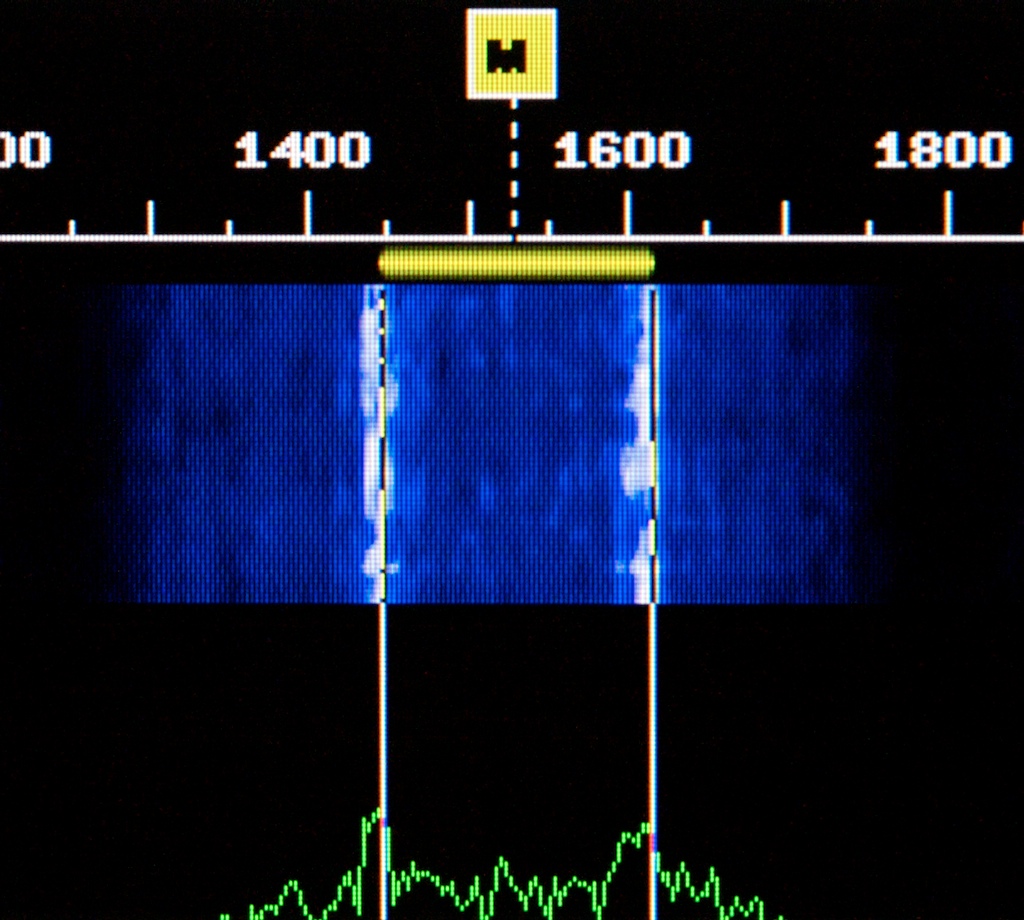
I worked the first day with the K3 in DATA A mode before remembering that AFSK A mode allows DUAL PB filtering to peak the mark and space tones. The DM780 waterfall screenshots below illustrate the difference far better than words:
K3 set to DATA A mode. BW = 400 Hz, Fc = 1530 Hz

K3 set to AFSK A mode. BW = 400 Hz, Fc = 1530 Hz, DUAL PB enabled
Note that the overall bandwidth in AFSK A mode is quite a bit narrower, even though in both cases the K3 was set to 400 Hz, and the distinct notch between mark and space tones is indicative of how effective this filtering mode works. Back in the pre-DSP days with the TS-930S and JST-135/245 transceivers and NRD-525/535 receivers, I used to use a Datong FL-3 audio filter which had a RTTY mode that accomplished the same thing, albeit at the AF stage.
DATA A and AFSK A each have their advantages. In DATA A (or AFSK A with DUAL PB turned off), I can open the bandwidth up and see a good portion of the band (I generally set DM780 to display 3 kHz on the waterfall and set the K3 bandwidth to match) and all the signals on the air, then select the desired signals with a point-and-click like I do in PSK31 mode. If QRM is a problem, I can crank down the bandwidth and shift the passband center frequency to pass only the station I’m working; once the QSO is complete, a quick tap-twist of the K3’s shift control recalls my wide settings and I’m back on the hunt. I rarely touch the VFO dial, all tuning is done with the mouse.
In AFSK A mode with DUAL PB enabled, however, the K3’s center frequency is fixed at 1530 Hz so all tuning must be done with the VFO. Also, the bandwidth is limited to 500 Hz max (which as shown in the image above is a bit less in practice, more like 250 Hz or so) making VFO tuning very touchy and slow (the 1 Hz fine steps must be used) and renders the waterfall useless for spotting other signals. But the filtering advantage is huge, especially in a contest scenario.
For me, it’s a no brainer — in the latter stages of the WAE contest I found myself using DUAL PB almost exclusively, occasionally switching it off and opening up the bandwidth if the band was quiet or if I’ve already worked the majority of the stations I tune across, since clicking on a waterfall makes it far easier to hunt and pounce.
DM780 facilitates the switch from narrow DUAL PB to wideband waterfall tuning easily: I first activate the center frequency marker (Tools>Program Options>Waterfall menu, or F8) and set it to match the K3 DUAL PB center frequency (1530 Hz). After finding a signal on the waterfall and clicking on it, I can then click the C button just above the waterfall to center it at 1530 Hz (HRD offsets the K3 VFO frequency to do this), and then activate the DUAL PB (press/hold the #6 key on the K3 keypad). The bandwidth is narrowed to 500 Hz, and the mark and space tones are perfectly positioned for decoding. To switch back to wideband, press/hold DUAL PB, and tap XFIL a couple of times to select the 2.7 kHz filter or use one of the filter presets to select my standard wide data setting of 3 kHz. This can perhaps be simplified to a one-button process using the new macro feature Elecraft just added to the latest firmware version; I need to check into that…
Note to K3 users: when working RTTY in AFSK A mode, either the radio or DM780 needs to be set to reverse, as AFSK A demodulates the lower sideband while DM780 looks for the upper. DATA A, however, works in the upper sideband.

CQ WWDX SSB 2009

My first major contest with the K3 — not a major effort, mind you, just a major contest, and it leaves me smiling. I could only squeeze in around 10.5 hours over the weekend, just enough to give the station a good shakedown under contest conditions and leave me hope for the future when I add an amp and a better antenna.
The K3 was a champ. With the latest DSP noise reduction tweaks I found it possible to run with RF Gain full throttle and not have the background noise kill me. Auto Notch took care of the tuner-uppers and the SWBC carriers on 40m. Left NB off most of the time as there was little QRN for a change, and the noise from the plasma TV was easily notched out with manual notch. All that was left was the DX.

Things started out rough Saturday morning (UTC) on 40m. Worked TO7M on my first call then spent a frustrating hour or so with no contacts. After a break things started to improve a little. Stayed at the mic until around 0600 UTC (2 am local) and landed 12 countries/7 zones on 40m, plus Canada (zone 3) on 80m. Worked 20m and 15m for about an hour and a half in the morning before going out and about, and again early Saturday evening (UTC Sunday) for about a half hour. Worked 13 countries/9 zones on 20m, and 3 countries/3 zones on 15m. Sunday saw fairly good conditions on 15m (14 countries/7 zones) and 20m (9 countries/7 zones).

Most of the DX I was able to work was in the Caribbean, Central and South America, but I managed to work D44AC (Cape Verde, an all-time new one on 20m), CN3A (Morocco), EA8/OH6CS (Canary Is.), three Hawaiians, and a few Europeans. 6W1RY (Senegal) was loud on 15m but I couldn’t break through the pile. Heard 4U1UN on 40m and 20m but only managed to work them on 15m.
It’s pretty frustrating to work a contest with 100 watts and a mobile antenna (without the benefit of an actual automobile underneath the antenna to provide a decent ground plane) but in the end, 10.5 hours at the mic netted me a bunch of new ones on 40m and 15m:
15m: 4U1UN (UN HQ), 8P (Barbados), CN (Morocco), EA (Spain), EA8 (Canary Is.), HI (Dominican Rep.), LU (Argentina), P4 (Aruba), PJ2 (Bonaire/Curacao), VP2V (British Virgin Is.), VP5 (Turks & Caicos Is.), and YV (Venezuela).
40m: FM (Martinique), HC8 (Galapagos Is.), HR (Honduras), KP2 (US Virgin Is.), PJ2 (Bonaire/Curacao), V3 (Belize), VP2V (British Virgin Is.), and XE (Mexico).
Totals:
Update 10/30: Was filling in some of the blanks in the HRD Logbook tonight and discovered one of the US stations I worked during the contest (K8PO) was in Maine. It didn’t immediately dawn on me because of the K8 prefix, but according to QRZ he’s in Union, ME. That’s #49 on my WAS tally sheet, just need Delaware now…

Subscribe FREE to AmateurRadio.com's
Amateur Radio Newsletter

 
We never share your e-mail address.


Do you like to write?
Interesting project to share?
Helpful tips and ideas for other hams?

Submit an article and we will review it for publication on AmateurRadio.com!

Have a ham radio product or service?
Consider advertising on our site.

Are you a reporter covering ham radio?
Find ham radio experts for your story.

How to Set Up a Ham Radio Blog
Get started in less than 15 minutes!


  • Matt W1MST, Managing Editor