Posts Tagged ‘JT9’
 New WSJT-X update
 March 12th, 2013 |
  Author:
 Hot news. I’ve just had an email from Joe Taylor K1JT informing me that a new version of WSJT-X, v0.6 r3045, has just been made available for download from the WSJT home page.
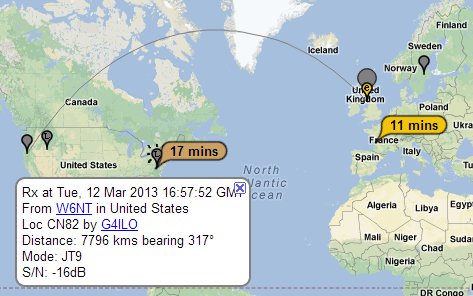
This is a must-have update which now includes spotting of JT9 signals decoded to the PSK Reporter website. (Tip: This needs to be enabled in Settings.)
Still to come are rig control – which I will hazard a guess will use hamlib – and integration with VK3AMA’s JT-Alert. Hopefully this will encourage current users of JT65 on HF to try the new JT9-1 mode which is 2dB more sensitive than JT65A and occupies less than 10% of the bandwidth.
Thanks Joe for giving us these great programs.
JT on JT9
I had an all-day session on the JT modes today. Actually, almost all of today’s contacts were on JT65A. I did listen for JT9-1 signals a few times but most of the time I only saw stations I had already worked before.
I put out a CQ call on 15m JT9-1 and Joe Taylor K1JT came back to me. I’ve decoded Joe’s WSPR signals numerous times and I’ve exchanged several emails with him but I had never had a radio contact with him until now, so that was a nice surprise.
Then it was back to JT65A. The contrast in activity was extreme. There were so many stations active I couldn’t find a space to call CQ, so I had to wait and pounce on new stations that called.
I must say that when using JT9 I miss the infrastructure that has been built up around the JT65A mode – the reverse beacons, the auto-spotting to PSK Reporter so you can see how far your signals have got, the JT-Alerts when you decode someone you’ve worked before. I especially need the B4 alerts. My memory is so bad I can’t remember the calls of stations I’ve worked before so I have often called people who I have worked only a couple of days earlier. I guess that due to the lack of new stations they probably don’t mind too much!
Ghosts on JT9-1
I spent a couple of hours working JT9-1 on 20m this afternoon. I only messed up once when I forgot where I was in the sequence. I could do with the software showing the outgoing message in the log as well.
WSJT-X update
A couple of days ago I had an email from Joe, K1JT, author of the WSPR and WSJT software. He had read my post about my first JT9-1 QSO in which I said that I missed the JT65-HF user interface. Joe pointed out that WSJT-X is in a very early stage of program development, and user input will surely help to define its future evolution. He asked what features of the JT65-HF GUI I found desirable.

I replied with what I thought were the key points that made JT65-HF easier to use. The result is a new version of WSJT-X which I have just tried. One change is that the horizontal ‘panadapter’ display scale now matches the waterfall when the user has set FFT Bins/Pixel greater than 1.
However, the real big change is that double-clicking on a decode line now generates a set of messages addressed to the second callsign on the line, regardless of where you double-click. It also sets the Tx and Rx frequencies to that of the decoded transmission and selects the first message in the sequence. This is a big time and error-saver in the few seconds you have between receiving a call and having to reply. You still have to set Auto to ON to enable the transmitter and select the next message in the sequence after the first has been received. Perhaps it’s a matter of personal preference but I don’t think it is a bad thing for the user to take control of this rather than have the program try to work out the appropriate reply. In other words, double-click on a decode when it is a CQ call or a reply to your CQ. Use the Tx n buttons to select the next message in the sequence as you progress through the QSO.
Try this latest version of WSJT-X. I think you’ll find it a big improvement. Now all we need is for Laurie VK3AMA to come up with a version of JT-Alert that adds logging and ‘worked before’ detection and there will be no reason not to switch to this much narrower JT mode.
My first JT9-1 QSO
PC4T Paul’s blog post about working Tasmania with 5 watts gave me the spur to try the new JT9-1 mode, so I installed the WSJT-X software. The user interface is quite a bit different to the older WSJT programs but most of the same controls are there. I never really figured out how to use WSJT, much preferring the simpler interface of Joe W6CQZ’s JT65-HF application.
 |
| Working SM5CS using JT9-1 mode |













