Posts Tagged ‘disability’
 Handiham World for 15 August 2012
 August 15th, 2012 |
  Author:
 Welcome to Handiham World.
Changing times, changing Radio Camp
Radio Camp has been a core part of the Handiham program, but it has not always been the same over the years. How can it change with the times? How is ham radio changing?
For the two decades plus that I have worked for Courage Center, the Handiham Radio Camps have been changing, but they have always included licensing classes and have been around a week long. I think the shortest was five full days; most were seven or even eight if you counted the two halves of the travel days. We offered a California camp and a Minnesota camp each year. The last California session was in 2008, just as the Great Recession was peeking above the horizon. Little did we know at that time how devastating that recession would be and how it would cause us to pull back some of our services. California camp was an early casualty, but we have managed to keep the Minnesota camp intact. Now, with the June 2012 camp session behind us, we must consider what we can do to make Radio Camp successful in 2013.
Before I tell you my ideas, I’d like to take a look at some trends in ham radio and life in general, so bear with me. Remember that what constitutes a “trend” isn’t always easy to define. Sometimes things change gradually over a long period of time – many years or decades, even centuries or millennia – while others change over a matter of months or a few years. It can be hard to tell when something is a short term trend or whether it is “permanent” for all practical purposes. Here are some trends that I have noticed:
- It is harder than ever to get people to commit to club meetings and organized group activities.
- The city parks and playgrounds are often nearly empty on a nice summer day.
- There are many two meter amateur radio repeaters with almost no activity.
- It seems as if every driver I see is talking on a cell phone.
- Two things that are getting hard to find are cassette tapes and photographic film.
- “LOL” has entered the vernacular.
- There is a lot of gray hair at ham club meetings.
- There is a lot of gray hair at lots of non-ham meetings.
- Most of us throw stuff out rather than getting it fixed.
- Social networks like Facebook are growing.
So what do I make of this and how does any of it relate to ham radio today and Radio Camp in particular?
Community:
Consider this: Ham Radio is a social network, and it predates Facebook by nearly a hundred years. It has many of the elements that web-based social networks do, including making friends and communicating with them on a regular basis, sharing news and information about other interests, and building technology. The “Amateur’s Code” was originally written by Paul M. Segal, W9EEA. in 1928. One of its main tenets is that the amateur is “BALANCED… Radio is a hobby never interfering with duties owed to his family, job, school or community.” Even in the early days of Amateur radio, it was observed that one could go overboard and miss out on real life by becoming too engaged in radio. Perhaps this wisdom should be applied to the digital distractions that empty out the city parks and playgrounds, and drain away participation from civic engagement. People are really, really connected these days. They cannot even drive around the block without making a phone call. Children have cell phones, and they communicate through interactive features in video games.
Computers:
Digital technology has married portability with computing. And NOTHING has escaped the long reach of the computer. It has gobbled up technologies like cassette tapes and photographic film and replaced them with digital audio and digital photography. It has transformed most areas of human endeavor. It has even changed our language to accommodate the compactness of texting. And with digital cellular service, all of this is available to nearly everyone near urban areas (which is most of us), at any hour of the day or night.
Overload!
Yes, we are digitized and connected. We can stay in touch with our circle of friends without ever being in the same place.
Is that good?
Well, yes, to a point. But the problem is that we are so connected that we get overloaded. No wonder we don’t look forward to a club meeting or a night out to dinner with friends. No wonder the playground is empty when the kiddos are thumbing away at their video game controllers in the family room. And no wonder the age of amateur radio operators is on the rise – there is lots of competition for engagement by other social networks and our ever-connected culture. Other clubs – not just radio clubs – have also seen their average age go up and up as young people just don’t engage as much as they once did in a pre-digital era.
How has ham radio changed?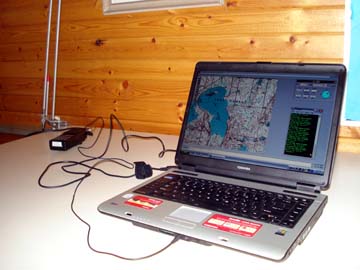
Ham radio is still a social network, but it is augmented by web-based social networks. Every ham radio operator on Facebook or Google Plus eventually uses these networks to discuss ham radio. Computing has transformed ham radio, with rig control, VoIP communications linking repeaters and computer users with smartphone users, and much more – too much to mention here. Digital technology has also made things cheap enough to replace rather than repair – and sometimes even to replace just because the new gear is magnitudes better, even though nothing is wrong with the old rig! All in all, while digital technology has been good to ham radio, it has sometimes been bad for ham radio in that it has buried everyone in constant connectivity that saps our will to participate in yet more communications. This gives us dead repeaters and sometimes poorly-attended meetings and events.
What about Radio Camp?
Radio Camp is quite a commitment for the campers, who have to take a week of their time at sometimes considerable expense if a lot of travel is involved, to attend. The camp session is also expensive to host, considering the preparation and camp rental along with a laundry list of other costs. Volunteers also incur similar expenses. Clearly this is a high-stakes event, so we need to make sure we are understanding the trends here. Is increased ever-connectedness growing and here to stay? It seems so. Is digital technology here to stay, along with increasing miniaturization and consolidation of functions? That seems a solid long-term trend as well. Is the marriage between ham radio and computing going to last? I’d say yes to that one, too. As I type this, I’m listening to 2O12L special event station calling CQ. The signal is being received by the Handiham TS-590S radio, remotely controlled via the internet.
Trending at Radio Camp…
So what seems to be trending at Radio Camp? For at least 10 years we have seen interest in the Operating Skills courses grow while in recent years it has become obvious that licensing courses are struggling. 2012 became a year without anyone attending camp to earn the Extra Class license. Operating Skills campers far outnumbered those who attended to study for a first license or upgrade. Let’s summarize and speculate on two camp trends:
- It is harder to attract campers who are interested in the licensing courses. We have to be careful here because we can’t assume that our Handiham members are no longer interested in licensing and upgrades to higher licenses, but they are less interested in doing so at a camp session and more likely to do it by using the on line audio lectures we offer at Handiham.org.
- There is growing interest in Operating Skills. This is at least a 10 to 15 year trend, and it may be driven by the new technologies and the desire to learn more about them as well as the need to simply meet other Handiham members in person and to have a week of fun. Camp has always been a place to meet old friends and make new ones, and our electronic connectivity can keep us connected after the camp session ends. Campers understand the balance between the real and the virtual and know that virtual cannot be a substitute for the real-life experience of attending camp in person. People are wanting to build real communities again!
A possible response:
So what do we learn from these trends?
Let’s put it this way: “The customer is always right”, as the old saying goes. Smart businesses listen to their customers and give them more of what they want. And what our campers want is more ham radio fun and less studying for licenses. What I propose is this:
- We continue to serve all of our Handiham members with our audio lectures for licensing or upgrades. Even those without computers can get our audio on Library of Congress digital player cartridges.
- This frees us to build and expand Operating Skills in the camp sessions.
- With more classrooms free because we don’t offer licensing classes, we can get our op skills people into separate spaces in small groups that make it easier to use the radios or have a discussion.
- Our instructors don’t have to worry about cramming an entire licensing class into a week and can concentrate on teaching operating procedures.
- We will have more time for traditional camp activities and the pontoon boat, plus field trips.
- We can set up more stations so that people with different skill levels and interests can get on the air more without waiting so long for a seat at the operating position.
- The Technician course would be replaced with a “Technician study group”. This would be a way to include a small number of unlicensed Handiham members in the week of Radio Camp, but it would only be a study group, not a complete course. There would be no more “Go to camp and get your license in a week.” Everyone there would have to be studying elsewhere prior to camp.
- VE Session: Maybe we have one, maybe not. We will see how this idea develops, but dropping the VE session gives us more time on the last day of camp to do our regular activities. The low pass rates in recent years do show that our traditional model of licensing classes is not effective. It might be better to review at camp and send the Tech students home to finish their studies and take the exams from their local VE teams.
- The emphasis will be on having fun through the week and being part of a community of friends. Learning can be fun, so we will learn about new things in Amateur Radio and learn how to be better radio operators.
Email me at [email protected] with your questions & comments.
Patrick Tice, WA0TDA
Handiham Manager
Handiham World for 01 August 2012
Welcome to Handiham World.
Troubleshooting 101
Last week’s problem showed up when I was using my shack’s two meter rig, which is powered by a switching power supply. Let’s just recap: It’s the one that’s typically used for the Handiham net each day. I’m located some distance from the N0BVE repeater system. (It’s in the western part of the Twin Cities Metro while I am in the east.) That means my reception of the N0BVE signal is not exactly perfect. I can hear an annoying hiss in the background when the repeater is active, but that’s easily eliminated with a flip of the switch on my external ClearSpeech speaker. This handy device has almost magical properties – really a very smart algorithm – that digitally cleans up the signal, virtually eliminating the noise. I don’t like to leave it turned on all the time because I also enjoy listening to Minnesota Public Radio with the extended receive feature of the transceiver, and MPR has enough signal to be rock-solid perfect. It sounds best with the external ClearSpeech speaker’s processing turned off.
One day I encountered an interesting problem. I had been listening to MPR when I last used the radio, and when I turned it on, that’s the station I heard. Since I wanted to monitor the repeater instead, I flipped the memory to the stored two meter channel. Then, noticing that the ClearSpeech speaker was turned off, I slid its power switch to “on”. At that very moment, the radio went dead – no power. I pushed the power button on the radio and everything was back to normal. I put up with this for weeks before finally getting the gumption to track it down.
The challenge was to guess what was going on. Rick, W0IS, was right on the money when he wrote:
My educated guess is that the negative power lead for the speaker had gotten disconnected, but it still got power because it was grounded through the radio, either through the speaker connection, or just from the two chassis touching somewhere. But my guess is that the radio’s negative power lead does not go directly to the chassis of the radio. There is some electronics between the black power wire and the chassis, and this electronics did not like the current running through it. I don’t remember the details, but I had something similar happen with my FT-817 (or maybe it was a different rig). The black wire came loose, but it was still connected to the negative side of the power supply through the chassis. It worked, but there were some flukes, since the black wire did not go directly to the rig’s chassis. Did I guess right? 73, Rick W0IS
Yes, and it turned out that the fault was in the ground side of one of those popular snap-together connectors in common use today. The connector was probably not properly installed in the first place, or else the spring tension inside was just so weak as to allow the ground side to lose contact if the connector was bumped or the power supply cable got moved in just the wrong way. It’s worth noting that had the powered speaker had a grounded metal cabinet with a common grounding lug and had both the radio and the speaker been grounded to a common station ground, this problem would likely not have even shown up. As it was, the ground had been completed through the speaker’s 3.5 mm audio plug’s grounded side to the radio. Obviously this is not the ideal way to power things! In any case, the fix was as simple as it could be – just repairing the power supply DC cabling fixed the problem.
Station grounding is important, though. Grounding equipment to a common station ground can help eliminate RF circulating in places where it shouldn’t be as well as protecting equipment from static discharges and keeping the gear at the same potential to avoid electrical shock hazards.
Email me at [email protected] with your questions & comments.
Patrick Tice, WA0TDA
Handiham Manager
Handiham World for 18 July 2012
Welcome to Handiham World.
Bucket list!

Photo: I found the problem. The confabulator gear is stripped. You’ll need a new one if you want this Vega to make it back to Podunk.
Hey, readers and listeners! It is certainly high summer here in North America and the temperature is so high and the humidity so oppressive that we are definitely not thinking clearly. That is why we have come up with this “bucket list” which we hope to complete before we die.
1. Landing a single engine plane on the beach.
2. Changing the transmission in a Chevrolet Vega.
3. Making yogurt from scratch.
4. Setting the tone and frequencies on a mobile radio while driving.
Well, if you are like me you have probably done the first three of these things without any particular problem, but you have never been able to safely program a mobile VHF/UHF radio while driving a car. In fact, programming a radio while driving can be a frighteningly dangerous experience, much worse than sampling that first icky-looking spoonful of homemade yogurt or dropping a Vega transmission on your toes. That is why the radio programming is not checked off my bucket list. In fact, programming a radio while driving instead of watching the road is a good way to assure that you will probably die before completing most of the items on your bucket list.
I started thinking about this particular problem when I read the correspondence section of the August QST wherein astute letter writer K2GW talks about making the programming process for VHF/UHF radios more user-friendly. The use of subaudible tones on repeater systems is so common as to be expected, and most of us will have to admit that these systems do an excellent job of preventing the repeater from ever actually being used for anything, but mostly from ever being successfully accessed by anyone trying to keep a car between the ditches while traveling through the area supposedly served by the repeater.
Of course the subaudible tones might be necessary to prevent interference from distant repeaters should there be a band opening or from other nearby RF sources or an alien invasion where the flying saucers transmit on the repeater input. I get that. But the problem remains that unless you are able to preprogram your radio for the repeaters along your route, you are likely going to be out of luck when you try to simply access them by punching a receive frequency into the VFO and letting the radio’s built-in offset function set the transmit frequency according to the band plan. One possible workaround is to listen for activity on the repeater in question and then punch the tone scan function button to try to locate the correct subaudible tone. If this works and you do not end up in the ditch (especially dangerous in Florida where hungry alligators find the ditches quite attractive), then you might be in business. The more likely outcome is that you will drive entirely through the repeater’s coverage zone without hearing any activity.
The ARRL TravelPlus® repeater directory on CD-ROM does provide a way to map and program radios along a planned route, so it is a good resource that allows you to program your radio well in advance of your trip. Programming your radio while sitting in the driveway is one heck of a lot safer than meeting an alligator for lunch. Still, you may need to program a radio while in motion. The safe way to do this is for you to pay full attention to the radio by letting someone else do the driving. When my wife and I take car trips, I feel safe enough fiddling with the radio while she pilots the car. While this division of labor keeps the car out of the ditch, it does not necessarily ensure that one will be able to access or make a contact on a repeater.
One time, on a trip through alligator-free central Illinois, I tried a repeater that I really, really wanted to use and that was programmed into my radio already, because I had looked it up in my repeater directory. I heard the repeater identify and decided to throw out my call sign.
Silence.
Okay, so I upped the power and tried again.
Silence.
Obviously, the subaudible tone that I had programmed was incorrect. So I set the radio to tone scan and hoped for someone to transmit on the repeater. Well, that didn’t happen. I guess I probably could have gone through every possible subaudible tone while kerchunking the repeater and throwing my call sign out, but somehow that didn’t seem to be worthwhile. Instead, I switched to VFO mode and 146.52 MHz where I had a nice QSO with a truck driver who was passing through. The subaudible tone system had certainly done its job of preventing interference and any actual use by mobile stations, that’s for sure. Later, after we got back home from vacation, I discovered that the subaudible tone for that particular repeater was incorrectly listed in the directory.
I’m not sure what the answer to this partly technological and partly behavioral issue is with VHF/UHF repeater systems. All I know is that you cannot make things that difficult to use because prospective users have many other alternative means to communicate and they will vote with their feet and go somewhere else. For example, I can easily bring up the node of my favorite repeater on my Android phone by using the EchoLink application. I recommend doing this while you are sitting in the passenger seat rather than trying to steer the car. Once I am connected on EchoLink, all I need for reliable communications is a cell phone data signal. I can talk to my friends who are regulars on my preferred EchoLink-enabled repeater system.
Would I prefer to use the radio in my car to make a local contact? Certainly! But hey, repeater owners out there – you might consider connecting your repeaters with the world via IRLP or EchoLink and make sure that your frequency and tone information are correctly listed in repeater databases and on your club website. And if any of you local stations are listening on the repeater and hear a mobile station give a call, take a minute to have a short conversation and make a new friend! Maybe the technology will improve to the point that radios will be easy enough to use while driving so that one day I will be able to actually use repeaters I encounter along my mobile route.
Today’s safety tip: Don’t feed the alligators. Also, but not safety-related, the QST audio digest in DAISY format is now available for our blind members in the DAISY section. You can hear me read the correspondence section with the K2GW letter.
The long-range forecast: Speaking of Podunk, localism is an endangered species. As applications for mobile devices like smartphones proliferate, people will listen to the broadcast stations they prefer, avoiding the local stations – especially when they are on the move, traveling by car. When the typical car driver would one time tune around for the local yokel stations along the route, the trend will favor simply staying tuned to the internet station they have always liked. Satellite radio is already making such inroads into localism. The same thing is going to happen to local repeater systems. If the repeater system is not linked, it may be doomed to obscurity. Repeater owners who think EchoLink “isn’t real radio”, take note.
Handiham World for 11 July 2012 (early release)
Welcome to Handiham World.
The band police
Recently I got an e-mail from a new amateur radio operator who told me about an encounter with an unpleasant character on the bands. This new operator was following all the rules of identification while enjoying an EchoLink contact with a DX station. Someone jumped in and told him he should get off the air if he wasn’t going to identify. Interestingly enough, the guy with this unsolicited advice didn’t identify his station at all. The whole incident confused and worried our new amateur radio operator. It wasn’t exactly a way to feel welcomed on the amateur radio bands, was it?
Let’s deconstruct this incident.
First off, our new amateur radio operator says that he was following all of the rules of identification and I believe him. Because it was an EchoLink contact, it is possible that because of delays in the various interconnected systems and possible packet loss, the station that broke in with the comment about identification may not have been able to hear all of the conversation. So there could be a technical issue here, but there is certainly no need to break into a conversation to rudely chastise someone with unsolicited advice. After all, all identifications were being done properly and sometimes band conditions or Internet connectivity can change what a third station might hear. Even if there is a compelling need to break in, the best way to do so is with one’s callsign, not with an unidentified scold.
What our new amateur radio operator had the misfortune to experience was a visit from one of the lower life forms on the amateur radio bands: the band police. Who knows if they even hold valid amateur radio licenses? If they do, do they think the rules about identification do not apply to them when they are busy butting into another conversation to complain about something they don’t like? Well, I suspect that these “band police” are pretty under socialized in other respects. I’d be willing to bet they are blowhard know it all’s at the Field Day site and at the radio club meetings. For them it’s “my way or the highway”, and that probably extends to other areas of life aside from amateur radio!
We all know that there are unpleasant and even downright toxic personalities out there, so in amateur radio as in the rest of life we need to have a strategy. Just as you would avoid contact as much as possible with an unpleasant and unreasonable neighbor or a pushy bully at the office, you can devise a strategy to minimize your contact with unpleasant people on the amateur radio bands. You may wonder how this is possible when they break in with unsolicited comments, but the best advice is the long-standing recommendation from experienced operators: simply ignore them. Don’t acknowledge them. Like Internet trolls, they like to interrupt and disrupt with off-topic and controversial or unsolicited comments. The more you engage them, the more you feed their egos. Ignoring the band police may not be as satisfying as telling them to mind their own business, but if you go down that road you are asking for trouble. Yes, there may be times when the situation gets so bad that you may need to escalate it by bringing it to the attention of the ARRL official observers in your area. One thing you should NOT do is let an incident like this spoil your enjoyment of the amateur radio bands. Almost all amateur radio operators are friendly, helpful, and understanding – and especially so when it comes to welcoming new amateur radio operators to a lifetime of fun on the bands.
This is a reminder that the Handiham office is open only with very limited services and hours this week. No renewals or new membership requests can be processed until July 16.
Email me at [email protected] with your questions & comments.
Patrick Tice, WA0TDA
Handiham Manager
Handiham remote base stations up & running, but…
…there are a couple of issues.
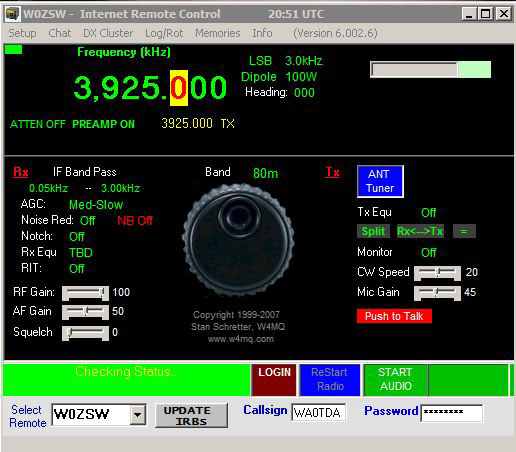
While W0EQO has returned to complete service following severe storms which took down over 20 trees at Courage North, W0ZSW remains only marginally useful. The problem is the internet connectivity and network problems at the Handiham headquarters office at Camp Courage. I do plan to spend some time working on these problems this week, which unfortunately means even less time to answer phone calls and emails or to work on the new Extra Class lecture series. Both stations remain accessible via Echolink for receive, but with occasional dropouts on W0ZSW.
Handiham World for 04 July 2012
Welcome to Handiham World.
We wish our USA members a happy Independence Day, and our Canadian members a belated Canada Day.
High summer here in North America isn’t exactly the best time to explore the HF bands, given the constant parade of interference-generating thunderstorms marching across the continent. While bands like 160 and 75 meters may seem like wall-to-wall noise, there are always some intrepid operators sticking to their usual schedules. The best time on both bands is usually early morning before solar heating and convection starts cooking up more lightning and thunder and before absorption becomes too odious, a real problem for propagation as the sun climbs higher in the sky. Summer is the traditional sporadic-E skip time of year, so it doesn’t hurt to keep checking out the VHF bands. A clue is that you might hear repeater identifiers that you don’t recognize because they are far outside the usual repeater coverage area. If you hear stations on 10 meters, you might also check out the 6 meter band. You never know – perhaps there is an opening, and if you are trying to work all states, such openings can be pure gold.
Summer, especially post-Field Day, is often considered the least active time of the ham radio year. Radio clubs may shut down for a few months in the summer – usually June, July, and August – and resume operations in September. The conventional wisdom is that people are busy doing summer stuff like taking vacations, working in the yard, boating, fishing – you name it, ANYTHING but sitting inside at the radio! But summer weather might chase you indoors with its heat and humidity. Maybe it wouldn’t be a bad time to get on the air after all. Besides, summer is a good time to get antenna projects done. Let’s list some summer ham radio activities:
- Put up or repair your antenna system.
- Check out VHF propagation on 6 and 2 meters. Try SSB on both bands. Log your contacts and send us a brag about your farthest contact so that we can publish it and make you famous.
- Go bicycle mobile!
- Take ham radio on vacation with you, both as a mobile station in the family car and as a portable station.
- Check into the daily Handiham Echolink net. If you have a smart phone, try checking in via the Echolink app. (Android and iPhone)
- Try out the Handiham HF remote base stations. Say hello to the folks on the always-friendly PICONET on 3.925 MHz.
- Build a kit.
- Study for a license or upgrade.
- Try setting up your own EchoLink or IRLP node.
- Take your handheld radio with you on a walk and find out how many contacts you can make on local repeaters.
- Set a goal to work as many stations as possible on 10 meters. Log all your contacts.
- What?!! You don’t have a logging program? Install XMLog and learn to use it. http://www.xmlog.com (Yes, it is blind-friendly, and it’s free.)
- On the water? Take ham radio with you on the boat. Don’t drop the radio in the water.
- New to blind-accessible technology? Try downloading DAISY book software and reading a DAISY book with it. Make it a ham radio book from the Handiham website. (More on this in a minute.)
I could go on and on (maybe I already have), but you get the idea. Now let’s get out there and have some ham radio fun!
This is a reminder that the Handiham office is closed this week and open only with very limited services and hours next week.
Email me at [email protected] with your questions & comments.
Patrick Tice, WA0TDA
Handiham Manager
Storms sideline Handiham remote base stations:
Severe storms in northern Minnesota last night had disrupted internet service to W0EQO at Courage North. The station returned to service around 12:50 PM on 3 July 2012.
W0ZSW is still offline following storm damage and power outages that disrupted our internet and networking equipment at Camp Courage. It was the first time in the history of our double remote system that both stations have been offline at the same time due to storms. Due to limited staffing at this time, we are unable to resolve the problems quickly.
Solar Activity Forecast: Solar activity is expected to be moderate during the period (03 – 05 July) with M-class flares expected from Regions 1513 and 1515.
Geophysical Activity Forecast: Geomagnetic field activity is expected to remain at unsettled to active levels on day 1 (02 July) as CH HSS effects persist. Activity is expected to decrease to quiet to unsettled levels during days 2 – 3 (04 – 05 July) as CH HSS effects gradually subside. The CME associated with today’s M5/2b flare is not expected to disturb the field during the forecast period.
Handiham World for 13 June 2012
Welcome to Handiham World.
We are back after a week at Radio Camp. There are lessons to be learned.
But first, I want to take you back to the early 1990’s, when interest in public service communications saw a real growth following the 9/11 attacks. Ham radio operators dusted off their VHF/UHF handheld radios and headed to training sessions. It was at one such event that many of us in my own local radio club found out how little we actually knew about operating our radios. In an embarrassing exercise that really only called for some very simple operations to be performed on the handheld radios, we discovered that many – maybe most – of us didn’t know how to enter frequencies, set offsets, and enter subaudible tones. In a real public communications emergency all of these things might leap to the fore as necessary skills. After all, plans change, interference happens, and repeaters can fail. We have to be ready to deal with all of these things – and more.
Photo: Matt, KA0PQW, talks on an HT while Phil, K9HI, leads a critique of the emergency communications exercise.
Now fast forward to Handiham Radio Camp 2012. Our scripted emergency exercise, written and led by volunteer Phil Temples, K9HI, called for a post-tornado communications response. Handheld radios and one mobile rig (for the net control station) were programmed and ready to go. Unbeknownst to the participants, a scheduled “repeater failure” took the camp repeater off the air mid-exercise. There was a good deal of scrambling to figure out a workaround during that part of the exercise. As a result, the mobile rig at the net control position was so out of whack from random button-pushing that it required a hard reset to return it to the original factory settings. Some participants had not programmed their handheld radios at all prior to the exercise and were left scratching their heads or borrowing radios from someone else.
This happens at virtually every camp, so we came up with an idea to test for HT skills. (Thanks, AB8WF.) We will be letting you know what is going to be involved in this skills test, more about which will be featured in the August Worldradio Online. In addition, we also are mulling over an operating skills exam in written format and an HF skills exam. This would give our Handiham members some new goals to work toward. We would provide an actual certificate for each “element” of our new skills testing. It would be fun to earn each certificate, but it would also help operators to focus on really learning their equipment.
We also had a VE session at camp, so here’s a photo of Rachel, KC0VBV, receiving her certificate of successful completion of examination from Dr. Dave Justis, KN0S. Congrats, Rachel! Our thanks to the Stillwater Amateur Radio Association (SARA) for fielding the VE team, and to VE Team Leader Shel Mann, N0DRX, and all the VEs. Following the VE session Shel and XYL Mary, N0DXH, stuck around to help us take down the wire antennas.
Photo: Rachel, KC0VBV, receives her certificate of successful completion of examination from Dr. Dave Justis, KN0S. 
Photo: Bill, K9BV, teaches the General Class. Here he points out a sine wave. “What goes up must come down.” 
Photo: Lucinda, AB8WF, taught one on one computer lessons and brought computers up to date, which included installing Microsoft Security Essentials. She also taught remote base operation with JAWS. Lucinda also suggested the operating skills certification and will continue to work with us on the lessons and testing.
Of course old man Murphy is not ever far from any antenna project, so the center insulator and 450 ohm feedline got REALLY stuck in the tree we used as the dipole antenna’s center support. We did have some wind during the week, so we will blame it on that rather than any of our expert antenna wranglers! Here is a photo of Dr. Dave attaching the remnants of the 450 ohm line to the back of my Honda CRV so that I can drag the feedline out of the clutches of the greedy tree with some serious horsepower. This proved successful, and although the feedline was somewhat the worse for wear Dr. Dave did collect the pieces for use back at his home QTH. He isn’t afraid of splicing the somewhat ragged pieces together!
Photo: No, we are not going to run 450 ohm open-wire ladder line to a mobile W0OXB Special antenna!
Although we foiled Murphy’s antenna tangle, he wasn’t through with his mischief. On Thursday evening I discovered that the Drupal-powered Handiham.org website had gone down and that problem persisted through Friday and the weekend. Here’s the story:
Handiham.org returns to service following SQL failure
The database failure at Handiham.org has been resolved. Our thanks to the kind technical support people at Network Solutions for their assistance.
The SQL database required by Drupal failed due to a problem with the table structure. This proved to be a bit beyond the pay grade and capabilities of your humble Handiham Manager to figure out, so I had to ask the folks at Network Solutions, our hosting service, for assistance.
The problem surfaced on Thursday, June 7, while we were at Handiham Radio Camp and as a result of being very busy at camp I didn’t notice that anything was wrong until very late Thursday night. Friday was travel day, so everyone was getting their travel back home underway and there was really no time to think about the website until later on Friday afternoon when I myself got back home. By that time it was quite late in the week and when I called Network Solutions I knew it would probably mean a weekend wait for a regular business day crew to be back on board – unless the staff could help me with a relatively simple problem. I spoke to my tech support guy, another ham who of course knew all about us, and we scheduled the service for this week. I am happy to report that the site has been restored to service as of this Tuesday morning, right on schedule. Good work, Netsol!
Of course we apologize for any confusion or inconvenience this outage may have caused. I guess one good thing about it happening in the summer was that everyone seems to be so preoccupied with summer outdoor activities that not too many people noticed!
*HANDIHAM* Echolink node guy visits camp!
Photo: Left to right – Matt, KA0PQW; Susan Tice; Pat, WA0TDA, and Handiham volunteer Mike, N0VZC, who hosts the excellent *HANDIHAM* conference which makes the worldwide Handiham net run smoothly on a single high-capacity node. Mike and Don, N0BVE (not pictured) visited to help the camp with some networking. I think he’s the guy who took this photo.
Post-camp cute puppy alert!
Photo: Jasper takes a well-deserved snooze after a week at Handiham Radio Camp. He was an enormous hit among the campers and staff, probably due to his overwhelming super- cuteness. Thankfully he only uses his amazing powers for good.
Email me at [email protected] with your questions & comments.
Patrick Tice, WA0TDA
Handiham Manager

Handiham World for 30 May 2012
Welcome to Handiham World.
You can do it!
Listen to this podcast in its entirety here: http://handiham.org/audio/handiham053012.mp3
Today, just as we did last week, we are going to begin with Troubleshooting 101 as part of our initiative to help new ham radio operators (and even some of us older ones) learn how to do some basic troubleshooting for ourselves. Yes, it can be tempting to ask someone else to do things for us. This can become a bad habit when it keeps us from learning new things, especially things that we could – with a bit of practice – learn to do for ourselves. Knowing these basic things can serve us well in the future when no help is available.
Troubleshooting 101

Let’s get to today’s troubleshooting question:
Question: I carry my HT everywhere, and recently I was outdoors when it started to rain. Luckily I was close to a picnic shelter and was able to stay dry until the rain passed. It did get me thinking about what I would do if my radio did get wet though. Any ideas?
It is summertime, and we do want to be outdoors, and naturally we want to take ham radio along for the walk! Part of always carrying a radio is the possibility that you – and the radio – will get wet. But there is wet and then there is really soaked. The two are pretty different, but you are probably going to want to act quickly in either case to protect the radio.
Recently I read a story in WIRED about how some really high percentage of cell phone users drop their phones in the toilet. I think it was something like 25%! Unless you have a waterproof radio, you are probably not going to be able to fish it out of the bowl in time to avoid damage.
Let’s assume you have a typical HT that is not marketed as waterproof, submersible, or even water-resistant. It can likely survive a bit of surface moisture, such as getting caught in a rainstorm, as long as you act quickly to get it out of the direct rainfall, power it off, and dry the outside as quickly as possible. It might also be a good idea to remove the battery. If the radio falls into the water, it is a different ballgame. As soon as the radio begins to sink, water pressure increases and forces moisture into the radio’s case in a way that does not happen in a simple rainstorm. That means that you have to act very quickly to get the radio out of the water and remove the battery. The next step is to dry the outside of the radio as quickly as possible, then (with the battery still removed), place the radio and battery pack in a dry container with a desiccant, sealing the container so that the moisture is drawn out of the radio by the desiccant. Are you wondering what a desiccant is? I am sure you have run across those little packets of silica gel that are sometimes packed with electronic devices. They remove humidity that might damage the electronics. If you don’t have silica gel packets handy (most of us just throw them away because they have a finite life anyway), you can put the radio in a container with uncooked rice overnight. The rice will help to draw moisture out of the electronics. When you dig the HT out of the rice in the morning, put it on a nice, dry paper towel. Is there any sign of moisture still on the towel? If so, you might need to repeat the rice treatment. In any case, you will not be powering up the radio for days – that means keeping the battery out. You want to make sure that the radio is completely dry before putting the battery back in. If you can perform the drying out procedures in an environment with already low humidity, that is best. An air-conditioned, dehumidified house trumps a humid garage workbench. I would avoid using a hair drier to try to heat the radio. You do not want to add heat that can speed up chemical reactions or damage the electronics or even melt the case. I would not want to try the radio for at least a week so that I was darned sure all the water was out.
Let’s consider the best plan of all: prevention. It is much better not to have to dry out a wet radio, so we want to follow some basic procedures to keep our electronics dry, rain or shine. If you take your HT everywhere, always keep a small plastic bag in your pocket. The plastic bag can be used to stow your electronics should you get caught in a downpour. Since I have my little doggie Jasper with me when I am out walking, a dog waste bag does the job of radio protector in an emergency. These bags come in little rolls and are available anywhere pet supplies are sold, or you can just stuff a zip-style plastic food bag into a pocket. If you are boating or in a wet environment, you can just store the HT in a plastic bag when it is not in use.
You should also plan ahead, developing good habits when around water. Keep your HT in a case that will keep it from falling out. If you keep it in a pocket, be sure it is a pocket that is deep enough to keep it from working its way out when you sit down. One danger of using pockets instead of a belt clip and case is that you can forget your cell phone or HT in that pocket and run it through the washing machine. Don’t laugh – it happens! If you do use pants pockets for your radio and phone, get in the habit of quickly patting each pocket when changing clothes so that you will feel the HT or phone and remember to remove it. At Dayton earlier this month I was using the restroom in Hara Arena and there was some guy sitting in one of the stalls having a phone conversation on his cell phone. Not only is this kind of clueless socially, it is also the reason cell phones go for a swim in the toilet. Never use your HT or phone in the bathroom, because the bathroom has more water hazards than the golf course after a thunderstorm. Similarly, it is best to keep the HT somewhere away from the kitchen counter, another place where spills happen and are even expected.
Finally, there is the drenching in something other than plain water. I’m afraid there is not much you can do about a radio that takes a salt water swim or a hot coffee bath. If disaster happens, the procedure is the same: remove from the liquid as quickly as possible while watching out for your own safety, take out the battery, and dry out as quickly as possible with absorbent towels on the outside and the dry rice treatment. Hopefully salt has not penetrated the radio, but if it has there may not be much you can do. The salt deposits left behind can become conductive in high humidity conditions, causing shorts. I am not a fan of disassembling electronics to give them a cleaning with distilled water or solvent, as that is a job for trained bench technicians. Considering the cost of bench time, it is likely that a salt water swim will mean it is cheaper to buy a new radio. Similarly, a drenching with sugar-infused soft drinks can leave a real mess of residue behind. If this mess gets onto circuit boards it can also absorb moisture and cause shorts, even after the drying out process. It will also gum up push buttons on the HT’s keypad. The bottom line: Don’t have your HT anywhere near such possible spills in the first place. If one does occur, follow the emergency procedure:
- Remove the radio as quickly as possible from the spill.
- Remove the battery.
- Blot the surface with a fresh paper towel or other absorbent cloth.
- Dry in a container of uncooked rice.
While your gooped-up radio is drying out, you can start shopping for a new one. It never hurts to be prepared for the possibility that your old HT is down for the count.
Email me at [email protected] with your questions & comments.
Patrick Tice, WA0TDA
Handiham Manager
A dip in the pool

It’s time to test our knowledge by taking a dip in the pool – the question pool, that is!
Today we are busting our brains with a question from the Extra Class pool:
E5C16 asks: “In polar coordinates, what is the impedance of a circuit that has an admittance of 7.09 millisiemens at 45 degrees?”
Possible answers are:
A. 5.03 E-06 ohms at an angle of 45 degrees
B. 141 ohms at an angle of -45 degrees
C. 19,900 ohms at an angle of -45 degrees
D. 141 ohms at an angle of 45 degrees
Now, you may be asking yourself, “Why should I worry about this particular question when the current question pool is only good until the end of June?”
The answer about why you should understand this question (and more importantly the answer) is that it is exactly the same question, including the question number, that appears in both the current pool AND that brand-new pool!
We can’t go into super-detail about how to work these out, but you can find the process easily enough in the ARRL or Gordo books or in the Handiham audio lecture series.
Briefly, here is the skinny:o Ohms at such and such an angle. If you have forgotten what admittance is, it is simply the reciprocal of impedance. If you don’t know what impedance is, you need to go back and hit the books. Anyway, here is how such a conversion works:
- The absolute value of Z (the impedance) equals 1 over .00709 (which is the 7.09 milliseimens converted into seimens by moving the decimal point three places to the left. The “1 over” part comes from the fact that we are working with a reciprocal, which means we flip the numerator and the denominator to get “1 over some other number”, which is a reciprocal.
- With me so far?
- Good; so now you just divide 1 by .00709 using your calculator. You get 141.0437 etc., etc., so you round that to 141 ohms.
- You look at the question and the possible answers again. Hey, answers B & D each have 141 in them! Now you have a 50-50 chance of guessing which one is right!
- But the question specifies “…at 45 degrees”, and we have done nothing with that number yet. We need to consider that phase angle “theta” equals zero degrees minus the 45 degrees we have been given. So zero minus 45 equals minus 45 degrees.
- Now we look at our two possible choices. Answer B is the one that says 141 ohms at an angle of -45 degrees, while answer D says 141 ohms at an angle of 45 degrees. Because you have cleverly subtracted 45 from zero to get -45 degrees, you pick answer B, 141 ohms at an angle of -45 degrees.
Here is a little memory trick: Always remember that admittance questions involve a reciprocal, you you are going to be dividing some small number into one. It will be expressed as one over the other number. You need to remember to convert to seimens by moving the decimal point. Then if the angle you are given is positive, such as 45 degrees, the final answer will likely be negative, such as -45 in this case. The reason for all this angle stuff is that we are not dealing with direct current. We are dealing with alternating current, which is always changing, so we have to pick a point in its alternating cycle where our specifications can be listed numerically.














