Posts Tagged ‘Computers’
 Microsoft Arrogance
 March 23rd, 2011 |
  Author:
 I had seen rumblings in various forums that the new Internet Explorer 9 caused problems for some websites so I thought that I had better install it for myself in order to check mine. The installation process itself was alarming. A window came up to say that various programs that included system functions were in use and had to be closed. I agreed, while making a mental promise to myself that if this f***s up my computer then I’m switching to Linux for good!
I also saw my security software disabling itself. If any other program from any other source did that I would bail out quick. It really is sheer arrogance on the part of Microsoft to expect users to allow an installer to do things that security common sense says it shouldn’t, just because the software came from Microsoft. I wonder how long it will be before the malware guys set up fake IE9 downloads which exploit the knowledge that the setup disables security to load bad stuff on a computer?
After the install was finished the computer had to be restarted. Windows just loves being restarted. I wonder how many millions of hours of productivity are lost every year waiting for Windows to restart after an update? But I was now ready to try Internet Explorer 9.
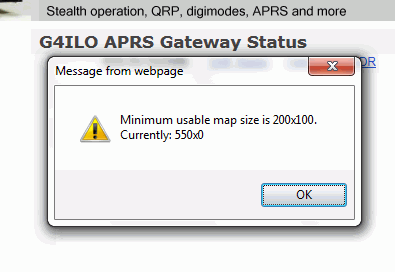
The first thing I spotted is that the embedded APRS maps from aprs.fi on my website and also the WOTA website no longer work. Instead of the expected map you get a message box that says: “Minimum usable map size is 200×100. Currently: 550×0.” This is something that has worked on every single browser on every computer platform until now. It is another example of Microsoft arrogance to release a browser that is incompatible with everything that went before, knowing that because so many people use their lousy browser website developers will have to change their sites to make them work with Internet Explorer.
On my QTH Information page where I had an embedded map from Google Maps showing an aerial view of the neighbourhood centered on my house, the map is replaced by a # and a pop-up panel appears at the foot of the page to say “Internet Explorer has modified this page to help prevent cross-site scripting.” I have no idea what that’s all about. I guess I’ll just have to dump the maps.
I gave up writing software except for my own use because Microsoft made it impossible for self-taught amateurs like myself to write programs that work on all the different versions of Windows. Now it seems they are trying to make it impossible for self-taught amateurs to create web pages. Why can’t they keep things simple, and if something worked why did they have to break it? Perhaps it’s time to reinvent those little badges that people used to put on websites in the 1990s, only this time the badge would say: “This website works best in anything other than Microsoft Internet Explorer.”

Happy birthday, ZX81
Thirty years ago today the Sinclair ZX81 was introduced to the world. The world’s first affordable personal computer, it wasn’t in fact the first home computer I had owned. That had been a Nascom 1, a Zilog Z80 based machine with just 1Kb of RAM, which I built from a kit – all 1,400 soldered joints of it, using the same Antex soldering iron I still use today.
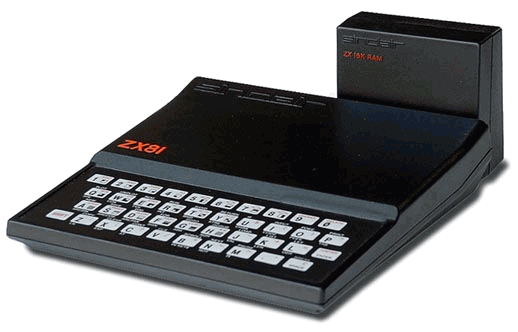
The ZX81 was also offered as a kit as well as a ready built version, so naturally I ordered the kit. I seem to remember it cost £49 – much less than the Nascom. I don’t remember how many soldered joints there were, but there were only four main chips. It was a much easier project to build. The ZX81 also came with just 1Kb of RAM. But unlike the Nascom, it had a built-in BASIC interpreter so you could still do more with that 1Kb and you didn’t have to program it in assembly code.
Innovative design was used to cut the cost of the ZX81. For example, instead of a dedicated display processor the Z80 CPU generated the display. Whenever your program executed, the screen went blank. The screen was an ordinary black and white TV. Programs were loaded and saved using a cheap cassette recorder. That was read and written by the CPU too, which generated wild patterns on the screen while it neglected its display duties. The keyboard was a plastic membrane type. It was horrible to type on.
Later I upgraded the memory to 48Kb using a third party RAM pack (the standard RAM pack sold by Sinclair was only 16Kb.) This, too was built from a kit. Like the Sinclair one, it fixed to the rear of the machine using an edge connector, with no other fixing. Every ZX81 owner is familiar with the term “wobbly RAM pack”. One accidental jolt could interrupt the connection and crash the computer losing all your work. Ah, those were the days!
As a radio ham, I naturally was interested in writing ham radio software for the ZX81. I wrote several programs including a morse tutor, which used a machine code routine for sending the actual code. I think I have written morse tutors for every type of computer I have owned – it’s amazing that I am still so bad at reading the code! An article describing the morse tutor and a memory keyer for the ZX81 was published in Short Wave Magazine and was one of my first published articles.
I can still remember the excitement of home computing in those early days. Today’s PCs, vastly more powerful and capable though they are, just aren’t as interesting. Back then, home computing was very much a hobbyist’s game. We were pioneers. Now everyone and his granny has a computer, and programming has become more or less a job for professionals. I do miss those old days!
Thank you, Clive Sinclair, for bringing us these wonderful toys. Happy 30th birthday, ZX81!

Unreliable connection
The webmaster of Summits On The Air kindly gave me permission to access the SOTA Spots RSS feed from the Wainwrights On The Air website so that spots for SOTA summits that are also Wainwright summits can automagically appear in the WOTA system. I started work on that the day before yesterday. I also noticed that APRS objects for the position of Mads, M/LA1TPA/P, were not appearing because the length of his call exceeded the maximum length of an APRS object name. I implemented a fix for that by lopping off the /P if the name would exceed 9 characters. Yesterday morning I did not receive any SOTA alerts over APRS at all so I wondered if I had broken something.
It didn’t help that I had trouble accessing aprs.fi to see whether the APRS spots were getting out. That might have given me a clue as to where the problem lay. As it was, it took quite a lot of time before I realized that the problem was my internet connection. Although the ADSL was up and working, I was having trouble connecting to various sites including the APRS-IS Tier 2 servers and packets were being lost along the way.
This forced me to address another problem. Currently all the APRS packets are sent by the WOTA website calling a file on a web server running on a network attached storage (NAS) backup device running in G4ILO’s shack which is actually a little Linux computer that runs Apache. This server hosts the script that sends the packet to the APRS network. I had tried running the script on the WOTA web server itself but it hadn’t worked and I didn’t know why so I decided to go for the path of least resistance since life is too short for making computers work the way I want them to.
Apart from the problem of connectivity with this solution there is also one of continuity. I don’t like to run computers 24/7 because it adds a significant amount to an electricity bill that is already high due to the fact that there are two people using even more computers and equipment home all day. Also, Olga is not happy about leaving any equipment running when we go away. Whilst it is unlikely that anyone will activate summits in the middle of the night they are certainly going to do so while we are on holiday. So I really need to send the APRS alerts entirely from the web server.
After another couple of hours of getting nowhere I filed a support ticket with the web hos. They replied that they block port 8080 which is the one used to post APRS packets to the network using HTTP. When you are paying $8 a month for web hosting there is a limit to the amount of help you can expect particularly when it comes to changing the configuration of the server (which no doubt hosts hundreds of sites) just for my convenience. The last reply said “please try now” but I did and it still didn’t work. So it looks as if I might have to live with having APRS spot functionality that goes QRT when we are on holiday.
Meanwhile I am waiting for someone to activate a SOTA summit in the Lake District so I can see whether my script to check the SOTA spots RSS file is doing what it supposed to.

USB technology du jour
Getting a radio to communicate reliably with a computer proves to be a difficult task for some people. The trouble seems to be caused by USB to serial adapters that corrupt the data when used with certain software or at certain speeds. Whenever these problems are discussed in amateur forums inevitably the question of why radio manufacturers don’t build USB interfaces into their radios (as Icom and Kenwood have started to do) is raised. I think this is a very short sighted view that really does nothing to solve the problem.
To begin, let’s deal with the argument that goes “why force users to buy a serial to USB adapter when serial ports have been obsolete for years.” Users have to use something to connect the radio to the computer and the only physical difference between a serial to USB adapter and a serial cable is that one end of the former is a bit fatter to accommodate the USB electronics. There is little difference in cost between the two cables. Furthermore, just because PCs don’t come with serial ports doesn’t mean that they are obsolete. My shack PC has four – soon hopefully to be increased to six if I can get it to accept the two port board I removed when I upgraded to four as an addition – and installing them is easily within the capabilities of any radio amateur. If you use a laptop you don’t have that choice, true enough, but why force a change on everybody because some people choose shack PCs that have limited expandability?
But the main reason why I think building USB into the radio isn’t the solution is that it doesn’t address the problem. It’s USB – either the hardware or its drivers – that is causing the connectivity problems in the first place. If an external adapter cable is used, users can try a different type if the one they have is not working correctly. If the USB hardware is built into the radio then they are stuck with it and reliant on finding a software solution. That might be a matter of getting the manufacturer to fix its drivers, which is not so easy.
Another reason why building USB into the radio is a bad idea is that it limits choices for users. If you want to connect your radio anything other than a PC, something like a MicroHam controller or a remote control over internet device for example, then you’re stuffed if you’ve got a USB port. Some owners of Kenwood’s new TH-D72 APRS handheld have already found that Kenwood’s decision to provide a USB rather than a serial interface to the radio’s internal TNC means they can’t use Bluetooth to link it to APRS software on another mobile device.
Whenever I argue that switching to USB is a bad thing someone always counters the argument by saying USB can provide a wide bandwidth connection that can handle other things such as audio. As somebody who has sometimes had three USB sound devices attached to my PC I can certainly see how a one cable interface between rig and computer might seem attractive, especially to those who believe that sound card modes need something like a RigBlaster. And I would agree that a fast interface would be a nice thing to have if it was one that was a true universal standard like, say, Ethernet.
But if we are talking about USB, most of my arguments still apply. Built-in USB limits choices. An analogue audio input and output lets you interface audio with other things such as digital voice recorders, TNCs and VOIP devices for remote control over the internet. We’re hams, we’re supposed to be able to handle technical stuff, do we really need plug and play interfaces for our radios?
USB is a technology du jour. It keeps changing, whereas RS-232 and analogue audio are permanent standards. USB 1.0 devices seem still to work with USB 2.0 but now USB 3.0 is starting to appear and it remains to be seen how backwards compatible that will be with older USB devices. Who knows what the computers of 10 or 15 years time will be equipped with? It may not be USB anything but something completely different.
Finally there is the fact that USB depends on software to work: drivers that are operating system dependent. Most serial to USB hardware is at least supported by operating systems other than Windows “out of the box.” I don’t have the experience to know whether that is true for USB interfaces that carry audio or other information. Is anyone using their IC-7600 or TS-590 under Mac OS or Linux?
Even if the manufacturer-supplied drivers work for Windows today, will they work on the latest version of Windows in 10 or 15 years time? If not, will the manufacturer of the radio provide new drivers once the radio is an obsolete model? I’ll bet a perfect but unusable as no longer supported scanner that they won’t. I’m equally sure that I’ll still be able to interface my K3’s RS-232 serial port and analogue line input/output to whatever computing hardware and operating system I’m using then.

Free Lake District Wallpaper
I have received many favourable comments whenever I have posted pictures from some of my local walks in this blog. I’m sure this has more to do with the beauty of the landscape than my skill as a photographer or the quality of my camera. Still, your appreciation of my pictures gave me the idea that I could use some of them to create desktop backgrounds or wallpapers that I could give away as promotional freebies from a website that needs more visitors. Here’s a sample of one of them.

If you would like a view from the English Lakes to brighten up your desktop, please visit Free Desktop Wallpapers. I hope you find something there you like. And please feel free to post the link anywhere it might be seen by others who would enjoy the images. Every little helps!

Technology failure
Olga and I went to a dinner party last night and the topic of how we have become slaves to computers came up. When I was a child, the science books promised that technology and automation would make our lives easier so we would work less hours and have more time for leisure. What a joke that seems now. We all work longer hours and the impact of computing and modern communications technology is that people now expect answers instantly instead of when you can get around to it. When I mentioned another promise of the computer age, the paperless office, the entire table fell about laughing.
Kelly, K4UPG writes that he had just spent six hours running updates, fixing the problems the updates created and figuring out how to install the updates that wouldn’t install automatically. His verdict: Computers Do Not Save Time.
The last couple of mornings Acronis Non-stop Backup has displayed a message that it was not running. Kelly’s post made me wonder if this was caused by a recent Windows update. I decided to do a System Restore back to last Monday, before most of the updates occurred, and lo and behold Non-Stop Backup is running again. I don’t have the inclination to spend six hours installing updates individually to find which one caused the problem, nor to ferret through forums searching for a solution, so automatic updates have been switched off for the time being. Having a working backup is more important than receiving fixes to problems I haven’t experienced and probably never will.
The trouble with computers is you have to spend too much time being your own support technician, time you should be spending working, playing radio or whatever the computer is supposed to be helping you with. Once upon a time computers were simple, reliable and never needed updating. What was the name of the operating system they ran? Ah yes, MS-DOS.

qsl.net gone phishing?
OpenDNS is a free domain name server (DNS). Most of you will know what that is, but for those who don’t, a DNS is a server that converts web addresses like blog.g4ilo.com into numeric IP addresses like 123.234.345 so the web browser can find the right web site. Most people use the DNS provided by their internet service provider (ISP) and don’t think twice about it. However, the DNS provided by many ISPs is slow and unreliable. It was because of that that I started searching for a free alternative and discovered OpenDNS.
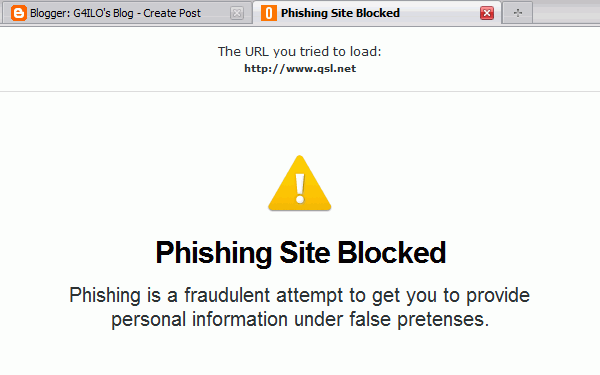
An added benefit of OpenDNS is that it provides content filtering. This can be a useful safeguard if you have children who use the computer as it can prevent them accessing various dubious sites. It can also protect you from visiting phishing sites – websites that pretend to be the login pages of various online banks or email services so they can steal your passwords. It does this by converting the addresses of known phishing sites to the IP address of a warning page instead. The web is a pretty dangerous place these days and any extra level of protection is a good thing as far as I am concerned.
However, this afternoon I tried to access a ham radio site at qsl.net, and was informed that this was a phishing site and had been blocked. In fact the whole of qsl.net has been blocked to users of OpenDNS. I have contacted them using the link provided to tell them that qsl.net is a free web host for ham radio hobby sites. I’m assuming, of course, that qsl.net hasn’t been blocked because it is hosting malware.














