Posts Tagged ‘blind’
 Handiham World for 07 December 2011
 December 7th, 2011 |
  Author:
 Welcome to Handiham World!

[email protected]
Handiham Manager

Handiham World for 30 November 2011
Welcome to Handiham World!

 | If you own more than one vehicle, consider doing your Christmas shopping with the one that does not have the amateur radio equipment installed in it. This makes it much easier to turn that car into a “plain Jane” that will not attract any attention in the parking lot. |
| If you have accessories like transceivers or a GPS, get them out of sight. The GPS can probably fit comfortably in the glove box, but I recommend taking the transceiver out altogether and either leaving it at home or locking it securely in the trunk of the car while you are at home, not in plain sight in the parking lot of some shopping center where the bad guys can see that you are putting valuables in the trunk. I prefer using magnetic mount antennas that can quickly be pulled off the roof of the car and tossed in the trunk. |
| I have become somewhat of an expert in hiding wires under the passenger side floor mat. After taking out the radio and throwing it into the trunk, I can easily disguise the antenna feed line by simply coiling it up and placing it under the floor mat where it is completely out of sight. Any accessory plugs or wires for the GPS can also go under the floor mat or in the glove box prior to my leaving my own property. |
| Any time you purchase gifts, the time to place them in the trunk of the car is immediately upon leaving the store. Never place them on the passenger seat or anywhere else in the passenger compartment where they can be seen by anyone pretending to park their car nearby. It takes only a few seconds to break into a car and transfer these packages into an adjacent vehicle. Again, the idea is to make your car look as plain and uninviting as possible. |
| Never, ever return to the car and put packages in the trunk or anywhere else in the car and then leave the car in the same place and return to your shopping. The only time you should place packages in the car at all is when you’re getting ready to leave. Anyone can see you putting packages in the car and break into the car, including the trunk, as soon as you are out of sight. If you must unload because you have just too much to carry and it is necessary to make a stop at the car to put packages in the trunk, I recommend that you do so and then drive the car to another part of the parking lot or a different floor on the parking ramp, park it again, and return to your shopping. That lessens the possibility of someone seeing you fill the car with packages and then leave, giving them time to break in. |
| Even if you have placed your antennas out of sight, don’t be tempted to leave radios installed in the front of the car where they can be seen through the windows. Thieves may not know what they are taking, but they probably figure that whatever they get can be sold for a few bucks for drug money. You can’t simply depend on a thief not wanting an amateur radio transceiver because they don’t know what it is! |
| I have heard other amateur radio operators suggest that callsign license plates on a vehicle can attract thieves, but I have never found this to be the case. In fact, I think the general public probably thinks of them more as vanity license plates and I have even run into police officers who aren’t familiar with call letter license plates. Maybe amateur radio operators are such good drivers that they never get pulled over! |
| Generally thieves who break into cars want to be able to do so quickly without being noticed. You can improve your odds of avoiding car break-ins by locating your car in a well lighted, busy part of the parking lot. I don’t like parking next to blank walls or trucks or vans that hide the vehicle enough for someone to break in while remaining out of sight. |
| The name of the game is to avoid drawing attention to your vehicle with anything that looks expensive, flashy, or easy to steal. I can’t emphasize enough how leaving packages or expensive radio equipment in plain sight can attract thieves at this time of year. They are out there looking for easy money, so you really have to be careful to make sure that your vehicle doesn’t stand out as an easy mark. |
| Even when you park your car in your own driveway your radio equipment can be at risk. I recommend parking cars with radio equipment that you want to leave installed in a secured garage. Don’t depend on car alarms to protect your expensive radio equipment. A car parked in the driveway can be burglarized in minutes while you sleep. If you have limited parking space, the car with the radio equipment should be parked inside and the car that must be parked in the driveway should be the “plain Jane” with nothing to attract thieves left in plain sight. |
| Of course no matter how careful you are, you can fall victim to thieves. You may want to consider insurance coverage for your radio equipment. Your existing automobile insurance may provide some coverage, but supplemental insurance is always available. This is a matter to discuss with your insurance agent. Sometimes relatively inexpensive transceivers, such as 2 m only mobile units, may not be worth paying an extra insurance premium. On the other hand, if you have a truck load of expensive radios that operate on multiple bands and that are difficult to remove from the vehicle when you go Christmas shopping, you may want to consider that extra insurance coverage! |
| As they used to say on the old Hill Street Blues TV series, “Let’s be safe out there.” Timely advice for the holidays! |
[email protected]
Handiham Manager
Early Winter Reading: Becoming a Ham (Part 11)

Becoming a Ham – Part 11
By T. A. Benham (SK – formerly W3DD, a callsign which has been reassigned.)
Tom Benham, now a silent key but who most recently held callsign W3DD, was a ham radio pioneer, and being blind didn’t even slow him down! Join us now as W3DD recalls more about satellites in the early days and his experience with a Senate investigation.
The Teletype Episode
We were a very active part of NASA tracking for a couple of years and the teletype was our means of receiving messages about launchings. One night I stayed in the trailer all night because there was to be a launch about five A.M. We had fitted out the front part of the trailer with a couch, a hot-plate, coffee pot and other things for comfort. I was awakened about three in the morning by the teletypewriter coming on and typing something. Of course, I didn’t know what it had written. Perhaps the message required a reply. If so, I would have to use the phone and find out what it was. After thinking about it for a few seconds, I got up, sat down at the machine and wrote, “If what you just sent requires a reply, ring the bell three times. If no reply is required, ring the bell twice.” After a few seconds, the bell went ding ding. I went back to bed until five o’clock. A couple of days later, a man walked into my lab and said, “The office in Philadelphia sent me out here to find out what that monkey business the other night was all about.” “What monkey business?” “That business about ringing the bell three or two times.” When I explained it to him, he got a huge bang out of it saying “Gosh, wait until I get back and tell them that!” and he left. “Voices of the Satellites” got additions made to it during this period. We got the recording of Eisenhower’s Christmas message broadcast from a satellite at Christmas 1959, telemetering signals from many satellites, John Glenn’s flight in which he talked about the ice crystals, Russians talking back and forth between two space vehicles. As a matter of fact, the news people were out several times with cameras and recorders to watch and listen to the signals as we picked them up. We were not able to pick up satellite signals until they got above the horizon, so there was a delay of about two minutes after launch until the satellite was about 100 miles high before we made contact. In about 1963 we were monitoring a launch. We waited for the two minutes and then began to look for the signal. Several minutes passed with no contact so I went to the teletype machine and asked what happened. In two or three minutes the teletype machine wrote a very short message. I asked someone to read it. All it said was “splash.” One time when I thought we would be able to hear the Russian astronauts talking from one ship to another, I invited a member of the University of Pennsylvania Russian Department to come listen. He did and we got a very good signal. Unfortunately, all they talked about was trivia about temperatures in the cabins, how their food was holding out, and such like. But it was interesting to us and he seemed to get a big kick out of it. An interesting but small contribution to the Space effort was made by Ham radio back in 1959. I mentioned that President Eisenhower provided a recorded Christmas message just before December 25th that year. The story has it that the message had not arrived in time for the launch. The vehicle was closed and launch was a few minutes away. A Ham, identity not known, rushed up with a recorder and equipment and said, “Hold it! let me radio the message to the receiver in the “bird”. He set things up and sent the taped message to be stored aboard. I recorded the result when it was transmitted some time later.
The Summons
A rather amusing incident took place early in the satellite project. During the first couple of years, there was much conversation about the fact that the Russians had launched before we did. The project for launching was well under way in this country. Werner Von Braun, the German Physicist who was responsible for the development of the V1 and V2 rockets in Germany, was brought to this country at the end of the war and was making good progress organizing rocket development down in Alabama, but the red tape and time spent arguing delayed our program so that the Russians got ahead of us. There was much talk in the US Senate about why we were behind. There was an article published in one of the popular magazines telling what a good job Russia was doing. A Senate Committee was convened to investigate matters. The author of the article and I were subpoenaed to appear before the Committee. I got a small recorder and a few tapes to take with me to demonstrate what I had been recording and asked Corlies to accompany me. We were shown into the committee room and the other fellow was called first. They gave him a hard time and he did not present his information very coherently. The tenor of his remarks was that the Russians were way ahead of us, that he had been there and seen for himself.
Senator Brooks, the chairman said something like, “Well, you certainly have been given a snow job and what you have said does not seem to mean much.” Then I was called to the witness table and the chairman said in a sarcastic tone of voice, “Now, what’s your story?”
“I don’t have a story, as you put it, sir. You summoned me so I’m here. What do you want of me?”
His attitude changed immediately. He said, “We’ve heard that you have been very active in tracking satellites. We’d like to hear some of your recordings and ask a few questions. Please give us a summary of your activities.”
Things proceeded peacefully and pleasantly after that. I played a few samples of the satellite signals and explained what they meant and the information that could be derived from them, both US and Russian vehicles. They seemed to enjoy what I played and were friendly and interested.
Next week: Moonbounce.
To be continued…

Handiham World for 23 November 2011
Welcome to Handiham World.
[email protected]
Handiham Manager

Early Winter Reading: Becoming a Ham (Part 10)
Becoming a Ham – Part 10
By T. A. Benham (SK – formerly W3DD, a callsign which has been reassigned.)
Tom Benham, now a silent key but who most recently held callsign W3DD, was a ham radio pioneer, and being blind didn’t even slow him down! Join us now as W3DD recalls more about satellites in the early days.
The Trailer
During April of ’59, the students and I heard of an offer from the Government. If we went to Indian Gap, near Harrisburg, we might be able to pick up some surplus equipment. Two boys and I went and we found a fully equipped trailer that was designed for tracking aircraft. It had a parabolic six-foot dish on top that was driven by a sophisticated system from inside. The trailer was 20 feet long and about 8 feet wide. We could have it for the price of getting it hauled to Haverford, which turned out to be $200. The college comptroller authorized the expense and the trailer was parked in a little lot behind the Physics building. With the help of several students, chief among them Amateur Ridgley Bolgiano, the trailer was converted into a satellite tracking station. The 6-foot dish was too small, so we set about finding a larger one. I had heard that ITT, in Nutley NJ, might be interested in giving a hand, so three of us went to visit. We were received most cordially and I asked my contact if they had any parabolic dishes that were due to be scrapped. He paused a minute, looked out the window, picked up the phone and called the Disposal Department. “Hey Jim, you know that 12-foot dish outside my window? Well, it looks like hell, cluttering up the lawn. Please send it to Haverford College, attention T. A. Benham and get rid of the unsightly thing.” That was more than we could have hoped for, but it wasn’t all. He next called his wife. “Dear, I have three very interesting fellows in my office and I want to bring them home to dinner so you can meet them.” We went to his house, had a very nice lobster dinner and a pleasant visit. In a week or so, an ITT truck appeared with the dish. The boys and I got it put together and mounted on top of the trailer. Then Ken from Gerald Electronics came out and helped get the equipment inside the trailer in good operating condition. Since it was intended to track planes, it was nowhere near ready for satellites. When the trailer was ready to be installed in a location suitable for tracking, it was moved to the middle of a large field about a quarter-mile behind the Physics building. We drove two stakes into the ground and strung a string between them to provide an exact north-south line so the tractor driver could point the trailer as nearly north as could be arranged. He had to maneuver the trailer several times to get it lined up to our satisfaction. We had built a heavy platform for it to rest on so it wouldn’t settle in the ground and perhaps alter its position. It was very interesting and exciting. We had electric, telephone and teletype lines buried from the nearest pole, which was about 300 feet away. One of the interested boys paid the monthly charges for the phone, another paid for the teletype, I paid the electric.
Linkup with NASA
Now we became a significant link in the NASA tracking chain, at least until they got their multimillion dollar system going. Ridgley built a remote control system so we could turn on functions in the trailer from anywhere. For example, I was coming home from Washington one evening and knew we had to track something about midnight. We stopped in Baltimore and by telephone I turned on the heat, and the receivers to give them time to stabilize. At that time it was illegal to use phone lines for private purposes, but we dodged the rules. One afternoon, there was a knock on my office door and a man entered saying, “I’m from the FCC. I have a complaint from the telephone company that you are running equipment by remote control through their lines.” “No, we’re not connected to their lines and are not violating the regulations,” I replied. “Well then, why have they complained?” I explained that we had mounted a coil on the wall under the wall phone in the trailer. When the phone rang, a voltage was induced in the coil which we used to control relays, timers, etc. He wanted to see, so I took him to the trailer and showed him. He was amazed and left saying “I guess we can’t stop you from that!” “No,” I agreed. “We do all this without removing the phone from the hook, so there is no way the phone company could know we’re doing it. If they allowed us to use the line, they could charge and it would be much easier for us to accomplish the task.” I never found out who complained to Ma Bell. Now days it would be no problem. Back in 1936 when I operated my transmitter from the College I had a dedicated line for which I paid, but it allowed control from only one location. The conditions under which this remote system were built had an interesting quirk. Ridgley was driving back to College from his home in Baltimore. Somewhere along the rather poorly lit route 926, he dozed a little and ran full tilt into the rear of a parked truck. Both of his knees were smashed. He spent many weeks in Bryn Mawr Hospital while they were mending. It was during this time that he and I designed the system, on the phone and in person. Then we got tools and parts together and took them to him. He mounted and wired all of the components on a piece of Plexiglas® measuring about two feet square. It was a beautiful piece of work and functioned like a charm. I was heart broken when it was destroyed in a fire! The operating code was simple. Call the number and let it ring once, then hang up. Within a minute, call and let it ring twice. This set two timers running. Then call again and let it ring three times to turn on the heat, or four times to turn on a receiver, etc. Timing was important. To turn things off, let the bell ring four times the second call instead of three and this would set things up for being turned off.
To be continued…

Handiham World for 16 November 2011
Welcome to Handiham World.

Image: Here I am recording AMSAT Journal. I find that using a USB headset with boom microphone gives the most consistent audio quality because you can maintain an exact distance between your mouth and the microphone. It is also more comfortable and allows you to use both hands to hold any print material you may be reading from or using as a reference. All recording is done digitally using the open-source software Audacity, which runs on Linux, Windows, and Mac. For insight into recording digitally, see the “With the Handihams” article in an upcoming issue of Worldradio Online. The headset pictured here is a Plantronics brand, but I don’t have the model number. It was one recommended for voice dictation by Nuance, the makers of Dragon Naturally Speaking®.
This edition of your weekly e-letter is a little bit early because I must be out of the office all day Wednesday for a meeting. I’ve noticed that the ARRL Letter sometimes has to shift its schedule around a little bit and occasionally there will be no audio version. Sometimes it is necessary for staff to have days off or take care of other office duties, and recording a newsletter is a specialized job only certain staff can complete.
[email protected]
Handiham Manager

Handiham World for 09 November 2011
Welcome to Handiham World.

Photo: Pat, WA0TDA, poses in front of the Honda Driving Simulator at the Mazda car rental agency in Chitose, Japan. Note the Handiham baseball cap! In Japan one drives on the left side of the road.
[email protected]
Handiham Manager

Handiham World for 26 October 2011
Welcome to Handiham World.


Handiham World for 19 October 2011
Welcome to Handiham World.
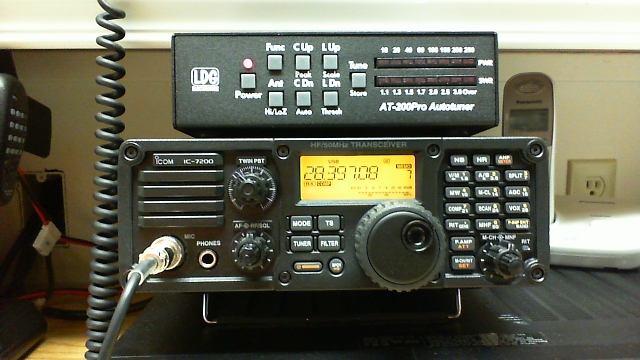
- Novice and Technician licensees may operate using single side band: between 28.300 and 28.500 MHz using up to 200 W.
- When the 10 m band is open as it is lately, high power is not necessary. Excellent contacts can be made even using very low power. Many stations will be using 100 W or less – in fact, I will amend that to say that MOST stations will be using 100 W or less. High power is simply not necessary, which puts Novice and Technician operators on a level playing field with other operators. Experience tells those of us who have been in amateur radio a long time that we are not going to bother turning on a linear amplifier to operate on the 10 m band.
- 10 m antennas are small and almost everyone can fit this kind of antenna into the space that they have available. Using our formula for a half wave dipole, 468 divided by 28.4 MHz (the middle of the Novice/Tech segment of the band), yields an antenna about 16 and one half feet long. That is a pretty manageable length! You would make each leg of a dipole 8 feet three inches long and feed it with 50 Ohm coax, such as RG-8X low loss if you must use a thinner cable or the standard size cable RG-213. Keep the coax run as short as possible in any case, because loss in the feedline increases as the operating frequency goes up. There is more loss per foot on 10 meters than on 75 meters. A quarter wave vertical antenna for 10 m is only a little over 8 feet high. If you want to construct a quad or Yagi antenna for 10 m, they are much smaller than 20 m directional antennas and thus have a smaller turning radius. A 10 m antenna is lighter and easier to handle, too.
- For our Technician Class Handiham members who have already purchased HF transceivers but who have never used them for anything but receiving, this is your chance to press that push to talk switch and enjoy operating SSB. Yes, I know that you have CW privileges on other HF bands, but this is PHONE, and conditions are so good that it is easy to make contacts. Of course Morse code contacts are easier and better during good band conditions, but the window for SSB is open right now.
- RF safety is a concern if you use indoor antennas on the 10 m band. Be sure to perform an RF safety evaluation and locate the antenna as far away from people as possible. Adjust the power level to achieve compliance. For more on how to do this, visit the ARRL website and check the TIS, or Technical Information Service. If you are a Technician Class operator who is studying for General, there is information both in your study materials and in the question pool.
 | It would be nice to extend these excellent Handiham resources to more members at a time when band conditions are so good. |
| Getting a taste of HF operation would surely make Techs excited about earning their General tickets. |
| The 10 m band is also a good place to learn more about HF operation because it is not as crowded and competitive a place to operate as bands like 20 m. |
| We are now hosting the software downloads for the W4MQ software. |
| The HF remote base stations do require some additional technical expertise to operate. Novice and Technician operators are usually the least experienced and need the most help getting things to work. Lyle, K0LR, and I don’t do much, if any, “tech support” on these stations because we simply do not have the time and most of the problems are located at the user’s own home computer anyway. My biggest fear is opening up a floodgate of emails and phone calls about how to install the software and get it to work. This is not an insignificant problem. An installation requires opening a free Skype account, getting audio settings correct, and then installing the W4MQ software and a required W4MQ update. After that, the software must be configured with the IP address of each station and the log in credentials. This is not a problem for a computer user with at least an intermediate skill level, but it is quite challenging for a user who does not know their way around a computer. |
| Technician users may get frustrated by operating practices on HF, which are much different than what they have experienced on FM repeaters. Of course you have to learn somewhere, but are we really ready to do a “sink or swim” exercise here? Maybe we need some training ahead of time, but we have none set up. |
[email protected]
Handiham Manager














