Posts Tagged ‘amateur radio’
 Handiham World for 20 June 2012
 June 20th, 2012 |
  Author:
 Welcome to Handiham World.

2012 ARRL Field Day is coming up this next weekend. It is always the last FULL weekend in June, which is Saturday and Sunday June 23 and 24.
Summer begins in the Northern Hemisphere on June 20, 2012, at 6:09 P.M. USA Central Daylight Time. Of course this means that our hours of daylight are at their maximum around this time of the year, and that always helps with getting set up for Field Day. There is always a lot of antenna work and temporary infrastructure to be set up at a multiple station club Field Day site. Having those extra hours of daylight can make it a little easier to get to the site and get things ready to go. On the other hand, more hours of daylight are likely to mean more absorption of signals on the lower frequency HF bands such as the 75 m band and – it goes without saying – more thunderstorm activity since thunderstorms are driven by convection and that takes place when you have long, hot, sunny days.
Field Day is different things to different participants. Some clubs are highly competitive, and this goes for individual participants as well. They are in it for the points and there is nothing wrong with that approach because if that is what you like and enjoy, then that is what you should do!
My feeling is that Field Day should ALWAYS be about having fun. I know that I have mentioned this before, but it certainly bears repeating: it is up to you to find a radio club Field Day that matches your expectations for what you expect the day to be all about. A mismatch between your expectations and the type of operating that is going on at the Field Day site will probably result in a disappointing experience for you and a bit of consternation on the part of the event organizers. If your idea of having fun is to get on the air and operate a highly competitive Morse code station to rack up hundreds and hundreds of points, you need to find a club Field Day whose goal matches yours. If you would rather spend most of the day socializing, greeting visitors to the Field Day site, helping newcomers get on the air, or experimenting with different modes of operation, then you should try to find a club that emphasizes those things over highly competitive operations.
If I hear from someone that they did not have a good experience on Field Day, I like to try to find out what went wrong. After talking with them for a while, I usually find out that there was a mismatch of expectations. They expected to do one thing at Field Day while the club’s event organizers had arranged for something entirely different. That is why you need to do a little bit of research to find the kind of Field Day operation that will suit you. If you do this, you are almost guaranteed to have an excellent time during what many of us consider the highlight of the amateur radio calendar – ARRL Field Day.
Incidentally, you do not have to feel as if you are all on your own when trying to find a club that will meet your Field Day expectations. ARRL Field Day sites across your state are probably going to be visited by your local League Section Manager. If you drop your Section Manager an e-mail or call him or her on the telephone, you can ask which Field Day sites they have visited and which they might recommend to a person like you with your expectations. Local League officials are a good resource to help you get connected with the right radio club as well. You can find lots of information on the ARRL website, which you can link to from the Handiham website.
Email me at [email protected] with your questions & comments.
Patrick Tice, WA0TDA
Handiham Manager

Handiham World for 13 June 2012
Welcome to Handiham World.
We are back after a week at Radio Camp. There are lessons to be learned.
But first, I want to take you back to the early 1990’s, when interest in public service communications saw a real growth following the 9/11 attacks. Ham radio operators dusted off their VHF/UHF handheld radios and headed to training sessions. It was at one such event that many of us in my own local radio club found out how little we actually knew about operating our radios. In an embarrassing exercise that really only called for some very simple operations to be performed on the handheld radios, we discovered that many – maybe most – of us didn’t know how to enter frequencies, set offsets, and enter subaudible tones. In a real public communications emergency all of these things might leap to the fore as necessary skills. After all, plans change, interference happens, and repeaters can fail. We have to be ready to deal with all of these things – and more.
Photo: Matt, KA0PQW, talks on an HT while Phil, K9HI, leads a critique of the emergency communications exercise.
Now fast forward to Handiham Radio Camp 2012. Our scripted emergency exercise, written and led by volunteer Phil Temples, K9HI, called for a post-tornado communications response. Handheld radios and one mobile rig (for the net control station) were programmed and ready to go. Unbeknownst to the participants, a scheduled “repeater failure” took the camp repeater off the air mid-exercise. There was a good deal of scrambling to figure out a workaround during that part of the exercise. As a result, the mobile rig at the net control position was so out of whack from random button-pushing that it required a hard reset to return it to the original factory settings. Some participants had not programmed their handheld radios at all prior to the exercise and were left scratching their heads or borrowing radios from someone else.
This happens at virtually every camp, so we came up with an idea to test for HT skills. (Thanks, AB8WF.) We will be letting you know what is going to be involved in this skills test, more about which will be featured in the August Worldradio Online. In addition, we also are mulling over an operating skills exam in written format and an HF skills exam. This would give our Handiham members some new goals to work toward. We would provide an actual certificate for each “element” of our new skills testing. It would be fun to earn each certificate, but it would also help operators to focus on really learning their equipment.
We also had a VE session at camp, so here’s a photo of Rachel, KC0VBV, receiving her certificate of successful completion of examination from Dr. Dave Justis, KN0S. Congrats, Rachel! Our thanks to the Stillwater Amateur Radio Association (SARA) for fielding the VE team, and to VE Team Leader Shel Mann, N0DRX, and all the VEs. Following the VE session Shel and XYL Mary, N0DXH, stuck around to help us take down the wire antennas.
Photo: Rachel, KC0VBV, receives her certificate of successful completion of examination from Dr. Dave Justis, KN0S. 
Photo: Bill, K9BV, teaches the General Class. Here he points out a sine wave. “What goes up must come down.” 
Photo: Lucinda, AB8WF, taught one on one computer lessons and brought computers up to date, which included installing Microsoft Security Essentials. She also taught remote base operation with JAWS. Lucinda also suggested the operating skills certification and will continue to work with us on the lessons and testing.
Of course old man Murphy is not ever far from any antenna project, so the center insulator and 450 ohm feedline got REALLY stuck in the tree we used as the dipole antenna’s center support. We did have some wind during the week, so we will blame it on that rather than any of our expert antenna wranglers! Here is a photo of Dr. Dave attaching the remnants of the 450 ohm line to the back of my Honda CRV so that I can drag the feedline out of the clutches of the greedy tree with some serious horsepower. This proved successful, and although the feedline was somewhat the worse for wear Dr. Dave did collect the pieces for use back at his home QTH. He isn’t afraid of splicing the somewhat ragged pieces together!
Photo: No, we are not going to run 450 ohm open-wire ladder line to a mobile W0OXB Special antenna!
Although we foiled Murphy’s antenna tangle, he wasn’t through with his mischief. On Thursday evening I discovered that the Drupal-powered Handiham.org website had gone down and that problem persisted through Friday and the weekend. Here’s the story:
Handiham.org returns to service following SQL failure
The database failure at Handiham.org has been resolved. Our thanks to the kind technical support people at Network Solutions for their assistance.
The SQL database required by Drupal failed due to a problem with the table structure. This proved to be a bit beyond the pay grade and capabilities of your humble Handiham Manager to figure out, so I had to ask the folks at Network Solutions, our hosting service, for assistance.
The problem surfaced on Thursday, June 7, while we were at Handiham Radio Camp and as a result of being very busy at camp I didn’t notice that anything was wrong until very late Thursday night. Friday was travel day, so everyone was getting their travel back home underway and there was really no time to think about the website until later on Friday afternoon when I myself got back home. By that time it was quite late in the week and when I called Network Solutions I knew it would probably mean a weekend wait for a regular business day crew to be back on board – unless the staff could help me with a relatively simple problem. I spoke to my tech support guy, another ham who of course knew all about us, and we scheduled the service for this week. I am happy to report that the site has been restored to service as of this Tuesday morning, right on schedule. Good work, Netsol!
Of course we apologize for any confusion or inconvenience this outage may have caused. I guess one good thing about it happening in the summer was that everyone seems to be so preoccupied with summer outdoor activities that not too many people noticed!
*HANDIHAM* Echolink node guy visits camp!
Photo: Left to right – Matt, KA0PQW; Susan Tice; Pat, WA0TDA, and Handiham volunteer Mike, N0VZC, who hosts the excellent *HANDIHAM* conference which makes the worldwide Handiham net run smoothly on a single high-capacity node. Mike and Don, N0BVE (not pictured) visited to help the camp with some networking. I think he’s the guy who took this photo.
Post-camp cute puppy alert!
Photo: Jasper takes a well-deserved snooze after a week at Handiham Radio Camp. He was an enormous hit among the campers and staff, probably due to his overwhelming super- cuteness. Thankfully he only uses his amazing powers for good.
Email me at [email protected] with your questions & comments.
Patrick Tice, WA0TDA
Handiham Manager

The KX3 Case – Decision Made
I’ve had in my possession my new Elecraft KX3 for over a month. I’ve watched and waited and watched some more. I’ve seen many of our fellow hams post pictures and such on the various reflectors about things that worked and things that didn’t work. Even I speculated on how an existing case would work using a short 2×4. I later realized I hadn’t taken into account the knobs with my 2×4 prototype. While the bag which works fine for my 817 does work, I wanted something a little more specific for the KX3.
My primary selection criteria was maximum protection. I really didn’t care how many other accessories I could cram into the case….I wanted something that was crush proof and water proof. In most circumstances, the KX3 case would always be carried inside the backpack I use for SOTA activations. I carry a smaller pouch which will hold the microphone, power cable etc.
While I would have gladly spent the $$ for a Pelican case, the size wasn’t right for my application. Again, I wanted something to protect the KX3…but I didn’t want the added bulk and weight. I also found a few, what I’ll call Pelican like models, but in the end they simply didn’t make the cut.
What I finally decided to purchase was the SIGG Aluminum Survival Kit Box. The large size measures 9.0” x 5.7” x 3.0”. The SIGG Aluminum Box is both durable and leak proof, so my two basic requirements are fulfilled. The lid locks in to place with two latches on each side and has a rubber gasket to keep moisture and dust out. Thanks to both Steve, wGØAT and Guy, N7UN for the idea.

While the inside of the box is just simply aluminum (no padding), working in the IT field does have its privileges. I receive weekly shipments of computers, servers and other computer hardware gadgets. I have a variety of different foam bits and pieces which will work perfectly to provide a nice comfortable nest for my KX3 to sit in.
Right now I’m still in basement construction mode. I start painting this weekend and there just is no time for SOTA activations. But I’m staying busy with conducting presentations to both local clubs and via remote connections to clubs outside the area. I’ll update once I have all the foam padding work completed in the new KX3 case.
Until then…
73 de KDØBIK
Is the Baofeng UV-3R Mark II really modifiable to 220 Mhz?
The answer is yes, and no. Using the software utility available here you can stretch the coverage of your UV-3R Mark II. This

UV-3R Mark II
only works on the Mark II (dual watch display) and the new Plus model. There are two options for changing the coverage. You can stretch up from VHF or down from UHF. Only the UHF option seems to work. Now, before you run off and do this, let me pass a few warnings. First of all, the UV-3R is NOT designed to do this, so transmitting at full power on a band your radio was not designed to work on has the potential to fry something. Second of all, most users have put the output power between 1 and 16 milliwatts (yes, milli), and my tests concur with this. It does receive OK on 220, but not as well as it does on 2M or 440. The procedure can be a little complicated, but there is plenty of help at the UV-3R Yahoo Group.
So, does it really work? During my morning commute, my train passes south of my club’s main repeater site. Now this is on a rather high building, in one of the highest points on western Long Island, and is pretty much line-of-site for a 4-5 mile stretch of my train ride. I tested to see if I could key up our 220 machine, and it seems that the effective range was about 4 miles this morning. Now that was just keying the repeater up. I’ll have to check to see if I can actually be HEARD on it. For listening to the 2 or 3 220 repeaters near my office though, it works fine. Also, keep in mind that this was all done with the stock antenna, which is most likely far from optimal at 220 Mhz.
Once again, I can’t stress enough that if you don’t want to risk breaking your radio permanently, don’t try this. So far, my little radio has suffered no ill-effects, but your mileage may vary.
-Neil W2NDG
The Johnson 275W Matchbox Antenna Tuner
I had purchased a Johnson Matchbox from an estate a while back & decided that while I was home with the flu I would open it up and check on its condition.
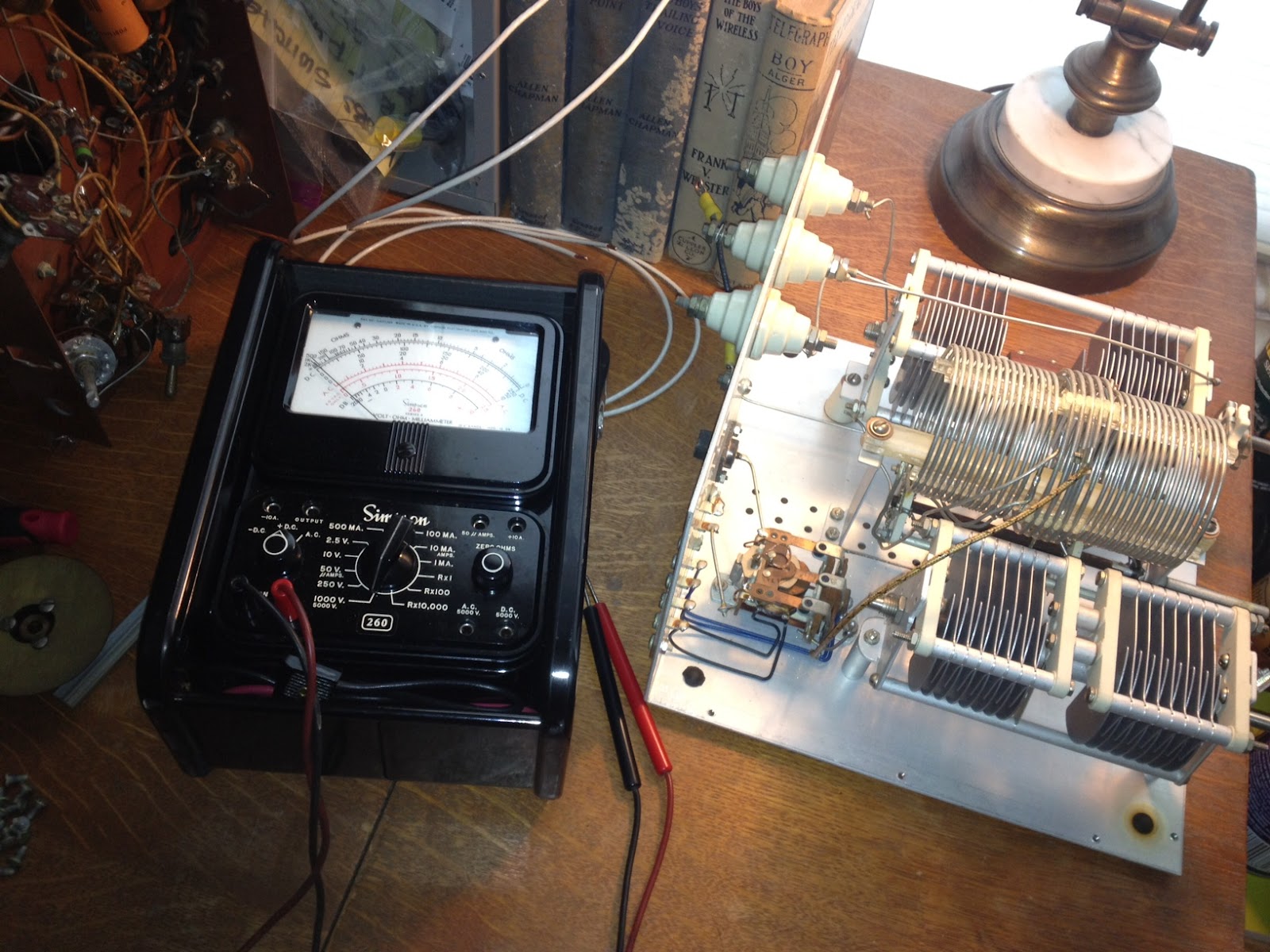 The Johnson Matchbox is found most commonly in two versions, the smaller “275W” unit and the larger Kilowatt Matchbox. Why did I use quotation marks around 275W? Well, these units were manufactured back in the good old days when men were men and transmitting voice meant using AM, not single side band. The conservative rating of 275W of AM translates into roughly 800W of peak SSB (Not really but close enough so you get the idea)
Unlike many who own a Matchbox I was hoping to keep it 100% original and that it would contain all its original components, including the antenna change-over relay and wiring for the high-impedance receiver antenna connections. I plan to use this Johnson Matchbox with a Heathkit AT-1 transmitter and Hallicrafters SX-25 receiver so the inclusion of an antenna change over relay and 300 Ohm receiver connections will make life MUCH easier. Something I didn’t realize until I had the unit apart (There are a LOT of screws holding this thing together) is that there is also a receiver control contact on the relay to break HT and mute the receiver during transmit which will work with my SX-25.
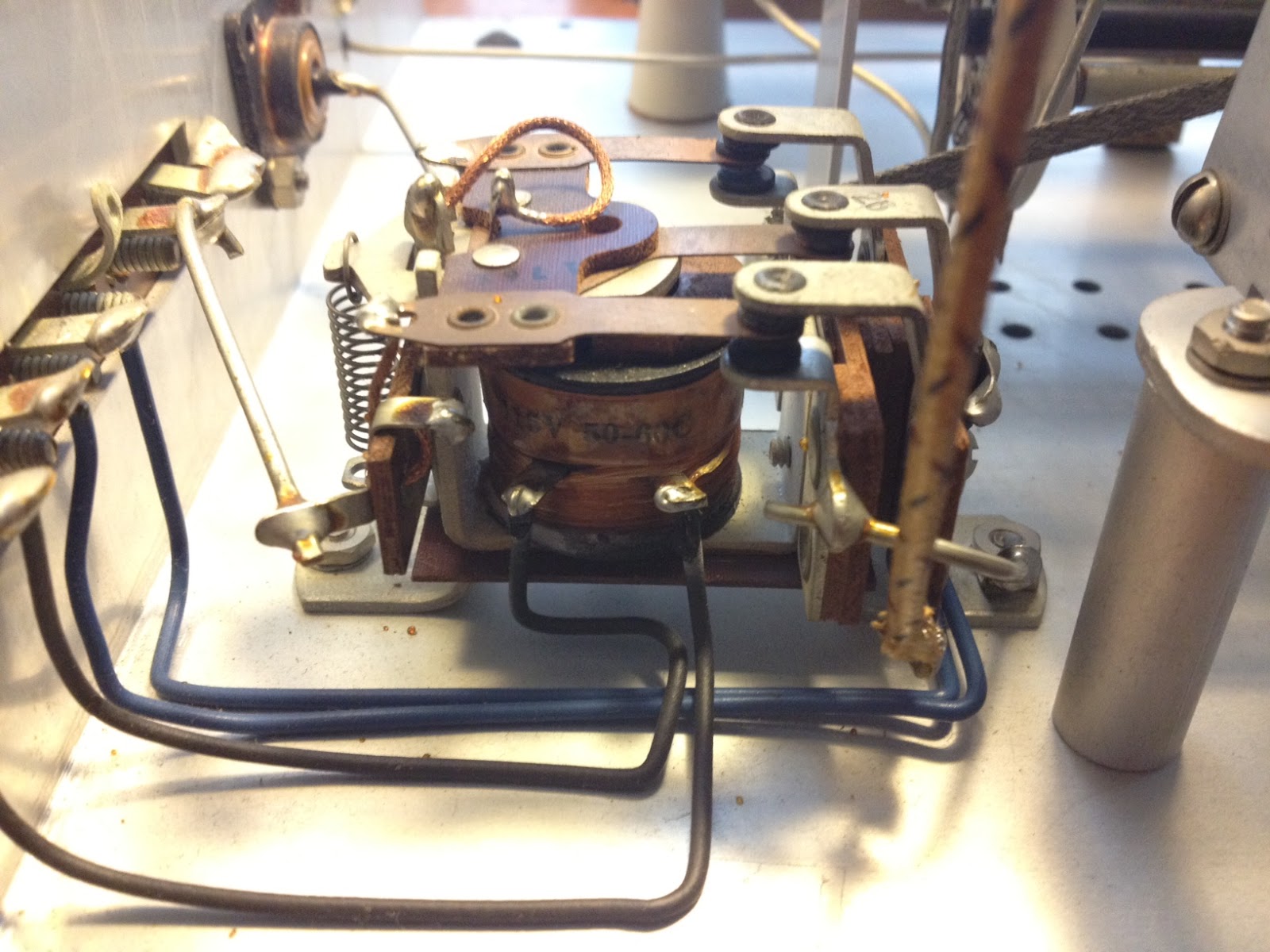 An initial inspection showed that the only modification was a small piece of plastic wedged into the relay contacts that held the relay in the transmit position. It was easily removed and the relay coil and contacts tested for continuity. The contacts seem a bit dirty which, from the little I have read online, seems to be a common problem.
Once the relay contacts and band-switch are cleaned I will button the unit back up and connect it to the loop antenna I have recently run around the eaves of the house. The loop has been a huge improvement to the long-wire and magnetic antennas I have run in the past, at least as far as reception goes … but that is a topic for another post.
Soft66LC4 SDR – initial impressions
I received a Soft66LC4 SDR receiver for evaluation. The review of this radio will be in 3 parts, initial impressions, usage test, and full technical test. Here are my initial impressions.
The Soft66LC4 is the newest SDR receiver from Kazunori Miura JA7TDO. There have been several revisions of this inexpensive

Soft66LC4
SDR over the last couple of years. The evaluation unit came in about a week from Japan in a plain envelope with no documentation or software. You are expected to refer back to JA7DTO’s website for help. Although the setup is a bit complicated, it wasn’t too bad for me since I deal with a lot of control software that uses USB-to-serial connectivity. I was pleasantly surprised to find out that my Dell laptop’s internal sound card can process at 192khz, giving me a full 192khz of visible bandwidth.
The Soft66 is a bit larger than an Altoids tin. JA7TDO’s eBay store states that you have to finish the case yourself and drill holes, but it seems that he is doing this for you now. There is an SMA antenna connector, a mini USB port, and an indicator light on one end. On the other end is a 3.5mm audio jack, and a hole for access to an adjustment pot for RF gain. I found that my sample needed a slightly longer mini USB plug as the first one I tried did not stay in well.
Driver installation can be quite complicated but I intend to help him with this by writing up some easy-to-follow instructions. One issue that exists with this SDR for now, but will probably be resolved soon, is that there isn’t a way to control the SDR with WinRAD yet. You have to use the separate control application which makes the process a bit clunky. I believe that once more of these newer LC4 models are out there there will be support for WinRAD and other SDR Applications, as there were for the previous Soft66 radios.
Initial usage tests at my location were favorable, considering my lack of a decent antenna (about 10M of wire in a tree outside my window), and excessive RFI at my location. I hope to get out to a more remote site to perform the detailed usage review in a more interference-free environment. Coverage is from 500 khz to 70 Mhz. For now, the control app does not warn you if you enter a frequency outside that range, but simply crashes. Luckily, this does not lockup the controller, and you simply need to relaunch the application. I was able to receive MW AM stations, CW, SSB, data, and AM on the amateur bands, and plenty of SW BC. I did not try WinRAD’s DRM feature yet.
I’ll try to get this set up for remote access if possible, but for now, with no way to control it other than with the supplied application, I will hold off. Special thanks to Kazunori Miura for supplying the test sample so quickly, and to my friend WA2CDL, who offered to perform the technical testing.
On JA7TDO’s eBay store these radios sell for $108 plus shipping, and are fully assembled. Well worth the money as long as the proper DLL files are made available for using it with WinRAD. A more extensive test will follow.
eBay store link: http://stores.ebay.com/HAMShopJapan?_rdc=1
Soft66 page: http://zao.jp/radio/soft66lc/
–Neil W2NDG
Handiham World for 30 May 2012
Welcome to Handiham World.
You can do it!
Listen to this podcast in its entirety here: http://handiham.org/audio/handiham053012.mp3
Today, just as we did last week, we are going to begin with Troubleshooting 101 as part of our initiative to help new ham radio operators (and even some of us older ones) learn how to do some basic troubleshooting for ourselves. Yes, it can be tempting to ask someone else to do things for us. This can become a bad habit when it keeps us from learning new things, especially things that we could – with a bit of practice – learn to do for ourselves. Knowing these basic things can serve us well in the future when no help is available.
Troubleshooting 101

Let’s get to today’s troubleshooting question:
Question: I carry my HT everywhere, and recently I was outdoors when it started to rain. Luckily I was close to a picnic shelter and was able to stay dry until the rain passed. It did get me thinking about what I would do if my radio did get wet though. Any ideas?
It is summertime, and we do want to be outdoors, and naturally we want to take ham radio along for the walk! Part of always carrying a radio is the possibility that you – and the radio – will get wet. But there is wet and then there is really soaked. The two are pretty different, but you are probably going to want to act quickly in either case to protect the radio.
Recently I read a story in WIRED about how some really high percentage of cell phone users drop their phones in the toilet. I think it was something like 25%! Unless you have a waterproof radio, you are probably not going to be able to fish it out of the bowl in time to avoid damage.
Let’s assume you have a typical HT that is not marketed as waterproof, submersible, or even water-resistant. It can likely survive a bit of surface moisture, such as getting caught in a rainstorm, as long as you act quickly to get it out of the direct rainfall, power it off, and dry the outside as quickly as possible. It might also be a good idea to remove the battery. If the radio falls into the water, it is a different ballgame. As soon as the radio begins to sink, water pressure increases and forces moisture into the radio’s case in a way that does not happen in a simple rainstorm. That means that you have to act very quickly to get the radio out of the water and remove the battery. The next step is to dry the outside of the radio as quickly as possible, then (with the battery still removed), place the radio and battery pack in a dry container with a desiccant, sealing the container so that the moisture is drawn out of the radio by the desiccant. Are you wondering what a desiccant is? I am sure you have run across those little packets of silica gel that are sometimes packed with electronic devices. They remove humidity that might damage the electronics. If you don’t have silica gel packets handy (most of us just throw them away because they have a finite life anyway), you can put the radio in a container with uncooked rice overnight. The rice will help to draw moisture out of the electronics. When you dig the HT out of the rice in the morning, put it on a nice, dry paper towel. Is there any sign of moisture still on the towel? If so, you might need to repeat the rice treatment. In any case, you will not be powering up the radio for days – that means keeping the battery out. You want to make sure that the radio is completely dry before putting the battery back in. If you can perform the drying out procedures in an environment with already low humidity, that is best. An air-conditioned, dehumidified house trumps a humid garage workbench. I would avoid using a hair drier to try to heat the radio. You do not want to add heat that can speed up chemical reactions or damage the electronics or even melt the case. I would not want to try the radio for at least a week so that I was darned sure all the water was out.
Let’s consider the best plan of all: prevention. It is much better not to have to dry out a wet radio, so we want to follow some basic procedures to keep our electronics dry, rain or shine. If you take your HT everywhere, always keep a small plastic bag in your pocket. The plastic bag can be used to stow your electronics should you get caught in a downpour. Since I have my little doggie Jasper with me when I am out walking, a dog waste bag does the job of radio protector in an emergency. These bags come in little rolls and are available anywhere pet supplies are sold, or you can just stuff a zip-style plastic food bag into a pocket. If you are boating or in a wet environment, you can just store the HT in a plastic bag when it is not in use.
You should also plan ahead, developing good habits when around water. Keep your HT in a case that will keep it from falling out. If you keep it in a pocket, be sure it is a pocket that is deep enough to keep it from working its way out when you sit down. One danger of using pockets instead of a belt clip and case is that you can forget your cell phone or HT in that pocket and run it through the washing machine. Don’t laugh – it happens! If you do use pants pockets for your radio and phone, get in the habit of quickly patting each pocket when changing clothes so that you will feel the HT or phone and remember to remove it. At Dayton earlier this month I was using the restroom in Hara Arena and there was some guy sitting in one of the stalls having a phone conversation on his cell phone. Not only is this kind of clueless socially, it is also the reason cell phones go for a swim in the toilet. Never use your HT or phone in the bathroom, because the bathroom has more water hazards than the golf course after a thunderstorm. Similarly, it is best to keep the HT somewhere away from the kitchen counter, another place where spills happen and are even expected.
Finally, there is the drenching in something other than plain water. I’m afraid there is not much you can do about a radio that takes a salt water swim or a hot coffee bath. If disaster happens, the procedure is the same: remove from the liquid as quickly as possible while watching out for your own safety, take out the battery, and dry out as quickly as possible with absorbent towels on the outside and the dry rice treatment. Hopefully salt has not penetrated the radio, but if it has there may not be much you can do. The salt deposits left behind can become conductive in high humidity conditions, causing shorts. I am not a fan of disassembling electronics to give them a cleaning with distilled water or solvent, as that is a job for trained bench technicians. Considering the cost of bench time, it is likely that a salt water swim will mean it is cheaper to buy a new radio. Similarly, a drenching with sugar-infused soft drinks can leave a real mess of residue behind. If this mess gets onto circuit boards it can also absorb moisture and cause shorts, even after the drying out process. It will also gum up push buttons on the HT’s keypad. The bottom line: Don’t have your HT anywhere near such possible spills in the first place. If one does occur, follow the emergency procedure:
- Remove the radio as quickly as possible from the spill.
- Remove the battery.
- Blot the surface with a fresh paper towel or other absorbent cloth.
- Dry in a container of uncooked rice.
While your gooped-up radio is drying out, you can start shopping for a new one. It never hurts to be prepared for the possibility that your old HT is down for the count.
Email me at [email protected] with your questions & comments.
Patrick Tice, WA0TDA
Handiham Manager
A dip in the pool

It’s time to test our knowledge by taking a dip in the pool – the question pool, that is!
Today we are busting our brains with a question from the Extra Class pool:
E5C16 asks: “In polar coordinates, what is the impedance of a circuit that has an admittance of 7.09 millisiemens at 45 degrees?”
Possible answers are:
A. 5.03 E-06 ohms at an angle of 45 degrees
B. 141 ohms at an angle of -45 degrees
C. 19,900 ohms at an angle of -45 degrees
D. 141 ohms at an angle of 45 degrees
Now, you may be asking yourself, “Why should I worry about this particular question when the current question pool is only good until the end of June?”
The answer about why you should understand this question (and more importantly the answer) is that it is exactly the same question, including the question number, that appears in both the current pool AND that brand-new pool!
We can’t go into super-detail about how to work these out, but you can find the process easily enough in the ARRL or Gordo books or in the Handiham audio lecture series.
Briefly, here is the skinny:o Ohms at such and such an angle. If you have forgotten what admittance is, it is simply the reciprocal of impedance. If you don’t know what impedance is, you need to go back and hit the books. Anyway, here is how such a conversion works:
- The absolute value of Z (the impedance) equals 1 over .00709 (which is the 7.09 milliseimens converted into seimens by moving the decimal point three places to the left. The “1 over” part comes from the fact that we are working with a reciprocal, which means we flip the numerator and the denominator to get “1 over some other number”, which is a reciprocal.
- With me so far?
- Good; so now you just divide 1 by .00709 using your calculator. You get 141.0437 etc., etc., so you round that to 141 ohms.
- You look at the question and the possible answers again. Hey, answers B & D each have 141 in them! Now you have a 50-50 chance of guessing which one is right!
- But the question specifies “…at 45 degrees”, and we have done nothing with that number yet. We need to consider that phase angle “theta” equals zero degrees minus the 45 degrees we have been given. So zero minus 45 equals minus 45 degrees.
- Now we look at our two possible choices. Answer B is the one that says 141 ohms at an angle of -45 degrees, while answer D says 141 ohms at an angle of 45 degrees. Because you have cleverly subtracted 45 from zero to get -45 degrees, you pick answer B, 141 ohms at an angle of -45 degrees.
Here is a little memory trick: Always remember that admittance questions involve a reciprocal, you you are going to be dividing some small number into one. It will be expressed as one over the other number. You need to remember to convert to seimens by moving the decimal point. Then if the angle you are given is positive, such as 45 degrees, the final answer will likely be negative, such as -45 in this case. The reason for all this angle stuff is that we are not dealing with direct current. We are dealing with alternating current, which is always changing, so we have to pick a point in its alternating cycle where our specifications can be listed numerically.














