 |
 LHS Episode #120: Steaming Mad
 31 December 2013 | by
  Howdy, folks! It's another rip-snortin' episode of Linux in the Ham Shack comin' atcha. In this installment, your intrepid co-hosts have discuss a couple of new Linux distributions, namely Fedora 20 and SteamOS. After that, we have a fantastic interview with the show's good friend Jonathan Nadeau. He has a new accessibility project to make Orca the best screen reader ever, and he (and we) wants everyone to know about it. Also, make sure to check out Hacker Public Radio's New Year's Eve show to get more details. Hope everyone had a wonderful holiday season, and has a most prosperous New Year in 2014.
73 de The LHS Guys
Russ Woodman, K5TUX, co-hosts the Linux in the Ham Shack podcast which is available for download in both MP3 and OGG audio format. Contact him at [email protected].
A few tweaks to the UZ7HO packet config – more copy from the ISS
I mentioned yesterday that I only seemed to be copying a few frames from each ISS pass. Those seemed to be when the satellite was closest. Which is fair enough of course.
This morning, I spent a few moments reading the UZ7HO manual (which is very good!). You might argue that I should have done that a week ago. But I’m really not that sort of person, I’m afraid.
It transpired that my audio levels into the program weren’t as high as they should have been. I cranked these up almost as far as they would go and left the program monitoring the next ISS pass.
Definitely an improvement! Many more frames copied – great, including some more distant stations such as HG8PL. Rather than copying frames over a short period of time, it was usable over several minutes.
The default setting for the UZ7HO software seemed to be a monochrome waterfall display. I changed it into colour and then followed the manual’s advice to make it a green colour, with red when packet signals are received.
So, a few more frames digi-ed via the ISS today, and messages swapped between Pete, 2E0SQL and myself, over a ground path of around 12 miles, via a spacecraft travelling above us at 17,500MPH.
Tim Kirby, G4VXE, is a regular contributor to AmateurRadio.com and writes from Oxfordshire, England. Contact him at [email protected].
Last Activation of the Year
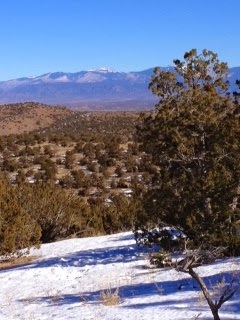
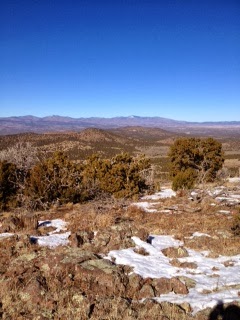
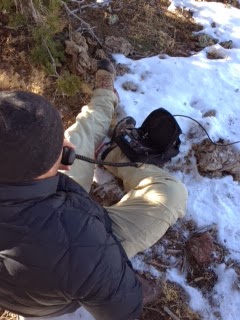
The Summit we chose was 7472. In the SOTA world, peaks without names are assigned their elevation as a name, so as you might guess the elevation of this peak was 7,472 feet ASL. The peak is located in the Caja del Rio area that I described in my previous post. the summit is actually half of an extinct volcano. As you would expect, there was lots of volcanic rock and cactus on the mountain.
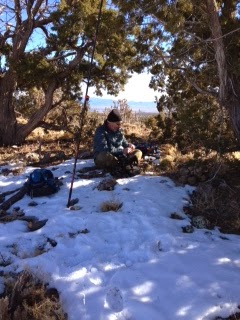
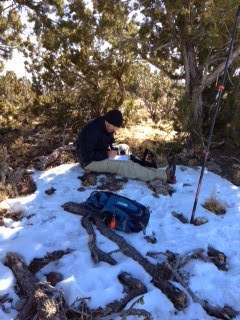
The GPS route estimated that it would take us an hour get to the summit. However, because of deep ruts in the 4WD roads it took us about an hour and a half to get to the base of the mountain. This summit, like Montoso Peak, had no trail to the top, we would have to bushwhack our way up. Also, because the approach to the summit was from the north side of the mountain, there was much more snow than we planned for. However, Jake and I made relatively good time up the mountain, scaling the 500 foot ascent over .8 of a mile in about 30 minutes.

Mike Crownover, AD5A, is a regular contributor to AmateurRadio.com and writes from Texas, USA. Contact him at [email protected].
88′ EDZ Problems
In addition to the fall that my 88′ EDZ took, there now seem to be other problems. While connecting it to the KX3 this afternoon, I noticed that depending on how I handled the coax, the antenna would either “hear” or not. I immediately suspected a fault at the PL-259, so I replaced it. Unfortunately, it didn’t make a difference. That means there is most likely a fault in the coax a bit further back.
Larry Makoski, W2LJ, is a regular contributor to AmateurRadio.com and writes from New Jersey, USA. Contact him at [email protected].
Packet signals through the ISS digipeater – success!
I posted a few days ago that I was hoping to have a go at digipeating my 145MHz packet signal through the digipeater on the International Space Station. I got all the gear and software set up and then the digipeater seemed to be switched off.
In fact, I think it was switched off for very good reason, whilst the astronauts were space walking; repairing the pump and deploying the cameras (and then undeploying them again).
I set it all up yesterday, before we went out family visiting. Apart from the fact that I didn’t connect the aerial!
Today I was slightly better organised and left things running whilst Julie and I went out for a chilly, but sunny walk. I was pleased to find that I had copied a frame from IW3RGK when I got back.
The next pass looked promising, being pretty much directly overhead. I started to hear the signals as the spacecraft approached, around 300 miles away and got some decodes so I decided to press the transmit button. To my delight, I saw the digipeater repeat my position: you can see on the screenshot below from the UISS program.
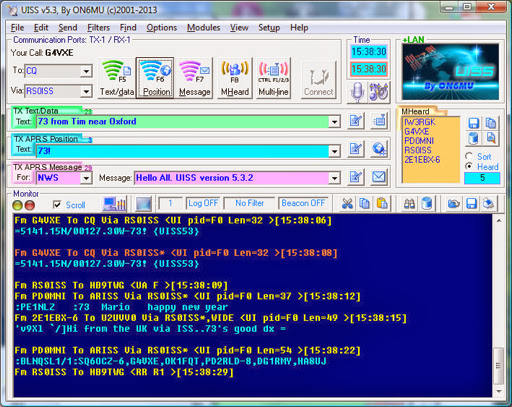
On transmit I was using the FT8900 to the V2000 collinear, so nothing too special. Although I am hearing quite a few packets on the pass, I only seem to be decoding the ones when the spacecraft is almost overhead – I suspect it’s the signal strength – or perhaps the doppler shift is messing with the Soundmodem decodes.
Great fun!
Tim Kirby, G4VXE, is a regular contributor to AmateurRadio.com and writes from Oxfordshire, England. Contact him at [email protected].
Series Six Episode Twenty-Six – Dip Meters and Absorption Wavemeters (29 December 2013)
Series Six Episode Twenty-Six of the ICQ Amateur / Ham Radio Podcast has been released. The latest news and Martin reviews Dip Meters and Absorption Wavemeters.
New Technician Class question pool released
Ham radio operator dials help
FM fans reject digital radio
Start the year off by getting a friend into the Amateur Radio Hobby
0-30 MHz Band Planning Committee announcement
Studies of ionograms show supremacy of 5 MHz band
Amateur Radio Antennas and Masts in NSW
SO-50's eleventh birthday
Spain gets experimental permission for 5 MHz
Youngsters On The Air Finland 2014
Colin Butler, M6BOY, is the host of the ICQ Podcast, a weekly radio show about Amateur Radio. Contact him at [email protected].
When you least expect it – expect it!
As the old joke goes …….
First, a little background. We have put up a baby gate in the doorway between the kitchen and the living room since Harold, our Beagle, came to live with us. Even though he has passed the one year mark, he still has a lot of puppy in him. By that, I mean to say that he chews ….. a lot! He has the run of the back yard, the family room and the kitchen. The living room and the rest of the house will become available to him as he grows older and becomes less of a chewer. In Jesse’s case, that came around about his second birthday, so I am expecting that Harold will become calmer as October 2014 approaches.
Anyway, earlier this week, I was taking dinner plates from the kitchen to the dining room, and I snagged my right leg on the baby gate. I mildly twisted it, but really didn’t feel anything at the time. The next day it was fine. Two days later? Whoa, Baby! My knee was sore, then that got better, then my hamstring was sore and that got better, and now my calf is the sore spot. I sure don’t heal like I used to when I was younger! I gave in and bought a heating pad on Thursday on my way home from work. That has helped a lot and today has been the first day since Christmas Eve that I have been walking without a noticeable limp.
I had planned to spend today on my fanny and not do much of anything – just rest the muscles in my right leg and apply some heat on and off throughout the day. Then this afternoon, my little eye spied out the rec room window and I saw the wire from my 88 foot EDZ was all kinds of droopy. What the hey?!?
I went outside to discover that the Dacron antenna rope holding up the center insulator had broken. The antenna was still in the tree, but had dropped about 10 feet. Not a good thing, especially as I am scheduled for 40 Meter QRP Fox duty this coming Tuesday night – New Year’s Eve. It seems you can always expect trouble when you least expect it.
The weather was nice here today – sunny and in the low 50’s (about 11C), so I began looking for my antenna stuff. I found the pneumatic launcher, and the mason’s twine that I use to pull up rope – but where’s my Dacron antenna rope? I searched the shack high and low for almost a half hour and couldn’t locate it. I know it’s hiding somewhere here in plain sight – but I still can’t find it. All I was able to locate was some Nylon rope that I use for tying various things. This rope is not ideal for antennas as it stretches over time, but with daylight starting to wane, it’s any port in a storm.
After one or two failed attempts, I got my line through the tree. The pneumatic launcher worked like a charm. One time I forgot to open the bale on the fishing reel, so the projectile launched just fine, but the fishing line broke and stayed put, while the little projectile soared like an eagle. Once I remembered all the steps, I got the line up and through how I wanted it.
At this point, I have to give big kudos to my son, Joey. He gave me a hand with this project today, and if it weren’t for him, this repair job would definitely have taken longer, and perhaps have not been accomplished at all. Thanks, Joey – I owe you a big one!
So my 88′ EDZ is now back in the air, with temporary rope support, a few feet higher than it was. I will have to purchase some bonafide Dacron antenna rope (if I can’t find what I thought I had) and re-do this some weekend in the near future. Of course, all the weekends from here on out until April with probably be sub-freezing and snowy!
I did get on the air tonight to hand out points to the Stew Perry contesters on 160 Meters. The W3EDP loads just fine on 160 Meters and with 5 Watts, I have been working up and down the East Coast and out towards Ohio and Michigan. Not bad for 5 Watts and about what I expected from last year’s contest.
But I think I’ll head upstairs now and apply some more heat to this old, aching calf muscle. And to think how I used to chuckle when my Mom used to tell me, “Don’t get old!”
72 de Larry W2LJ
QRP – When you care to send the very least!
Larry Makoski, W2LJ, is a regular contributor to AmateurRadio.com and writes from New Jersey, USA. Contact him at [email protected].
 Ham Radio Deluxe |
 W5SWL Electronics |
 Ham Radio Prep |
 KB3IFH QSL Cards  Hip Ham Shirts  HamRadioAuctions HamRadioAuctions Reliance Antennas Reliance Antennas Enigma Shop Enigma Shop |  morseDX  Ni4L Antennas  R&L Electronics R&L Electronics antennas.us antennas.us QRV QRV |
- Matt W1MST, Managing Editor
