Upcoming ‘NAVTEX’ CLE

http://www.nautelnav.com
Well it's CLE time in another week but this one is a little different ... it's a NAVTEX listening weekend. This will be the 7th annual event of this nature.

NAVTEX is a one-way bulletin service for maritime vessels that allows them to print out up-to-date weather and navigational warnings. NAVTEX is broadcast in the SITOR / FSK mode (using a 170Hz frequency shift) on 518KHz and 490KHz.

Stations throughout the world, usually located near the coast or large inland waterways such as the Great Lakes, transmit scheduled broadcasts once every four hours. They have a ten-minute 'slot' which is often not fully used. Conversely, some stations consistently run over their allotted time slot with longer then normal bulletins.

Most NAVTEX stations run a minimum of 400W, with most of them in the 1000W or higher range, making for some interesting DX targets around the world. Under good conditions, it is not unusual to log NAVTEX stations from the Far East here on the west coast or from Europe, on the eastern side of North America.

Simple software can be downloaded and used to decode NAVTEX broadcasts but you'll need to feed audio from your receiver into your computer's sound card. Most amateurs already have some method of doing this, usually via the 'mic' or 'line' input on the computer.

Today's CLE 'heads-up' is to give participants extra time to flesh-out their system, especially if you have not tried decoding these transmissions before ... But the learning-curve is not a difficult one.

From CLE organizer, Brian Keyte (G3SIA),  comes the follow by way of the Yahoo NDBlist Group:

Hi all

Our seventh Navtex Co-ordinated Listening Event will soon be here.
The sixth Navtex Event (CLE168) was in March 2013.
Many NDB List members have 'discovered' the NAVTEX mode from our
earlier CLEs and found it fascinating. Any NavtexDX members who
haven't taken part in a CLE before can discover the value of comparing
their results with the rest of us - in a constructive, non-competitive way!

Days: Friday 27 March - Tuesday 31 March
Times: Start and end at midday, your local time
QRG: 490kHz and 518 kHz (no other frequencies please)

We are adding the extra 24 hours at the end, to help us to cover
the two frequencies adequately.

Newcomers to Navtex are very welcome to join in - my simple Introduction
to get you started is below. For the much better FULL DETAILS AND ADVICE
go to our info page ( http://www.ndblist.info/ ) and select the box to visit
the Datamodes Section or direct to http://www.ndblist.info/datamodes.htmhttp://www.ndblist.info/datamodes.htm
All the Navtex information is in the lower part there:
Details are given of several good decoders which are freely available
including Dirk's excellent YaND and the SeaTTY decoder which can
be used without charge for a 30-day trial period. Members' Navtex
reports are included in REU/RNA/RWW, also reached via
http://www.ndblist.info/

This advice is a bit early to give extra time to prepare for decoding.
Please look out for the Final Details about three days before the CLE
starts. It will include important advice about log making, etc.

## This Listening Event is for the NDB List AND the NavtexDX List.
The advice is going to both Lists, and so will my 'Final Details' and the
Combined Results after the event, etc.
If you are a Member of NavtexDX, please continue to post to that list.
If you are ONLY a Member of NDB List please post any NAVTEX CLE logs
to NDB List (including any trial sessions before the CLE).

Whichever List(s) you belong to, do give the event a try.

Good Navtexing
Brian
----------------------------------------------------------
From: Brian Keyte G3SIA ndbcle'at'gmail.com
Location: Surrey, SE England (CLE Co-ordinator)
----------------------------------------------------------

NAVTEX - A SIMPLE INTRODUCTION

The worldwide NAVTEX system transmits navigational and meteorological
warnings and forecasts and urgent marine safety information to ships.
It provides a fascinating variation on our hobby, needing all the usual
skills with receivers and aerials and knowledge of different propagation
conditions, but adding some good DX reception, interesting navigational
messages and the ability to leave your receiver and PC 'listening all night'
while you are fast asleep! These short notes are just intended to GET YOU
STARTED, taking some of the initial mystery out of Navtex and Decoding,
explaining as simply as possible how to receive your first stations, how to
identify them and how to report your loggings.

1. TUNING TO A NAVTEX SIGNAL Set your receiver to show 516.30 kHz
on the dial for 518 kHz (or 488.3 for 490 kHz) with USB setting and
a wide filter, such as 2 kHz (Or, with CW setting, set your receiver to
the actual Navtex frequency and the BFO to +1.7 kHz).
You should occasionally hear the background noise replaced by the
warbling sounds of a Navtex signal.

2. GETTING SIGNALS TO YOUR PC Make an audio connection from the
receiver to the PC sound card input. It's best to use the more professional
advice about how to do that, but I just take a length of co-ax from the two
terminals of one side of some primitive headphones direct to the PC's line
input socket. You should be able to hear the signal in the speakers by
adjusting the PC volume control settings (playback and/or recording). If
necessary you could use the microphone input socket, but it is important
to AVOID OVERLOAD which could damage the sound card.

3. INSTALLING A DECODER PROGRAM A decoder program (see the Navtexsection in the Website) is easily installed in your PC - just follow the
advice. When you have succeeded with your first decodes we recommend
using YaND, which has many features designed specially for our needs.

As a very simple 'starter' though, I recommend the free Frisnit decoder.
Go to http://www.frisnit.com/navtex/ and in Downloads select NAVTEX
decoder (PC). Just save the 'navtex.exe' file, then double click on it.
With a 1700 Hz setting on the display, in no time you will see the incoming
messages.

Then move on to Dirk's YaND, which identifies the received Stations for you,
helps you to set up your log in the right format for REU/RNA, etc. and has
many extra features.
Alternatively, SeaTTY is also a very good decoder with some extra features.
It is quite easy to install and use and its 30-day trial is free of charge.

4. RECOGNISING THE STATIONS You will find that most Navtex messages
start with 'ZCZC' and end with NNNN. The ZCZC is followed by two letters
and two numbers - e.g. OA12. The first letter gives you a good idea which
Station you have received and it tells you the times of day, 4 hours apart,
when that station is likely to transmit. Most of the 'O' stations transmit
starting at 02:20, then 06:20, 10:20, etc. The World is split into Navtex
areas and there is often only one Navtex station using each letter in each
area. In North West Europe (Area 01) an 'O' station heard on 518 kHz is
likely to be Portpatrick in Scotland, but it might be from Malta (Area 03)
or even St Johns, Newfoundland (in Area 04). The actual messages should
remove any doubt about which of the possible stations it is - the messages
may include the Station Name (e.g. 'MALTA RADIO'), or the Navtex Area
Number or geographical references, latitude/longitude, etc.
The second letter (A) shows what kind of message it is and the rest
provides a message number.

5. STATION IDENTS We use our own way of identifying each station in our
logs and station lists. It always starts with a '$' which means 'this is a
Navtex Station' and it allows us to include these stations in lists with the
other kinds of beacons in the Rxx database, etc. Immediately after the $
comes the two-digit Area Number (most of the eastern part of N.America is
area 04). Last comes the Station Letter - an important part which provides
the main 'key' to the station sending the message. So the 'O' station above
would be $01O if Portpatrick, $03O if Malta and $04O if St Johns. You can
find lists of the Navtex stations and the times they transmit in Rxx and
from Alan's World Database in the Navtex Section of the Website.

YaND automatically works out for you everything in 4. and 5. above!

### IMPORTANT: However, WHICHEVER decoder you use it is important to
CHECK ALL YOUR LOG ENTRIES. Make sure that each decoded message
shows the as-transmitted Station letter and that each message
contains text confirming the identity of the Station you are showing.

6. OVER TO YOU! You can sit and watch the messages arriving or just leave
your receiver and decoder program running overnight, then look through the
messages afterwards to see what you have caught.

Enjoy!

Steve McDonald, VE7SL, is a regular contributor to AmateurRadio.com and writes from British Columbia, Canada. Contact him at [email protected].

ARRL Field Day: Season To Taste

2015 Field Day Logo Red Design 1I’ve written before about the flexibility of Field Day and the need to season to taste to make it your own. I have always thought that one of the great things about Field Day is that it can be tuned to whatever interests you or your club. It can be a serious radio contest (well, almost); it can be an emcomm drill. It can be a radio campout; it can be a foodfest, it can be a beer-drinking party. Insert your idea here.

This year, our local club, the Tri-Lakes Monument Radio Association is going to try a new approach that we call Tech Field Day. We previously have held a one-day educational event that we call Tech Day, that featured a series of presentations and hands-on demonstrations. The main theme of Tech Day was to help the Technician level hams gain more knowledge and help them move on up to General class operating.

We are taking the basic idea of Tech Day and combining with a shortened one-day version of Field Day. So on Saturday June 27th, we’ll offer a series of educational presentations along with some classic Field Day radio operating. The operating emphasis will be on giving newer hams a chance to get on the air, probably on both HF and VHF. (Our plans are still coming together.) We will also promote the theme of emergency communications, operating off a emergency power source, etc.

There are a number of things that we are intentionally leaving out. We won’t operate the entire 24 hour period…in fact, we’ll probably just be on the air Saturday afternoon. We won’t worry about making a lot of contacts or running up the score. Our stations will be relatively simple (no towers, no amplifiers).

So that’s our idea of a fun Field Day. What are you planning to do?

73, Bob K0NR

The post ARRL Field Day: Season To Taste appeared first on The KØNR Radio Site.


Bob Witte, KØNR, is a regular contributor to AmateurRadio.com and writes from Colorado, USA. Contact him at [email protected].

A Buzzy Day On The Magic Band

courtesy: http://www.swpc.noaa.gov/


A swift-moving Coronal Mass Ejection (CME) arrived earlier than predicted, slamming into the earth's atmosphere shortly after 0430z yesterday morning. What begin as a small K5 disturbance quickly grew to a K8, signalling the strongest geomagnetic storm of Solar Cycle 24.


courtesy: http://www.swpc.noaa.gov/


It didn't take long for the VHF bands to start filling up with auroral signals as 6m diehards soon discovered that something was amiss.

Throughout all of the day, strong auroral signals were copied and many stations were worked from here in SW British Columbia. Having the peak conditions in the middle of a working day meant hearing fewer stations than might normally be expected compared with an evening event, yet dozens of stations, including Colorado, made it out west ... even on 2m!

courtesy: http://www.on4kst.org/chat/index.php


Strong auroral events like this, especially at the equinox, can trigger swift rises in the F2 MUF as conditions return to normal. Hopefully 6m will unleash some of its F2 magic for what might be one of the cycle's last big hurrahs.

Steve McDonald, VE7SL, is a regular contributor to AmateurRadio.com and writes from British Columbia, Canada. Contact him at [email protected].

Severe solar storm

We are currently experiencing the most severe solar storm in very many years with HF very badly disturbed. There are auroras expected far further south than normal. This is a result of a CME event on the Sun interacting with the magnetic field of our planet.

If the weather is clear, check for a visual aurora!

It is also worth keeping eyes and ears alert for auroral propagation on 10m, 6m, 4m and 2m. I have in the past worked stations via aurora using QRP SSB and CW with very simple wire antennas on 10m and 6m. As frequency goes down SSB becomes more possible. What may be a very rough hissy CW note on 2m maybe a fairly decent SSB signal on 10m. The 10m and 6m bands are very worth a try when there is an aurora about.

See http://spaceweather.com/ .


Roger Lapthorn, G3XBM, is a regular contributor to AmateurRadio.com and writes from Cambridge, England.

PI Day Outing with the PRC-104 3.14.15

Saturday being PI Day 3.14 on the calendar and with still major remnants of cabin fever after what seems to be a very long and never ending winter I decided to head out to a place South of Thunder Bay towards the ON/MN border.

The site is located off of Memory Road and is a slight walk up to the top of the hill and from there is a beautiful look at Pine Bay and Lake Superior.

VE3FAL_PM Memory Road Lookout3The wind was quite strong but at 4C and bright sun peeking through the clouds made this outing a great one.  I snowshoed in as the snow was soft but had to take them off when I got to the hill for the last part of the climb to prevent sliding down. Once at the top the view is awesome, there is also a Shrine that was built many years ago now and serves as place for people to go and share some thoughts I guess, as well on the way up are benches for resting with the words, LOVE,HOPE and FAITH on them, As well there are various pictures of Jesus carrying the cross.

VE3FAL_PM Shrine Memory Road

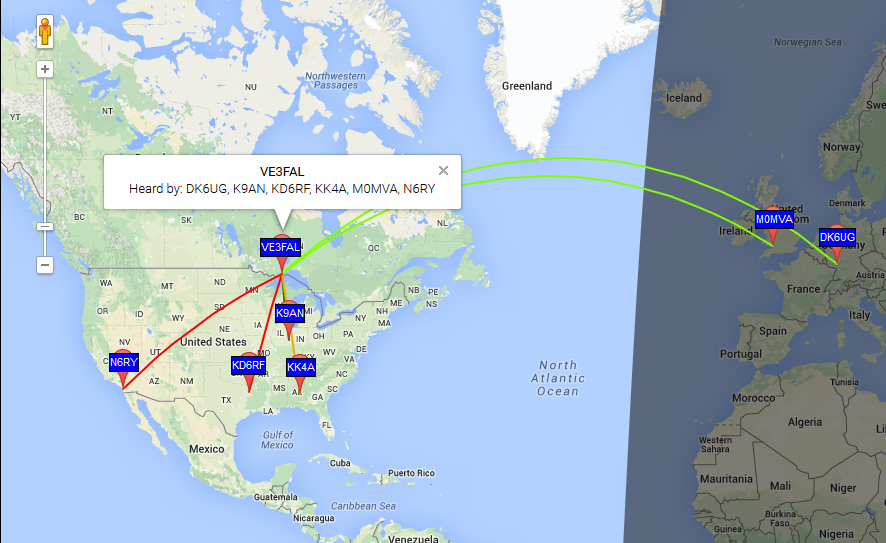
I brought my PRC-104 with me and the PRC-74 antenna with counterpoise and figured that since we were in the time frame for both RaDAR and the HFPack roundup on 18157.5 I would call CQ if the band was not busy, I used cw first and was able to work KC5UN, after that I worked WB4ETT on voice. I then tried the other bands but no joy. I then went and checked into the MMN on 20 meters on 14.300 and checked in with NCS.

VE3FAL_PM Memory Road Lookout2

PRC-74 antenna

VE3FAL_PM Setup

PRC-104 Radio


So once again another good day to take the radio out and enjoy the day and just to get out. The video of my outing can be seen on my YouTube Channel at:

I do say Trout Bay in the video but it is Pine Bay, Trout Bay is just a bit further down the road from where I was but is also a bay along the shores of Lake Superior. I thanks all those who listen and work me, and for all the others who enjoy the hobby as much as I do. Portable Ops have really taken the front seat for me and I have no ambition to be cooped up inside the house in a room, but would much rather be outside. The cold I can kinda deal with in my outings, but come summer it brings along the mosquitoes, ticks and blackflies that really have no way to stop or get away from, unless you wait till after 11 PM at night when things cool off and the bugs slow down. But lets see how things work out. See you all down the logbook and have fun. Next RaDAR event is April 4th and I look forward to operating from the same place my winter survival shelter is located near Prince-Jarvis Bay.

73

Fred

VE3FAL

Thunder Bay, Ontario


Fred Lesnick, VE3FAL, is a regular contributor to AmateurRadio.com and writes from Thunder Bay Ontario, Canada. Contact him at [email protected].

"QRL?" – please !!!!!

I did go out to the Jeep during lunch today, and no, the bands were NOT dead. But before I go there, I must digress.

I was involved in a 2X QRP QSO on 14.060 MHz with Tom, KC9RXI in WI. He was about a 449 to me; and I'm sure I was no better to him, but we were having a QSO.  I'm sure at times, that to people who may have been listening to the frequency, that it sounded like it was dead.

It wasn't.

All of a sudden, out of the blue, another QRPer started calling CQ/QRP on frequency!  The call will be omitted to prevent embarrassment (but it is forever burned into my brain).  Not so much as a single, solitary "QRL?"

Yes, I am sure that both Tom and I were weak, but we WERE in the middle of a QSO.  Coming on to a frequency, plopping yourself down and commencing to call CQ without asking is just - arrgh! And to top it off, the CQer was calling CQ DE WXXXX/QRP !!!!  I'm sorry, but QRPers, above all Amateur Radio ops, should know better. No excuse - period. If he had sent "QRL?" waited for a bit AND THEN had started calling CQ on top of us, I may still have been annoyed, but I would have thought to myself, "Well, he just didn't hear us."

Unfortunately, while Tom was trying to talk to me, I had to transmit "QRL. PSE QSY". He immediately QSYed (so he was able to hear me!), but at that point I had lost what Tom was trying to say. Shortly after that the QSB went off the Richter scale and the QSO came to a premature end. The "meat" that I could have copied was drowned out forever by needless QRM.

A bit after that debacle, I went to 12 Meters and tuned around for a bit. I heard 7QAA in Malawi quite loudly.  He was loud enough to work - even QRP. I don't think I broke the pile up, as again there was a lot of QSB. If I had more time (lunch hour was running out) I'm pretty darn certain I would have worked him. This time I had the patience - I ran out of minutes.

So , even with the G4 geomagnetic disturbance, Malawi was coming in the best I've heard them so far. Go figure.  Luckily, the station will be on the air until early April and I'm taking a vacation day on Friday. I just may make it into their logbook yet!

72 de Larry W2LJ
QRP - When you care to send the very least!

Larry Makoski, W2LJ, is a regular contributor to AmateurRadio.com and writes from New Jersey, USA. Contact him at [email protected].

Review Baofeng FF-12P (UV-5X)

Probably because Baofeng is running out of letters (although I didn’t see the Baofeng UV-5Y or Z yet), there’s a new numbers game in order. The FF-12P is essentially a UV-5X and my sample came in…. silver.

Baofeng FF-12PThe radio houses the latest chip set and firmware. Pressing various keys confirm this: pressing ‘0’ for a bit more than a second shows the battery voltage, pressing PTT + Band generates 2100 Hz, PTT + A/B generates 1750 Hz, and PTT + VFO/MR generates 1450 Hz.

The display is of the inverse type, the antenna the short one we all learned to hate, “FF-12P” is printed on both the left and right side of the radio. Batteries / accessories aren’t compatible with the standard UV-5R. While I could find enough suppliers of the FF-12P and UV-5X, not a single one appears to sell spare batteries or any other accessory.

Charger / battery combination
I wasn’t able to charge the battery at first, because the battery and charger don’t match: the two indentations of the battery prevented it from being inserted in the charger. After scraping away enough plastic in the charger I got it to fit.

CHIRP
CHIRP recognized the radio as being a UV-5R and squelch thresholds could be modified without a problem.

Scanning
A clip on YouTube suggested that the UV-5X / FF12P scans faster. This proves to be true: the FF-12P outperforms all other Baofeng radios I own, including the GT-3 Mark II. Scan speed is about 5-6 channels/sec.

Transmitter

Frequency accuracy of the sample: +2 Hz on VHF, -11 Hz on UHF.

Power output VHF: (@ 145 MHz): 4.1 Watts (high), 1.7 Watts (low)
Power output UHF: (@ 435 MHz): 3.6 Watts (high), 1.8 Watts (low)

TX Audio: Bright and loud. Very nice.

Harmonics: the usual peaks on VHF and UHF. Still not very impressive.

UV-5X_FF-12P-VHF
UV-5X_FF-12P-UHF

Receiver

RX Audio: good.

Front-end: surprisingly good, just like the GT-3 Mark II. Nice.

Sensitivity: -127 dBm (VHF), -125 dBm (UHF). These are good numbers.

Conclusion
The FF-12P aka UV-5X is the typical Baofeng: value for money, but not without its flaws. Harmonic suppression is a mixed bag and the lack of accessories is a potential problem.

The fact that I had to modify the charger to make the battery fit is a dumb factory mistake. The short stock antenna just doesn’t want to die — put a few bucks aside to buy a better one.

The positive side of the radio is the good receiver, good TX audio and faster scan speed. And, if you care about such things, it comes in shiny SILVER!


Hans, PD0AC, is a regular contributor to AmateurRadio.com and writes from Almere, The Netherlands. Contact him at [email protected].

Subscribe FREE to AmateurRadio.com's
Amateur Radio Newsletter

 
We never share your e-mail address.


Do you like to write?
Interesting project to share?
Helpful tips and ideas for other hams?

Submit an article and we will review it for publication on AmateurRadio.com!

Have a ham radio product or service?
Consider advertising on our site.

Are you a reporter covering ham radio?
Find ham radio experts for your story.

How to Set Up a Ham Radio Blog
Get started in less than 15 minutes!


  • Matt W1MST, Managing Editor