 |
 Walter Winchell
 3 June 2016 | by
 I was meandering around the web this morning and stumbled on to a page where famous key collector and curator Tom Perera W1TP had re-created the morse key setup used by Walter Winchell to introduce and punctuate his radio and later TV broadcasts. They were a pair of Vibroplex bugs.

I grew up in Sydney in the 1950s and remember how radio station 2UE would start their news bulletins with a brisk CQ CQ. They were probably inspired by Winchell. Another memory is watching ‘The Untouchables‘ on TV with narration by Walter Winchell.
It’s worthwhile reading Walter Winchell’s Wikipedia entry while you listen to and occasionally watch an archived TV show of his from December 1953.

Ironically in his early years as a gossip journalist he was close to prominent criminal identities and later became friends with J. Edgar Hoover. He was Jewish and in the lead up to the second world war was one of the first Americans to criticise Hitler and those in the US who supported him. Another of his targets was isolationist Charles Lindbergh. His fame followed his reporting the famous kidnapping and subsequent trial.
From the clip you can hear the rapid-fire delivery. In many ways it’s like a precursor to much of what we consume today.

He attacked the Klan and its supporters. After the war he aligned himself with the Senator Joe McCarthy’s hunt for communists. But within this short clip there are a couple of places where he briefly questions a couple of issues that were to haunt the US for the next couple of decades – Vietnam and cigarettes and cancer.
Complex and probably unattractive, what I want to know is if he actually knew how to handle those Vibroplex keys.
Having fun on the "Magic Band"
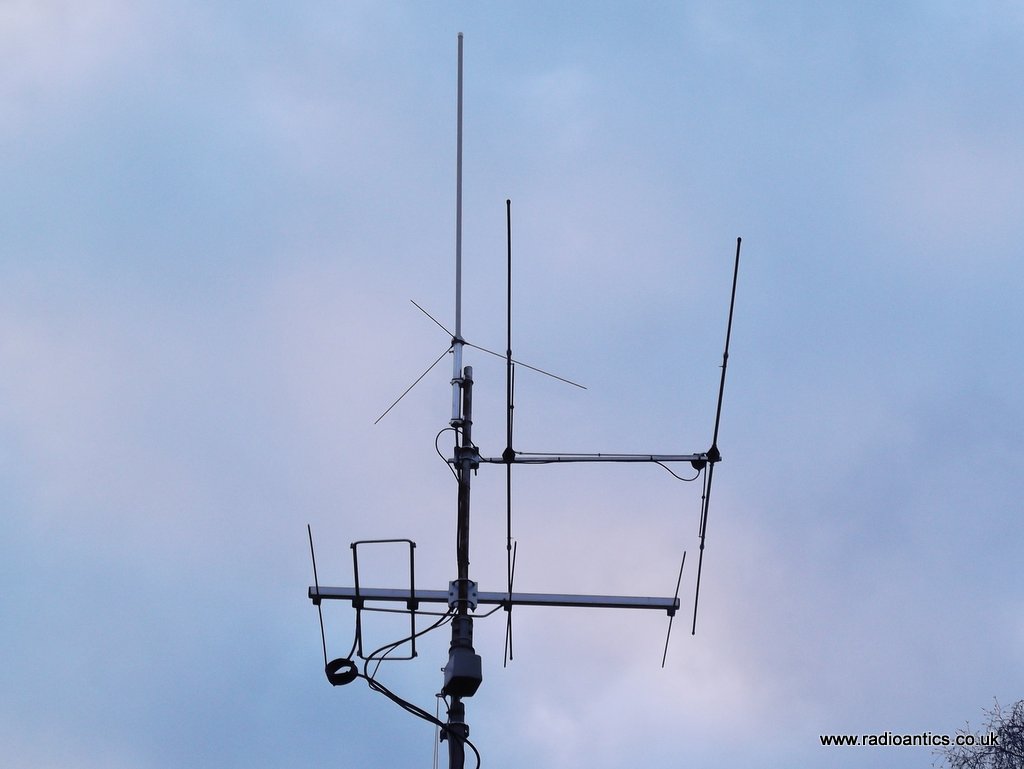
Still a relative newcomer to the hobby (only licensed at end of 2013) I had little experience of the 50MHz/6m band and have been mostly met with static whenever I did turn the dial to have a listen but happily that has changed in the last few weeks.
I knew that 6m can be an interesting, unpredictable almost unique band. Being at the lower end of the VHF spectrum it exhibits the usual characteristics of VHF communication, mostly short range line-of-sight contacts since 50MHz is usually well beyond the maximum usable frequency (MUF) for normal 'F-layer' ionospheric propagation utilised by the lower bands. However solar activity and other factors can trigger other types of propagation, in fact the band can support just about every form of propagation possible and is the main reason why it has become known as the "Magic Band"
One interesting form of propagation is sporadic E, or popularly referred to as Es. Small clouds of unusually ionised atmospheric gas form in the lower E-layer of the ionosphere (located at altitudes of 90 to 160 km). These clouds 'bounce' the radio waves allowing long-distance communication at VHF frequencies, sometimes multiple hops are possible giving extreme DX. One advantage of sporadic E over other forms of propagation is that it allows low-power QRP communication. As its name suggests, sporadic E is not a normal occurrence but can happen at almost any time. It does display a seasonal pattern with activity peaking in the summertime most noticeable in mid-to-late June.
I had turned the antenna to the East and have been running WSPR on and off over the last month on 6m with no luck, just the odd spot from the UK. I was in the shack one Saturday evening and was tuning around on 6m and heard some Italian stations calling CQ on SSB. I tried my luck and answered (using 50W) and was amazed to be heard, working a couple of stations in quick succession then suddenly the opening closed mid contact with another station. I was hooked!
Over the past few weeks I have caught a few more openings and have managed to work (in no particular order) Latvia, Croatia, Lithuania, Slovenia, Czech Republic, Slovakia, Serbia, Italy, Germany, Switzerland, Poland, France, Spain, Austria, Canary Islands and Finland - using a combination of voice on SSB and the JT65 digital mode.
Using JT65 has been particularly interesting since it allows me to 'remote operate' from work otherwise I would miss most of the 'Es'. Being able to monitor the waterfall and see the signals gaining and falling in strength during the minute long transmission is particularly fascinating.
Using the PSKReporter website I can see the location of all the stations I could hear and was being heard by. This map shows activity over the couple of hours on the 26 May using just JT65.
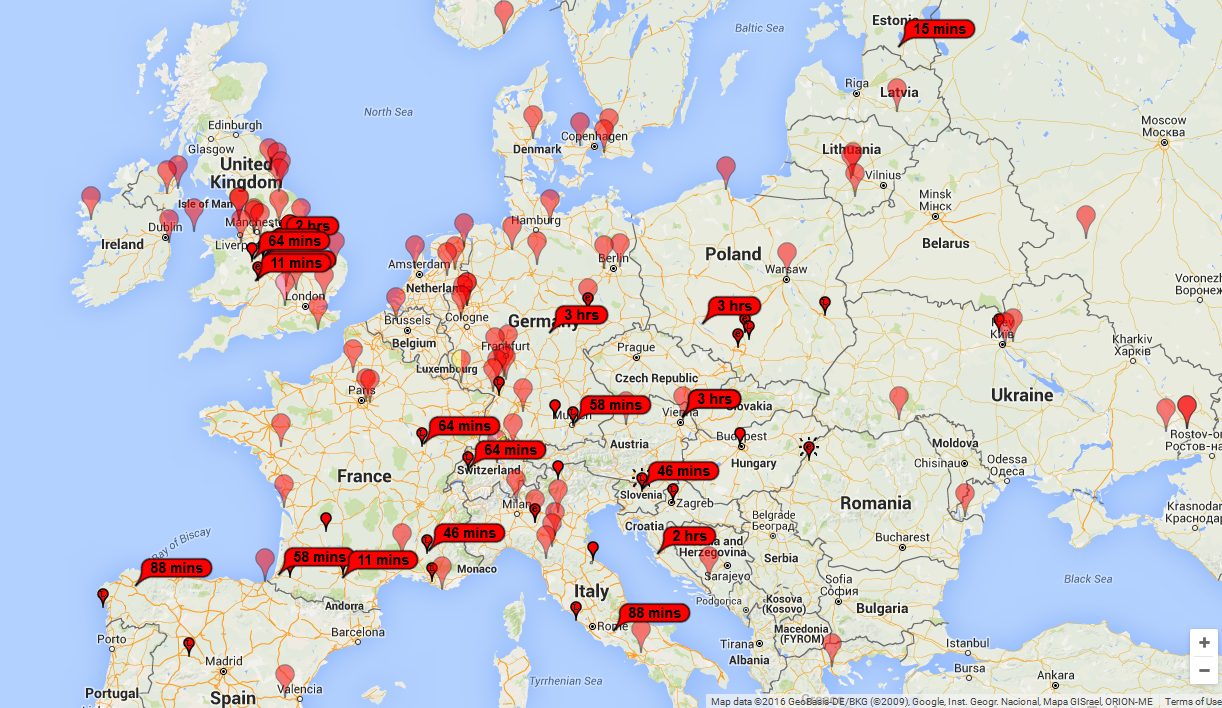
I have joined the UK Six Meter Group (UKSMG) to find out more about this "magic band" and their website is full of lots of information and resources along with the magazine Six News for subscribers.

Andrew Garratt, MØNRD, is a regular contributor to AmateurRadio.com and writes from East Midlands, England. Contact him at [email protected].
Having fun on the "Magic Band"
Still a relative newcomer to the hobby (only licensed at end of 2013) I had little experience of the 50MHz/6m band and have been mostly met with static whenever I did turn the dial to have a listen but happily that has changed in the last few weeks.
I knew that 6m can be an interesting, unpredictable almost unique band. Being at the lower end of the VHF spectrum it exhibits the usual characteristics of VHF communication, mostly short range line-of-sight contacts since 50MHz is usually well beyond the maximum usable frequency (MUF) for normal 'F-layer' ionospheric propagation utilised by the lower bands. However solar activity and other factors can trigger other types of propagation, in fact the band can support just about every form of propagation possible and is the main reason why it has become known as the "Magic Band"
One interesting form of propagation is sporadic E, or popularly referred to as Es. Small clouds of unusually ionised atmospheric gas form in the lower E-layer of the ionosphere (located at altitudes of 90 to 160 km). These clouds 'bounce' the radio waves allowing long-distance communication at VHF frequencies, sometimes multiple hops are possible giving extreme DX. One advantage of sporadic E over other forms of propagation is that it allows low-power QRP communication. As its name suggests, sporadic E is not a normal occurrence but can happen at almost any time. It does display a seasonal pattern with activity peaking in the summertime most noticeable in mid-to-late June.
I had turned the antenna to the East and have been running WSPR on and off over the last month on 6m with no luck, just the odd spot from the UK. I was in the shack one Saturday evening and was tuning around on 6m and heard some Italian stations calling CQ on SSB. I tried my luck and answered (using 50W) and was amazed to be heard, working a couple of stations in quick succession then suddenly the opening closed mid contact with another station. I was hooked!
Over the past few weeks I have caught a few more openings and have managed to work (in no particular order) Latvia, Croatia, Lithuania, Slovenia, Czech Republic, Slovakia, Serbia, Italy, Germany, Switzerland, Poland, France, Spain, Austria, Canary Islands and Finland - using a combination of voice on SSB and the JT65 digital mode.
Using JT65 has been particularly interesting since it allows me to 'remote operate' from work otherwise I would miss most of the 'Es'. Being able to monitor the waterfall and see the signals gaining and falling in strength during the minute long transmission is particularly fascinating.
Using the PSKReporter website I can see the location of all the stations I could hear and was being heard by. This map shows activity over the couple of hours on the 26 May using just JT65.
I have joined the UK Six Meter Group (UKSMG) to find out more about this "magic band" and their website is full of lots of information and resources along with the magazine Six News for subscribers.
Andrew Garratt, MØNRD, is a regular contributor to AmateurRadio.com and writes from East Midlands, England. Contact him at [email protected].
NPOTA – First Pile Up
NPOTA as most reading this will know by now, stands for National Park On The Air. It is an ARRl year long event helping the National Park Service celebrate their 100th anniversary. It operates a lot like SOTA in that there are activators and chasers. I was able to participate last Saturday as an activator when I visited some other hams that had setup at the Pea Ridge National Military Park for an activation.

The battle at Pea Ridge was a pivotal Civil War battle that took place March 7-8 1862. The battlefield was spread across 4,300 acres where 26,000 soldiers fought. Today it is still one of the most intact remaining battlefields from the Civil War left in the United States. If you are a history buff and would like more information about the park, you can visit the nps.gov website. Here is the wikipedia page about the battle.
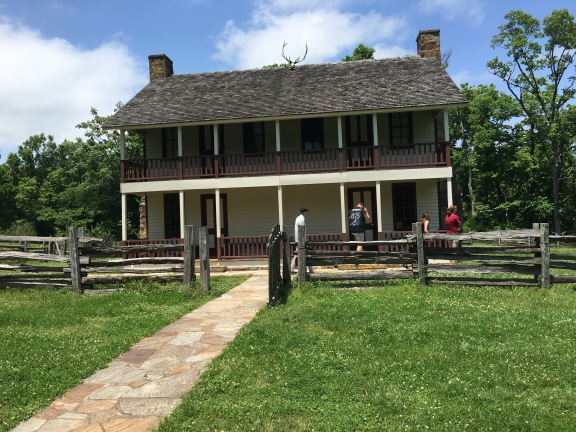
The radio setup consisted of a Yaseu FT-450, a Carolina Windom antenna, and laptop all being powered by a small generator. The team made over 400 contacts for the day. We worked stations fairly constantly most of the day.
I watched the operators for a little while, then jumped in to log for the operator working the radio. After a while they asked me to take the microphone. This was my fist time on the receiving end of a pile up. Someone had spotted us and there were a lot of people all at once trying to contact us. I got flustered and made a lot of mistakes. After a bit, I turned the microphone over to Don, K5DB who was a lot more experienced at working this style of operation. He has been doing NPOTA all year. I went back to login but watching and listening to Don work the pileup, trying to learn. After a while I got back on the mic and tried again. I simply tried to emulate what Don did. I actually was better at it the second time. When I called QRZ or CQ, I would write down 2-4 partial callsigns or even a complete call, as I was able. Then I worked down that small list, calling for the partials. Don got it across to me that I needed to control the pileup. Ask for specific partials, ignore the ones that don’t match that are just trying to barge their way in. I was in charge! I say that not as a control freak but as someone who learned a lot this weekend, working his first pileup.
A few tips for anyone who tackles a NPOTA pileup for the first time. The more experienced ops already know this!
- It’s not a real contest, it’s NPOTA. So relax!
- If you have someone logging for you, you should have paper & pencil for notes, partial callsigns as you operate. I can’t speak to doing this by yourself as I have not done that yet.
- Call the stations you hear, calling back partials as needed.
- Don’t let bully stations barge in when you are calling a specific station. Ignore them.
- Maintain control of the pileup! You are the boss for the moment.
- You can only work one station at a time. You will get to most of them in time.
- You will make mistakes the first time, just deal with it a move on.
- Relax! it’s not a real contest!
I definitely need to get out and operate more in this the of situation.
73 and good luck!


Wayne Patton, K5UNX, is a regular contributor to AmateurRadio.com and writes from Arkansas, USA. Contact him at [email protected].
Enjoying the journey
I think we have to keep in mind, that for many of the Activators, this is not a "free" exercise. Maybe they have to pay to get into a National Park, perhaps not. Destinations a long way from home involve gas, wear and tear on the car, perhaps even lodging and meals. There are also other considerations that don't involve money, but still involve expense. Time away from home, friends and family. These all factor into the equation.
Yes, Activators are putting the Parks on the air, because they want to. No one is holding a gun to their heads. So they pretty much ignore the personal expense because they're having a good time and are getting some personal satisfaction from doing their activations. At the same time, they are giving all the Chasers something invaluable, too. They are giving you a good time! They are providing you with something fun, something exciting, and new.
There have been anecdotes told of those who have their dwindling interest in the hobby rekindled because of NPOTA. In my own personal experience, I had a dormant Ham come up to me while I was activating the National Gateway (RC08) at Sandy Hook, NJ. He saw my antenna and me, sitting at my little table, putting The Hook on the air. He bicycled up and introduced himself with this name and call and proceeded to ask me "What's going on?" He then proceeded to tell me how he was licensed, but was inactive. I in turn, explained all about NPOTA and portable ops. Not only was his interest in the hobby rekindled (you could tell by "that look" in his eyes), but he also brought his young son over to take a look. You could almost see the light bulb go off over his head. To him, the idea of not being stuck in a Ham shack, but being able to be operate outside in the sunshine, with the breeze in his hair struck a resonant chord with him. It was almost like he never thought of the possibility before.
Let's also not forget that NPOTA is not a contest. Yes, there's a Leader Board and yes, stats are being kept; but that doesn't mean that NPOTA is radio sport and nothing else. If anything, it's an operating event - designed by the ARRL to put a new, shiny face on our wonderful hobby.
With that, I'm going to go off on a tangent here, and am going to state my personal opinion that Amateur Radio has gone somewhat off the rails and has become too much "radio sport". We worry too much about DXCC tallies and contests in general. Look, I'm as guilty as anyone else in that regard, as I run a QRP contest each August ........ but what's happened to the rag chew? When was the last time you had a QSO with a DX station that was more than "599 TU"? When was the last time you talked about the weather with a foreign Ham, or about some other subject not related directly to radio?
I remember when I was a Novice in the late 70s, and actually had conversations with DX stations! I know, unheard of, right? And the QSL cards I received actually contained friendly letters, sometimes with photos of the DX Ham's station or hometown. Why have we largely gotten away from that? That was the best part of the hobby!
Before I get accused of contest bashing - let me state that radio sport has its time and place. There are people that exist only for that - and that's fine. That's another facet of this hobby that is perfectly legitimate. However, it seems to me that we've let a little bit too much of that mentality creep into the rest of our hobby. We worry too much about scores, standings and results. I think what we need to do is slow down and enjoy the journey and not worry so much about the destination.
The journey is the fun part and the destination should be the fond memories of the things we enjoyed along the way. We need to exist for each other, not just for standings, results, wallpaper and trophies.
72 de Larry W2LJ
QRP - When you care to send the very least!
Larry Makoski, W2LJ, is a regular contributor to AmateurRadio.com and writes from New Jersey, USA. Contact him at [email protected].
Enjoying the journey
I think we have to keep in mind, that for many of the Activators, this is not a "free" exercise. Maybe they have to pay to get into a National Park, perhaps not. Destinations a long way from home involve gas, wear and tear on the car, perhaps even lodging and meals. There are also other considerations that don't involve money, but still involve expense. Time away from home, friends and family. These all factor into the equation.
Yes, Activators are putting the Parks on the air, because they want to. No one is holding a gun to their heads. So they pretty much ignore the personal expense because they're having a good time and are getting some personal satisfaction from doing their activations. At the same time, they are giving all the Chasers something invaluable, too. They are giving you a good time! They are providing you with something fun, something exciting, and new.
There have been anecdotes told of those who have their dwindling interest in the hobby rekindled because of NPOTA. In my own personal experience, I had a dormant Ham come up to me while I was activating the National Gateway (RC08) at Sandy Hook, NJ. He saw my antenna and me, sitting at my little table, putting The Hook on the air. He bicycled up and introduced himself with this name and call and proceeded to ask me "What's going on?" He then proceeded to tell me how he was licensed, but was inactive. I in turn, explained all about NPOTA and portable ops. Not only was his interest in the hobby rekindled (you could tell by "that look" in his eyes), but he also brought his young son over to take a look. You could almost see the light bulb go off over his head. To him, the idea of not being stuck in a Ham shack, but being able to be operate outside in the sunshine, with the breeze in his hair struck a resonant chord with him. It was almost like he never thought of the possibility before.
Let's also not forget that NPOTA is not a contest. Yes, there's a Leader Board and yes, stats are being kept; but that doesn't mean that NPOTA is radio sport and nothing else. If anything, it's an operating event - designed by the ARRL to put a new, shiny face on our wonderful hobby.
With that, I'm going to go off on a tangent here, and am going to state my personal opinion that Amateur Radio has gone somewhat off the rails and has become too much "radio sport". We worry too much about DXCC tallies and contests in general. Look, I'm as guilty as anyone else in that regard, as I run a QRP contest each August ........ but what's happened to the rag chew? When was the last time you had a QSO with a DX station that was more than "599 TU"? When was the last time you talked about the weather with a foreign Ham, or about some other subject not related directly to radio?
I remember when I was a Novice in the late 70s, and actually had conversations with DX stations! I know, unheard of, right? And the QSL cards I received actually contained friendly letters, sometimes with photos of the DX Ham's station or hometown. Why have we largely gotten away from that? That was the best part of the hobby!
Before I get accused of contest bashing - let me state that radio sport has its time and place. There are people that exist only for that - and that's fine. That's another facet of this hobby that is perfectly legitimate. However, it seems to me that we've let a little bit too much of that mentality creep into the rest of our hobby. We worry too much about scores, standings and results. I think what we need to do is slow down and enjoy the journey and not worry so much about the destination.
The journey is the fun part and the destination should be the fond memories of the things we enjoyed along the way. We need to exist for each other, not just for standings, results, wallpaper and trophies.
72 de Larry W2LJ
QRP - When you care to send the very least!
Larry Makoski, W2LJ, is a regular contributor to AmateurRadio.com and writes from New Jersey, USA. Contact him at [email protected].
The Spectrum Monitor – June, 2016
 Stories you’ll find in our June, 2016 issue:
TSM Reviews: Finally, a Mobile Shortwave Radio that Works
By Thomas Witherspoon K4SWL
Every scheme to receive shortwave radio inside the typical sedan or minivan has its shortfalls, some far greater than others. Now there is a product on the market that not only makes listening to shortwave in the car possible, but actually easy. Shortwave listening guru, Thomas Witherspoon K4SWL, literally takes the new BST-1 mobile shortwave receiver for a spin.
Monitoring Russian HF Military Networks
By Tony Roper
This month, military monitoring specialist, Tony Roper, is sticking with the current theme of monitoring the Russian military networks, starting with yet another mission by the Russian Air Force with a pair of their Tu-160 Blackjacks circumnavigating the UK, down into the English Channel between England and France. Then he follows elements of the Russian navy, tracking them as far as Antarctica, all from the comfort of his home listening post in Scotland.
Wi-Fi Radio Primer Part 3: Two Wi-Fi Radios
By Thomas Witherspoon K4SWL
In April Thomas discussed what makes Wi-Fi radios “tick”––their ability to find radio stations via radio station aggregators. In May he took a quick look at various Wi-Fi radio manufacturers whose models use proper aggregators with market longevity, with reviews of the C.Crane Wi-Fi and Sangean WFR-28 Wi-Fi radios. In the finale, he looks at two completely different Wi-Fi radios—the Grace Digital Mondo and the Amazon Echo.
Your TV System is Changing – Again!
By Mike Kohl
Remember the Great ATSC digital TV conversion of 2009? Now, it’s about to happen again, this time with ATSC 3, a new digital TV scheme that will also require “repacking” the Over-the-Air TV band—all for the benefit of Internet delivery over wireless devices. Mike tells us how this will affect us all.
TSM Reviews: Icom IC-7300 Button and Knob SDR Transceiver
By Mark Haverstock K8MSH
In a world of increasing noise, requiring even better filtering and signal processing than ever before, Software Defined Radio (SDR) is rapidly becoming the logical way to go. Icom’s introduction of the new IC-7300 is shaking up an HF transceiver market that has been complacent for the last 15 years or so. Mark notes, “With the 7300, you get the benefits of direct conversion SDR without the rig being tethered to a computer. This makes it easier for portable and field use.”
Your New CB “Good Buddy,” the SDR Dongle
By Mario Filippi N2HUN
TSM regular contributor, Mario Filippi N2HUN, is always finding new uses for the inexpensive SDR dongle. This time he has turned his attention to the world of Citizens Band radio. He recalls the colorful history of CB in the US and listens in to stalwart CB operators today from around the country and across the Atlantic, undeterred by propagation and the declining solar cycle.
Scanning America
By Dan Veenaman
New Scanner News; Ocean City, Maryland
Federal Wavelengths
By Chris Parris
More Summer Vacation Scanning
Utility Planet
By Hugh Stegman NV6H
Spring 2016 “Numbers” Update
Digital HF: Intercept and Analyze
By Mike Chace-Ortiz AB1TZ/G6DHU
Reader’s Questions and an Update on US SHARES NCS PacTOR Network
HF Utility Logs
By Mike Chace-Ortiz and Hugh Stegman
Digitally Speaking
By Cory Sickles WA3UVV
Beer-Budget Digital Repeater Project
VHF and Above
By Joe Lynch N6CL
June: The Month of VHF and Above Contesting
Amateur Radio Insights
By Kirk Kleinschmidt NT0Z
Tales of Junk Boxes and Counterfeit Parts
Radio 101
By Ken Reitz KS4ZR
FM Radio Reception Part 1: Stalking the FM Band in a Time of Excessive Translators and Boosters
Radio Propagation
By Tomas Hood NW7US
Propagation and Field Day 2016
The World of Shortwave Listening
By Andrew Yoder
NYC FM Pirates; Atlantis Radio on MW and FM Pirates in China
The Shortwave Listener
By Fred Waterer
New SW Programs and Korea: North vs. South
Amateur Radio Satellites
By Keith Baker KB1SF/VA3KSF
Yet More AMSAT History
The Longwave Zone
By Kevin O’Hern Carey WB2QMY
Summer Strategies for LW DX
Adventures in Radio Restoration
By Rich Post KB8TAD
Another Heavy Hammarlund HQ-129X Part 2: Voltage and Alignment
Antenna Connections
By Dan Farber AC0LW
Antenna Improv: Portable and Temporary Antennas
The Spectrum Monitor is available in PDF format which can be read on any desktop, laptop, iPad®, Kindle® Fire, or other device capable of opening a PDF file. Annual subscription is $24. Individual monthly issues are available for $3 each.
Ken Reitz, KS4ZR, is publisher and managing editor of The Spectrum Monitor. Contact him at [email protected].
 Ham Radio Deluxe |
 W5SWL Electronics |
 Ham Radio Prep |
 KB3IFH QSL Cards  Hip Ham Shirts  HamRadioAuctions HamRadioAuctions Reliance Antennas Reliance Antennas Enigma Shop Enigma Shop |  morseDX  Ni4L Antennas  R&L Electronics R&L Electronics antennas.us antennas.us QRV QRV |
- Matt W1MST, Managing Editor
