 |
 Things On The Air (TOTA) Launched
 25 May 2018 | by
  The Sundance Mountain Radio Association (Palmer Lake, CO) today announced the creation of the Things On The Air (TOTA) program. The radio association’s Need More Lists Committee spent the past year analyzing the effect of various “on the air” programs, including the Islands On The Air (IOTA), National Parks On The Air (NPOTA) and Summits On The Air (SOTA).
The overall trend is clear. The ham radio community used to be satisfied with the basic DXCC list (a list of countries that aren’t really countries so we have to call them entities). But over time, additional lists to be worked have been created. For example, the Islands On The Air (IOTA) was created in 1964. More recently, the Summits On The Air program was established in 2002. It seems that every year or so we hear of another “something” on the air program. Even the normally docile satellite grid chasers created a Walmart Parking Lots On The Air (WMPLOTA) event.

Unfortunately, this has created a miss-mash of programs with inconsistent and conflicting rules. The Need More Lists Committee concluded that the best solution to this problem is to fast-forward to the likely end state: pretty much everything can be put on the air. Inspired by the latest technical hype called Internet Of Things (IoT), the committee named this program Things On The Air (TOTA).
To be comprehensive and inclusive, the TOTA program is based on the existing Maidenhead Grid system. There are 324 fields defined (AA through RR), each having 100 squares (although they really are not square). Each square contains 576 subsquares indicated by aa through xx. So using the six-character locator results in 324 x 100 x 576 = 18,662,400 unique locators. Or, as the Committee likes to say, about 18 million locators. In North America, the six-character locator represents a rectangle about 3 miles by 4 miles. This raises the question of how many things need to be on the list inside a typical 3 x 4 mile rectangle. An in-depth study revealed there are a lot of things that might need to be listed in even a small area.
For TOTA to achieve the vision of being the “last list of things on the air”, it must accommodate an unlimited number of listed things. To start out a 15-digit serial number is appended to the 6-character locator to indicate a TOTA thing. As the program grows and new Things are added to the list, the 15-digit number can be extended indefinitely.
Here’s an example listing of some of the first TOTA designators:
Locator  Serial Number      Description
DM79nb   000000000000001    Walmart Parking Lot
DM79nb   000000000000002    Home Depot Parking Lot
DM79nc   000000000000001    Leroy's home QTH
DM79nc   000000000000002    Leroy's barn
DM79nc   000000000000003    The big tree behind Leroy's house
DM79db   000000000000001    Charlie's home QTH
DM78lu   000000000000001    Pikes Peak Summit
DN70di   000000000000001    Rocky Mountain National Park
When making a valid TOTA contact, the activating station must give a signal report and the TOTA designator: 6-character locator followed by the serial number (at least 15 digits but may be longer). The official TOTA list is currently be maintained on an Excel spreadsheet on Leroy’s computer but a HDFS database is under construction to handle the expected large dataset.
The Committee requests the help of all amateur around the world to submit additional entries into the TOTA list. Eventually, this process will be automated via the ThingsOnTheAir.com web site but for now submissions can be made in the comments field below.
The post Things On The Air (TOTA) Launched appeared first on The KØNR Radio Site.
Bob Witte, KØNR, is a regular contributor to AmateurRadio.com and writes from Colorado, USA. Contact him at [email protected].
LHS Episode #229: The Weekender X
 In this episode, we wrap up our Hamvention 2018 experience and move on to upcoming contests, special events, Linux distributions to try, Open Source conferences to attend, beer, whiskey, food and all the things that make life worth living. Thank you to everyone who donated to our cause, visited our booth or otherwise contributes to or listens to our program.
73 de The LHS Crew
Russ Woodman, K5TUX, co-hosts the Linux in the Ham Shack podcast which is available for download in both MP3 and OGG audio format. Contact him at [email protected].
Hunting For NDBs In CLE 232
 |
| YEK - 329kHz courtesy: www.ve3gop.com/ |
This coming weekend will see another monthly CLE challenge. This time the hunting grounds will be 320.0 - 334.9 kHz.
For those unfamiliar with this monthly activity, a 'CLE' is a 'Co-ordinated Listening Event', as NDB DXers around the world focus their listening time on one small slice of the NDB spectrum.
A nice challenge in this one is to hear the Arviat NDB, located in Nunavut on the western shores of Hudson Bay.
'YEK', on 329 kHz runs 500W into a 100' vertical and it's well-heard throughout North America and many parts of Europe under the right conditions. Listen for its upper-sideband CW identifier (with your receiver in the CW mode) on 329.421 kHz.
Propagation has been very good on the MF band recently but at this time of the year, good listening is often hampered by a lot of lightning activity. Hopefully that will not be the case this coming weekend but today's map shows what we may be up against!
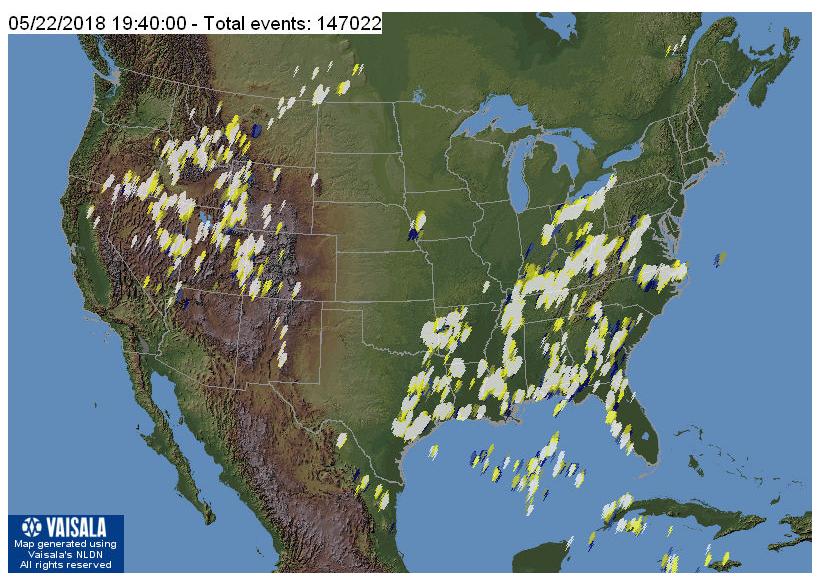 |
| courtesy: http://thunderstorm.vaisala.com/explorer.html |
If you are interested in building a system for the new (U.S.) 630m band, the CLE will give you the chance to test out your MF receiving capabilities and compare against what others in your area might be hearing.
When tuning for NDBs, put your receiver in the CW mode and listen for the NDB's CW identifier, repeated every few seconds. Listen for U.S. NDB identifiers approximately 1 kHz higher or lower than the published transmitted frequency since these beacons are modulated with a 1020 Hz tone approximately.
For example, 'AA' near Fargo, ND, transmits on 365 kHz and its upper sideband CW identifier is tuned at 366.025 kHz while its lower sideband CW ident can be tuned at 363.946 kHz. Its USB tone is actually 1025 Hz while its LSB tone is 1054 Hz.
Often, one sideband will be much stronger than the other so if you don't hear the first one, try listening on the other sideband.
Canadian NDBs normally have an USB tone only, usually very close to 400 Hz. They also have a long dash (keydown) following the CW identifier.
All NDBs heard in North America will be listed in the RNA database (updated daily) while those heard in Europe may be found in the REU database. Beacons heard outside of these regions will be found in the RWW database.
From CLE organizer Brian Keyte, G3SIA, comes the details:
Hello all
Our next Co-ordinated Listening Event is less than a week away.
It is an ideal one for new listeners as well as for regulars:
Days: Friday 25 May - Monday 28 May
Times: Start and End at midday, your LOCAL time
Range: 320.0 - 334.9 kHz
It's straightforward - just log the NDBs that you can identify having their
nominal frequencies in the range, plus any UNIDs that you come across
there. We last concentrated on these frequencies during CLE216 in
February 2017.
We'll be near the DGPS beacons range and some of us, especially in North
America, may hear a few, but please don't report them in this CLE.
73
Brian
-----------------------------------------------------------------
From: Brian Keyte G3SIA ndbcle'at'gmail.com
Location: Surrey, SE England (CLE coordinator)
-----------------------------------------------------------------
If you are interested in some remote listening - maybe due to local difficulties - you could use any one remote receiver for your loggings, stating its location and with the owner’s permission if required. A remote listener may NOT also use another receiver, local or remote, to make further loggings for the same CLE.
-------------------------------------------------------------------
- determine, worldwide, which beacons are actually in service and on-the-air so the online database can be kept up-to-date
- determine, worldwide, which beacons are out-of-service or have gone silent since the last CLE covering this range
- will indicate the state of propagation conditions at the various participant locations
- will give you an indication of how well your LF/MF receiving system is working
- give participants a fun yet challenging activity to keep their listening skills honed
*** NEWS FLASH ***
The Yahoo ndblist Group has been moved to Groups.io and The NDB List Group will now be found there! The very active group is a great place to learn more about the 'Art of NDB DXing' or to meet other listeners in your region. There is a lot of good information available there and new members are always very welcome. As well, you can follow the results of other CLE participants from night to night as propagation is always an active topic of discussion.
You need not be an NDB List member to participate in the CLEs and all reports, no matter how small, are of much value to the organizers.
Remember - 'First-time' logs are always VERY welcome!
Reports may be sent to the NDB List Group or e-mailed to CLE co-ordinator, Brian Keyte (G3SIA), whose address appears above. If you are a member of the group, all final results will also be e-mailed and posted there.
Please ... give the CLE a try ... then let us know what NDB's can be heard from your location! Your report can then be added to the worldwide database to help keep it up-to-date.
Have fun and good hunting!
Steve McDonald, VE7SL, is a regular contributor to AmateurRadio.com and writes from British Columbia, Canada. Contact him at [email protected].
Weekly Propagation Summary – 2018 May 21 16:10 UTC
Here is this week’s space weather and geophysical report, issued 2018 May 21 0042 UTC.
Highlights of Solar and Geomagnetic Activity 14 – 20 May 2018
Solar activity was very low throughout the period and no events were reported. No Earth-directed CMEs were observed.
No proton events were observed at geosynchronous orbit.
The greater than 2 MeV electron flux at geosynchronous orbit reached high levels on 14-17 May with moderate levels observed on 18-20 May.
Geomagnetic field activity was quiet to unsettled on 17 May due to the influence of a negative polarity coronal hole/high speed stream. Quiet conditions were observed throughout the remainder of the period.
Forecast of Solar and Geomagnetic Activity 21 May – 16 June 2018
Solar activity is expected to be very low throughout the period.
No proton events are expected at geosynchronous orbit.
The greater than 2 MeV electron flux at geosynchronous orbit is expected to reach very high levels on 05-07 Jun with high levels expected on 02-04 and 08-13 Jun. Moderate flux levels are expected for the remainder of the outlook period.
Geomagnetic field activity is expected to reach G2 (Moderate) geomagnetic storm levels on 02 Jun and G1 (Minor) storm levels are expected on 01 Jun due to the influence of a recurrent, negative polarity coronal hole/high speed stream. Active conditions are expected on 23 May and 03-05 Jun.
Don’t forget to visit our live space weather and radio propagation web site, at: http://SunSpotWatch.com/
Live Aurora mapping is at http://aurora.sunspotwatch.com/
If you are on Twitter, please follow these two users: 1. https://Twitter.com/NW7US 2. https://Twitter.com/hfradiospacewx
Check out the stunning view of our Sun in action, as seen during the last five years with the Solar Dynamics Observatory (SDO): https://www.youtube.com/watch?v=zXN-MdoGM9g
= = = = =
BOOK SALE: Space Weather and Sun Science – get these from Amazon, and help us stay online!
NOTICE: When you buy this (or any item after starting with this link), you are helping us keep our SunSpotWatch.com and other resources “on the air” (up and running!). In other words, you are helping the entire community. So, check out this book:
Here is the link to Amazon: http://g.nw7us.us/fbssw-aSWSC
We’re on Facebook: http://NW7US.us/swhfr
Be sure to subscribe to our space weather and propagation email group, on Groups.io
https://groups.io/g/propagation-and-space-weather
Spread the word!
= = = =
HOW CAN YOU HELP?
I am working on launching a YouTube channel overhaul, that includes series of videos about space weather, radio signal propagation, and more.
Additionally, I am working on improving the educational efforts via the email, Facebook, YouTube, Tumblr, and other activities.
You can help!
Please consider becoming a Patron of these space weather and radio communications services, beginning with the YouTube channel:
https://www.patreon.com/NW7US
The YouTube channel:
https://YouTube.com/NW7US
Spread the word, too!
= = = =
BOOK SALE: Space Weather and Sun Science – get these books from Amazon, and help this service stay online!
NOTICE: When you buy this (or any item after starting with this link), you are helping keep SunSpotWatch.com and other resources “on the air” (up and running!). In other words, you are helping the entire community. So, check out these books:
Here is the link to Amazon: http://g.nw7us.us/fbssw-aSWSC
= = = =
If you are on Twitter, please follow these two users:
1) https://Twitter.com/NW7US
2) https://Twitter.com/hfradiospacewx
= = = =
Check out the stunning view of our Sun in action, as seen during the a five-year span with the Solar Dynamics Observatory (SDO):
https://www.youtube.com/watch?v=zXN-MdoGM9g
= = = =
Visit, subscribe: NW7US Radio Communications and Propagation YouTube Channel
LHS Episode #228: Hamvention 2018 Update 2
 In this episode of Linux in the Ham Shack, your hosts do a couple of live interviews on Saturday at Hamvention 2018. The first is with Kevin, K2FN, and the second is with Gene, BX8AAD. There is also a second-day wrap up of the event and lots of discussion and banter about ham radio, Ohio, the weather, vendors, visitors and a lot more. Thank you for listening.
73 de The LHS Crew
Russ Woodman, K5TUX, co-hosts the Linux in the Ham Shack podcast which is available for download in both MP3 and OGG audio format. Contact him at [email protected].
DMR Hotspot
There is a lot of blogs, forums and place to get information about various aspects of our hobby. Ham Radio, as you all know, is a diverse hobby with a lot of different ways to enjoy it. This post is going to be about my learning and stepping in DMR. As with most of my posts, this is aimed at someone just looking at and thinking about diving into DMR. If you are a seasoned DMR operator, then you likely know all this already.
A friend of mine brought an inexpensive TYT MD-380 DMR radio to a club meeting and told us about DMR. He uses it a lot when he travels around a two state are for his job and loves it. After that, I decided to order the same radio and see what DMR was all about. This friend sent me his code plug and when I looked at it I was lost. He had all the repeaters for two states, lots of talk groups and lots of operator call signs. It was a lot to digest for someone who didn’t know how to program a DMR radio.
I decided to take a step back and learn some more about how DMR works and how to do the programming. I wanted to start simple and begin my code plug from scratch. The closest DMR repeater to my house is about 20 miles away and with all the hills around Arkansas, I cannot hear it with the HT antenna. I figured putting together my own hotspot would be the ticket as I have three Raspberry Pi’s sitting around doing nothing but collecting dust, so acting on some advice from more experienced hams, I ordered a DVMega board to go with one of the Pi’s.
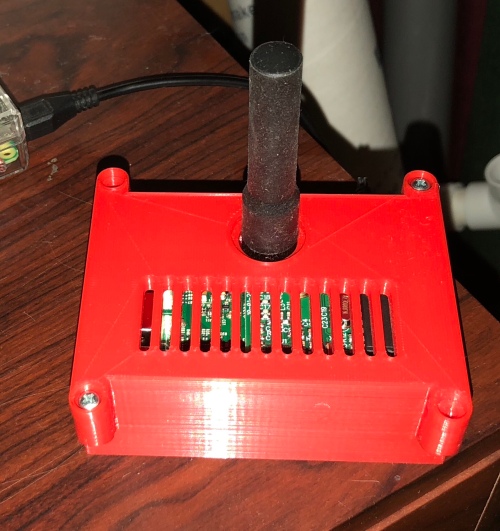
I asked a friend with a 3D printer to print this case for the Pi and DVMega from Thingiverse.

The completed Pi, DVMega combination put together and ready to go. Yes there are two screws missing. I don’t know that I need them so I left them out.
For storage for the Pi, I used a Sandisk class 10 32GB micro SD card that I already had. It is important to use a decent storage card so the performance isn’t worse than it needs to be. One of these cards is less than $15, so it is not very expensive compared to the cost of the entire hotspot project.
One could download Raspian and install all the software separately but there is an image already created that is very popular called Pi-Star. It is essentially Raspian with MMDVMHost, DStarRepeater and other software included. It is an easy way to get everything you need for DMR, DStar, P25 and more digital voice modes.
Pi-Star can be downloaded from here. Once the image was downloaded, I used the Linux dd command to write the image to the card.
After inserting the card into the Pi and booting it up, there are two very important steps. The first is to expand the image to use the entire card. When first written, a small portion of the space is used and a command needs to be run to expand the file system to use the rest of the space. That command is pistar-expand. The second important thing to do is to make sure the image is updated. The Pi-Star creators provide two commands for doing that. pistar-update / pistar-upgrade which are similar to the Raspian apt-get-update and apt-get upgrade commands but do so for the operating system and the software included in pi-star.
To setup the Pi-Star software, I followed along with this page:
https://www.toshen.com/ke0fhs/pi-star.htm
There is a lot of information on this site in addition to this page related to DMR. It was worth browsing around and finding information that I didn’t know.
After configuring the hotspot, I was able to verify that it connected to the BrandMeister Network.
The next step was to program the TYT MD-380. I had to choose a simplex 70cm frequency. After consulting the band plans and looking at the Arkansas repeater council page, I was able to choose one to use.
I won’t go into a lot of detail on programming the radio as there are a lot of YouTube videos and web pages describing that process.
I listen to the Hamradio 360 Workbench podcast and they use a talk group that I programmed into a channel and was able to hear some of that traffic. I also made a call and confirmed that I was able to transmit on the talk group as well as receive.
My next step is to find other talk groups that I might want to listen to, and determine how I will use DMR going forward. I am planning on taking the hotspot on business trips and possibly use it in the car for DMR mobile. I’ll figure that out as I go along.
Overall the process was not difficult, but took some time researching how DMR worked so I could understand the programming better. I used many web resources along with several YouTube videos. I still have a few more bookmarked to watch but I am getting a handle on it.
Comments and questions are welcome.
Wayne Patton, K5UNX, is a regular contributor to AmateurRadio.com and writes from Arkansas, USA. Contact him at [email protected].
LHS Episode #227: Hamvention 2018 Update 1
Welcome to the first day wrap-up of Hamvention 2018. We talk about the show, our experience and give you a look forward to Saturday's update. Thanks for listening and please check social media for information on when we'll being live streams from the show.
73 de The LHS Crew
Russ Woodman, K5TUX, co-hosts the Linux in the Ham Shack podcast which is available for download in both MP3 and OGG audio format. Contact him at [email protected].
 Ham Radio Deluxe |
 W5SWL Electronics |
 Ham Radio Prep |
 KB3IFH QSL Cards  Hip Ham Shirts  HamRadioAuctions HamRadioAuctions Reliance Antennas Reliance Antennas Enigma Shop Enigma Shop |  morseDX  Ni4L Antennas  R&L Electronics R&L Electronics antennas.us antennas.us QRV QRV |
- Matt W1MST, Managing Editor
