 |
 ICQ Podcast Episode 279 – Introduction to BYLARA and Komunica Power HF-PRO-2 Portable Antenna Review
 28 October 2018 | by
 In this episode, Martin M1MRB is joined by Chris Howard M0TCH, Martin Rothwell M0SGL, Dan Romanchik KB6NU and Ed Durrant DD5LP to discuss the latest Amateur / Ham Radio news. Colin M6BOY rounds up the news in brief, and this episode’s feature is - Introduction to BYLARA and Komunica Power HF-PRO-2 Portable Antenna Review.
ICQ AMATEUR/HAM RADIO PODCAST DONORS
We would like to thank Andrew de Mora, Phil Bourke M0IMA and our monthly and annual subscription donors for keeping the podcast advert free. To donate, please visit - http://www.icqpodcast.com/donate
- New Strategic Direction for the Emergency Services Network (ESN)
- New UK Amateur Radio Prefixes
- US Senator Highlights Amateur Ham Radio's Disaster Response
- Bouvet Island DXpedition
- FCC Proposes Revised Interference Protection for Class A AM stations
- December is YOTA Month
- Special Amateur Radio Callsign to Commemorate End of World War 1
- iWSPR TX – WSPR for iOS Version 2.8 Available
Colin Butler, M6BOY, is the host of the ICQ Podcast, a weekly radio show about Amateur Radio. Contact him at [email protected].
Ham College 46
Ham College episode 46 is now available for download.
General Amateur Radio Exam part 17. Solar Propagation Effects, Delta Loop and Log Periodic Antennas.
54:28
Download
YouTube
George Thomas, W5JDX, is co-host of AmateurLogic.TV, an original amateur radio video program hosted by George Thomas (W5JDX), Tommy Martin (N5ZNO), Peter Berrett (VK3PB), and Emile Diodene (KE5QKR). Contact him at [email protected].
Getting On HF: Some Remedies
 In my previous blog post, I listed four barriers to getting on HF:
- antenna restrictions
- radio frequency interference (RFI)
- cost
- the fiddle factor.
Fiddle Factor really represents how multiple issues can come together to dramatically increase the complexity of an HF installation.
Now I’d like to propose some ways of dealing with these barriers.
Antenna Restrictions
A lot has been written about this problem and there’s enough material to write a dozen books about this topic. The remedies that come to mind fall into two main categories:
- Hide your antenna
- Change your location (temporarily or permanently)
Common strategies for hiding an HF antenna include: attic antenna, low profile wire antenna, flagpole antenna and temporary antenna. I recently came across this fabulous guide to stealth antennas from The Villages Amateur Radio Club. It was developed based on practical experience in an HOA-controlled community. One interesting point they stress is that the mode you use interacts with the capability of the antenna. Simply put, if you are using a compromised antenna then it really helps to use a more efficient mode such as CW, PSK31, JT65 or FT8. Good advice!
I received quite a bit of feedback via twitter that a solution to antenna restrictions is change your location. One answer is to permanently move your home to a new location, typically out in the country with wide open spaces and no restrictive covenants. This is easy to say and often difficult to do. I am going to assume that for the most part you are stuck with your home location (for whatever reason) and not spend much time on it here. But keep this in mind when the opportunity to move happens. Every time I’ve purchased a house, I always evaluated the property for antenna options.
Another option is to change your location temporarily, as in portable operation (can you say Summits On The Air?) I like portable HF operating and have operated from a number of islands while on vacation. You don’t have to do a DXpedition, you can always just go to a local park and set up a station there. Heck, you can always “go portable” in your backyard. Set up a temporary antenna, operate and take it down before anyone has a chance to complain.
Another “change your location” strategy is to use a remote ham radio station. Many clubs have established a remotely-controlled station (usually controlled via the internet) for their members to use. Or you could use one of the commercial remote radio systems (such as Remote Ham Radio).
Radio Frequency Interference (RFI)
RFI generally occurs when a device creates radio frequency energy on frequencies that you want to use. One very discouraging experience is to turn on your newly-installed HF station to find the ambient noise at S5 across your favorite operating band. Frankly, this can be a really difficult problem to solve. Many books have been written on this topic, too. One of the best is The ARRL RFI Book. The ARRL RFI web page may be helpful, too.
The source of interference is either under your control (something in your residence) or it can be from external sources (your neighbor’s house, the AC power lines, …) RFI sources are easier to find in your own home. A good first move is to go around and unplug everything electronic in the house to see if the problem goes away. Or you can go through your circuit breaker box flipping all circuits off until the problem disappears. (Of course, you need to keep you HF radio powered up so you can listen for the noise.)
If the problem is outside your home, things get a lot more difficult. You’ll have to track down the source and engage the owner of the device in a conversation about correcting the problem.
If the problem is power line noise, the electric utility is supposed to be able to correct it. However, the technical capability on RFI issues at electric companies ranges from none to quite competent.
Cost
What can we do about the cost of getting on HF? I’d say, not a lot. Your best strategy is to look for used equipment which can be less than half the price of new. However, if you are comparing an HF station to the cost of a $30 Baofeng handheld transceiver, you will probably be disappointed. In my previous blog post, I estimated that a used HF station could be on the air for ~$500.
One comment I received via twitter is that the cost alone may not be the issue. For some folks, the issue is spending that much money and not knowing how much success they will have on HF and whether they will truly enjoy it. Good point. One way to deal with this issue is to operate from someone else’s station to try out HF or to borrow some equipment. This will defer the cost until you know more about HF operating and judge whether it’s right for you.
One idea that might look attractive for saving cost is to buy an inexpensive, low-power (QRP) transceiver. I would avoid that option as it increases the fiddle factor.
The Fiddle Factor
The fiddle factor represents how multiple issues can come together to dramatically increase the complexity of an HF installation. When the complexity increases, the probably of success decreases because there are just more things to go wrong.
So the remedy is to avoid a high-fiddle-factor installation. Ideally, you would use a simple antenna (dipole, end-fed halfwave, etc.) hung in the clear with no obstacles around. Real world constraints may come into play here and require you to make other choices. Just be aware that each complication drives complexity.
Find a Mentor (Elmer)
The one universal strategy for success with ham radio is find a mentor, also called an Elmer. Having an experienced radio ham to answere questions and bounce ideas off of is extremely valuable.
How do you find a mentor? See Dan/KB6NU’s suggestions on the topic. You may have to settle for mentoring via the internet but it is way better to have someone local that can actually see your house and antenna installation options.
Anything else?
Those are my suggestions for how to deal with the barriers of getting on HF. I am sure there are more ideas out there.
What do you think?
73 Bob K0NR
The post Getting On HF: Some Remedies appeared first on The KØNR Radio Site.
Bob Witte, KØNR, is a regular contributor to AmateurRadio.com and writes from Colorado, USA. Contact him at [email protected].
Amateur Radio Weekly – Issue 222
ISS SSTV this weekend
Twelve images will be downlinked, but this time with six featuring the SCaN educational activities while the other six images will commemorate major NASA anniversaries.
AMSAT
VP6D Ducie Island seeing too many dupes
They’re seeing “far too many dupes” as they work their way through the pileups.
ARRL
ISS voice active, SSTV from satellite
NASA astronaut Serena Auñón-Chancellor KG5TMT, who is currently on the International Space Station, was active on 145.800 MHz FM making contacts on Saturday, October 20.
AMSAT UK
W5KV’s 2018 Ham Holiday Gift Guide
It’s never too early to start planning gifts for the holidays.
W5KV
Download of DSLWP-B Moon and Earth pictures continues
It was expected that the Earth would be visible in the image, and this was indeed the case.
Daniel Estévez
Global JS8Call Network
I can even have a chit-chat by relaying my messages through stations I can hear, to a station I can’t. JS8Call is not a mode, it’s a system.
OH8STN
Every Amateur Radio Satellite Frequency List
JE9PEL
Knots…
From securing loads to securing antennas, a knowledge of some basic knots is very valuable.
VE7SAR
Video
Meet the Amateur Astronomer who found a lost NASA satellite
Amateur astronomer Scott Tilley made international headlines when he rediscovered NASA’s IMAGE satellite 13 years after it mysteriously disappeared.
Freethink
Monitoring airplane communications
Information and examples how to monitor communications between airplanes and ground using RTL SDR, SDRPlay, SDRConsole and other equipment.
N1SPY
Get Amateur Radio Weekly in your inbox.
Sign-up here
Amateur Radio Weekly is curated by Cale Mooth K4HCK. Sign up free to receive ham radio's most relevant news, projects, technology and events by e-mail each week at http://www.hamweekly.com.
Hunting NDBs In CLE237
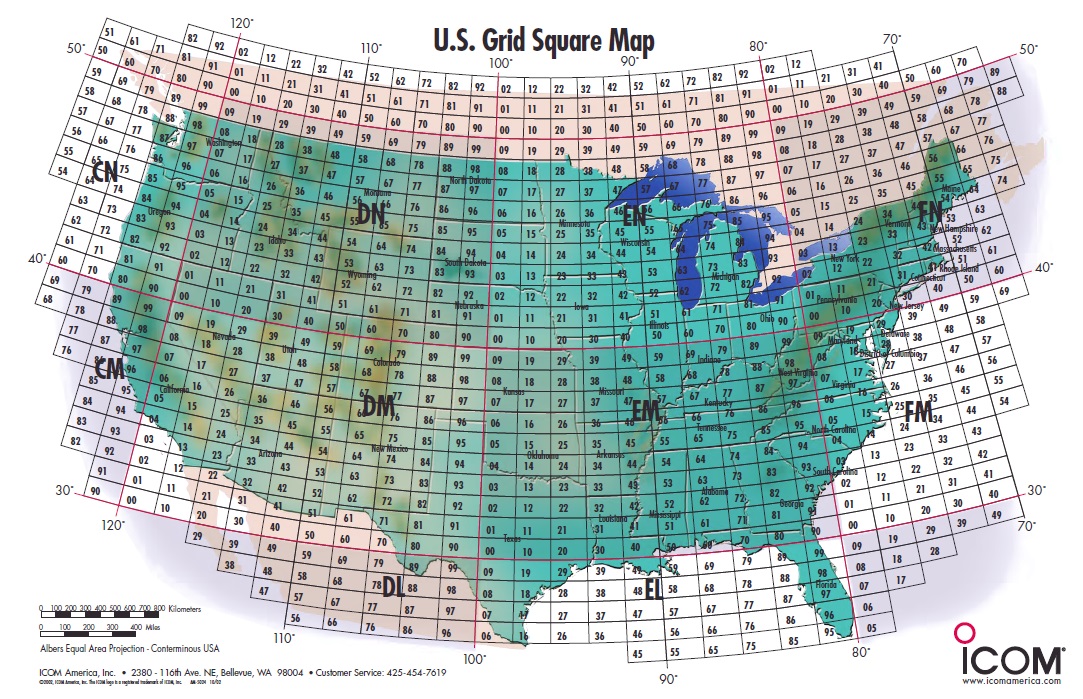
CLE 237 will be held this coming weekend and will be somewhat different than normal.
'CLE's are 'Co-ordinated Listening Events, and NDB DXers around the world focus their listening time on one small slice of the NDB spectrum ... but this one is a little different.
This event has been organized around the Maidenhead Locator system and will challenge hunters to log beacons based upon the beacon's FIELD designation. Listeners should seek to log a maximum of five NDBs in each GRID FIELD.
The grid field is actually the first two letters of the grid locator, such as 'CN', 'FN', 'DM' etc., as seen in the map above. Each field itself is divided into 100 GRID SQUARES, but individual grid squares are not relevant for this CLE ... only the fields.
Most amateurs that operate on the VHF bands are very familiar with the 'grid square locator' system and many VHF operating awards and events are focused on working different grid squares. This may all be a new adventure for many non-VHF DXers but it does present a whole new way of keeping track of your catches.
I have always kept track of the grid square locator for all NDB signals that I hear and often find that a signal being heard from one particular square will lead to other beacons being heard (often new catches) from adjacent squares, while propagation is spotlighting that region ... it often pays to keep a grid square map handy while you search the band!
If you are not familiar with the grid square system, it's all pretty simple and this CLE only focuses on the largest part of the system, the FIELD. The first thing you should do is determine your own grid FIELD location, which, for North America, can be found very easily from the map above or anywhere in the world on K7FRY's locator map.
When tuning for NDBs, put your receiver in the CW mode and listen for the NDB's CW identifier, repeated every few seconds. Listen for U.S. NDB identifiers approximately 1 kHz higher or lower than the published transmitted frequency since these beacons are modulated with a 1020 Hz tone approximately.
For example, 'AA' near Fargo, ND, transmits on 365 kHz and its upper sideband CW identifier is tuned at 366.025 kHz while its lower sideband CW ident can be tuned at 363.946 kHz. Its USB tone is actually 1025 Hz while its LSB tone is 1054 Hz.
Often, one sideband will be much stronger than the other so if you don't hear the first one, try listening on the other sideband.
Canadian NDBs normally have an USB tone only, usually very close to 400 Hz. They also have a long dash (keydown) following the CW identifier.
All NDBs heard in North America will be listed in the RNA database (updated daily) while those heard in Europe may be found in the REU database. Beacons heard outside of these regions will be found in the RWW database.
From CLE organizer Brian Keyte:
===============================================
Here are the Final Details for this weekend's DX Listening Event.
We'll be listening for NDBs in as many Locator FIELDS as we can.
Fields are the first 2 letters of the 6 character locators ('Grid Square').
Days: Friday 26th October – Monday 29th October
Times: Midday on Friday to Midday on Monday, your LOCAL* time
*(NB Many of us will be changing our house clocks this weekend.
UTC time, shown in our logs, continues unaffected by that)
QRG: Normal LF/MF frequencies 190 - 1740 kHz
Target: UP TO 5 NORMAL NDBs IN EACH LOCATOR FIELD (see below)
(not DGPS, NAVTEX, Amateur or UNIDs)
Please also log YOUR NEAREST ACTIVE NDB - it will probably be one of
the five in your own Field.
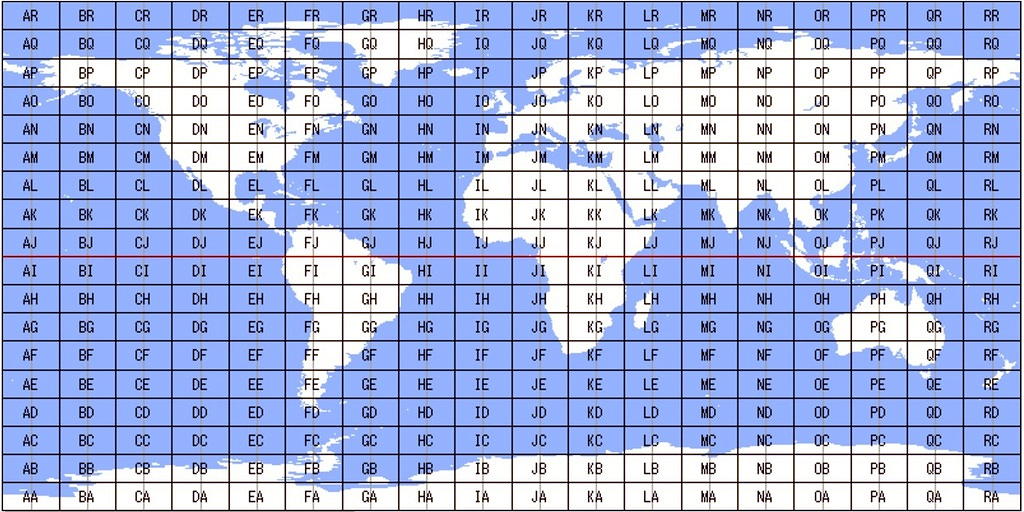
A World map of all the locator Fields is attached. You can see, for
example, that Field IO includes most of the British Isles.
 |
| (click map to expand) |
Please post your CLE log to the List in a plain text email if possible,
with 'CLE237' at the start of its title and showing on each log line:
The full Date ( e.g. 2018-10-26, etc., or just the day number 26 )
UTC (The day changes at 00:00 UTC).
kHz - the NDB's nominal published frequency
The Call Ident.
As always, put those FOUR MAIN ITEMS FIRST on each log line, with
any other optional details such as location and distance LATER in the
same line.
There is no need to show the locator Fields (the harvester program
will work out all of them and the nearest NDB you logged).
Your log will be easier to read if you leave a blank separator line
between the groups of up to 5 lines for each Field.
If you wish, you could add the 2-letter Field ident (NOTHING ELSE)
at the start of each separator line.
Any UNIDs that you come across will also be of interest - in a separate
part of your log please.
If you send interim logs, please make sure that you also send a 'FINAL'
log showing ALL your loggings for the CLE.
We will send the usual 'Any More Logs?' email to NDB List at about
18:00 UTC on Tuesday so you can check that your log has been found OK.
Do make sure that your Final log has arrived on the list by 09:00 UTC
on Wednesday 31st October at the very latest.
Joachim and I hope to complete the combined results within two days.
PLANNING YOUR LISTENING
It will really help you to plan your listening if you go to the excellent
Rxx Database https://www.classaxe.com/dx/ndb/reu
(Replace the 'reu' by 'rna' if you are in North America, 'rww' elsewhere)
THE KEY PLACE to start entering details of what you want is
'Signal Locations - GSQs'.
Put a 2-letter FIELD id in that box to see all the NDBs in that Field that
have been logged from your part of the World (i.e. EU or NA or other).
You could alter the resulting list in lots of different ways:
Select 'Only active' (bottom right)
Enter your own Country or State in 'Heard Here'
Select a specific listener (yourself?) in 'Logged by' – BUT you might missa beacon that you haven’t heard so far
Add extra locator Field(s) in the 'GSQs' box, separated by blanks
- In ANY of the above, you can select 'Map' instead of 'List' (top right)
Add your own full locator (6 characters) in the 'Distance - From GSQ' box to see the distances and bearings from your location.
In 'Sort By' (bottom line) select GSQ
Getting cleverer (!) you could use the wild card _ (an underscore) to see details of all Fields with the same column of Longitude or row of Latitude
e.g. I_ selects all of locator column I (0 to 20 degrees west), _O would give all of row O (50 to 60 degrees north).
Good Listening
73 Brian
---------------------------------------------------------------------
From: Brian Keyte G3SIA ndbcle'at'gmail.com
Location: Surrey, SE England (CLE coordinator)
---------------------------------------------------------------------
(As usual a handful of us may choose to listen via a remote receiver
with permission if required - its own location will be their temporary
home Field).
A remote listener may NOT also use another receiver, whether local
or remote, to obtain further loggings for the same CLE.
===================================================
- determine, worldwide, which beacons are actually in service and on-the-air so the online database can be kept up-to-date
- determine, worldwide, which beacons are out-of-service or have gone silent since the last CLE covering this range
- will indicate the state of propagation conditions at the various participant locations
- will give you an indication of how well your LF/MF receiving system is working
- give participants a fun yet challenging activity to keep their listening skills honed
The Yahoo ndblist Group has been moved to Groups.io and The NDB List Group will now be found there! The very active group is a great place to learn more about the 'Art of NDB DXing' or to meet other listeners in your region. There is a lot of good information available there and new members are always very welcome. As well, you can follow the results of other CLE participants from night to night as propagation is always an active topic of discussion. Joining the group also makes it much easier to post your logs!
You need not be an NDB List member to participate in the CLEs and all reports, no matter how small, are of much value to the organizers.
Remember - 'First-time' logs are always VERY welcome!
Reports may be sent to the NDB List Group or e-mailed to CLE co-ordinator, Brian Keyte (G3SIA), whose address appears above. If you are a member of the group, all final results will also be e-mailed and posted there.
Please ... give the CLE a try ... then let us know what NDB's can be heard from your location! Your report can then be added to the worldwide database to help keep it up-to-date.
Have fun and good hunting!
Steve McDonald, VE7SL, is a regular contributor to AmateurRadio.com and writes from British Columbia, Canada. Contact him at [email protected].
LHS Episode #253: JS8CALL Deep Dive
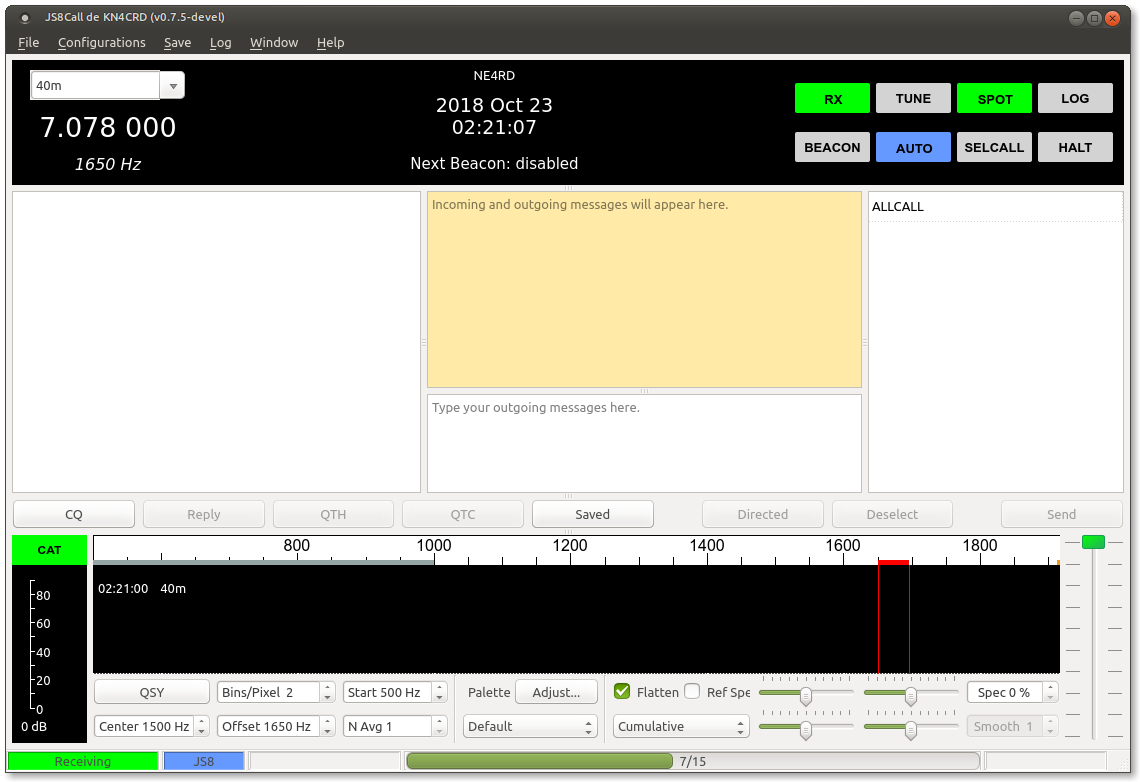 Hello and welcome to this episode of Linux in the Ham Shack! In our deep dive this time around, we take an in-depth look at the new weak-signal chat mode called JS8CALL, formerly FT8CALL. We explore the history and development of the mode, how it's currently being used, the team behind the project, the operation of the software and much more. Thank you for tuning in and thank you for supporting our program.
73 de The LHS Crew
Russ Woodman, K5TUX, co-hosts the Linux in the Ham Shack podcast which is available for download in both MP3 and OGG audio format. Contact him at [email protected].
W3EDP Antenna
My QTH isn’t great for antennas. I’ve tried a few types but haven’t managed to find one that works for me, especially on the lower bands like 40m and 80m. About 2 years ago I made up a W3EDP antenna using some left over wire and a 4:1 balun. It was noisy and worse than anything else I had kicking about. So back in the box it went.
I thought I’d give it another go as domestic planning permission has been relaxed a bit. There are a few different configurations of the antenna but they follow a similar path. A long, not particularly resonant, antenna made up of a long element and a counterpoise.

In my case I followed the ‘ladder line method‘ where the antenna and counterpoise are as a single piece of ladder line for 17ft and the remainder antenna wire is just normal wire. So it looks like the original Zepp antennas and a little bit like this

The diagram above gives an additional component to the ‘normal’ W3EDP antenna. that is an additional counterpoise. I thought I’d give this a go based on a bit of background reading I did. NC4FB explains his experiences with the normal design and I have to say I had similar experiences. Namely that the swr was quite high and it was not that easy to get it down to usable levels on any of the bands when the antenna was first played with. A good idea to try my own extra’s.
So, test gear is as follows.
Antenna connected to homemade 4:1 balun with some mini 8 coax (about 7m) hanging outside a downstairs window. Antenna raised in a V shape with the balun box at ground level and the antenna supported about 1/3 of the way down on an aluminum mast approximately 8m off the ground. The end of the antenna is resting on the fence at about 1.8m off the ground. Hardly ideal but good for enough for a lash up.
I used a MR100 Antenna analyser. These are cheap and good for indicative measurements. There is also some good free software available to use with you Linux PC (There are probably windows varieties but I didn’t look).
I did 4 tests. Vanilla, i.e. no extra counterpoise. A 32ft counterpoise, A 16ft counterpoise & lastly an 8ft counterpoise. The outputs are below.


So what does this tell us?
Actually that there is a good argument on the face of it to add in an additional counterpoise. The 32ft one has a greater effect on the lower bands and the short on the higher bands. Nothing too contentious here then. So what happens if you connect them all up together.

It does lower the swr but that is probably not the only effect. I think this might need some extra experimentation or at least a bit more digging to see how to improve the antenna for my qth. But for now I’ll sort the lash up out and give it some on air testing.
Alex Hill, G7KSE, is a regular contributor to AmateurRadio.com and writes from Cumbria, UK. Contact him at [email protected].
 Ham Radio Deluxe |
 W5SWL Electronics |
 Ham Radio Prep |
 KB3IFH QSL Cards  Hip Ham Shirts  HamRadioAuctions HamRadioAuctions Reliance Antennas Reliance Antennas Enigma Shop Enigma Shop |  morseDX  Ni4L Antennas  R&L Electronics R&L Electronics antennas.us antennas.us QRV QRV |
- Matt W1MST, Managing Editor
