 |
 LHS Episode #289: Linux Deep Dive
 18 June 2019 | by
Hello and welcome to Episode #289 of Linux in the Ham Shack. In this episode, LHS gets a visit from Jon "maddog" Hall, a legend in the open source and Linux communities. He discusses--well--Linux. Everything you ever wanted to know about Linux from its early macro computing roots all the way up to the present. If there's something you didn't know about Linux, you're going to find it here. Make sure to listen to the outtake after the outro for 30 more minutes on Linux you problem didn't know anything about. Thanks to Jon for an illuminating and fascinating episode.
73 de The LHS Crew
Russ Woodman, K5TUX, co-hosts the Linux in the Ham Shack podcast which is available for download in both MP3 and OGG audio format. Contact him at [email protected].
VHF/UHF Omni Antenna for SOTA Use
For Summits On The Air (SOTA), I’ve been using just the VHF/UHF ham bands, with the 2m band being the most popular. For most activations, I use a 3-element Arrow II yagi antenna that has a gain of about 6 dBd. Sometimes that extra gain makes the difference between completing a contact or not.
Omnidirectional Antenna

But it is also handy to have an omnidirectional antenna that is easy to deploy. Sometimes I’d rather just call or monitor using an omni without having to point the antenna. “Easy and good enough” can be an effective strategy for SOTA.
A key advantage to an omnidirectional antenna is that it is always pointed in the right direction.
I usually carry one of the TWAYRDIO RH770 VHF/UHF antennas for use with my 2m/70cm handheld transceiver. Despite its low cost, I have found that its performance to be quite good. That antenna is offered with a variety of connectors, including a BNC.
This led me to the idea of putting together a simple antenna mount with a BNC on it, attach an RH770 antenna to it and support it using some kind of pole. I have several monopod devices (intended for use as a camera support) that use the standard 1/4-20 thread. I also have a trekking pole that has the same camera mounting thread. Another option is to use an actual camera tripod which is a bit bulky but may work for some SOTA activations.
After a short visit to the hardware store, I selected crossbar for mounting a light fixture that was about the right size and shape. I happened to have a bulkhead-mount BNC-to-BNC connector which I inserted into the large hole in the crossbar. That hole was not quite large enough for the connector, but a few minutes work with a round file solved that problem.

The crossbar was originally flat but I bent one one end of it 90 degrees, with the idea that this might offer other mounting configurations in the future. For example, I might be able to strap or tape the 90 degree angle member to a pole or support.

The other end of the crossbar has a large slot that accommodated the 1/4-20 mounting stud. Actually, the slot was not quite wide enough, so some addition work with a round file opened it up. I secured the 1/4-20 thread using a nylon wing nut.

I’ve used this setup on one SOTA activation and was pleased with the results. I carried the crossbar mount attached to the monopod in my pack. On the summit, I simply installed the RH770 antenna onto the top BNC and extended the monopod. On this summit, I found the perfect pile of rocks that made a good support for the monopod. Then I used a short length of RG-8X coax between the bottom BNC and the 2m/70cm transceiver.

Although my primary interest was with the 2 meter band, it was really convenient to have both 2m and 70cm on the same antenna. I am pleased with operation of the antenna and the ability to deploy it quickly. I expect to carry this on most of my SOTA activations.
73 Bob K0NR
The post VHF/UHF Omni Antenna for SOTA Use appeared first on The KØNR Radio Site.
Bob Witte, KØNR, is a regular contributor to AmateurRadio.com and writes from Colorado, USA. Contact him at [email protected].
Weekly Propagation Summary – 2019 Jun 17 16:10 UTC
Here is this week’s space weather and geophysical report, issued 2019 Jun 17 0339 UTC.
Highlights of Solar and Geomagnetic Activity 10 – 16 June 2019
Solar activity was at very low levels. No sunspots were observed on the visible disk and there was an absence of significant flare activity. No Earth-directed CMEs were observed in available imagery.
No proton events were observed at geosynchronous orbit.
The greater than 2 MeV electron flux at geosynchronous orbit was at normal levels throughout the reporting period.
Geomagnetic field activity reached active levels on 13 June, and unsettled levels on 14 June due to recurrent CH HSS influence. Quiet conditions were observed during the remainder of the period.
Forecast of Solar and Geomagnetic Activity 17 June – 13 July 2019
Solar activity is expected to be at very low levels throughout the outlook period.
No proton events are expected at geosynchronous orbit.
The greater than 2 MeV electron flux at geosynchronous orbit is expected to reach high levels on 26-30 June, with moderate levels expected on 18-25 June and 01-03 July in response to elevated wind speeds associated with recurrent CH HSS activity.
Geomagnetic field activity is expected to reach active levels on 17-19, 25 June, unsettled levels on 20-22, 24, 26 June and 06, 10-11, 13 July due to CH HSS influence. Quiet conditions are expected throughout the remainder of the outlook period.
Don’t forget to visit our live space weather and radio propagation web site, at: http://SunSpotWatch.com/
Live Aurora mapping is at http://aurora.sunspotwatch.com/
If you are on Twitter, please follow these two users: 1. https://Twitter.com/NW7US 2. https://Twitter.com/hfradiospacewx
– – – – – – – – – – – – –
Be sure to subscribe to our space weather and propagation email group, on Groups.io
https://groups.io/g/propagation-and-space-weather
Spread the word!
– – – – – – – – – – – – –
Links of interest:
+ Amazon space weather books: http://g.nw7us.us/fbssw-aSWSC
+ https://Twitter.com/NW7US
+ https://Twitter.com/hfradiospacewx
Space Weather and Ham Radio YouTube Channel News:
I am working on launching a YouTube channel overhaul, that includes series of videos about space weather, radio signal propagation, and more.
Additionally, I am working on improving the educational efforts via the email, Facebook, YouTube, Tumblr, and other activities.
You can help!
Please consider becoming a Patron of these space weather and radio communications services, beginning with the YouTube channel:
https://www.patreon.com/NW7US
The YouTube channel:
https://YouTube.com/NW7US
..
Visit, subscribe: NW7US Radio Communications and Propagation YouTube Channel
AmateurLogic 131: Interesting Things at Hamvention
AmateurLogic.TV Episode 131 is now available for download.
Another excellent adventure at Dayton Hamvention. Some of the sights and sounds that make this a very special event. Emile’s WWII Museum PT Boat event. A tour of Mendelson’s Surplus in Dayton. There is no place else like this in the world.
2:23:03
George Thomas, W5JDX, is co-host of AmateurLogic.TV, an original amateur radio video program hosted by George Thomas (W5JDX), Tommy Martin (N5ZNO), Peter Berrett (VK3PB), and Emile Diodene (KE5QKR). Contact him at [email protected].
DMR Plus – The Network that is Gaining Popularity in the West
 When it comes to DMR, people usually think of Brandmeister. But there is another network rapidly gaining popularity in North America worthy of your attention – DMR Plus. DMR Plus gives you many of the same features as Brandmeister such as talkgroups, SMS messaging, private call, reflectors and more. The main difference is DMR Plus presents these features in a well thought out manner which allows for outstanding flexibility when it comes to the way we communicate.
Doing a google search for DMR Plus comes up with the following from the DMR-MARC website:
DMR Plus is the original network that developed tools to interconnect ETSI Tier 2 DMR repeaters. It has been popular in Europe for years but now, with the cooperation of DMR-MARC, it has finally arrived in North America and the South Pacific. The DMR Plus architecture is similar to D-Star. Users have talkgroups to converse, to disconnect, and to monitor channel status. Users choose from a large pool of reflectors and move back to the converse talkgroup for all QSOs.
The DMR-MARC and DMR Plus partnership is ideal. The DMR-MARC network is robust and reliable. The DMR Plus network is more aligned with experimentation and interoperability of technologies. Think of DMR Plus as the best possible implementation of the former DMR-MARC Sandbox.
DMR Plus also supports a configuration that features the traditional DMR-MARC talkgroups like Worldwide English, North America, Latin America, etc. on TS1 and the DMR-Plus reflectors on TS2. The USA Regional talkgroups and the Canadian Provincial talkgroups are now connected to the TS2 reflectors.
Like Brandmeister, DMR Plus uses talkgroups (many of which are bridged between the two networks such as TAC310, World Wide 91 etc) but they also use reflectors. A reflector is kind of like a hub that allows you to communicate with everyone else that is also connected to that same reflector. But on DMR Plus, the reflector itself can be bridged to either another talkgroup, another reflector or even another network or digital voice mode.
One perfect example of this is the QuadNet Array. The Array brings the most popular digital voice modes under the same roof. You can find the QuadNet Array on reflector 4551 or DMR Plus talkgroup 320. By connecting to either of these your transmission can be heard by users on DMR Plus but also Brandmeister 31012, Yaesu System Fusion reflector 37099, D- STAR reflector XRF757A, Smart Groups DSTAR1 and more. For a complete overview of the QuadNet Array visit the QuadNet website at www.openquad.net.
You can also find an updated list of DMR Plus reflectors at https://www.dmr-marc.net/FAQ/dmrplus-america.html.
One thing that stands out in my experience is that DMR Plus appears to have better audio quality than Brandmeister. I find much fewer dropouts and lower packet loss on the DMR Plus network.
So, what do you need in order to give DMR Plus a try? If you are running a Pi-STAR based hotspot you are good to go. The OpenSPOT will also allow you to use DMR Plus. However since I have not had the opportunity to use one I am not able to give you specific setup instructions. Refer to the OpenSPOT website and Facebook group for more information.
In Pi-STAR version 4, do the following:
- Login to your dashboard
- Click on configuration
- Scroll down to DMR Configuration
- Under the DMR Master setting select IPSC2-Quadnet and click on apply settings.
While you can use any IPSC2 server you like, I recommend IPSC2-Quadnet because it is very well maintained and extremely stable. We make sure it is up to date with the latest software version which provides the newest features and bug fixes and I personally feel our technical support team is second to none. We are very responsive when it comes to support requests as well as adding requested DMR Plus talkgroups to the server. If there is a talkgroup you are having difficulty accessing on IPSC2-Quadnet send an email to [email protected] and let us know the DMR Plus talkgroup number and time slot and we will add it to the server.
Once your hotspot returns to the configuration page, enter the following in the options= box
StartRef=;RelinkTime=120;UserLink=1;TS1_1=320;TS1_2=;TS1_3=;TS1_4=;TS1_5=;
Once entered, click on apply changes.
What this line means is you are having our hotspot not automatically link to a reflector upon startup. If you want to setup a default reflector, enter the reflector number after the StartRef= command. RelinkTime means if you do link to a reflector it will automatically disconnect after 120 minutes if you don’t key your mic to reset the timer. If you have a default reflector set and change to a different reflector your hotspot will automatically return to the default reflector after the time expires. UserLink tells your hotspot to allow you to link to talkgroups and reflectors via RF. The TS1 lines setup static talkgroups. In this example I entered talkgroup 320 which is the QuadNet Array. I use the talkgroup for the QuadNet Array instead of selecting reflector 4541 because this allows me to monitor the Array and use reflectors at the same time. Very convenient when listening for a call while tuning around the various reflectors searching for activity.
Now in your radio code plug you will want to do the following:
Setup a contact for talkgroup for 320 and then add this contact to a channel and zone in your radio code plug. You will want to do the same for any other talkgroups that you would like to use and add them to your radio. Talkgroup 320 is what you would use to talk on the QuadNet Array multi protocol network. So if you have a friend that uses D-STAR, Yaesu System Fusion, Brandmeister DMR etc you can still talk with them on the Array. You can also use this talkgroup to talk with the administrators of the IPSC2-QuadNet server in case you notice a problem or have a question.
Add any reflectors that you would like to use (see the link earlier in this article to find the list of available DMR Plus reflectors) in your radio code plug as well. Any reflector you want to add needs to be setup as a private call in your contacts instead of group call. Then create a channel with the reflector contact that you just created, then add the channel to a zone. To link to a reflector you will then have easy access by selecting the zone you just programmed these into. When selected, key your mic and you should get an acknowledgement that you are now connected to that reflector.
You will also need to add a contact, channel and zone for talkgroup 9 (groups call, not private call) in your radio code plug. This is the talkgroup you will need to use when talking on a DMR Plus reflector.
While you are setting up your code plug, you will want to make sure you have your friends contact information setup in your radio and set these contacts as private call instead of group call. This is how you will initiate a private call to talk radio to radio outside of any talkgroups or reflectors. Private call is similar to call sign routing on D-STAR in that it allows you to talk with the other station radio to radio without using a talkgroup or reflector. The two of you can have a relatively private conversations and not get in the way of other users. You will also use this contact if you want to send them a SMS message.
I hope you decide to give DMR Plus a try. If you have any questions you can usually find me on the QuadNet Array talkgroup 320. If you prefer you can also contact me via email. I can be reached either at [email protected] or [email protected].
Jeff Bishop, VE6DV, is a special contributor to AmateurRadio.com and writes from Alberta, Canada. Contact him at [email protected].
Back To The Magic

This odd love-hate relationship continues to this day but with the FT8 mode being used almost exclusively now on 6m, it’s your computer that now snickers at you for any untimely excursions from the shack ... showing you, in any delightful color scheme that you choose, all of the DX that you 'just missed' once again!
It happened to me again yesterday, while out in the yard stacking next winter's firewood.
It was just a short excursion, as the eastern stations were working Europeans and all of the VE4 beacons were very loud back here on the coast. The possibilities of a link to the European path kept my excursion to only 10 minutes but sure enough, there it was on my WSJT-X list of decodes .... several CQs from CT7ANG in Portugal! My laptop could barely stop giggling. This would have been the first PNW-EU QSO of the summer had I been maintaining vigilance.l!
I continued to stack firewood and to watch the band more closely, knowing that every once in awhile, for entertainment purposes, the prop gods will toss out a bone or two, just to keep you on the hook.
A later check indicated that CT1HZE’s CQs had been decoded just a few moments earlier ... there was renewed hope!
Joe’s strong FT8 CQ popped-up again a few minutes later and he came right back to my initial call. Although that was it for the day, the 2019 PNW-EU path had begun!
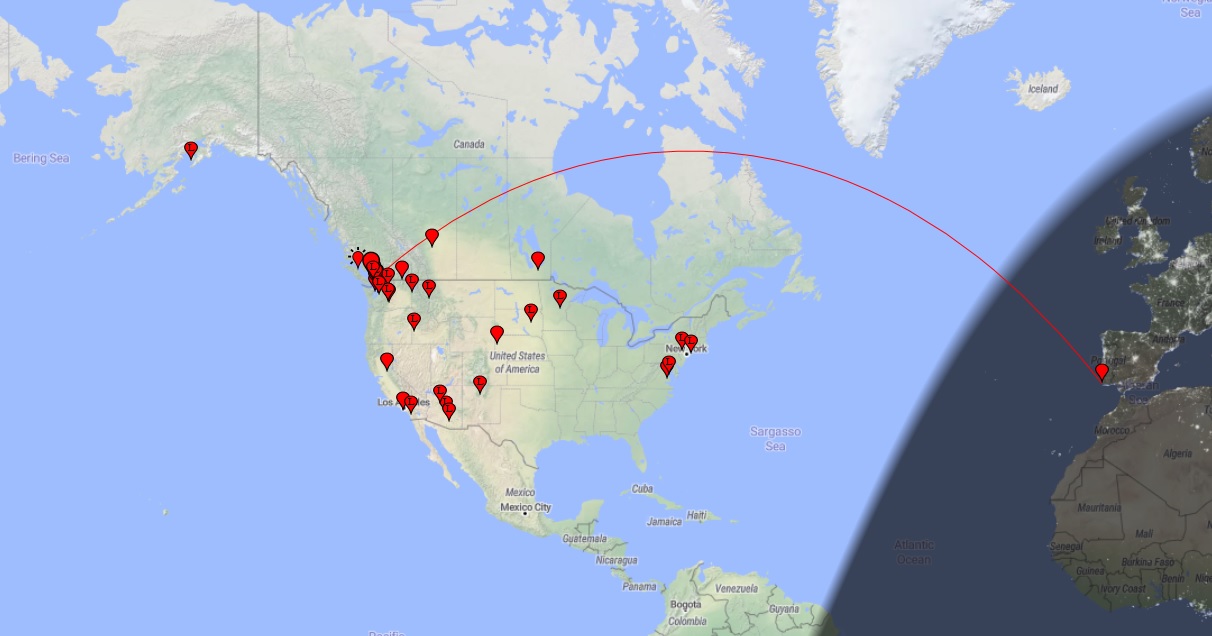 |
| courtesy: PSK Reporter |
I’m still somewhat ambivalent about FT8 and its ‘coldness’ when it comes to person-to-person interaction, but since most of the DX action on 6m is now digital, it’s either embrace it or miss out. At the moment, I’m at least prepared to hug it and see how it behaves. If it puts more Europeans and new DXCCs into my magic band log, then that’s a worthwhile investment.
Unlike way too many others, I’m not prepared to let my computer endlessly CQ for hours at a time. In a crowded local environment, with big strong signals being the norm, this method of operating is simply disrespectful to other amateurs as this mostly useless CQing will usually make reception of any weaker signals impossible.
FT8 is a weak-signal mode and the interfaces used do not handle extremely strong local signals very well. I would urge others to think about this poor operating practice and adopt what has always proved to be the best tactic for catching DX ... listen, listen, listen. The same tactic works just as well on FT8 as it does on CW.
Back to stacking firewood but having tossed me a bone yesterday, I’m sure the prop gods will be out to get even for awhile!
Steve McDonald, VE7SL, is a regular contributor to AmateurRadio.com and writes from British Columbia, Canada. Contact him at [email protected].
Weekly Propagation Summary – 2019 Jun 10 16:10 UTC
Here is this week’s space weather and geophysical report, issued 2019 Jun 10 0314 UTC.
Highlights of Solar and Geomagnetic Activity 03 – 09 June 2019
Solar activity was at very low levels. No sunspots were observed on the visible disk and there was an absence of significant flare activity. A dissapearing solar filament (DSF), centered near S05E52, was observed in GONG optical imagery at 03/0715 UTC but was not observed in LASCO imagery. This CME was believed to have impacted Earth midday on 08 June. An additional DSF, centered near S05E13, was observed at 07/2145 UTC and is expected to have a possible geoeffective component with an anticipated arrival of 12 June.
No proton events were observed at geosynchronous orbit.
The greater than 2 MeV electron flux at geosynchronous orbit reached high levels on 03 June and moderate levels on 04-08 June in response to elevated wind speeds from a negative polarity, coronal hole high-speed stream (CH HSS). The peak electron flux during the reporting period was 2,270 pfu at 03/1755 UTC.
Geomagnetic field activity reached G1 (Minor) storm levels on 08 June and unsettled levels on 09 June as a result of the aforementioned 03 June CME. Quiet conditons were observed throughout the remainder of the period.
Forecast of Solar and Geomagnetic Activity 10 June – 06 July 2019
Solar activity is expected to be at very low levels throughout the outlook period.
No proton events are expected at geosynchronous orbit.
The greater than 2 MeV electron flux at geosynchronous orbit is expected to reach high levels on 11-13 and 26-30 June, with moderate levels expected on 10, 14-20, 25 June and 01-03 July in response to elevated wind speeds associated with recurrent CH HSS activity.
Geomagnetic field activity is expected to reach active levels on 12 and 25 June, unsettled levels on 10-11, 13, 24, 26 June and 06 July due to CH HSS influence. Quiet conditions are expected throughout the remainder of the outlook period.
Don’t forget to visit our live space weather and radio propagation web site, at: http://SunSpotWatch.com/
Live Aurora mapping is at http://aurora.sunspotwatch.com/
If you are on Twitter, please follow these two users: 1. https://Twitter.com/NW7US 2. https://Twitter.com/hfradiospacewx
– – – – – – – – – – – – –
Be sure to subscribe to our space weather and propagation email group, on Groups.io
https://groups.io/g/propagation-and-space-weather
Spread the word!
– – – – – – – – – – – – –
Links of interest:
+ Amazon space weather books: http://g.nw7us.us/fbssw-aSWSC
+ https://Twitter.com/NW7US
+ https://Twitter.com/hfradiospacewx
Space Weather and Ham Radio YouTube Channel News:
I am working on launching a YouTube channel overhaul, that includes series of videos about space weather, radio signal propagation, and more.
Additionally, I am working on improving the educational efforts via the email, Facebook, YouTube, Tumblr, and other activities.
You can help!
Please consider becoming a Patron of these space weather and radio communications services, beginning with the YouTube channel:
https://www.patreon.com/NW7US
The YouTube channel:
https://YouTube.com/NW7US
..
Visit, subscribe: NW7US Radio Communications and Propagation YouTube Channel
 Ham Radio Deluxe |
 W5SWL Electronics |
 Ham Radio Prep |
 KB3IFH QSL Cards  Hip Ham Shirts  HamRadioAuctions HamRadioAuctions Reliance Antennas Reliance Antennas Enigma Shop Enigma Shop |  morseDX  Ni4L Antennas  R&L Electronics R&L Electronics antennas.us antennas.us Ears to Our World Ears to Our World |
- Matt W1MST, Managing Editor
