 |
 HT and Light Bulb Load
 22 November 2020 | by
 The light-bulb dummy load has been used with HF transceivers from way back in the old days (and sometimes more recently). Also, the Lightbulb QSO Party promoted the use of light bulbs as antennas.

I wanted to find out if I could do the same thing with a 5W handheld transceiver, so I scavenged a bulb from an old string of Christmas tree lights and hooked it up to my Yaesu FT-60. This video shows what happened next.
After I made the video, I checked the specs on the FT-60 and found that the transmit power settings are: 5.0 W (High) / 2.0 W (Middle) / 0.5 W (Low). In the video, I said the middle setting was one half watt, which is incorrect.
I checked the SWR on the light bulb and found it to be 2.7. I was not worried about damaging the handheld radio because they are designed to work into crummy antennas such as the standard rubber duck.
I hope you enjoyed this fun experiment. Sorry about the amateurish video quality…I just shot it with my iPhone and did some simple editing.
73 Bob K0NR
The post HT and Light Bulb Load appeared first on The KØNR Radio Site.
Bob Witte, KØNR, is a regular contributor to AmateurRadio.com and writes from Colorado, USA. Contact him at [email protected].
LHS Episode #380: The Weekender LXI

It's time once again for The Weekender. This is our bi-weekly departure into the world of amateur radio contests, open source conventions, special events, listener challenges, hedonism and just plain fun. Thanks for listening and, if you happen to get a chance, feel free to call us or e-mail and send us some feedback. Tell us how we're doing. We'd love to hear from you.
73 de The LHS Crew
Russ Woodman, K5TUX, co-hosts the Linux in the Ham Shack podcast which is available for download in both MP3 and OGG audio format. Contact him at [email protected].
Hunting For NDBs In CLE262
 |
| ZYC-254 courtesy: http://www.ve3gop.com/ |
Propagation on MF has been excellent this past week and hopefully will continue to be good.
A challenge target for listeners in North America is ZYC - 254kHz in Calgary, Alberta. It's widely heard throughout North America thanks to its lower than usual modulation frequency. Listen for ZYC's upper sideband on 254.361 kHz with your receiver in the CW mode.
When tuning for NDBs, put your receiver in the CW mode and listen for the NDB's CW identifier, repeated every few seconds. Listen for U.S. NDB identifiers approximately 1 kHz higher or lower than the published transmitted frequency since these beacons are modulated with a 1020 Hz tone approximately.
For example, 'AA' near Fargo, ND, transmits on 365 kHz and its upper sideband CW identifier is tuned at 366.025 kHz while its lower sideband CW ident can be tuned at 363.946 kHz. Its USB tone is actually 1025 Hz while its LSB tone is 1054 Hz.
Often, one sideband will be much stronger than the other so if you don't hear the first one, try listening on the other sideband.
Canadian NDBs normally have an USB tone only, usually very close to 400 Hz. They also have a long dash (keydown) following the CW identifier.
All NDBs heard in North America will be listed in the RNA database (updated daily) while those heard in Europe may be found in the REU database. Beacons heard outside of these regions will be found in the RWW database. These databases have recently been re-vamped and are slicker than ever before!
From CLE coordinator Brian Keyte (G3SIA), comes the following CLE info:
Hello all,
This coming weekend we have another chance to forget the current problems for a while and enjoy a Coordinated Listening Event.
All CLE logs will be very welcome, short or long.
Days: Friday 20 Nov. - Monday 23 Nov.
Times: Start and end at midday, local time at the receiver.
Normal NDBs in the ranges:
240.0 - 259.9 kHz plus 420.0 - 439.9 kHz
(BOTH ranges are for ALL listeners)
Please log the NDBs you can identify that are listed in the ranges, plus any
UNIDs that you come across there.
You can find details of the beacons in those ranges, lists and maps, if you
go to http://www.ndblist.info/cle.htm and click on the 'CLE SEEKLIST'
link.
Send your final CLE log to [email protected] with CLE262 and FINAL in the
email title.
Please show on EVERY LINE of your log:
# The full Date (or Day no.) e.g. '2020-11-20' (or just '20')
and UTC (the day changes at 00:00 UTC)
# kHz (the beacon's nominal published frequency if you know it)
# The Call Ident.
Other optional details - Location, Distance, etc. - go LATER in the same line (or in footnotes). Please make your log useful to old and new members alike by ALWAYS including your own location and brief details of the equipment and aerial(s) that you were using.
We will send an 'Any More Logs?' email at about 20:00 UTC on Tuesday evening so you can check that your log has been found OK.
To be included in the combined results your log must have arrived by 09:00
UTC on Wednesday 25 Nov. at the very latest.
We hope to complete making the Combined Results within a day or two.
Good listening
Brian and Joachim
---------------------------------------------------------------------
From: Brian Keyte G3SIA ndbcle'at'gmail.com
Location: Surrey, SE England (CLE coordinator)
---------------------------------------------------------------------
If you are interested in some remote listening - maybe
due to local difficulties - you could use any one remote
receiver for your loggings, stating its location and with
the owner's permission if required.
( e.g. see kiwisdr.com )
A remote listener may NOT also use another receiver,
local or remote, to make more loggings for the same CLE.
These listening events serve several purposes. They
• determine, worldwide, which beacons are out-of-service or have gone silent since the last CLE covering this range
• will indicate the state of propagation conditions at the various participant locations
• will give you an indication of how well your LF/MF receiving system is working
• give participants a fun yet challenging activity to keep their listening skills honed
Final details can be found at the NDB List website, and worldwide results, for every participant, will be posted there a few days after the event.
The NDB List Group is a great place to learn more about the 'Art of NDB DXing' or to meet other DXers in your region. There is a lot of good information available there and new members are always very welcome. As well, you can follow the results of other CLE participants from night to night as propagation is always an active topic of discussion.
You need not be an NDB List member to participate in the CLEs and all reports, no matter how small, are of much value to the organizers.
Remember - 'First-time' logs are always VERY welcome!
Reports may be sent to the NDB List Group or e-mailed to CLE co-ordinator, Brian Keyte (G3SIA), whose address appears above. If you are a member of the group, all final results will also be e-mailed and posted there.
Please ... give the CLE a try ... then let us know what NDB's can be heard from your location! Your report can then be added to the worldwide database to help keep it up-to-date.
Have fun and good hunting!
Steve McDonald, VE7SL, is a regular contributor to AmateurRadio.com and writes from British Columbia, Canada. Contact him at [email protected].
LHS Episode #379: LHS at Ohio LinuxFest 2020

Hello and welcome to Episode 379 of Linux in the Ham Shack. In place of our normal deep dive episode this week, the hosts were invited to be a part of Ohio LinuxFest 2020. We hosted a Birds-of-a-Feather (BoF) session on the topic of using Linux and amateur radio. We had a great turnout and a lot of fun. So we hope you enjoy this special episode of the program and a huge thank you to the staff and volunteers at Ohio LinuxFest. Here's to getting back to in-person conferences again soon.
73 de The LHS Crew
Russ Woodman, K5TUX, co-hosts the Linux in the Ham Shack podcast which is available for download in both MP3 and OGG audio format. Contact him at [email protected].
Contesting at QRPp levels!

Yesterday I dabbled in the OK/OM DX CW contest for about an hour and a half. This time for some fun and interest I entered QRP level but lowered my power to just one watt. Propagation has been surprisingly nice over the past week or so and I wanted to give the new solar flux a test run. My radio is the Icom 7610 and my antenna is a slopped Endfed antenna at about 25 feet. I stayed on 20m as the radio gods seemed to be smiling on me there. I made only 10 contacts as I was not in the contest for scoring just to see how the fishing was with one watt. I was only asked for repeats regarding my exchange twice other than that the 1 watt made it through.
Because I was operating at only 1 watt I also wanted to take the loss of my SWR into account. I checked with my antenna analyzer and the CW portion on 20m my SWR was 2.3:1. According to the power loss at various SWR readings chart at 2.3:1, I was in around 15% so this took my 1 watt down to 850 milliwatts.
Below are the results of my QRPp contest efforts:
Band 20m
QSO 10
Score 300
Contacts and Miles per watt using grid square to grid square for millage
1. OM7M 3720 miles 4376 miles per watt at .850 watts.
2. OM3CGN 3795 miles 4464 miles per watt at .850 watts.
3. OL3Z 3515 miles 4135 miles per watt at .850 watts.
4.OK7K 3503 miles 4121 miles per watt at .850 watts.
5. OK1DOL 3478 miles 4091 miles per watt at .850 watts.
Mike Weir, VE9KK, is a regular contributor to AmateurRadio.com and writes from New Brunswick, Canada. Contact him at [email protected].
AmateurLogic 149: Another Friday The 13th
AmateurLogic.TV Episode 149 is now available for download.
It’s another Friday The 13th in 2020.
Tommy sends pictures over the radio.
Mike discusses the new M17 digital radio protocol project.
Jeffery Kopcak, K8JTK joins in with a background look at the K8JTK Hub Digital Multimode Interlink System we use each Tuesday night for the AmateurLogic Soundcheck Net. AllStar Link, EchoLink, DMR, D-STAR, NXDN, P25, and Yaesu System Fusion are linked together for the ultimate multimode conferencing experience.
1:10:53
George Thomas, W5JDX, is co-host of AmateurLogic.TV, an original amateur radio video program hosted by George Thomas (W5JDX), Tommy Martin (N5ZNO), Peter Berrett (VK3PB), and Emile Diodene (KE5QKR). Contact him at [email protected].
RFI issue solved!
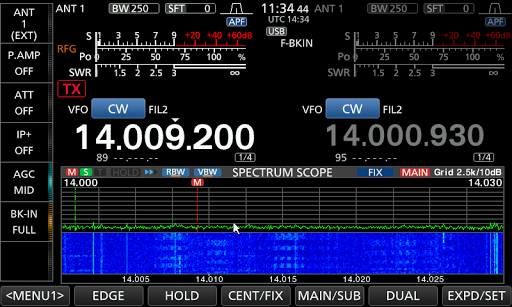 Back in May I posted regarding an RFI issue I was having and at the time I thought is was the neighbors heat pump. A few weeks ago my neighbor was away on business and his heat pump was off but my RFI was still present and more of it! I took my Eaton FRX5-BT put it on AM with the antenna up and took it for a walk about. When I passed by my Hydro smart meter the RFI was present big time but last time there was no issue at the meter. Upon investigation I read that the meter has cycles were it transmits data and thus the off and on issue with the RFI. The other issue is we are in very close proximity to other homes and I am certain my Endfed antenna is picking up not just my smart meter. The good new in all this is my Icom 7610 has great filtering and my NB is able to filter it out and the issues are gone. It's a problem that I can live with along side the rigs filtering.
Mike Weir, VE9KK, is a regular contributor to AmateurRadio.com and writes from New Brunswick, Canada. Contact him at [email protected].
 Ham Radio Deluxe |
 W5SWL Electronics |
 Ham Radio Prep |
 KB3IFH QSL Cards  Hip Ham Shirts  HamRadioAuctions HamRadioAuctions Reliance Antennas Reliance Antennas Enigma Shop Enigma Shop |  morseDX  Ni4L Antennas  R&L Electronics R&L Electronics antennas.us antennas.us QRV QRV |
- Matt W1MST, Managing Editor
