 |
 PLT DX Contest
 9 June 2010 | by
 For someone as plagued with HF band interference as me this sounds like a sick joke or an April 1 spoof that passed it’s read-by date. The Electromagnetic Compatibility Industry Association (bet you didn’t even know there was one) has announced a contest to see who can detect interference furthest from a power line adapter installation. Yes, really. There are two prizes: the Long Distance Award (LDX) for the person who detects interference the greatest distance from the installation, and the Most Typical prize (MTY) for the entrant whose detection distance is closest to the median value.
Well I suppose when interference blots out HF entirely we need to use our radios for something. I believe a CQ WW Wi-Fi contest in the offing. You collect SSIDs for multipliers. Double points if the network is unencrypted.

Julian Moss, G4ILO, is a regular contributor to AmateurRadio.com and writes from Cumbria, England. Contact him at [email protected].
Handiham World for 9 June 2010
Welcome to Handiham World!
We are definitely in the summer ham radio doldrums. I can tell that we have reached this time of year by some of the comments I hear, usually by word of mouth or by e-mail:
| “What is wrong with the bands?” | |
| “When will the bands get better? I don’t hear anything on HF.” | |
| “I never hear anything on the repeater.” | |
| “My radio club doesn’t meet during the summer.” | |
| “No one is around to help me with my station/antenna projects.” | |
| “When I went to check into the net, there was no net control station and no one ran the net.” |
Does any of this sound familiar? I hear most of this same kind of discussion every year about this time. As summer arrives here in Minnesota, people start thinking seriously about outdoor activities and taking vacation. Of course we have ARRL Field Day in June each year, but the overall disconnect from many ham radio activities really begins in mid-Spring, generally following Dayton HAMVENTION.
Mother Nature contributes to the problem of HF operation by throwing thunderstorms at us all summer long. The resulting radio interference pretty much makes operation on the lower HF frequencies something that would try any operator’s patience. Then there is the onset of spring and summer jobs waiting for everyone when the snow finally melts here in central North America. I have noticed that radio club attendance usually starts to decline in March. Many radio clubs don’t even meet during the summer because everyone has so much going on that it is difficult to find a quorum for a meeting.
When I hear questions about the HF bands, I know that they are usually coming from newbies who don’t have too much experience and have never learned about the seasonal fluctuations in HF and VHF propagation. Old timers know that the 6 m band comes alive in the late spring and early summer, just as the lower HF bands start to get plagued by thunderstorm static. If these newbies haven’t learned about seasonal fluctuations, they certainly don’t know about or understand solar weather or the sunspot cycle either. Oh, well… I look upon it as a teaching opportunity.
Last week we reminded you to get ready for Field Day. As long as band conditions aren’t too good, now is the time to head out to the backyard for an antenna inspection. Those of you listening to the podcast can hear me as I go through my usual checklist to make sure that my antennas are going to keep working all right. An antenna inspection should be done several times each year, or even more often if you have experienced severe weather in your area.
What to look for:
Are the antennas still up in the air?
Don’t laugh — I have heard from people who didn’t even know half of their antenna was lying on the ground someplace after one of the supports broke. A visual inspection will include making sure that any wire antennas are still in position and that tree branches are not impinging on the radiating element or feedline. Other types of antennas, like vertical or beam antennas, should be visually inspected just to see that all of the elements are in place. If an antenna is designed to rotate, you should look to see that trees have not grown so close to the antenna that they enter the turning radius. So far, all of this can be done by simply walking outside and looking around. If you are blind or have low vision, you will want to get a helper to do this part of the job with your direction.
What about the feedline?
Next, you are going to pay particular attention to the feedline or feedlines, and if the antenna is really high in the air, a pair of binoculars can bring the feed point (center insulator) into focus so that you can see if everything is connected properly. This antenna inspection is a pretty simple one and it does not include any tower climbing. You can follow the feedline down to the point where you can do a close inspection, being sure to include where the feedline enters the building. Since you can actually feel and manipulate the feedline at that point, you can check for any deterioration that might indicate a need for replacement. You will also want to check to make sure that where the line enters through the wall that water or insects cannot get into the building. If coax connectors are covered with a sealant, check to make sure that they are still being protected from the elements. I hope you have some kind of lightning arrestor and grounding system where the feedline enters the house. Check to make sure the connections are solid. If you do any actual work on the antenna or feedline, all of the radios inside should be disconnected from the AC mains to avoid any possibility of electric shock. Remember, at this point we are just doing a visual inspection.
Have animals damaged the coax?
Since one of my antennas is a ground mounted Butternut vertical, I will need to do a close up inspection of the feed point to make sure that the coaxial cable is connected at the base, both the center conductor to the vertical radiating element and the coax braid to the grounding system and radial field. Since this particular antenna model has several capacitors that I can reach from the ground, I can also check to make sure that they have not come loose or broken over the winter. My antenna has a small fence around it to protect the base, and even the fence deserves a quick look over to make sure that it is still structurally sound. The vertical is fed underground, so I will need to inspect the parts that are visible in the feedline system, looking for signs of deterioration or damage caused by rodents or rabbits. (I once looked out the back window and saw a squirrel happily eating away at a plastic lawn chair. Animals can cause similar damage to coaxial cable.)
Towers need special attention.
If you are lucky enough to have a tower, you should also include it in your periodic inspection to make sure that it is structurally sound, and that includes a close-up inspection of at least some of the hardware that holds the tower together and the tower base to make sure that corrosion has not compromised its integrity. Naturally you want to inspect as much of the feedline as you can easily reach around the base of the tower and take a look at the grounding system as well.
A checklist can help. Pilots use them before takeoff – you can use checklists, too.
Every antenna installation is different, so I can’t get overly specific about a check list. However, I can say that it is my responsibility to know and understand the design and layout of my own antenna system so that I can make sure that it remains safe and effective. You have that same responsibility for your station, whether you have a disability or not. Perhaps you cannot easily get outside or see the antenna system yourself, but you should still have a complete understanding of where things are and how they work and how they should be inspected so that you can direct your helper or helpers during a routine inspection. Of course it helps to have amateur radio operators — hopefully friends from your local radio club — to help you with your antenna inspections. But if you don’t, you may have to call on friends who know very little if anything about amateur radio and antennas. In that case, you really have to be able to take charge of the inspection and give good directions so that the inspection can be done properly and your helpers can be safe as they are following your directions. You may want to make a checklist of basic items so that you don’t forget anything.
Yes, summer may be the ham radio doldrums, but it is a lot easier to do an antenna inspection on a nice summer day than it is in the middle of winter. So if you can’t hear anything on the bands it might be time to think about an antenna inspection followed by iced tea on the veranda.
For Handiham World, I’m…
Patrick Tice
[email protected]

Pat Tice, WA0TDA, is the manager of HANDI-HAM and a regular contributor to AmateurRadio.com. Contact him at [email protected].
Handiham World for 9 June 2010
Welcome to Handiham World!
We are definitely in the summer ham radio doldrums. I can tell that we have reached this time of year by some of the comments I hear, usually by word of mouth or by e-mail:
| “What is wrong with the bands?” | |
| “When will the bands get better? I don’t hear anything on HF.” | |
| “I never hear anything on the repeater.” | |
| “My radio club doesn’t meet during the summer.” | |
| “No one is around to help me with my station/antenna projects.” | |
| “When I went to check into the net, there was no net control station and no one ran the net.” |
Does any of this sound familiar? I hear most of this same kind of discussion every year about this time. As summer arrives here in Minnesota, people start thinking seriously about outdoor activities and taking vacation. Of course we have ARRL Field Day in June each year, but the overall disconnect from many ham radio activities really begins in mid-Spring, generally following Dayton HAMVENTION.
Mother Nature contributes to the problem of HF operation by throwing thunderstorms at us all summer long. The resulting radio interference pretty much makes operation on the lower HF frequencies something that would try any operator’s patience. Then there is the onset of spring and summer jobs waiting for everyone when the snow finally melts here in central North America. I have noticed that radio club attendance usually starts to decline in March. Many radio clubs don’t even meet during the summer because everyone has so much going on that it is difficult to find a quorum for a meeting.
When I hear questions about the HF bands, I know that they are usually coming from newbies who don’t have too much experience and have never learned about the seasonal fluctuations in HF and VHF propagation. Old timers know that the 6 m band comes alive in the late spring and early summer, just as the lower HF bands start to get plagued by thunderstorm static. If these newbies haven’t learned about seasonal fluctuations, they certainly don’t know about or understand solar weather or the sunspot cycle either. Oh, well… I look upon it as a teaching opportunity.
Last week we reminded you to get ready for Field Day. As long as band conditions aren’t too good, now is the time to head out to the backyard for an antenna inspection. Those of you listening to the podcast can hear me as I go through my usual checklist to make sure that my antennas are going to keep working all right. An antenna inspection should be done several times each year, or even more often if you have experienced severe weather in your area.
What to look for:
Are the antennas still up in the air?
Don’t laugh — I have heard from people who didn’t even know half of their antenna was lying on the ground someplace after one of the supports broke. A visual inspection will include making sure that any wire antennas are still in position and that tree branches are not impinging on the radiating element or feedline. Other types of antennas, like vertical or beam antennas, should be visually inspected just to see that all of the elements are in place. If an antenna is designed to rotate, you should look to see that trees have not grown so close to the antenna that they enter the turning radius. So far, all of this can be done by simply walking outside and looking around. If you are blind or have low vision, you will want to get a helper to do this part of the job with your direction.
What about the feedline?
Next, you are going to pay particular attention to the feedline or feedlines, and if the antenna is really high in the air, a pair of binoculars can bring the feed point (center insulator) into focus so that you can see if everything is connected properly. This antenna inspection is a pretty simple one and it does not include any tower climbing. You can follow the feedline down to the point where you can do a close inspection, being sure to include where the feedline enters the building. Since you can actually feel and manipulate the feedline at that point, you can check for any deterioration that might indicate a need for replacement. You will also want to check to make sure that where the line enters through the wall that water or insects cannot get into the building. If coax connectors are covered with a sealant, check to make sure that they are still being protected from the elements. I hope you have some kind of lightning arrestor and grounding system where the feedline enters the house. Check to make sure the connections are solid. If you do any actual work on the antenna or feedline, all of the radios inside should be disconnected from the AC mains to avoid any possibility of electric shock. Remember, at this point we are just doing a visual inspection.
Have animals damaged the coax?
Since one of my antennas is a ground mounted Butternut vertical, I will need to do a close up inspection of the feed point to make sure that the coaxial cable is connected at the base, both the center conductor to the vertical radiating element and the coax braid to the grounding system and radial field. Since this particular antenna model has several capacitors that I can reach from the ground, I can also check to make sure that they have not come loose or broken over the winter. My antenna has a small fence around it to protect the base, and even the fence deserves a quick look over to make sure that it is still structurally sound. The vertical is fed underground, so I will need to inspect the parts that are visible in the feedline system, looking for signs of deterioration or damage caused by rodents or rabbits. (I once looked out the back window and saw a squirrel happily eating away at a plastic lawn chair. Animals can cause similar damage to coaxial cable.)
Towers need special attention.
If you are lucky enough to have a tower, you should also include it in your periodic inspection to make sure that it is structurally sound, and that includes a close-up inspection of at least some of the hardware that holds the tower together and the tower base to make sure that corrosion has not compromised its integrity. Naturally you want to inspect as much of the feedline as you can easily reach around the base of the tower and take a look at the grounding system as well.
A checklist can help. Pilots use them before takeoff – you can use checklists, too.
Every antenna installation is different, so I can’t get overly specific about a check list. However, I can say that it is my responsibility to know and understand the design and layout of my own antenna system so that I can make sure that it remains safe and effective. You have that same responsibility for your station, whether you have a disability or not. Perhaps you cannot easily get outside or see the antenna system yourself, but you should still have a complete understanding of where things are and how they work and how they should be inspected so that you can direct your helper or helpers during a routine inspection. Of course it helps to have amateur radio operators — hopefully friends from your local radio club — to help you with your antenna inspections. But if you don’t, you may have to call on friends who know very little if anything about amateur radio and antennas. In that case, you really have to be able to take charge of the inspection and give good directions so that the inspection can be done properly and your helpers can be safe as they are following your directions. You may want to make a checklist of basic items so that you don’t forget anything.
Yes, summer may be the ham radio doldrums, but it is a lot easier to do an antenna inspection on a nice summer day than it is in the middle of winter. So if you can’t hear anything on the bands it might be time to think about an antenna inspection followed by iced tea on the veranda.
For Handiham World, I’m…
Patrick Tice
[email protected]
Pat Tice, WA0TDA, is the manager of HANDI-HAM and a regular contributor to AmateurRadio.com. Contact him at [email protected].
Small minded Britain
I’m sorry for another non-radio related post but as someone whose wife is an immigrant from outside the EU I can’t let this news pass by without comment. The British government has announced today that it is bringing forward measures to require people from outside the EU who marry British citizens to demonstrate a knowledge of English in order to obtain a visa. I think this is discriminatory, insulting and a denial of what ought to be a basic human right to be able to live in your own home with the person you have chosen to marry.
Although Olga knew sufficient English when she came to the UK to have met the requirement had it existed at the time, I know of British men who have married women they met whilst working or holidaying in Russia, China or Asia who spoke little or no English at the time they came here. I’m sure most of them learned the language after they got here, which of course is now (quite rightly) a requirement for gaining British citizenship. But there is a world of difference between allowing someone to learn the language in their own time, if they choose to (after all, gaining citizenship is not essential to live in Britain) once they are here, instead of compelling them to do so before they are allowed to live in the country that is home to the person they married. It’s the difference between treating someone with respect or as a second class citizen.
I’m sickened by some (the majority, actually) of the small minded comments supporting this measure on the various blogs and news media forums. It seems that most people in this country view all immigrants as idle spongers who contribute nothing and only come to the UK to claim benefits and become a drain on public services. I’m sure that’s true of some, but all of those I know are hard working and pay their taxes. I also know of many born and bred Brits who prefer living on benefits to getting off their backsides and earning a living. Perhaps we should cut benefits and make them less attractive?
If it’s OK to stereotype immigrants then I guess it’s also OK to stereotype working class Brits as lazy uneducated whingers who think the world owes them a living just because they are British, and who complain about immigrants taking their jobs when the truth is employers prefer immigrants because the British are idle, useless and far too prone to “take a sickie.” There was a TV programme a couple of months ago where firms that employed East Europeans were persuaded to hire some unemployed Brits and they either were late for their first day, called in sick, or had egos that couldn’t take being shown up for being too dumb to do even a simple manual job properly. I’d employ a Pole instead of a Brit any day.
There is a latent racism in British society which is pandered to by the right wing mass media, with the result that the government can get away with policies like this that go completely against the old British tradition of fairness. It’s perfectly reasonable to expect that someone coming to live in Britain has a means of support, whether that is a Swiss bank account, a job or a husband. But to keep people out because they can’t speak the language when they have a husband to support them (spouses from outside the EU aren’t even allowed to work for the first two years in another nonsensical piece of regulation) is pure discrimination which I’m sure we’d be up in arms about if it started to be applied when we want to live in their countries. It’s well known that the British are useless at languages. When in Rome – or Paris, or Madrid, or Moscow – JUST SPEAK ENGLISH LOUDER.

Julian Moss, G4ILO, is a regular contributor to AmateurRadio.com and writes from Cumbria, England. Contact him at [email protected].
About ads and websites
This morning I see that Peter G4NKX has written on his blog about “Personal Web Targeting“. Peter wrote it after noticing that ads were appearing on various sites that were related, not to that site, but to things he had previously been looking for. These days I earn my living from internet marketing, so it is something I know a bit about. I was going to comment on Peter’s post but it would have been rather a long comment. In the past I have been asked by a couple of my readers to write about topics related to running a website and blog but there have always been other topics that took priority. Someone even slammed my blog’s rating at eHam because “the ads were annoying.” So this is perhaps a good opportunity to tackle this topic. If it is of no interest to you, you may as well skip the rest of this post.
First, why ads on websites? Put simply, there’s no such thing as a free lunch. Web hosting costs money. If you run a professional site and need to employ people to run it, paying their salaries costs money too. Sites like Fred AA7BQ’s QRZ.com cost a lot of money to run and the ads allow people like me to access it for free. If you don’t like the ads, Fred provides the option to remove them by paying a subscription. If you don’t want to pay, you also have the option of not visiting QRZ.com. I certainly don’t expect Fred to pay the running costs out of his own pocket. The same goes for most of the sites you visit on the internet. If there weren’t ads, most of the web wouldn’t exist and a lot of the rest would be subscription-only, as the websites owned by Rupert Murdoch’s News Corporation have recently become. It will be interesting to see where that ends.
I’ve sometimes been asked why there are ads on my website. I’ll be as brief as I can. For best part of the last 20 years I have worked freelance. As the demand for my services declined due to recession, people who hired me moving on and so on, I was forced to look for new ways to make money. I stumbled into internet marketing more or less by accident and since my ham radio hobby site was one of my most popular sites I thought I’d try advertising on it. I certainly couldn’t live off the income generated by this site, far from it, but during times when my income only just paid the bills the fact that my hobby made a bit of money allowed me to resist selling my gear and even make the occasional new purchase.
Currently my business website makes us a comfortable living. But as I will eventually be retiring without the benefit of a final salary or inflation-linked pension scheme, in fact without much of a pension at all, I will soon be back in the situation where hobby expenditure is a luxury. So I expect I will be trying to make pocket money from my hobby right up until the day I finally become a silent key.
The issue Peter raised in his post was about ads appearing that related to something he had previously searched for, not the site he was currently on. Though he doesn’t mention it specifically, I presume he is referring to Google, which recently changed the way its context based advertising service AdSense worked. Previously, the ads that were displayed on a web page through the Adsense program were related solely to the content of that web page. When I first tried AdSense on my sites I felt that it actually enhanced the value of the pages. I have found out about radio products I might otherwise never have known about through the ads that have appeared on my and other ham radio web pages, so on balance I consider AdSense a good thing.
For the last couple of years the world has been in recession. The number of internet advertisers and the amount of money they have to spend has fallen. So Google has looked at ways to try to maintain advertising revenues. It has gone into partnership with DoubleClick, a long established web advertising company, to create what it calls interest-based advertising. Essentially it gets your browser to store a piece of information called a cookie when you visit a site, containing information about the topic of that site. When you visit another site that displays Google ads it can display ads related to the previous topic rather than the topic of the current site if the previous topic’s ads are likely to be more profitable to Google (and the site owner.)
Personally I think this is a step backwards. I would prefer people who visit my site to see radio-related ads primarily, not ads about bathroom fittings or whatever else they have been looking for. I haven’t observed a significant increase in advertising revenue since Google introduced its new policy. But in this new tough economic environment where people have to justify every cost website owners have to take what the advertisers will give them. I don’t think the subscription-only model is going to work for News Corporation, it certainly isn’t an option for hobby sites like mine (or even QRZ.com) and I am not going to forego my small but still worthwhile advertising earnings just because some people consider that advertising invades their privacy. You open a newspaper or watch TV and see ads about all kinds of things that aren’t relevant to what you’re reading or watching. Why does it become such a big deal when it’s on a web page?
Google has a Privacy Center which sets out its privacy policy with regard to advertising and also provides a link to the DoubleClick privacy policy. There you will find an Opt Out button that allows you to opt out of interest-based advertising or alternatively to set preferences for the types of ads you don’t mind seeing.
There are also software tools including plug-ins for Firefox that can block ads from appearing in your browser. However I hope you don’t use them. Personally I regard blocking the ads that help pay to keep a site running as a bit like stealing. As I said earlier, there’s no such thing as a free lunch and every website that you visit for free is costing somebody something to provide it.

Julian Moss, G4ILO, is a regular contributor to AmateurRadio.com and writes from Cumbria, England. Contact him at [email protected].
Free grid mapping software for all you VHF’ers (and up!) – WorkedGrids from Bertrand Zauhar, VE2ZAZ
 Every now and then, a little gem comes along, something that just works right.
I recently stumbled on a piece of software called “WorkedGrids” by Bertrand Zauhar, VE2ZAZ. This software, of course, is geared towards those of you in the VHF and up crowd. Satellite, VHF/UHF/Microwave sidebanders and such. Bertrand describes it as:
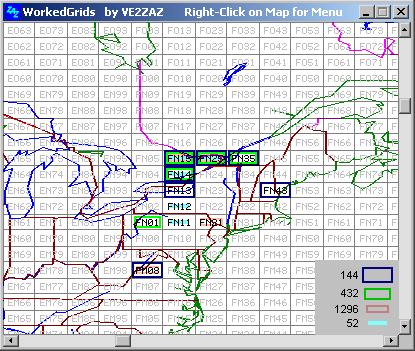
WorkedGrids is a Windows application that displays a map showing the amateur radio grid squares contacted and logged in using a third-party logging program. WorkedGrids uses colors to display information on a per-band basis. Up to four bands can be displayed concurrently.
As you can see by the image on your right, there are plenty of color coded grid squares telling you how you worked a station. Swell stuff really! Being a “1 call”, I thought it was neat that the image he uses on his site was centered right on my area. Some of those spots are indeed hard to work, but I digress…….
The beauty of this software is it’s not “logging” software, it’s really QSO mapping software. You use your logging program of choice. If it doesn’t have a similar feature, you can export your log and then load it into this program and Voila! All set.
System requirements:
Operating System: Any 32-bit version of Windows from Windows 95 to Windows Vista. Most likely 64-bit versions of XP and Vista as well, but untested so far.
Minimum CPU Hardware: Pentium-Class CPU, preferably Pentium-II or faster for quicker map refresh.
Display: 640×480 or higher resolution, 256 colors or more.
Disk usage: 1MB
Typical RAM usage: < 10MB, varies as a function of Map window size.
So why not give this gem a try? You can find it at:
http://www.ve2zaz.net/WorkedGrids/WorkedGrids.htm
Jonathan Hardy, KB1KIX, is a regular contributor to AmateurRadio.com and writes from Connecticut, USA. Contact him at [email protected].
Another K3 panadapter option?
Cross Country Wireless recently introduced a new product, a built, boxed and ready to use SDR receiver that is optimized to work with the bog standard sound card provided with every computer. It covers two 48kHz segments which may be on one or two bands using a switched local oscillator. At £49.95 it looks like something of a bargain.
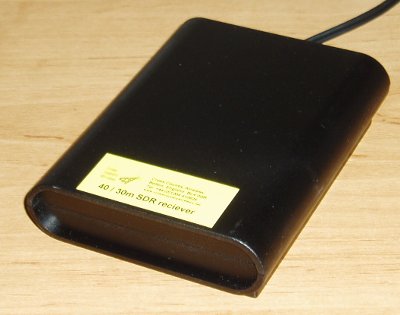 I was looking at the product’s web page this evening and the thought occurred to me that this might make a rather good inexpensive option for a panadapter for the Elecraft K3. It would need a different crystal to cover the K3 IF output frequency which is 8.215MHz, but that shouldn’t be a problem. CCW might even offer this as a stock option if there was a demand for it.
As the receiver covers 40m and 30m everything else should work OK unmodified. The key point would be whether there is adequate isolation to prevent the local oscillator leaking into the K3 IF and desensitizing the receiver – the reason why most people use a buffer amplifier when using SoftRock boards for this purpose.
I don’t have a great urge to have a panadapter display and I already have three sound cards (well, one and two USB sound modules) in use with my shack computer so this isn’t something I’m planning on trying. But I thought it might be worth mentioning the possibility for other K3 users. Even if the idea is a non-runner, the Cross Country Wireless receiver still looks like a very nice product.

Julian Moss, G4ILO, is a regular contributor to AmateurRadio.com and writes from Cumbria, England. Contact him at [email protected].
 Ham Radio Deluxe |
 W5SWL Electronics |
 Ham Radio Prep |
 KB3IFH QSL Cards  Hip Ham Shirts  HamRadioAuctions HamRadioAuctions Reliance Antennas Reliance Antennas Enigma Shop Enigma Shop |  morseDX  Ni4L Antennas  R&L Electronics R&L Electronics antennas.us antennas.us QRV QRV |
- Matt W1MST, Managing Editor
