 |
 QRL for Sprint and September VHF
 16 September 2010 | by
 As I mentioned previously, I was planning to make the NCJ North American Sprint and the ARRL September VHF contests my kick-off to the Fall/Winter contest season. When a work trip was scheduled for that weekend, I assembled my portable station. But, Sarah convinced me not to take it since carrying the ham gear always complicates travel a little bit. Since the work trip was radio-related, I thought I’d share a couple of pictures and stories.
One of the projects in which I participate is the middle-latitude expansion of SuperDARN (Super Dual Auroral Radar Network). SuperDARN is a global HF radar network that is used to monitor plasma processes in the polar ionosphere/magnetosphere. It was recently highlighted on QRZ.com. Last year, we built a pair of radars near Hays, KS. This year, two radars are under construction in central Oregon. I went out to assist with the initial phases of the build.
The radars are installed on an old HF over-the-horizon-backscatter (OTH-B) radar transmitting site in Christmas Valley, OR.
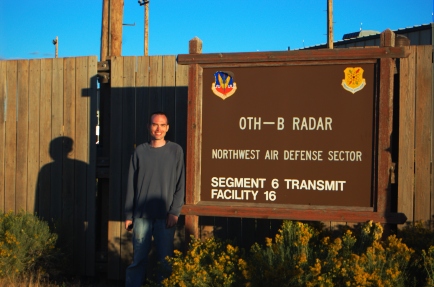
Two of these radars were constructed for the U.S. Air Force as an early-warning system for aircraft, one in Maine and one in Oregon/California. The western portion of the radar was only turned on briefly for testing before being relegated to “warm storage” and then decommissioning. Typical. None of the antennas or transmitters are still on site and a lot of the copper wiring has been looted. Everything left inside the building, including the backup generator, was in essentially mint condition. As an aside, the transmitters from the Maine site were recently installed at Arecibo Observatory. I have no idea what happened to the transmitters from this site. Despite the fact that the antennas and transmitters were missing, there were a number of interesting things to see.
This OTH-B radar was a megawatt class (output, not ERP) system split into three segments/sectors, facing NW, W, and SW, each fed by four transmitters. Each sector had a separate, dedicated 3-phase power line that came from a substation some 50 miles away—I found it on the way home. You could follow the poles straight to it if you knew what you were looking for. Each of the transmitting arrays was surrounded by a fence, for obvious reasons. The fence was made entirely of wood. Furthermore, almost all of the washers were a fiber material, not galvanized steel like the bolts.
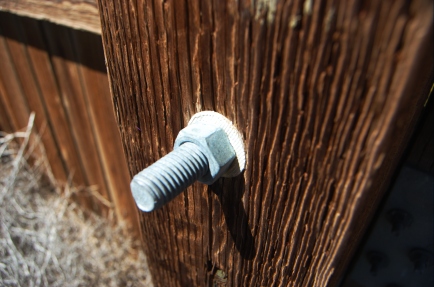
At first, I thought that the washers might have been an electromagnetic consideration, like the wooden fence, which might have distorted the antenna pattern in the best of cases or simply melted in the worst. But, I suspect now that it was a mechanical consideration to deal with dramatic changes in temperature and humidity in central Orgeon’s Great Sandy Desert.
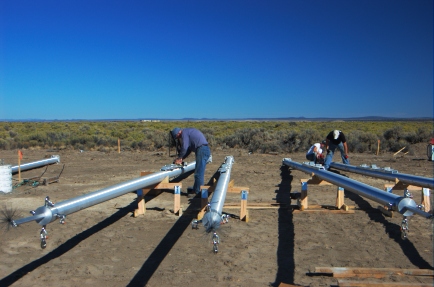
The actual construction of the SuperDARN radar is not that exciting at this point, but here are some of the 72 aluminum poles we dressed with cables for the two radars. Each radar has a 16-element phased-array of folded dipoles mounted in a corner reflector. I installed a lot of N connectors on LMR-600 and a lot of Preformed end-grips on Phillystran, in addition to some more cerebral tasks.
The site has good optical conditions, too. So, I’m looking forward to trying some of my optical instruments out there. Here’s a quick star-trail exposure I took with the camera propped up on a picnic table in the motel parking lot.

So, that’s what I was doing instead of Sprinting and grid hunting! I should be QRV in the NS Ladder tonight.
Ethan Miller, K8GU, is a regular contributor to AmateurRadio.com and writes from Maryland, USA. Contact him at [email protected].
Duh: Learning Curve #4 Oops I did it again!
Ever see one of those tie bars or pins that say, “IYKDWYBDYKGWYBG” My dad had one back in the days when men wore ties. The thing used to bug me cause he didn’t tell us what it meant right away. We tried guessing for a few days before he got tired of 7 kids all ganging up on him.
It is the famous “If You Keep Doing What You’ve Been Doing, You’ll Keep Getting What You’ve Been Getting!” Not sure who gets the credit for that one, but it sure stuck with me all these years. Of course, I’ve heard my bosses recite it a few times along the way too.

It only hurts when I laugh, or think, or move, or…use a new antenna in a contest!
That’s what this series of posts is about. Not repeating mistakes I’ve made. Maybe you can learn from my mistakes and save a bit of time. Or maybe you’ll just get a laugh and some relief from knowing someone else made the same mistake you’ve made. HA!
Well, last night, I did not follow my own advice. I put together a new antenna a few hours before the NAQCC Sprint and set it up. LESSON: As previously mentioned, don’t try to use a brand new antenna in a contest.
Ooops I did it again. Strike TWO! It was a disappointing night and too late to try to get another antenna up before the 2 hour sprint was over. So no contacts for me, I’m still scratching my head. Was it the antenna, me, or the band conditions? BUT… I don’t think I’ll pull that one again. Unless I have a hole in my head…
72,
Kelly K4UPG
p.s. Don’t forget to take the poll on my blog for the best ham radio QTH in the USA! It is on the left side column.
Kelly McClelland, K4UPG, is a regular contributor to AmateurRadio.com and writes from Florida, USA. Contact him at [email protected].
Terminator

Ethan Miller, K8GU, is a regular contributor to AmateurRadio.com and writes from Maryland, USA. Contact him at [email protected].
Handiham World for 09 September 2010
Welcome to Handiham World!
Back at work!
The Handiham World weekly is finally back at work after a couple weeks of rest & relaxation. While the e-letter went on holiday, I also took my vacation at exactly the same time. What a coincidence!

In the accompanying photo, I am posing in front of something that would make a perfect ham radio antenna support – the Eiffel Tower. My XYL and I made the trip to celebrate our anniversary, and she was a saint to put up with my obsession with ham radio and antennas. According to Wikipedia, “The tower stands 324 meters (1,063 ft) tall, about the same height as an 81-storey building.” Just imagine the signal you could get out with a multielement Yagi antenna on top, right?
As nice as it is to travel, it’s always great to be back. Today will be mostly filled with member contacts like phone calls and emails, because I have quite a backlog. I hope to get our audio magazine digest updated either later today or perhaps tomorrow if I run out of time today, but rest assured I will eventually catch up – in the meantime, I am coping with the jet lag by draining out the entire coffee pot.
One of the most fun things was checking in to the PICONET on 3.925 MHz via the Handiham remote base from France and Italy. This is certainly proof that a remote base station can be useful when setting up antennas or traveling with lots of radio gear is simply not practical. I also enjoyed making some Echolink contacts, including a check in on the daily Handiham net. These days, one does not need to give up regular operating just because you are staying in a hotel. These new ways to use technology enhance our options to use ham radio, and I’m sure thankful to all of our volunteers and supporters who make it possible. The best thing about ham radio for me has always been staying in touch with my community of friends. In order to get through all of the calls today, this edition will be a bit shorter than usual, but hopefully still worth a few minutes of your time.
73,
Patrick Tice, WA0TDA
Handiham Manager
[email protected]

Pat Tice, WA0TDA, is the manager of HANDI-HAM and a regular contributor to AmateurRadio.com. Contact him at [email protected].
We all should know the benefits of salt water and antennas…. but salt water AS the antenna……
OK, I just had to post this.
I’ve experimented with saltwater when operating portable (one of the benefits of living about a half hour from the shore). I know friends that have made antennas using salt water, and they had great luck.
This guy, took the idea and spun it on it’s head. Check out the induction as well – SWEET!
Jonathan Hardy, KB1KIX, is a regular contributor to AmateurRadio.com and writes from Connecticut, USA. Contact him at [email protected].
The GPS you didn’t know you had
The great thing about the internet is that you can find the answer to anything. You may not understand the answer, it may not even be the correct answer, but you can find it. And sometimes you will find out more than you were expecting.
Yesterday I happened to think “If I have a computer or smartphone with a GPS, can my position be accessed from its web browser?” A quick search of Google turned up the answer that yes, it could, in newer browsers that support HTML 5 like Firefox 3.6 and Google Chrome and the Android web browser. I even found some example code showing how to use it. I made a test page to try it out for myself. The results were a little unexpected.
First I tried it using my shack PC, which is a mini-tower with only a wired connection to my router. It told me that I was in Sheffield. This was actually not unexpected, as that is similar to the location I see when visiting some blogs that have a widget to show where visitors come from. I presume they, and the web browser, use geolocation by IP address if that is the only available method, and Sheffield is presumably the location of my broadband ISP’s data centre.
When I tried using my smartphone running Android I saw the GPS status icon flicker on for a couple of seconds and my page then reported my position as being in Broughton, a village a couple of miles west of here. I’m guessing that the GPS didn’t have time to get a good fix so I got a poor one, or else it is reporting the location of the cell the phone is connected to.
But the really surprising result was when I tried using my laptop. This doesn’t have a GPS and is connected using wi-fi to my router, so it has the same IP address on the web as the shack system. Yet my test page pinpointed my location as across the street over the back, only about 20 yards from my actual location. I tried my netbook as well and got more or less the same position . How the heck did it know where I am?
After a bit more Googling I discovered that this is done by triangulating your position using the names or SSIDs of the wi-fi access points your computer can receive. A firm called Skyhook has created a database of access points and their locations by driving around every street in every town and city in the US. There is also a site called Geomena.org that has an access point database created by ordinary individuals. You can even add to it by installing a client app in your iPhone or Android phone and going walkabout. Google has a database which it presumably created at the same time it drove around doing Street View mapping and snooping on people’s unsecured data. In Firefox you can see which wi-fi geolocation database is used by going to the address about:config (no http://) and examining the value of geo.wifi.uri. By default it’s Google’s. You can also disable browser geolocation by changing the value of geo.enabled.
I think the geolocation feature is pretty cool but I’m sure many privacy-obsessed types will be horrified by the thought that even without an actual GPS their position can be located to that kind of accuracy.
If you are interested in trying this for yourself then you can visit the Geolocation Test page that I created. If your browser supports geolocation (and you have Javascript turned on, which is necessary for the page to work) then you will be asked if you want to share your location with g4ilo.com. This is presumably a privacy thing, because if I wanted to I could log all the positions in a database. I don’t, and in any case you’re all hams so I can find out where you are from qrz.com, so hopefully you won’t have a problem with that. If you allow the site to see your position it will then display your latitude, longitude and Maidenhead locator and show the position on a map so you can easily see if it is accurate.
If you do try my test page I’d be interested to know, via comments, how accurate the position was and whether your computer had a GPS, wi-fi or you were using a smartphone. If you have a mobile wi-fi device, does it track your position as you move around? If the results are promising I might make a permanent page for determining your grid locator using geolocation.

Julian Moss, G4ILO, is a regular contributor to AmateurRadio.com and writes from Cumbria, England. Contact him at [email protected].
Life, Death, and Technology

 Ham Radio Deluxe |
 W5SWL Electronics |
 Ham Radio Prep |
 KB3IFH QSL Cards  Hip Ham Shirts  HamRadioAuctions HamRadioAuctions Reliance Antennas Reliance Antennas Enigma Shop Enigma Shop |  morseDX  Ni4L Antennas  R&L Electronics R&L Electronics antennas.us antennas.us QRV QRV |
- Matt W1MST, Managing Editor
