 |
 Handiham World for 15 December 2010
 15 December 2010 | by
 Welcome to Handiham World!

Last week we asked: How do you use equipment manuals, and what can be done to make learning about a radio easier? Let me know so that we can figure out where to go with this next new frontier.
As you might expect, we got some interesting and insightful responses. I will condense the main ideas down to just two different methods of making a manual accessible.
- A popular suggestion was to create the manual in HTML with links from topics listed in the contents directly to the relevant section of the manual. So, for example, if you wanted to read about how to set a memory channel, you would find “setting memory channels” in the contents, then follow that link directly to the part of the manual main text that has the instruction on setting memories. One example of why HTML is good was sent by Gerry, WB6IVF. He said: ” I think that HTML is the best because you can create links that are accessible by the tab key, and you can use the arrows to move with in a line and spell something or transcribe something to Braille character by character. So in other words, if a document looked to a blind person like a web page, I think we would find it easy to get around. Daisy is good, but it isn’t easy for everyone to use yet.”
Another writer favored HTML, but added that a special description of the front and rear panels of the radio should be written so that blind readers would not have to ask someone sighted to map out the location of controls for them from the print diagrams.
- Some of you have Kurzweil scanners and are able to scan the print manual, or alternatively to download the manual from a company website and use the embedded text in the PDF version. Getting the information into the linear system used by screenreaders is still somewhat problematic as some items like sidebars and captions can get out of context. However, the availability of embedded text PDF manuals is still a great advancement from the paper-only days! A description of the panels is still needed, however.
I was surprised at this request for HTML functionality, but it really does make a lot of sense. While DAISY does provide for at least a similar way to navigate through a book, it is still a learning process that is new to many users. DAISY is built upon XML, and as such is similar to web-based documents. The question in coming months and perhaps years is whether the standard for DAISY will be so well-accepted that it will be preferable to website-like manuals designed in plain old HTML. We could try converting a text to HTML and give it a test run, but the question will then be what to do with users who do not have computers but who have the government-issued NLS DAISY players.
Time will tell, of course. I am going to put on my prognosticator’s hat and predict that cassette tapes will really take a hit in 2011. I’ve always hated the way it’s so hard to find a particular part of an audio instruction manual in a tape. Another problem was the way adequate control layouts were not always added by the volunteers who read the manuals. This year Sony discontinued the venerable Walkman portable cassette player, and of course the National Library Service discontinued support for the old 4-track production system. RFB&D also moved forward, leaving cassette tapes behind. At Handihams, we still get a few requests for tapes, but in 2011 these will all be “special order”, as they are no longer in stock and have to be produced on an as-needed basis.
The new methods of producing manuals will be HTML and DAISY. We hope that these can be augmented with users teaching via audio how to find one’s way around the radio and adjust the settings, as well as to use the radio’s basic functions. Actual users with experience doing these “quick start” guides can really be helpful, not as a substitute for the manuals, but as an added reference.

Pat Tice, WA0TDA, is the manager of HANDI-HAM and a regular contributor to AmateurRadio.com. Contact him at [email protected].
LHS Show Notes #053
Announcements:
- Thanks, again, to Gamma Leonis for the opening and closing music for the show.
- LHS Merchandise is available at PrintFection and Cafe Press. LHS items make great Christmas gifts! Or, make a donation by clicking the Donate link on the website. Donations cover such things as the telephone lines, server fees, and more. Thank you!
Topics:
- Articles seem to be popping up at www.amateurradio.com designed to get us talking about Linux and Amateur Radio. The latest one is by Anthony, K3NG, self-proclaimed radio artisan. Our hosts discuss his assertions that:
- Ham Radio Deluxe, DXLab, and N1MM software all beat any Linux offerings. (Note: Russ has found that both Ham Radio Deluxe and N1MM logger will run under WINE in Linux. DXLab, on the other hand, will not.)
- There is more amateur radio software available for Windows than Linux.
- CQRLOG is an adequate Linux program for casual logging, but not great for contesters.
- “Quite simply, if one intends on using Linux exclusively in the hamshack they have to lower their expectations and requirements for logging and are between a rock and a hard place when it comes to contesting.”
- He does praise fldigi, but still claims Windows software is better.
- In summary, he thinks hard-core contesters may wish to stay with Windows. Our suggestion: run Linux and write a program that works better!
- Russ talks about his success with WSPR and Echolink.
- He found that instead of using “dpkg -i” to install the latest Debian WSPR package, use “dpkg -x”. You’ll extract the files to the current directory. You then run the program from a terminal session in your home directory using “./wspr”. If you run it that way, instead of letting it install, it seems to work a lot better. The Gnome launcher doesn’t seem to work with that sort of installation, but running it from a terminal works well.
- Russ has Echolink running under WINE v1.13. This version of WINE was chosen for it’s native support of PulseAudio, which made configuring EchoLink much easier. Russ’ node is on 146.225MHz simplex, Echolink node 54711.
- Russ then tells us why Echolink and IRLP are different and why IRLP might be “better.” (Hint: Echolink may not have an amateur radio anywhere in the link, while IRLP definitely uses a radio somewhere in the link.)
Feedback:
- Scott, HL2/AD7MI, sends his appreciation for the discussion in Episode 50 of his blog entry about his Ubuntu installation, and adds a note about problems with running CQRLOG under 64-bit Linux. He says you can install CQRLOG on a 64-bit machine, but it will only work with the 32-bit version of hamlib. Unfortunately, that breaks 64-bit fldigi, which expects the 64-bit version of hamlib. This issue has been reported on both the linuxham Yahoo group and the CQRLOG forum. Scott has also successfully installed Xastir, and is looking forward to receiving a MicroHAM III interface.
- Matt, KC8BEW, asks “What is a good and easy Linux distribution for a web server?” Russ recommends a plain vanilla installation of Debian server, without the X-windows environment, and either Apache or nginx (a light-weight web server).
- Dave, M0DCM, tells us of his success running fldigi and CQRLOG under Ubuntu 9.10 on an Acer Aspire A0751h netbook. Well done, Dave!
Donations:
- A very generous donation was received from Gerrit R. Thanks, Gerrit!
Contact Info:
- Contact Richard at [email protected], Russ at [email protected], or both at the same time at [email protected].
- Listen to the live stream every other Tuesday at 8:00pm Central time. Check the LHS web site for dates.
- Leave us a voice mail at 417-200-4811, or record an introduction to the podcast.
- Sign up for the LHS mailing list.
- Sign up for the MAGNetcon mailing list.
- Thanks to Dave from Gamma Leonis for the theme music.
Music:
- “Steel Concrete” by Mad Mav from the album “Black Sheep II”, courtesy of Jamendo.
Russ Woodman, K5TUX, co-hosts the Linux in the Ham Shack podcast which is available for download in both MP3 and OGG audio format. Contact him at [email protected].
We’ve just joined Facebook!
AmateurRadio.com is now on Facebook. Why? Who knows! The important thing is that all the cool kids are doing it….
So, if you’re on Facebook, please take a moment to “Like” our page below.
I’m curious. Are you a Facebook user? Why or why not?
Matt Thomas, W1MST, is the managing editor of AmateurRadio.com. Contact him at [email protected].
Work FM Satellites
I came across this website while reading a thread about the new Kenwood TH-D72. It claims to be the best website for current information about working FM satellites. It looks pretty good, but I really need to find the time to look through all the information. There’s a blog, too.
The trouble with this hobby is that there is so little time and so many interesting, challenging things you can do!

Julian Moss, G4ILO, is a regular contributor to AmateurRadio.com and writes from Cumbria, England. Contact him at [email protected].
LHS Episode #053: Windows in the Ham Shack?
 Hello, everyone. We're coming to the end of another year and the world is aglow with holiday spirit. With that in mind, we bring you the second-to-last episode of Linux in the Ham Shack for 2010. We will have one more recording and release before the end of the year, so don't miss out on our holiday extravaganza.
We no longer broadcast video via Ustream, but we do have a live audio feed. Just point your streaming audio player at http://stream.lhspodcast.info:8008/lhslive starting about 30 minutes prior to air time (8:15pm CT). You can join in the chat room scene as well with your favorite IRC client. We are at irc.freenode.net in channel #lhspodcast. The channel is available 24/7, even when we're not doing a live show. Join in when you can and chat with other LHS listeners. During the live show, #lhspodcast becomes our chat room and our live connection with YOU.
Cheers and 73 from the LHS Guys
Russ Woodman, K5TUX, co-hosts the Linux in the Ham Shack podcast which is available for download in both MP3 and OGG audio format. Contact him at [email protected].
APRS Handies head to head
My long awaited package from Martin Lynch was finally delivered by UPS on Saturday afternoon and as one reader correctly guessed, it was a new Kenwood TH-D72! I was lucky. The UPS tracking page had been changed to say delivery was rescheduled for Monday, so we went out on Saturday morning. You can imagine how happy I would have been to get home and find a card through the door to say UPS had tried to deliver it! I was pleased to receive the radio and although I did consider wrapping it and putting it under the tree until Christmas Day, the chance of being the first blogger to write about it was too great to resist.
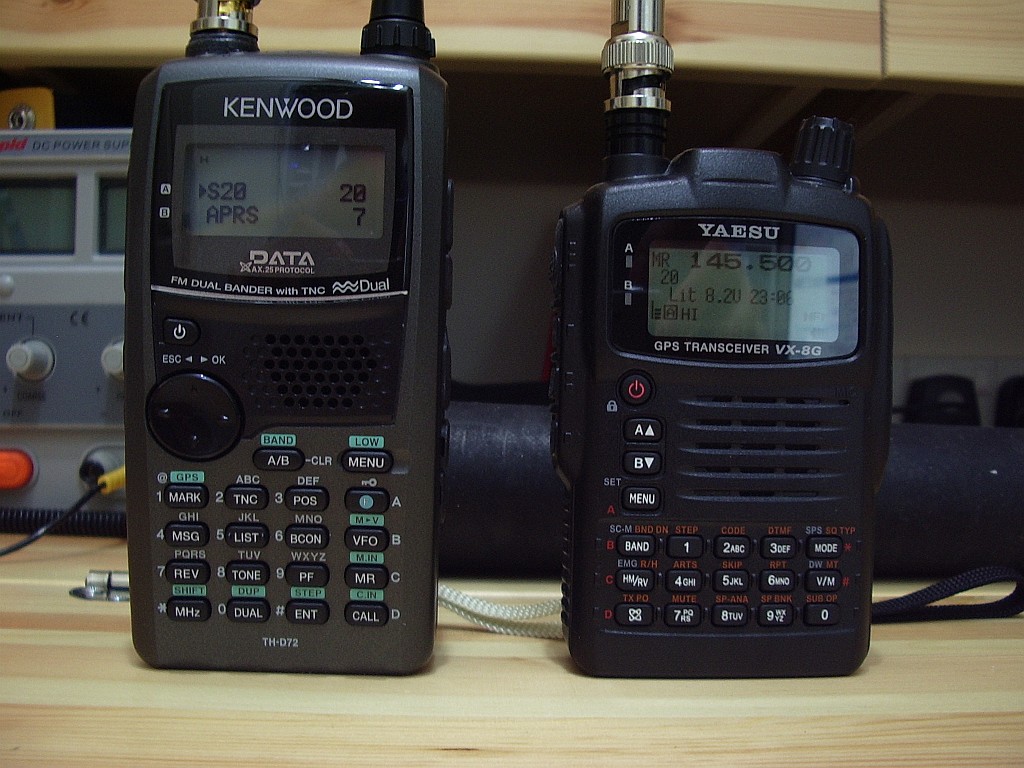
This is not meant to be a review of the Kenwood, more an account of my first impressions of the radio and how it compares with the Yaesu VX-8GR which I have been using for the past few months. The first thing you notice is that the Kenwood is quite a bit bigger than the Yaesu. It’s taller, thicker and heavier. Although I think the Kenwood is nicer looking, the Yaesu feels a bit more rugged and I think its plain black finish would take knocks and scuffs better than the Kenwood’s metallic grey finish. I’ll probably need to get a protective case for it.

The additional thickness and weight can partly be attributed to the Kenwood’s battery pack which has 1800mAh capacity, compared to the Yaesu’s 1100mAh. This should translate into longer endurance in the field. Yaesu does offer an 1800mAh battery pack for the VX-8 series but it is an optional extra for quite a lot more money. Still, there is no question the slimmer, smaller VX-8GR slips more easily into a pocket for about-town use.
The TH-D72 is a dual band 2m/70cm radio so it it is more directly comparable with the Yaesu VX-8GR than with the tri-band (quad band in the USA) VX-8DR. Both radios have an integral GPS rather than the expensive optional GPS of the VX-8DR which must be fitted to an even more absurdly expensive clunky looking bracket or to a specially made Yaesu speaker mic. (Having said that, the Yaesu GPS options are good value compared to the add-ons for Icom’s D-Star radios – talk about rip-offs.)
The TH-D72 comes with the usual pathetic SMA socket for the antenna and an equally pathetic dual band dummy load, er, I mean whip antenna. The first thing I did, and I mean literally the first thing, was to fit one of my SMA to BNC adapters so I can use any of my collection of BNC whip antennas with the rig. The SMA socket sits deep in a large recess on the top face of the Kenwood, so I was able to use one of the chunky gold plated adapters rather than the slimmer black one that I use on the VX-8GR.
I checked with a piece of paper to see if the adapter tightened all the way down to the body of the radio, which is essential to avoid the risk of snapping the SMA at the first accidental knock. It didn’t, so I added a steel washer to fill the gap. I covered the knurled base of the adapter with a layer of self amalgamating tape to hide the gold finish and once an antenna is fitted you wouldn’t know that the BNC socket was not standard equipment. Why couldn’t the manufacturers fit one in the first place? By the way, neither of these radios come with a wrist strap – the ones shown in the picture were salvaged from old mobile phones in the junk box.

One of the main reasons I decided to get the Kenwood TH-D72 even though I had the VX-8GR was that I was very unhappy with the performance of the Yaesu’s GPS which is slow to acquire a fix and usually can’t manage it at all from inside the house. I found this a real nuisance as often I just could not be bothered to hang around waiting for it, while the chance of acquiring a fix once you are on the move is even worse. As you can see from the picture above, the Kenwood has got my position while sitting on the bench being photographed while the Yaesu’s GPS screen was (and remained) blank.

The Kenwood has a display to show how many GPS satellites it is receiving and as you can see from the picture above, even on the bench it does quite well. This is a nice screen to have, but with this exception I prefer the Yaesu VX-8 display which shows more information at a glance. The Kenwood display often consists of a couple of short lines of text and you have to page through several screens to get all the information. However I do like that the Kenwood position screen shows the grid locator square – the Yaesu doesn’t.
The TH-D72 has the ability to plot your track and store it in memory – not something I can see myself using though. What I do consider very useful is the ability to enter and store the co-ordinates of several locations or waypoints. You can then select one and one of the Position pages will display your distance and bearing from it. This will be very useful during WOTA operating as I will be able to enter the exact co-ordinates of the summits I intend to visit, eliminating the difficulty sometimes experienced of identifying the summit on the ground!
The TH-D72 is virtually a hand held TM-D710. It has almost the same functionality of its bigger mobile brother, in fact more: it supports the Kenwood Sky Command remote control system which my European D710 doesn’t. A pity – it would have been fun to see if I could have used it to remote control my Elecraft K3, which uses a command set similar to the TS2000.
In common with the D710 the D72 has hierarchical menus. Personally I prefer the menu system of the VX-8 series, which has just two linear menus, one for radio settings and one for APRS. I know where the ones I most often use are and can quickly zip to them using the rotary control. The Kenwood menus require a lot of clicking with the four way directional button thingy.
If you want to connect your VX-8 to a PC for memory management you need to purchase third party memory management software and an interface cable. Kenwood provides the memory management software free and the TH-D72 has a USB port which can be connected to your computer using a provided, but in any case standard, USB cable – a significant saving. Through this cable you can not only manage the memories you can also edit all the radio’s settings and access the built-in packet TNC. This appears to be completely compatible with the one in the TM-D710. I just changed the COM port number and APRSIS32 as set up for the D710 was immediately able to use the D72 instead. A menu option allows the internal GPS data to be output over the same serial connection. I haven’t experimented with this, so I don’t know if this can be done at the same time as accessing the TNC or whether APRSIS32 would be able to take advantage of it.
Hopefully the TH-D72 will, like the D710 (and unlike the Yaesu radios) be software upgradeable. I discovered, to my disappointment, that my APRS repeater objects being transmitted by my G4ILO gateway were displayed by the VX-8GR but not by the Kenwood. The packets were received but were apparently considered to be invalid. A bit of research by Kai Gunter, LA3QMA led to the conclusion that this is a bug, not just in the TH-D72 firmware but in the TM-D710 as well, as the same objects were displayed by older model Kenwoods. The problem is apparently caused by the time-stamp in the objects created by APRSIS32 which is in local time (ending in ‘h’) instead of zulu time (ending in ‘z’.) The objects are correct according to the APRS spec, so the Kenwood should display them.
The TH-D72 is full duplex. That is, it can receive on 70cm while transmitting on 2m or vice versa. There are very few current model radios that can do this, one of which (the Alinco DJ-G7) doesn’t do it very well as 70cm is severely desensed by the 2m transmission. This would make it a good choice for FM satellite operation allowing you to hear your own signal. One of these days I will try this, I just need to get round to making a suitable dual band antenna.
Another neat feature of the TH-D72 is the nine EchoLink memories. This allows the radio to store the DTMF sequence needed to connect to up to nine different conferences or nodes so you can recall them by name and transmit them to your local EchoLink repeater. If you use EchoLink it is a real boon as I can never remember node numbers – heck, I still can’t remember my mobile phone number!
The Kenwood TH-D72 is quite an amazing radio packing an incredible number of features into its small form factor. However I would not go so far as to say it is a better radio than the VX-8GR. There are things I like and things I dislike about each of them.
- Yaesu VX-8GR – Like: smaller size, lighter weight, feels more durable, more informative displays. Dislike: deaf GPS.
- Kenwood TH-D72 – Like: sensitive GPS, editable waypoints, accessible TNC, EchoLink support, full duplex. Dislike: hierarchical menus, plain displays requiring scrolling through pages to view all information, more bulky.
In the UK, the VX-8GR is being sold for quite a bit less than the TH-D72, even at the discounted price I got from Martin Lynch. If you don’t want to connect the radio to APRS software on a PC, aren’t bothered about getting your GPS position indoors and never use EchoLink then you probably won’t think the Kenwood is worth the extra money. Though it does include a higher capacity battery as standard and if you want memory management software then both this and the connecting cable will cost you extra for the Yaesu.
I’m still making my mind up which of the two of them is going to be the keeper but I suspect it’s going to be the Kenwood.

Julian Moss, G4ILO, is a regular contributor to AmateurRadio.com and writes from Cumbria, England. Contact him at [email protected].
With a little help from my friends, Part II
You might want to read Part I of this if you haven’t done so already. It’ll be a lot less confusing that way.
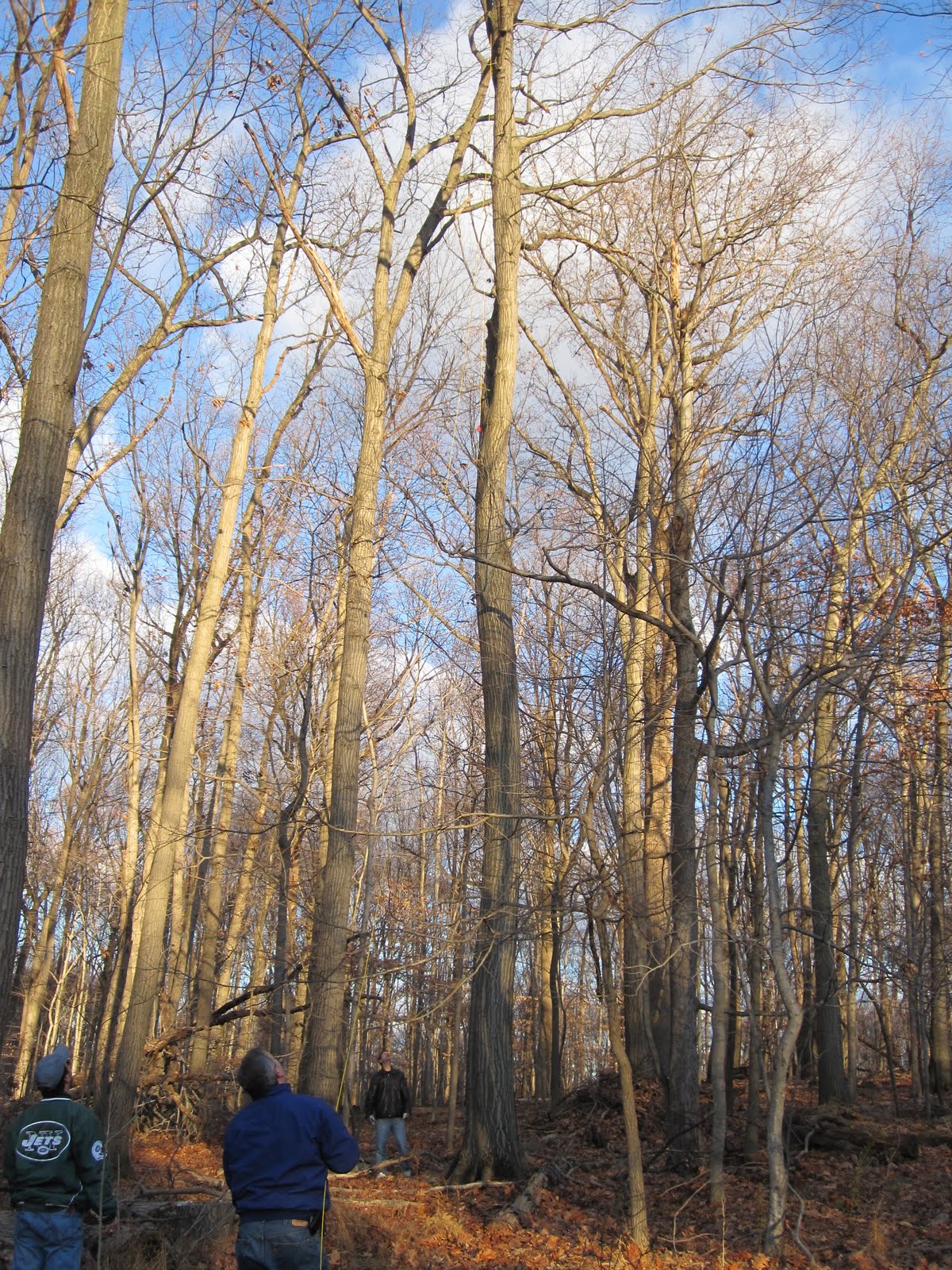
After we got the far-end rope over the correct limb, we tied off one end of the new G5RV and pulled it up in the air a bit just to make sure that we didn’t run into any unexpected issues. That went well, so we moved to the near-end tree to attach the other end to that rope, which I’d lowered before David and Matthew arrived. We attached the other end of the G5RV to the rope and I started to pull it up, but the insulator at the end snagged on a branch and we couldn’t get the antenna up nearly high enough. We dropped the antenna down to the ground and tried to use the rope itself as a kind of saw to see if we could break off the very small branch that was causing the problem. After about 5 or 10 minutes, we realized that 1) It was getting dark enough that we were having trouble seeing where the rope was going, and 2) The cold wind that had been blowing all afternoon wasn’t stopping, and with the lack of sun it had gone from chilly to “ok, we’ve just about had enough of this” cold. It was time for plan B.
Several years ago, when having some work done on that “near-end” tree, I had the tree service put a pulley with some rope as high as they could up in the tree. I’ve played with it a few times trying some wire antennas, but hadn’t used it at all for the last year or two. I figured that at least temporarily we could attach the remaining end of the G5RV to that rope to get it up into the air. If needed, Matthew could come back another time and try to get a rope over a higher branch with the potato gun, but there wasn’t enough light to try that. (The reason why I didn’t want to use the pulley permanently was because it wasn’t all that high up in the tree, plus I didn’t want to lose the use of that for any future experiments.) That worked out pretty well, and David, K2DSL, was nice enough to volunteer to head up to the roof to connect the antenna to the feedline. Next, it was into the shack to see if the antenna would load up (and to warm up!), which it did. I made sure that the tuner would be able to find a match as it had with the old antenna and was able to do so on all bands. By that point, we were all exhausted and cold, so after thanking Matthew and David they left. I did a little cleanup outside and headed in. I made one quick QSO (KP2B on 40m CW) just to make sure that the antenna actually worked, then headed out for dinner with Sharon.
The next morning I figured that I’d see what things actually looked like, and I was disappointed when I realized that the antenna was even lower than I’d thought. The pulley just wasn’t very high up in the tree, and my G5RV was nowhere near a “flat-top” installation. I figured that I’d take a look at the other rope to see if I could do anything with it, hoping that perhaps “something” had happened overnight that might allow me to use it instead of the lower-than-expected pulley rope. It seems that I finally got a little break: I got both ends of the old rope and pulled back and forth to see if the resistance caused by that little branch was any less. As soon as I did, I saw a small piece of ice drop off from where the rope was wrapped around the branch, followed by a small piece of a branch. I think that what happened was that the rope rubbing the night before had allowed some sap to get onto the branch, which froze overnight and must have caused the branch to break. As a result, the little branch that was not allowing the insulator to move when pulled up into the tree was no longer in the way.
I dropped down the antenna from the “pulley rope” (which required me to toss the throw bag over the antenna wire, and carefully pull it down) and attached it to the older rope, and pulled it up. It took a little bit of work, but I was able to get it back up to nearly the original height. I spent about another 30 minutes more permanently tying off the ends of the rope, including connecting the ends to bungee cords that I use as shock absorbers before heading inside. I was able to make a few DX contacts on several bands, and in the week since then, I’ve actually picked up a couple of new countries on 80m (Iceland and Faroe Islands) as well as some new bands or modes for other countries (Congo on 20m phone and CW and 17m RTTY, Gabon on 20m CW, and Dominica on 40m RTTY, among others), so I guess the antenna is working well.
I’m still not very happy with the mechanical connections, and in particular, the connection from the ladderline to the coax feedline. I don’t think they are nearly as sturdy as the antenna that I replaced, but I hope that what’s there now will work out until the spring. At that point I want to replace some of what I think are the weak points with something sturdier. I may also look into other types of antennas, but for now, I’m very happy to be back on the air.

David Kozinn, K2DBK, is a regular contributor to AmateurRadio.com and writes from New Jersey, USA. Contact him at [email protected].
 Ham Radio Deluxe |
 W5SWL Electronics |
 Ham Radio Prep |
 KB3IFH QSL Cards  Hip Ham Shirts  HamRadioAuctions HamRadioAuctions Reliance Antennas Reliance Antennas Enigma Shop Enigma Shop |  morseDX  Ni4L Antennas  R&L Electronics R&L Electronics antennas.us antennas.us QRV QRV |
- Matt W1MST, Managing Editor
